
Image Slides Rebuilder
Convert image or screenshot slides to editable PPT
Image Slides Rebuilder
Convert image or screenshot slides to editable PPT
Showcase
Description
Rebuilds "pure image" PowerPoint slides (such as image-only PPTs, screenshot PPTs, AI-generated infographics, PDF-exported image pages, and screenshot-only pages) into editable native text, shapes, and vector icons. It uses a clean, high-resolution base image underneath while preserving the original layout and color scheme. Use this when you want to make flattened, uneditable slides fully editable.
Why we love this skill
Accurately restores image or screenshot slides into editable PPTs, converting text, structures, icons, charts, and tables into native objects while preserving themes, speaker notes, and existing content.
Best for
Ideal for presenters who need to convert flattened, uneditable slides into modifiable PPT files.
How to use this Skill
Provide your input
Provide an image-based or screenshot-based PPT, PDF, or presentation slide image.
Run the Skill
Reconstructs image pages into editable native text, shapes, icons, and data objects while preserving layout, color scheme, and necessary high-resolution base images.
Review your result
Receive an editable PPT file, complete with a comparison check between the original and finished product, plus items requiring confirmation.
Related Skills
View all Slides
White Space | Minimalist PPT
"White Space" is a Skill specifically designed to generate minimalist research report slides. Upload Word, PDF, web pages, data tables, research materials, or old PPTs, and it will convert them into an editable PPT with a cool white background, black-gray text, generous white space, thin line separators, and a touch of deep red accents. It automatically completes: · Reading and organizing raw materials · Extracting core conclusions from the report · Building a complete presentation storyline · Generating conclusion-style titles with one point per page · Redrawing native editable data charts · Unifying fonts, colors, margins, and page grids · Controlling text and chart density per page · Adding page numbers, dates, and data sources · Outputting actually editable Slides By default, it uses a 16:9 aspect ratio, with visual features including: · Cool white background · Black-gray text · Single deep red accent color · All left-aligned · Generous white space · Minimalist architectural geometry · At most two fonts throughout · Charts and shapes are fully editable Suitable for industry research, market analysis, business presentations, strategic plans, course reports, graduation defenses, and management reports. Simply upload your materials and describe the presentation scenario to generate a clean, professional, directly editable and presentable minimalist PPT.
 Slides
Work Report Slides
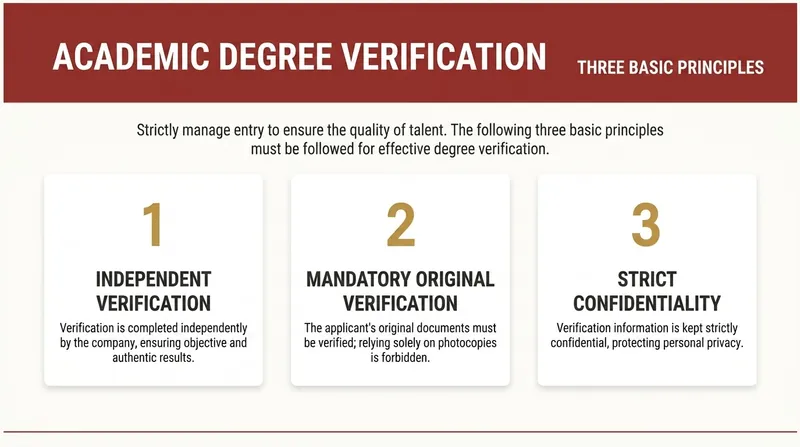
Automatically convert work report text into editable Slides with a minimalist business report style. Supports two modes: structured input and free-text speech drafts. First confirm the structure, then generate page by page, outputting only one slide at a time. Example: Input a slide speech script to output multiple Slide versions. No exaggeration, no flashy techniques—consistent, high-quality output that makes it easy to produce a series of uniformly styled Slide versions. Example image generation prompt: In the current complex employment environment, resume padding and false academic credentials are increasingly common. Verifying the authenticity of academic degrees is a necessary compliance procedure for hiring, serving as the bottom line for guarding the entry gate and protecting talent quality. This is not only responsible for the company but also a reflection of the professionalism of every HR worker. So, how to do a good job of academic credential verification? First, we must keep in mind three basic verification principles: First, independent verification, using official public channels; second, verify original documents, focusing on authenticity of anti-counterfeiting features, embossed seals, and official stamps; third, strict confidentiality, compare and archive verification information.

pptx.max
Easily create, edit, and manage your PowerPoint presentations, whether from scratch or based on an existing template. This skill is designed for handling various PPTX file needs, helping you efficiently produce professional and engaging slides. You can use this skill to parse existing PPTX files, extract text content, or make modifications to presentations. It supports structural adjustments to slides, such as deleting, copying, or reordering, and intelligently selects diverse layouts based on your content to avoid monotony. From multi-column designs to text-image combinations to full-bleed images, ensuring your presentations are visually rich and engaging. When you need to build a presentation from scratch, this skill helps you design outstanding slides. It guides you to choose a color scheme that matches the theme, emphasizes the importance of visual elements, and offers multiple layout options such as dual columns, icon grids, or data displays. Whether it's text, shapes, images, or backgrounds, you get fine-grained control to ensure the final presentation is both professional and impactful. After completing the presentation, this skill performs a rigorous quality check. It helps you review content, find omissions or errors, and scrutinize visuals to ensure no overlapping elements, text overflow, or insufficient contrast. Through iterative validation and correction, it ensures your final presentation is flawless.
Information
- Version
- v3
- Last updated
- Runtime credits
- Usage-based
- Models
- Auto
- Use cases
- Images & designPresentations & reporting
- What you get
- Slides
