A structured prompt for generating a calm geometric exhibition poster with archival coastal ecology imagery, scientific labels, and muted field-note aesthetics.
Prompt
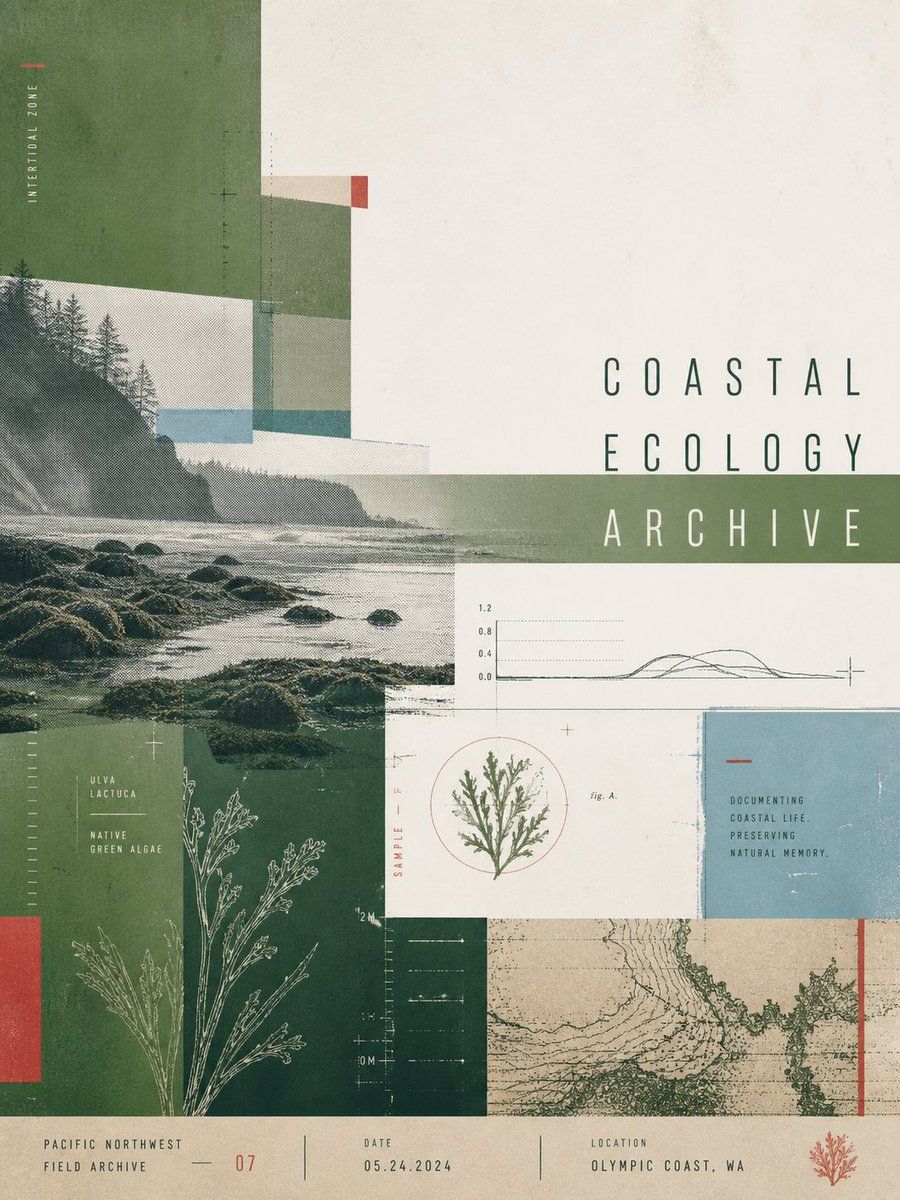
Goal: Create a calm, information-dense exhibition poster for a coastal natural-history archive, combining geometric slicing, archival field-notes aesthetics, and muted Pacific Northwest ecology imagery.
Canvas: Vertical 3:4 poster, off-white aged paper background with subtle stains, dust, print grain, and screen-printed halftone texture. Overall mood is quiet, restrained, scientific, and museum-like.
Layout: Use an asymmetrical collage grid with overlapping translucent rectangular slices. The left half is dominated by a large monochrome coastal landscape photo showing a rocky ocean shore, low surf, misty cliffs, and dark evergreen trees. The right half contains open negative space and the main title. Add a horizontal translucent sage-green band crossing the title area. Use thin technical registration marks, dotted measurement lines, small crosses, and faint grid ticks throughout.
Main title text: Set the large headline in tall, narrow, widely spaced uppercase sans-serif letters on the right side in dark desaturated green: COASTAL ECOLOGY ARCHIVE. Stack it as three lines, aligned slightly right of center, with the third line crossing the green band in pale off-white.
Visible text elements: Include exactly 10 distinct text groups: 1) vertical left label “INTERTIDAL ZONE”; 2) main title “COASTAL ECOLOGY ARCHIVE”; 3) algae label “ULVA LACTUCA / NATIVE / GREEN ALGAE”; 4) small vertical red label “SAMPLE F”; 5) tiny caption “fig. A.” near the algae specimen circle; 6) blue card text “DOCUMENTING / COASTAL LIFE, / PRESERVING / NATURAL MEMORY.”; 7) bottom-left footer “PACIFIC NORTHWEST / FIELD ARCHIVE”; 8) bottom center index “07”; 9) bottom metadata “DATE / 05.24.2024”; 10) bottom-right metadata “LOCATION / OLYMPIC COAST, WA”.
Image and diagram elements: Include exactly 7 main visual elements: 1) the large coastal shoreline photo on the left; 2) a white botanical line drawing of branching algae in the lower-left green block; 3) a small circular botanical specimen illustration in the lower middle, enclosed by a thin red circle; 4) a simple scientific line graph with dotted horizontal gridlines above the specimen; 5) a pale blue rectangular note card on the right; 6) a beige-green contour-map texture panel along the lower right with a single vertical red stripe near its right edge; 7) a small red coral or seaweed icon in the bottom-right footer.
Geometric composition: Include exactly 9 prominent color blocks: 1) large vertical forest-green block at upper left; 2) translucent pale cream rectangle over the photo near upper left; 3) muted green rectangle near upper center; 4) narrow red accent rectangle near upper center-right; 5) wide translucent sage-green horizontal band through the title; 6) deep green lower-left specimen block; 7) narrow red vertical accent at the far lower-left edge; 8) pale blue note-card rectangle on the right; 9) beige map panel at lower right.
Color palette: Desaturated forest green, sage green, seafoam blue, faded teal, warm ivory, charcoal ink, muted brick red accents, and aged beige. Keep contrast soft and avoid bright saturated colors.
Typography and style: Use condensed uppercase technical typography with generous letter spacing, small archival labels, thin rules, and minimal scientific annotations. The poster should feel like a contemporary gallery exhibition print, a field archive page, and a coastal ecology research document at once.
Constraints: Preserve the exact count of 10 text groups, 7 main visual elements, and 9 prominent color blocks. Do not add people, animals, logos, QR codes, or extra large text. Keep the composition flat, editorial, geometric, grainy, and print-based rather than photorealistic.
How to use this prompt
1
Copy the full prompt above.
2
Open a platform that supports GPT Image 2, such as YouMind, and paste the prompt in.
3
Swap the subject, style, or details to fit your idea, then generate.
This is a free AI prompt from YouMind's prompt library. Explore thousands more image prompts, all free to copy and adapt.
Let AI search through tens of thousands of prompts. Filter by model, time range, keywords, and sort by engagement — views, bookmarks, reposts and more.
Turn any photo into a detailed AI image prompt. The free image to prompt converter analyzes composition, style, and lighting so you can recreate any look in seconds.