YouMind
Sign in

Cityscape / Street

Explore free Cityscape / Street image prompts from YouMind's AI prompt library, grouped under subjects. Every prompt is curated from real creative workflows and ready to copy, adapt, and reuse.

Prompt to ImageImage to Prompt
GPT Image 2
Hand-Drawn 2D Cartoon Illustration
View full prompt & copy

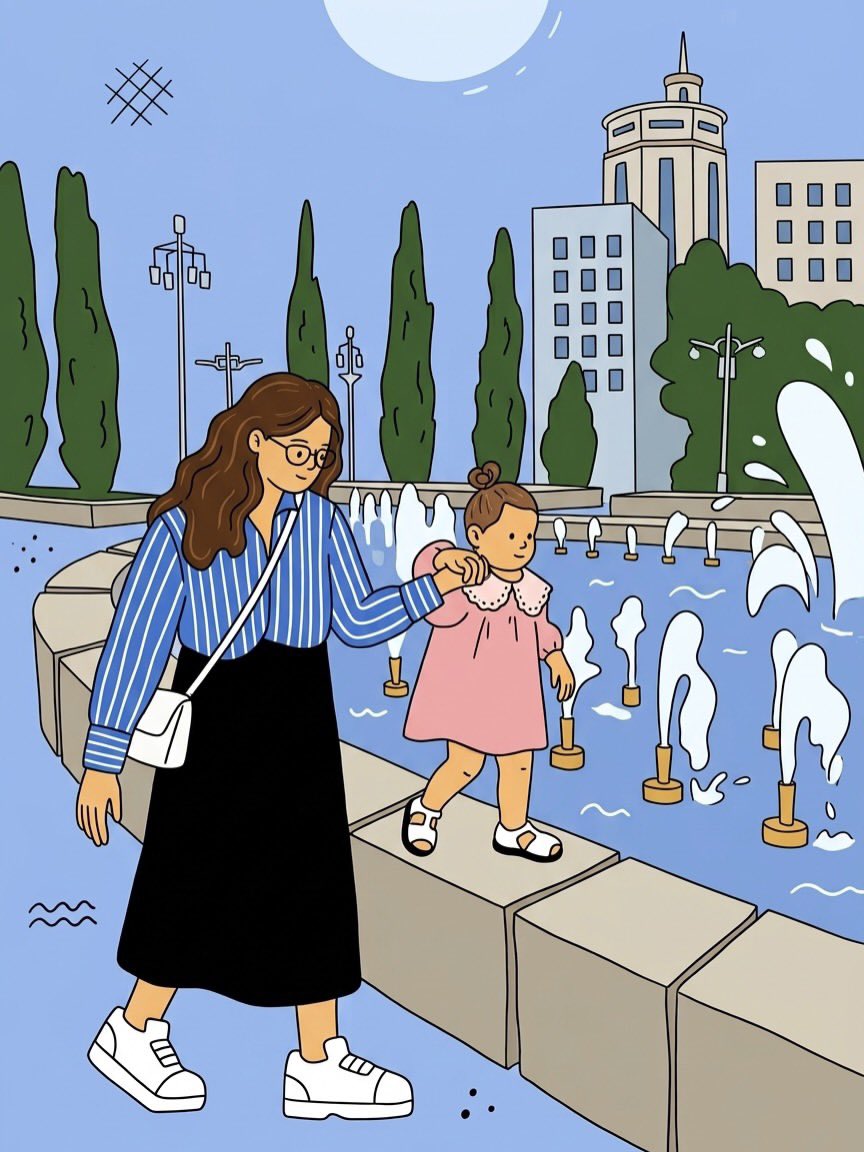
Convert the entire uploaded photograph into a clean, colorful, hand-drawn 2D cartoon illustration. Preserve the original composition, camera angle, poses, facial expressions, recognizable identities, hairstyles, clothing, accessories, and all important background elements. ILLUSTRATION STYLE: •Clean black outlines with slightly varied, hand-drawn line weight. •Flat pastel colors with minimal cel shading. •Simplified characters with cute proportions, expressive faces, and natural poses. •Smooth, slightly imperfect lines for an authentic illustrated feel. •Simplify realistic textures into clean shapes while retaining recognizable details. •Recreate the original environment, including buildings, trees, fountains, pathways, and other objects, in the same cartoon style. •Use a soft pastel palette with light blue skies, muted greens, warm skin tones, and gentle pinks. •Add subtle artistic details while maintaining the original scene’s atmosphere. PRESERVE THE ORIGINAL: Keep the same number of people, their positions, body proportions, clothing colors, interactions, and relative sizes. Maintain the original background layout and perspective. Do not add, remove, or reposition important objects. OUTPUT REQUIREMENTS: A polished, full-frame 2D illustration with consistent outlines, flat colors, and a playful, storybook aesthetic. The entire image must be illustrated, with zero photorealistic elements. AVOID: 3D rendering, photorealism, excessive shading, watercolor textures, blurry lines, distorted faces, extra fingers or limbs, changed outfits, altered poses, missing background details, and unwanted text or watermarks. Aspect ratio: Match the uploaded photo exactly. Pro tip: Upload one photo at a time and use this same prompt to transform different photos into a consistent cartoon style.
Generate image
GPT Image 2
Quiet vs Abandoned Train Station Comparison
View full prompt & copy

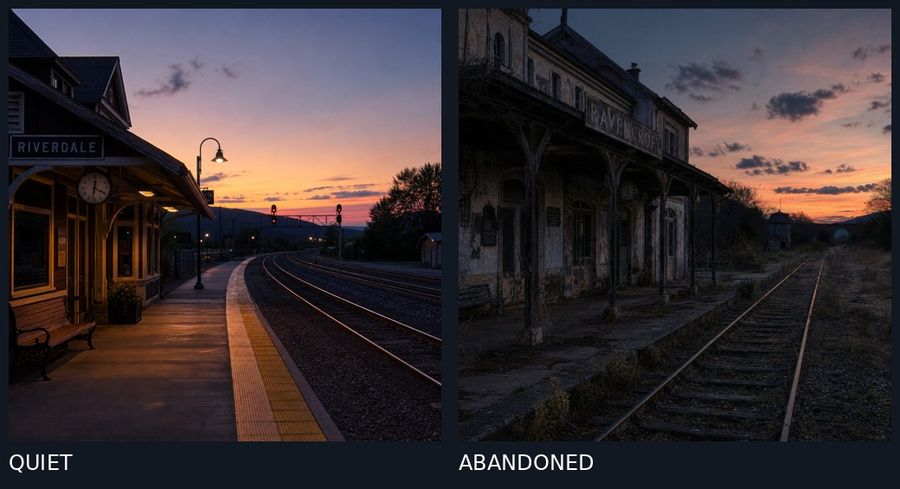
A split-screen comparison of two train station scenes at dusk, separated by a thin vertical line. Left panel: A quiet, well-maintained train station named "RIVERDALE" with warm yellow lighting under the platform canopy, a wooden bench, a round clock on the wall, clean concrete platform with yellow tactile paving edge, curved railway tracks leading into the distance, signal lights glowing red, and a vibrant sunset sky with orange and purple hues over distant hills. Right panel: An abandoned, dilapidated train station named "RAVENSBROOK" with peeling paint, broken windows, overgrown weeds and grass between cracked concrete platforms, rusted railway tracks, weathered wooden support beams, dark and eerie atmosphere, similar sunset sky but more muted and cloudy. Bottom labels: "QUIET" in white text on dark background beneath left image, "ABANDONED" in white text on dark background beneath right image.

Generate image
GPT Image 2
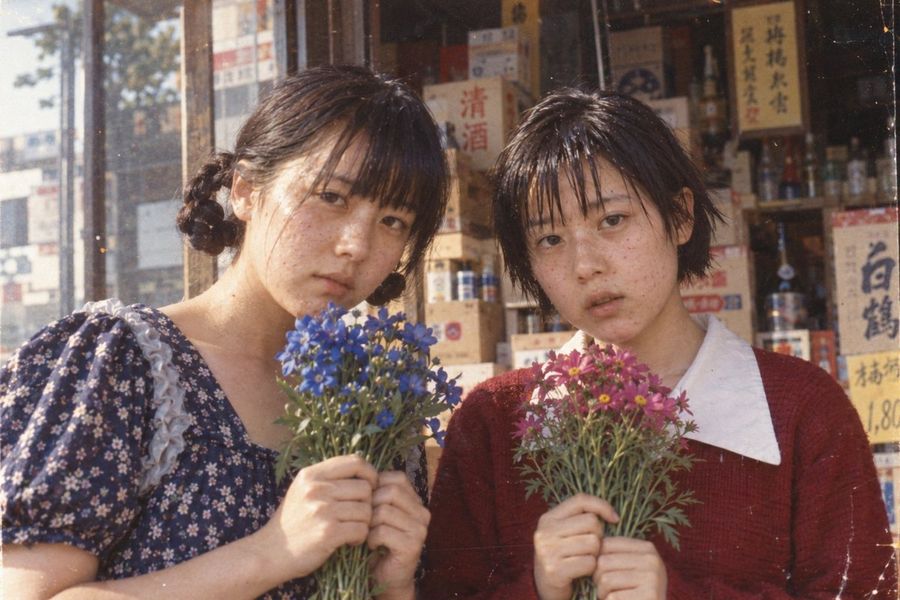
Vintage Photo of Two Women Holding Flowers
View full prompt & copy

A vintage-style photograph of two young East Asian women standing close together in front of a traditional Japanese shop. The woman on the left has dark hair styled in two braided buns and wears a navy blue dress with a small white floral pattern and ruffled collar, holding a bouquet of blue flowers. The woman on the right has short, choppy black hair and wears a maroon sweater over a white collared shirt, holding a bouquet of pink cosmos flowers. Both have natural skin textures with visible freckles and slight acne, looking directly at the camera with neutral expressions. The background features wooden shelves stocked with various bottles and boxes, including signage with Japanese characters like '清酒' (sake) and '白鶴'. The image has a warm, faded color palette typical of old film photography, with soft lighting and a slightly grainy texture.

Generate image
GPT Image 2
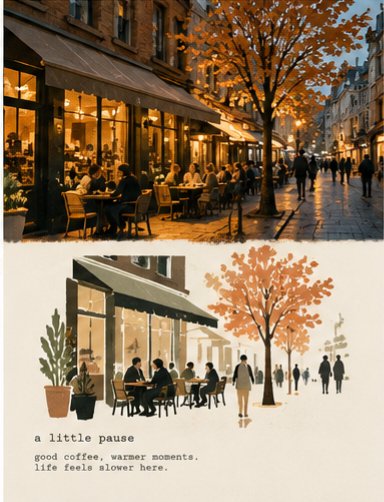
Vintage Travel-Journal Photo Collage
View full prompt & copy

Transform the uploaded photograph into a minimalist vintage travel-journal collage. Match the provided two-panel reference style as closely as possible. CANVAS: Vertical 3:4 composition with two horizontal sections of approximately equal height. TOP HALF — ORIGINAL PHOTO: Preserve the uploaded photograph and its original composition, location, architecture, objects, colors, and perspective. Keep the image photographic, natural, slightly soft-focused, and cinematic. Do not turn the top half into an illustration. BOTTOM HALF — SIMPLE FLAT ILLUSTRATION: Create a deliberately simplified, minimalist watercolor-and-ink illustration of the EXACT SAME SCENE. IMPORTANT: The bottom illustration must look like the simple, faded illustration in the reference image, NOT a detailed watercolor painting. Use: Simplified architectural silhouettes Flat, translucent watercolor washes Minimal outlines and loose brushwork Faded terracotta and dusty blue Muted olive green and charcoal Large areas of empty cream paper Simple human silhouettes Very few architectural details Soft, imperfect edges Do not reproduce every photographic detail. Preserve only the most recognizable elements of the original scene. The illustration should feel understated, airy, slightly faded, and hand-painted on vintage paper. LAYOUT: Keep the photograph in the upper half and the illustration in the lower half. Separate them with a simple, subtly irregular horizontal edge. Avoid elaborate torn-paper effects. PAPER: Warm ivory paper with subtle natural grain and a matte finish. The lower section should have plenty of empty space. TEXT: At the bottom of the illustrated section, add a small lowercase typewriter-style heading followed by two short lines of reflective text relevant to the scene. Use dark gray monospaced letters, slightly faded ink, and generous spacing. Keep the text small and understated. STRICT STYLE RULES: The top must remain a photograph. The bottom must remain a simple flat illustration. Do not make the bottom photorealistic. Do not use highly detailed watercolor rendering. Do not fill the entire paper with paint. Do not add extra panels, borders, decorative elements, or random text. Preserve the original scene's recognizable identity. The final image must resemble a minimalist travel-journal page with a photograph above and a simple illustrated interpretation below. Aspect ratio: 3:4 vertical.

Generate image
GPT Image 2.5
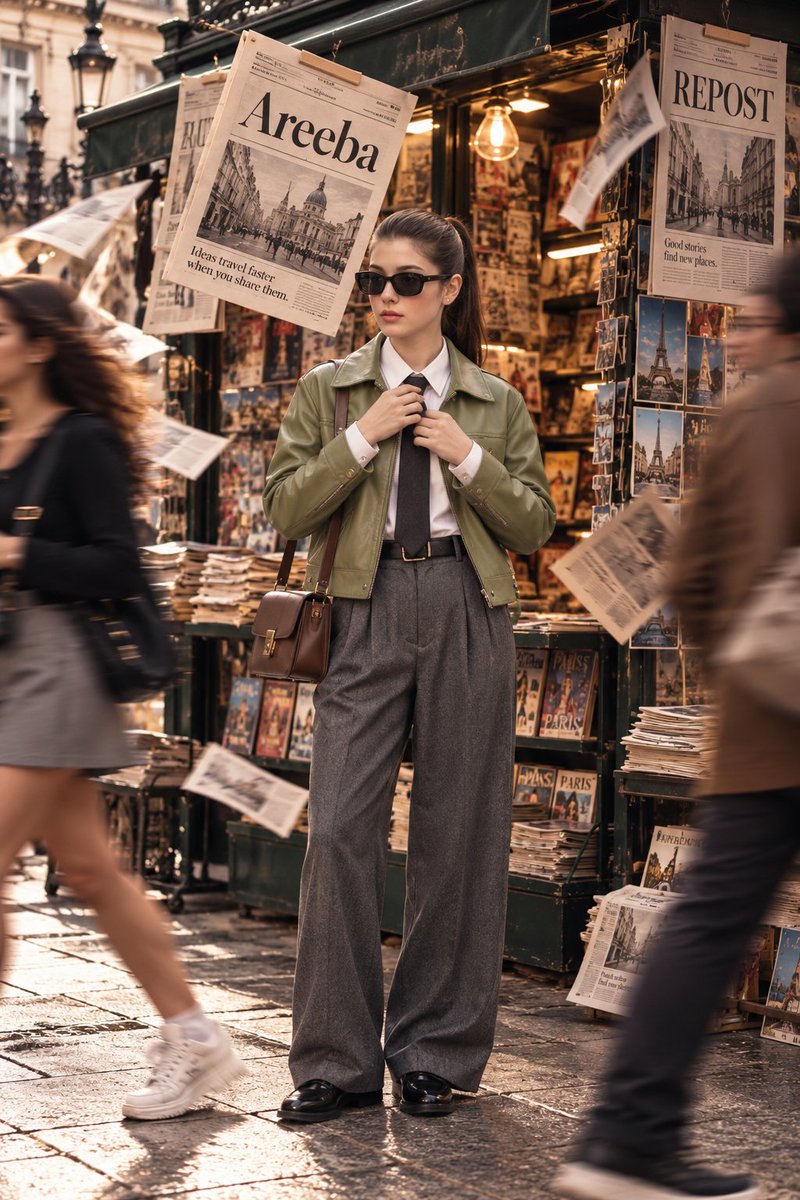
Parisian Street Fashion Editorial
View full prompt & copy

Using the uploaded reference image, create an ultra-photorealistic, premium high-fashion street editorial photograph. Preserve the woman's exact facial identity, natural skin texture, facial proportions, eye shape, nose, lips, and hairstyle. No facial modifications, artificial beautification, or AI-generated appearance. COMPOSITION: Vertical 2:3 full-body editorial portrait. A beautiful young woman stands confidently in the center of a bustling Parisian street, directly in front of a charming vintage dark-green European newsstand. Straight-on camera angle, entire body visible from head to polished shoes, comfortable headroom, perfectly balanced composition. MODEL & STYLING: She wears a luxurious sage-green leather jacket over a crisp white button-down shirt, a neatly tied charcoal-black necktie, elegant high-waisted pleated gray wool trousers, polished black leather loafers, narrow rectangular black sunglasses, and a structured chocolate-brown leather shoulder bag with gold hardware. Her dark hair is styled into a sleek, naturally textured high ponytail. Minimal sophisticated makeup, realistic skin pores, soft natural lips, subtle rosy cheeks, and an effortlessly elegant expression. POSE: Standing naturally with relaxed shoulders, both hands gently adjusting her necktie. Her head faces slightly toward the camera, maintaining a calm, confident, sophisticated fashion-editorial attitude. ENVIRONMENT: A richly detailed vintage Parisian newsstand overflowing with newspapers, fashion magazines, travel postcards, and stacked publications. Warm tungsten bulbs illuminate the interior. One large vintage newspaper hangs prominently above the model's left shoulder, displaying the perfectly readable headline "Areeba" in elegant black serif typography. A second newspaper on the upper right displays the bold headline "REPOST". Several loose newspaper pages flutter naturally through the air, creating dynamic movement. MOTION & ATMOSPHERE: A young woman wearing a dark top, gray skirt, white socks, and chunky white sneakers walks briskly across the left foreground. Another pedestrian wearing a brown jacket crosses the right foreground. Both pedestrians appear naturally motion-blurred through realistic long-exposure photography, while the central model remains perfectly sharp and detailed. LIGHTING & COLOR: Beautiful golden-hour daylight mixed with warm tungsten newsstand lighting. Sophisticated cinematic color grading featuring muted sage green, warm champagne beige, charcoal gray, rich chocolate brown, and soft golden highlights. Natural skin tones, realistic shadows, gentle film grain, subtle atmospheric depth, and beautifully controlled contrast. PHOTOGRAPHY: Shot on a professional full-frame camera, 50mm editorial lens, f/2.8, natural perspective, realistic depth of field, exceptionally detailed clothing textures, authentic leather reflections, and magazine-quality sharpness. Premium European fashion campaign

Generate image
GPT Image 2.5
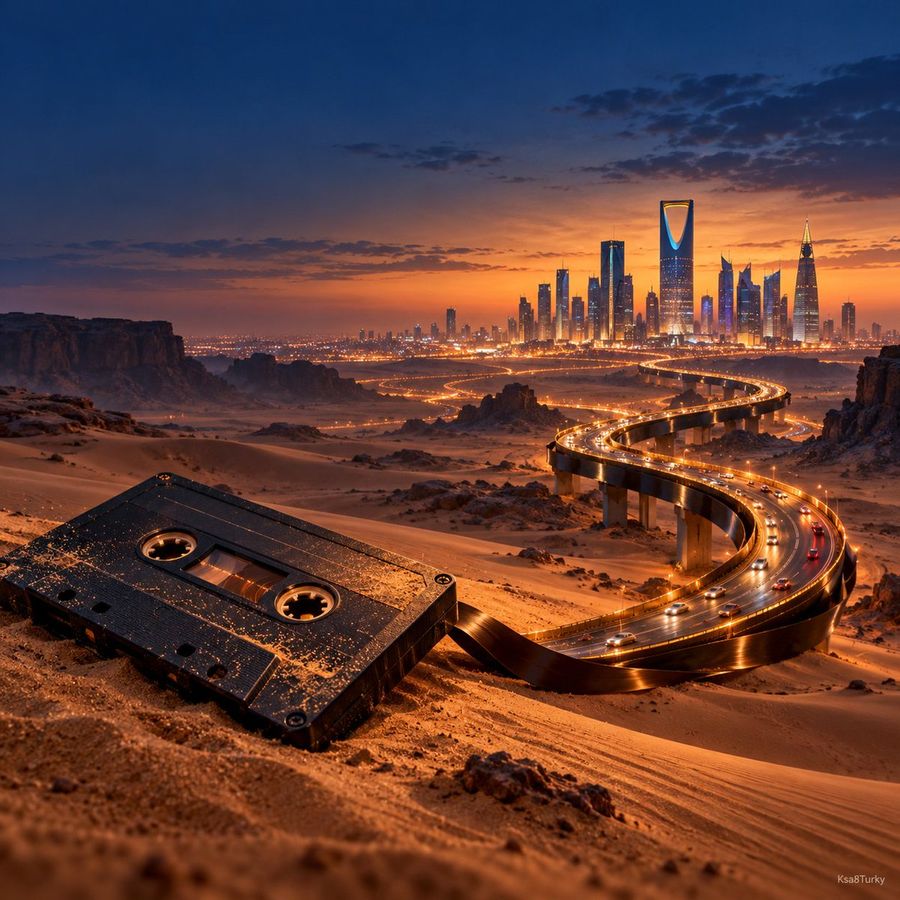
Vintage Cassette Surreal Highway
View full prompt & copy

A vintage black cassette tape resting on desert sand at blue hour, its magnetic ribbon transforming seamlessly into a real illuminated highway leading toward a futuristic city skyline, believable scale transition, tiny moving cars, deep navy and warm amber palette, cinematic volumetric haze, premium photorealistic editorial advertising, strong focal point, clean negative space, no logos, no extra text, small Ksa8Turky signature, square 1:1.

Generate image
GPT Image 2.5
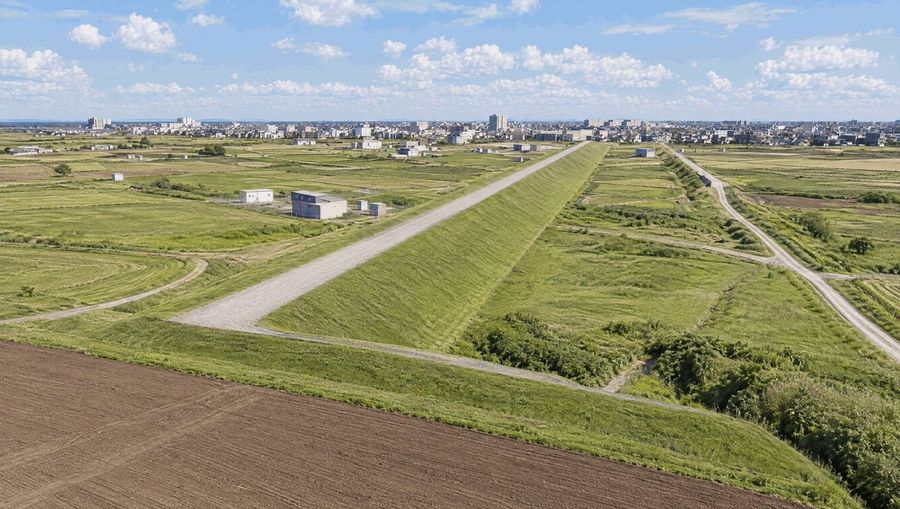
Aerial View of Long Earthen Levee
View full prompt & copy

A high-angle aerial photograph of a massive, perfectly straight earthen levee stretching into the distance through flat agricultural plains. The levee features steep grassy slopes and a wide gravel service road running along its crest. To the left of the levee, there are several small, rectangular concrete utility buildings scattered across green fields. In the immediate foreground, a large patch of brown tilled soil is visible. The background shows a dense urban skyline with numerous mid-rise apartment buildings and houses under a bright blue sky filled with fluffy white cumulus clouds. The lighting is natural daylight, casting soft shadows that emphasize the texture of the grass.

Generate image
GPT Image 2.5
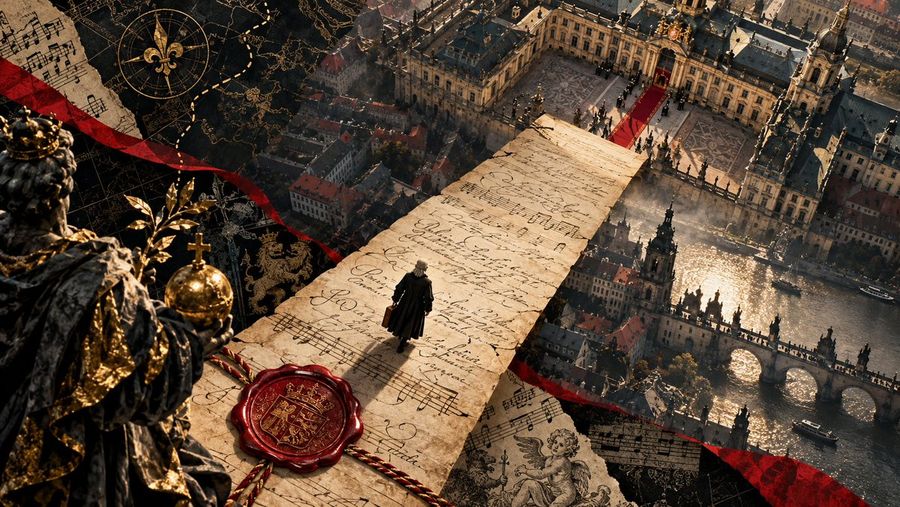
Bach's Musical Petition to Dresden
View full prompt & copy

Goal: Create a cinematic, high-resolution digital illustration depicting the historical moment of Johann Sebastian Bach submitting his musical petition to the court in Dresden. Canvas: Wide aspect ratio (16:9), photorealistic 3D render style with dramatic lighting and rich textures. Layout & Composition: - **Foreground Left:** A close-up, slightly out-of-focus statue or bust of a crowned monarch (King Augustus III) wearing heavy velvet robes with gold embroidery and holding a golden orb. This frames the scene on the left. - **Center Axis:** A massive, long scroll of aged parchment stretches diagonally from the bottom center toward the top right, acting as a bridge or path over the city below. The parchment is covered in handwritten cursive script and musical notation (staves and notes). - **Midground Center:** A tiny figure of Bach, dressed in black 18th-century attire with a white wig, stands on the parchment scroll, looking down at the document he has written. He holds a small leather satchel. - **Background Right:** An aerial view of the historic city of Dresden. Key landmarks include the Zwinger Palace with its ornate baroque architecture and red carpet entrance, the Hofkirche (Court Church) spires, and the Augustus Bridge spanning the Elbe River. The river reflects the sunlight. - **Overlay Elements:** Scattered around the edges are torn fragments of sheet music, a golden compass rose symbol, a red wax seal with a coat of arms attached to the main scroll, and flowing red ribbons that weave through the composition. Visual Style: - **Lighting:** Golden hour sunlight hitting the city and the parchment, creating strong contrasts and shadows. Warm tones dominate. - **Texture:** Highly detailed paper grain on the scroll, stone texture on the buildings, fabric texture on the king's robe. - **Atmosphere:** Majestic, historical, and artistic. It visualizes the concept of "music as a plea for status." Text Content: - The handwriting on the scroll should be illegible but stylistically accurate to 18th-century German Kurrent script. - Musical staves should look authentic. Constraints: - Do not make the text readable English; it must look like a historical manuscript. - Ensure the scale difference between the giant scroll/king and the tiny composer is exaggerated for dramatic effect.

Generate image
GPT Image 2.5
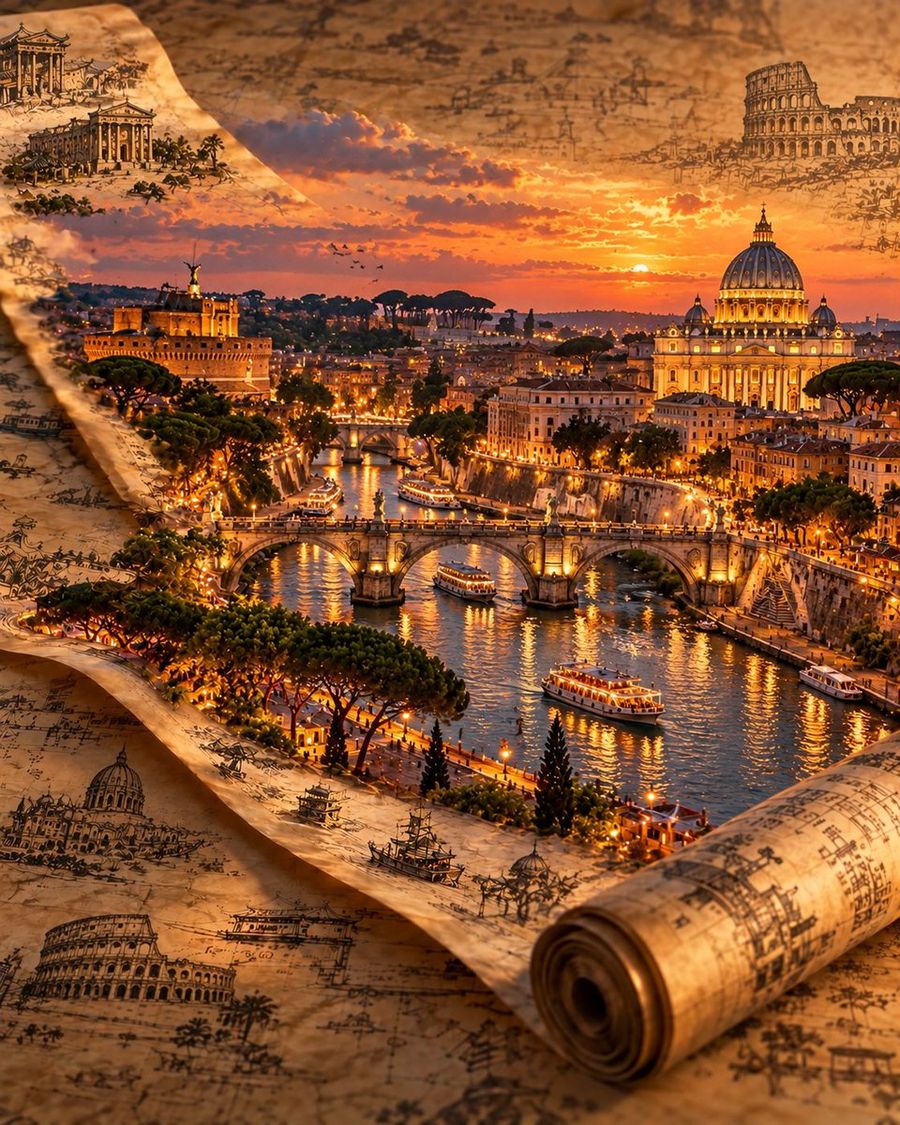
Antique Map Cityscape Prompt
View full prompt & copy

Create a 4:5 vertical, cinematic 3D travel artwork of [CITY / COUNTRY]. An old, weathered parchment map unfolds diagonally across the frame, with one corner curling into a tight roll in the lower right. From the map, a detailed miniature version of the city rises into a realistic, three-dimensional world. Include the city's recognizable landmarks, local architecture, bridges, waterways, vegetation, and surrounding landscape. Keep the landmarks authentic to the chosen destination. Cover the parchment with fine sepia ink drawings, historical architectural sketches, and old cartographic details. Add soft clouds around the distant skyline to blend the miniature city naturally into the scene. Use an elevated three-quarter perspective, with the city as the main focal point and the rolled parchment clearly visible in the foreground. Lighting should feel like late golden hour: warm amber highlights, long cinematic shadows, glowing windows, realistic water reflections, and atmospheric depth. Focus on realistic materials, intricate architectural details, aged paper texture, and the feeling of a miniature world photographed in a studio. Style: Photorealistic 3D diorama, antique cartography, cinematic travel photography, Unreal Engine 5 aesthetic. Avoid: Generic or inaccurate landmarks, mixed cultural styles, flat illustrations, distorted buildings, excessive details, text, logos, and watermarks. Format: Full-frame 4:5 vertical.

Generate image
GPT Image 2.5
Winter Storybook Illustration Prompt
View full prompt & copy

A beautiful 2D storybook illustration of a cute young cartoon woman standing in a snowy city at sunset, full body visible. She has big expressive brown eyes, rosy cheeks, dark brown windblown bob hair, a teal wide-brim hat, a vibrant mustard-yellow long coat, chunky teal knitted scarf flowing in the wind, navy trousers, burnt-orange boots, and a caramel leather handbag. Deep cobalt-blue snowy sky, glowing orange and golden sunset clouds, distant skyscrapers with warm illuminated windows, sparkling snowfall, a vintage glowing street lamp on the left, snow-covered railing, colorful river reflections. Rich vibrant colors, teal-orange contrast, magical cozy atmosphere, detailed painterly textures, soft cinematic lighting, adorable character design, sharp details, premium storybook art, 4K quality, vertical 9:16 composition, character slightly right of center. Negative prompt: photorealistic, 3D, dull colors, blurry face, cropped feet, extra fingers, deformed anatomy, text, watermark, logo

Generate image
GPT Image 2.5
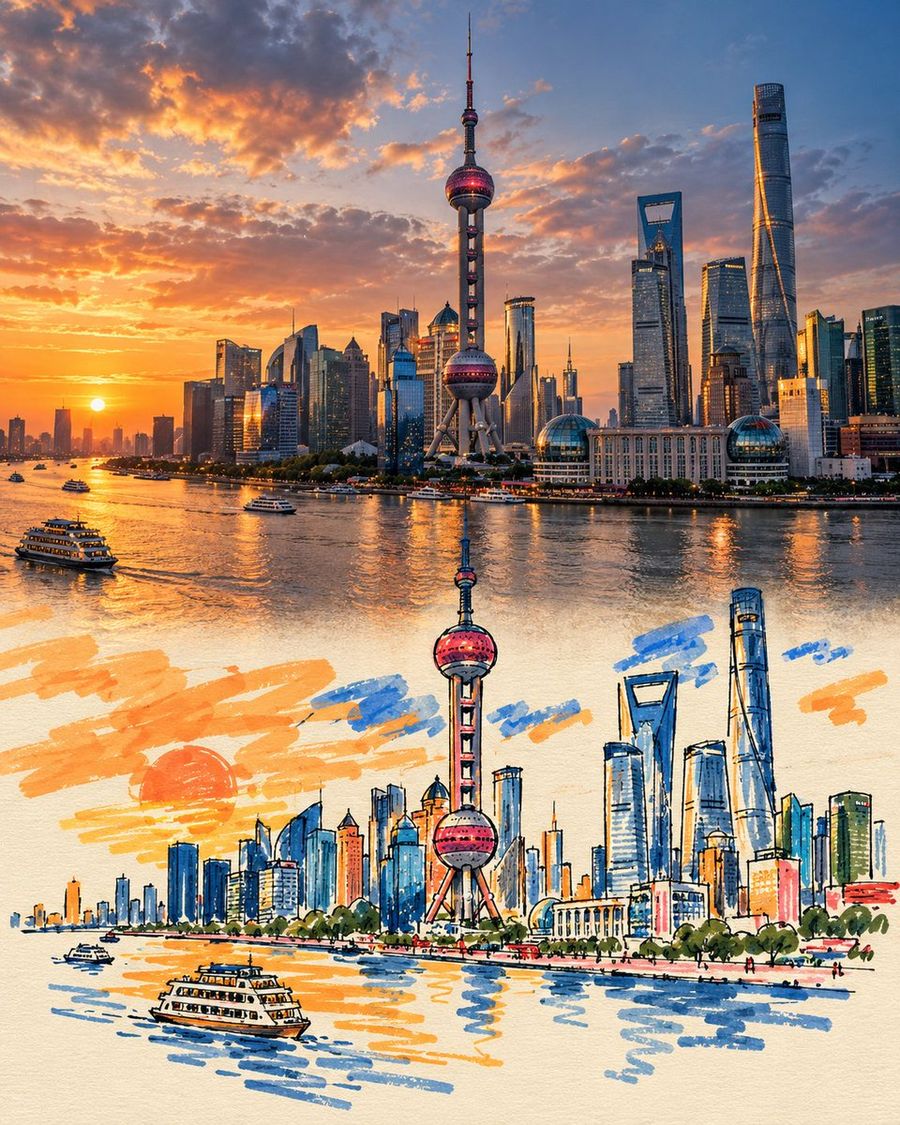
Travel Poster Graffiti Art Prompt
View full prompt & copy

Create a premium FULL-FRAME 4:5 vertical Photo × Graffiti Art travel poster for COUNTRY / CITY / LOCATION / SUBJECT. TEXT-TO-IMAGE ONLY — generate everything creatively from the written subject alone. No reference image required. CORE CONCEPT: A cinematic realistic scene in the upper 50%, seamlessly transforming into minimalist, playful hand-drawn graffiti art on warm ivory paper in the lower 50%. One recognizable element naturally extends across the center, maintaining its original shape, perspective, colors, and direction. ART STYLE: Use chunky marker strokes and opaque paint pens, awkward rounded outlines, oversized simple shapes, tiny facial features where appropriate, and slightly wobbly hand-drawn lines. Preserve the subject’s identity while simplifying it into charming, naïve artwork. COLOR & COMPOSITION: Choose one dominant vivid color inspired by the scene, plus 1–2 accent colors. Keep secondary details mostly paper-white with sparse colored outlines. Use broad, imperfect paint strokes, subtle ink irregularities, and tiny handwritten English commentary. Remove unnecessary background details from the illustrated section and leave at least 70% of its area as clean negative space. FINAL AESTHETIC: Authentic photography × minimalist naïve graffiti × continuous visual transformation × contemporary travel editorial. Airy, playful, artistic, and collectible. AVOID: Visible seams, rigid dividing lines, gradients, shadows in the illustration, detailed background recreation, smooth vector curves, excessive lettering, borders, logos, watermarks, and interface elements. FORMAT: Full-bleed 4:5 vertical artwork. Exact 50/50 composition, with a natural, seamless transition and no external margins.

Generate image
GPT Image 2.5
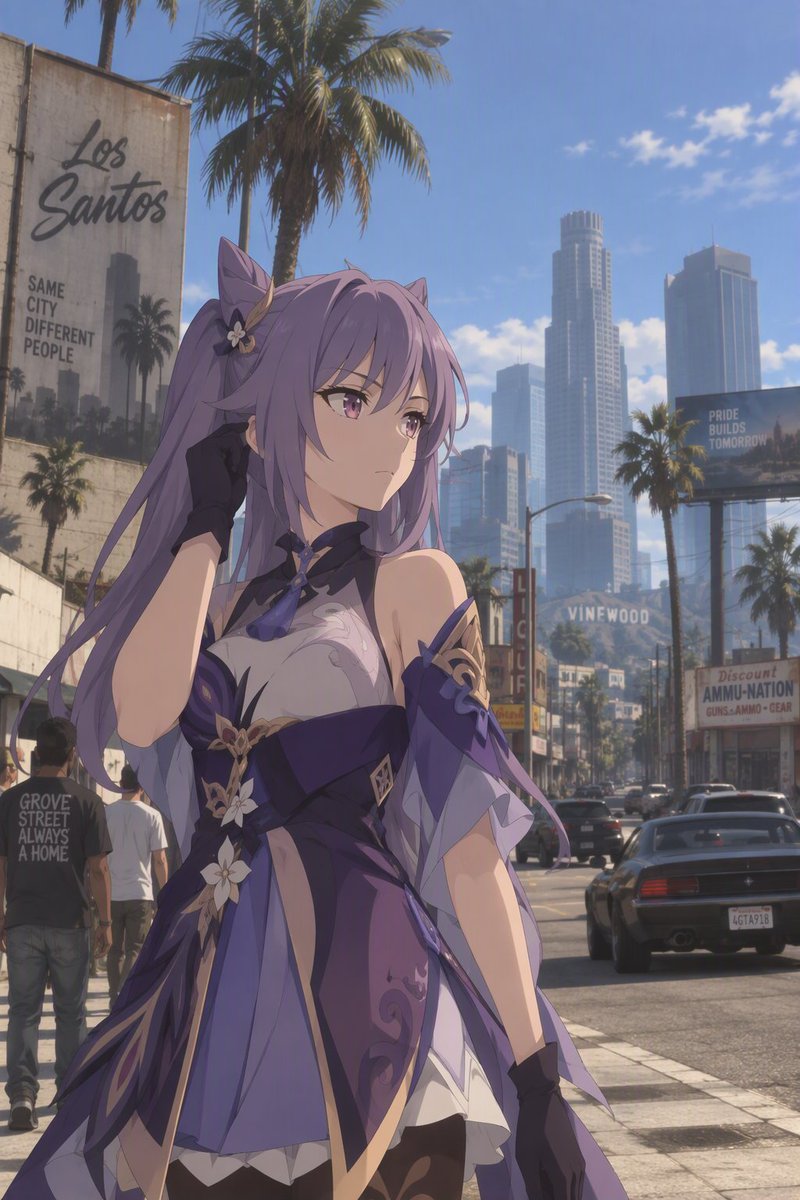
Anime Girl in GTA Los Santos
View full prompt & copy

A high-quality anime illustration of a beautiful female character with long, flowing lavender hair and purple eyes. She is wearing an elaborate dark purple dress with gold accents and floral patterns, featuring detached sleeves and black gloves. Her expression is calm and slightly serious as she stands in the foreground. The background depicts a realistic, sunny urban street scene reminiscent of Los Santos from GTA V, complete with tall palm trees, skyscrapers, and a 'VINEWOOD' sign on a distant hill. To the left, a large billboard reads 'Los Santos' and 'SAME CITY DIFFERENT PEOPLE'. On the right, there are storefronts including a liquor store and an ammo shop. A black sports car is parked on the street behind her.

Generate image
GPT Image 2.5
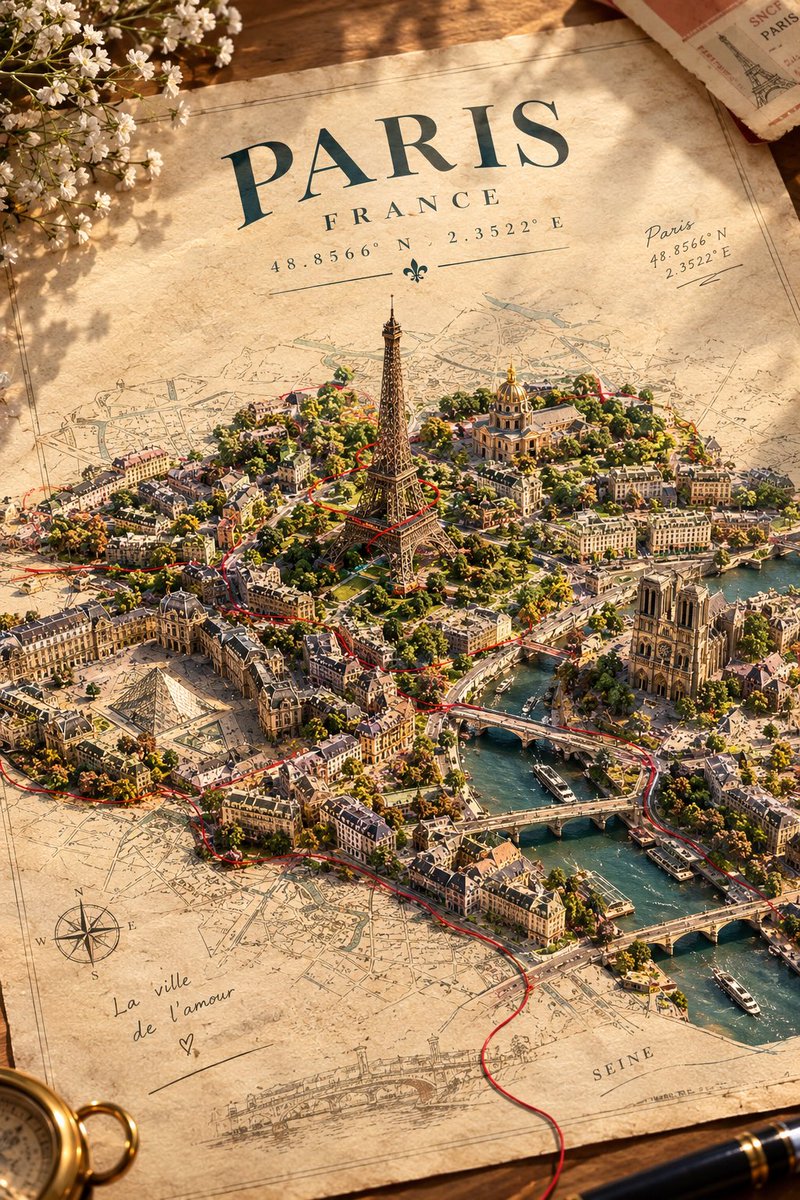
City Emerging from Vintage Map Prompt
View full prompt & copy

A real city appears to be physically breaking free from an old paper map, with its actual streets, buildings, and famous landmark rising out of the printed geography into the real world. Create a breathtaking, surreal-meets-realistic art composition of [CITY, COUNTRY], emerging from an enormous vintage paper map laid flat on a warm ivory surface. The city’s REAL architecture and geography rise naturally from the map like a miniature three-dimensional world. Its famous landmark stands tall at the center, surrounded by accurately recognizable buildings, winding streets, bridges, rivers, and local architectural details. The printed roads on the map seamlessly transform into actual city streets, while tiny buildings gradually rise from flat ink illustrations into detailed miniature structures. A single delicate red thread travels across the map, following the city’s real street layout before spiraling around its most famous landmark. Tiny handwritten location coordinates appear in the margin. Use a stunning combination of architectural realism, miniature diorama photography, vintage cartography, subtle paper textures, and cinematic lighting. Warm sunlight creates long, beautiful shadows across the map. Keep the background minimal and elegant, with the city as the undeniable focal point. At the top, display the city’s name in sophisticated vintage typography, with its country name and geographical coordinates beneath it. The result should feel like a real city has magically escaped its map — imaginative, visually striking, geographically recognizable, and beautifully detailed. Ultra-high detail, realistic materials, exceptional composition, premium art-poster aesthetic, no distorted buildings, no fictional architecture, no clutter.

Generate image
GPT Image 2.5
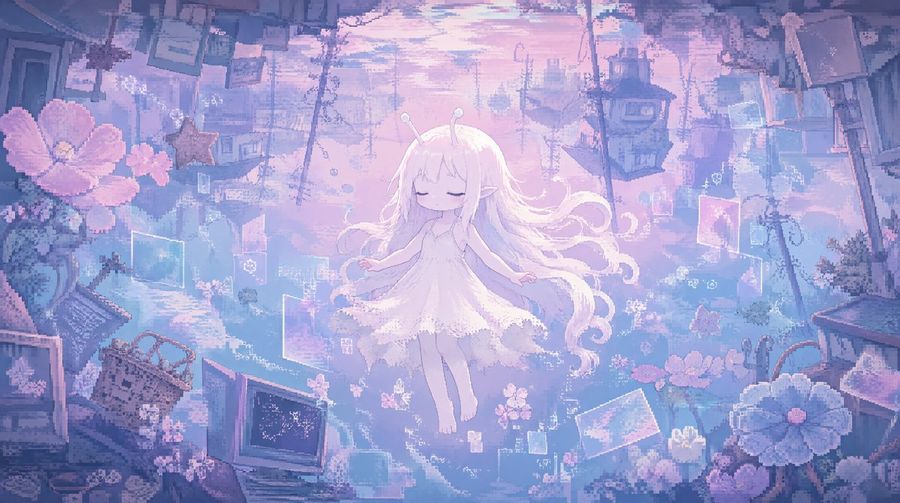
Ethereal Anime Girl Floating in Pastel City
View full prompt & copy

A dreamy, ethereal anime-style illustration featuring a young girl with long, flowing white hair and two small antennae on her head. She is wearing a simple, frilly white dress and appears to be floating or sleeping peacefully in mid-air with her eyes closed. The background is a surreal, pastel-colored cityscape filled with floating objects like old CRT monitors, picture frames, flowers, and debris, all rendered in soft shades of lavender, pink, and light blue. The atmosphere is nostalgic and slightly melancholic, reminiscent of vaporwave aesthetics.

Generate image
GPT Image 2
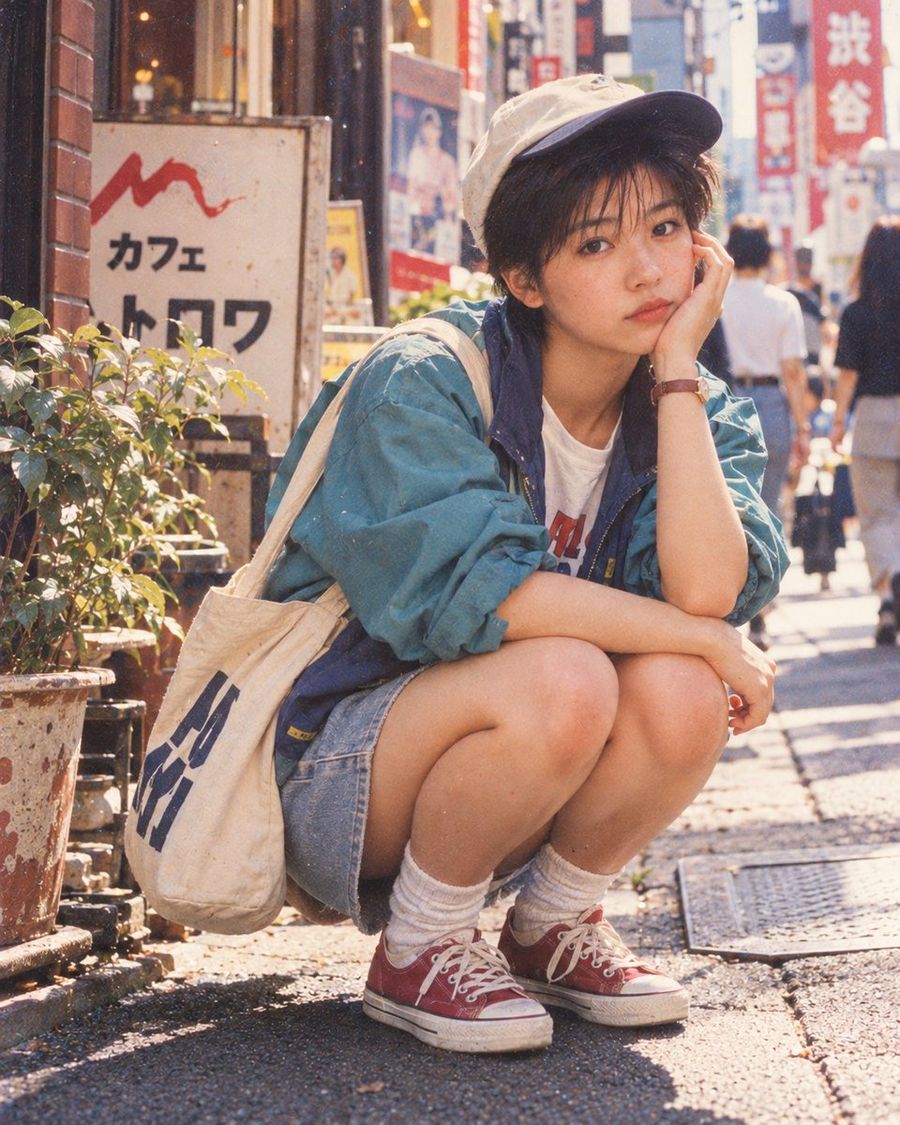
Shibuya Street Style Portrait
View full prompt & copy

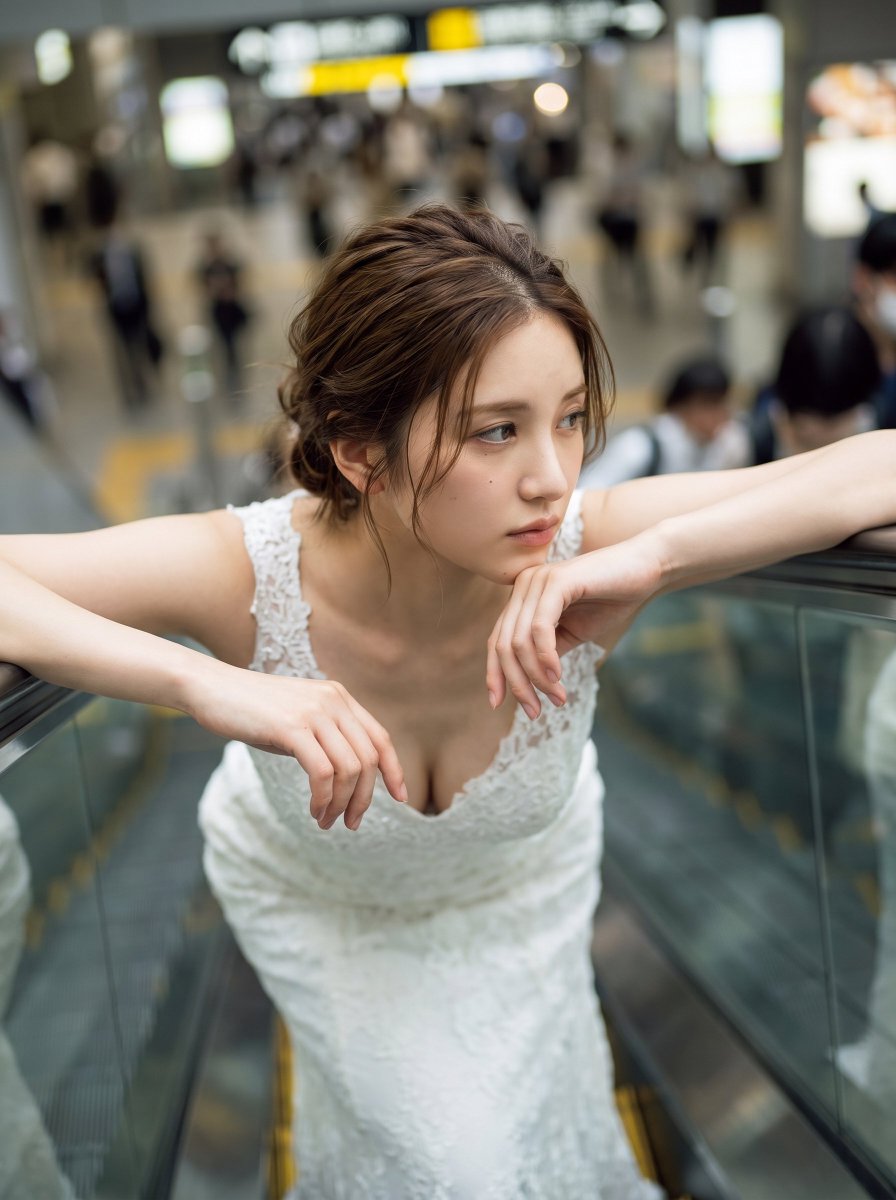
A vertical portrait of a young woman squatting on a sunlit street in Shibuya, Tokyo. She has short dark hair and wears a beige baseball cap with a black brim. Her outfit consists of an oversized teal windbreaker jacket over a white graphic t-shirt, denim shorts, white ribbed socks, and red canvas sneakers. A large cream-colored tote bag with blue text hangs from her shoulder. She rests her chin on her left hand, looking directly at the camera with a calm expression. The background features blurred storefronts with Japanese signage, including a prominent 'Cafe' sign and vertical banners, along with potted plants to the side. The image has a warm, grainy film photography aesthetic.

Generate image
GPT Image 2
Japanese Newspaper Front Page: Giant Rescue Robot
View full prompt & copy

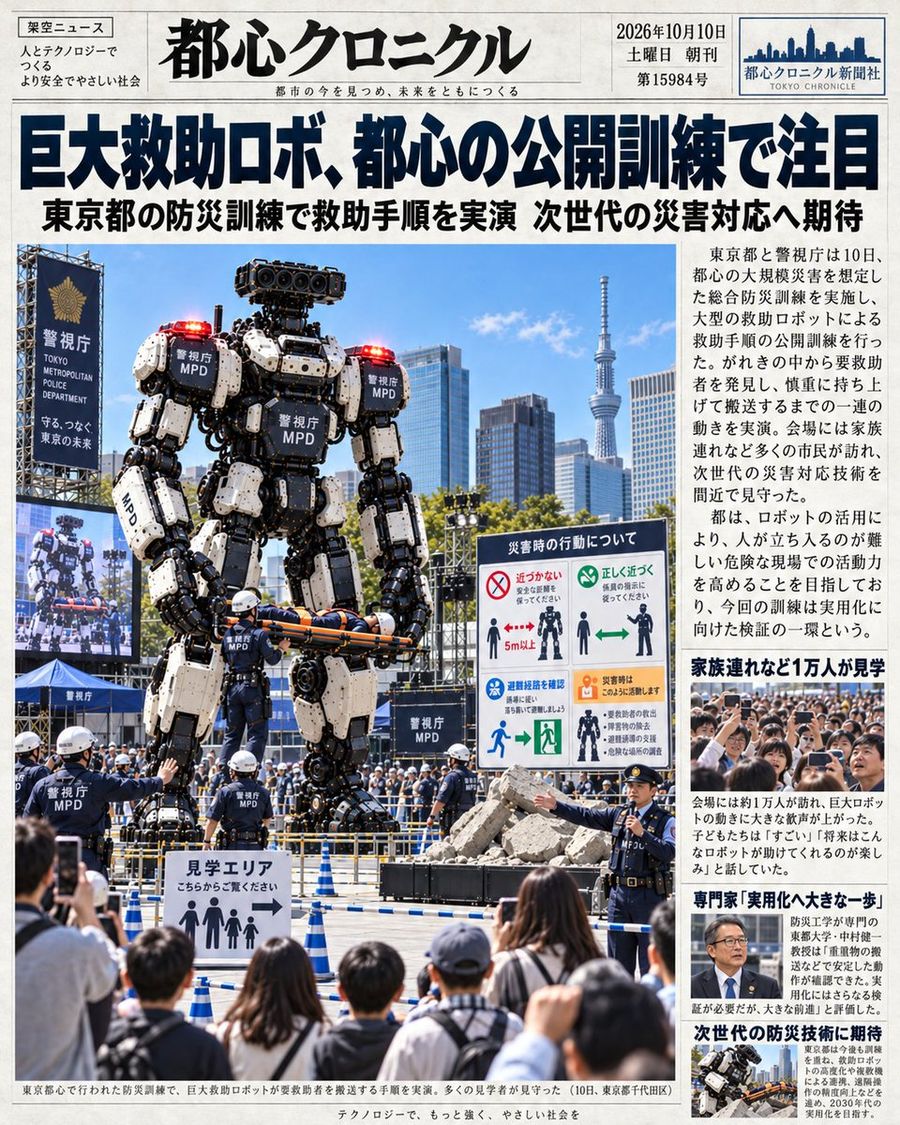
Goal: Create a realistic Japanese newspaper front page featuring a giant rescue robot demonstration. Canvas: Vertical portrait layout, high-resolution print style, white background with black text and color photos. Layout: Standard newspaper masthead at the top, large headline below it, main photo on the left taking up 60% of the width, sidebar column on the right with smaller text and images. Text content: - Masthead (Top Center): Large bold Kanji "都心クロニクル" (Tokyo Chronicle). Small English text below: "都市の今を見つめ、未来をともに". Top right box: Date "2026年10月10日", Day "土曜日", Edition "第15984号", Logo "都心クロニクル新聞社 TOKYO CHRONICLE". Top left box: Category "架空ニュース" (Fictional News), slogan "人とテクノロジーで つくる より安全でやさしい社会". - Main Headline (Below Masthead): Huge bold blue/black text "巨大救助ロボ、都心の公開訓練で注目". Sub-headline below in smaller black text: "東京都の防災訓練で救助手順を実演 次世代の災害対応へ期待". - Sidebar Text (Right Column): Multiple paragraphs of Japanese news copy describing the event. Key phrases visible: "東京都と警視庁は10日...", "会場には家族連れなど多くの市民が訪れ...", "ロボットを活用により...". Bold subheads in sidebar: "家族連れなど1万人が見学", "専門家「実用化へ大きな一歩」", "次世代の防災技術に期待". - Photo Captions: Bottom caption under main image: "東京都心で行われた防災訓練で、巨大救助ロボットが要救助者を搬送する手順を実演。多くの見学者が見守った(10日、東京都千代田区)". Footer line: "テクノロジーで、もっと強く、やさしい社会を". Subject details: - Main Image: A massive bipedal humanoid robot standing in an urban plaza. The robot is white and black with heavy industrial plating, labeled "警視庁 MPD" on its chest, shoulders, and legs. It has red warning lights on its shoulders and head. It is holding a stretcher with a person on it horizontally in its hands. - Background: Modern Tokyo skyline including the Tokyo Skytree tower in the distance. Blue sky with light clouds. - Foreground/Midground: Police officers in dark uniforms and white helmets directing a crowd. A sign reading "見学エリア こちらからご覧下さい" (Viewing Area - Please view from here) with stick figure icons. A crowd of spectators (back of heads) watching. A large LED screen on the left showing a close-up of the robot's face. A safety instruction board on the right titled "災害時の行動について" with diagrams showing "近づかない" (Do not approach) and "正しく近づく" (Approach correctly). Visual style: Photorealistic, journalistic photography, bright daylight, sharp focus, authentic newspaper typography and grid structure.

Generate image
Loading more prompts

FAQ

Where do YouMind prompts come from?
YouMind curates high-signal AI prompt examples from creator communities and public creative workflows. The library focuses on prompts that are useful to inspect, reuse, and adapt.
How are image prompt categories organized?
Image prompts are grouped into use cases, styles, and subjects. Use cases describe the job to be done, styles describe the visual treatment, and subjects describe what the image is mainly about.
How are prompts assigned to categories?
YouMind uses AI to analyze each image prompt, its title, metadata, and generated result when available, then assigns the closest categories. Editors can refine categories as the taxonomy evolves.
What is YouMind?
YouMind is an AI workspace for turning research, ideas, and creative references into usable outputs. The prompt library is one public part of that workflow, built to help creators learn from strong examples faster.