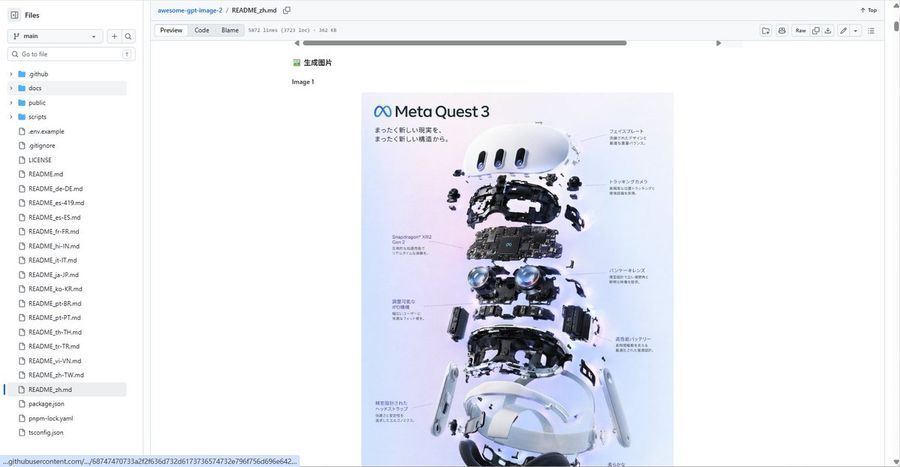
Generates a realistic GitHub repository README screenshot featuring a centered Meta Quest 3 exploded-view infographic, useful for showcasing prompt repositories or documentation pages.
Prompt
Goal: Create a realistic desktop browser screenshot of a GitHub repository page showing a markdown README preview for awesome-gpt-image-2, with a large embedded product teardown poster centered in the document.
Canvas: Wide 16:9 screenshot, approximately 1200×625 px, light GitHub interface theme, crisp UI text, no browser address bar visible, repository file view cropped to the GitHub content area.
Layout: Left sidebar file explorer, top repository breadcrumb/header, markdown toolbar row, and main README preview area. The main content should show a small Chinese heading “生成图片”, the label “Image 1”, and below it a centered vertical poster image. The page has a horizontal scrollbar near the top of the README content and a vertical page scrollbar on the far right.
Left sidebar details: Show the “Files” panel with a branch selector set to “main”, a search field labeled “Go to file”, and exactly 25 visible file/folder entries: 4 folders named “.github”, “docs”, “public”, “scripts”; then 21 files named “.env.example”, “.gitignore”, “LICENSE”, “README.md”, “README_de-DE.md”, “README_es-419.md”, “README_es-ES.md”, “README_fr-FR.md”, “README_hi-IN.md”, “README_it-IT.md”, “README_ja-JP.md”, “README_ko-KR.md”, “README_pt-BR.md”, “README_pt-PT.md”, “README_th-TH.md”, “README_tr-TR.md”, “README_vi-VN.md”, “README_zh-TW.md”, “README_zh.md”, “package.json”, “pnpm-lock.yaml”, plus “tsconfig.json” visible at the bottom if space allows. Highlight “README_zh.md” as the selected file.
Top header details: Breadcrumb reads “awesome-gpt-image-2 / README_zh.md”. Include the tabs/buttons “Preview”, “Code”, and “Blame”, plus metadata text similar to “5872 lines (3723 loc) · 362 KB”. On the right show compact GitHub controls including “Raw” and small icon buttons.
Embedded poster content: The poster is a clean product-exploded-view infographic for Meta Quest 3. It has a soft pastel lavender-to-blue background, the Meta infinity logo and title “Meta Quest 3” at top left, Japanese subtitle text beneath, and an exploded vertical stack of VR headset components. Count exactly 9 main component layers from top to bottom: 1 white curved front faceplate, 2 small sensor/camera modules floating around it, 3 black internal frame, 4 central motherboard labeled Snapdragon XR2 Gen 2, 5 dual pancake lens assembly, 6 side battery/controller-like modules, 7 lower black head strap/inner frame, 8 two white side arms, 9 white outer headset shell and bottom padding. Add fine Japanese callout labels with thin leader lines on both left and right sides, but keep them small and slightly unreadable like a real screenshot.
Visual style: Photorealistic GitHub UI screenshot, clean white background, small sans-serif UI fonts, subtle gray dividers, blue link accents, centered document content with wide margins. The poster should be high-quality glossy tech advertising imagery with realistic shadows, floating hardware parts, and precise product-render lighting.
Constraints: Do not add people, do not add extra popups or modal windows, keep the GitHub interface recognizable, preserve the Chinese/Japanese text where specified, and make the screenshot look like a real repository README preview rather than a standalone poster.
How to use this prompt
1
Copy the full prompt above.
2
Open a platform that supports GPT Image 2, such as YouMind, and paste the prompt in.
3
Swap the subject, style, or details to fit your idea, then generate.
This is a free AI prompt from YouMind's prompt library. Explore thousands more image prompts, all free to copy and adapt.
Let AI search through tens of thousands of prompts. Filter by model, time range, keywords, and sort by engagement — views, bookmarks, reposts and more.
Turn any photo into a detailed AI image prompt. The free image to prompt converter analyzes composition, style, and lighting so you can recreate any look in seconds.