Korean GPT Image Prompt Gallery
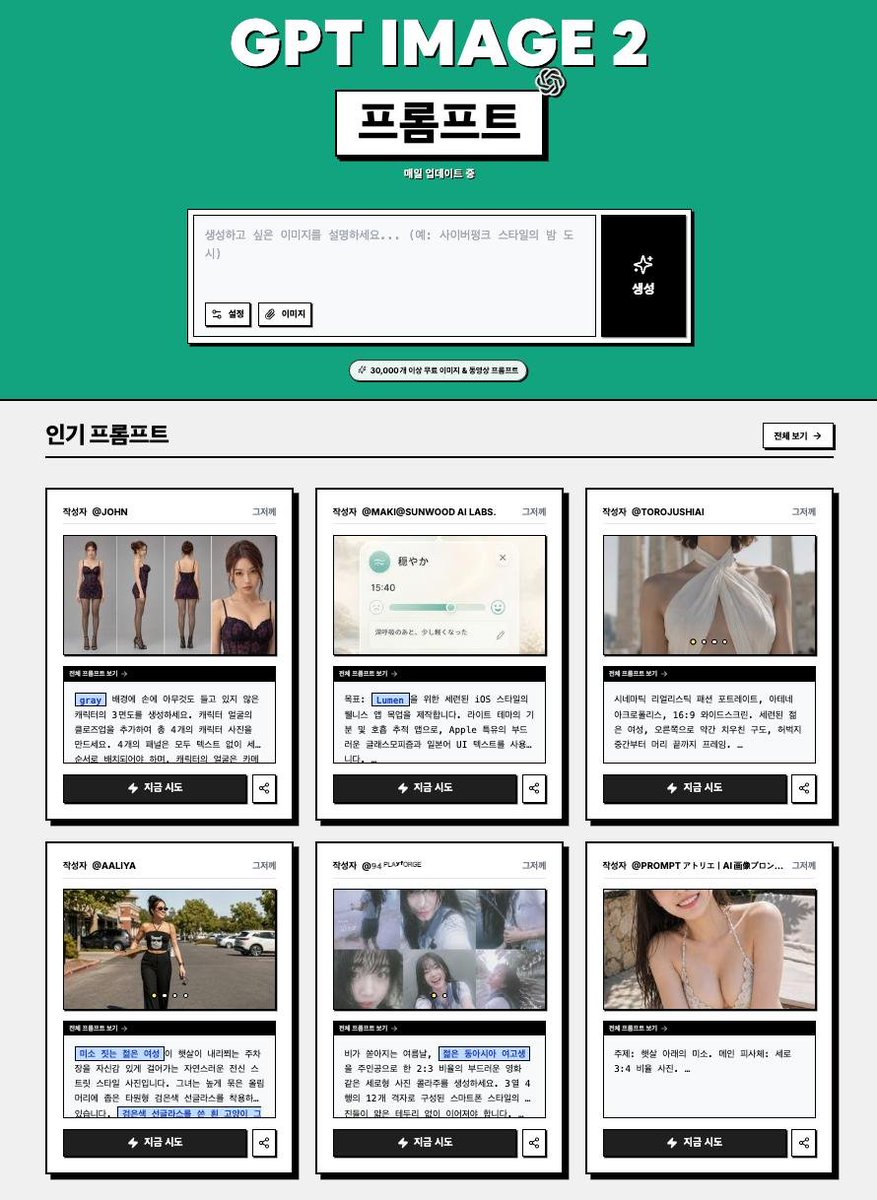
Generates a Korean brutalist-style GPT Image 2 prompt gallery webpage from an existing brand banner reference.

Prompt
Using the provided reference image as the branding and topic base, redesign it into a retro Korean web-gallery landing page for GPT IMAGE 2 prompts. Keep the bold black-and-white, slightly offset drop-shadow typography vibe and the OpenAI-style mark, but replace the dark striped banner with a flat teal hero section and a clean black/white brutalist layout. Layout: Create a vertical webpage screenshot. At the top, center the main title, then add a boxed Korean title label reading 프롬프트 with a small OpenAI knot icon near it and tiny subtext reading 매일 업데이트 중. Below, add a large prompt-input mockup: a white text area with Korean placeholder text, two small buttons on the left labeled “설정” and “이미지,” and a tall black action button on the right with a sparkle icon and the label “생성.” Add a small rounded pill beneath it stating “⚡ 30,000개 이상 무료 이미지 & 동영상 프롬프트.” Main content: Add a light gray section titled “인기 프롬프트,” with a small outlined “전체 보기 →” button on the right. Show exactly 6 prompt cards in a 3-column by 2-row grid. Each card must have a thick black border, subtle shadow, a top author line, one thumbnail image, a small black strip labeled “현재 프롬프트 보기 →,” a Korean prompt excerpt with a few blue highlighted keyword chips, a black CTA button labeled “⚡ 지금 시도,” and a small share icon button. Card count and thumbnail themes: exactly 6 cards: 1) fashion model outfit/reference collage, 2) soft iOS-style UI music widget, 3) close-up fashion/back-detail photo, 4) street fashion walking photo, 5) dreamy photo collage of a girl, 6) portrait/crop fashion photo. Use plausible Korean author handles and Korean prompt snippets; keep the text small but legible enough to feel like a real prompt gallery. Style constraints: high-contrast black outlines, off-white panels, teal hero background, bold Korean typography, intentionally simple web UI, no browser chrome, no extra cards, no extra sections, no watermark.

Reference images

How to use this prompt

  1. 1

    Copy the full prompt above.

  2. 2

    Open a platform that supports GPT Image 2, such as YouMind, and paste the prompt in.

  3. 3

    Swap the subject, style, or details to fit your idea, then generate.

This is a free AI prompt from YouMind's prompt library. Explore thousands more image prompts, all free to copy and adapt.

Explore more image prompts
More Prompt Features

AI Library

AI prompt search

Let AI search through tens of thousands of prompts. Filter by model, time range, keywords, and sort by engagement — views, bookmarks, reposts and more.

Vision Tools

Image to Prompt

Turn any photo into a detailed AI image prompt. The free image to prompt converter analyzes composition, style, and lighting so you can recreate any look in seconds.

Built for creators. Free forever.

YouMind is the AI creative copilot trusted by millions of creators worldwide. Every prompt here is curated to help you create better, faster.

Explore more prompts