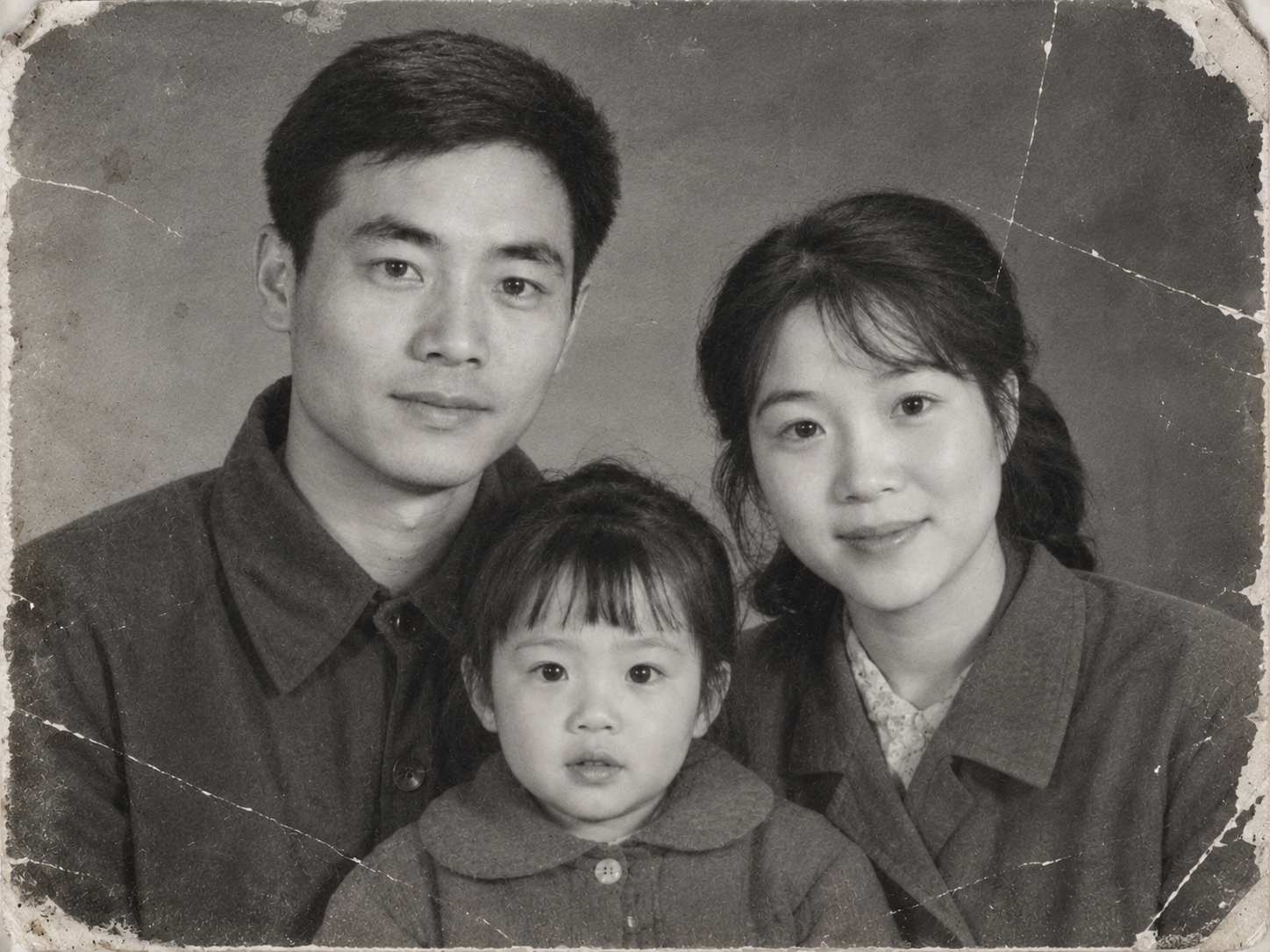
Vintage Photo Restoration and Colorization
Restore damaged old photos and colorize them naturally
Vintage Photo Restoration and Colorization
Restore damaged old photos and colorize them naturally
Showcase
Description
Transform black-and-white, yellowed, blurry, or damaged vintage photos into high-definition, natural color images. Remove scratches, creases, cracks, mold, stains, water damage, noise, and yellowing. Repair damaged corners and missing edges, rebuild clear facial details, hair strands, and clothing textures, and correct exposure and lighting contrast while applying reasonable, period-appropriate coloring based on ethnicity, clothing style, and era. Strictly lock facial structures, facial proportions, expressions, age traits, hairstyles, poses, and positioning of all subjects in the original photo, while keeping the composition, shooting angle, number of people, clothing styles, background objects, and scene layout unchanged. No face-swapping, no heavy beautification, no adding or removing people or objects, and no modern alterations. By default, it uses the image generation model with the highest fidelity to the reference image. The default output is one image per original photo with an aspect ratio matching the original. Clothing colors, background colors, and overall tones can be specified manually. Supports both single-image touch-ups and batch processing for multiple vintage photos.
Recommended by
Dancang
Why we love this skill
Using the original photo as the sole baseline, it assesses the era, damage, and detail limits before step-by-step restoration, natural coloring, and consistency checks, delivering an authentic historical texture.
Best for
Great for users looking to preserve, organize, or share family heritage photos while keeping the original appearance and era atmosphere intact.
How to use this Skill
Provide your input
Upload one or more black-and-white, yellowed, blurry, or damaged vintage photos, and optionally specify clothing colors, background tones, or overall style.
Run the Skill
The system repairs scratches, creases, stains, and missing areas from the original photo, reconstructs recognizable details, and adds natural colors appropriate to the era while preserving the subjects, composition, and scene.
Review your result
Get the restored and colorized photo. Areas with insufficient information in the original image receive restrained and reasonable restoration, without guaranteeing the recovery of unidentifiable details.
Related Skills
View all
One-Click Photo Restoration
Upload damaged, faded, or blurry old photos and restore them into polished, high-resolution results in one go: repair tears and creases, remove stains and mildew, correct color casts and yellowing, intelligently colorize black-and-white photos, and enhance and enlarge blurry, low-resolution images. Strictly preserves faces and identities—only damage and clarity are corrected, with no beautification, face swapping, or invented details absent from the original. By default, you’ll receive one high-resolution restored photo plus one before-and-after comparison. Multiple photos are processed individually, and you can request adjustments such as “colorize only” or “keep black and white.”
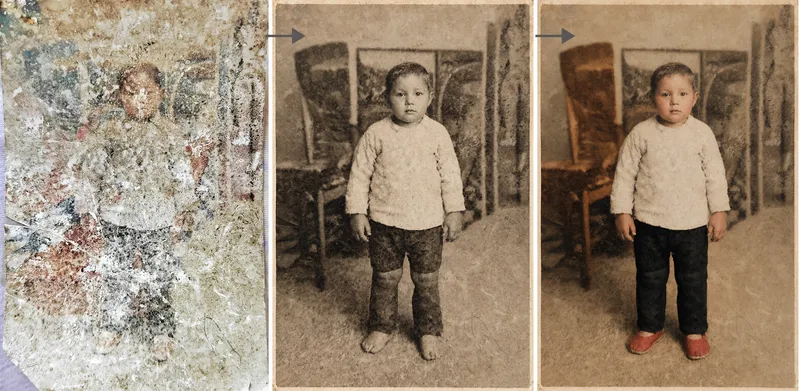 Image
ImagePhoto Restoration Studio
Old photo restoration specialist: upload an old photo of people, buildings, plants, or animals to repair damage—scratches, creases, mold, stains, fading, and missing areas—and add historically appropriate color while strictly preserving the original composition, number of people, expressions, and image dimensions. Trigger it when users say “restore an old photo,” “colorize an old photo,” “can this badly damaged photo be repaired?”, “colorize a photo of my grandparents,” “can you remove the scratches?”, “make an old photo clearer,” or “restore a family photo.” Core rule: restoration is subtraction, not addition—remove damage without adding content, and make the edit as invisible as possible. Faces are the only acceptance standard; colorization is a reasonable estimate, not a fact; the image dimensions must exactly match the original. By default, the output dimensions match the uploaded photo. Nano Banana 2.1’s high-fidelity reference image mode is preferred; Midjourney is disabled. For severe damage, use a two-step process: restore first in black and white, then colorize.
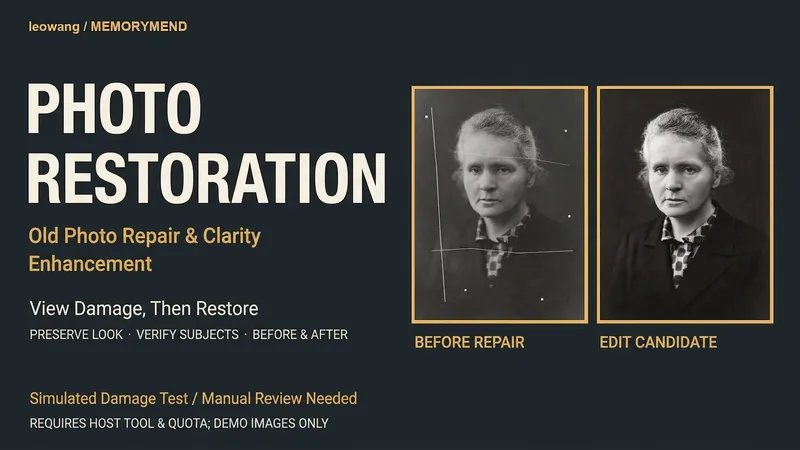 Image
ImageOld Photo Restoration
Restore clarity to old photos while preserving their original appearance. Upload a scanned or photographed old photo to first identify scratches, blemishes, fading, and blur, followed by conservative enhancement or generative restoration based on available host tools, while checking the number of people, facial features, clothing, composition, and inscriptions. The original tone is retained by default, with a speculative colorized version noted if requested. A diagnosis and complete prompt are provided when editing tools are unavailable. This workflow was adapted by leowang from an MIT project, with the original license included. An actual editing sample is attached where the input is a public-domain historical portrait with artificially simulated damage, and the clean original image was not sent to the model. Local facial textures may be redrawn with no guarantee of authentic facial feature recovery or that faces remain unaltered. Not test-run within YouMind; tools or model quotas are not included. This candidate removes simulated damage, though fine facial and hair textures show reconstructed changes and require manual review rather than being considered an authentic final version.
Information
- Version
- v3
- Last updated
- Runtime credits
- Usage-based
- Models
- Auto
- Use cases
- Images & design
- What you get
- Image
- Visual styles
- RetroPhotorealistic
