saga su
 Research
Cloud Service Risk Check
A billing and account risk check for independent developers building products with AI. It covers Cloudflare, Vercel, Supabase, Stripe, VPSs, object storage, and AI APIs such as OpenAI, Gemini, and Anthropic: first verifying whether each platform has any hard limits today that could suspend service, then checking for exposed keys, database permissions, self-scheduling loops, single-account points of failure, and frozen funds. The report only covers what relates to your tech stack: how much the worst case could burn, the cost of applying each brake, the switches to flip today, and prompts you can hand directly to an AI to fix code. If something has already gone wrong, it switches to emergency mode, first telling you what to stop and what to capture, then helping you write an appeal. Principle: count refunds as zero; alerts don't count as brakes.
Mero — AI Memory Manager
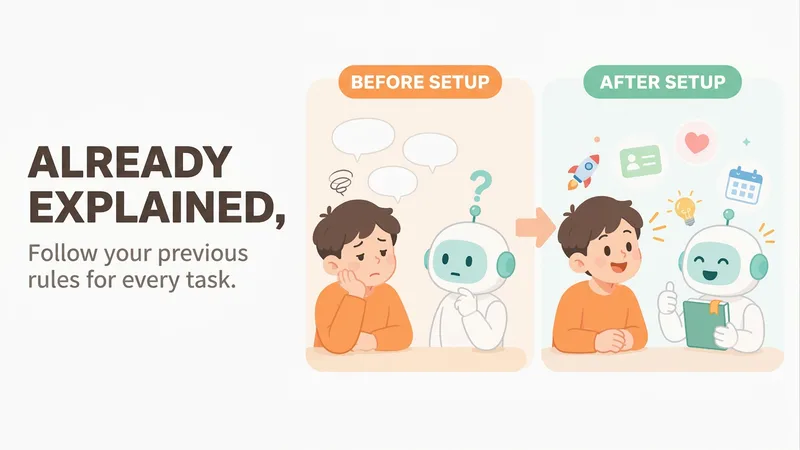
【What problem does it solve?】 Do you have to explain the same things every time you ask AI to do something? “Keep the answer short.” “Don’t use that kind of canned phrasing.” “Write in my voice.” “Give me the conclusion first.” “I work in product—don’t explain the basics.” You may have said these dozens of times, but start a new conversation and AI forgets everything. 【What changes after setup】 You only need to say these things once. After that, AI follows your usual rules first: · Writing articles: It automatically uses your voice, and avoids words and formatting you’ve said you don’t want · Writing weekly reports or proposals: It knows what you do and what you’re currently working on, so you don’t need to explain the background first · Asking questions: Answers come in the length and style you want 【What you’ll get】 1. A project called “My Memory Bank,” organized into “Who you are / How to work with you / What you’re working on / Your preferences,” which you can open, edit, or delete at any time 2. A “memory notebook” stored in the project you’re using, which AI reads before every conversation 3. A prepared “Who I am” profile that you can paste into your YouMind personal settings so it applies to all projects; you can also send it directly to Doubao, ChatGPT, or other AI tools 4. Automatic weekly organization: duplicates are removed, outdated items are archived, and contradictions are brought to your attention 【How to use it】 You don’t need to learn any special steps—just mention things naturally in everyday chats: “Remember, do it this way from now on.” “Forget that.” “Change it to this.” “What do you remember about me?” It also automatically records new details you mention in passing, such as changing jobs, starting a new project, or having a deadline next week. 【Who it’s for】 People who often use AI to write or get things done and are tired of repeating the same instructions. No technical knowledge is required. 【How to get started】 The first time, tell it one or two things you often repeat to AI, such as “Use simpler language and give more examples,” or simply say “set me up.” 【Privacy】 Personal matters such as health, emotions, and finances are not remembered by default. Web clippings and other people’s articles are not treated as information about you. You can ask at any time what it remembered and why.
 Image
ImageGenerate OG Share Image
Paste a webpage URL to generate a link preview image (OG image/social preview card) for display when shared on WeChat, Twitter/X, LinkedIn, or Slack. You’ll also get ready-to-paste og / twitter meta tags. The title, subtitle, and data are extracted from the page itself—nothing is made up. Branding is represented with text only; no fake logos are drawn. The design direction is selected automatically based on the page type: editorial layouts for personal blogs, branded gradients for product homepages, high-contrast minimalism for developer tools, and information cards when real data is available. 2026.10 update: · Upgraded to GPT Image 2.5 for more accurate text rendering in images; · All images are now generated in 16:9, with text and brand names placed in the central safe area so they won’t be cropped when center-cropped to 1200×630; crop guidance is included with delivery; · Meta tag width and height now match the actual published dimensions instead of conflicting with the image; · Design directions are no longer limited to seven rigid options and are combined flexibly based on the page content; · Less common pages such as login and privacy policy pages no longer require confirmation—the site-wide default image is generated directly; · Repeated rules have been streamlined. One image is generated by default, reducing unnecessary generations and credit usage.
 Image
ImageCreative Tableware Design
Helps non-designers create and continuously refine visual concepts for plates, bowls, coasters, and children’s tableware sets using natural language. Supports same-family variations, changing the tableware item, changing the scene, and creating four-image social media sets.

Frosted Glass Silhouette Art
Using your character or theme and event details, generate original Swiss grid frosted-glass silhouette art posters with GPT image 2, while adapting to precise text and post-production layout needs.
 Image
ImageTravel Rubber Stamp Posters
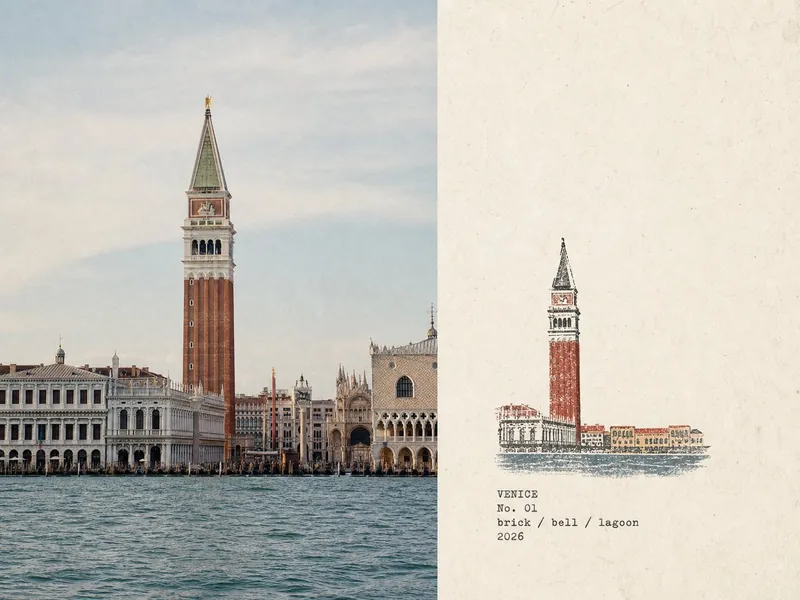
Turn each travel or field photo you upload into a standalone 4:3 landscape “Travel Field Note” poster: the left side faithfully preserves the original photo, while the right side uses minimalist print-style marks on warm off-white aged paper to outline the location’s most recognizable features with fine-line contours and flat, low-saturation color blocks. Add typewriter-style field text: the place name in uppercase / No. 0X / lowercase slash-separated keywords / year. Output one separate poster for each photo—no multi-photo collages and no redrawing of the left-side photo. Style inspired by and paying tribute to the original post by X creator @Hamburgerai (https://x.com/Hamburgerai).