Article to Vertical Minimal Motion
Any article or idea into a 9:16 B&W kinetic type video
Article to Vertical Minimal Motion
Any article or idea into a 9:16 B&W kinetic type video
Showcase
English Video Content Plan
365 Days of Content
365 Days of Content
365 Days of Content
English Video Content Plan
365 Days of Content
365 Days of Content
365 Days of Content
Description
Turn any article, link, file, or idea into a 9:16 vertical black-and-white minimalist motion video built from kinetic typography and line infographics. Only black and gray are used, every idea becomes a concrete visual structure, and the pacing builds from a single word to a dense climax frame. You first get an English storyboard to confirm. It then becomes a video-exportable motion webpage, laid out on a strict UI layout system with nested containers and an 8pt grid, plus a built-in check that no text overlaps, overflows, or gets clipped.
Why we love this skill
An editor’s pick for turning dense ideas into disciplined 9:16 visual arguments. Its storyboard-first workflow, strict component system, and layout-aware kinetic typography create minimalist black-and-white videos that clarify rather than overwhelm.
Best for
Content creators and educators turning articles or ideas into concise vertical educational motion videos.
How to use this Skill
Provide your input
Provide an article, link, file, or idea, along with any preferred duration or scene changes.
Run the Skill
Review the English storyboard, request edits if needed, then confirm it to generate the motion piece.
Review your result
Receive a 9:16 black-and-white kinetic typography video with structured line-infographic visuals and video-exportable motion layout.
Related Skills
View allCreate videos with Opus 5.5
Turn an idea, message, or creative brief into a polished motion video with a distinctive visual identity. This skill helps you shape the concept, key visuals, typography, color palette, composition, pacing, and transitions so every design choice supports the story you want to tell. It can create a wide range of video experiences, from expressive title sequences and promotional pieces to presentations, social content, and other visual storytelling projects. Your explicit requirements remain central, while the overall direction is developed with the judgment of a creative director and motion designer to produce engaging visual moments and smooth continuity from shot to shot. The result is a finished, browser-based video experience with carefully coordinated motion and design, checked for technical issues before delivery. Start with a clear prompt describing what you want to communicate, the tone or style you have in mind, and any must-have content or constraints.
 Write
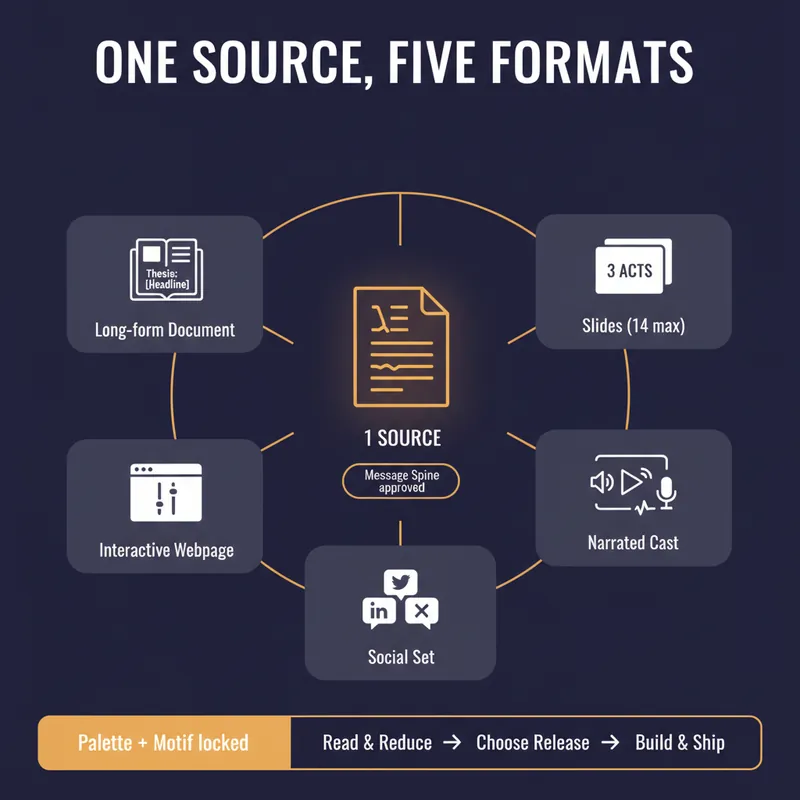
WriteOne Source, Five Formats
YouMind can produce a document, a slide deck, a narrated video, an interactive webpage and a set of social posts. Most people use one of them, because doing all five by hand means writing the same argument five times and watching it drift a little further each time. This skill stops the drift by refusing to start until you have a spine. Before anything is generated it writes a Message Spine: one thesis under 25 words, three load-bearing points, the single strongest piece of evidence, the one image a reader should still have tomorrow, the change you want in them, and who this is explicitly not for. You approve it. Every format is then built from the spine, never from the previous format, so nothing compounds an earlier compromise. Then it tells you which formats are actually worth making. A short reflective essay makes bad slides. A dense data teardown makes bad audio. It will recommend two formats and explain why the other three would weaken the work, which is the opposite of what a content-multiplier is supposed to say. Each format gets built to its own rules, one at a time, with your confirmation. Slides get one idea per slide and speaker notes that carry the argument. The cast script is written for the ear, with numbers rounded and given a comparison and a deliberate pause before the strongest evidence. The webpage gets exactly one interactive move the flat text could not do. The social set opens each post on a different point so it does not read as three copies of itself, and every post gives away something real instead of begging for a click. One palette, one type treatment, one recurring motif, decided in writing before the first image is generated. You finish with a ship sheet: what goes where, in what order, how many days apart, with what call to action, and the one signal to watch. Plus a consistency check that quotes the thesis sentence from every format and confirms they still agree. It estimates credits before it spends them and never renders a full cast or image set without an explicit yes.
 Image
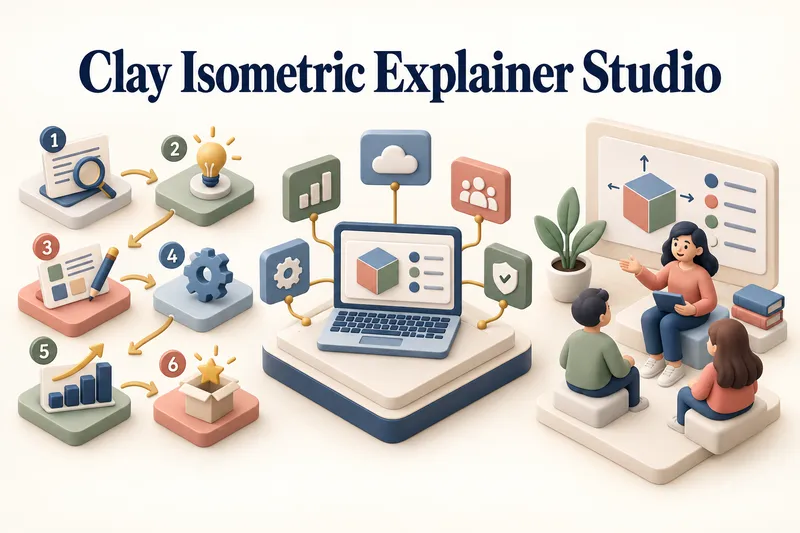
ImageClay Isometric Explainer Studio
Turn any topic into a clear, memorable visual explanation. Clay Isometric Explainer Studio transforms products, processes, services, systems, and educational subjects into polished hybrid 3D clay and isometric visuals. You can start with only a topic. The Studio performs a focused research snapshot, identifies the core message, recommends the clearest visual direction, and guides you through the creative process step by step. It builds the information architecture, maps each idea to a visual object, defines a consistent style system, and prepares a complete production prompt. Titles, numbered stages, information cards, labels, and short explanations are planned and included directly during image generation. Choose an Explainer Scene, Process Flow, Product Feature Board, Educational Visual, or a coherent 3–5-piece Visual Series. After the still image is approved, optionally turn it into a short image-to-video animation with subtle object motion, natural clay character gestures, or guided focus through numbered stages. Ideal for presentations, websites, social posts, posters, PDF pages, product communication, onboarding, and learning materials. Not intended for decorative 3D scenes without an explanatory purpose, random visual elements, dense paragraphs inside images, or final editable design files.
Information
- Version
- v4
- Last updated
- Runtime credits
- Usage-based
- Models
- Auto
- Use cases
- Images & designLearning & education
- What you get
- WebpageVideo
- Visual styles
- MinimalistBlack and white
