Subway Good Vibes App Card Portrait
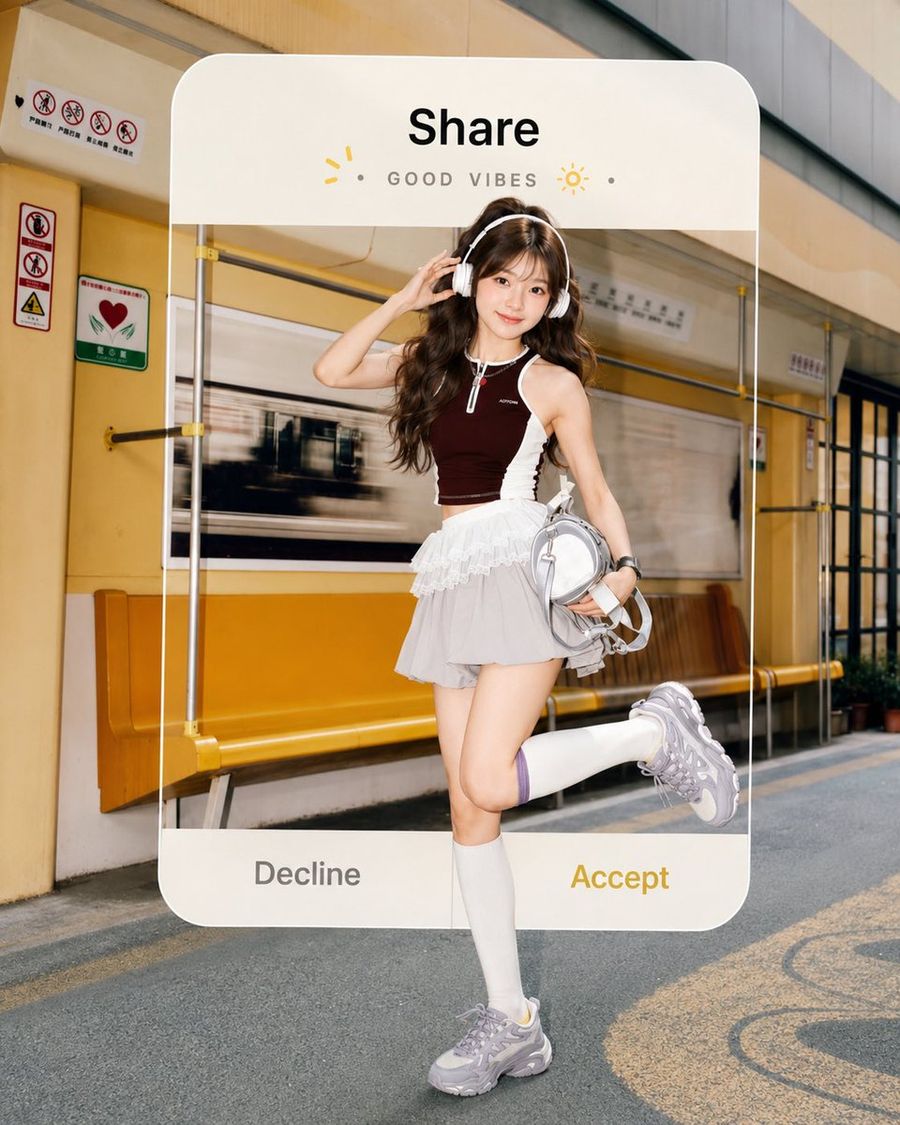
A realistic youth-fashion portrait of a headphone-wearing girl in a subway station framed by a playful social app invitation card overlay.

Prompt
Create a high-resolution realistic vertical 4:5 fashion editorial photo of a cheerful young woman standing in a warm yellow subway station, framed inside a large semi-transparent rounded-corner social app invitation card overlay. The subject is a cute young East Asian woman with long wavy dark brown hair and soft bangs, smiling directly at the camera with a bright youthful expression. She wears white over-ear headphones, one hand touching the headphones, the other holding a small metallic silver backpack; pose her standing on one leg with the other leg bent backward playfully. Outfit: exactly 6 main visible fashion pieces: a dark burgundy sleeveless zip-front crop athletic top with white side panels, a layered white ruffle mini skirt over pale gray shorts, tall white knee socks, chunky silver-gray sneakers, white over-ear headphones, and a small glossy silver backpack. Background: an outdoor/above-ground subway platform or station corridor with yellow walls, yellow bench seating, safety signs, glass panels, metal rails, and a blurred passing train behind her, sunny late-afternoon lighting, shallow depth of field, crisp realistic skin and fabric details. Add one large centered UI card overlay with rounded corners and off-white header/footer; the woman appears inside and slightly in front of the card for a 3D cutout effect. The card contains exactly 5 visible UI text/icon elements at the top: bold black title “Share”, spaced gray subtitle “GOOD VIBES”, one small yellow sparkle icon on the left, one yellow sun icon on the right, and two small gray dot separators around the subtitle. At the bottom of the card, include exactly 2 large choice buttons: gray “Decline” on the left and golden yellow “Accept” on the right. Style should feel like a vibrant youth music video still, clean commercial photography, glossy social-media dating-card aesthetic, natural proportions, no collage, no extra panels, no watermark.

How to use this prompt

  1. 1

    Copy the full prompt above.

  2. 2

    Open a platform that supports GPT Image 2, such as YouMind, and paste the prompt in.

  3. 3

    Swap the subject, style, or details to fit your idea, then generate.

This is a free AI prompt from YouMind's prompt library. Explore thousands more image prompts, all free to copy and adapt.

Explore more image prompts
More Prompt Features

AI Library

AI prompt search

Let AI search through tens of thousands of prompts. Filter by model, time range, keywords, and sort by engagement — views, bookmarks, reposts and more.

Vision Tools

Image to Prompt

Turn any photo into a detailed AI image prompt. The free image to prompt converter analyzes composition, style, and lighting so you can recreate any look in seconds.

Built for creators. Free forever.

YouMind is the AI creative copilot trusted by millions of creators worldwide. Every prompt here is curated to help you create better, faster.

Explore more prompts