Puppy and Robot Dog Cyber Portal
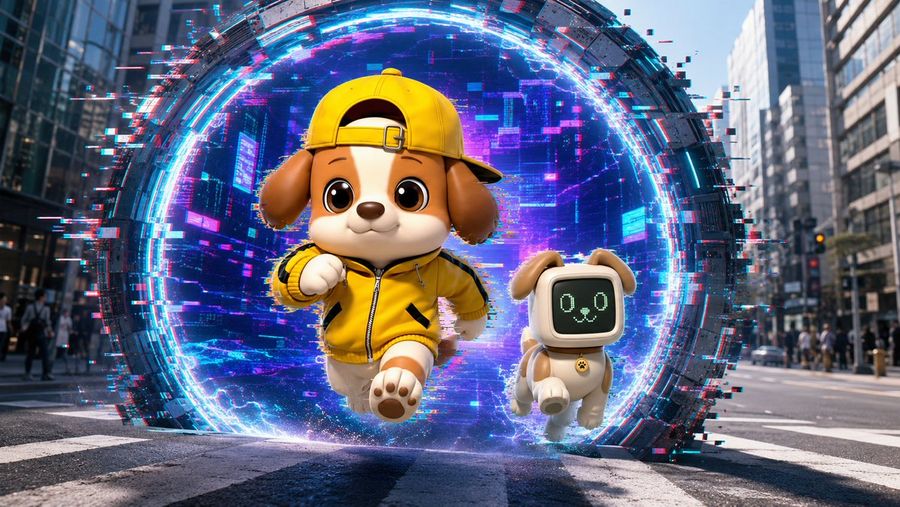
A cinematic 3D prompt for generating a cute puppy mascot and robot dog bursting from a neon glitch portal in a realistic city street.

Prompt
Create a cinematic 3D animated scene in a modern city street, wide 16:9 composition, low camera angle at crosswalk level. In the center background is one enormous circular cyber portal standing vertically in the road, made of dark segmented metal and surrounded by bright neon cyan, electric blue, magenta, and pink light rings. Add strong RGB split / chromatic aberration and digital glitch effects only around and inside the portal: pixel fragments, horizontal scanline streaks, blocky noise, broken red-cyan offsets, and scattered glowing data squares. Inside the portal, show a futuristic purple-blue city or digital tunnel texture with depth and luminous grid-like highlights. Emerging from the portal are exactly 2 characters: first, a cute anthropomorphic puppy mascot running toward the viewer, centered slightly left, with tan and cream fur, big glossy brown eyes, floppy brown ears, a small rounded muzzle, and a cheerful confident smile; it wears a bright yellow zip-up sporty jacket with black accents and a matching yellow baseball cap worn backward, plus soft rounded cartoon paws. Second, to the right of the puppy mascot, a small robot dog companion running beside it, cream-colored body with tan ears and tail, compact toy-like limbs, and a rounded square black digital face screen showing a simple pale green pixel dog expression with exactly 2 circular eyes and 1 small mouth/nose icon; add a small collar tag. Use a polished Pixar-like / high-end toy-render 3D style for the characters, realistic urban background with tall office buildings on both sides, blurred pedestrians, traffic lights, lane markings, and daylight reflections. Make the portal glow illuminate the characters and pavement, with sparks and blue energy near their feet. Keep the characters sharp, adorable, and clean while the portal has heavier glitch distortion. No text, no watermark, no extra characters.

How to use this prompt

  1. 1

    Copy the full prompt above.

  2. 2

    Open a platform that supports GPT Image 2, such as YouMind, and paste the prompt in.

  3. 3

    Swap the subject, style, or details to fit your idea, then generate.

This is a free AI prompt from YouMind's prompt library. Explore thousands more image prompts, all free to copy and adapt.

Explore more image prompts

More Prompt Features

AI Library

AI prompt search

Let AI search through tens of thousands of prompts. Filter by model, time range, keywords, and sort by engagement — views, bookmarks, reposts and more.

Vision Tools

Image to Prompt

Turn any photo into a detailed AI image prompt. The free image to prompt converter analyzes composition, style, and lighting so you can recreate any look in seconds.

Built for creators. Free forever.

YouMind is the AI creative copilot trusted by millions of creators worldwide. Every prompt here is curated to help you create better, faster.

Explore more prompts