Pink Wolf Doctor Mascot
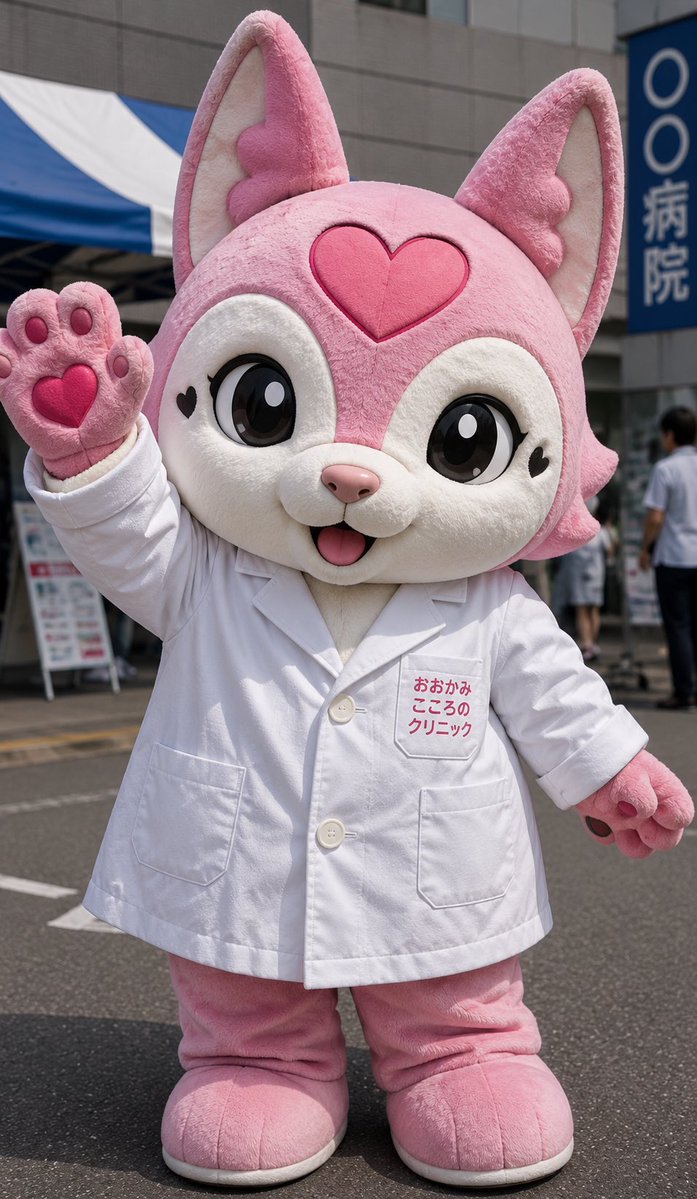
A realistic portrait prompt for generating a cheerful pink wolf mascot in a doctor coat at an outdoor clinic event.

Prompt
Create a realistic full-body street photo of a cute mascot character in a plush animal kigurumi costume, standing outdoors in daylight in front of a clinic or hospital building. The character is a pink fox or wolf mascot with a large oversized head, short chibi proportions, soft fuzzy fabric, two tall pointed ears with cream inner ears, big glossy black anime eyes with white highlights, cream-colored face patches, a small pink nose, an open smiling mouth with a tiny tongue, black heart marks near both cheeks, and one large raised heart emblem centered on the forehead. The mascot wears a white doctor’s lab coat over the pink plush body; include exactly 4 visible coat features: two front buttons, two lower patch pockets, short sleeves, and a chest pocket label with red Japanese text reading おおかみ こころの クリニック. The mascot has exactly 4 visible paws: the left paw raised in a friendly wave showing four rounded paw pads and one heart-shaped palm pad, the right paw lowered at the side with small dark claws/pads, and two large rounded pink feet with pale soles. Set the scene on an asphalt street with realistic shadows, a blue-and-white striped event tent on the left, gray building walls behind, blurred pedestrians in the background, and a vertical blue hospital sign on the right with Japanese text. Use a candid event-photography look, portrait orientation, 3:4 crop, eye-level camera, sharp focus on the mascot, shallow background blur, natural sunlight, highly detailed plush fibers, cheerful and welcoming mood. Main character customization: pink wolf mascot, white doctor’s lab coat, large pink heart, outside a Japanese clinic during a public event. Do not add extra characters in the foreground, do not make it a cartoon drawing, and keep the proportions like a real wearable mascot suit.

How to use this prompt

  1. 1

    Copy the full prompt above.

  2. 2

    Open a platform that supports GPT Image 2, such as YouMind, and paste the prompt in.

  3. 3

    Swap the subject, style, or details to fit your idea, then generate.

This is a free AI prompt from YouMind's prompt library. Explore thousands more image prompts, all free to copy and adapt.

Explore more image prompts

More Prompt Features

AI Library

AI prompt search

Let AI search through tens of thousands of prompts. Filter by model, time range, keywords, and sort by engagement — views, bookmarks, reposts and more.

Vision Tools

Image to Prompt

Turn any photo into a detailed AI image prompt. The free image to prompt converter analyzes composition, style, and lighting so you can recreate any look in seconds.

Built for creators. Free forever.

YouMind is the AI creative copilot trusted by millions of creators worldwide. Every prompt here is curated to help you create better, faster.

Explore more prompts