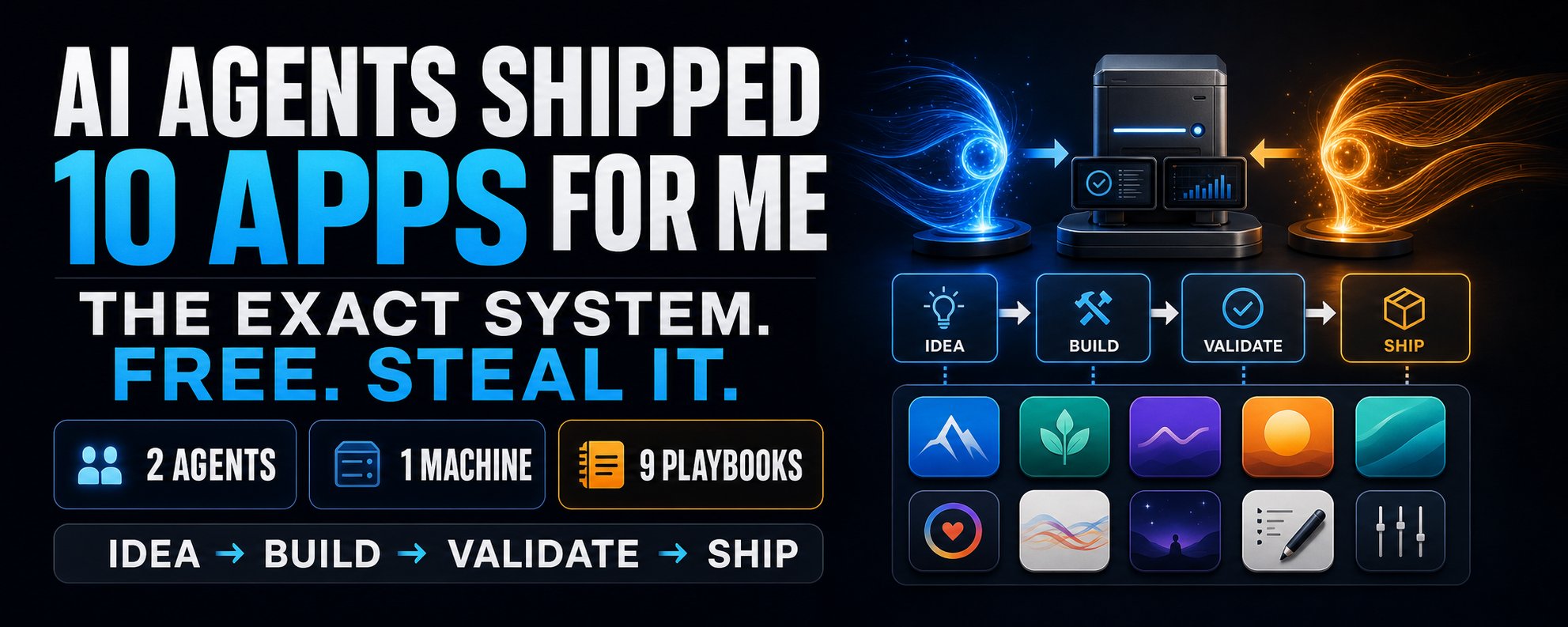
One model to think. Three hundred to build. This is what happens when you stop using AI as a chatbot and start using it as an org chart.
300 parallel agents → 4,000 steps per run → 1 afternoon → 0 lines typed by hand
Everyone is still arguing about which chatbot is smartest. They're answering a question that stopped mattering.
For two years the game was a single model in a single chat window. You typed, it answered, you typed again. The real question now isn't which model answers best. It's how many you can run at once, and who is in charge of them.
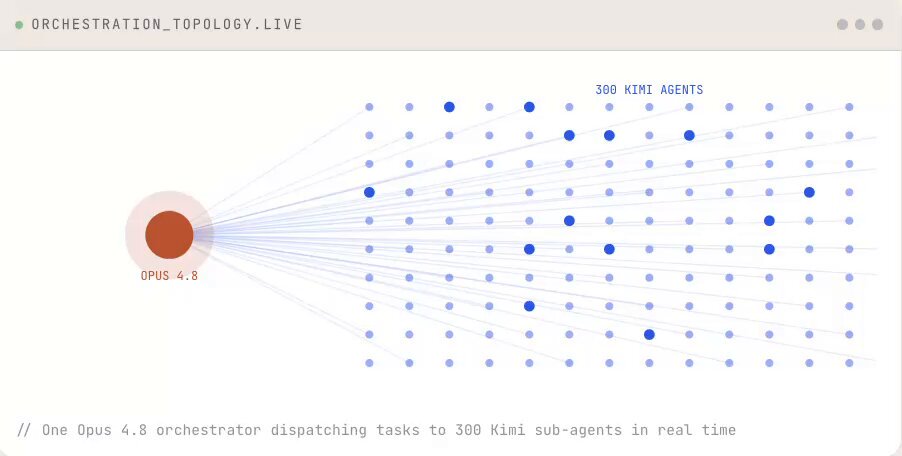
So I ran an experiment. I took Claude Opus 4.8 for the one thing it's the best in the world at: thinking, planning, deciding, checking work. Then I handed the actual labor to Kimi Agent Swarm: up to 300 sub-agents in parallel, up to 4,000 steps in a single launch. Not 4,000 turns in a chat. One launch.
The goal was deliberately not a toy. Ship a working analytics SaaS, end to end, with live market data and a sales deck, and I will not write a single line of code myself.
If Opus 4.8 is the architect, Kimi Agent Swarm is the entire construction crew. Run them together and you don't have a chatbot anymore. You have a company.
Why a single agent always hits a wall
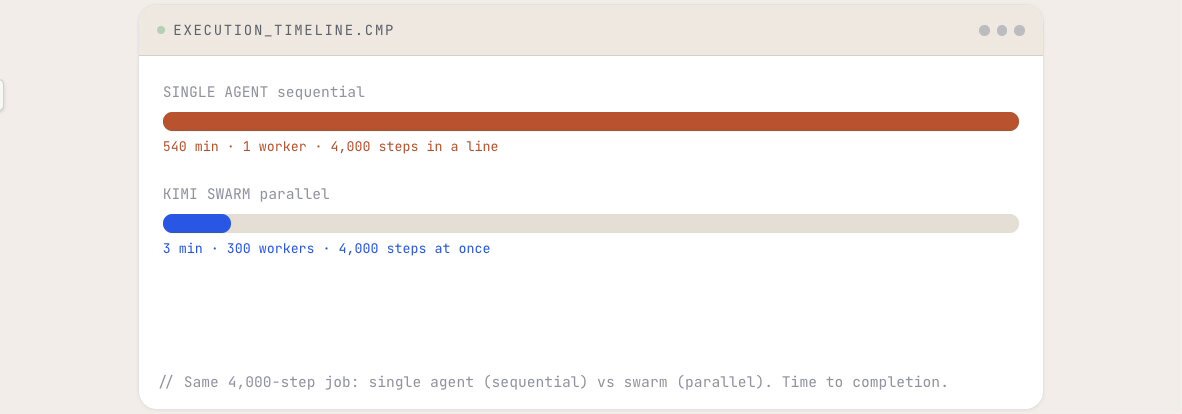
Here is what people miss about a single agent, even a brilliant one. It works in a straight line. Opus 4.8 reasons better than almost anything on earth, but if a job contains 4,000 distinct moves, it executes them one after another. You feel every second. It isn't a quality problem, it's a geometry problem.
Kimi Agent Swarm changes the geometry. Instead of one worker grinding through 4,000 steps in sequence, you get up to 300 doing them at the same time. Researching 100 companies stops being 100 lookups stacked back to back. It's 100 agents reading 100 sources at once, each citing a real, clickable source.
But raw parallelism with no plan is just 300 ways to drift off task. Speed without direction is noise. That's exactly the seat Opus 4.8 sits in: it supplies the plan and the review, the swarm supplies the throughput. Neither half works without the other.
Brain plans. Hands build. Brain checks.
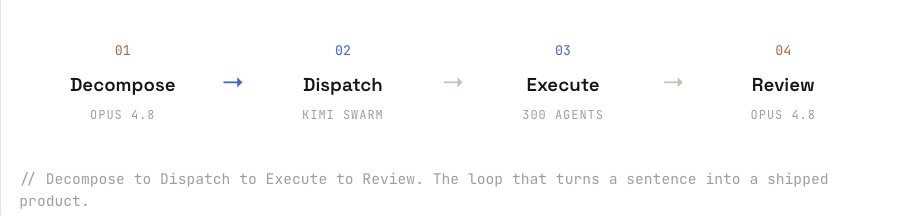
The system runs on four stages. The discipline that makes it work: Opus and Kimi each do only what they're best at, and never reach into each other's lane. The brain never touches a wrench. The hands never make a judgment call.
- Decompose · Opus 4.8 Opus takes a one-sentence goal and explodes it into a dependency tree of concrete sub-tasks: schema, data ingestion, API, frontend, auth, landing page, deck. It also marks the order, what must finish before what can start.
- Dispatch · Kimi Swarm Every leaf becomes a sub-agent. Kimi spins up as many as 300. Data agents hit Binance, Yahoo Finance, IMF and World Bank live. Build agents write code. Asset agents generate the deck. Each starts the moment its dependencies clear.
- Execute · 4,000 steps in parallel Inside one launch the swarm produces working code, a populated database, research-grade charts, and exportable PDF, PPT, Excel and web outputs. Different formats, same run.
- Review · back to Opus 4.8 Opus reads everything back, checks each piece against the spec, flags drift, and assembles the final product. The judgment layer stays sharp because a frontier reasoning model owns it, not a script.
That last stage is what most "throw more agents at it" setups skip, and it's why they produce impressive-looking garbage. The loop only closes when something with real judgment signs off.
Watching 300 agents ship a SaaS
This is the prompt I gave Opus 4.8 to start the run. Read it carefully, because the most important thing about it is what it does not ask for. It never asks Opus to write application code. It asks Opus for a plan that a swarm can execute. That single constraint is what keeps the brain in its lane.
1orchestrator_prompt.md2Opus 4.83# Role: you are the orchestrator, not the builder.45GOAL: ship a working analytics SaaS dashboard.6DATA: live feeds binance, yahoo finance, world bank.78YOUR JOB:91. decompose this into independent sub-tasks102. write a spec for each that one agent can run alone113. mark dependencies (what must finish before what)124. emit the full task tree as JSON for the swarm1314# do NOT write application code yourself.15# your output is the blueprint. the swarm builds.
Opus returned a clean dependency tree of around 40 tasks grouped into six tracks. It knew the data layer had to resolve before the backend could query it, and that the frontend depended on the backend's API shape. That ordering is not a small detail. It is the difference between a swarm that builds in harmony and a swarm that builds four incompatible halves of the same app.
I took that JSON and handed it straight to Kimi Agent Swarm as the brief. Then I did nothing but watch the feed.
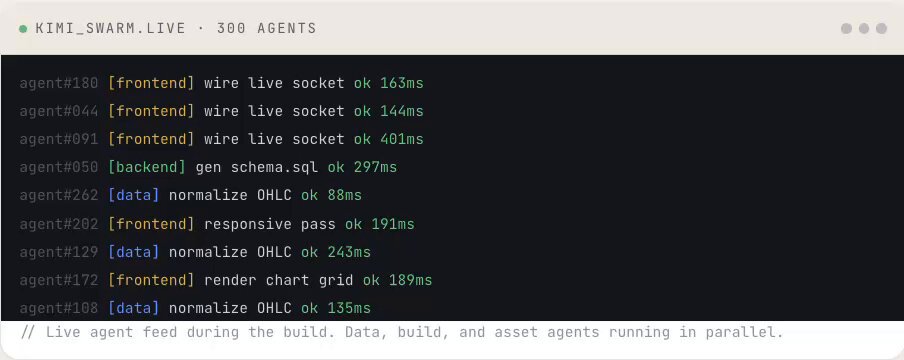
What follows is what actually happened inside that forty minutes, track by track. The interesting part is not that it was fast. It's that the tracks barely waited on each other.
Track 1 · the data layer
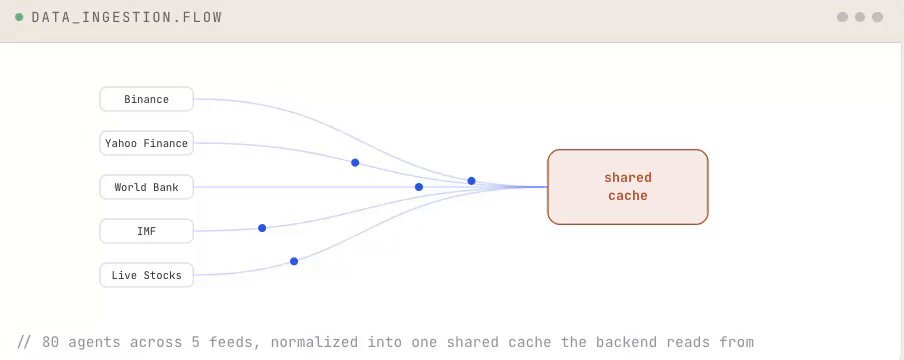
Eighty agents went out at once. Some hit Binance for live crypto pricing, some pulled equities from Yahoo Finance, some grabbed macro series from the World Bank and IMF. Each one normalized its slice into the same shape and wrote it to a shared cache. Because they ran in parallel, the entire ingestion layer was populated in under three minutes. A single agent doing the same crawl in sequence would have spent most of an hour just waiting on network round-trips.
Track 2 · the backend
The moment the data schema stabilized, sixty backend agents started. They generated the database tables, wrote the API routes, wired up an auth middleware, and seeded the tables from the cache the data track had just filled. This is exactly why the dependency ordering from Opus mattered. The backend never tried to query a table that didn't exist yet, because Opus had marked the data track as a hard prerequisite.
Here is one of the route files the backend track produced. No edits from me. This is what came out of the run:
1api/quotes.ts2swarm output3import { Router } from "express";4import { cache } from "../lib/cache";5import { requireAuth } from "../mw/auth";67const router = Router();89// GET /api/quotes/:symbol -> latest normalized quote10router.get("/:symbol", requireAuth, async (req, res) => {11 const symbol = req.params.symbol.toUpperCase();12 const hit = await cache.get(`q:${symbol}`);1314 if (!hit) return res.status(404).json({ error: "no feed" });1516 res.json({17 symbol,18 price: hit.price,19 change24h: hit.change24h,20 source: hit.source, // binance | yfinance | worldbank21 ts: hit.ts22 });23});2425export default router;
Track 3 · the frontend
Ninety agents built the interface against the API shape the backend had just locked. They scaffolded the dashboard, wired a live socket so prices tick without a refresh, rendered the chart grid, and did a responsive pass for mobile. The frontend track was the largest because it had the most independent pieces, and independent pieces are exactly what a swarm eats for breakfast.
Track 4 · the assets
This is the track that makes the whole thing feel unfair. While code was being written, seventy more agents were building everything around the product. The landing page hero, the open-graph image, the pricing table, and a full McKinsey-style pitch deck exported straight to PowerPoint. Not mockups. Finished, exportable files, generated in the same launch as the codebase.
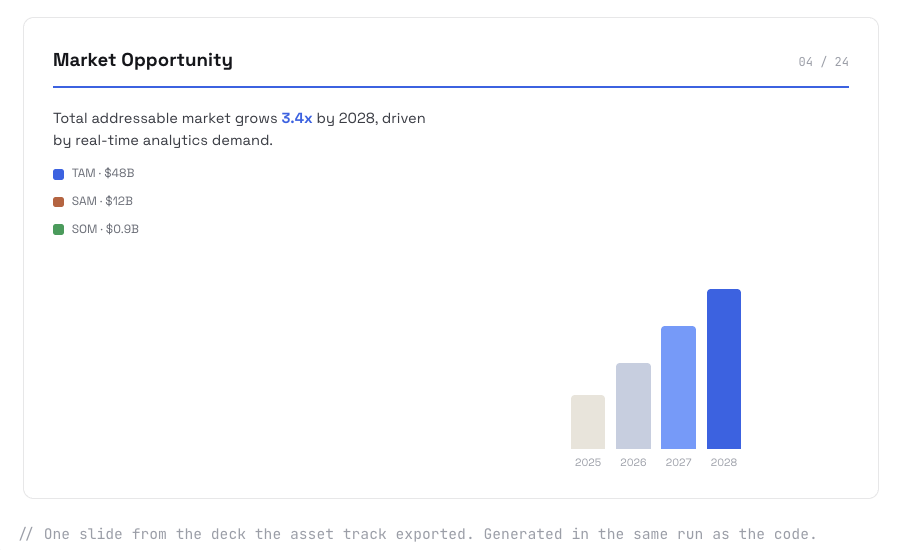
Forty minutes after I pasted the task tree, there was a working product in front of me. Not a sketch of one. A real one.

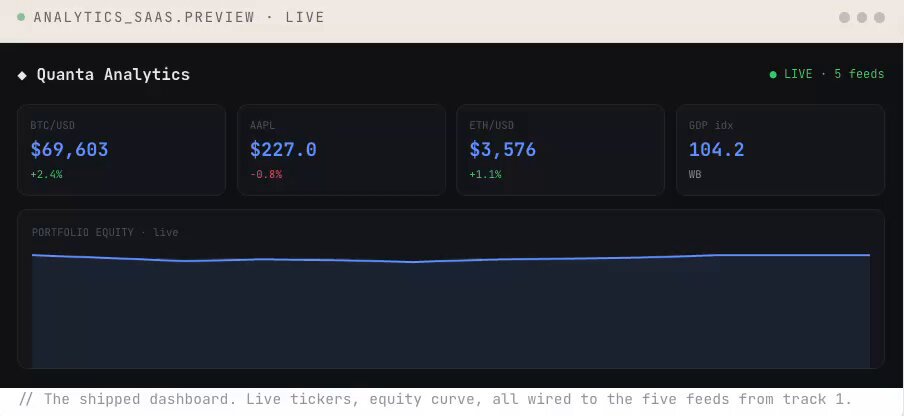
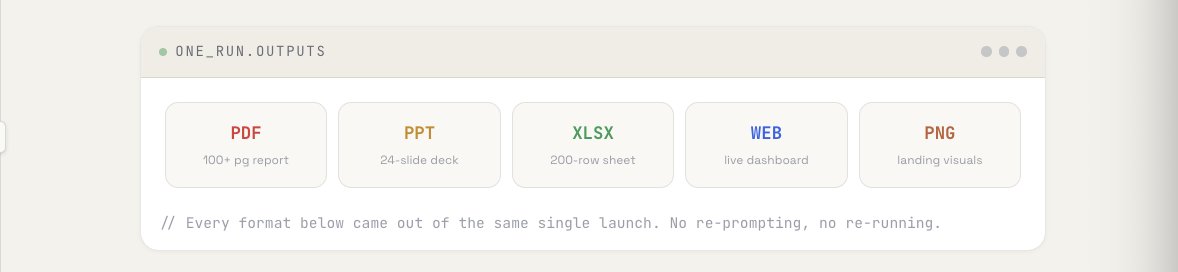
The dashboard pulled live market data through five feeds. It had a backend, an auth layer, a responsive frontend, a landing page, and a McKinsey-style pitch deck. The deck is the part that still surprises me. It was not a separate task I ran afterward. The same swarm that wrote the API also rendered the slides that sell the product, in the same launch, because Kimi outputs PDF, PPT, Excel, web and images natively.
The deck wasn't an afterthought. The same swarm that wrote the API also rendered the slides that pitch it.
That last point deserves its own frame. Most tools give you one format at a time. You generate the report, then separately the slides, then separately the spreadsheet. Kimi emits all of them from a single launch:
Compare that to how this normally goes. A single agent would still be on task number nine of forty, the slides would be a problem for next week, and you'd have written half the boilerplate yourself out of impatience.
This is another DeepSeek moment
Step back from the build for a second, because the strategic picture is the actual story here.
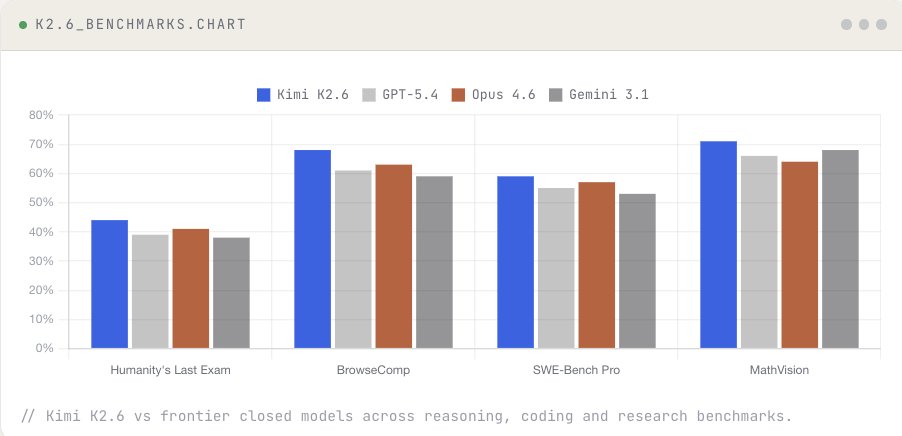
While the closed labs keep shipping single-agent chatbots, an open Chinese lab valued at $20B shipped a system that runs 300 agents in parallel. Their open-weight model, Kimi K2.6, currently sits at #1 on the OpenRouter weekly leaderboard. By usage, it is the most-used LLM in the world right now.
We have seen this exact shape before. An open release from China reframes what the closed frontier thought it owned, and the whole field has to recalibrate overnight. It happened with DeepSeek. The Agent Swarm release has the same fingerprint.
And it isn't strong everywhere by accident. It is strongest precisely where real professional work happens:
- Finance and consulting. Professional charts, heatmaps, multi-year report analysis, McKinsey-grade slide output by default.
- Academic and research. LaTeX formula rendering, literature reviews with comparison matrices, citations that trace to source.
- Scale that breaks other tools. 200,000+ words of context in a single pass, 500-page documents, 100-sheet spreadsheets, 100-slide decks.
- Traceability. Every data point links back to a clickable source. Research-grade is the default, not a setting you turn on.
The setup, start to finish
You do not need a lab or a budget to run this. You need the two halves wired together correctly, and a prompt that keeps each one in its role. Here is the whole thing.
- Get the brain Open Claude Opus 4.8. This is your orchestrator and reviewer. Its only job is to plan and to check. The moment you let it start building, you've lost the parallelism that makes this worth doing.
- Get the hands Open Kimi Agent Swarm. This is where the 300 sub-agents live and where the parallel execution actually happens. This is your throughput layer.
- Wire the handoff Use the orchestrator prompt above so Opus emits a task tree as JSON. Paste that tree into Kimi Swarm as the brief. The cleaner the dependency markings, the smoother the run. Then let it go.
- Close the loop Feed the swarm's output back to Opus for a review pass. It catches drift, fills gaps, and assembles the final deliverable. Skip this step and you get volume without judgment, which is the one failure mode that matters.
1handoff.json2Opus to Kimi3{4 "goal": "analytics SaaS, live market data",5 "tracks": [6 { "id":"data", "agents":80, "feeds":["binance","yfinance","worldbank"] },7 { "id":"backend", "agents":60, "deps":["data"] },8 { "id":"frontend","agents":90, "deps":["backend"] },9 { "id":"assets", "agents":70, "out":["deck.pptx","landing"] }10 ],11 "review": "opus-4.8"12}
The before and after, in one frame
Single-agent way
- 4,000 steps in a straight line
- One output format at a time
- Slides are a separate project
- Hours of waiting per build
- You start typing code out of impatience
Brain + swarm way
- 4,000 steps across 300 agents
- PDF, PPT, Excel, web in one run
- Deck ships with the codebase
- A working SaaS in an afternoon
- You write zero lines yourself