Echo Pro – Capture, Decode, and Share Your YouMind Thought Trails
Echo Pro – Capture, Decode, and Share Your YouMind Thought Trails
Showcase
Description
You save, highlight, write, and think in YouMind every day. These actions may seem random, but they actually trace a thematic thread. Echo helps you hear it. Three-layer insight engine, diving deeper layer by layer: ⚡ Anti-intuitive discoveries – you think you're doing A, but you're actually doing B 🌊 Second-order ripples – what you plant today, what will it grow into in six months 💎 First principles – peel away all the surface layers, and it comes down to that one sentence For yourself, it's an archaeology of thought. For others, it's a story that resonates. One-click sharing mode switch: perspective flip, context completion, term translation. Output to Twitter, Xiaohongshu, WeChat public accounts, video scripts. With continuous use, it remembers your thematic thread. Your digital life creates echoes every day. Echo captures them, amplifies them, and shares them.
Why we love this skill
This skill mines deep thinking patterns from your YouMind footprint, delivering three progressive insights: counterintuitive discoveries, second-order ripple effects, and first principles. It also generates multi-platform content with one click, aiding thought visualization and efficient sharing.
Related Skills
View all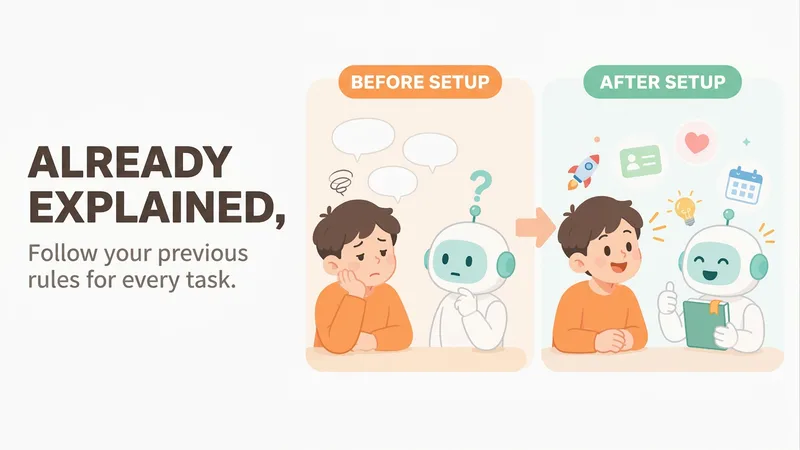
Mero — AI Memory Manager
【What problem does it solve?】 Do you have to explain the same things every time you ask AI to do something? “Keep the answer short.” “Don’t use that kind of canned phrasing.” “Write in my voice.” “Give me the conclusion first.” “I work in product—don’t explain the basics.” You may have said these dozens of times, but start a new conversation and AI forgets everything. 【What changes after setup】 You only need to say these things once. After that, AI follows your usual rules first: · Writing articles: It automatically uses your voice, and avoids words and formatting you’ve said you don’t want · Writing weekly reports or proposals: It knows what you do and what you’re currently working on, so you don’t need to explain the background first · Asking questions: Answers come in the length and style you want 【What you’ll get】 1. A project called “My Memory Bank,” organized into “Who you are / How to work with you / What you’re working on / Your preferences,” which you can open, edit, or delete at any time 2. A “memory notebook” stored in the project you’re using, which AI reads before every conversation 3. A prepared “Who I am” profile that you can paste into your YouMind personal settings so it applies to all projects; you can also send it directly to Doubao, ChatGPT, or other AI tools 4. Automatic weekly organization: duplicates are removed, outdated items are archived, and contradictions are brought to your attention 【How to use it】 You don’t need to learn any special steps—just mention things naturally in everyday chats: “Remember, do it this way from now on.” “Forget that.” “Change it to this.” “What do you remember about me?” It also automatically records new details you mention in passing, such as changing jobs, starting a new project, or having a deadline next week. 【Who it’s for】 People who often use AI to write or get things done and are tired of repeating the same instructions. No technical knowledge is required. 【How to get started】 The first time, tell it one or two things you often repeat to AI, such as “Use simpler language and give more examples,” or simply say “set me up.” 【Privacy】 Personal matters such as health, emotions, and finances are not remembered by default. Web clippings and other people’s articles are not treated as information about you. You can ask at any time what it remembered and why.
 Image
ImageVideo Diary Creator Pro
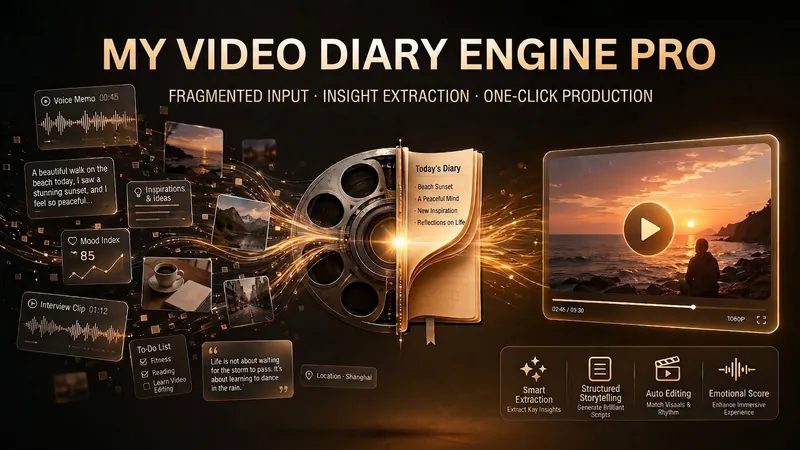
This skill is designed to help video creators easily produce and manage their video diary content. It is especially suitable for users of Douyin, Xiaohongshu, Bilibili, or WeChat Channels who want to record life through short videos, share insights, and continuously improve content quality. By receiving fragmented material in various forms such as voice, text, or images provided by users, this skill intelligently analyzes and extracts core insights, helping users discover hidden themes and points of resonance in their daily lives. It can automatically generate video scripts that are colloquial and authentic based on the user's personal style preferences and publishing platform, and refine them into catchy quotes suitable for sharing. In addition, this skill has powerful visual content generation capabilities, automatically creating high-click-rate video covers and beautiful quote cards for users' video diaries. These visual assets not only enhance content appeal but also make it easy for users to share directly on social media. For users who want to systematically manage personal content, it can archive daily records and provide weekly and monthly review reports, helping users review their growth trajectory and optimize content strategy.
Viral Content Creation Engine
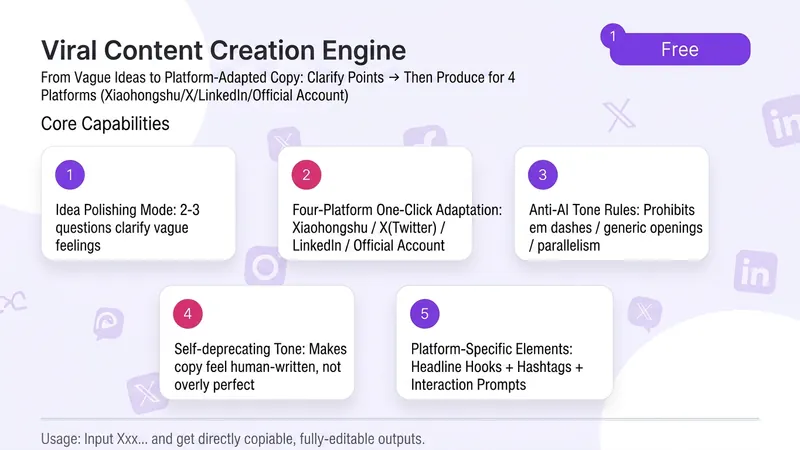
Sometimes you have a brilliant idea in your head, but when you open the editor, you don't know where to start. After agonizing for an hour, you end up posting something that feels flat—the insight that initially excited you gets buried under 'formal' expression. Feed it a vague idea, and it first helps you sharpen it—asks a few pointed questions to turn your insight from 'sounds plausible' to 'that's exactly it.' Then it translates it into Xiaohongshu friend-sharing, X founder insights, WeChat Official Account warm know-how. ✨ Core Capabilities 1. Idea Refinement Mode: 2-3 questions to turn vague feelings into shareable insights 2. One-click adaptation for 4 platforms: Xiaohongshu / X (Twitter) / WeChat Official Account / LinkedIn — tone, rhythm, and format all switch automatically 3. Anti-AI flavor mandate: No dashes, generic openings, hollow parallelisms, or abstract wisdom. Each sentence under 30 characters. 4. Self-deprecating tone: Makes your copy sound like it's written by a real person, not a grammatically correct robot. 5. Each platform includes: headline hook + hashtags + engagement prompt 📱 Use Cases - Personal brands/entrepreneurs who want to post consistently but often get stuck on 'how to say it' - Marketers who need multi-platform distribution but don't want to rephrase for each platform - Professionals with industry insights but no time to polish copy - Content creators looking to level up from 'writing articles' to 'making an impact' Good expression isn't 'writing beautifully'—it's 'making people feel that you get them.'
Information
- Version
- v2
- Last updated
- Runtime credits
- Usage-based
- Models
- Auto
