Dual-Topic Comparison Infographic
Compare differences, principles, and choices clearly
Dual-Topic Comparison Infographic
Compare differences, principles, and choices clearly
Showcase
Description
Enter two topics to turn their differences, principles, and selection criteria into a clear educational infographic. It first verifies the meanings and comparison scope of both sides, then selects evidence-based common dimensions. Key differences explain what each is, why it matters, and any exceptions, backed by sources without inventing reviews or specs. The visual design follows professional science publication standards: recognizable titles, well-weighted sections and key values, and readable body text. Line breaks are handled semantically, with tuned font weight, tracking, leading, and text-to-image ratios so the typography helps build the layout. Art style and fonts adapt to the topic and tools. By default, the standard version is in Simplified Chinese with a 3:4 vertical ratio. Saying "more detailed" creates a single long image including definitions, process diagrams, common dimensions, misconceptions, and conditional choices. User-specified ratios and styles take priority. Copyable text, sources, and complete image prompts are also included. Great for science communication, material identification, method explanation, and selection guides. Search, image generation, and post-processing rely on YouMind's actual tools and quotas, and absolute winners without basis are not guaranteed. Product and workflow design by leowang.
Recommended by
Dancang
Why we love this skill
Turns A and B into evidence-based science comparison graphics that explain principles, misconceptions, and selection criteria, making complex info easy to understand.
Best for
Ideal for science communicators, educators, and content planners who need to explain differences, principles, and use cases between two topics.
How to use this Skill
Provide your input
Provide two topics, and optionally add your audience, use case, reference materials, aspect ratio, or visual style.
Run the Skill
Verifies definitions and comparison metrics for both sides, selects evidence-based common dimensions, and organizes principles, differences, misconceptions, and selection criteria into an infographic.
Review your result
Receive a clear dual-topic educational infographic, along with copyable text, sources, and complete image prompts.
Related Skills
View all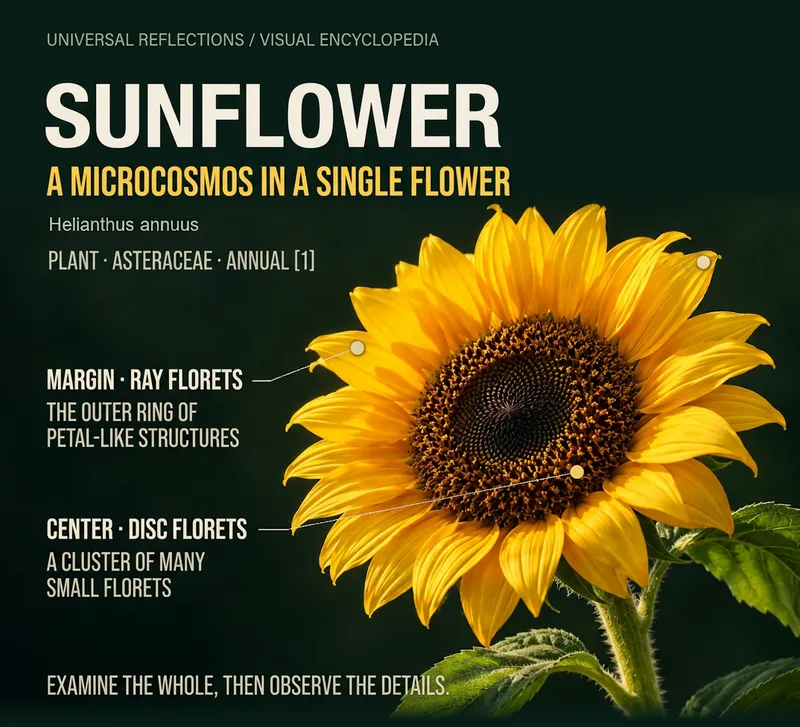 Image
ImageInfographic Generator
Input an object or theme to create an encyclopedia infographic featuring a main visual, local details, and knowledge explanations. First ensure the facts are accurate, then decide whether to use an overall closeup, local comparison, process diagram, or misconception analysis. Choose from concise, standard, or complete archive versions; use long formats for content-heavy topics to prevent text from shrinking too much. Ideal for science communicators, educators, and knowledge creators. Supports content routing for biology, materials, artifacts, locations and buildings, cultural concepts, and historical figures; current display cases are local sunflower layout drafts and do not imply all subjects have been fully tested. Image generation and file processing depend on YouMind's current tools and quotas. Examples use existing AI main visuals plus local cropping, relationship diagrams, and local typesetting, and have not yet been test-run on YouMind. Product design and prompt writing: leowang.
 Image
ImageOne Text, One Visual
Have you saved lots of articles but still struggle to find the key points at a glance? Give it an article, note, or clearly defined topic that you have permission to use. It will organize the information around one question and present it as a hand-drawn-style diagram. The first version focuses on method steps and operational workflows. You’ll get: ① A knowledge diagram with clear steps, conditions, and reading order. ② Copyable text, including the title, nodes, and key explanations. ③ A source checklist that preserves the original evidence and items requiring confirmation. ④ Short sharing copy to make it easy to post with the image. It won’t depict parallel content as causal, omit key conditions, or invent performance data. When there is too much content, it will narrow the topic first while preserving readable type size and whitespace for mobile viewing. Creating the final image requires access to an image or drawing tool in the current environment. If no tool is available, it will clearly state that the image has not been generated and preserve the complete image-ready draft. Image-generation usage is subject to the platform’s rules at the time. Suitable for study organization, knowledge sharing, and adapting content for social media. It does not publish on your behalf or guarantee traffic. The sample image uses a newly created article and local drawing tools; it is not a YouMind runtime screenshot.
 Image
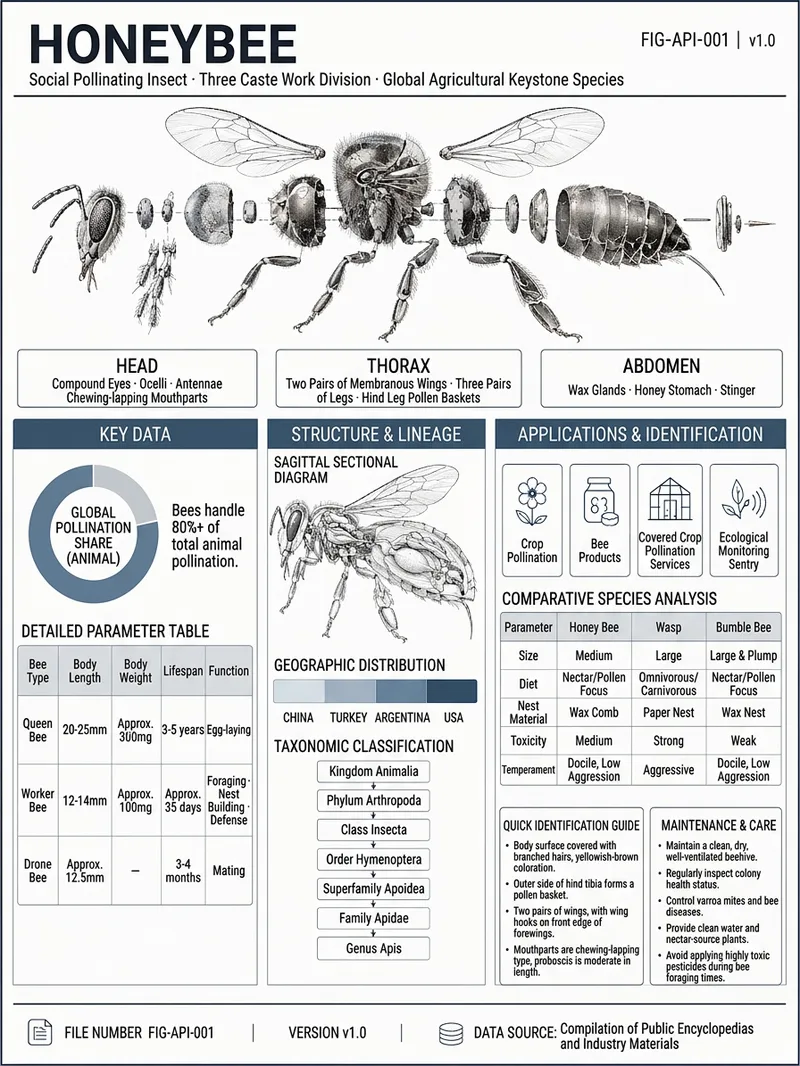
ImageViral Infographic Maker
Enter an object name and any optional requirements to receive a research-verified reference infographic about it. Whether it is machinery, an electronic product, a living organism, a building, a vehicle, or a natural object, the system organizes its English name, field, key parameters, structural components, geographic or industry distribution, development lineage, use cases, comparisons with similar objects, identification points, and maintenance recommendations, while recording traceable data sources. Information that cannot be confirmed is clearly marked “Unverified.” The finished design uses a low-saturation gray-blue industrial drafting style, with an exploded view of the main subject and structural cross-section diagrams. Key data is presented as parameter tables, ring charts, distribution maps, lineage diagrams, and comparison panels to help readers quickly understand the object’s appearance, construction, performance, and applications. For abstract or data-based subjects, suitable geometric diagrams or data visualizations are used instead. The final deliverable is a strictly 3:4 infographic poster suitable for high-resolution viewing and print, along with an editable HTML source file. The layout includes title identification, main subject illustrations, structured information modules, and source notes, with a focus on complete content, clear text, and verifiable data.
Information
- Version
- v2
- Last updated
- Runtime credits
- Usage-based
- Models
- Auto
- Use cases
- Images & designResearch & analysisLearning & education
- What you get
- DocumentImagePrompt
- Visual styles
- Editorial
