
Weekly Philosophy Frontiers
Blogger @学术羊驼 shared an example you can adapt into your own academic frontier briefing using this guide
Weekly Philosophy Frontiers
Blogger @学术羊驼 shared an example you can adapt into your own academic frontier briefing using this guide
Showcase
Description
First, enter the philosophy fields, optional subtopics, key figures, and keywords you want to follow. The Skill then searches for new English-language philosophical publications and academic events from the past seven days, checks your existing materials to remove duplicates, ranks the results by relevance, and produces a Chinese or multilingual weekly briefing based on your language. The briefing is saved as a document, and you are then asked whether to set up a weekly scheduled task.
Recommended by
Shuting@YouMind
Why we love this skill
A rigorous, customizable way to track philosophy research, with source verification, duplicate removal, relevance ranking, and date-based weekly reports.
Instructions
The first step is to gather the user's focus for the week. If the user has already specified their interests in the input, analyze it directly without asking follow-up questions. If the user hasn't specified, ask four questions at once: What are their areas of interest in philosophy? Are there any key sub-topics? Are there any key figures they need to follow? Are there any key terms or keywords? Compile the user's answers into a set of topics for this run, and use this set for all subsequent searches. This skill is not tied to any fixed domain; "practical necessity," "moral incapacity," and "character" are just possible examples, and should not be taken as default topics.
The second step is to define the time window. The default is to cover the past seven days, calculated according to the user's time zone. Explicitly state the specific date range at the beginning of the weekly report, for example, "September 28, 2026 to October 4, 2026". Only retain content that is first published within this window. Do not treat the date when older documents are reindexed in the database as the new publication date.
The third step is to generate English search queries. Based on the user-provided field name, sub-topics, key figures, and keywords, create English search queries. Add synonyms and related concepts to each concept; for example, replace a term with its common alternatives. The search queries should dynamically change according to the user's topic; do not use a fixed set of keywords. When searching by person, also search for the author's full name and common abbreviations.
Step four: Source retrieval. Prioritize these English-language philosophical academic sources: PhilPapers, PhilPeople, PhilEvents, Stanford Encyclopedia of Philosophy, Google Scholar, arXiv, SSRN, official websites of major philosophy journals, and the new philosophy book pages of Oxford, Cambridge, Springer, and Wiley. Use only English-language sources. Do not use Chinese reprinted pages or Chinese database pages.
Step 5: Define the content scope. Search the following types based on the user's topic: journal articles, online first articles, future articles, preprints, books, book reviews, dissertations, lectures, workshops, conferences, CFPs, and conference agendas. Use Google Search to find candidates, use fetch to open the original pages for verification, and use read and grep to process longer fetch results if necessary.
Step 6: Verify the original source for each candidate entry. For each candidate entry, verify: author, English title, publication or organizer, publication date, DOI or original link, volume, issue, and page numbers. If only an abstract is available, mark any relevant information as "speculated." If the volume, issue, and page numbers are not verified, write "Volume, issue, and page numbers to be verified." Do not guess the content based on the title.
Step 7: Deduplication. Before searching, use searchBoards to check the user's existing data and historical reports, skipping entries that have already been recorded. If the user specified a different board or data in this input, check that as well. Documents that have already appeared in the historical reports will not be listed again.
Step 8: Filtering and Sorting. Sort by relevance to the user's current field and research question, placing the most relevant items first. Delete old entries outside the window, and delete entries with only superficial keyword matches. Don't keep peripheral content just to fill space. Generally, empirical research in personality psychology is only retained when it directly enters into philosophical discussion.
Step 9: Writing. Each entry should include: author, English title, journal or organizer, date, two to four sentences of explanation, relationship to the user's field or research question, and a clickable link to the original English source. The output language should follow the language the user entered. Philosophical terms, literature titles, author names, and journal names should remain in English. Use short sentences, each conveying only one point, prioritizing active voice and avoiding exaggeration. Use full-width Chinese commas and half-width English commas within English phrases; do not use dashes, and use quotation marks "". If there are no new entries this week, simply write "No new content found this week," without using old literature or peripheral content to pad the count. If there are more than eight entries, create a separate YouMind document titled "Weekly Literature Report + Specific Date Range".
Step 10: Save the document and end. Save a weekly report using `writeDocument` each time you run the program. The document title should include the specific date range. If the current context is a artboard, save to the current artboard first; if the user specified an artboard or group, save and move it to that location. After saving, ask the user at the end of the reply if they want to set this search as a weekly scheduled task. Do not automatically create a scheduled task without user confirmation.
Related Skills
View all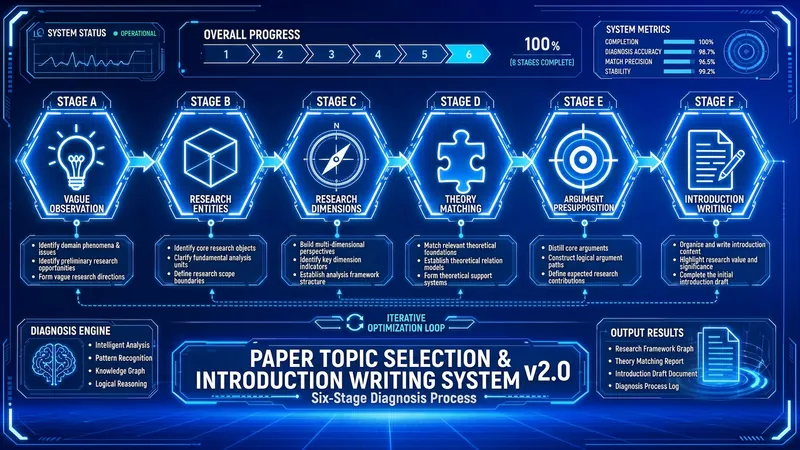 Research
Thesis Topic & Intro v3.2
Read in 10 seconds: turn a vague observation into a defensible topic, then into an introduction that can pass review. Throughout, it uses only the real materials you provide — no fabricated references. Trigger words: thesis topic, topic selection, introduction, research gap, academic writing, thesis proposal, topic selection before literature review. Applies to: journal papers / dissertations / conference papers / course papers, across all disciplines — humanities and social sciences, STEM, agriculture, medicine, and life sciences. Up and running in 3 minutes: lock in your discipline and starting point → shape the topic layer by layer → strict evidence-chain gate → module-by-module introduction → ratchet finalization. [Division of labor with other skills] The health check comes first, writing comes after, and polishing comes last. This skill handles the middle stretch: topic shaping + introduction draft. It does not write the full paper (that's the Academic Paper Full-Process Writing System v4.x), and it does not polish language sentence by sentence (that's the Academic Paper Three-Track Polishing System v8.x). [Six gates] 1. Discipline placement: classify into one of four categories — 1A humanities/arts, 1B social sciences, 2A STEM, 2B agriculture/medicine/life sciences — and load the corresponding red-line norms; for category 2B, ethics review status is always checked. 2. Stage positioning: are you at a vague observation, have a unit but no angle, have an object but no theory, lack a method, lack a viewpoint, or only lack an introduction? Start from the corresponding gate instead of starting over from scratch. 3. Topic shaping: research unit → dimension compass → theoretical perspective → research method → research viewpoint, locked layer by layer; before locking each layer, first judge whether the previous layer holds. 4. Strict evidence-chain gate: before the introduction, your references are registered into an M1/M2… material library, each entry verified on four elements — author/year/title/locator; if fewer than 3 references are registered in the conversation, the system refuses to generate the research-gap statement — not a downgrade, a refusal. 5. Module-by-module generation: the introduction is produced in five inverted-pyramid modules, and each module must be annotated with citation numbers [Mn]; no source, no sentence. 6. Ratchet finalization: only versions that have passed receive credit; qualifying modules are locked and no longer changed; scores only go up, never down. [Deliverables] A '[Topic Keyword] · Topic & Introduction' document + a sentence-level traceable citation mapping table + a ⚠️ to-verify checklist + an AFP archive code. The archive code works across four systems — the proposal health-checker, the v4.x full-process system, and the three-track polishing system — so switching skills doesn't require re-stating your discipline, topic, journal, or material library. [Explicitly not done] It does not fabricate authors, years, volumes, issues, page numbers, or DOIs; any bibliographic records retrieved online are marked ⚠️ to-verify and can only be written into the reference list after you verify them; it makes no promises of acceptance or passing review. Authorship and responsibility are yours — please verify every citation and data point.

Water Intel Weekly Report
Load this skill when you need to automatically compile the latest week's water conservancy/water industry dynamics—key news, policies, technological innovations, top journal academic research, risk challenges, and international developments—into a Chinese-language intelligence weekly report with five-dimensional scoring, categorization, and next-week attention suggestions. Typical use cases: Scheduled or manual generation of 'Water Industry Intelligence Weekly Report', or to quickly understand the overall water industry dynamics of the week. Not suitable for: Interpreting or translating single news articles/papers, writing feature articles or literature reviews, deep tracking of pure academic papers (use academic daily skills), or intelligence outside the water industry—do not load this skill in these scenarios.
 Research
Guided Literature Search
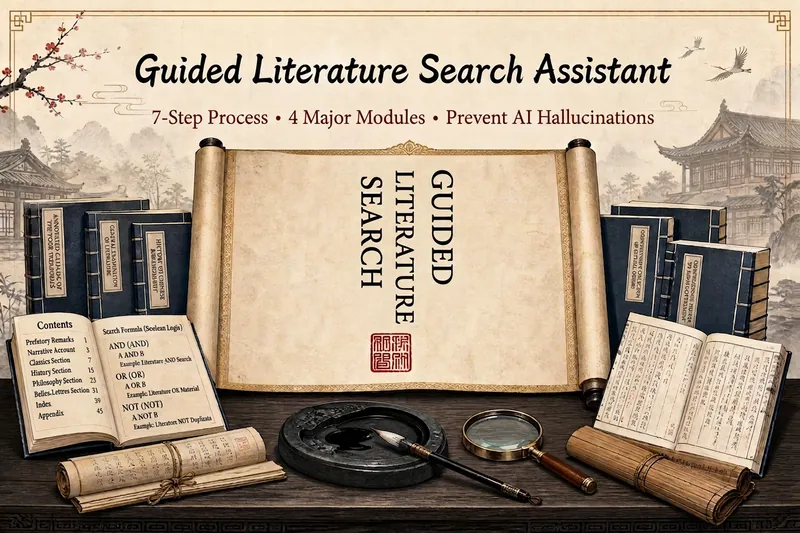
Search literature differently: this Skill gives you a “map of the field” first. It offers five standout capabilities: ① Reviews first, core papers second (a strict rule)—find 3–5 review articles to map the field, then follow their references to locate core literature, so you are not overwhelmed by hundreds of papers from the start; ② Literature authenticity verification (to prevent AI hallucinations)—uses placeholder-pattern checks and real-time verification through CrossRef, DOI, CNKI, and Wanfang, checking each author, journal, DOI, and page number without fabricating a single reference; ③ Automated advanced CSSCI searches on CNKI—when you have VPN or institutional access, automatically extract CSSCI records and abstracts, up to 100 papers at a time, and save them directly to Excel; ④ Direct English OA downloads—download directly from arXiv, MDPI, Frontiers, and other sources at 100%; download approximately 50–70% of Springer and Elsevier OA papers directly; for paywalled papers, receive a DOI link and VPN download instructions; ⑤ Topic selection with the Three-Circle Focus Method—intersect policy trends, your prior experience, and your problem awareness to turn a vague idea into a genuinely worthwhile research topic. The seven-step core workflow is: research topic design → keyword refinement → find reviews first → find core literature → screen and verify → attempt downloads → produce a prioritized reading list. It also includes two enhanced modules: a structured 12-element breakdown in Excel and iterative reflection after reading. Clear boundaries: it does not promise to bypass CNKI’s anti-scraping protections to download Chinese full texts, log in to a VPN on your behalf, or write the main body of your paper. Designed for graduate students, university faculty, and academic researchers who need to conduct systematic literature searches.
Information
- Version
- v3
- Last updated
- Runtime credits
- Usage-based
- Models
- Auto
