
Event Poster Designer
Clear event details and eye-catching visuals
Event Poster Designer
Clear event details and eye-catching visuals
Showcase
Description
Send me the event name, time and location, and participation details to design a visually appealing promotional poster with clear key information. Suitable for community operations, retail stores, markets, trial classes, lectures, and promotional roles. Long event names are broken down by meaning while preserving the official full name. Dates, locations, pricing, and essential participation conditions are placed in easily visible spots. Organizers, co-organizers, and supporters are presented according to their original relationships without inventing discounts, quotas, addresses, or official endorsements. Offers 12 style directions that you can choose by number, feel, or reference image, or let me recommend 2 to 3 styles based on the event. The default is a 3:4 mobile poster with support for custom aspect ratios and color palettes; layout adjustments are made when other sizes are needed. After generation, event fields are checked word for word, reviewing title hierarchies, occlusion, and mobile thumbnail recognition, along with complete prompts and pending items. QR codes use only the original image you provide, without generating fake codes. This version uses a fictional botanical event for a single local node test; other styles and QR code workflows are not fully validated. The host requires image capabilities, and installation does not include runtime credits. Output is provided as images, with no promise of editable source design files, print-ready formats, or recruitment results. Not yet run or published within YouMind. Product and workflow design by leowang.
Recommended by
Dancang
Why we love this skill
Featured because it elevates event posters from merely looking good to being ready for publication. It verifies official names, times, locations, prices, and participation conditions before applying appropriate visual hierarchy, with special attention to QR codes, brand assets, and small-format readability.
Best for
Ideal for community managers, store owners, market organizers, workshop hosts, lecturers, and anyone needing to create event promotional materials.
How to use this Skill
Provide your input
Provide the full event name, time and location, participation methods, pricing, and necessary conditions, along with brand assets, QR codes, reference images, purpose, and dimensions if available.
Run the Skill
Designs the promotional poster based on confirmed details, organizes the hierarchy for titles and participation info, and verifies event fields, overlap, cropping, and thumbnail readability.
Review your result
Receive a clear, visually appealing event promotional poster, complete with the full prompt, field verification results, and items pending confirmation.
Related Skills
View all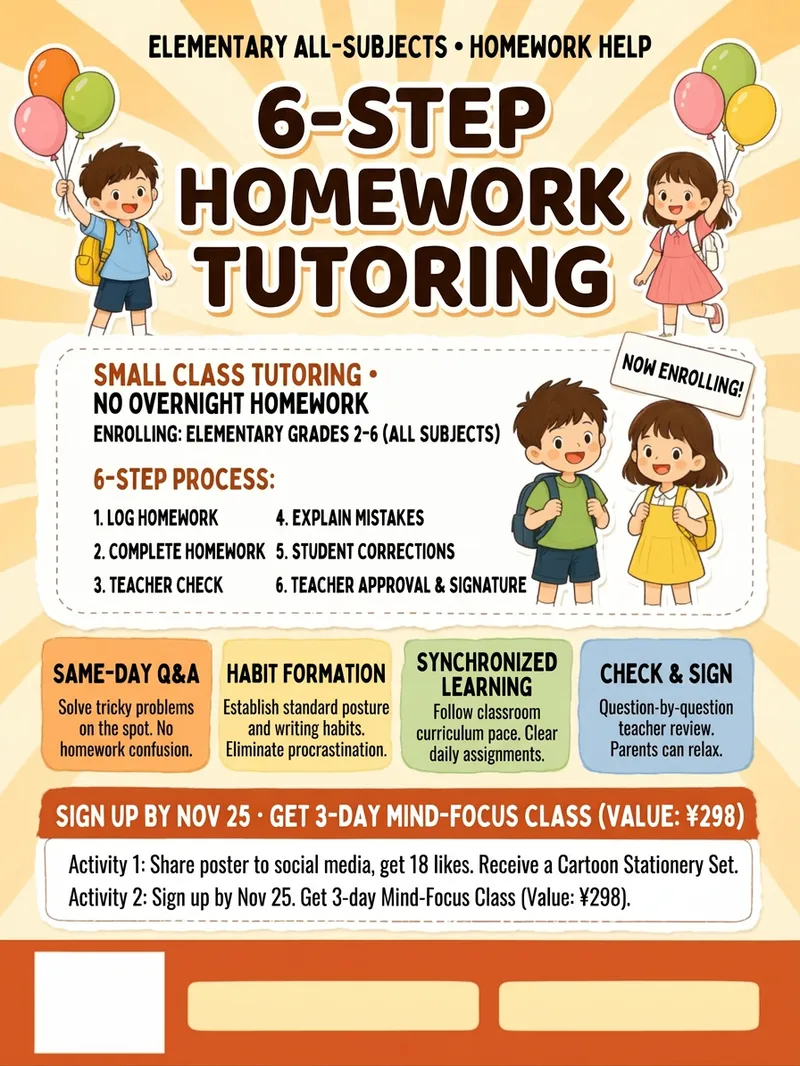 Image
ImageFlyer Designer
Flyer Designer: Provide an industry and the message you want to share, and get a one-page promotional design ready to print or post to social media—with a three-layer information structure, four tone options, tiered text to reduce typos, and reserved space at the bottom for a QR code and phone number. Trigger it with requests such as “make a flyer,” “design a flyer,” “make a poster,” “grand opening poster,” “event poster,” “promotional flyer,” “store flyer,” “hiring poster,” “menu flyer,” “social media poster,” “flyer,” or “poster.” Core guidelines: cover only three points per flyer, keep the main headline to eight Chinese characters or fewer, submit text organized by level, and never use words prohibited under advertising laws. The default format is a 3:4 vertical layout, which can be customized. The output includes Chinese copy layout, copyable English prompts for image generation, a list of text to add later, and print specifications.
 Image
ImageAction Sports Poster Pro
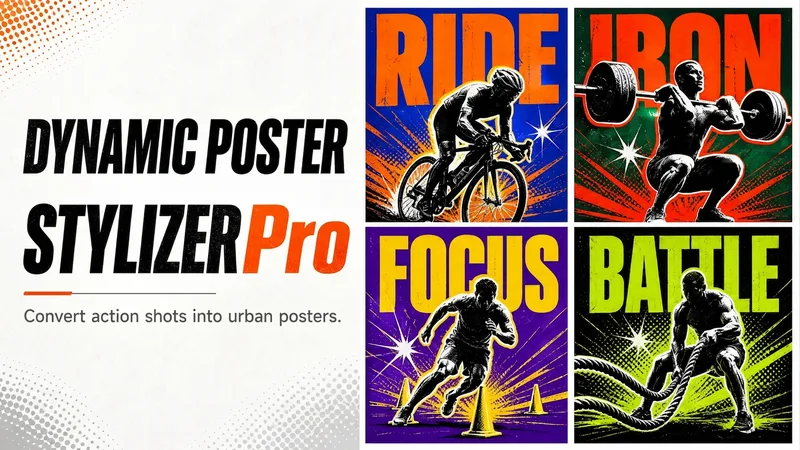
Upload one action photo and get a finished 3:4 portrait sports street-style poster—with a giant compressed bold English headline, highly saturated contrasting colors, radial starbursts in the corners, halftone dots and speed lines, a high-contrast black-and-white silhouette, and offset overprint outlines in contrasting colors. It also features the distressed grain and scratch texture of vintage screen printing for instant visual impact. Ideal for sports, fitness, cycling, running, and ball sports—whether you’re sharing on WeChat Moments or social media, or creating recruitment and record posters for fitness coaches, running groups, and clubs. The workflow takes two steps: first, you’ll receive concept card options with a headline, subtitle, color palette, layout, and one-line mood description. Approve or fine-tune one, then generate the finished poster—no need to repeatedly describe your requirements. Includes 6 contrasting color palettes: Klein blue × bright orange (signature), black and gold × fluorescent green, magenta × off-white, violet × bright yellow, dark green × orange-red, and black and white × a highly saturated accent color; plus 4 layouts: headline at the top / vertical side panel / circular wraparound / offset double line. Headlines adapt to your needs—you can provide your own copy or let AI suggest options based on the photo. When you write in Chinese, you’ll receive both Chinese and English versions. Core safeguards: the photo is the only source of visual content. The subject’s identity, number of people, pose, direction of movement, equipment, and orientation are kept as consistent as possible. The subject won’t be replaced with another person, and the sport won’t be changed. During generation, brand names, logos, wall slogans, screen text, and bottom information bars from the original photo are actively removed. Some remnants may occasionally remain and can be corrected through iteration. You can also upload multiple photos at once for batch generation; no more than 10 photos per batch is recommended. Delivery and iteration: every finished poster includes a copyable prompt for reusing the same style, along with an AI-generation and copyright compliance statement. After generation, you can make targeted changes—switch the color palette or layout, edit the headline, adjust decorative density, or strengthen or soften the silhouette contrast. Each iteration changes only the dimensions you specify while keeping everything else unchanged, helping avoid subject drift.
 Image
ImageArtistic Typography Poster
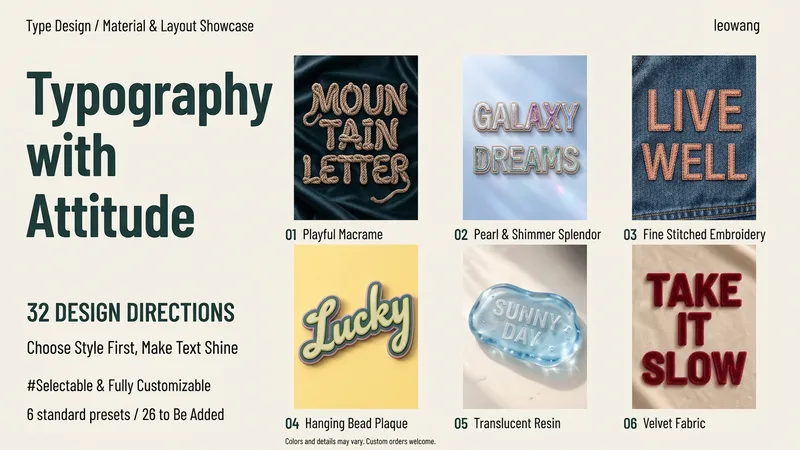
Enter a sentence, name, or English word, choose your preferred style, and generate an artistic typography image. The 32 directions are divided into 8 groups: soft handmade, delicate accessories, clear light and shadow, textured objects, paper sculpture, natural growth, sweet and playful, and graphic expression. From ribbons, jewelry, and yarn to ceramics, paper carving, petals, and editorial layout, glyph structures and compositions are designed individually rather than simply swapping colors. You can choose by number, describe the desired feel, upload a reference image, or let me recommend 2 to 3 styles based on your purpose. Customization is also supported beyond the 32 styles. By default, it generates one style and one 3:4 vertical image; proportions, colors, and backgrounds can be modified, and multiple comparisons for the same text can be created when explicitly requested. After generation, each character is checked along with material structure and thumbnail readability, accompanied by the complete prompt. Styles 01 through 06 each have a local sample image; 07 through 32 are newly added directions pending testing, meaning not all 32 styles are fully verified. The host platform must support image capabilities, and installation does not include runtime credits. The output is an image, not installable fonts, vector typefaces, or craft blueprints. Operation within YouMind has not yet been verified. Product and workflow design by leowang.
Information
- Version
- v2
- Last updated
- Runtime credits
- Usage-based
- Models
- Auto
- Use cases
- Images & designMarketing & growth
- What you get
- ImagePrompt
- Visual styles
- EditorialRetroPaper art
