
Artifact Digital Deconstruction Video
Turn artifact photos into 3D showcase shorts with generation, unfolding, shattering, and reunion.
Artifact Digital Deconstruction Video
Turn artifact photos into 3D showcase shorts with generation, unfolding, shattering, and reunion.
Showcase
Description
Upload a clear photo of an artifact to transform a static object into a digital animation showcasing its form, patterns, and colors. Centered on a single artifact, it arranges a seven-stage sequence of "particle generation -> scanning appearance -> structural breakdown -> pattern scroll unfolding -> curved surface shattering -> particle dispersion -> complete reunion," combined with slow rotation, detail callouts, and texture color grading to present the object's structure and decoration. Suitable for museum and heritage content, artifact displays, artistic short videos, and design portfolios, and especially great for continuous curved objects like porcelain vases and pottery jars. Supports adjusting duration, aspect ratio, title, and display focus. Delivers playable animations and editable scenes; outputs MP4 when rendering and export conditions are met. A single image is used for approximate appearance reconstruction, while multi-angle photos help improve restoration accuracy. Delivers playable animations and editable scenes; outputs MP4 when rendering and export conditions are met. A single image is used for approximate appearance reconstruction, and multi-angle materials help restore the back and patterns. This Skill does not provide precise physical scanning.
Recommended by
Dancang
Why we love this skill
Transforms artifact images into 3D exhibition narratives with realistic spatial structures, fully presenting generation, scanning, slicing, unrolling, shattering, dissipation, and reunion.
Best for
Best for creators of museum content, artifact showcases, artistic short videos, and design portfolios.
How to use this Skill
Provide your input
Upload a clear photo of the artifact with the full subject and state your production requirements; you can also provide multi-angle photos, title, duration, aspect ratio, and focus areas.
Run the Skill
The system turns the artifact's appearance, structure, patterns, and colors into a continuous 3D showcase animation featuring particle generation, scanning, structural breakdown, pattern unfolding, shattering, dispersion, and reunion.
Review your result
Receive a playable digital deconstruction short video and editable scenes. MP4 output is available when rendering and export conditions are met. A single image yields an approximate appearance reconstruction.
Related Skills
View all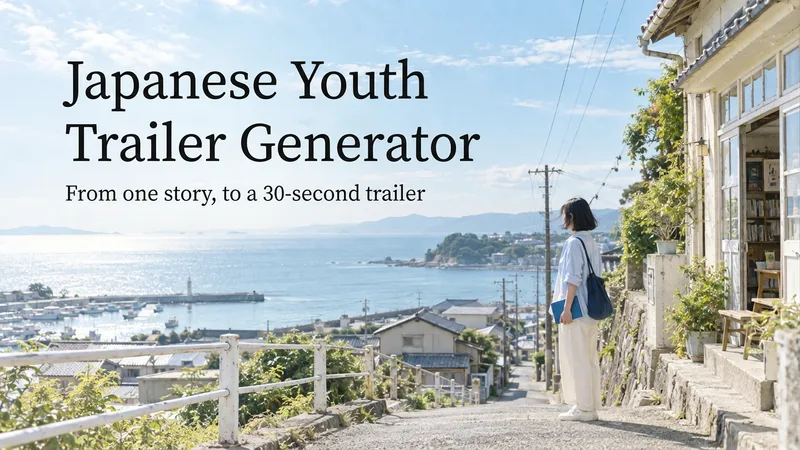 Video
VideoJapanese Youth Trailer Maker
How can you turn a story idea into a suspenseful Japanese youth trailer? This Skill breaks production into a repeatable workflow: define the style, write the script, choose scenes, establish characters, assemble the storyboard, generate video shot by shot, then organize editing and sound. Provide a story or reference image, and it first locks in the composition, lighting, colors, and details that must remain consistent. It then uses a four-panel empty-scene grid to select visuals and creates facial, half-body, and full-body references for each character, giving the people, clothing, props, and environment a consistent basis across shots. Before batch generation, sample images are used to calibrate light direction, skin tones, highlights, and character states. The default is 30 seconds, 16:9, and 8 shots; duration, aspect ratio, number of characters, and mood can all be adjusted. You can also create only the script, reference images, or storyboard instead of completing the entire film at once. Deliverables • Consistent visual rules and a suspenseful script • Scene, character, prop, and storyboard materials • Separate image and video prompts for each shot • A shot-by-shot timing, in/out point, editing, and sound table • Generated files and review records, based on the capabilities of the available tools When the appropriate media tools are available, the Skill continues with actual generation and review. When tools are unavailable, it delivers complete production materials and explains where the process stops. Image, video, and music generation costs are billed separately and depend on the runtime environment. The featured example, “The Day I Returned the Book,” consists of AI-original still images and storyboards; it is not yet a completed video.
 Image
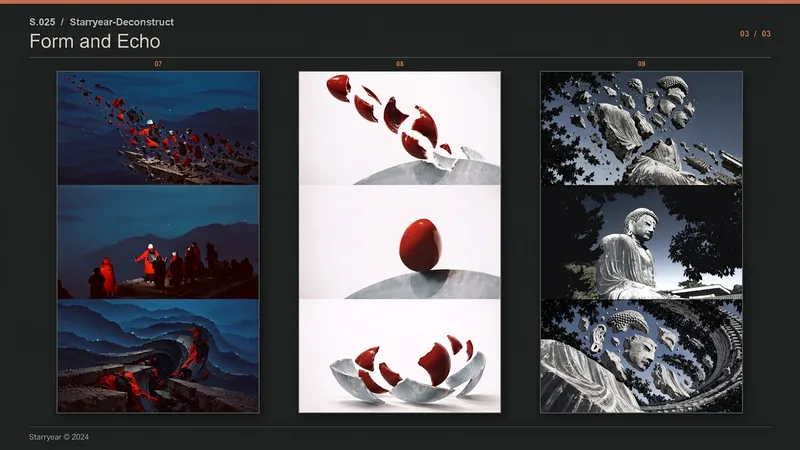
Image【S.025】Year · Deconstructed | Photo Skill · Starryear
Transform a single photo into a unified-tone triptych that deconstructs its source subject, suited to architecture, sculptures, natural landscapes, objects, and other subjects with distinctive contours and material qualities. The final piece uses a 16:27 vertical canvas composed of three equal-sized horizontal panels joined vertically, with a default output of 1920×3240 pixels and no added text, borders, or decorative elements. The top panel captures the moment the subject bursts outward from a clearly defined point of force, forming an orderly explosive deconstruction through separated primary fragments, a shared direction of motion, and ample negative space. The middle panel preserves a centered 16:9 crop of the input photo, serving as the only original color reference in the composition. The bottom panel develops the forms and environment in the photo into a more intense, source-specific surreal spatial echo, continuing the deconstruction with a different center of gravity, viewpoint, and motion relationship from the top panel. Changes in materials, environment, and space across the top and bottom panels remain traceable to the original photo while avoiding the addition of unrelated subjects. All three panels maintain continuity in white balance, dominant colors, saturation, tonal contrast, and overall brightness, allowing the creative transformations to connect naturally with the original image’s color identity. Suitable for visual posters, art imagery, and serialized creative work that calls for a narrative of “photographic original + explosive deconstruction + surreal afterecho.”
 Image
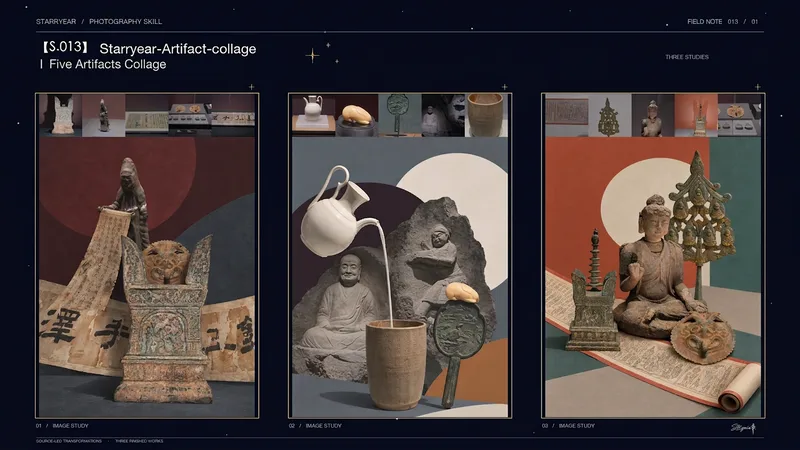
ImageS.013 Five Relics · Starryear
Arrange five artifact photos into a vertical surreal color-block collage, creating clear and imaginative visual relationships among different objects in one composition. The finished piece keeps five tightly aligned horizontal colored squares at the top, each corresponding to one source photo. Below, the main artwork occupies most of the canvas and is rebuilt from the artifacts’ recognizable forms, patterns, materials, and damage, with display cases, platforms, and other surroundings removed. The main artwork may use black and white, grayscale, or selective color. Based on the contours, colors, and relationships within the group of objects, design curved surfaces, geometric blocks, bands, and other color fields. The artifacts interact through support, passage, nesting, occlusion, or tipping and catching, rather than sitting in isolation. A small number of lines, short arcs, or color fragments are used only to reinforce movement and connection. Keep the overall composition clean, with a flat background, clear depth layering, and moderate negative space, while emphasizing the artifacts’ authentic details and photographic texture. Suitable for visually reinterpreting photos of multiple artifacts, exhibition concept images, culture-themed posters, and artistic image creation. Not intended for artifact identification, restoration, historical reconstruction, or archaeological fact inference. The output is a complete vertical composition without titles, logos, or watermarks.
Information
- Version
- v3
- Last updated
- Runtime credits
- Usage-based
- Models
- Auto
- Use cases
- Images & designVideo & audio
- What you get
- Video
- Visual styles
- 3D
