
Course Material Expert
Turn topics into ready-to-teach course materials
Course Material Expert
Turn topics into ready-to-teach course materials
Showcase
Description
Turn any topic into well-structured, ready-to-teach course materials in Markdown, complete with a cohesive set of supporting illustrations. Ideal for live classes, recorded courses, bootcamps, and visual self-study: first create a course blueprint with learning objectives, a chapter outline, and assessment and submission plans; then write each chapter and finish with illustrations tailored to the content.
Best for
Ideal for teachers, course designers, and knowledge creators who want to turn a topic into teachable, self-study, and assessable course materials.
How to use this Skill
Provide your input
Enter the course topic and, if possible, include the target audience, skill level, teaching format, duration, learning goals, and reusable materials.
Run the Skill
The system first plans a course blueprint, then writes clear, ready-to-teach Markdown course materials and designs visuals that match the content.
Review your result
Get a complete course document with learning goals, chapter content, exercises, assessment criteria, and supporting illustrations.
Related Skills
View all
Complete Lesson Pack & Slides
Enter the topic and basic information (textbook scope, learners, class hours, and lesson type) to generate a complete five-part lesson preparation package in one go, following a fixed framework and a consistent academic handout style: a word-for-word lesson plan, classroom activities and interactive question design, a board plan, and in-class exercises, plus an approximately 40-slide competition-ready PPT. Document structures are fixed while content adapts to the topic. The PPT follows the same visual system across lessons and is produced in two steps: generate images first, then assemble them with slidesCompose. Course memory is updated automatically. Suitable for all subjects and grade levels.
 Webpage
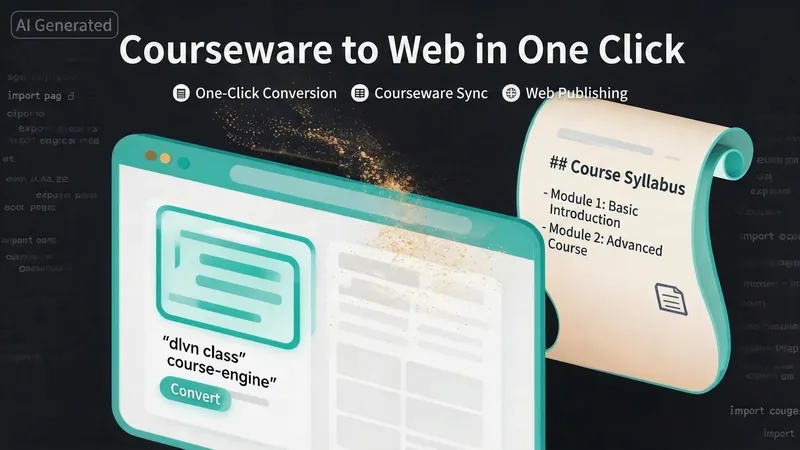
One-Click Courseware to Web
Turn your courseware into a viewable website. Whether you have a Markdown note, a PDF paper, a PPT slides, or a plain text script, or even a public account link, One-Click Courseware to Web can automatically convert it into a clear, beautifully designed online course display webpage. You don't need to write a single line of code—just provide the content. Two display styles: - Course training content → generates a scrolling long page, like flipping through a book. - Paper/report content → generates a PPT-style page-turning website, like browsing slides one by one. Responsive design adapts to mobile and desktop. What you need to do: Just one step: provide your courseware content. Supported formats: .md Markdown files, .pdf PDF documents, .pptx PPT presentations, .txt plain text. You can also paste course content directly in the conversation. Example commands: "Turn these lecture notes into a webpage" "Make this PDF paper into a PPT-style website" "Here is my courseware content, generate an online display page" What you get: A directly accessible online course display website, with the display mode automatically determined. Your content automatically selects the effect: - Course outlines, training handouts, textbooks → scrolling long pages, modules naturally connected, scroll to browse. - Academic papers, research reports → PPT-style slide flipping, each page focuses on one point. - Speeches, meeting reports → PPT-style page-by-page display, supports keyboard/click navigation. If you explicitly request "scrolling" or "PPT", your request is respected. Content extraction capability: For information-dense papers and long texts, the skill automatically performs: - Structure decomposition: splits continuous discourse into independent chapters/slides. - Information condensation: condenses three paragraphs into three key points, each within 20 characters. - Thesis-first: each page gives the conclusion first, then supporting arguments. - Framework visualization: models and classification systems are presented with charts instead of plain text. - Data highlighting: key numbers and metrics are displayed on separate pages prominently. Subsequent modifications: After the website is generated, you can request adjustments at any time: "Update the content of module three" "Change the color scheme to warm tones" "Add a course roadmap" "Change this module to a timeline layout" Modifications only affect the corresponding part; you don't need to regenerate the entire website. What it does not do: This skill currently focuses on course content display and does not include the following LMS (Learning Management System) features: - User login/registration - Learning progress tracking - File download - Online quizzes/practice If you need these features, they are separate extensions.
 Research
Premium 3-Step Teacher Prep v4
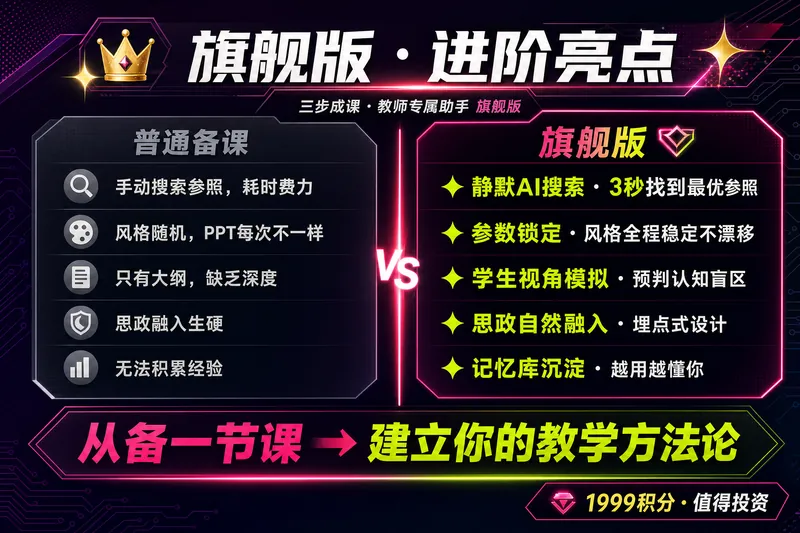
🔥【Back-to-School Limited-Time Offer】1,599 credits from August 27 to September 5 (regularly 1,999)! Start the new semester with a competition-ready lesson plan. 【One Generation · Five Lesson-Prep Essentials】 🖥 PPT (competition-ready refined version / lightweight everyday version) · 📝 Word-for-word teaching script (with complete prompts—just follow along) · 🎯 Activity design · Board work · In-class exercises 【Why “Competition-Level”?】 This Skill includes a library of teaching-design patterns from high-quality and model lessons nationwide, covering mainstream competition approaches such as situational introductions, task-based learning, question chains, and flipped classrooms. It also incorporates professional frameworks including Bloom’s taxonomy, the ADDIE model, and Understanding by Design (UbD). Every lesson is validated against these methodologies rather than being a simple collection of content. 【Premium Edition Upgrades】—Designed around the logic of a high-quality lesson ✨ Hybrid questionnaire: Click options or enter your own responses to complete information collection in 30 seconds ✨ Parameter locking: Course details and PPT style are locked in Step 1, keeping all later generations consistent ✨ Real interaction and confirmation: Clickable options for outline approval and selection of the five essentials enable personalized customization ✨ Dual-mode PPT: Smart switching between competition presentation and everyday teaching modes ✨ Post-lesson reflection loop: Questionnaire → AI-generated reflection → Board Memory, building your dedicated teaching profile ✨ Controlled costs: Cost expectations are stated before generation; choose between the full visual version and the lightweight skeleton version, with no over-generation or forced upgrades 【Three-Step Process】 ① Collect information → Two rounds of interactive questionnaires + parameter locking ② Confirm the outline → AI provides the teaching framework first, then generates after you approve it ③ Visual delivery → Generate the complete five-piece set at once: PPT + word-for-word script / competition-standard lesson plan + activity design + board work + exercises, with flexible combinations 【Pricing】 1,999 credits = the price of a cup of coffee in exchange for daily freedom from lesson prep. · Generate the complete five-piece set in one use · Reduce prep time from about 4 hours to about 1 hour · Generate competition lesson plans directly · Teach everyday lessons with ready-to-use materials · Iterated through use by 45 teachers, saving more than 200 hours of lesson-prep time in total 💡 Suitable for: All grade levels from preschool through university, and all subjects including Chinese, math, English, physics, chemistry, biology, history, geography, civics, art, and physical education. Suitable for everyday teaching, competition presentations, and open classes. ⚠️ Review and revise AI-generated content based on your textbook edition, school requirements, and students’ actual learning needs. Teachers’ professional judgment should remain the final authority. 📩 Feedback and suggestions: 593975647@qq.com. There may be a little surprise for you 🎁~
Information
- Version
- v2
- Last updated
- Runtime credits
- Usage-based
- Models
- Auto
- Use cases
- Writing & contentImages & designLearning & education
- What you get
- DocumentImage
