Honestly, I didn't really understand it at first.
Maybe we've entered an era where you can earn while sleeping lol
I just clicked a button on the X automation system I built with Claude Code...
+3000 followers just by sleeping
+600 followers from a single post the AI made on its own
A series of posts with tens of thousands of impressions on total autopilot

As a specific example, I'll pick out some good moments from when I was running an account called 'Armadillo' on full AI autopilot (AI creating posts and posting them without me even looking):
Like the ones below, it went viral like crazy,
Even quote posts that the AI posted on its own went viral,
It's like that lol.
Of course, since it's AI automated, I can run not just one account, but 5, 10, or even 100 accounts lol.
For nearly two months from July to August 2025, I ran this Armadillo account on 'full autopilot,'
And it was exactly like this lol:
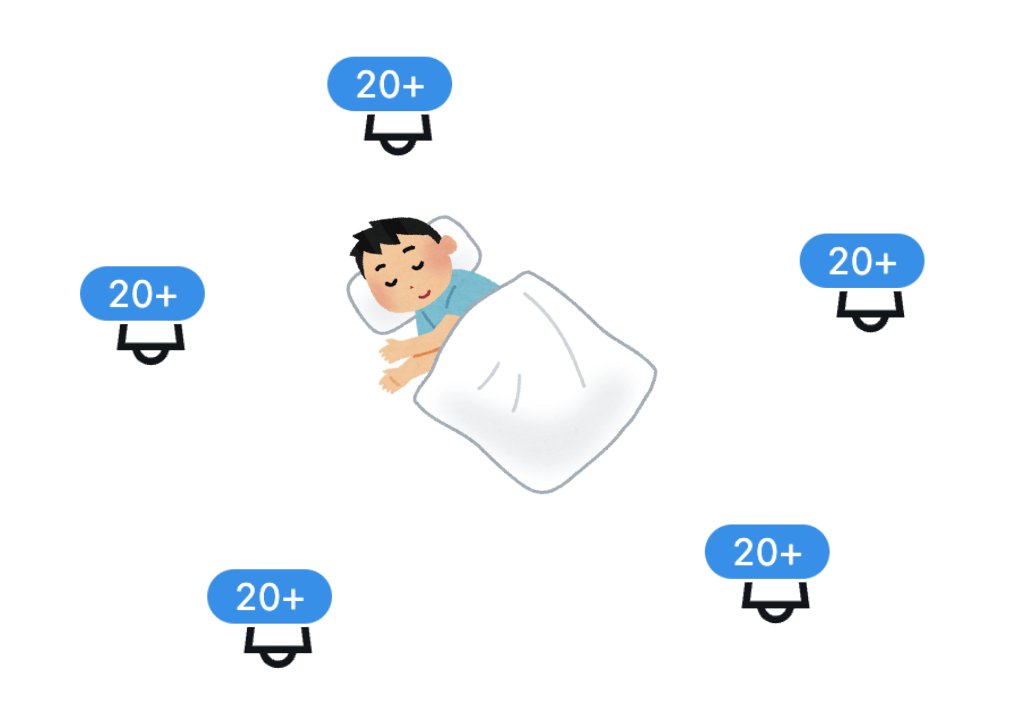
When I write things like this, people often misunderstand and think...
- 'You probably made a bunch of posts with AI, copied them, and posted them yourself, right?' -> No.
- 'You probably stocked up on AI posts and scheduled them for specific times, right?' -> No.
So what was it?
The AI was 'creating posts on the spot' at 'random times' and posting them 'with zero human checks.'
In other words,
【Full AI Automation of X Operations】
Now, some might ask, what's so fun about being able to run X automatically with AI in the first place?
Of course, it's nice to automatically receive 'tiny creator rewards from X (lol),' but...
Being able to sell the products you want to sell automatically is the best lol
In fact, I tried the same X automation with a paid Note and its related X account...
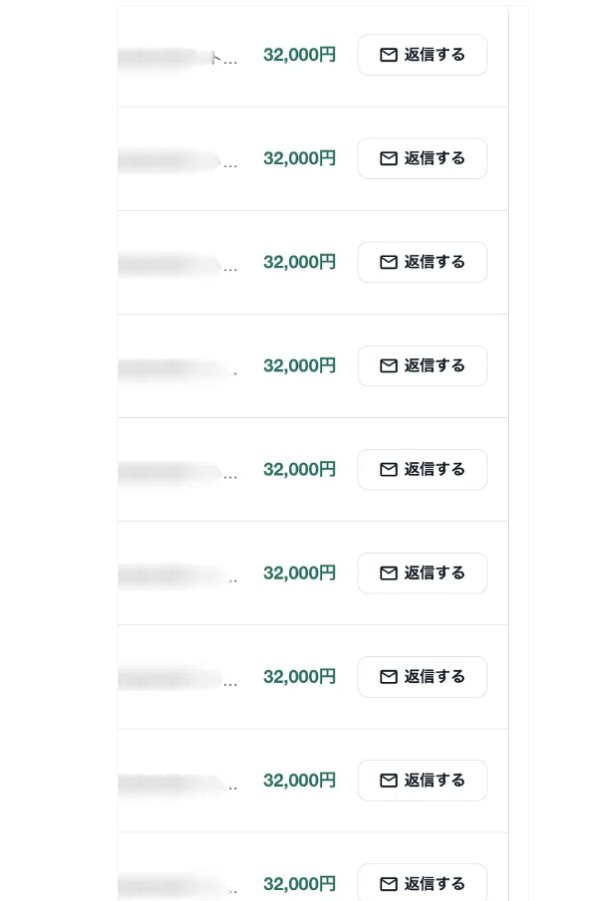
32,000 yen Notes were selling like crazy while I was sleeping...
*I've earned about 8.8 million yen a year doing this lol.
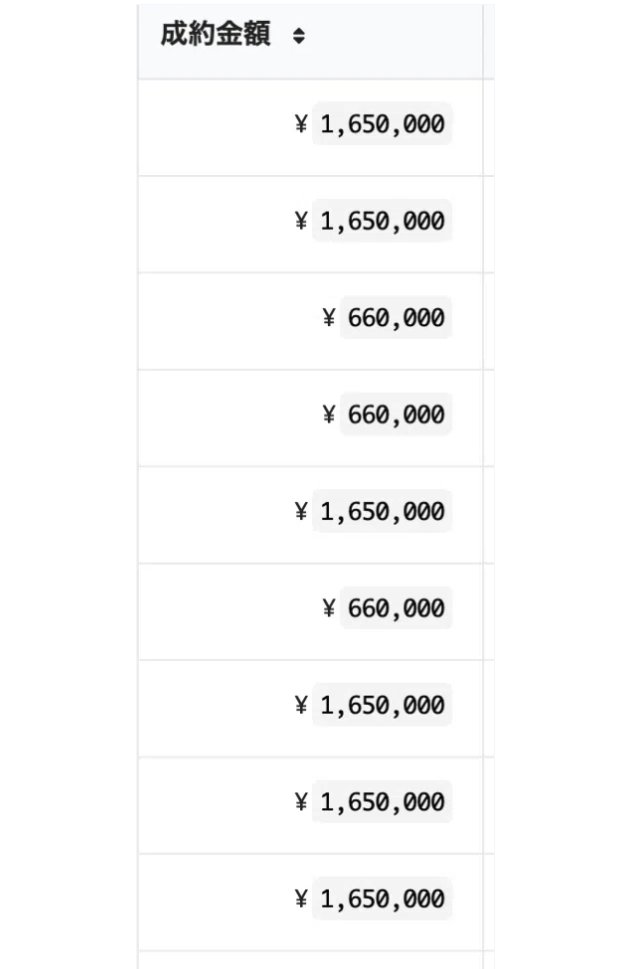
After that, high-ticket items started selling one after another...
(I said I earned 8.8 million a year on Note, but now I can earn that in 1 or 2 days lol.)
It's no exaggeration to say that AI automation of X is the 'Alchemy of the Reiwa Era' lol.
Reiwa is the era of earning while sleeping lol.
・
・
・
・
・
Sorry for the late introduction after all that hype. My name is Armadillo.
I graduated at the top of a certain science department at the University of Tokyo and now work as an engineer at an AI company.
In my main job, I use Claude Code and Cursor to build systems, and sometimes I'm a 'PowerPoint artist' (lol).
I've been using Claude Code for 10 months, and I built this X automation system 8 months ago lol. So I'm different from those influencers (lol) who have recently started saying 'Automate with Claude Code!' because it's a trend.
・
・
・
・
・
Now, the main point of this article is to completely expose how to do X automation using AI.
For those who have never done X or AI automation, it might seem like gibberish, so I'll explain from the preparation stage!
Before that, let me tell you one thing:
Automating X with AI is 10 times simpler than you think!
If you read this article to the end, you'll understand why!
By the way, this article is a huge giveaway project, so I've included lots of template code you can use with one click and template prompts you can copy and paste lol.
Just by pasting them while reading this article, you'll be able to post automatically in about 3 seconds lol.
I wrote it in great detail, so if you don't have time to read it now, just bookmark it and read it carefully later!
Oh, if you're only interested in the early-bird benefits of this article, just scroll to the end for now!
・
・
・
・
・
・
Now, I'll explain from the simplest example of X automation.
For example,
If you want to create an X bot that says 'Good morning!' every morning at 8:00,
There are only two things to do:
① Get an X API key (like a login password)
② Use the key from ① to send a post request to the X API
That's really it!
*An API is a window for calling service functions and data directly from a program without going through a UI, and an API key is like a password to use that window.
By the way, in the case of AI automation for X, you just need to make the posting time random and have the 'Good morning!' part 'automatically generated by AI.'
Specifically, the steps are divided into these three simple ones:

① Get X API keys and AI API keys
↓
② Build the X auto-posting mechanism
↓
③ Adjust the prompts
First, I'll explain ①!
① Preparation of X API and AI API

First, you need to get two types of API keys (like login passwords).
- X API Key -> Used to post the created content to X
- AI (ChatGPT, Claude, etc.) API Key -> Used to have the AI create the posts
That's the idea.
Regarding how to get the X API key, you can get it by going to the X developer page and following the instructions.
(You can also search for X Developer Portal)
While logged into the X account you want to automate, go to Projects/Apps in the side menu.
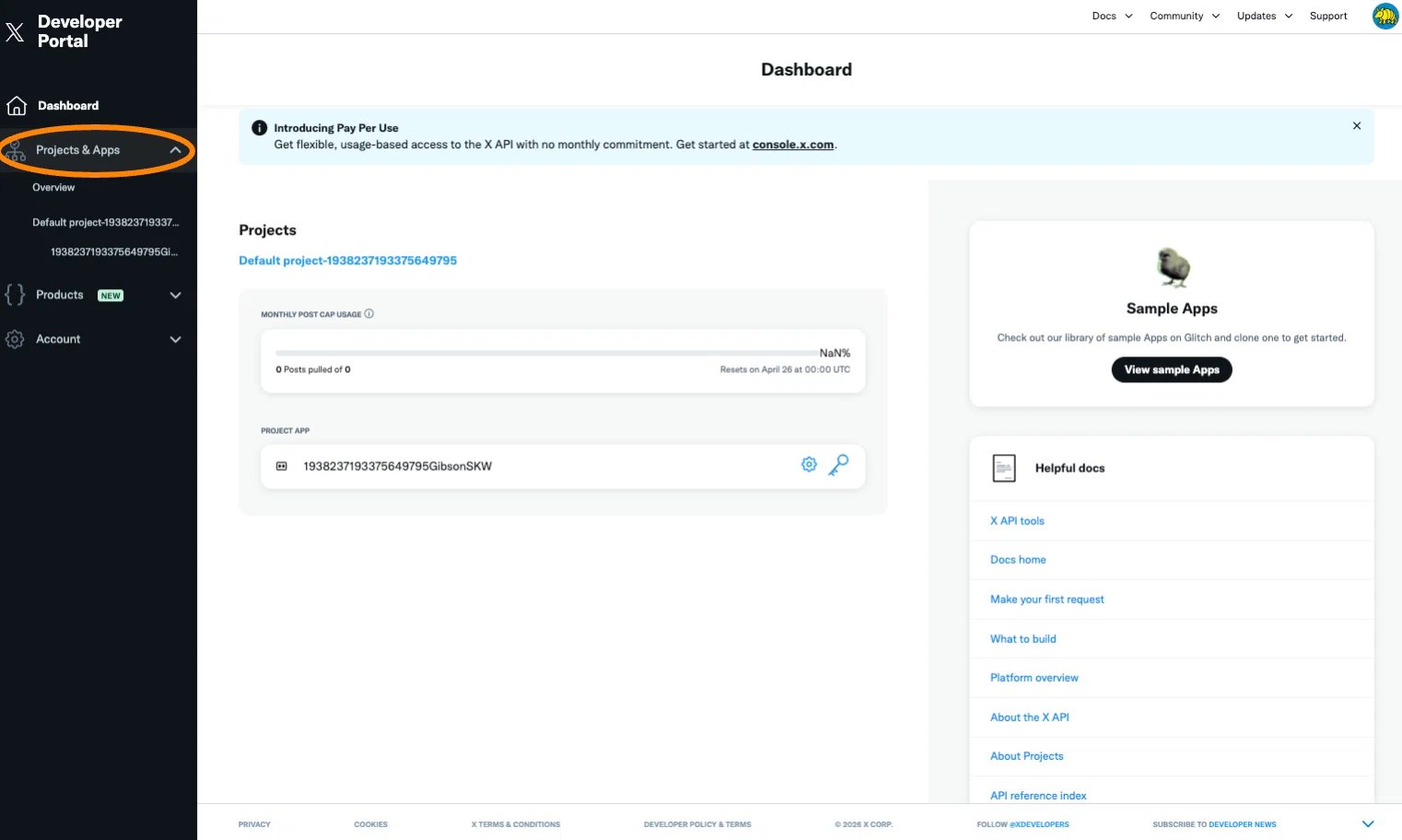
A sample project and app should already be there, so if you click the key icon,
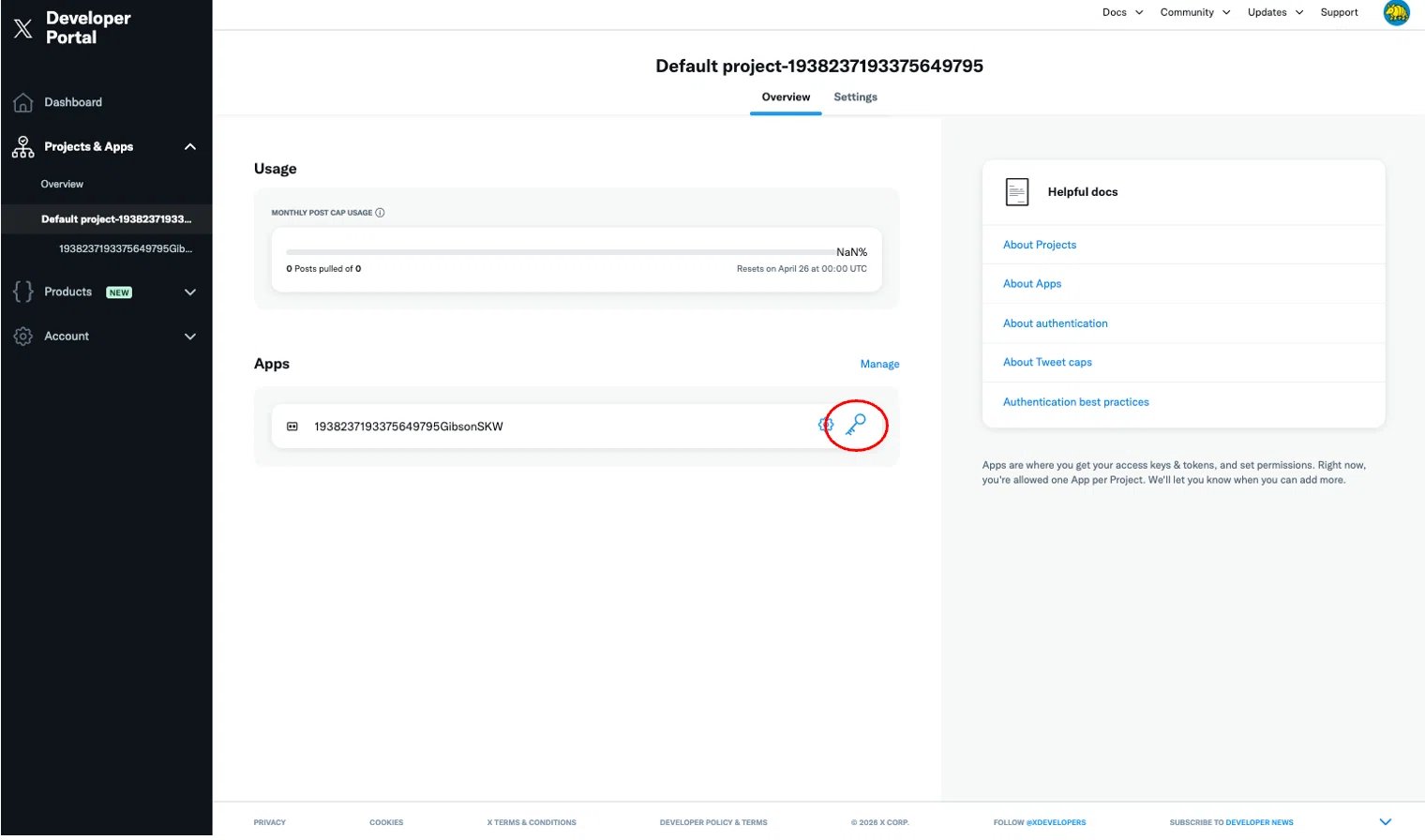
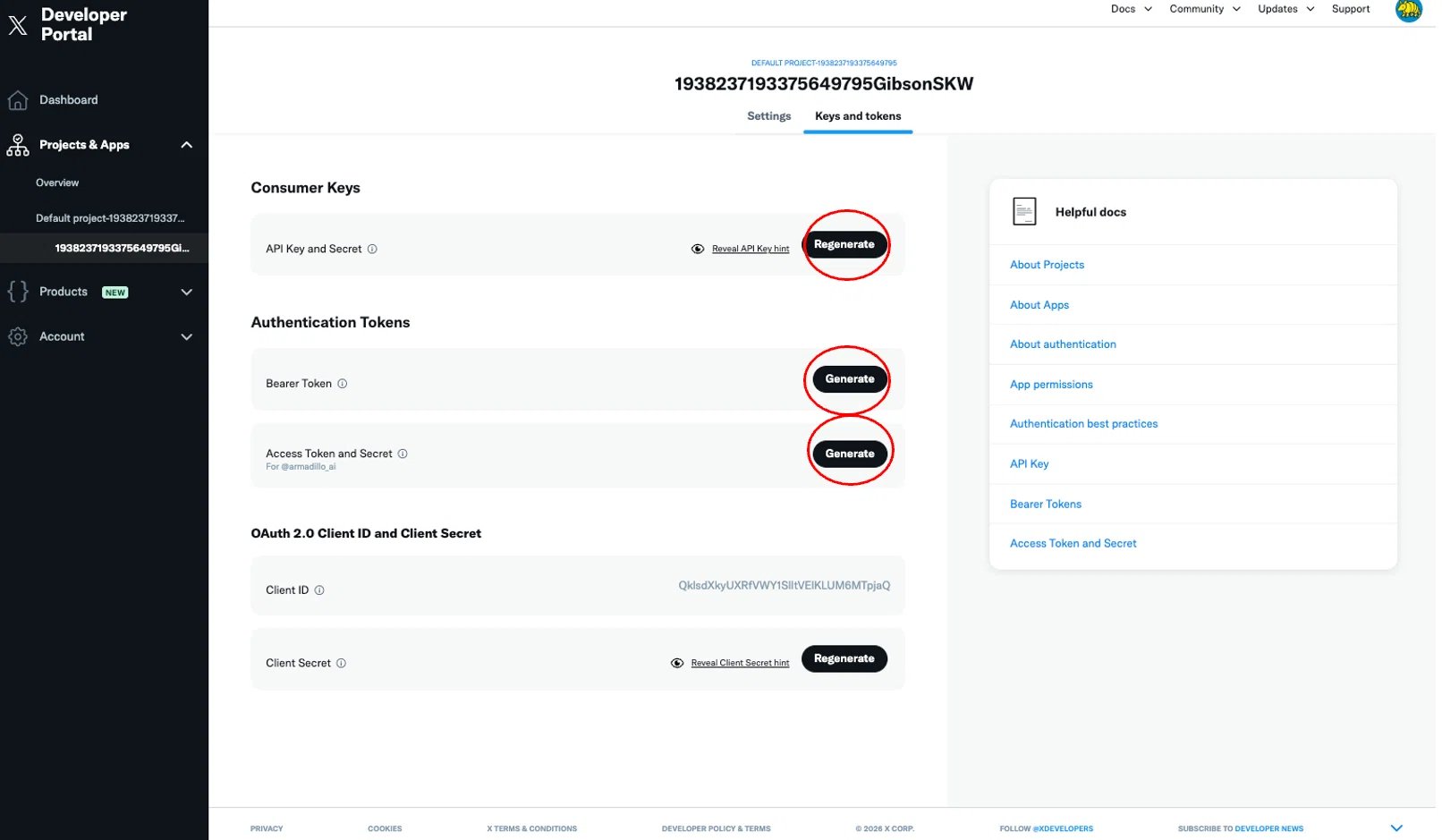
A page like this will appear. Press the Regenerate or Generate buttons and save the following four API keys in a notepad!
- Consumer Key
- Consumer Secret
- Access Token
- Access Token Secret
To put it very simply, what you're doing here is issuing a key that says, 'This program is allowed to post using your X account.'
Roughly speaking:
- Consumer Key / Consumer Secret -> Like the ID and password for the app itself
- Access Token / Access Token Secret -> Like a permit to operate your X account
The actual values will be long alphanumeric strings. They look a bit intimidating, but what you're doing is basically the same as 'getting a login password.'
*So if these leak, others can operate your X account, so please keep them safe.
Also, to actually use the API keys, you need to purchase credits, although it's a small amount. You need to purchase at least $5 from Billing / Invoicing in the side menu. Once you've bought credits, you're ready!
This article also explains the procedure in detail.
Next, prepare the AI-side API as well.
This time, I'll explain assuming you're using the ChatGPT API, but the method is almost the same if you use the Claude API, Grok, or OpenRouter, which has cheap or free APIs.
For example, for ChatGPT, you can issue an OpenAI API key at:
https://platform.openai.com/api-keys
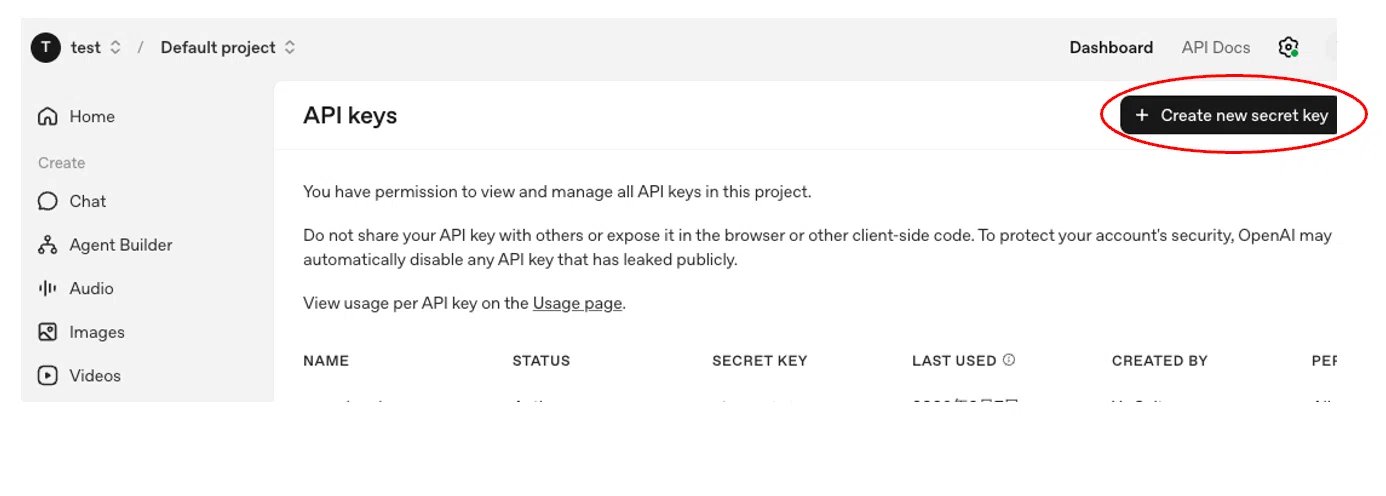
To get an OpenAI API key, press 'Create new secret key' at the top left of the screen! You can get the key and use it to have the AI create posts.
You also need to purchase credits here. Go to Billing from the gear icon (Settings) at the top right and purchase about $5 worth!
Once you've done this, step ① 'Preparation of X and AI APIs' is complete.
Once you've reached this point, you're 70% done lol.
Next is step ②, 'Build the X auto-posting mechanism.'

If you simplify AI automation for X, this is really all you're doing:
- Have the AI create a post
- Post it to X
- Repeat
I've prepared a template at the end of this article that even total beginners can use for AI automation, so please read to the end!
For example, as a first step, let's try posting a fixed phrase without using AI.
First,
Let's make a code that auto-posts 'Good morning!' once.
Oh, if you're going to try automation, please use a burner account! Use your main account only after you're used to it!
Starting with the simplest version:
1. 【Copy-Paste & One-Click Execution】 Simple code that just posts 'Good morning!' to X
It's just this. What it's doing is really simple:
- Set the X API keys
- Access X with the API keys
- Post 'Good morning!'
How to run
If you name the file post_simple.py...
2. Simple code to create a post with ChatGPT
Next, instead of a fixed phrase, let's have the AI create a post. When you run this, you'll get something like:
- Good morning. Let's take it one step at a time today without overdoing it.
- Good morning. It's a nice morning, let's do our best today in a relaxed way.
3. Simple auto-posting code combining X and AI post generation
Once you've come this far, the rest is easy. Just have the AI create a sentence and post it to X as is. This is the minimum configuration for AI auto-posting.
In short:
- Create a post with ChatGPT
- Send that post to X
That's it.
How to run
If you name the file ai_post.py...
4. Code to repeat posting every hour
To make it look a bit more like automation, let's use a for loop to repeat the posting every hour. The idea is very simple:
- Have the AI create a post
- Post it to X
- Wait for 1 hour
- Repeat this several times
In Python, you use a for loop when you want to repeat the same process many times. So this time, we'll use for to repeat the posting process. For example, here's a code that posts every hour, 5 times.
What this code is doing
What this code is doing is actually quite simple. First, for i in range(5): means 'I'm going to repeat the same process 5 times from now on.'
Inside that, what it's doing each time is:
- Have the AI create a post
- Post that sentence to X
And when the posting is done, time.sleep(3600) waits for 3600 seconds = 1 hour.
In other words, this code just repeats the flow of:
- Post once
- Wait 1 hour
- Post once
- Wait 1 hour
- Post once
5. 【Copy-Paste & One-Click Execution】 Code to auto-post by specifying a 'System Prompt' that determines the AI's behavior
By now, you'll probably want to 'make it write in a human-like tone instead of just making up random sentences every time.' That's where the system prompt comes in.
A system prompt is, very roughly speaking, something that gives the AI preconditions like 'What is your role, what tone should you use, and what rules should you follow?'
For example, you can specify things like:
- Write politely
- Write in a slightly casual way
- Don't use emojis
- Keep each sentence short
- Make it natural rather than assertive
Just by adding this, the atmosphere of the sentences the AI produces changes significantly. In OpenAI's Responses API, you can write this role in instructions.
Code
Name the file system_prompt_post.py.
What this code is doing
For a beginner, this code is doing only three things. First, system_prompt decides 'what character and what rules to use.' Next, user_prompt decides 'what the theme of the post will be this time.' And finally, create_tweet() posts the sentence the AI made to X.
So the division of roles is:
system_prompt-> Decides the personality and rules of the postuser_prompt-> Decides the theme of this postcreate_tweet()-> Actually posts to X
Setting it up this way makes it much easier to adjust later.
【Use in 1 second!】 Implement with Claude Code by copy-pasting the prompt
Honestly, with code at this level, you can make it very quickly using Claude Code. For example, you can just tell Claude Code:
Then, the code you can use immediately will come out. So in reality, the flow is:
- Create a draft with Claude Code
- Replace the API keys with your own
- Run it
- If an error occurs, just paste it into Claude Code
This is the super basic part of X automation with AI. From here, I'll talk more deeply about how I removed the 'AI feel,' made it look like a human was posting, generated buzz, and increased followers!

Basically, I used two types of posts: regular posts (normal posts) and quote posts. In refining these two types of posts, 'adjusting the prompts' was necessary.
I'll explain more specifically how I actually created regular posts, how I judged quote posts, and even what settings I gave the AI.
First, to explain the conclusion or the big picture:
For regular posts:
① Create a list of ideas
② Choose an idea
③ Create a draft based on syntax
④ Brush it up
⑤ Final improvement
For quote posts:
① Narrow down compatible accounts to quote first
② Find posts that are growing
③ Judge if it's worth quoting
④ Reinforce with paraphrase -> reason -> evidence
That's how I was running it automatically.
Now, specifically,
【Super Important】 How I created regular posts
Regarding posts, if the AI generates them completely freely, the 'AI feel' becomes maximum, so I focused on:
- Post ideas (direction)
- Rough syntax
- The sender's personality and experience
- A feeling of unique information (primary information) rather than general content
I'll explain the 3rd and 4th points in the section on how to create system prompts, so let me explain the 1st and 2nd points first!
As for how to create regular posts, I actually broke down the process, and I was making regular posts fully automatically in these 3 steps:
① Create post draft
↓
② AI brush-up
↓
③ Final improvement
But there's a preparation step to create the foundation for the AI to make the post. That is:
0. Auto-generate post themes
Before creating auto-posts, the first thing I did as preparation was to have the AI create a large number of theme candidates. (I say 'large number,' but you can literally make them in about 10 minutes using AI lol.)
If you have dozens or hundreds of themes that seem likely to resonate, it becomes much easier to create both regular and quote posts. In short, it's like I was making an idea book with AI beforehand.
For example, I'd generate themes along appeal axes that are easy to get reactions from, like:
- Automation
- Low cost
- Time reduced to 1/10
- 100,000 yen a month
- High profit margin
To give some examples:
- 900k/month with faceless YouTube automation
- 2M/month with sleep sound channels
- Fully automated YouTube using ElevenLabs or Veo3
- Passive channels for AI-generated meditation or good luck BGM
I'd make about 100 of these ideas at once. You can make a lot using ChatGPT, Claude, or Gemini.
If you have one theme, you can create posts from various angles at the stage of creating the post, such as:
- Why it's growing now
- What beginners should start with
- Common traits of people who fail
- Where to differentiate
You can make about 10 posts from one theme lol. That's why it's very important to make this idea list with AI first.
And if you have a list of 50 or 100 ideas, the AI will just pick ideas from there and automatically create and post from various angles. Simply put, it's like this:

From here, I'll explain the
Full Auto-Generation Process
where the AI creates and posts regular posts on its own in more detail.
As I said before, the full auto-generation process consists of the following 3 steps:
1. First, the AI automatically creates a draft
In the first step, the AI freely chooses an idea based on the idea list prepared in advance and creates a draft of the post with the specified length.
For this post draft, you can just let it make it based on the idea, but creating the post according to a syntax makes the post output stable.
To introduce some examples of syntax:
Basic Pattern
[Strong Hook]
[Ideal or Hellish Future]
[Value Provision or Call to Action]
Hook Pattern
[Strong Claim/Contrarian View]
[Reason/Evidence]
[Specific Example/Method]
[Value Provision / Call to Action]
Know-how Provision Pattern
If you want [Results] with [Target], just do [Method]
① [Step 1]
② [Step 2]
③ [Step 3]
Experience Sharing Pattern
[Past Achievements/Experience]
[Lessons Learned from there]
[How to Apply to Readers]
Problem Analysis Pattern
[Phenomenon/Problem] is caused by [Root Cause]
Because [Reason]
[Specific Example]
So you should [Solution]
Numbers/Results Pattern
If you want to make [Number] a month quickly, [Method] is the fastest
❶ [Step 1]
❷ [Step 2]
❸ [Step 3]
Comparison Pattern
[Successful People] are [Acting]
[Failures] are [Acting]
I achieved [Results] in the [Past]
In the end, it's only about [Essence]
By combining this kind of syntax with the ideas, you can create posts that are relatively easy to grow.
2. AI Brush-up
Next is the AI brush-up. You can use the same AI as in step 1, or a different one. For example, have Claude make the draft and ChatGPT improve it.
Here, based on the draft, I had the AI automatically make adjustments like:
- If the hook is weak, make it stronger
- If it's abstract, make it specific
- If it's likely to be ignored, stir emotions
- Add value provision or a call to action
3. Final Improvement
Finally, the AI does the final improvement automatically. Here, it mainly did fine-tuning like:
① Adjusting to a specific character count
② Cutting unnecessary phrasing
③ Organizing line break positions
④ Organizing sentence endings and tempo
Content is important on X, but visibility and tempo are also very effective. Even with the same content, the completion rate changes just by the order and line breaks, so I had the AI tighten that up at the end.
How I created AI auto-quote posts
Quote posts have a slightly different mindset than regular posts. Regular posts start from a post idea, but for quote posts, 'whose post you ride on' is important.
First, narrow down the source accounts.
The first thing I did was decide whose posts to react to. If you do it indiscriminately, the context gets blurred, so it's important to quote accounts with momentum in the same field as your own! So, I'd decide on about 5 to 10 compatible accounts in advance. Once these accounts are decided, everything from there is fully automatic.
The criteria were:
- Similar posting themes (same field)
- The account has momentum (high impressions)
- Easy to add your own angle
- Easy to add unique experience or contrarian views
Next, judge 'posts that are growing.'
Then, I'd automatically look for posts worth quoting. I wasn't just looking at the number of likes, but also:
- Whether reactions have been growing recently
- Whether the reaction rate relative to impressions seems high
In short, I was looking for 'posts that become even stronger when I quote them' rather than just 'growing posts.'
For quote posts, I basically made them with: Paraphrase + Reason + Evidence.
The structure of a quote post is quite simple:
- Paraphrase of the original claim
- The reason for it
- Specific examples or episodes that serve as evidence
This is important. Just by setting this in the prompt...
For example, if the original post is 'The gap between those who use AI and those who don't will widen':
① First, paraphrase the claim
② Next, write the reason
③ Finally, add your own experience or observations
This way, it doesn't end as a quote with just a simple impression, but becomes a quote that amplifies the value of the original post.
The prompt to do this with AI is here ↓↓↓
And to be more specific:
① Use the X API to
② Look at the latest 5 posts of about 5-10 specific accounts
③ Get the post ID of the post that's growing the most
④ Use that post ID to have the AI read the content of the original post
⑤ Create a quote post.
That's the process I used for quote posts.
This was the explanation of regular posts and quote posts, which are important for X automation, but...
・
・
・
・
・
・
Everyone, I'm sorry, all of that was just a preamble lol.
After reading this far, you might think, 'So X automation is just about ideas and syntax for posts, right?' but that's not the essence of AI automation for X.
The most important thing was the
System Prompt
If you're sloppy here, the posts will be thin no matter how much you divide the process. Conversely, if you build this up, both regular and quote posts will become very natural.
The idea of a system prompt is simple: make the AI remember the sender's persona, the purpose of the posts, past achievements/experiences, position, tone, etc.
In short, define:
- Who are they?
- What are they posting about?
- What achievements do they have?
- What philosophy do they hold?
- From what position are they posting?
- Who are they talking to?
In other words, what's more important than 'what to say' is deciding 'WHO is saying it.'
Elements I actually included were, for example:
① Account personality settings
② Achievements and experiences
③ Posting themes, position on X
④ Target readers
⑤ Copywriting elements to use
⑥ Tone, vocabulary, vibe
⑦ Actual post examples
Specific examples... ↓↓↓
If you don't define this system prompt, you're headed straight for being an AI NPC account lol.
Often, people say to make the AI learn your own posts to create a clone of yourself. If you're already a growing influencer (10k+ followers, at least 5000 impressions, etc.), making a clone is okay, but if you're not growing and you make a system prompt from your past posts, you'll never grow...
That's why researching growing accounts and having correct knowledge of X operations is important... (But be careful not to just copy-paste growing accounts, as the posts you should make differ depending on the account phase...)
Well, putting the complicated talk aside,
In the end, what was I doing with AI automation of X?
What I was doing back then wasn't just a 'scheduled auto-posting bot' that posts at 8:00, 12:00, and 18:00 every day, but a mechanism where an AI, defined with a persona, specific achievements/experiences, and posting purposes, executed regular posts (idea selection, syntax application, improvement) and quote posts fully automatically at random times.
So, as you can see if you've read this far, what you're doing in AI automation of X isn't that difficult. To summarize, these are the three main things you need:
- Have the AI generate ideas in advance
- Create a system prompt to define the persona, experience/achievements, tone, position, and purpose for the AI.
- Create a mechanism to generate and post regular and quote posts at random times fully automatically * (e.g., 10-15 posts a day about every hour)
That's it.
And this API stuff isn't particularly difficult either. If you tell an AI like Claude Code or Cursor, 'Make a system that can do this kind of thing,' even a beginner can easily make it. If you throw this article into Claude Code, you might be able to make the same system lol.
<Supplement>
When I post about AI automation of X like this, I get quite a few questions in my DMs. The most common one is:
Doesn't X automation get you 'frozen' (banned)?
In conclusion, as long as you follow the X official rules regarding automation, the possibility of being frozen is very low (about the same as posting by hand)! However, automated replies other than automated likes and reply-backs are generally prohibited, so if you do a lot of those, the risk of freezing increases significantly.
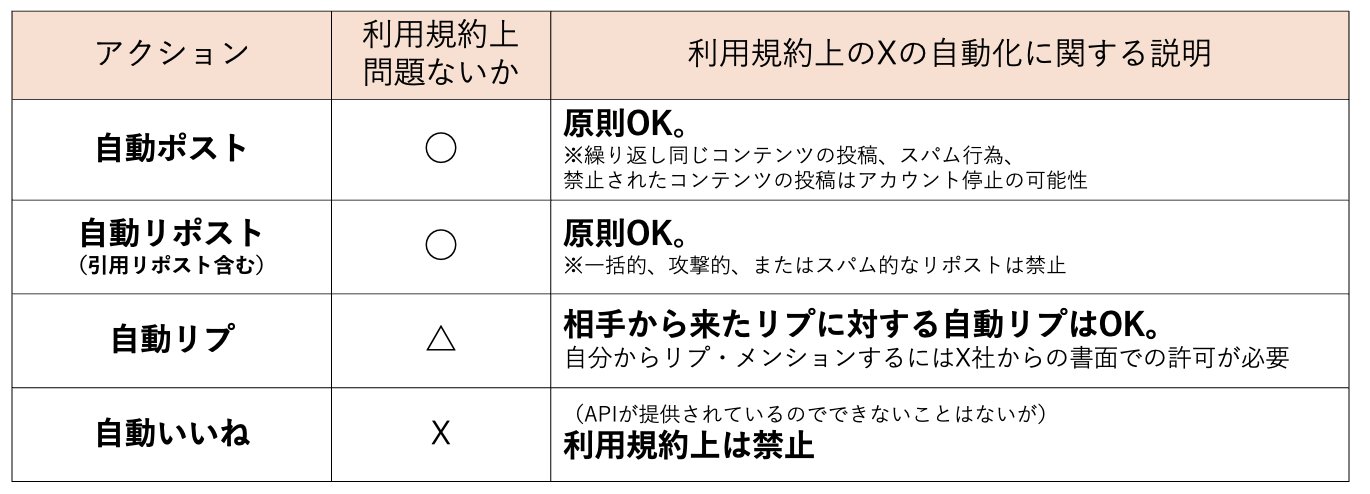
(*By the way, I've tried automated likes and automated replies with the official API to some extent, and I've never been frozen once... but it's technically against the rules, so I don't recommend it lol.)
Conversely, 'auto-posts' and 'auto-reposts' can be done without any problem as long as they don't seem 'spammy'!
In fact, while the Armadillo account was under auto-operation, it almost only did:
- Regular posts
- Quote reposts
I was experimentally trying likes and replies a bit, but since it grew more than expected with just posts and quote posts, I only tried it for about a week lol.
<Supplement 2>
Just recently, X official also announced xmcp.
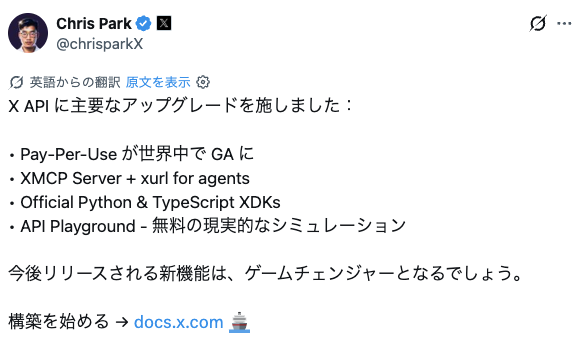
This is a mechanism to make it easier for AIs like Claude to get information from and operate X. For example, you'll be able to handle things like 'Collect posts that are currently viral about the topic of ChatGPT' on a conversation basis.
However, xmcp isn't a magical new feature; it's actually just making the X API easier to call from AI. Therefore, while it's convenient, since it uses the API internally, the cost will increase normally if you use it too much, so be careful! So, rather than doing all routine automation with xmcp, I recommend building regular automation for processes that can be ruled, and using xmcp only for situations where you want to flexibly get information or analyze with AI!
・
・
・
・
・
・
・
・
・
If you've read this far, I think you've understood the craziness of AI automation for X, and that while it's easy to try a bit, it's surprisingly deep.
So why do I think AI automation for X is so hot? It's because of
'Automating customer attraction on X.'
In the end, just by being able to attract customers:
- Products sell automatically
- Affiliates convert automatically
- You can automatically send people to other platforms like Note lol
You can create that state. In short, it's not that X auto-posting itself makes money, but that by automating customer attraction on X with AI, you can earn the maximum with minimum labor.
In fact, I was earning decently with paid Notes.
↓↓↓
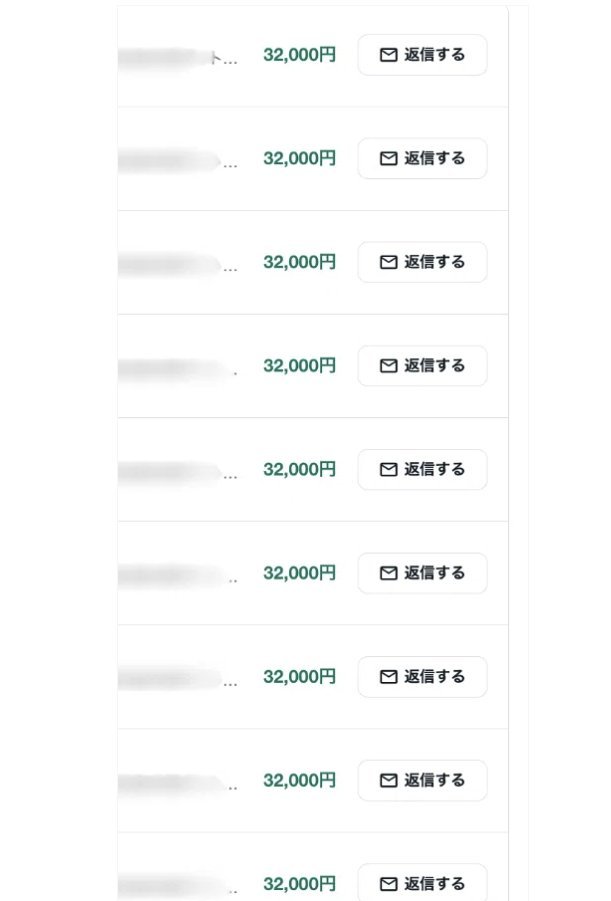
It's embarrassing to say for a top graduate of the University of Tokyo, but...
Half a year ago, I thought 'paid Notes are quite hot.' In fact, I was monetizing with the X automation I explained above using paid Notes, and I actually earned 8.8 million.
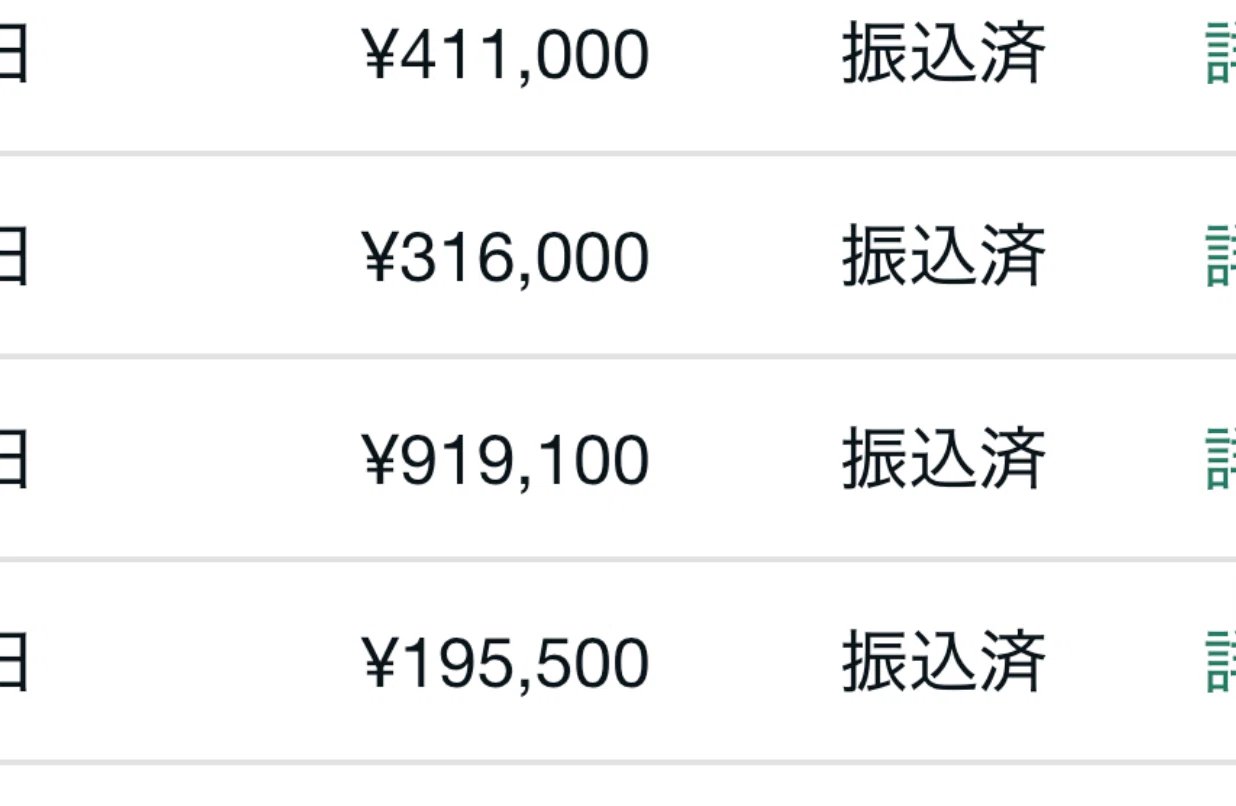
But what I found out by actually doing it is that you can't really raise the unit price much with paid Notes. Maybe 50,000 yen at most? lol.
Even looking at the timeline, the top tier of paid Notes probably makes 1M or 2M a month? Very rarely there are people selling over 5M a month on Note, but they're already non-human lol.
Ultimately, if the top tier of that side hustle isn't earning much, the general public will earn even less... So while it's easy to earn 100k a month in a side hustle where 1M a month is normal, it's quite hard to earn 100k a month in a side hustle where 50k is normal...
In my case, it was an 'easy-to-sell genre,' so even a beginner could sell decently just by letting the bot flow posts, but in genres that don't sell, it's truly hell lol.
In other words, Note isn't bad, but in terms of whether it's super profitable, it's a tough side hustle. Breaking 1M a month is a high hurdle.
So, is there a side hustle where even a beginner can earn over 1M a month, unlike Note?
You might think there's no way to earn:
- Easily
- Big
- With decent reproducibility...
・
・
・
・
・
But
I finally found it lol.
- Just keep X running every day.
With just that, a 'super hot business' where a single reward can be over 1M yen...
Actually, I tried it a bit too...
Almost 40M in March alone...
And for a certain reason, this business is perfectly compatible with X automation via Claude Code. If so, there's only one thing to do, right? lol.
To automate this super hot affiliate business that's perfectly compatible with X, I'm developing
(Provisional Name) The Influencers
an integrated platform that can operate X fully automatically.
If you're just running 2 or 3 accounts with simple settings, the code I explained above is fine, but to run 10 or 100 accounts with my X operation know-how packed in, it's obviously more convenient to be able to operate them from a management screen, so I made it lol.
In this integrated platform, if you decide on the ideas to post, for example, AI side hustles or the latest AI tool information, it's a platform that can post them fully automatically. (There's also a mode where more detailed specifications like ideas, angles, and syntax are possible.)
For example, if you set it to post 10 AI side hustle ideas a day, the AI will pick up ideas on its own every 1 to 1.5 hours, automatically create posts, and automatically post them. lol.
Using this, you can, for example, connect to your own customer attraction funnel like Note or affiliates and make money automatically lol.
Of course, to attract customers efficiently on X, you need to learn correct X operation and customer attraction skills, but once you've mastered them, you just keep piling up money fully automatically lol.
This system itself is not open to the public, and whether to sell it is undecided, but for those who are highly motivated and want to try it, I plan to provide guidance exclusively in the OpenChat, so if you're interested, please wait in the OpenChat.
↓↓↓
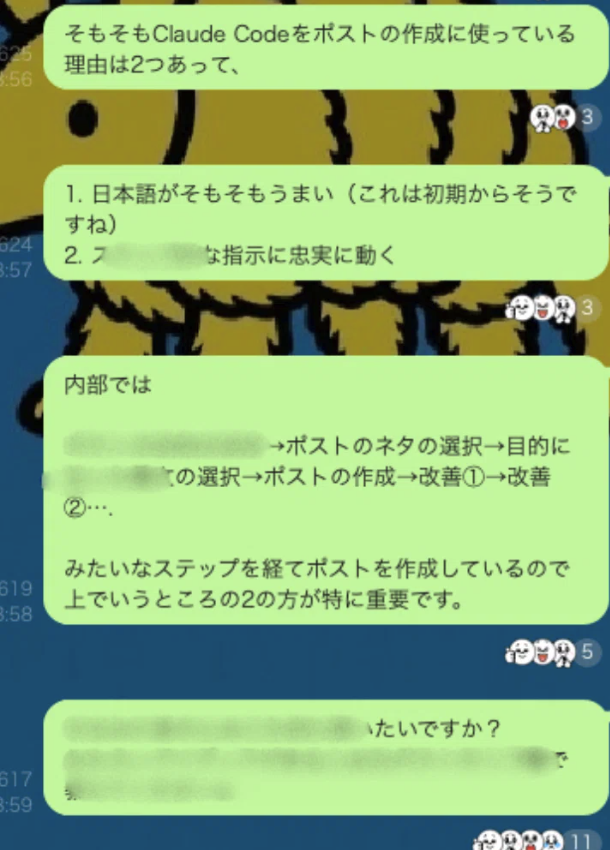
Take a look at the OpenChat 'X x AI Automation'
By the way, in the OpenChat, I occasionally put out internal information lol.
↓↓↓
Now, this AI automation of X, which looks like modern alchemy, actually has a pitfall.
That is...
As expected, if you start with a completely new account with 0 following and 0 followers, it will take quite a while to grow, and whether it grows properly in the first place becomes a game of luck. (It becomes like running a large number and hoping to hit one by chance...)
To be honest, even for me, starting in this state is tough lol.
However, there is a trick to solve this. Using that trick, I was able to start auto-operating an account and generate sales like this in 2 weeks ↓↓↓

I've lost interest in monetizing anything other than the super hot business I talked about a bit above, so I'll specially expose this trick. For those who have read this article this far and want to know this trick:
↓↓↓↓
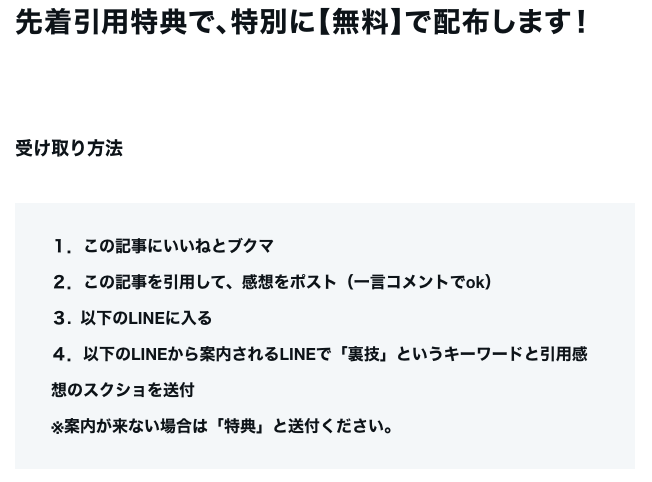
>> Click here for the LINE to receive it
Finally
Regarding auto-operation, I received several questions in the replies, so I'll answer them here:
'Isn't it a terms of service violation?'
-> Auto-posting itself is not a violation at all. However, intentional spamming or engagement manipulation with a large number of accounts, such as promoting the same URL with 100 accounts or RTing a specific account repeatedly, is of course a violation. On the other hand, as long as you operate each account independently, such as Account 1 posting about AI side hustles, Account 2 about investment, Account 3 about poems, etc., there is no problem at all.
'Will it be frozen? Banned?'
-> For the same reason as above, if you operate normally, you won't be banned.
'Don't I need to separate IPs?'
-> This is also the same; as long as you operate using the official API, you won't be banned even with 100 accounts. If you're really worried, it's possible to separate IPs for each account using Cloud Run on Google Cloud, etc. It's a bit tedious though lol.
'AI posts don't grow'
-> Bad posts don't grow. That's a joke, but in this system, I've put in the X operation know-how I've learned, so it can create posts that are quite easy to grow. Even in the last week, I've put out several fully AI posts on this Armadillo account. How many people noticed? lol.
Take a look at the OpenChat 'X x AI Automation'
That's all. Thank you for reading this long text!