Learn to Build a Pro Skill
Turn ideas or drafts into a publishable Skill
Learn to Build a Pro Skill
Turn ideas or drafts into a publishable Skill
Showcase
Description
Are you completely new to making Skills? This Skill acts like a teacher who stays with you through the entire process, guiding you to create a professional Skill on YouMind that you can truly be proud of: First, uncover your real use case and identify potential pitfalls; Three confirmation checkpoints ensure nothing is written or taken off track without your approval; Generate it using YouMind’s professional methodology, with the structure, trigger terms, and sections all meeting the requirements; Run a quality check, revise anything that falls short, and deliver only when it passes; Best for: complete beginners who have never made a Skill. Its core value is not simply “helping you chat a Skill into existence,” but guiding you to create a finished product with a complete structure, accurate triggering, and quality checks—one that is genuinely ready to use.
Related Skills
View all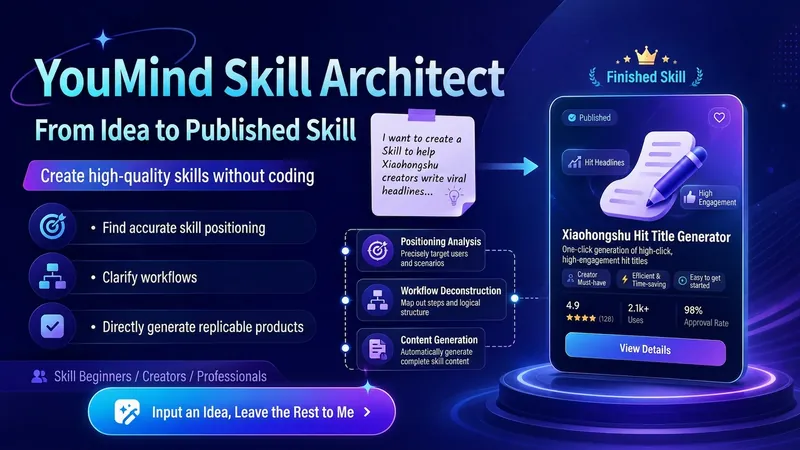
YouMind Skill Architect v2.0
Turn a vague idea into a YouMind Skill that's ready to publish. You can use it even if you don't know how to write Skills, understand prompts, or break down workflows. It will help you: Identify the right positioning: determine your target users, core pain points, and use cases truly worth building Design the workflow: break your experience into a complete workflow of "input → judgment → steps → output" Generate the finished product: write out the Skill name, subtitle, description, input hint, and full instructions for you Check quality: automatically check whether it's too broad, the input is too complex, the output is unclear, the flow is broken, or it lacks value Finish the packaging: make the Skill easier to understand, install, use, and reuse Using it is simple: Just open it and tell me: "I want to make a Skill that helps XX people solve XX problem." Even if you only have a vague one-line idea, you can get started. You'll end up with a complete, finished Skill that you can copy directly into the YouMind creation page.
 Write
WriteAFP Skill Listing Arch v8.1
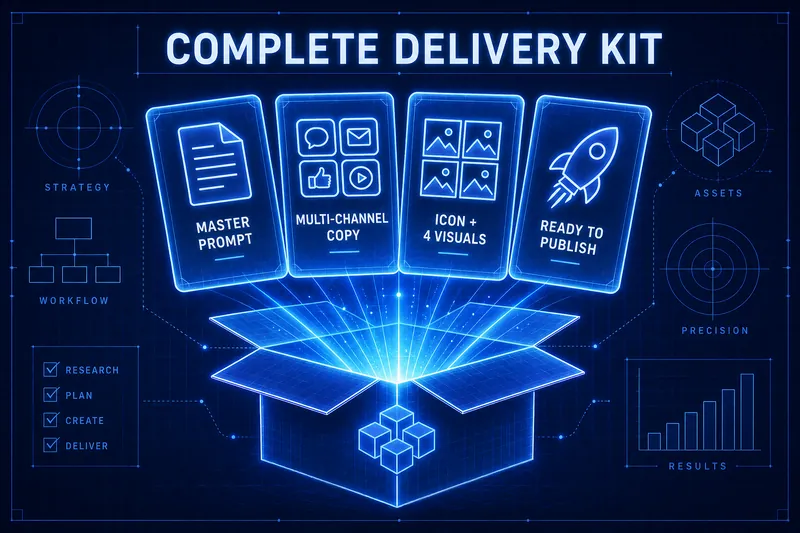
A single idea can create a complete Skill ready for listing. It doesn't just give you a prompt; it provides all the assets needed for listing in one go: 🔍 Automatic complexity diagnosis — first determines whether the task is light or heavy, then decides to go with the 3-stage lightweight version or the 6-stage heavy version, avoiding overkill. 🏗️ One-click AFP skeleton — operation protocol + numbered stages + forced stop points + status dashboard + stage inheritance protocol; industry-standard structure all set up at once, your Skill will never go off track. 🏷️ Easily name and write descriptions — apply viral naming formulas and golden description structures; names feel valuable and descriptions are instantly understandable. 📣 Four-channel promotional copy — Moments / Xiaohongshu / Community / Official Account; one set of themes automatically adapts to four tones, ready to post once done. How to use? After opening, just say 'I want to make a Skill that helps XX', and it will guide you step by step with an always-visible progress panel. At each step, just reply 'continue' or 'modify'. It includes a complete AFP methodology framework and a 15-item listing self-check list (including quality inspection and criticism rules).

YouMind Skill Cover Generator
Want to create professional and eye-catching icons and cover images for your YouMind Skill? This skill is your dedicated visual designer, intelligently generating two types of high-quality visual assets based on your Skill's name, core functions, target users, and usage scenarios. Whether it's a clean 1:1 avatar icon for your Skill or a narrative 3:2 cover image for detail pages and recommendation cards, each is carefully designed to make your Skill stand out. Simply provide a basic description of your Skill, such as 'a Skill that summarizes podcasts,' and this skill will automatically understand and complete the design direction, including core metaphors, visual subjects, color schemes, and composition, ensuring visual consistency between the avatar and cover. Even if information is incomplete, it will make reasonable assumptions and can ask clarifying questions as needed to ensure the final design meets your expectations. This skill supports a variety of visual styles, from 'minimalist tech' to 'premium product poster' to 'cute and friendly assistant.' Based on your preference or by default, it will adopt a 'premium, clean, tech-forward, modern SaaS visual style suitable for AI tool products,' delivering both beautiful and practical visual works. Ultimately, you'll get a unified and professional Skill visual identity that effectively communicates your Skill's value and attracts more users.
Information
- Version
- v5
- Last updated
- Runtime credits
- Usage-based
- Models
- Auto
