Skill Creation Guide
Skill Creation Guide
Showcase
Description
A structured 6-step Skill creation process with built-in requirement templates and a 3-iteration circuit-breaker mechanism. Step 5 automatically invokes the 'Skill Quality Detector' (9-dimension engine), catching 95% of rework. Designed for non-technical users, it outputs production-grade Skills.
Related Skills
View all
Skill Quality Detector
A 9-dimensional automated quality inspection engine covering input validation, tool invocation, output format, boundary conditions, testability, anti-patterns, prompt quality, multilingual support, and dependency chains. Input a Skill instruction, and get ✓/✗ verdicts with evidence and fix code. Supports 3 rounds of automatic repair. Suitable for quality gate scenarios like Skill creation, code review, and process design.
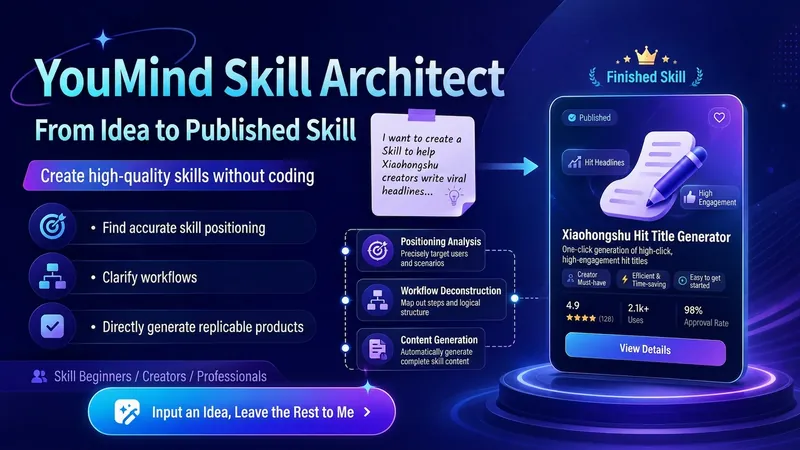
YouMind Skill Architect v2.0
Turn a vague idea into a YouMind Skill that's ready to publish. You can use it even if you don't know how to write Skills, understand prompts, or break down workflows. It will help you: Identify the right positioning: determine your target users, core pain points, and use cases truly worth building Design the workflow: break your experience into a complete workflow of "input → judgment → steps → output" Generate the finished product: write out the Skill name, subtitle, description, input hint, and full instructions for you Check quality: automatically check whether it's too broad, the input is too complex, the output is unclear, the flow is broken, or it lacks value Finish the packaging: make the Skill easier to understand, install, use, and reuse Using it is simple: Just open it and tell me: "I want to make a Skill that helps XX people solve XX problem." Even if you only have a vague one-line idea, you can get started. You'll end up with a complete, finished Skill that you can copy directly into the YouMind creation page.
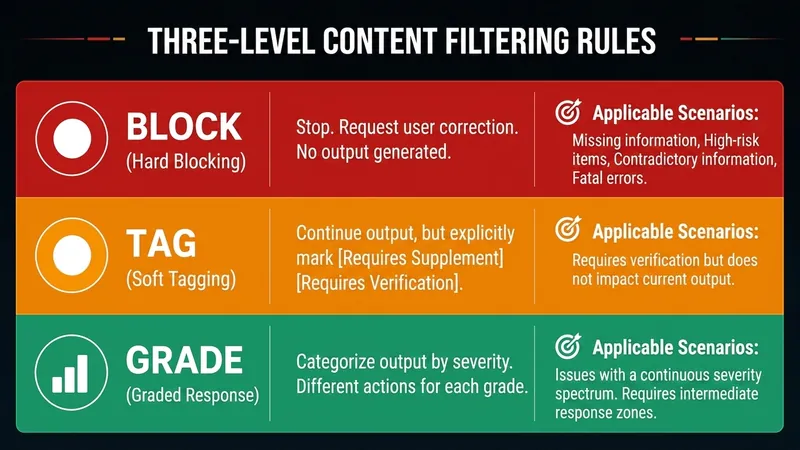
SkillDesigner:StrictBlockerUX
Have you ever encountered these problems? ❌ Your own Skill seems fine, but users encounter errors as soon as they try it. ❌ The Skill works with standard input, but crashes on edge cases. ❌ You want sub-type routing (e.g., quantitative vs qualitative papers), but don't know how to design blocking rules. ❌ The Skill either asks at every step (user fatigue) or runs fully automatic (no confirmation for high-risk actions). This Skill helps you solve: ✅ Failure mode first: Model how the Skill might fail before writing the execution flow. ✅ Strict blocking: Truly stop when information is missing or risk is high, requiring supplements—no soft markers. ✅ 7-phase dialogue: Type identification → 7D matrix → Failure mode modeling → Blocking rule design → Self-check → Creation. ✅ UX enhancement: Structured tabs to reduce cognitive load + progress anchors + positive blocking language. ✅ Interaction density matches risk: High-risk tasks have confirmation points; batch tasks don't interrupt at every step. Output includes: - AFP type identification (Academic/Speech/Safety Communication/Text Review/Skill Review/Custom) - Sub-type routing matrix (optional, for heterogeneous inputs) - Blocking rules (BLOCK/TAG/GRADE three levels + judgment cards) - Manual_Fallback degradation path - Test scenarios (scaled by complexity: Standard/Border/Blocking/Interaction/Sub-type) - Self-check list (Honesty first/Type consistency/Neutral naming/Anti-hardcoding) In a word: It is not a 'casual generation' Skill generator, but a strict design consultant that helps you design Skills that are executable, have blocking rules, have degradation paths, and are interaction-friendly. For you, if you are: 🛠️ A creator who wants to turn highly repetitive tasks into reusable Skills 🎯 An advanced user needing to design complex Skills (with sub-type routing, judgment cards) ✅ A user with strict quality requirements, not accepting 'it runs but is unstable' 📚 A YouMind user who wants to learn Skill design methodology
Information
- Version
- v1
- Last updated
- Runtime credits
- Usage-based
- Models
- Auto
