
Photo to Miniature World
Turn a photo into a miniature keepsake card.
Photo to Miniature World
Turn a photo into a miniature keepsake card.
Showcase
Description
Street corners you've visited, beloved pets at home, and little desserts too precious to eat can all become exquisite miniature scenes. Upload a photo to turn its main subject into a miniature scene with handcrafted textures, a dimensional base, and soft lighting, then arrange it alongside the photographic image as a keepsake card. Travel mementos, pet albums, and everyday collections can all begin with your own photos. You only need to upload one photo. You can also add a note such as “Keep the red umbrella,” “Title it Summer by the Sea,” or “Make it feel warmer.” Each photo is output as one complete image, with a 3:4 portrait layout by default. You can adjust the title, language, and mood. Without a photo, you can also create an AI demo card from a theme. Pick a photo from your album that you can't bear to delete and see what it looks like as a miniature world. Note: The output is an image, not a physical ornament or 3D model. Full-image generation may redraw details from the photo; preserving the original photo exactly requires separate layout. The showcase images are newly created AI demos, and complete image generation in YouMind has not yet been tested. The Skill is free to install; actual image-generation usage is subject to the platform's rules.
Recommended by
Dancang
Why we love this skill
Turns a photo into a saveable 3D miniature card, combining the original scene with handcrafted relief, material depth, typography, layout, and final-output checks.
Best for
For anyone who wants to turn travel moments, pets, or everyday photos into unique keepsake cards.
How to use this Skill
Provide your input
Upload one photo. You can also add a title, language, details to preserve, or an overall mood. If you don't have a photo, provide a creative theme instead.
Run the Skill
The system transforms the main subject into a miniature scene with handcrafted textures, a dimensional base, and soft lighting, then arranges it with the original image as a keepsake card.
Review your result
Get one complete, saveable keepsake card image in a 3:4 portrait layout by default.
Related Skills
View all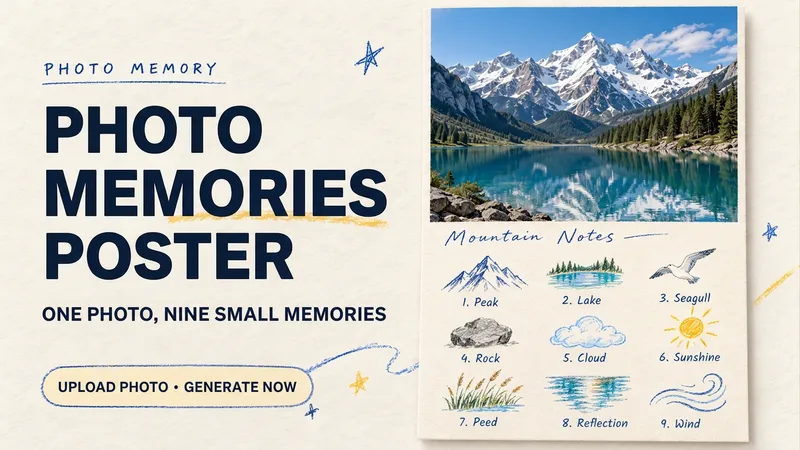 Image
ImagePhoto Memory Poster
Some photos in your album deserve to be remembered with care. Upload an original photo of a trip, a coffee break, a pet, or an everyday moment to turn it into a textured memory poster with paper grain and drawn strokes: the top half preserves the real moment, while the bottom half illustrates the details worth remembering as nine small crayon-and-colored-pencil icons. Each photo is output separately in a 3:4 portrait layout, with no multi-photo collage. The top and bottom each take up half the page, with a loose nine-grid layout, short handwritten title, and small caption, creating the feel of a private visual diary. Colors adapt to the photo instead of using a fixed scenic template. Just upload a photo and optionally add a title. The Skill extracts memorable details, creates the image, and checks the subject, nine icons, and actual layout divisions. When an image tool with reference-image support is available, it can generate the image directly. Strict layout separation and fidelity to the original photo also depend on the editing and assembly capabilities of the runtime environment; if the requirements cannot be met, this will be explained. Suitable for travel keepsakes, pet collections, lifestyle journaling, and social sharing. The showcase images are demonstrations using locally created original AI scenes, not examples from real users; on YouMind, the Skill has been trialed with input guidance for missing photos, while complete image generation still awaits testing. Image-generation usage is subject to the current platform.
 Image
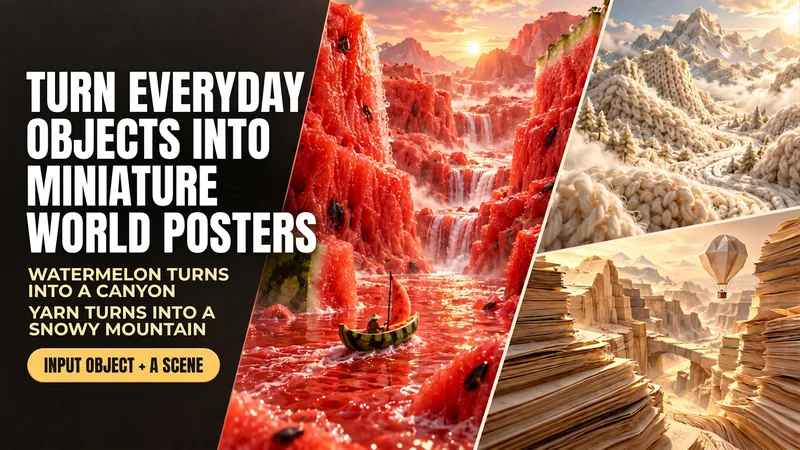
ImageEveryday Items to Mini Worlds
Enter “boating through a watermelon canyon” to generate a realistic poster made of flesh-colored mountain ranges, a juice river, and a watermelon-rind boat. This Skill transforms everyday objects such as food, yarn, and paper into miniature worlds you can explore. Simply describe “what object+what scene,” and it uses the object's real textures to arrange the terrain, lighting, and composition, then generates the image directly. Here are some ways to use it: Boating through a watermelon canyon: the flesh becomes mountains, and the rind becomes a small boat. Camping on yarn-covered snowy mountains: knitted textures form the mountain ranges, with a small campsite set up on the slopes. Hiking through coffee dunes: coffee grounds form the dunes, and coffee beans become giant boulders. Traveling through a book-page canyon: layered pages form the cliffs, while a paper hot-air balloon passes through the valley. You can start by naming just one object, and the Skill will automatically pair it with a scene. You can also upload a reference image and carry over its colors and textures. People, props, titles, and aspect ratios can all be adjusted as needed. By default, each generation produces one 3:4 portrait, text-free poster, suitable for creative visuals, social media covers, themed posters, and brand-visual inspiration. After generation, it checks the materials, composition, and unwanted elements, then makes corrections as needed. An environment that supports image generation is required; actual usage is subject to the platform's rules. The displayed images are AI-generated examples.
 Image
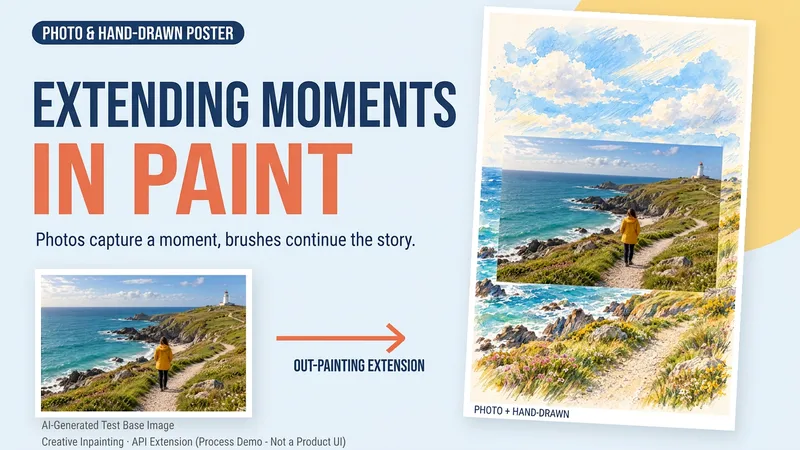
ImageDraw That Day | Photo Poster
Some photos deserve another page. Upload a travel, walking, or everyday photo to create a keepsake poster where the photo meets hand-drawn scenery. The photo preserves that moment, while watercolor and colored pencil continue the scene beyond its edges. You can get: ① A keepsake poster: 2:3 portrait format by default, with a warm paper texture and no text. ② A grounded extension: starting from the sky, coast, road, or room in your photo, hand-drawn elements echo the original setting. ③ A note about photo preservation: when compositing is supported, the photo layer can be retained; with generative editing only, details may change, and this will be explained. ④ An optional short caption: use a sentence, location, or date you provide to preserve a little of how you felt at the time. Suitable for travel memories, everyday keepsakes, and social sharing. One image by default; it does not automatically create a full storybook. The scene beyond the photo is an artistic creation, not a recreation of the actual surroundings. Generation and compositing depend on the platform's current image tools and usage limits. We do not promise that the original photo will remain completely unchanged using a generative model alone. If the tools are unavailable, this will be stated clearly and a complete prompt will be provided.
Information
- Version
- v3
- Last updated
- Runtime credits
- Usage-based
- Models
- Auto
- Use cases
- Images & designLifestyle & entertainment
- What you get
- Image
- Visual styles
- 3DCollagePaper art
