
Multi-Source Mind Map 2.0
One-click visual mind maps from any source
Multi-Source Mind Map 2.0
One-click visual mind maps from any source
Showcase
Description
Turn complex documents, web pages, or long text into clearly structured visual mind maps with one click. Whether it's academic papers, course materials, or technical documents, this tool intelligently extracts core topics and multi-level knowledge points, helping you quickly clarify the logical structure. Through in-depth content analysis of the input source, it automatically identifies section structure and key details, generating a well-organized knowledge system. This tool supports generating mind maps in multiple styles, including professional educational tree diagrams (PlantUML format) and intuitive center-radial diagrams (Mermaid format). You can directly get SVG images viewable in a browser, along with the corresponding source code files. This means you can quickly preview the results and also import the source code into XMind, FreeMind, or a Markdown editor for further editing and in-depth processing. Simply upload a PDF, Word, or text file, or provide a web link, to transform a large amount of information into a visual knowledge map. It's ideal for study notes, structured paper reading, and brainstorming presentations, making knowledge organization and sharing more efficient and professional.
Recommended by
nene@YouMind
Why we love this skill
One-click conversion of PDFs, Word docs, and web pages into professional mind maps. Supports PlantUML and Mermaid styles, with simultaneous export of SVG images and editable source code, a powerful tool for structured knowledge organization.
Related Skills
View all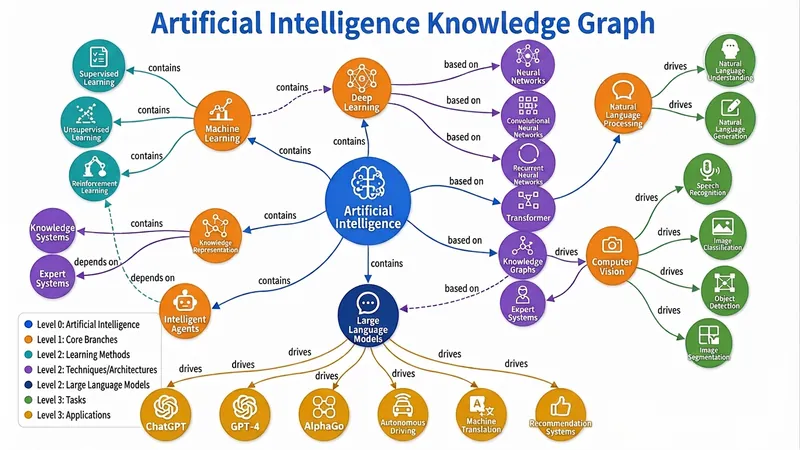
Knowledge Graph Engine
Automatically build five types of diagrams (Knowledge Graph, Mind Map, Concept Map, Flowchart/Architecture Diagram, Relation Diagram) from text, files, or topics, and output an interactive web page, static image, and visualization code all in one — a triple-threat solution built to the highest standards. Combines best practices from knowledge graph engineering and information visualization, supporting dynamic granularity control, disambiguation and deduplication, and multi-source cross-validation. Turn your words, files, or even a thought into a draggable, zoomable, searchable interactive knowledge graph in seconds, and export high-definition images and ready-to-use code with one click — this is the knowledge visualization "triple-threat" engine you've never experienced before. 🧠 What is the Knowledge Graph Engine? It's not the simple drawing tool you've seen before. It's a knowledge engineer + visualization expert hidden in your browser. Give it a textbook passage, a thesis, a PDF, or just a keyword, and it will automatically: 🔍 Extract core entities and clarify deep relationships 🧱 Build structured graph JSON (Knowledge Graph / Mind Map / Concept Map / Flowchart / Relation Diagram) 🎨 Output three top-tier forms: interactive web page + high-definition static image + Markdown/Mermaid/Graphviz code From now on, information organization doesn't rely on manual box drawing, and knowledge presentation is no longer just a static picture. ⚡ Why is it "top-tier"? 1. Fully automatic "text-to-graph" pipeline: No need to learn any modeling language or manually define nodes and connections. Just input content, and the engine automatically determines the graph type: Subject knowledge system? → Generates a semantically rich knowledge graph Reading notes deconstruction? → Generates a clear hierarchical mind map Process and decision? → Generates a flowchart/architecture diagram with branches Character relationship network? → Generates a multi-dimensional relation diagram Even if you just throw a topic word, it can independently gather information, fill in the content, and then generate the graph. 2. Triple-threat output covering all use cases: 🖱️ Interactive D3.js web page: Drag nodes, scroll to zoom, click for details, highlight related paths, keyword search... like operating a living map. Single-file HTML, no backend, can be embedded directly into any page or sent to anyone. 🖼️ High-definition static graph: Force-directed layout, color-coded categories, directly usable for thesis illustrations, PPT presentations, teaching materials — every label is sharp and readable. 📜 Visualization code: Generates both Mermaid and Graphviz source code simultaneously. Developers can directly insert into documentation, wiki, Notion, with unlimited expandability for secondary editing. 3. Ultimate user experience design: 🎨 Colors automatically mapped by entity type, hierarchy expressed intuitively by node size 🔗 Relationship labels displayed directly on curves — instantly see 'contains', 'causes', 'supports' 💡 Click any node, non-related parts auto-fade to focus on the thought path 🔄 Reset layout, search positioning, zoom and pan... all operations smooth as silk 4. Engineering wisdom balancing 'breadth' and 'depth': From entity disambiguation and deduplication to multi-source cross-validation; from hierarchical granularity control to dotted-line connections supporting cross-domain relationships — behind this are the best practices of knowledge graph engineering, not a toy but a productivity tool. 👥 Who needs it most? Teachers & Educational Content Creators: Turn entire textbook chapters into an interactive knowledge map — students click to understand concept relationships. Researchers & Students: Literature reviews no longer rely on text walls — one diagram clarifies the theoretical threads of dozens of papers. Product Managers & Enterprise Architects: System architecture, business processes, feature breakdown — instantly generate architecture diagrams, doubling communication efficiency. Readers & Lifelong Learners: Notes are no longer just outlines but explorable thought networks, letting knowledge truly 'grow' together. 🚀 Now, let your knowledge 'come alive' You give content, it gives insights. You give a topic, it gives a system. You give a requirement, it gives a complete deliverable of web pages, images, and code. This is not a feature; it's a workflow that elevates information into cognition. Let the Knowledge Graph Engine become an extension of your thinking, visualize your expertise, and reach every audience's 'aha moment.' — From today, don't 'draw' graphs, 'generate' graphs.
 Image
ImageBatch Article Illustration 2.0
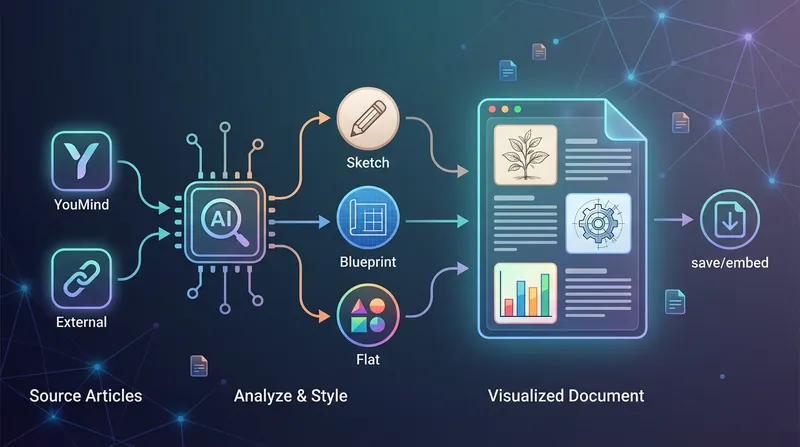
This is an intelligent visual enhancement tool designed for content creators. It deeply understands the flow of your text and automatically creates high-quality supporting illustrations for key paragraphs of your articles. Whether your content resides in a personal knowledge base or you need to process externally imported long-form articles, it accurately identifies core concepts, turning abstract text into concrete visual language and significantly improving the reading experience and shareability of your content. The tool offers three distinct visual styles to suit different creation scenarios: a fresh and lively minimalist hand-drawn style fits essays and popular science; a rigorous and professional architectural blueprint style is the ideal choice for technical documents and research reports; and a modern flat illustration style perfectly matches the aesthetic needs of social media accounts and knowledge notes. For long-form content, it also intelligently suggests illustration layouts to ensure a reasonable visual distribution with key points highlighted. During generation, you can flexibly choose how images are produced. You can have the generated illustrations seamlessly embedded directly into the original document paragraphs for automated layout, or you can opt to receive a standalone image resource package for manual distribution. This end-to-end collaboration, from content analysis to visual generation, makes your writing more impactful and complex ideas instantly clear.
 Research
Extract a Book's Value 2.0
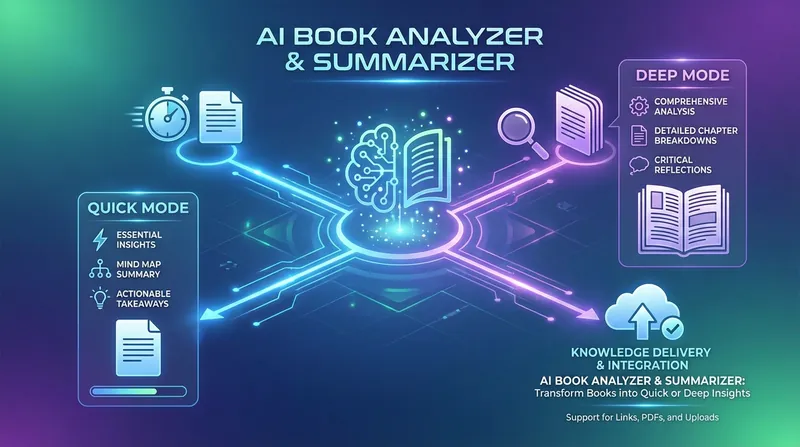
A deep-reading expert that helps you absorb knowledge efficiently, it focuses on transforming long books or documents into structured core-value reports. Whether you need to quickly grasp a book's main ideas or pursue systematic deep learning, it accurately analyzes the original content to extract key arguments, methodological frameworks, and inspiring actionable points. This skill offers two custom reading modes: Quick Mode generates concise summaries with mind-map structures, perfect for reviewing key points in a short time; Deep Mode provides detailed reading notes, including in-depth chapter analysis, core insight breakdowns, and notable quote excerpts, helping you build a complete personal knowledge base. It can process uploaded PDF or Word documents as well as directly parse web content, making sure no key details are missed. Beyond high-quality notes, it also turns book theory into immediately actionable recommendations for life or work. Whether you're doing academic research, exploring business, or pursuing personal growth, it becomes your most reliable partner for internalizing knowledge—ensuring every book's value is fully extracted.
Information
- Version
- v6
- Last updated
- Runtime credits
- Usage-based
- Models
- Auto
