
HR Flowchart Specialist
Turn HR SOPs into editable diagrams
HR Flowchart Specialist
Turn HR SOPs into editable diagrams
Showcase
Description
A dedicated flowchart skill for HR teams (v1.1). Paste SOP text or organization/role information—or upload a policy document—and the skill automatically determines the diagram type: HR process content produces a swimlane flowchart, while organization, headcount, and talent information produces an org chart. The process has four steps: ① Conversational needs assessment that identifies missing details and guides you to complete the process; ② Generation of a “structural specification (IR)” as the single blueprint for swimlanes, nodes, connectors, and visual mapping; ③ Compilation into an editable Excalidraw file that preserves element IDs, text containers, and arrow bindings, followed by PNG/SVG export. Before delivery, a “validation gate + render self-check” helps prevent text overflow, dangling arrows, and isolated nodes; ④ Incremental editing for changing text, moving, resizing, restyling, deleting, or adding elements—only the specified nodes are changed, leaving the rest of the diagram untouched. It includes a library of common HR process families and consistent visual guidelines, using Peking University red (#B31B1B) as the primary color. It solves the HR pain points of time-consuming manual diagramming and having to rework an entire diagram to change one node: diagrams are made for editing, images are made for sharing.
Related Skills
View all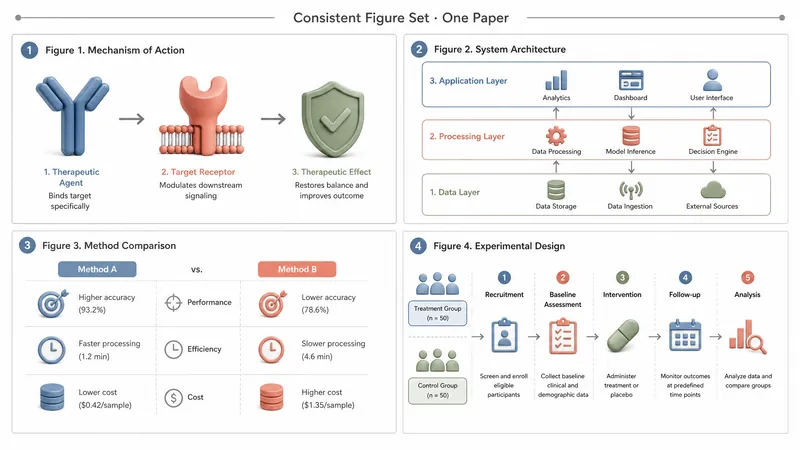
SCI Paper Figure Workflow Pro
📌 A paper has a dozen figures, all with different styles. Changing one label means redrawing the whole thing? Reviewers hate schematics that 'look right but are actually wrong.' ✨ From a single figure to the entire paper's illustrations, one workflow produces them all — consistent style, correct logic, ready for submission. 🎯 Core Advantages 1. 10 figure types: 7 core types + system architecture diagrams / roadmaps & timelines / network diagrams, covering everything from mechanisms to systems. 2. 3 output styles × multiple ratios: SCI color (colorblind-friendly) / black and white print / presentation poster. Single-column, double-column, timeline — one-click adaptation. 3. Consistent series style: Anchored by Nano Banana Pro reference images, multiple figures in a paper share the same visual language. 4. Local refinements: Edit labels, swap icons, adjust a module locally — no need to redraw the entire figure. 5. Quality guardrails: English term proofreading + arrow logic, hierarchy, and step consistency checks to prevent 'looks reasonable but is wrong' errors. 6. Mount your own custom layout templates and color schemes — output that others can't copy. 📱 Use Cases SCI/EI submissions, graduation theses, grant proposal figures, review graphics, lab showcases. Quality results can be distributed on Xiaohongshu, WeChat Official Accounts, Zhihu for lead generation. 💡 Don't let figures hold up your submission — leave the drawing to the workflow, you just focus on the research.

Research, Course & Media
Research, Teaching Reform, Course Development & Media Visual Generator is a visual design Skill for research and teaching reform charts, social media visuals, and course development diagrams. It first identifies the visual type, offers options from suitable structure or style libraries, and then presents a complete design plan. It generates the visual only after receiving the user's explicit approval, and checks the content, relationships, Chinese text, composition, people, and visual quality before delivery. Research, Teaching Reform, Course Development & Media Visual Generator can turn research materials, course content, and social media topics into clear, polished visual concepts that match your personal aesthetic. It supports technical roadmaps, theoretical mechanism diagrams, research framework diagrams, course system diagrams, role–competency–course mapping diagrams, WeChat Official Account header images, knowledge infographics, scene illustrations, and multipage graphic cards. The Skill first translates the content into “topic—nodes—relationships—hierarchy—capacity—medium,” then recommends 3–5 suitable structures or styles and presents the composition, color palette, materials, lighting, text treatment, rendering method, and risks. It does not generate images without user approval. After the user changes the content, structure, style, color palette, or dimensions, it updates the plan and waits for approval again. Research and course diagrams prioritize editable, deterministic rendering with accurate relationships. Social media and scene visuals use text-free image generation with reliable text overlays.
 Video
VideoSpark | Video Diagram Maker
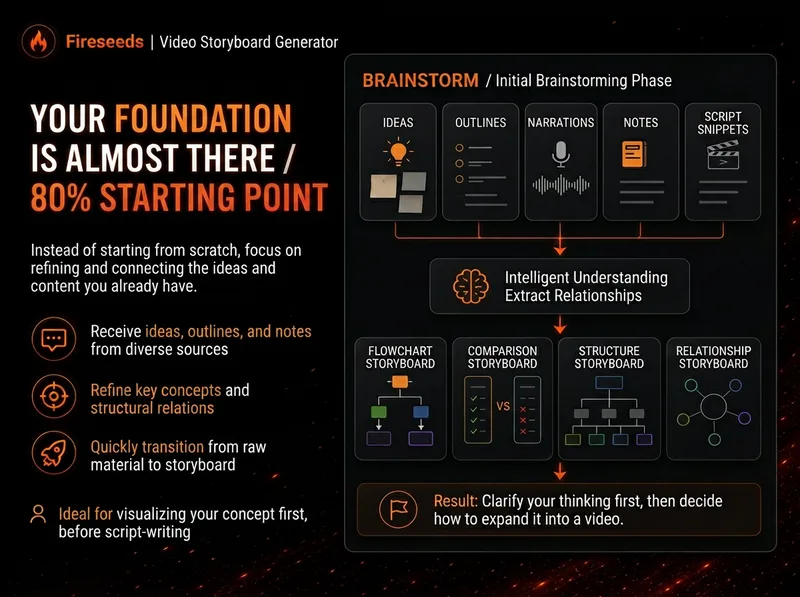
Many videos don’t lack content—the content is simply too abstract or dense. Viewers understand one sentence, then forget it by the next. “Spark | Video Diagram Maker” takes your ideas, brainstorms, outlines, scripts, transcripts, or articles and first breaks them down into concepts that are genuinely worth visualizing. It then determines whether they are best expressed as a process, comparison, architecture, hierarchy, cycle, branch, decision tree, or another diagram structure. It won’t draw just to hit a quota, or cram complex content into one cluttered infographic. Multiple diagrams maintain the same visual language, naming, and semantic color system, making them easy to insert into videos as an explanatory framework. Especially useful for: Explaining complex concepts Breaking down workflows Comparing two methods Showing system structures Clarifying cause-and-effect relationships Turning a long brainstorm into a set of visual nodes for a video The default output is a 16:9 static diagram. If the runtime environment cannot provide an editable Excalidraw source file, this will be stated clearly; static images will never be presented as .excalidraw files. Use cases Use case 1 | Turn a brainstorm into diagrams You only have a long stream of spoken ideas, without a complete script. The Skill identifies the points most worth drawing and organizes them into a set of diagrams with a clear presentation order. Use case 2 | Turn a script into visual nodes for a video You already have a complete script but don’t know where to add visuals. The Skill determines which sections are worth visualizing and selects suitable diagram types. Use case 3 | Explain complex concepts For example: how an AI Agent works, why a workflow matters more than a one-off demonstration, how a business model operates, or which layers make up a product architecture. Use case 4 | Break down a workflow or process For example: topic pool → research → Hook → script → production → review. Use case 5 | Make comparisons For example: no workflow vs. a workflow; traditional methods vs. AI methods; one-time success vs. stable, repeatable results.
Information
- Version
- v4
- Last updated
- Runtime credits
- Usage-based
- Models
- Auto
