Multi-Brand Podcast Shownotes
Turn Feishu or Tongyi SRT into shownotes
Multi-Brand Podcast Shownotes
Turn Feishu or Tongyi SRT into shownotes
Showcase
Description
This podcast shownotes writer supports switchable brand packages. Input an SRT transcript plus a content script, and it outputs title candidates with a top pick, an intro, a timestamped timeline, and web-verified new-knowledge terms — all following the selected brand's fixed template (default: Shougong Daji). Show name, host names, and recurring segment images are drawn from the brand package, with placeholders left for anything missing. Adding a new brand is as simple as appending a brand package.
Why we love this skill
Strictly separates a general shownotes methodology from switchable brand assets, using SRT timeline and script structure to produce titles, intros, timelines, and new knowledge entries. Retains placeholders for missing info and offers consolidated prompts, balancing efficiency, accuracy, and brand consistency.
Related Skills
View all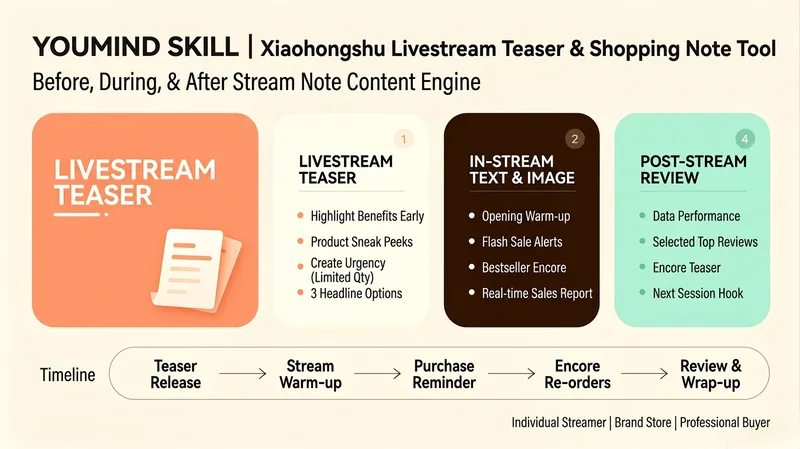
Xiaohongshu Live Notes
An end-to-end live content engine built for Xiaohongshu live commerce hosts, brand stores, and buyer teams. This Skill is more than simply "writing a live stream preview." It is a complete live note content matrix covering three stages: before, during, and after the live stream: 📢 Live stream preview: Go beyond telling followers "what time the stream starts." Increase booking conversions by leading with benefits ("Buy one, get one free storewide"), teasing featured products ("This is the first time this XX product is appearing in our live stream"), and creating urgency with limited-time, limited-quantity offers ("The first 50 orders get XX"). Pair these with attention-grabbing cover copy and precise hashtags. Generate three title options using different strategies—mystery, benefits, and product teasers—for users to choose from. ⚡ Live stream posts: Prepare 3–5 image-and-text posts to publish during the live stream, including warm-up posts ("We're live! Today's benefits are huge"), flash sale reminders ("3 minutes left on the countdown! XX is only XX yuan"), best-seller restock announcements ("So many requests! We're adding 50 more orders for XX"), and real-time updates ("More than XX orders in the first hour!"). Each post includes the best time to publish, helping note traffic continuously direct viewers to the live stream. 📊 Live stream recap: Automatically generate a recap note template after the stream, including performance data (GMV, order volume, and viewers), selected positive user feedback, best-seller restock previews, and a teaser hook for the next live stream to maximize the long-tail value of each session. ⏰ End-to-end timeline: Provide a complete schedule from publishing the preview through wrapping up the recap, ensuring that note content reaches target users at each key moment. Whether you are an individual host just getting started, a brand store that needs standardized operations, or a professional buyer team focused on maximizing GMV, this Skill helps you build a complete live note content matrix and double the traffic value of every live stream.
Podcast Production Pipeline
Turn a piece of written material, an article, a note, or a topic into a publish-ready solo podcast in Chinese. The Skill first understands the source, assesses the right tone, and recommends a narrator voice and show structure. After confirming with you, it writes a conversational monologue script. Once the text is approved, it generates the complete audio episode, handles loudness and chapter packaging, and assembles a full publishing package—including the finished audio, transcript, chapter timeline, title and description, platform-specific copy, cover art, and publishing guidance. It pauses for your confirmation at key points throughout, because revising is much cheaper than starting over.
 Video
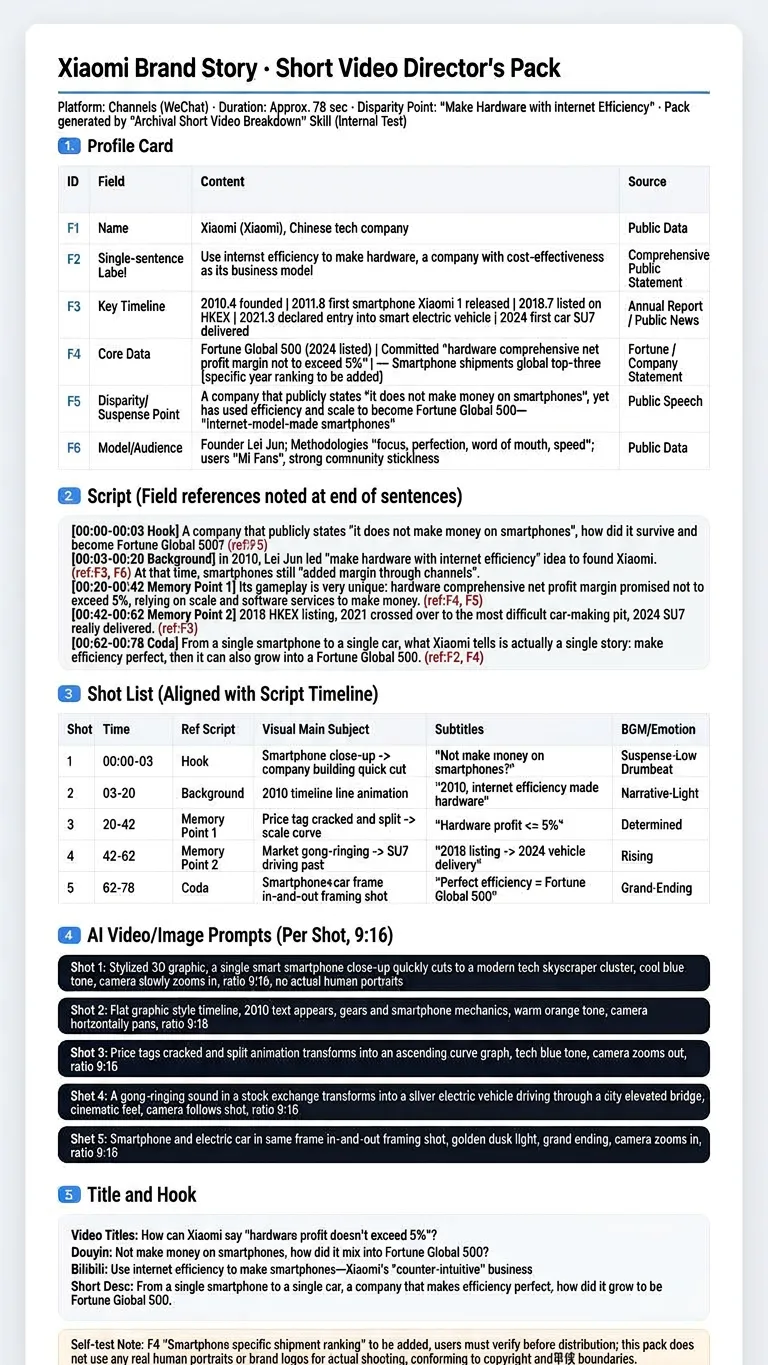
VideoUniversal Video Generator
Transform any person, brand, institution, or city into a verified profile card, then generate talking-head scripts, storyboard sheets, AI video generation prompts for every shot, and multi-platform hooks. Get a complete director pack ready for filming or feeding into Kling, Jimeng, or Runway. The workflow goes from topic input to profile card creation, followed by scripts, storyboards, prompts, and titles. Equip yourself with a data-driven short video production tool that avoids fabricated details and helps you stand out.
Information
- Version
- v2
- Last updated
- Runtime credits
- Usage-based
- Models
- Auto
