Configuration techniques to turn Claude into your "private management consultant"
What executives should do in the first 15 minutes
Many business owners use ChatGPT extensively, but when it comes to Claude, the story changes.
Most people use it with the settings left blank, thinking only that "it's made by Anthropic" or "it's good at writing."
However, Claude has structural features that make it a step easier to use than ChatGPT as a partner for management decisions and strategic thinking. Whether you can unlock those features depends on whether you finish the settings in the "first 15 minutes."
This time, for startup and SME owners, I will summarize the configuration techniques to turn Claude from a "general-purpose chatbot" into a "partner who understands your mind" in a copy-pasteable format.
━━━━━━━━━━━━━━━━━━
■ Why Claude for Executives
━━━━━━━━━━━━━━━━━━
First, let's clarify why you should choose Claude as your "management partner" instead of ChatGPT. If you don't understand this, the intent of the settings will waver.
There are three reasons:
・Strong in long-form structural thinking
It is suitable for tasks involving long documents like business plans, contracts, and proposals while maintaining context.
・Relatively little "flattery"
While ChatGPT tends to start with affirmations like "That's a great question!", Claude is relatively straightforward in pointing out issues or offering counterarguments. This is a crucial quality for a sounding board for management decisions.
・Memory function "explicitly shows what it's using"
When Claude refers to past conversations, it explicitly states, "Regarding the matter of XX you mentioned earlier." It's easy to grasp what it remembers and what it has forgotten, which directly links to reliability for a business owner.
Conversely, if you don't have settings that leverage these characteristics, you are throwing away more than half the benefits of using Claude.
Before getting into the main topic, the first and most important setting you must configure is to prevent "information leakage" and "Anthropic automatically learning your conversation content."
If you neglect this, information leakage could occur without you realizing it!
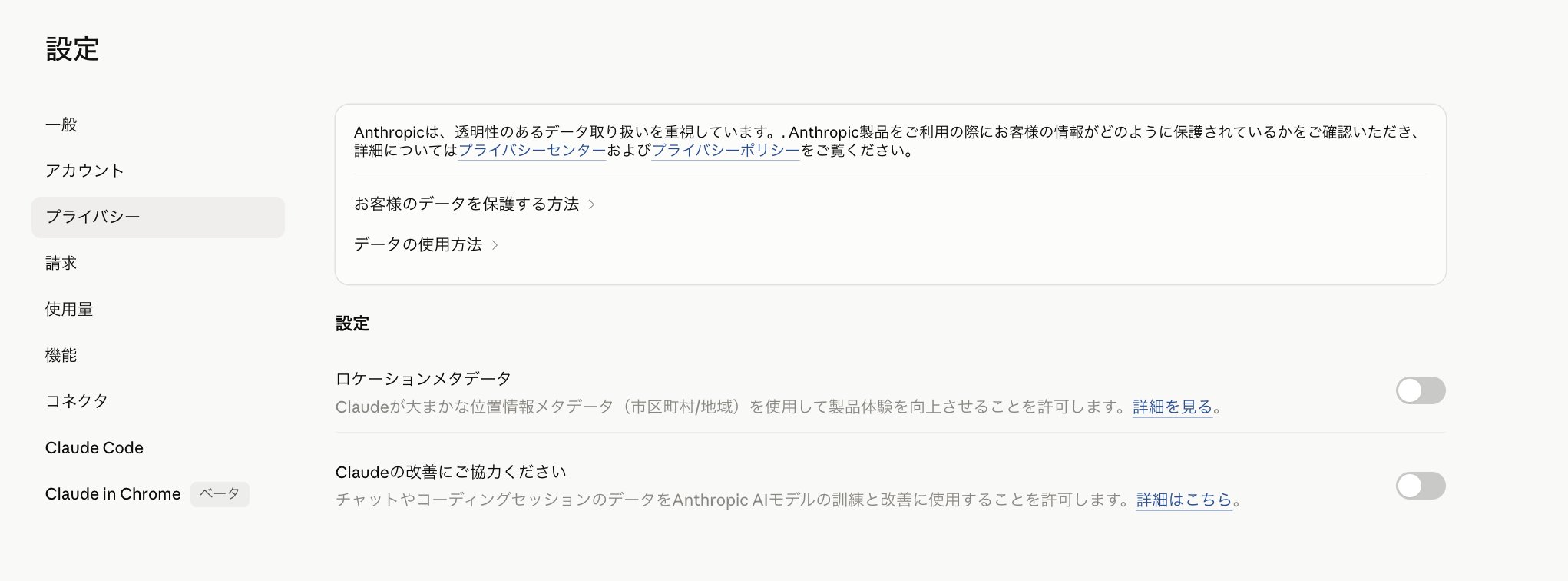
The procedure is:
Tap the icon in the bottom left → Settings → Privacy
Once you reach this screen, be sure to turn OFF the following two items:
- Location metadata
- Help improve Claude
Turn them OFF, not ON!
Now the risk of information leakage is prevented. Let's move to the main topic!
━━━━━━━━━━━━━━━━━━
■ What are Claude's Customization Features?
━━━━━━━━━━━━━━━━━━
Claude's customization has four major layers. It has more layers than ChatGPT, so let's organize them first.
▼ Layer 1: Profile Preferences
・Location: Settings → Profile
・Scope: Automatically applied to all conversations
・Use: Unchanging rules like profession, role, and communication style
・Available on all plans (including free)
▼ Layer 2: Projects
・Location: "Projects" in the sidebar
・Scope: Applied only to conversations within that project
・Use: Instructions and materials for specific cases or clients
・Available on all plans (Free plan can create up to 5)
▼ Layer 3: Styles
・Scope: Can be switched per conversation
・Use: Change the output format or tone depending on the situation
・Available on all plans
▼ Layer 4: Memory
・Scope: Context automatically accumulated as conversations repeat
・Use: Ongoing project status, preferences, and current cases
・Available on all plans (including free) from March 2026
The basic approach is to use "Profile Preferences for unchanging rules," "Projects for specific cases," "Styles for specific situations," and "Memory for natural accumulation."
Executives should first start with Layer 1: Profile Preferences.
Just spending 5 minutes refining this will raise the quality of all conversations.
━━━━━━━━━━━━━━━━━━
■ 4 Components to Master in Profile Preferences
━━━━━━━━━━━━━━━━━━
Unlike ChatGPT, Claude's Profile Preferences are not divided into "About you" and "How to respond." It's just one free-text field.
Because it's highly flexible, it's easy to get stuck not knowing what to write, so let's decide on a structure.
For executives, assembling it with these 4 elements is most efficient:
- Who you are and what you do (2-3 sentences)
- How you want it to respond (tone, length, format)
- What tools you use and who your audience is (tools, customer persona)
- What you want it to avoid (write specifically in positive terms)
The target word count is about 500-800 Japanese characters. Being too long is counterproductive. Since Profile Preferences are loaded at the start of every conversation, writing too much will squeeze the capacity available for the main topic.
━━━━━━━━━━━━━━━━━━
■ Profile Preferences Template for Executives (Copy-Paste OK)
━━━━━━━━━━━━━━━━━━
Here is the main part. I've prepared settings that startup and SME owners can use as-is. Just replace the [ ] parts with your own information.
To set it up:
Tap your icon in the bottom left,
Go to Settings → General → Instructions for Claude and enter it there.
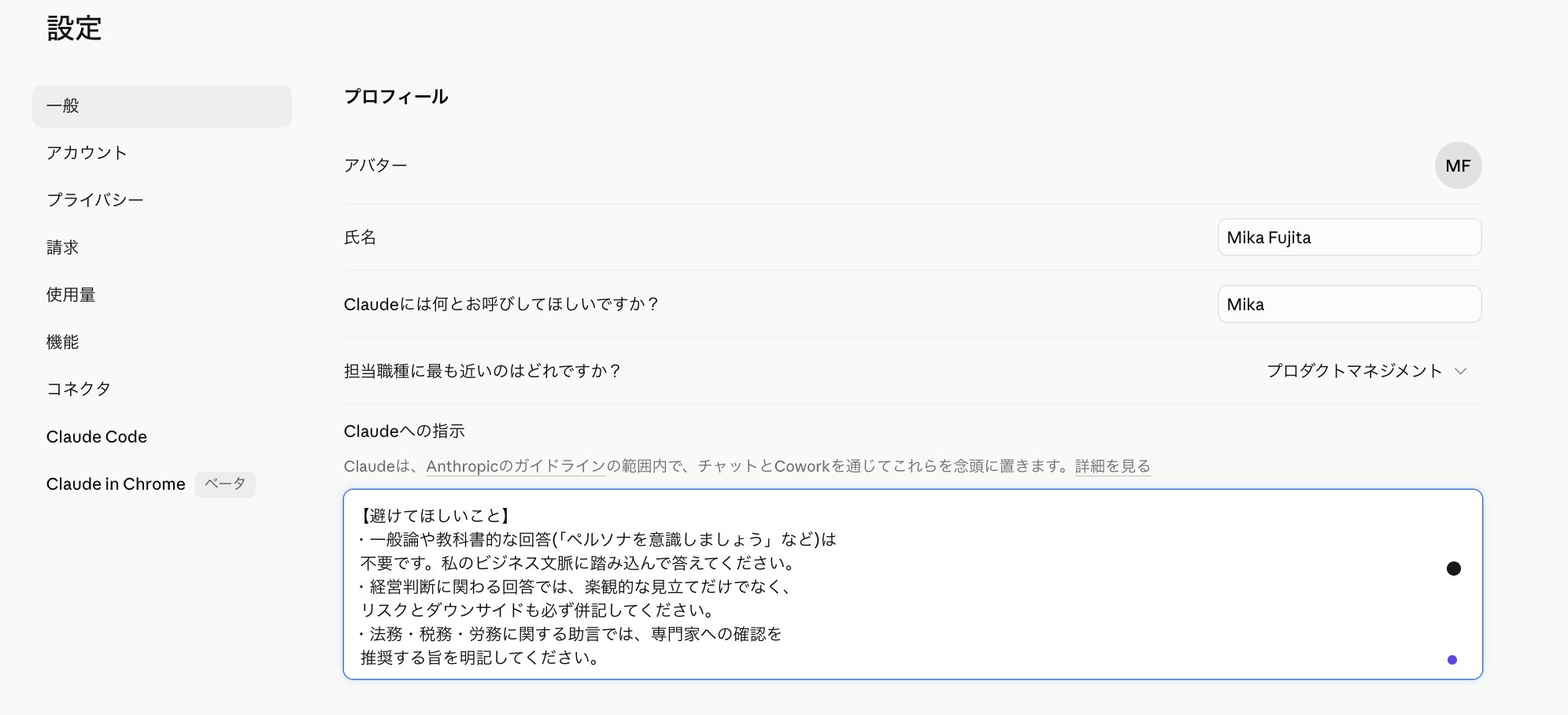
━━ Copy from here and modify as needed ━━
【About Me】
I am the representative of [Company Name], operating in [Industry/Business Content].
With [Number] employees and annual revenue of [Scale], I personally handle all management judgments and major decision-making.
Our customers are primarily [Target Customer Persona], and the unit price of our products/services is [Range].
【Response Rules】
・Write the conclusion first (within 2-3 sentences).
Follow it with the rationale and specific measures.
・Omit clichés and preambles like "Of course" or "That's a wonderful question."
・Use bullet points and tables actively to answer in a visually easy-to-grasp format.
・Clearly distinguish between facts and assumptions. If you are not certain, specify "Certainty: High/Medium/Low" or "This is an assumption."
・Honestly answer "I don't know" for things you don't know. Do not fill in with guesses.
・Do not flatter my opinions; feel free to point out logical holes or oversights. I do not need answers that just agree with me.
【Tools & Environment Used】
・Main tools: [e.g., Notion, Slack, Google Workspace, freee, etc.]
・Business partners and customers are mainly in Japan, and Japanese business customs and laws (Companies Act, Tax Law, etc.) are the premise.
【Things to Avoid】
・Generalities or textbook answers (e.g., "Be aware of personas") are unnecessary. Please answer by diving into my business context.
・For answers involving management decisions, always list risks and downsides alongside optimistic outlooks.
・For advice regarding legal, tax, or labor matters, clearly state that confirmation with a specialist is recommended.
━━ End of copy ━━
This template incorporates requirements specific to executives, such as "flattery is unhelpful," "hiding risks is problematic," and "it's unusable if not based on Japanese law."
━━━━━━━━━━━━━━━━━━
■ Additional Settings for Executives Aiming Higher
━━━━━━━━━━━━━━━━━━
While the basic template is practical enough, I recommend the following additional settings for those who want to use Claude at a management consultant level.
▼ Structural Thinking Instructions
For questions regarding important management decisions, please answer in the following order:
- Conclusion (2-3 sentences)
- Rationale for judgment (cite data or examples if available)
- Specific execution steps
- Alternatives (if there are multiple options)
- Risks and conditions under which assumptions fail
- What I should check or verify next
This structure is close to the report format of foreign consulting firms. Giving Claude a thinking template raises the accuracy of its answers.
▼ Hallucination (Misinformation) Suppression
・For content requiring the latest information or fact-checking, please perform a fact-check via web search.
・If numerical calculations or character counts are needed, please calculate using code.
・If there is a source for the information, please specify the source.
Although Claude has relatively few hallucinations, they are not zero. Facts directly linked to management decisions, such as laws, tax rates, competitor information, and the latest industry data, should be mandated for verification.
▼ Executive-Specific Context Settings
・If I say "I want to use you as a sounding board," do not provide a conclusion; focus on providing questions, counterarguments, and different perspectives on my thoughts.
・If I say "I want to decide," provide a clear recommendation and its rationale.
Executives move between "expansion mode" (thinking) and "decision mode" throughout the day. If you teach Claude this distinction, you will get the desired response in one go.
━━━━━━━━━━━━━━━━━━
■ How Executives Should Use the Project Feature
━━━━━━━━━━━━━━━━━━
After the initial user settings, the next thing to tackle is Projects.
For executives, the following divisions are practical. Simply put, it's like dividing folders by task and creating rules or assigning specific tasks to each.
・"Business Strategy" Project
A place for thinking about everything related to the business, such as mid-to-long-term plans, KPI design, and organizational charts.
・"Major Client A" Project
Transaction history, proposals, and meeting minutes for specific important customers.
・"Recruitment & HR" Project
Job descriptions, interview records, and evaluation system design.
・"Contracts & Legal" Project
Contract drafts and review history.
・"Personal Knowledge" Project
Reading notes, industry articles, and accumulation of your own thoughts.
Within a project, you can upload related materials (PDF, Word, minutes, etc.). Claude will answer while referring to those materials, so you don't have to repeat the background explanation every time.
The free plan allows up to 5 projects, and the paid plan has no limit.
━━━━━━━━━━━━━━━━━━
■ Dealing with the Memory Function
━━━━━━━━━━━━━━━━━━
The memory function, which became available even on the free plan from March 2026, is convenient for executives but requires caution. Regarding the memory function, Claude will automatically remember your conversation content without any special settings.
Memory is a feature where Claude automatically remembers information that naturally comes up in conversation. For example, if you say "We are BtoB with 30 million monthly revenue," it will remember that and reflect it in future conversations.
However, memory has some limitations:
・It doesn't remember the "reason for the decision"
Articles explaining the memory function point out that it might remember "We use Postgres" but not "Why we chose Postgres over MySQL."
・Managed separately from conversations within projects
Things discussed within a project are not carried over to conversations outside the project.
・It might remember unintended information
Since it even remembers things said in small talk, I recommend periodically checking and editing the content in "Settings → Features → Memory."
In the case of executives, there are likely many things you don't want left in memory, such as competitor info, highly confidential customer info, or M&A deals under consideration. It's safer to get into the habit of saying "Please do not remember the content of this conversation" before important talks or manually deleting items from the memory settings.
━━━━━━━━━━━━━━━━━━
■ 5 Configuration Mistakes to Avoid
━━━━━━━━━━━━━━━━━━
We've covered what to do, but finally, let's organize what NOT to do. If you get the settings wrong, the quality of the answers will actually drop.
▼ Mistake 1: Writing only in negative terms
NG: "Don't write long preambles," "Don't flatter me."
OK: "Write the conclusion within the first 2 sentences," "Feel free to point out logical holes."
AI tends to understand better when you write "what you want it to do instead" in positive terms rather than just "what you want it to stop."
▼ Mistake 2: Instructions that are too abstract
NG: "Please answer professionally."
OK: "Avoid subjective opinions and provide data or examples as evidence."
The definition of "professional" varies by person. If you don't give Claude specific actions, the interpretation will waver.
▼ Mistake 3: Cramming too many characters
Since Profile Preferences are loaded at the start of every conversation, writing too much will squeeze the capacity for the main topic. The guideline is 500-800 characters. For anything more, distribute it to the instruction fields of Projects.
▼ Mistake 4: Not writing the target (customer persona)
Many executive questions assume "who you are doing what for." If the customer persona isn't written, Claude defaults to generalities for the masses. Just adding one line like "The target is XX" significantly changes the accuracy of the answer.
▼ Mistake 5: Leaving settings as they are
It's a common pattern for the business phase and customer base to change while the Profile Preferences remain as they were a year ago. Please review them once a month, even for just 5 minutes.
I recommend asking Claude directly:
"Looking back at our recent conversations, please point out any gaps, contradictions, or points for improvement in my current Profile Preferences."
Having Claude itself suggest improvements is the most efficient review method.
━━━━━━━━━━━━━━━━━━
■ Priority of Settings: Step-by-Step Guide
━━━━━━━━━━━━━━━━━━
For those who say "I can't do it all," I've prioritized them.
▼ What to do in the first 5 minutes
Copy and paste the template introduced above into Profile Preferences and replace the [ ] parts with your own info. This alone will raise the quality of all conversations and eliminate the need for background explanations every time.
▼ What to do in the next 5 minutes
Add "Structural Thinking Instructions" and "Sounding Board/Decision Mode Switching." This will make Claude return answers that follow an executive's thought process.
▼ What to do in the last 5 minutes
Create 2-3 projects for major themes and upload related materials. Prioritize themes you use continuously (business strategy, major clients, recruitment, etc.).
━━━━━━━━━━━━━━━━━━
■ Finally
━━━━━━━━━━━━━━━━━━
Whether it's ChatGPT or Claude, an unbridgeable gap will form after one year between those who use it with blank settings and those who took 15 minutes to set it up.
This isn't a matter of talent or IT literacy; it's just the difference of whether you put in the effort for those first 15 minutes.
If you consider an executive's time to be worth 10,000 yen per hour, the first 15 minutes is only a 2,500 yen investment. If that investment saves 10-30 minutes every day and improves decision accuracy, the return is on a different scale.
Start by copying and pasting the settings from this article today.
*This article is based on Claude's specifications as of May 2026.