A GTM team looks like a sending operation. Most of its real work is judgment: which company is worth a message this week, what to say that proves you noticed, which no-show to chase, what actually moved the pipeline.
The sending was always the cheap part. The judgment is what you used to need a team for, and it is exactly what one person plus Claude Code can now run end to end.
So stop thinking in headcount and start thinking in jobs.
A GTM team is a list of them, and most are the same shape: read a pile of data, make a call, write something, follow up, and remember what happened.
Wire each job to an agent, give them one shared memory, and put them on a schedule. People get a UX, software gets an API, an agent gets a command line, so the whole team runs from one cron line at eight in the morning. Every morning it reports in, and your work turns into editing instead of operating.
Below is the build, seat by seat, with the prompt I paste into Claude Code for each one.
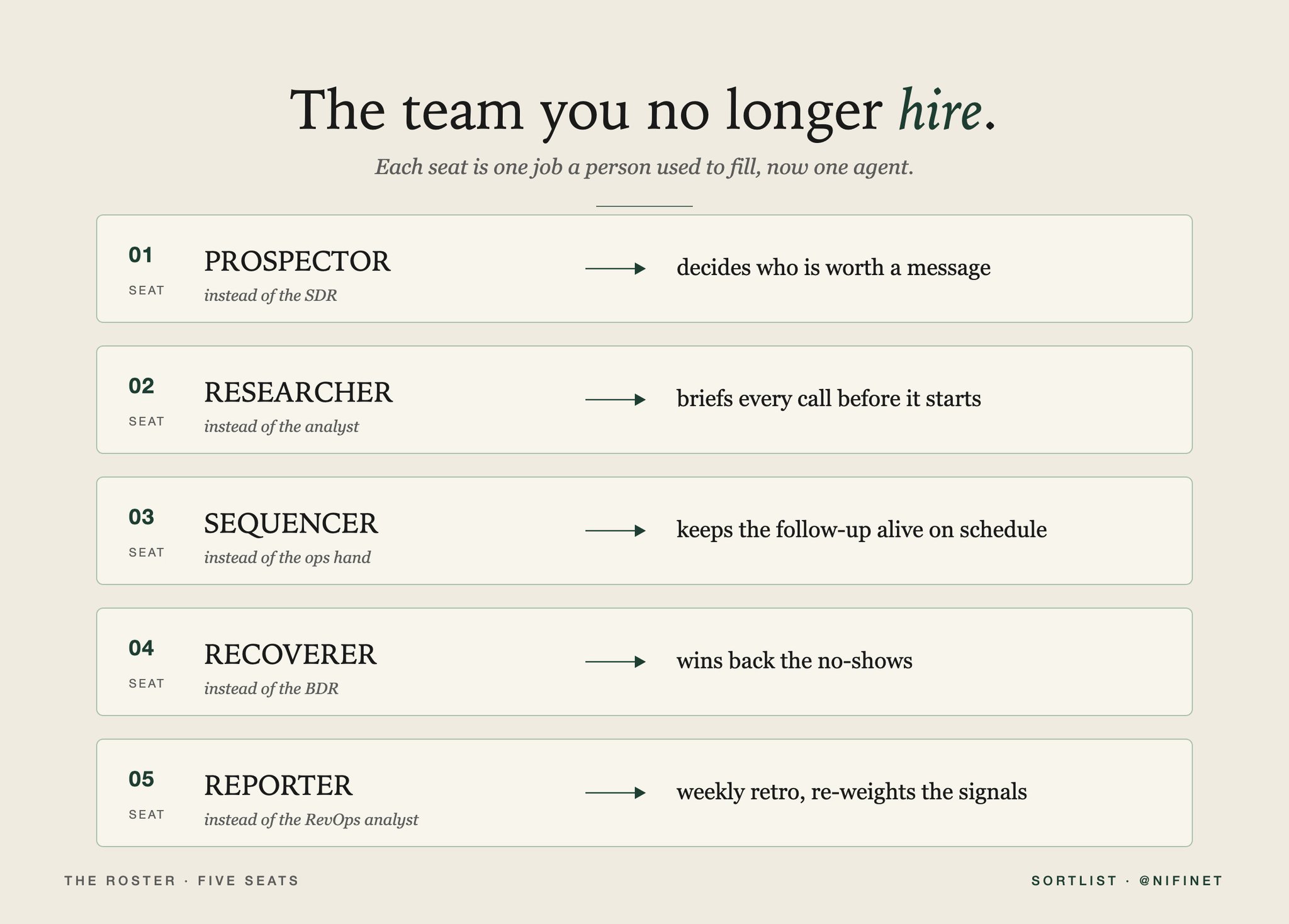
The roster: five seats
Decide who's worth a message
The hard part of outbound was never the sending. It was the judgment in front of it: out of every company in the market, which one is worth reaching this week, and what do you say that proves you noticed.
That judgment is the first seat.
It watches four kinds of movement, the four a decade of marketplace data keeps narrowing the list down to:
- A role opens, or gets reposted.
- A company engages a competitor, or posts about the problem you solve.
- A company launches, expands, or changes its stack.
- Money moves through a round or an acquisition.
It scores each one against who actually fits and against everything you already know about that account, then drafts from the trigger itself.
The rule it never breaks is to quote the thing that moved. "Saw you reposted the Head of RevOps role, second ops hire this quarter." Never "Hi {{firstName}}." If the message could have gone out unchanged last month, the trigger got skipped and the account waits.
1Write team/prospector.py: run(memory, source, delivery, icp, sequences, weights, offline, dry_run).2Sense new signals into the four buckets (job, social, company, funding) and write them to the shared3memory. Cluster by account. For each account, judge it against the ICP and the full history with4prompts/judge.md (Claude, temperature 0), falling back to a weighted-bucket heuristic that skips weak,5off-ICP signals. For the ones that clear the bar, draft from the strongest trigger with prompts/draft.md,6hand the draft to delivery (dry-run by default), and record the touch. Return ranked standup lines.
Brief every call before it starts
Before a first call, someone used to spend twenty minutes building a one-pager: what this company is, what moved, what you have already sent them, where the last thread went cold.
Hand that to the second agent.
It writes the brief on every booked call off the same memory the prospector writes to. By the time the call starts the page is already there, with the trigger that brought them in, the history, and the one thing worth opening on.
Nobody preps at 11pm for a 9am call, and nobody walks in cold.
1Write team/researcher.py: run(memory, calendar, icp, offline).2For each call on today's calendar, pull the account's full history from the shared memory and write a3one-page brief with prompts/brief.md: what moved, what we already sent and how it landed, and the single4best thing to open the call on. Ground every line in the history, never invent. Fall back to a plain5template built from the latest signal when there is no API key. Return one standup line per call.
Let the sequence do the chasing
A signal is the start line. The sequence is what converts, and it is the part people are worst at, because follow-up depends on a human remembering to follow up. We forget, we hesitate, we do it once and stop.
So the sending and the chasing run in Overloop AI as sequences that fire on their own once the agent hands them off. The agent decides who and writes the first touch. Overloop carries the rest on a schedule, across email and LinkedIn, so the cadence never lives or dies on anyone's memory.
1Write team/sequencer.py: run(memory, delivery, sequences, offline, dry_run, min_age_days, max_age_days).2Ask the shared memory for accounts whose last touch is a few days old and that have no reply or meeting3on the books. Draft a light follow-up that adds one genuinely new angle, send it into the follow_up4sequence, and record the touch. Leave fresh touches alone by honoring the min-age window. Return one5standup line per account.
Win back the no-shows
A no-show is a qualified lead who hit a calendar conflict. They leak out of the pipeline for one reason: manual recovery never happens.
So the same engine runs a recovery sequence for every miss. Four touches over a week, two channels, no blame in any of them:
- One hour after the miss: a two-click rebook link.
- The next day: the same offer on LinkedIn.
- Day three: one useful thing tied to their industry, no ask.
- Day seven: a plain last call.
It takes the emotion out of the follow-up, and it brings back about a third of the no-shows that used to just vanish. Nobody has to remember to send a single one.
1Write team/recoverer.py: run(memory, calendar, delivery, sequences, offline, dry_run).2For each recent no-show from the calendar, enrol it into the no_show_recovery sequence defined in3config/sequences.yaml (four touches over a week, two channels, no blame in any step), record the touch,4and return a standup line. The cadence lives in config, not in code.
Make the weekly report tune itself
Every Friday someone used to assemble the retro: what went out, what booked, what is stuck, where the pipeline stands. The last agent builds it from the same memory, every week, without being asked.
Then it does the thing a human report never does.
It grades its own plays: signals that keep booking meetings get more weight, copy that keeps failing gets cut. Next month's shortlist is ordered by what the market actually responded to, not by what you guessed mattered in January. The report stops being a record of last week and becomes the thing that tunes the next one.
1Write team/reporter.py: run(memory, weights, days, offline).2Read the week's stats from the shared memory. Lead with the meeting count. Re-weight the four signal3buckets by win rate, counting a meeting more than a reply, with a floor so no bucket ever drops to zero.4Return the standup lines and the new weights for the next run. prompts/report.md writes the prose5version when a key is set.
The two prompts that run every morning
Every build prompt above runs once. These two run on every account, every day, so they are the ones to keep and tune. The judgment and the voice live here, in plain files, not buried in code.
The prospector judges on this:
1ROLE You are the prospector's judgment layer. For one account, decide whether a buying signal is worth2acting on right now, and how.3INPUT { icp, new_signals: [{bucket, summary}], history, days_since_last_touch }4SCORING 80-100 strong ICP fit and a high-intent signal (funding, or two clustered); 50-79 good fit,5one solid signal; 20-49 weak fit or a lone low-intent signal; 0-19 off-ICP or noise6RULES Under 7 days since the last touch, prefer nurture or skip, never first_touch. If the signal is7weak or off-ICP, score it low and skip; saying no is part of the job. why_now must quote the actual8trigger, in words a rep could say to the buyer.9OUTPUT (JSON only) { "score": 0-100, "why_now": "...", "play": "first_touch|follow_up|nurture|skip", "rationale": "..." }
And it writes on this:
1ROLE You write the opening message. The signal is the reason you are reaching out, and the message has2to prove you noticed it.3INPUT { trigger, bucket, why_now, play, guardrails: {goal, must, never} }4RULES Open the first sentence on the trigger, never "Hi {{firstName}}". Connect the trigger to one5problem you solve, in a single sentence. Close with one low-friction ask. Plain sentences, mixed length,6no fake urgency, no em dashes, no buzzwords. If the message could have gone out unchanged last month, you7skipped the trigger; start over.8OUTPUT (JSON only) { "subject": "6-9 words", "body": "3-5 sentences" }
What makes five agents a team
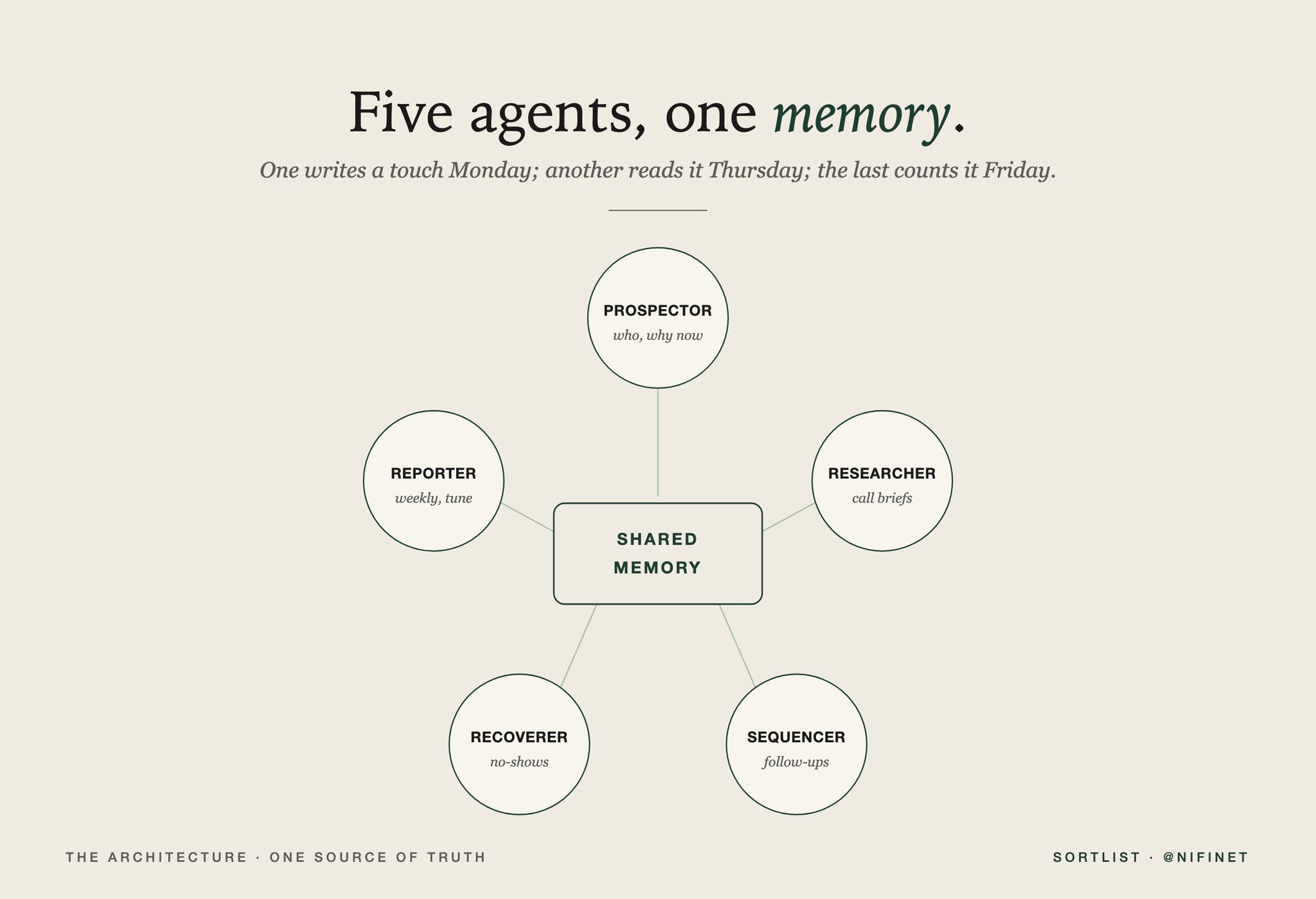
Five agents, one shared memory
Five scripts that each keep their own notes are not a team. What turns them into one is a single shared memory: one record per account that every seat reads and writes.
The prospector logs a touch on Monday. The sequencer reads it on Thursday, sees no reply, and sends the next step. The reporter counts it on Friday and re-weights the buckets. Same record, one source of truth. Build that store first, keep its method names stable, and every seat leans on it instead of guessing.
How one person runs it
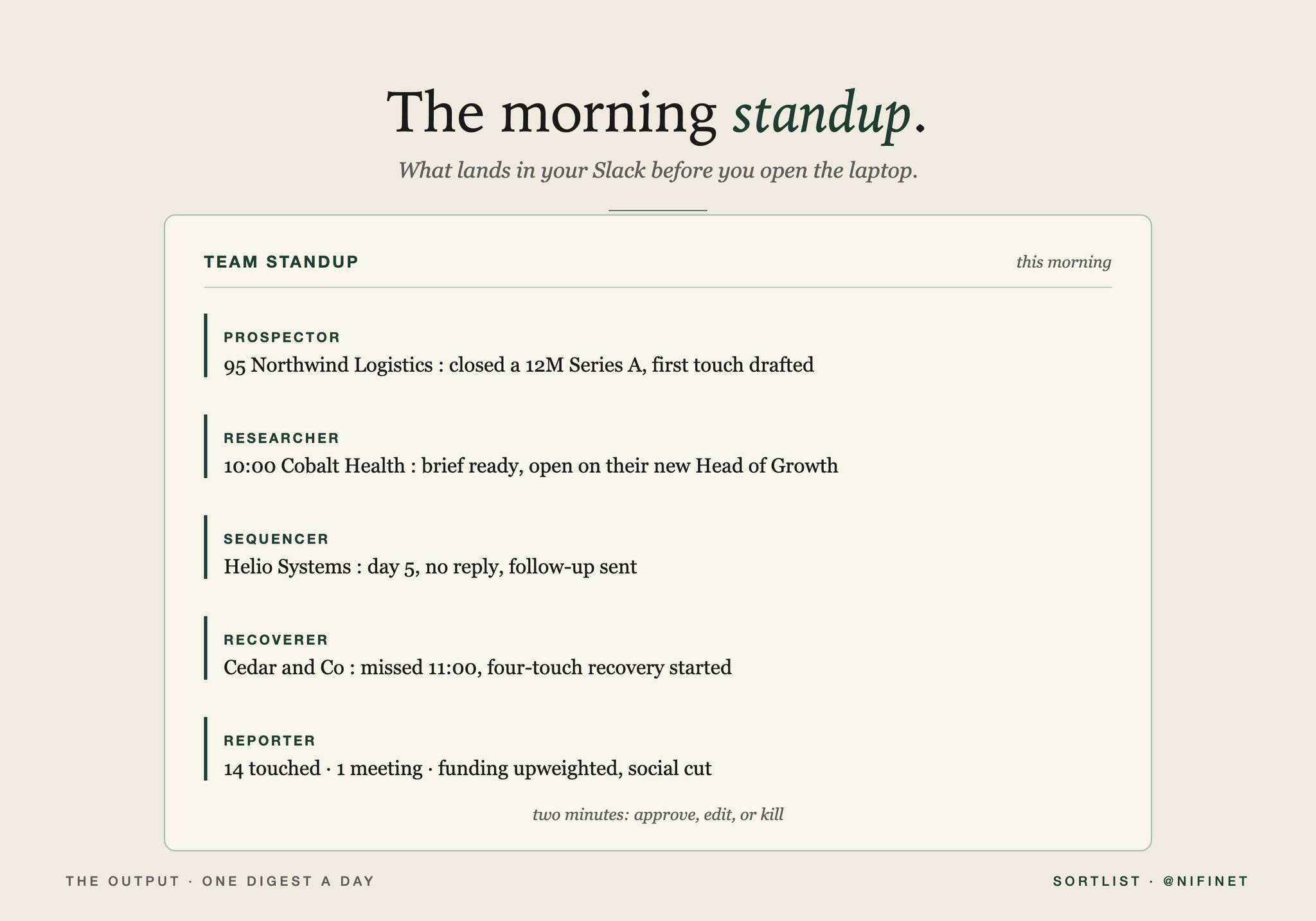
The morning standup
You do not operate this. You edit it, which is a smaller and very different job.
The team runs on cron before you are awake. By the time you sit down the standup is waiting in Slack: who to reach today and why, a brief for every call on your calendar, the no-shows being chased, last week's numbers re-weighted by what actually booked. Two minutes: approve, edit, or kill.
No list to build, no subject lines to guess, no Monday meeting about who to call. The whole team runs for about $400 a month in tokens, the entire operating cost of the department. What is left is editorial: having taste about what the team puts in front of you, and saying no to most of it.
Where humans still win
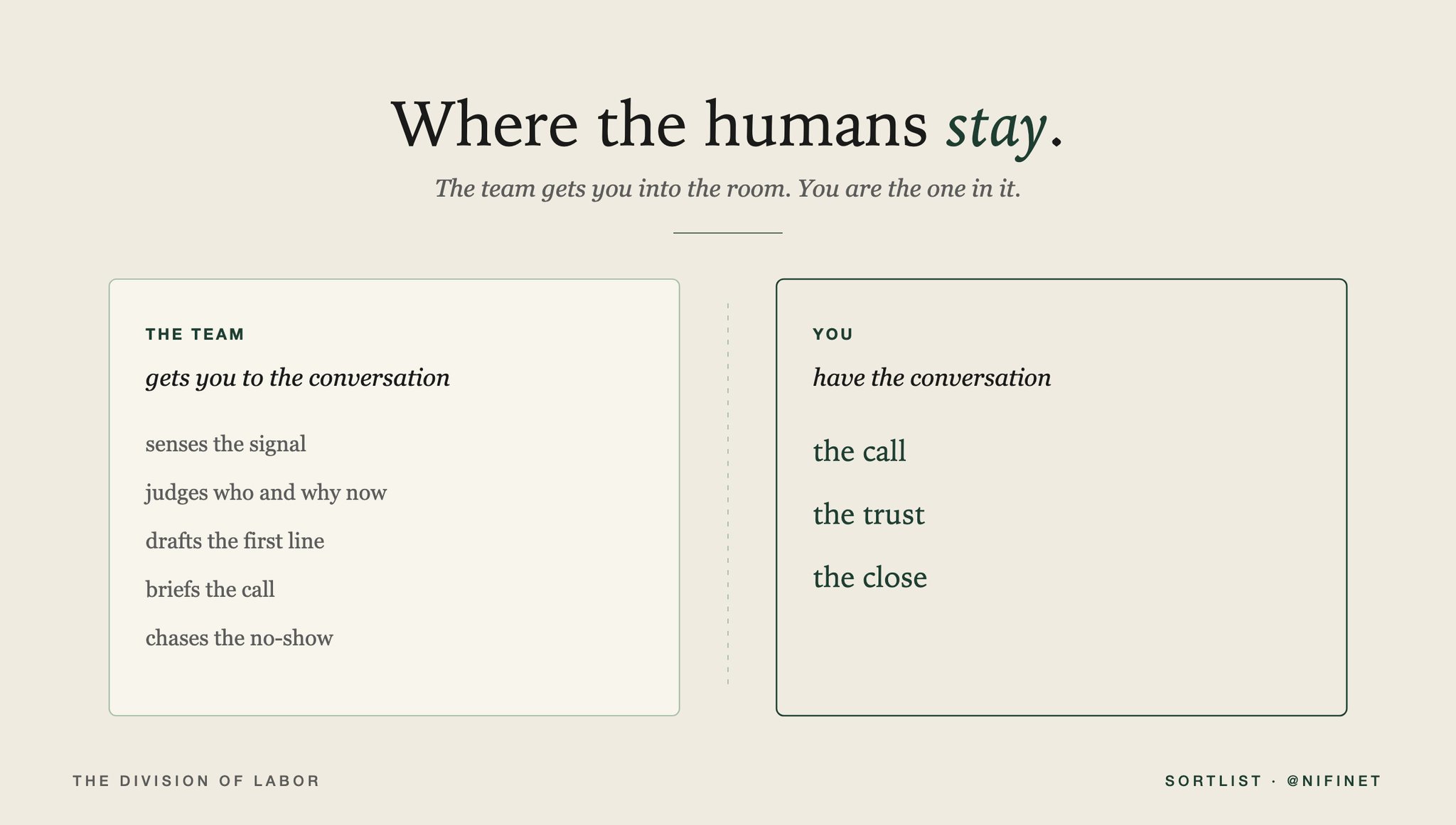
Where the humans stay
This does not run the whole of go-to-market, and the parts it skips are the ones that matter most. The agents decide who to contact and write the first line. They do not close, and they do not build the relationship that makes a buyer choose you a year later, when the budget finally lands.
When a reply comes back with a real question, a hesitation, a quiet "we are not sure this is for us," that is a human conversation, and it should stay one. The system is very good at getting you into the room. It has nothing to say once you are in it.
So the people you would have spent on the grind go where they were always worth more: the call, the trust, the close. The team buys back the hours that used to vanish into deciding who deserved a call, and spends them on the conversations that decide deals.
Take the team
I packaged the whole thing into a repo you can clone and run: the five seats, the shared memory they run on, the prompts that carry the judgment and the voice, and the standup that ties them together.
1gtm-team/2 team/ prospector · researcher · sequencer · recoverer · reporter3 core/ memory · models · adapters · llm4 prompts/ judge · draft · brief · report5 config/ icp · sequences · signals · team6 run.py the morning standup
It is a working build, not the internal stack we run at Sortlist. The prospector seat is the gtm-brain from the last drop. This is the team around it.
Comment TEAM and I will send it over. Be following so the DM goes through.
If you would rather have it run for you than wire it yourself, that is MAX: the same idea with the seams hidden. An agent you talk to that watches the signals, runs the sequences across email and LinkedIn, and hands you the standup, backed by ten years of buyer-vendor matching data you cannot pull from a public API. Visit: yourmax.ai