Have you ever encountered this situation?
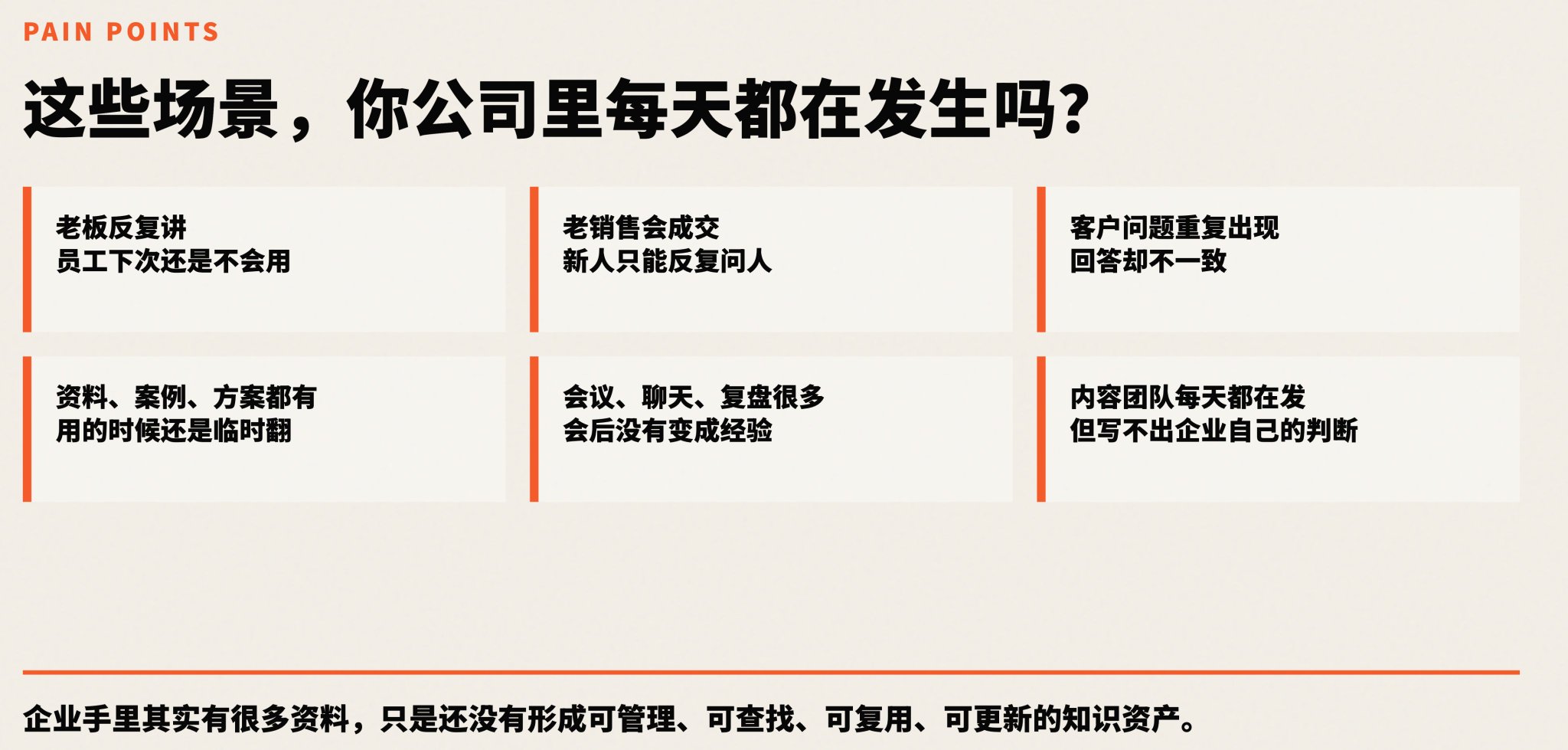
Your boss assigns a task, and you explain it to a new employee. Then another person joins, and you have to explain it all over again from the beginning.
There is a top salesperson in the company with a high conversion rate, but their experience isn't being passed down. New sales hires don't know how to learn and grow slowly.
Customer questions revolve around the same few categories, but every time you have to re-search for information and reorganize your language.
Meeting minutes, project reviews, product materials, customer cases... they are generated every day, but when you actually need them, you can't find them even after searching your entire computer.
This is the daily life of most SMEs. It's not that they don't value knowledge, but they simply don't have the energy to organize it.
Many people have used Doubao, DeepSeek, or ChatGPT. The feeling after using them is consistent: what it says is correct, but it's useless for your specific business.
For example, if you ask it to help reply to a customer question, the answer looks plausible, but you know at a glance that it's not your company's product, not your company's service style, and not the tone your company uses with customers.
To put it bluntly, it doesn't know you at all.
So where is the problem?
The general AI tools on the market are trained on public data. You can think of it as a well-informed but newly hired person who knows a lot of general knowledge but doesn't know your company's specific situation.
But your enterprise and your personal work have their own set of things: product parameters, customer cases, service processes, writing styles, and things done right or wrong in the past.
AI hasn't seen these things.
So it can only give you vague, "correct" nonsense.
This article aims to solve one thing: letting AI get your context and start working based on your materials.
After reading, you will take away at least four things: a minimum knowledge base directory structure, a process to run starting from safe tasks, two sets of prompts you can copy, and a judgment standard for choosing tools.
The first version doesn't require a technical foundation or buying a complex system. Getting it running is the key.
AI Knowledge Base: Start with Context
When many people hear "knowledge base," they think of a folder or a document management system.
An AI knowledge base is not that.
An AI knowledge base is essentially providing context to the AI.
What is context? It's the internal information, materials, and product introductions about your company that the AI doesn't know.
For example, what your company does, what products it has, which customers it has served, what questions customers frequently ask, which past cases were successful, which failed, what tone should be used for external output, and what should be avoided.
All these things together are the AI's context.
The final output quality of AI is actually determined by three things: the capability of the model itself, the quality of the context you provide, and the task constraints you set.
Model capability is important, of course. But in specific business scenarios, AI also needs specific context and clear task constraints.
If you use the same model and give it a bunch of vague materials, it can only give vague answers. But if you give it your company's product materials, real customer questions, good cases, and clear output rules, it can produce content that looks like it was written by someone in your company.
That's where the value of an AI knowledge base lies.
There's another thing many people don't realize.
In the past, knowledge management relied almost entirely on humans. Humans organized data, retrieved data, understood content, judged what was usable, and then rewrote the output.
Every step required a human. Anyone who has done management knows that human cost is the highest. Even if you give tools and document libraries to employees and train them, not everyone will use them well.
Now?
Except for the final step—the one where a human makes judgments and calibrations—AI can participate in many of the previous steps of organizing, retrieving, and preliminary rewriting.
Humans primarily make judgments. Humans calibrate whether the AI's output is correct, good, or usable, and then tell it what to change.
Five Ways to Implement an AI Knowledge Base
When talking about AI knowledge bases, two terms often come up: Vector Databases and RAG.
For ordinary people and SMEs, the first version usually doesn't need such heavy solutions.
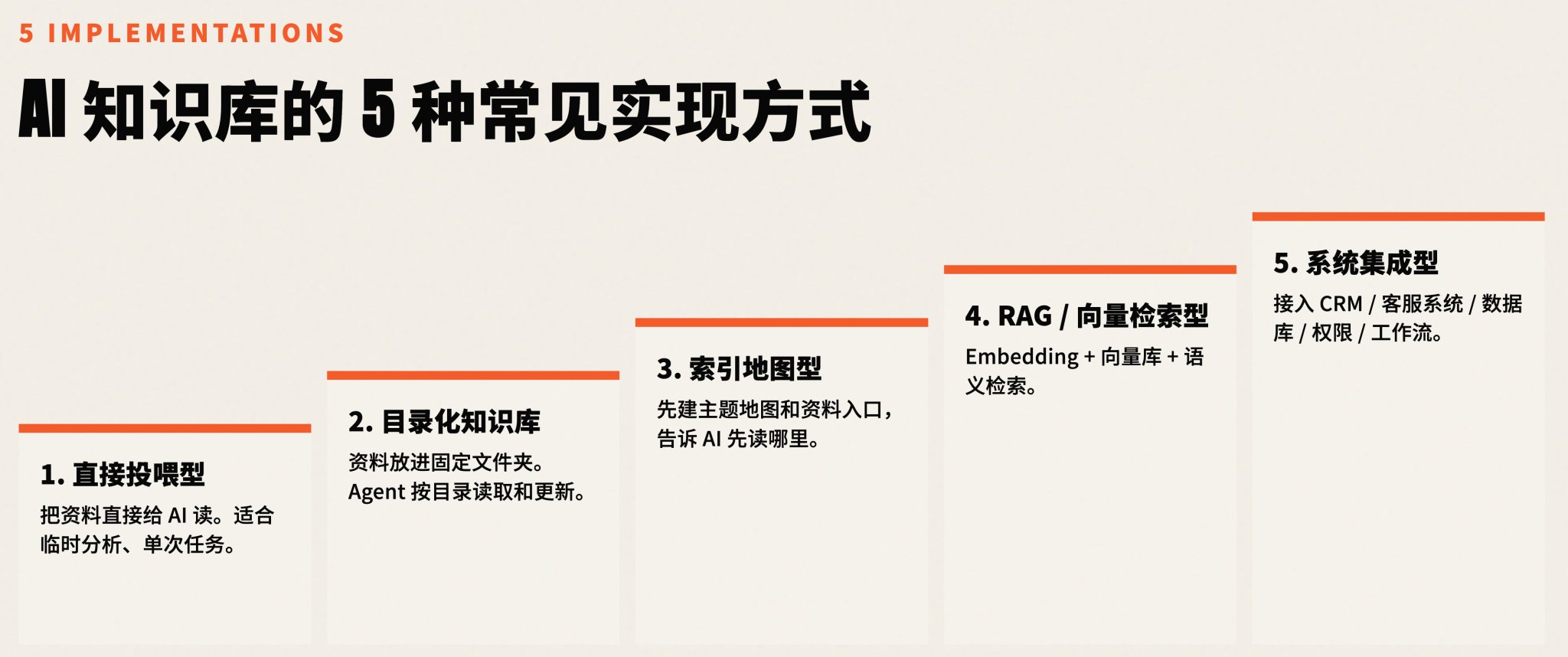
There are currently five common implementation methods. They are not five parallel options but rather five stages from light to heavy. Choose the solution corresponding to your current stage.
1. Direct Feeding.
The simplest way. You just upload files directly to the AI and let it answer questions based on those files. It's suitable for one-off, small-scale, temporary tasks. But the problem is obvious: you have to re-upload every time, and it's hard to turn into a long-term system.
2. Categorized Directory Knowledge Base.
This is what I recommend most for individuals and SMEs to do first. Don't build a platform; just categorize your existing materials into different directories (e.g., Basic Info, Products, Customer Questions, Cases, Output Rules). Then tell the AI which directory to look in for specific scenarios. No technical foundation is needed.
3. Index-based Maps.
When files belong to multiple categories, let the AI scan all materials and draw an index map by theme. This doesn't require perfect classification but lets the AI know "where to go when looking for something." You can refer to Andrej Karpathy's LLM Wiki idea: let AI maintain wiki pages and logs to string raw materials together.
4. RAG and Vector Retrieval.
This sounds technical. In practice, when data becomes too vast for directories or indices to be precise, you need AI to find materials by semantics. RAG processes your data into chunks beforehand, and when AI retrieves, it matches the "meaning" of your question to the closest data chunk. It's for large data volumes requiring high precision.
5. Integration into Existing Systems or Custom Platforms.
This is an enterprise-level solution, like embedding AI into your internal CRM or customer service platform. The AI customer service button in the corner of many websites works on this logic.
For the vast majority, starting with the second method is enough.
Personal Knowledge Base: Solving Your Own Output Problems
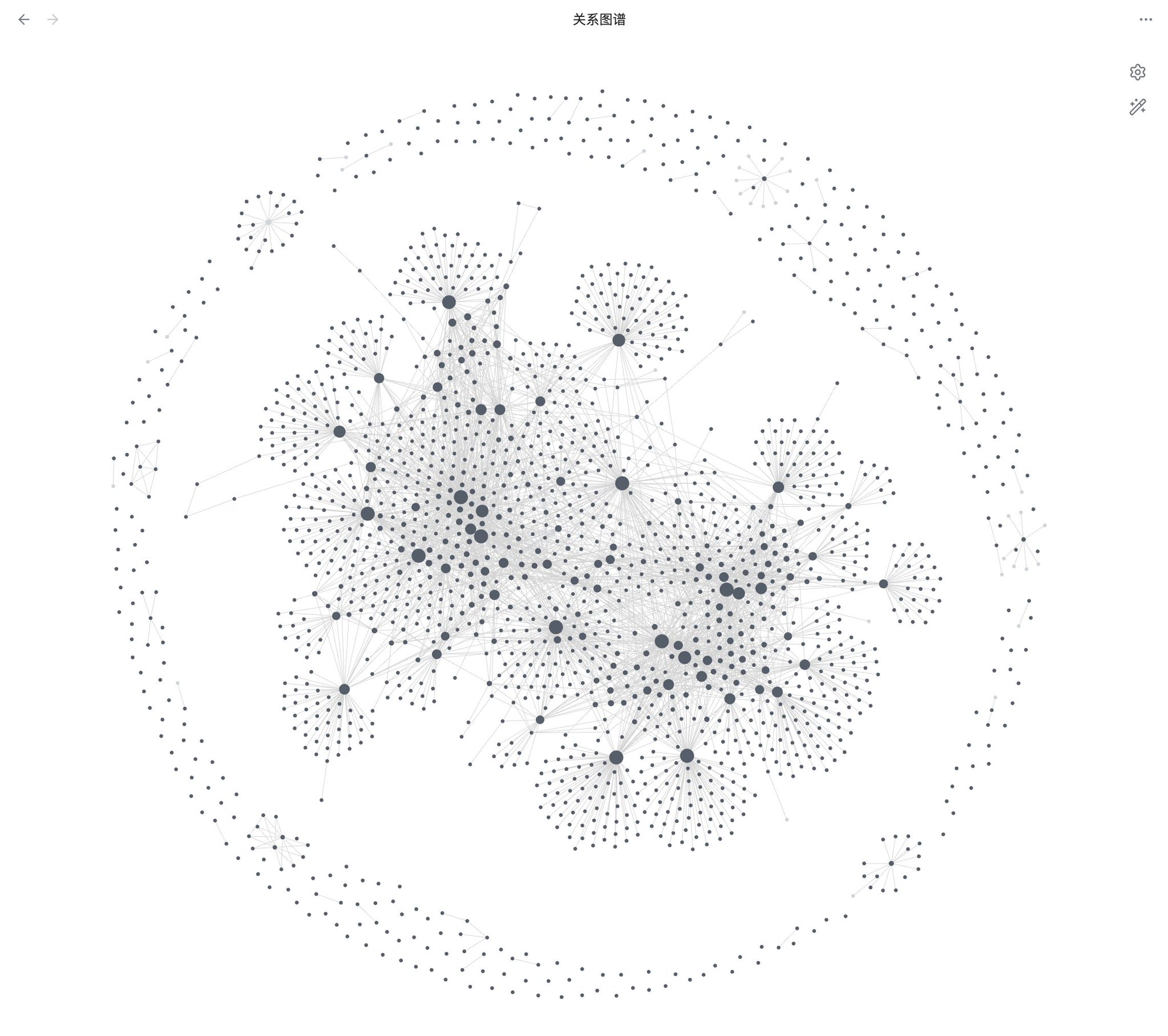
I built a directory on my computer for my thoughts, diaries, past articles, and meeting notes. I used an AI agent tool that can read local files. Now, when I write an article, I don't search folders; I tell the AI the topic, and it pulls my past related thoughts to organize materials for me. It can even draw a knowledge graph connecting seemingly unrelated notes.
Enterprise Knowledge Base: Starting from the Most Painful Business Scenario
1. Education/Training Institutions: They categorized SOPs, consulting scripts, and case summaries. AI now generates initial drafts for customer inquiries and social media content, which humans then refine.
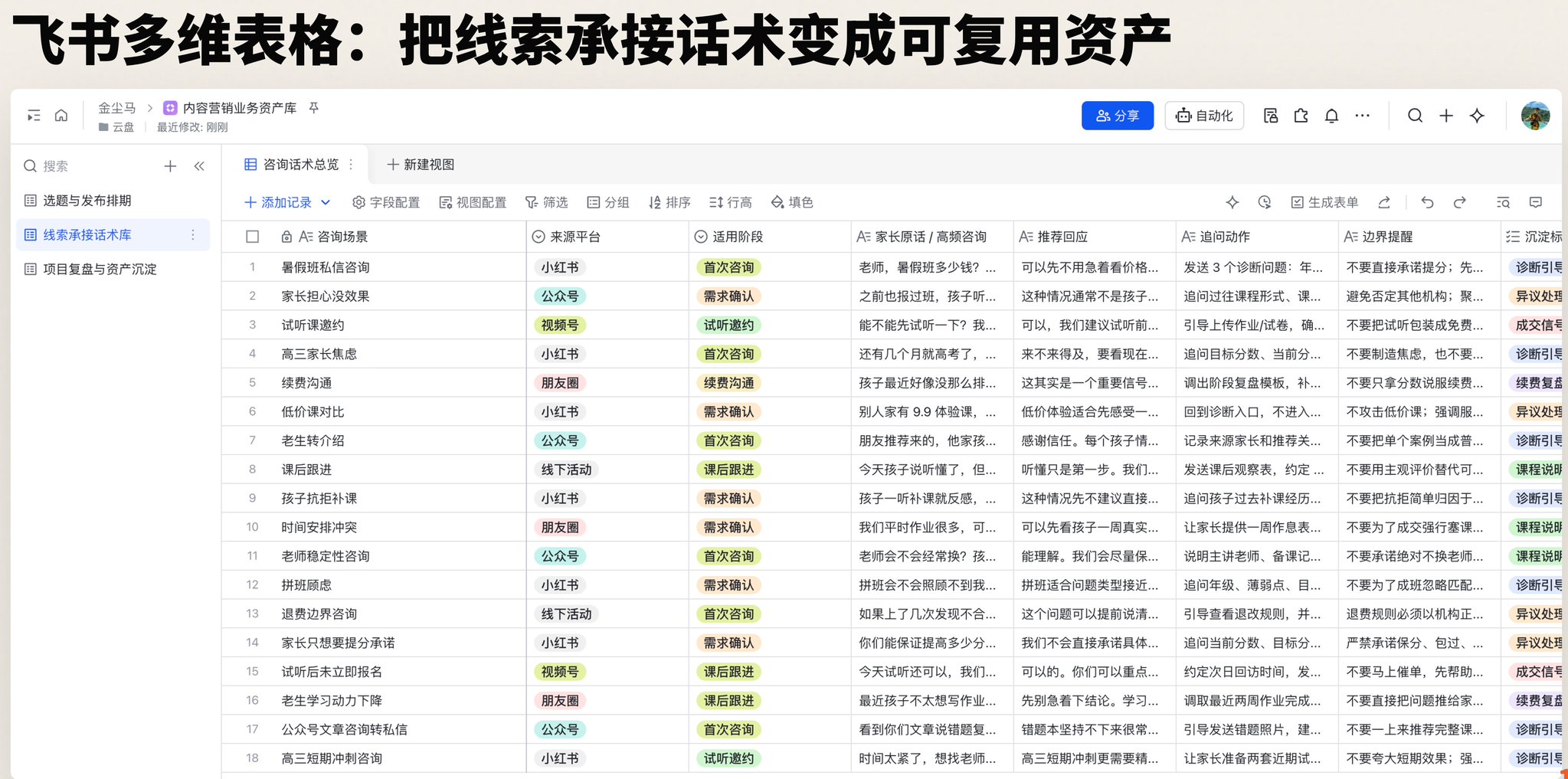
2. Health Products Company: With dozens of products, they collected real customer voices from social media comments. AI now generates response templates based on product data and real questions, helping sales staff provide accurate advice quickly.
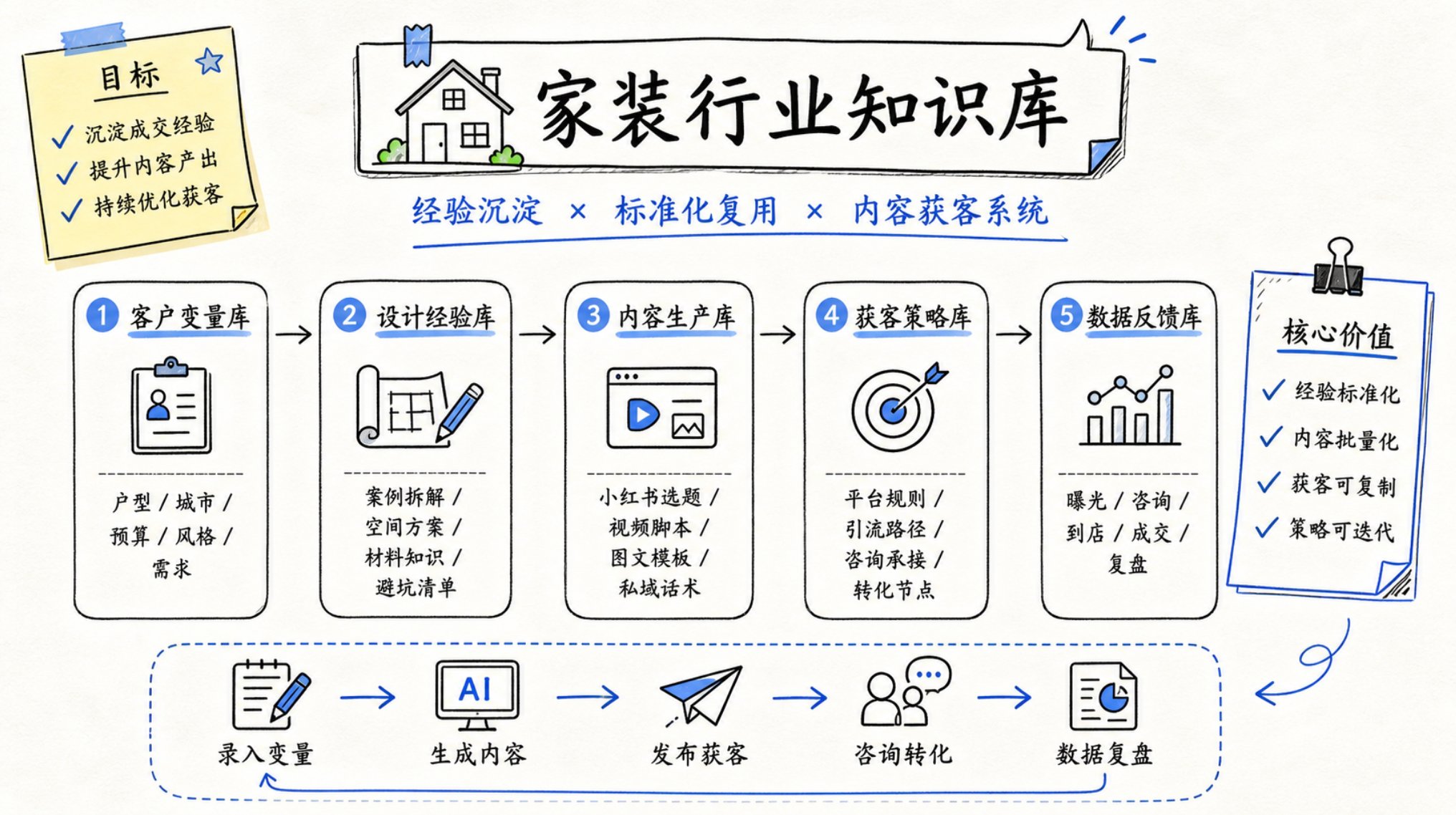
3. Home Decor Enterprise: They combined industry standards with their own design philosophy and case studies. AI helps generate marketing drafts and internal training materials, reducing reliance on expensive external agencies.
The Minimum Version You Can Start Today
- Create a root directory called "Knowledge Base."
- Create five sub-directories: Enterprise Basics, Products/Services, Customer Questions, Case Materials, Output Rules.
- Choose an AI agent tool that can read local files (e.g., Codex or WorkBuddy).
- Use structured prompts to let AI help you categorize.
- Test with a specific, safe scenario (e.g., answering a non-sensitive customer question).
Two Prompts You Can Copy
1. Automatic Data Categorization Prompt:
(Provide the path to your root directory and pending files. Ask AI to categorize them into the five categories without moving or deleting files.)
2. Answering Customer Questions Based on Knowledge Base:
(Provide the path. Ask AI to identify the customer's core concern, provide a direct answer, explain for internal staff, list follow-up questions, and cite sources. If info is missing, it must say so.)
How to Choose Tools
General chat tools aren't designed for file management. Look for "AI Agent" tools like Codex (mature, good if your network allows) or WorkBuddy (more convenient for domestic use in China). If you use Lark (Feishu), its built-in docs and multidimensional tables are a great foundation.
Success Depends on Feedback
Building it is just the first step. When AI makes a mistake, don't just call it stupid—write the correction into your "Output Rules" document. If a certain style works well, add it as a reference. It's a loop: Data in -> AI tries -> Human corrects rules -> AI improves.
Final Thoughts
An AI knowledge base isn't a high-end system; it's a way to make your experience and data callable by AI. Start with a 15-minute test today. Stop making AI guess from the internet; let it work from your data.