Nano Banana(別名 Gemini 2.5 Flash Image)をご紹介します。これは、最新で最速、そして最も効率的なモデルです。そのネイティブなマルチモーダルアーキテクチャは、テキストと画像を単一のステップで処理し、会話型編集、複数画像の合成、論理的推論などの強力な機能を実現します。
これらの機能は、公式ドキュメント のコードを使って試したり、Google AI Studio の ai.studio/banana で直接作成を開始したりできます。
主な機能は次のとおりです:
- テキストから画像へ: シンプルまたは複雑なテキスト記述から高品質の画像を生成します。
- 画像 + テキストから画像へ(編集): 画像を提供し、テキストプロンプトを使用して要素の追加、削除、変更、スタイルの変更、色の調整を行います。
- 複数画像から画像へ(合成とスタイル転送): 複数の入力画像を使用して新しいシーンを構成したり、1 つの画像から別の画像へスタイルを転送したりします。
- 反復的な改良: 会話を重ねて画像を段階的に洗練させ、複数回のやり取りで小さな調整を加えながら完璧な画像に仕上げます。
- テキストレンダリング: ロゴ、図表、ポスターに最適な、クリアで適切に配置されたテキストを含む画像を生成します。
このガイドでは、Gemini 2.5 Flash から最高の結果を得るためのプロンプトの書き方と指示の出し方を説明します。すべては、1 つの基本原則から始まります。
シーンを説明し、キーワードを羅列しないでください
。このモデルの核となる強みは、深い言語理解にあります。物語性のある説明的な段落は、単なる無関係な単語のリストよりも、ほぼ常に、より優れた、より一貫性のある画像を生成します。
テキストから画像を作成する
最も一般的な画像生成方法は、見たいものを説明することです。
1. フォトリアリスティックなシーン
リアルな画像を生成するには、写真家のように考えましょう。カメラアングル、レンズの種類、照明、細部のディテールを指定することで、モデルをフォトリアリスティックな結果へと導きます。
テンプレート
: フォトリアリスティックな [ショットタイプ] の [被写体] で、[動作や表情]、[環境] に設定。シーンは [照明の説明] で照らされ、[ムード] の雰囲気を演出。撮影は [カメラ/レンズの詳細] を使用し、[主要なテクスチャと詳細] を強調。画像は [アスペクト比] 形式であるべきです。
プロンプト例:
フォトリアリスティックなクローズアップポートレート。被写体は、深い皺と温かみのある知恵に満ちた笑顔を持つ、高齢の日本の陶芸家。彼は釉薬をかけたばかりの茶碗を慎重に検査している。設定は彼の素朴で日光の差し込む工房。シーンは窓から差し込む柔らかなゴールデンアワーの光に照らされ、粘土の細かい質感を強調。85mm のポートレートレンズで撮影され、柔らかくぼやけた背景(ボケ)を実現。全体的な雰囲気は静寂で達人技。縦長のポートレート構図。
1from google import genai2from google.genai import types3from PIL import Image4from io import BytesIO56client = genai.Client()78# Generate an image from a text prompt9response = client.models.generate_content(10 model="gemini-2.5-flash-image-preview",11 contents="A photorealistic close-up portrait of an elderly Japanese ceramicist with deep, sun-etched wrinkles and a warm, knowing smile. He is carefully inspecting a freshly glazed tea bowl. The setting is his rustic, sun-drenched workshop with pottery wheels and shelves of clay pots in the background. The scene is illuminated by soft, golden hour light streaming through a window, highlighting the fine texture of the clay and the fabric of his apron. Captured with an 85mm portrait lens, resulting in a soft, blurred background (bokeh). The overall mood is serene and masterful.",12)1314image_parts = [15 part.inline_data.data16 for part in response.candidates[0].content.parts17 if part.inline_data18]1920if image_parts:21 image = Image.open(BytesIO(image_parts[0]))22 image.save('photorealistic_example.png')23 image.show()
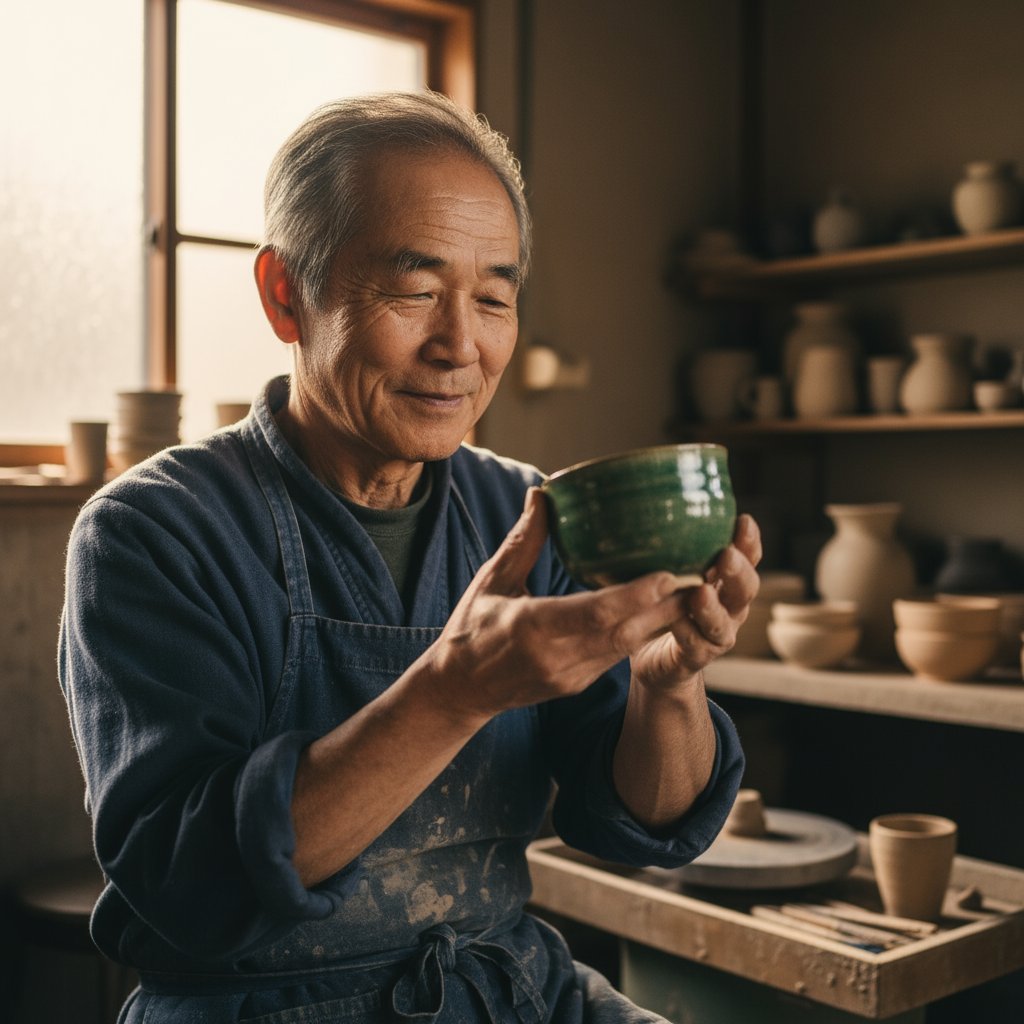
フォトリアリスティックな高齢の日本の陶芸家のクローズアップポートレート...
2. スタイライズされたイラストとステッカー
プロジェクト用のステッカー、アイコン、アセットを作成するには、スタイルを明確に指定し、必要に応じて白い背景をリクエストしましょう。
テンプレート
: [スタイル] のステッカー、[被写体]、[主な特徴] と [カラーパレット]。デザインは [線のスタイル] と [シェーディングスタイル] に。背景は白にすること。
プロンプト例
: かわいいスタイルのステッカー、小さな竹の帽子をかぶった幸せそうなレッサーパンダ。緑の竹の葉をむしゃむしゃ食べている。デザインは太くてクリーンなアウトライン、シンプルなセルシェーディング、鮮やかなカラーパレット。背景は白にすること。
1from google import genai2from google.genai import types3from PIL import Image4from io import BytesIO56client = genai.Client()78# Generate an image from a text prompt9response = client.models.generate_content(10 model="gemini-2.5-flash-image-preview",11 contents="A kawaii-style sticker of a happy red panda wearing a tiny bamboo hat. It's munching on a green bamboo leaf. The design features bold, clean outlines, simple cel-shading, and a vibrant color palette. The background must be white.",12)1314image_parts = [15 part.inline_data.data16 for part in response.candidates[0].content.parts17 if part.inline_data18]1920if image_parts:21 image = Image.open(BytesIO(image_parts[0]))22 image.save('red_panda_sticker.png')23 image.show()
**

かわいいスタイルのステッカー、幸せそうなレッサーパンダ...
3. 画像内の正確なテキスト
Gemini はテキストのレンダリングが得意です。テキスト、フォントスタイル(説明的に)、および全体的なデザインを明確に指定しましょう。
テンプレート
: [ブランド/コンセプト] 向けの [画像タイプ] を作成し、テキスト "[レンダリングするテキスト]" を [フォントスタイル] で表示。デザインは [スタイルの説明]、[配色] にすること。
プロンプト
: 'The Daily Grind' というコーヒーショップの、モダンでミニマルなロゴを作成。テキストはクリーンで太字のサンセリフフォントを使用。デザインは、コーヒー豆のシンプルでスタイライズされたアイコンをテキストとシームレスに統合。配色は白黒。
1from google import genai2from google.genai import types3from PIL import Image4from io import BytesIO56client = genai.Client()78# Generate an image from a text prompt9response = client.models.generate_content(10 model="gemini-2.5-flash-image-preview",11 contents="Create a modern, minimalist logo for a coffee shop called 'The Daily Grind'. The text should be in a clean, bold, sans-serif font. The design should feature a simple, stylized icon of a a coffee bean seamlessly integrated with the text. The color scheme is black and white.",12)1314image_parts = [15 part.inline_data.data16 for part in response.candidates[0].content.parts17 if part.inline_data18]1920if image_parts:21 image = Image.open(BytesIO(image_parts[0]))22 image.save('logo_example.png')23 image.show()

'The Daily Grind' というコーヒーショップのモダンでミニマルなロゴを作成...
4. 製品モックアップと商品写真
E コマース、広告、ブランディング用のクリーンでプロフェッショナルな商品写真を作成します。
テンプレート:
[背景面/説明] 上の [商品説明] の高解像度でスタジオ照明による商品写真。照明は [照明設定、例: 3 点ソフトボックス設定] で [照明の目的]。カメラアングルは [アングルの種類] で [特定の機能] を強調。超リアル、[重要な詳細] にピントが合っている。[アスペクト比]。
プロンプト例:
研磨されたコンクリート表面に置かれたマットブラックのミニマルなセラミックコーヒーマグの、高解像度でスタジオ照明による商品写真。照明は 3 点ソフトボックス設定で、柔らかく拡散したハイライトを作り出し、強い影を排除するように設計。カメラアングルはやや高い 45 度のショットで、すっきりとしたラインを見せる。超リアル、コーヒーから立ち上る湯気にピントが合っている。正方形画像。
1from google import genai2from google.genai import types3from PIL import Image4from io import BytesIO56client = genai.Client()78# Generate an image from a text prompt9response = client.models.generate_content(10 model="gemini-2.5-flash-image-preview",11 contents="A high-resolution, studio-lit product photograph of a minimalist ceramic coffee mug in matte black, presented on a polished concrete surface. The lighting is a three-point softbox setup designed to create soft, diffused highlights and eliminate harsh shadows. The camera angle is a slightly elevated 45-degree shot to showcase its clean lines. Ultra-realistic, with sharp focus on the steam rising from the coffee. Square image.",12)1314image_parts = [15 part.inline_data.data16 for part in response.candidates[0].content.parts17 if part.inline_data18]1920if image_parts:21 image = Image.open(BytesIO(image_parts[0]))22 image.save('product_mockup.png')23 image.show()
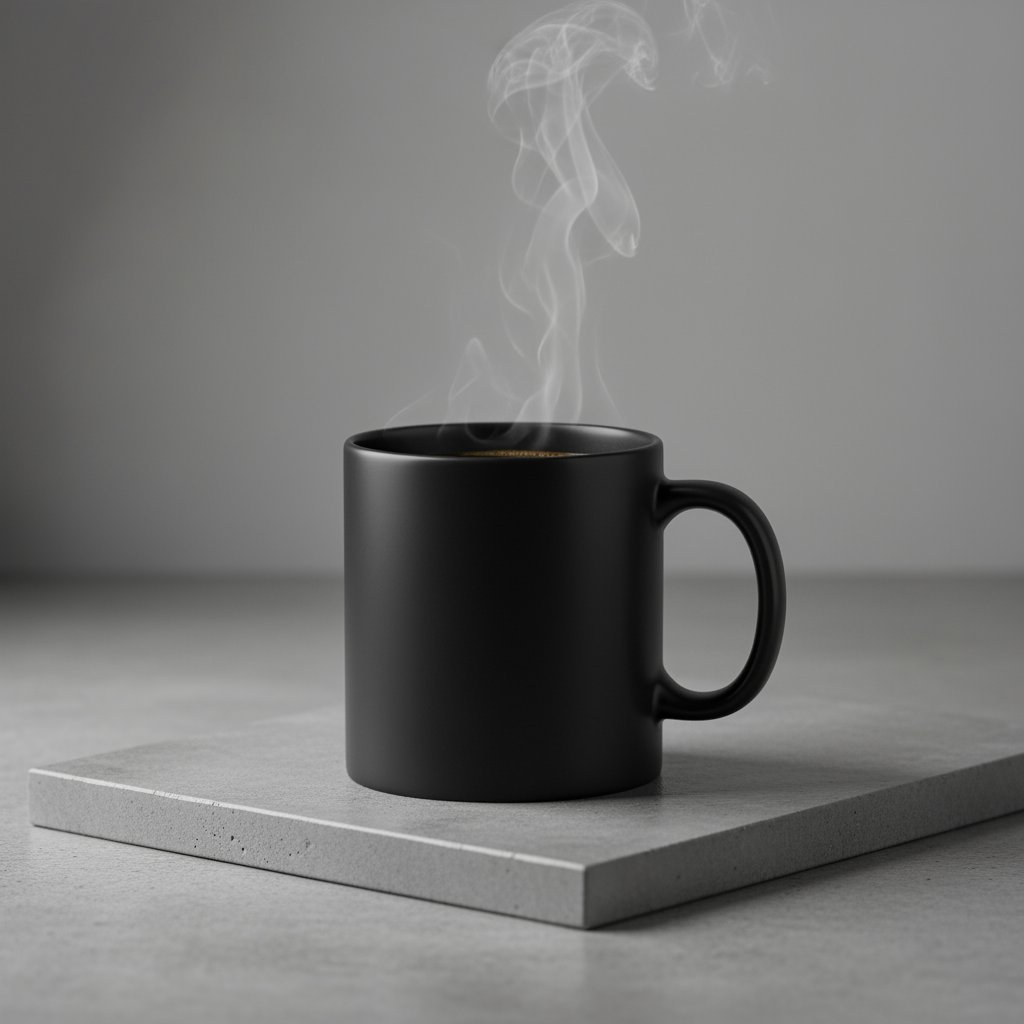
研磨されたコンクリート表面に置かれたマットブラックのミニマルなセラミックコーヒーマグの高解像度商品写真...
5. ミニマルでネガティブスペースを活用したデザイン
テキストを重ねるウェブサイト、プレゼンテーション、マーケティング資料の背景を作成するのに最適です。
テンプレート
: フレームの [右下/左上など] に配置された 1 つの [被写体] を特徴とするミニマルな構図。背景は広大で空の [色] のキャンバスで、大きなネガティブスペースを創出。柔らかく微妙な照明。[アスペクト比]。
プロンプト例
: フレームの右下に配置された、1 枚の繊細な赤いもみじの葉を特徴とするミニマルな構図。背景は広大で空のオフホワイトのキャンバスで、テキスト用の大きなネガティブスペースを創出。左上からの柔らかく拡散した照明。正方形画像。
1from google import genai2from google.genai import types3from PIL import Image4from io import BytesIO56client = genai.Client()78# Generate an image from a text prompt9response = client.models.generate_content(10 model="gemini-2.5-flash-image-preview",11 contents="A minimalist composition featuring a single, delicate red maple leaf positioned in the bottom-right of the frame. The background is a vast, empty off-white canvas, creating significant negative space for text. Soft, diffused lighting from the top left. Square image.",12)1314image_parts = [15 part.inline_data.data16 for part in response.candidates[0].content.parts17 if part.inline_data18]1920if image_parts:21 image = Image.open(BytesIO(image_parts[0]))22 image.save('minimalist_design.png')23 image.show()
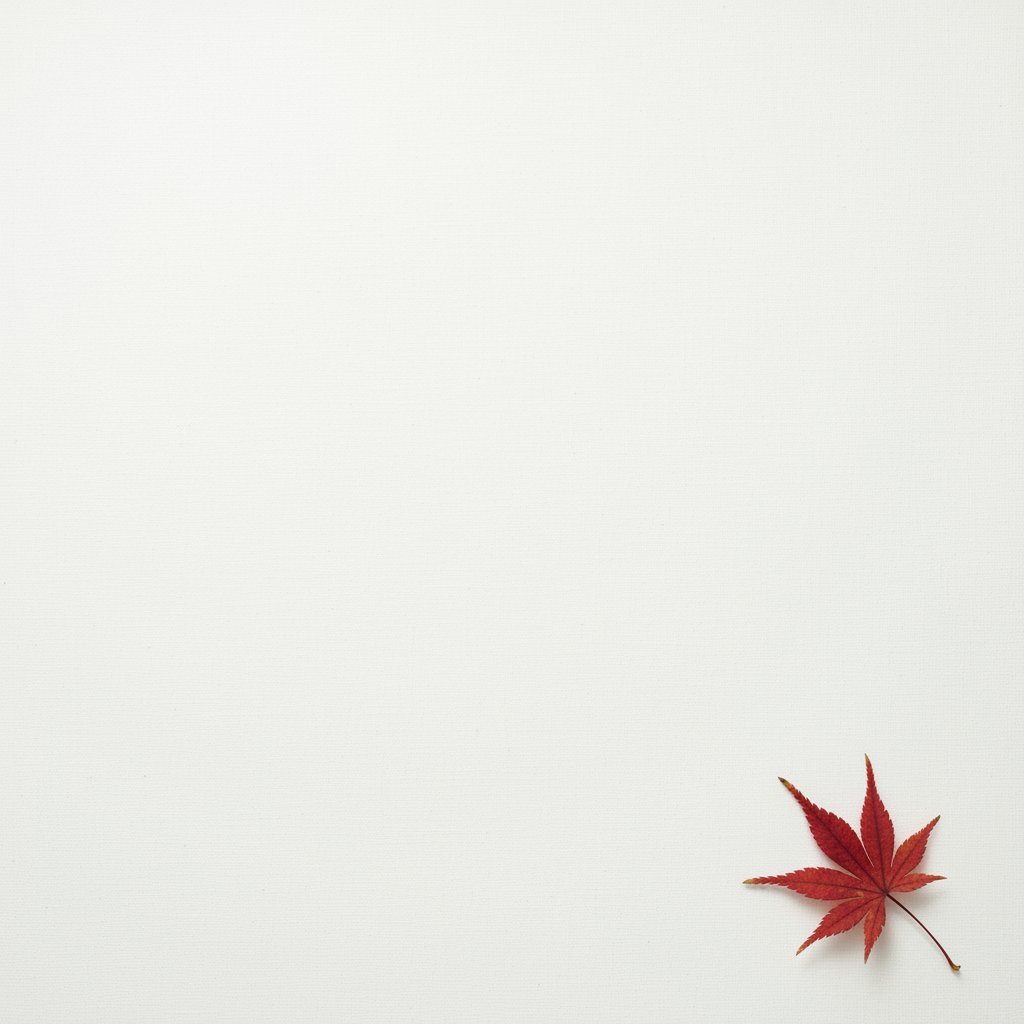
フレームの右下に配置された1枚の繊細な赤いもみじの葉を特徴とするミニマルな構図...
6. シーケンシャルアート(漫画パネル / ストーリーボード)
明確なシーン説明に焦点を当てることで、ストーリーボード、漫画のストリップ、またはあらゆる形式のシーケンシャルアートの開発に最適な、魅力的なビジュアルナラティブをパネルごとに作成します。
テンプレート
: [アートスタイル] スタイルの 1 コマ漫画パネル。前景では [キャラクターの説明とアクション]。背景では [設定の詳細]。パネルには [吹き出し/キャプションボックス] があり、テキスト "[テキスト]" が表示。照明は [ムード] の雰囲気。[アスペクト比]。
プロンプト例
: ハイコントラストな白黒インクの、ざらついたノワールアートスタイルの 1 コマ漫画パネル。前景では、トレンチコートを着た探偵が、雨で肩を濡らしながら、明滅する街灯の下に立っている。背景では、寂れたバーのネオンサインが水たまりに映っている。上部のキャプションボックスには「この街は秘密を守るには厳しい場所だった」と表示。照明は厳しく、劇的で陰鬱なムードを創出。横長。
1from google import genai2from google.genai import types3from PIL import Image4from io import BytesIO56client = genai.Client()78# Generate an image from a text prompt9response = client.models.generate_content(10 model="gemini-2.5-flash-image-preview",11 contents="A single comic book panel in a gritty, noir art style with high-contrast black and white inks. In the foreground, a detective in a trench coat stands under a flickering streetlamp, rain soaking his shoulders. In the background, the neon sign of a desolate bar reflects in a puddle. A caption box at the top reads \"The city was a tough place to keep secrets.\" The lighting is harsh, creating a dramatic, somber mood. Landscape.",12)1314image_parts = [15 part.inline_data.data16 for part in response.candidates[0].content.parts17 if part.inline_data18]1920if image_parts:21 image = Image.open(BytesIO(image_parts[0]))22 image.save('comic_panel.png')23 image.show()
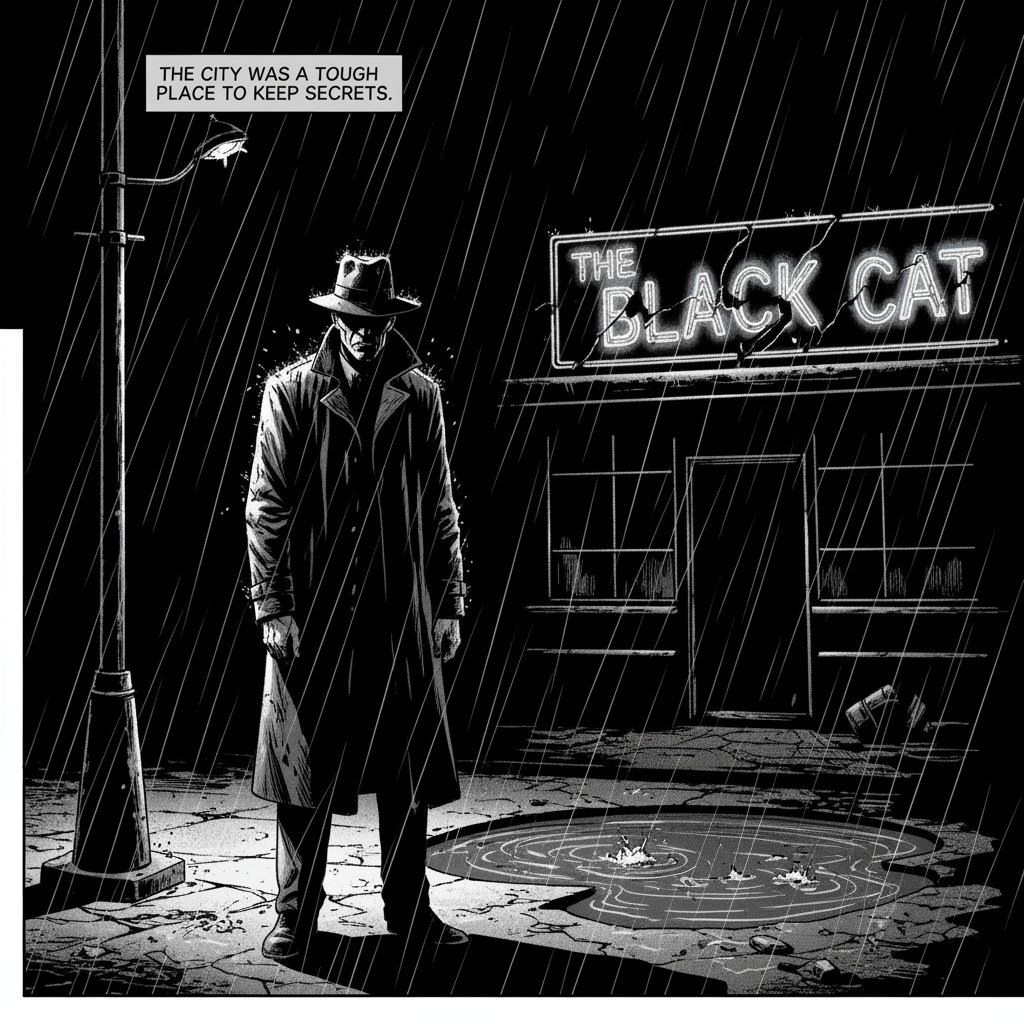
ハイコントラストな白黒インクの、ざらついたノワールアートスタイルの1コマ漫画パネル...
**