
UGC Video Prompt
6-scene UGC ad scripts with voiceover and shot direction
UGC Video Prompt
6-scene UGC ad scripts with voiceover and shot direction
Showcase
Description
Generate high-converting UGC (User Generated Content) video ad scripts with scene-by-scene breakdowns. Use this skill when the user wants to create a UGC ad, video script, social media ad, or creator brief for any product or service. Produces a 6-scene structure (hook, pain, product, demo, result, CTA) with video direction prompts, voiceover lines, and pattern interrupt techniques for each scene. Optimised for short-form video (TikTok, Instagram Reels, Facebook Ads).
Best for
Marketers, creators, and businesses developing authentic short-form ads for products or services.
How to use this Skill
Provide your input
Provide a product or service description, plus any audience, platform, or campaign context you want reflected.
Run the Skill
The Skill turns your brief into a short-form UGC ad script with scene direction, spoken lines, and production guidance.
Review your result
Receive a ready-to-produce video script and creator brief designed for social advertising.
Related Skills
View all Video
VideoUGC Ad Video Prompt
Turns a product and a creator into a ready-to-paste short-form UGC video ad prompt. It engineers a strong pattern-interrupt hook for the opening seconds, builds a multi-angle shot list with punchy camera play instead of one static shot, and writes natural, human-sounding voice direction — no flat, robotic delivery. The result is a single prompt block you can drop straight into a video generator.

Cinematic Scene Prompts
This skill turns any request with a film-like or cinematic intent into a precise, production-grade video-generation prompt. It applies professional cinematography: a 2-second opening hook to stop the scroll, exact camera movement and lighting setups, depth and composition guidance, color grading, timeline structures for 4/8/10/15-second clips, synchronized sound design, and platform-specific optimization (TikTok, YouTube Shorts, Instagram Reels, LinkedIn). Each prompt uses specific numbers, timings, and technical language (focal lengths, f-stops, Kelvin temperatures, movement speeds) and supports @material[name] references for uploaded images, videos, and audio. The result is a ready-to-use prompt that produces broadcast-quality cinematic video.
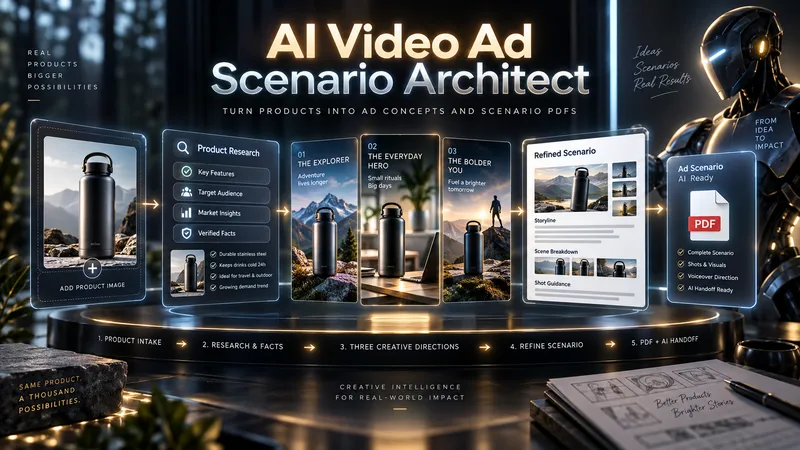
AI Video Ad Scenario Architect
Upload a product image or provide a product/model name. AI Video Ad Scenario Architect researches the product, identifies verified features, and turns them into creative advertising opportunities. The Skill first builds the Product Creative DNA, then uses the Creative Diversity Engine to generate 3 genuinely different ad directions. You can choose one, combine ideas, or introduce your own concept. If you want more control, Collaborative Mode lets you refine the selected direction together with the AI. For identifiable products already on the market, the Skill researches the web, prioritizes official sources, resolves conflicting information, and prevents unsupported technical claims from entering the script. When you upload a product image, Product Identity Lock preserves key visual details such as color, silhouette, logo placement, and distinctive product features for later production stages. After your chosen direction is approved, it is developed into a complete video ad scenario with scene timing, dialogue, visual direction, product visibility, sound design, payoff, and an optional CTA. The final deliverable is a structured PDF. It is not just a readable script: it also includes Verified Sources, Product Identity Lock, Production Context, and a Universal AI Continuation Prompt. You can give the PDF to another capable AI assistant and continue with image generation, image-to-image, image-to-video, voice, sound, and editing planning. You can also pass the same PDF into an optional AI Video Ad Production Workflow for a more advanced production pipeline.
Information
- Version
- v5
- Last updated
- Runtime credits
- Usage-based
- Models
- Auto
- Use cases
- Writing & contentVideo & audioMarketing & growth
- What you get
- ScriptBrief
