
Human-like Design Master
Description
An AI design specification Skill for human-like design. Used in frontend UI, landing pages, product pages, PPT/visual drafts, design systems, and DESIGN.md scenarios. It helps AI first establish a credible design context, then produce work that feels more like a human designer rather than a template generator.
Related Skills
View all
Senior UI Product Designer
Provides product and engineering teams with restrained, systematic, and verifiable AI-assisted guidance for product and interface design, covering landing pages, apps, terminals, prototypes, and visual systems.
Product Design Expert PRO
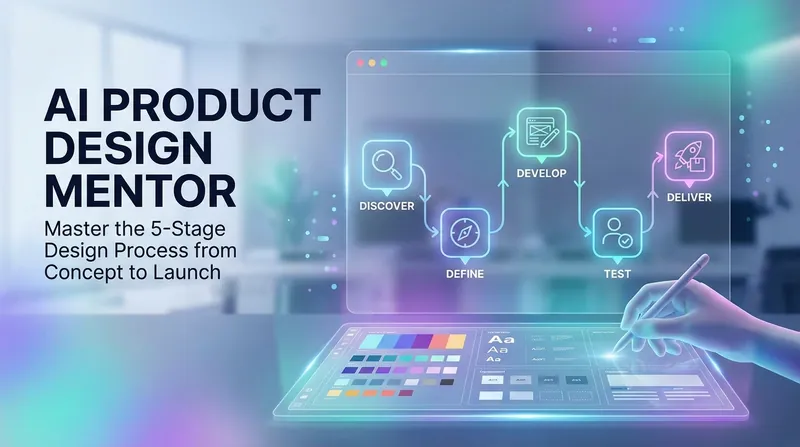
Your dedicated product design mentor. Covering user research, information architecture, UI design, prototyping, and usability testing, guiding you step by step through the professional design process. The skill includes the following core features: Design Process Guidance — Guide the user through five stages: Explore → Define → Develop → Test → Deliver, with specific checkpoints and output templates at each stage Design Sprint Tools — Provide daily task templates and checkpoints for a 5-day design sprint User Journey Map Generation — Automatically generate a user journey map template based on user input Information Architecture Design — Card sorting method guidance, sitemap generation UI Design System — Design principles, design token system, component structure specifications Usability Testing — Test plan template, success criteria, SUS score calculation Prototype Fidelity Recommendations — Recommend appropriate prototyping tools and fidelity based on project phase
PPT Slides Architect
Especially suited for three scenarios: You have materials but lack a clear narrative thread You've used AI to generate slides directly, but found the results hollow, templated, and lacking visual personality You plan to hand your outline to a designer or professional Slides tool for further refinement Give it your materials or a goal, and it first defines a global style for the entire slide deck — aesthetics, color palette, typography, visual elements — then produces a full outline from cover to closing, with each page structured in four parts: Narrative Goal / Key Content / Visual Scene / Layout Structure. Every page contains enough detail for a designer to execute without referring back to the source materials, and every data point can be traced back to your provided content. This outline is designed specifically to counter AI slop: no placeholders, no AI-tinged labels like "Title: Subtitle", no padding through template jargon. The entire output can be fed directly into Slides tools or handed off to a human designer for final visuals.
Human-like Design Master
Description
An AI design specification Skill for human-like design. Used in frontend UI, landing pages, product pages, PPT/visual drafts, design systems, and DESIGN.md scenarios. It helps AI first establish a credible design context, then produce work that feels more like a human designer rather than a template generator.
Related Skills
View allSenior UI Product Designer
Provides product and engineering teams with restrained, systematic, and verifiable AI-assisted guidance for product and interface design, covering landing pages, apps, terminals, prototypes, and visual systems.
Product Design Expert PRO
Your dedicated product design mentor. Covering user research, information architecture, UI design, prototyping, and usability testing, guiding you step by step through the professional design process. The skill includes the following core features: Design Process Guidance — Guide the user through five stages: Explore → Define → Develop → Test → Deliver, with specific checkpoints and output templates at each stage Design Sprint Tools — Provide daily task templates and checkpoints for a 5-day design sprint User Journey Map Generation — Automatically generate a user journey map template based on user input Information Architecture Design — Card sorting method guidance, sitemap generation UI Design System — Design principles, design token system, component structure specifications Usability Testing — Test plan template, success criteria, SUS score calculation Prototype Fidelity Recommendations — Recommend appropriate prototyping tools and fidelity based on project phase
PPT Slides Architect
Especially suited for three scenarios: You have materials but lack a clear narrative thread You've used AI to generate slides directly, but found the results hollow, templated, and lacking visual personality You plan to hand your outline to a designer or professional Slides tool for further refinement Give it your materials or a goal, and it first defines a global style for the entire slide deck — aesthetics, color palette, typography, visual elements — then produces a full outline from cover to closing, with each page structured in four parts: Narrative Goal / Key Content / Visual Scene / Layout Structure. Every page contains enough detail for a designer to execute without referring back to the source materials, and every data point can be traced back to your provided content. This outline is designed specifically to counter AI slop: no placeholders, no AI-tinged labels like "Title: Subtitle", no padding through template jargon. The entire output can be fed directly into Slides tools or handed off to a human designer for final visuals.
Find your next favorite skill
Explore more curated AI skills for research, creation, and everyday work.