
Seedance 2.5 Master Shot
Turn plots into scene scripts and video prompts
Description
Turn an idea or short plot into a video-ready package for Seedance 2.5—from identifying the core story, theme, narrative structure, and character arcs to creating a scene-by-scene script with connected events and clearly visible end states at each stage. Ideal for filmmakers, storytellers, and creators who want to systematically develop plots into visual work. You’ll receive ready-to-use Seedance 2.5 prompts in English that specify the subjects and actions, setting, visual style, shot size and camera movement, editing, sound, dialogue, and atmosphere in detail. The workflow also supports reference images, longer clips, clip extension, storyboards, and blockouts. With this information, the prompts help maintain continuity in characters, clothing, props, the number of people, and their positions in the scene. The output document is written in Thai for the analysis and explanations, with English prompts for each scene. It also includes the reasoning behind the script and visual language choices, so you can understand how each beat, camera movement, and emotional cue helps tell the story more clearly.
Related Skills
View all Write
WriteSeedance 2.5 Prompt Director
An industrial-grade prompt optimization system designed for Seedance 2.5, combining the expertise of a director, cinematographer, and technical artist. It quickly transforms rough ideas into director-level prompts ready for generation, covering the full range of scenarios from creation from scratch and troubleshooting to fine-tuning, iteration, and reference material integration. The system uses a 3×3 temporal structure to control narrative pacing, four-dimensional industrial controls to precisely manage visual, physical, spatial, temporal, and stylistic attributes, and standardized subject anchoring with negative constraints. It addresses issues such as subject drift, flickering, and loss of style control at the source, helping produce stable, high-quality, cinematic motion visuals.

Seedance 2.5 Image-to-Video
You already have the key image. I’ll turn it into a short Seedance 2.5 image-to-video prompt, adding only what the model can’t read from the image. Ideal for turning product shots, makeup looks, and scene stills into 30-second videos. I don’t write purely text-to-video single-shot prompts or handle blank models, extensions, or green screens. The target is 300–500 Chinese characters without adjective overload. Nighttime BGM, four nightclub elements, and potentially sensitive scene terms are proactively removed. I don’t generate the video; I deliver two versions of the short prompt.
Seedance 2.5: 3 Extensions
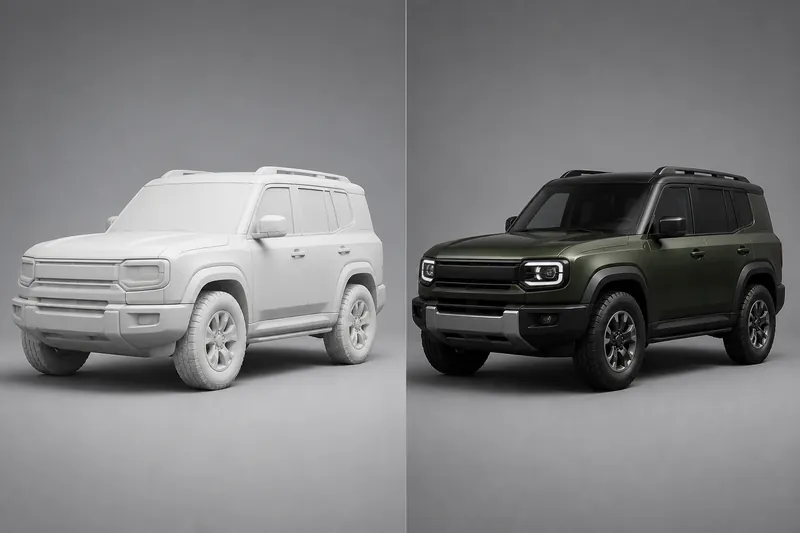
This Skill focuses specifically on Seedance 2.5’s three added capabilities: white-model trajectory control, extending finished clips, and replacing green-screen backgrounds. It is for people who already have a white-model video, a master clip, or green-screen footage and want to continue working from it. It does not write prompts for a purely text-to-video shot from scratch or image-to-video from scratch. If the corresponding source asset is missing, it stops rather than pretending it can generate one from text. The deliverable is still two versions of the instructions, not a finished video.
Seedance 2.5 Master Shot
Turn plots into scene scripts and video prompts
Description
Turn an idea or short plot into a video-ready package for Seedance 2.5—from identifying the core story, theme, narrative structure, and character arcs to creating a scene-by-scene script with connected events and clearly visible end states at each stage. Ideal for filmmakers, storytellers, and creators who want to systematically develop plots into visual work. You’ll receive ready-to-use Seedance 2.5 prompts in English that specify the subjects and actions, setting, visual style, shot size and camera movement, editing, sound, dialogue, and atmosphere in detail. The workflow also supports reference images, longer clips, clip extension, storyboards, and blockouts. With this information, the prompts help maintain continuity in characters, clothing, props, the number of people, and their positions in the scene. The output document is written in Thai for the analysis and explanations, with English prompts for each scene. It also includes the reasoning behind the script and visual language choices, so you can understand how each beat, camera movement, and emotional cue helps tell the story more clearly.
Related Skills
View allWriteSeedance 2.5 Prompt Director
An industrial-grade prompt optimization system designed for Seedance 2.5, combining the expertise of a director, cinematographer, and technical artist. It quickly transforms rough ideas into director-level prompts ready for generation, covering the full range of scenarios from creation from scratch and troubleshooting to fine-tuning, iteration, and reference material integration. The system uses a 3×3 temporal structure to control narrative pacing, four-dimensional industrial controls to precisely manage visual, physical, spatial, temporal, and stylistic attributes, and standardized subject anchoring with negative constraints. It addresses issues such as subject drift, flickering, and loss of style control at the source, helping produce stable, high-quality, cinematic motion visuals.
Seedance 2.5 Image-to-Video
You already have the key image. I’ll turn it into a short Seedance 2.5 image-to-video prompt, adding only what the model can’t read from the image. Ideal for turning product shots, makeup looks, and scene stills into 30-second videos. I don’t write purely text-to-video single-shot prompts or handle blank models, extensions, or green screens. The target is 300–500 Chinese characters without adjective overload. Nighttime BGM, four nightclub elements, and potentially sensitive scene terms are proactively removed. I don’t generate the video; I deliver two versions of the short prompt.
Seedance 2.5: 3 Extensions
This Skill focuses specifically on Seedance 2.5’s three added capabilities: white-model trajectory control, extending finished clips, and replacing green-screen backgrounds. It is for people who already have a white-model video, a master clip, or green-screen footage and want to continue working from it. It does not write prompts for a purely text-to-video shot from scratch or image-to-video from scratch. If the corresponding source asset is missing, it stops rather than pretending it can generate one from text. The deliverable is still two versions of the instructions, not a finished video.
Find your next favorite skill
Explore more curated AI skills for research, creation, and everyday work.