90% of people who say "NotebookLM is convenient" aren't even using 10% of its power. I used to be one of them.
I can say this with certainty.
It's not a matter of ability.
It's a matter of "what you put into it."
※ Saving this article is recommended.
Why is there such a difference using the same tool?
Imagine two people.
Both are using the same NotebookLM.
One has reduced their 100 hours of monthly overtime to almost zero.
The other is still manually aggregating Excel sheets today.
The difference isn't talent.
It's simply knowing "what to put in."
Most people stop at this kind of usage:
Upload one PDF.
Type "Summarize this."
Read the response and think, "That's convenient."
End of story.
I understand that feeling.
To be honest, I initially thought of NotebookLM as nothing more than a "smart photocopier."
I was using it in an embarrassing way.
Friday at 9 PM, only the sound of fluorescent lights echoed
Let me tell you a bit about my past.
I used to work 100 hours of overtime a month.
I'd go to the office at 9 AM.
But I couldn't start my actual work until the evening.
During the day, I was constantly copying and pasting data from various Excel sheets sent from different branches into a single sheet.
Fixing full-width and half-width characters.
Standardizing date formats.
Fixing broken formulas.
Over and over again.
I stayed at the office until 10 PM every night, sometimes until midnight.
On Friday nights, when I had to make regular reports.
I would transcribe form responses one by one into a separate sheet and send dozens of emails with only the recipient's name changed.
While thinking, "A machine should be doing this," I was acting as the machine myself.
What I remember most is Friday at 9 PM.
I was alone in the office.
The buzzing sound of the fluorescent lights seemed unusually loud.
I'd watch my colleagues leave, saying "Good job today."
I was still doing copy-paste work that wasn't even half-finished.
It wasn't frustration I felt.
It was emptiness.
Even if I performed this task perfectly, no one would remember it.
No skills or achievements were being built.
Even though I was working hard, no evidence of that effort remained.
That feeling of "nothingness" is still the hardest part to remember.
I threw in 10 things at once and almost gave up
When I first learned about NotebookLM, I completely underestimated it.
I'd throw in one PDF from a meeting.
Type "Summarize this."
Read the text and think, "Oh, neat," and that was it.
I wouldn't even open it the next day.
Once, I threw in 10 PDFs at once without organizing them.
I asked, "Based on all of this, make it look good."
The response was a vague, bland piece of writing.
"Well, it's not that great."
At that point, I almost gave up.
But now I understand.
It wasn't NotebookLM that was bad.
It was me, who hadn't thought for a second about "what to put in."
I was blaming the tool and running away from the most important part: the creative effort.
When I pressed the execute button, 3 hours became 10 seconds
The turning point was the 5th use case: GAS (Google Apps Script).
GAS is an automation mechanism provided by Google.
(Think of it as the Google version of Excel macros.)
It started out of desperation.
Thinking "It probably won't work anyway," I gathered articles and examples explaining GAS and put them into NotebookLM.
Then I asked:
"Write a code that automatically aggregates spreadsheets every Friday and sends an email to the team."
I pasted the code that came out exactly as it was.
I pressed the execute button.
Let me tell you upfront: you don't need to be able to read code at all.
You just copy and paste the text NotebookLM wrote into the designated spot and press "Execute."
To be honest, I still don't really understand the content myself.
...It worked.
The Friday aggregation and email sending that usually took me 3 hours was finished with one button.
3 hours → 10 seconds.
At that moment, I actually shouted in front of the screen.
"Wait, is that it?"
At the same time, I felt a chill down my spine.
What on earth were those hundreds of hours I had dedicated to the company?
That's when I became convinced.
The value of NotebookLM is not "summarization." It's "stocking knowledge and growing it into your own personal 'expert'."
From there, I started building automations like a dam breaking.
In about a month, I built 12 automations.
My 100 hours of monthly overtime became almost zero.
This is the real deal. 10 ways to change your life
Now for the main topic.
What they all have in common is NotebookLM's "Find Sources" feature.
(Sources = the original materials you feed into the AI.)
You just throw a prompt in there.
(Prompt = a request to the AI. You don't even have to prepare the materials yourself.)
It will gather related information from the web for you.
Store them in notebooks by theme.
Then, that notebook becomes an "expert" in that field.
It's not a disposable suggestion box.
Imagine having 10 of your own personal colleagues.
You don't have to do all 10 at once.
One a week is fine.
If you're inexperienced, start with these three: "7. Meeting Minutes, 10. Information Gathering, 5. GAS."
Do the rest once you're used to it.
For each item, I've written the materials to collect (sources to put in), how to actually type it (instruction examples), and the effects you'll get.
Store the materials in the notebook and type the instructions. That's it.
1. Prompt Design Support | Stop worrying about instructions to AI
"I don't know what to ask the AI."
This is the most common stumbling block in AI utilization.
Whether it's ChatGPT or Gemini, the response changes completely based on how you ask.
It's not that "AI is useless," it's just that the way of asking is a waste.
That's why I put this first.
The moment you get better at asking, all the AI you have will become a level smarter.
Sources to put in (type this in "Find Sources"):
・"Collect articles that explain how to create AI instructions simply for beginners."
・"Collect many examples of prompts that can be used in different work situations."
・"Collect articles that summarize tips for asking questions that significantly improve response accuracy."
Now the notebook becomes a "teacher of how to ask."
Example usage:
・"Write an instruction for creating a report memo to be used in tomorrow's morning meeting." → You'll get an instruction that organizes who, what, and in what order to communicate.
・"Write an instruction for creating a draft proposal to convince my boss." → You'll get an instruction designed with the conclusion first and how to include numbers.
Effect: The time spent searching the web for how to ask every time disappears.
Moreover, when the way you ask improves, the quality of the emails, proposals, and SNS posts that come out of it all improves together.
When I assign a new task to an AI, I always create the instruction here first before sending it to each AI.
2. GPTs Creation Support | From a user to a creator
Do you think AI is just something to "use"?
Actually, you can move to the "creator" side and make your own personal AI.
GPTs is a feature that allows you to create "your own AI assistant" that has learned your specific work.
(※ Requires a ChatGPT Plus plan.)
You'll be able to do the customization that would cost hundreds of thousands of yen if outsourced, all by yourself.
Sources to put in:
・"Collect articles that explain the steps to create GPTs for beginners."
・"Collect various examples of GPTs actually used in business."
・"Collect articles that summarize tips for making AI remember roles and rules."
Example usage:
・"Create a design document for a GPTs that handles initial customer inquiries." → You'll get instructions to remember, assumed Q&A, and the line for handing over to a human.
・"I want to make a GPTs that answers internal 'frequently asked questions,' please design it." → It will suggest the organization of necessary data and the tone of the response.
Effect: You can have a "personal tool" that you used to outsource, with zero outsourcing costs.
You know your work best.
That's why you can create an "AI that reaches the itchy spots" that outsourcing can't reach.
3. Business Improvement Know-how | Change how you work without calling a consultant
Business improvement consultants cost hundreds of thousands for small projects, and millions for full-scale ones.
Moreover, outsiders don't know the real hassles of your workplace.
So, let the AI learn only the "knowledge" of improvement, and do the analysis with your own work data.
This is the cheapest and most accurate way.
Sources to put in:
・"Collect articles that explain business improvement concepts to eliminate waste, with examples."
・"Collect articles that summarize work techniques for organizing tasks and arrangements."
・"Collect successful examples of visualizing work flow and improving efficiency."
Example usage:
・"Our sales team manually enters results on Monday, reports on Tuesday, and meets on Wednesday. Where is the waste?" → You'll get suggestions for automating manual entry, AI drafting of reports, and moving meetings to chat.
・"Divide these into what can be done immediately this week and what will take a month." → It will organize them into short-term and medium-term plans.
Effect: Even with zero specialized knowledge of improvement, you can get professional-level analysis and suggestions.
And because you can directly communicate the realities of the workplace, it hits home more than an outsourced consultant.
4. Marketing Techniques | End "because it's not my specialty" today
"Marketing has nothing to do with me." Is that really true?
When getting a new service proposal approved.
When winning a budget within the company.
When communicating the company's appeal in recruitment.
It's all about "to whom, what, and how to communicate," which is marketing itself.
Sources to put in:
・"Collect articles that explain basic marketing concepts for non-specialists."
・"Collect marketing examples that can be used by small companies or individuals."
・"Collect articles that summarize successful examples of attracting customers via SNS or the web."
Example usage:
・"To whom and with what words should I sell a cloud service for SMEs?" → You'll get the target audience, strengths to highlight, and the first campaign.
・"How should I communicate our strengths against competitors A and B?" → It will organize differentiation points in four areas: product, price, place, and promotion.
Effect: You can create strategies yourself that you previously had to rely on specialized departments or outsiders for.
"Thinking frameworks" can be reused forever, whether for presentations to your boss or as a starting point for proposals.
5. GAS | Manual work finished with one button
This is exactly how I reduced my 100 hours of monthly overtime to almost zero.
GAS is an automation mechanism provided by Google.
(Think of it as the Google version of Excel macros.)
You can move spreadsheets, Gmail, and forms all together automatically.
"I can't do it because I have no programming experience." It's okay, NotebookLM will fill that gap.
Sources to put in:
・"Collect articles that explain the basics of Google Apps Script for beginners with steps."
・"Collect example GAS codes for automating spreadsheets and Gmail."
・"Collect articles that explain how to fix errors and common pitfalls."
Example usage:
・"Write a GAS that aggregates each sheet every Friday at 9 AM and sends the results to the team via email." → You'll get code that works just by pasting it.
・"Write a GAS that automatically sends a thank-you email when a form response arrives and records it in a sheet." → You'll get the integration code.
Effect: 3 hours of manual work becomes 10 seconds.
You don't need to be able to read code at all.
Just copy and paste the text that comes back and press "Execute."
Starting from here, I built 12 automations for aggregation, email sending, calendar integration, etc., in about a month.
It's the moment you change from a "person who moves their hands" to a "person who builds systems."
6. SEO Measures | Write articles that naturally attract people from search
For those writing on note or blogs.
"It's not being read at all." Does that sound familiar?
Most of the time, the cause is a lack of SEO design (efforts to rank high in search).
Even if the content is good, it won't be read if it's not found.
Sources to put in:
・"Collect articles that explain how to write articles to rank high in search for beginners."
・"Collect articles that summarize how to choose keywords that get read."
・(Even more powerful) Search for the theme you want to write about and put the URLs of the top 10 articles directly into the notebook.
Example usage:
・"Tell me the common themes in the top articles and, conversely, the angles that none of them touch on." → You'll find "holes" that competitors haven't written about.
・"Compare the headings of these 10 articles and suggest the best structure." → You'll get a framework for an article that is likely to rank high.
Effect: You can judge "what to write to rank high" based on facts rather than intuition or sheer willpower.
I always do this before writing a note.
30 minutes of preparation before writing extends the life of the article many times over.
7. Meeting Minutes Creation | The work after the meeting disappears entirely
That dull, heavy time spent creating minutes after a meeting is over.
You can let go of that now.
Just by putting in the meeting transcript, it will organize it into decisions and ToDos.
If you're inexperienced and trying it for the first time, I recommend this.
Because it's the easiest to feel the effect.
Sources to put in:
・Meeting transcript text (smartphone recording apps or transcription tools are fine)
・"Collect articles that summarize easy-to-understand meeting minutes formats and writing styles."
Example usage:
・"From this transcript, make a table of decisions, person in charge, and deadline." → You'll get a table you can share as is.
・"Extract only the ToDos for what needs to be done by next time and by whom." → You'll get a task list with no omissions.
Effect: Creating minutes that used to take an hour now takes 5 minutes.
You'll find yourself saying, "This is organized more carefully than I could do it."
You can focus on the notes during the meeting, and the minutes are ready the moment it's over.
Once you experience this, you can't go back.
8. Data Analysis | Turning the "meaning" of numbers into words
Have you ever frozen in front of a sheet with rows of numbers, thinking, "So, what does this tell me?"
NotebookLM is not a full-scale calculation tool.
But it's great at putting "what can be read from these numbers" into words.
Sources to put in:
・Your own numbers, such as sales memos or monthly reports
・"Collect articles that explain how to interpret data and grasp trends for beginners."
Example usage:
・"List three trends you can notice from this sales memo." → It will return words about factors for the increase, months that dropped, seasonal waves, etc.
・"Compared to last month, what are the changes we should be careful about?" → It will point out anomalies that are easy to overlook.
Effect: 2 hours of staring at Excel becomes 10 minutes.
What's important here is not the calculation itself, but being able to "put trends into words and explain them to people."
You'll be able to say, "In short, this is what it means," in meetings or reports.
9. Document Creation | Drafts are born from scratch
The hardest part of creating documents is the first 10 minutes in front of a blank page.
That "how should I start writing" will disappear.
If you let it learn the patterns of proposals and presentations, it will give you a draft anytime.
Sources to put in:
・"Collect articles that summarize structure patterns for effective proposals and presentation materials."
・Your own past documents that were well-received (putting them in improves accuracy)
Example usage:
・"With this content, create a slide structure for an internal proposal." → You'll get a draft of the page layout from the cover to the conclusion.
・"Shorten the structure to one that can be explained in 3 minutes for executives." → You'll get a shortened version focused only on the main points.
Effect: 3 hours from a blank page becomes 30 minutes with a draft.
You're not creating from scratch; you're just fixing the ideas that came out.
The psychological hurdle is on a different level.
10. Information Gathering | Latest information gathers itself
Wandering the web for an hour every time you want to look up "what's happening in that industry now."
You can skip that entirely.
Just by throwing in the theme you want to research, it will collect and organize related information.
Along with meeting minutes, this is perfect for inexperienced people to try first.
Sources to put in:
・"Collect articles introducing the latest movements and examples in the ◯◯ industry."
・"Collect both supporting and opposing opinions on this theme."
Example usage:
・"Summarize the latest trends in this industry in three main points." → Only the points you should grasp now will be returned.
・"If explaining to a beginner, where should I start?" → It will even organize the order.
Effect: Searching time disappears entirely.
You can start from "using" immediately.
This is where it works.
Because the effort of collecting becomes zero, you can spend more time thinking.
Six months later, it will show as a difference from those around you.
※ These 10 items become an execution checklist as they are, "one per week from the top." Bookmark it and start from number 1 on Monday.
Once you have all 10, you're no longer an island.
A team of experts will work for you like a factory.
I'll dismantle the three "But..."s first
When I recommend this method, three phrases always come back.
① "I think it's impossible for my company for security reasons."
Yes, I used to think so too.
But if you dig deeper, it's usually just "somehow scary."
For aggregation and email sending like this, the processing is all completed within your own Google account.
You only use Spreadsheets and Gmail.
Unless you link it with external services, the data won't go outside.
Most of the time, you can break through just by "asking the IT department a quick question."
② "I don't have time to do that."
This is the biggest waste.
I was exactly like this.
But I could make the first one in 2 hours on a weekend, and that alone significantly reduced my monthly overtime.
By accumulating small automations in the same way, my overtime became almost zero in about a month.
Endure overtime once this week to sow the seeds.
You can collect the harvest every month starting next month.
That's all it is.
③ "My work is special anyway."
If you break down the work, 80% is simple work like "copy-paste, transcription, sending, and aggregation."
Only the remaining 20% is special. You hand over the 80% to the machine so you can use your time for that 20%.
The only difference that separates those who master it
2026.
Those who use AI as a "search tool" and those who have grown it into an "expert team."
This gap will widen every day.
At this rate, you'll be left behind.
That feeling of slowly getting anxious.
I remember it too.
But it's okay.
You can start closing that gap today.
Work that would cost hundreds of thousands of yen if outsourced can be done by yourself, for free.
Once you know this feeling, you can't go back.
Summary
There are three main points today:
- The value of NotebookLM is determined by "what you put in." If it's just for summarization, you're not even using 10% of it.
- If you stock knowledge by theme, it becomes a "team of 10 experts" just for you.
- I built 12 automations in about a month and reduced my 100 hours of monthly overtime to almost zero.
The order to work in is this:
Week 1: Create one notebook for Use Case 1, "Prompt Design."
Weeks 2-3: Choose one use case from the 10 that fits the task you're struggling with most, and grow it.
Months 1-2: Build your first automation with GAS. Once it works, increase the number of automations by repurposing it.
If you're going to do just one thing today.
There's only one thing to do tonight.
Search for "NotebookLM" on your smartphone or PC and open it (it's free if you have a Google account).
Paste one recent meeting memo and type "Summarize the minutes in 3 lines."
Experience this success once.
Work automation is not a talent.
You just know "what to put in."
Those who end with zero and those who do just one.
That's the only difference.
Finally
What did you think?
Finally, just one thing.
To prevent you from just "reading and finishing" the AI usage I wrote about in this article, I'm currently giving away 32 super luxurious benefits for free for a limited time.
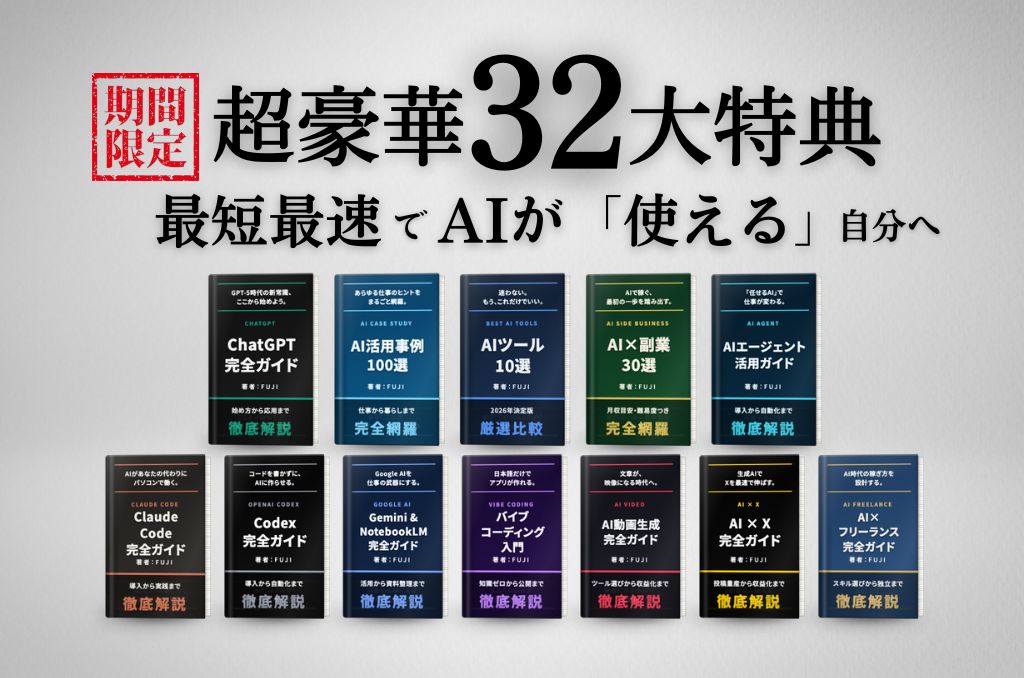
The overview of the benefits is as follows:
・ChatGPT / Claude Code / Codex / Gemini Complete Guide
・AI Side Hustle Roadmap to earn 1 million yen a month, profitable genre map, unit price list, market price data
・Practical guides for AI video generation, AI agents, vibe coding, etc.
・100 examples of AI utilization, etc.
A total of 32 items, over 860 pages in total.
And it's all free.
You can get it all without participating in seminars or individual consultations.
It sounds like a lie, doesn't it?
But it's true.
The way to receive it is simple.
Just join the LINE Open Chat below.
You can enter from here.
However, these benefits are for a limited time.
I haven't decided on a deadline, but it will end without notice when it's over.
Almost everyone forgets "I'll do it tomorrow."
Please receive it while you can.
Let me say it just one more time.
Whether you can earn with AI is not determined by talent.
It's whether you can learn in the right order.
That order is all in these 32 benefits.