Applicable versions: CC Switch v3.16.1 and above. This article is organized based on current code, user manuals, and v3.16.1 Release Notes. Screenshots use desensitized example data and do not contain real Access Tokens or API Keys.
What problem does this guide solve?
Many people have two requirements when using Codex:
- Use third-party APIs such as DeepSeek, Kimi, GLM, MiniMax, SiliconFlow, or use GPT models through a proxy station.
- Retain the mobile remote operation, official plugins, and other capabilities of the official Codex App.
Previously, when switching to a third-party provider, the old behavior would write the third-party API Key into Codex's auth.json, thereby overwriting the original official ChatGPT / Codex login cache. This made third-party models usable, but functions relying on the official login state would disappear.
The new Codex App Enhancement toggle in v3.16.1 is designed to solve this contradiction: it allows the official Access Token to remain in auth.json while third-party provider information is written to config.toml. This way, the Codex App still thinks you are logged into the official account, but actual model requests go through the third-party provider currently selected in CC Switch.
This feature existed in v3.16.0 and was enabled by default, but some users reported they did not want it, so it was made into a toggle in v3.16.1.
Conclusion First
The recommended order is:
- Switch to OpenAI Official in the Codex panel of CC Switch.
- Start Codex and log in once with an official ChatGPT / Codex account; a Free subscription is fine (to write the access token to the configuration file).
- Return to CC Switch, go to Settings → General → Codex App Enhancement → Retain official login when switching third parties.
- Add or switch to a third-party Codex provider.
- If the provider uses the Chat Completions protocol, such as DeepSeek / Kimi / MiniMax, you must also enable local routing and Codex takeover.
- Restart Codex to allow config.toml and the model directory to reload.
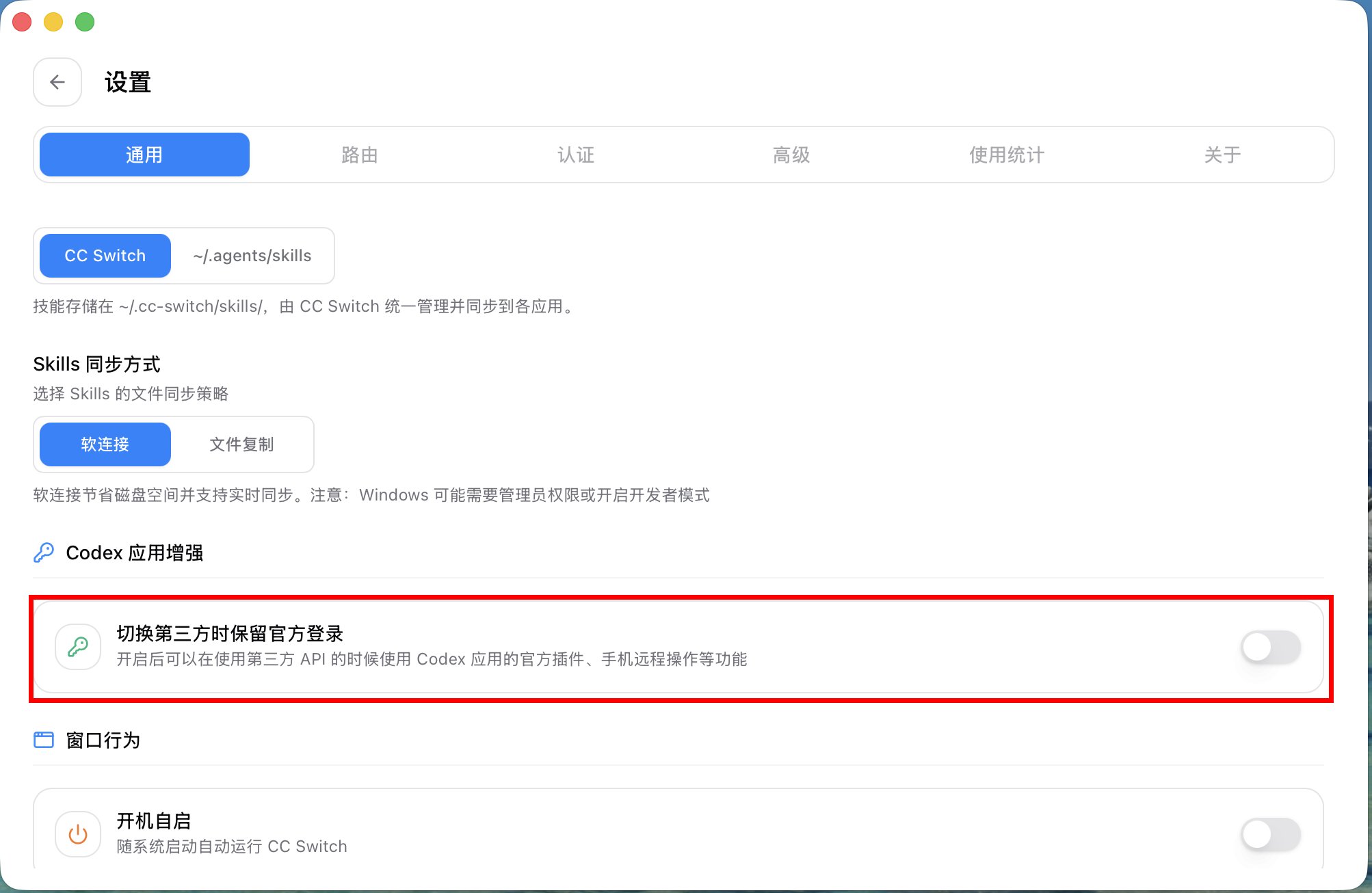
Codex Enhancement Toggle
Preparation
You will need:
- CC Switch v3.16.1 or newer.
- Codex installed and launchable (both app and cli recommended).
- An official ChatGPT / Codex account that can log into Codex (Free subscription is okay).
- A third-party API Key, such as DeepSeek, Kimi, GLM, MiniMax, OpenRouter, SiliconFlow, etc.
Please do not manually copy or share the contents of ~/.codex/auth.json. It contains official login caches and Access Tokens, which are sensitive information.
Step 1: Switch back to OpenAI Official and complete official login
Open CC Switch and go to the Codex tab at the top. First, select the OpenAI Official provider (if you don't have one, add it from the preset providers) and set it as the current provider.
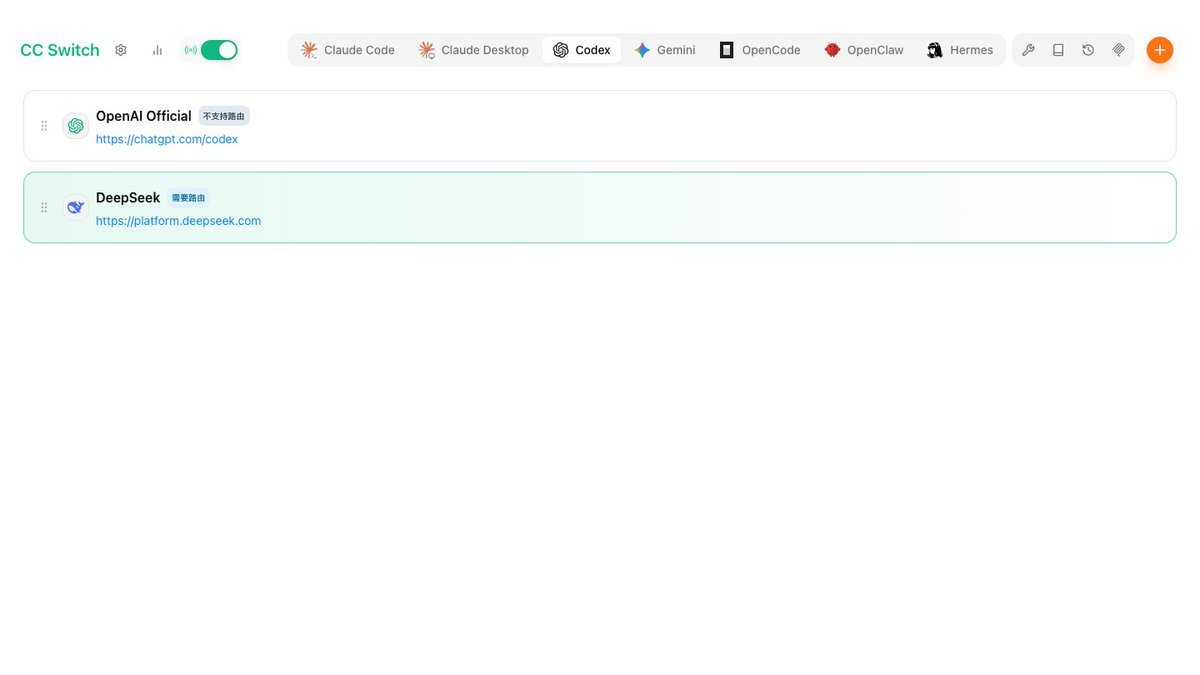
Next, start Codex (cli recommended) and follow the official Codex login process to log into your ChatGPT / Codex account. This account can be a Free subscription; in this setup, it is primarily responsible for maintaining the login identity recognized by the official Codex App and is not responsible for third-party model billing.
Once logged in, Codex will save the official login cache in ~/.codex/auth.json. The key point moving forward is: do not let third-party provider switching overwrite this file.
Step 2: Enable Codex App Enhancement
Return to CC Switch and go to:
Settings → General → Codex App Enhancement
Turn on:
Retain official login when switching third parties
This toggle is off by default because some users do not want this feature. You only need to enable it when you explicitly need "Third-party API + Official Remote Operation / Official Plugins" to coexist.
Once enabled, switching Codex third-party providers in the backend will follow a config-only write path:
- auth.json: Continues to retain the official ChatGPT / Codex login cache.
- config.toml: Writes the current third-party provider's model, endpoint, model_provider, and experimental_bearer_token.
Step 3: Add a third-party Codex provider
Go back to the Codex panel and click the plus sign in the upper right corner to add a provider. It is recommended to prioritize built-in presets such as DeepSeek, Kimi, MiniMax, GLM, SiliconFlow, etc.
Taking DeepSeek as an example, after selecting the preset, you only need to fill in the API Key. The preset will automatically configure the base URL, default model, model mapping table, and "Requires local routing mapping."
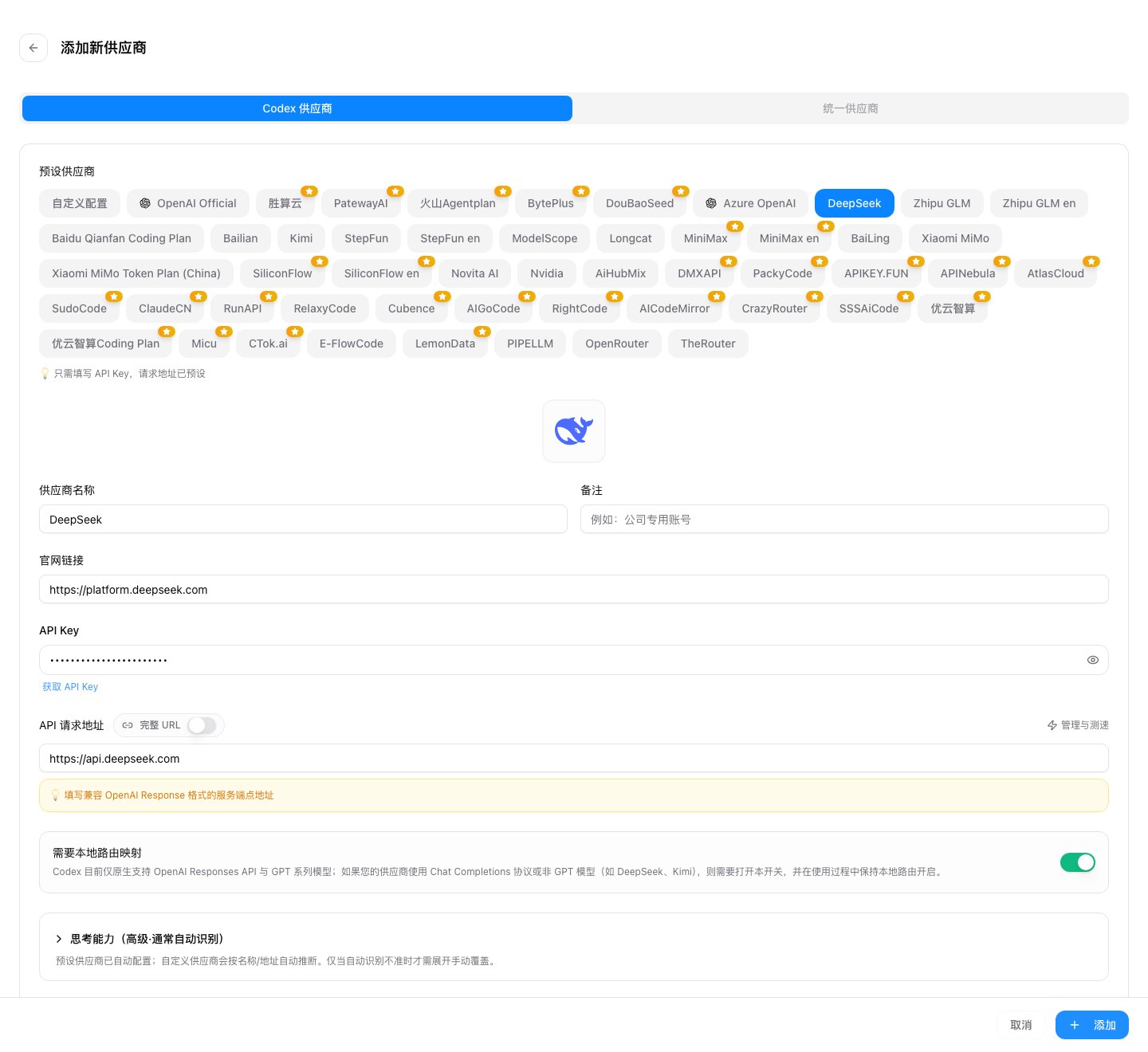
If your third-party provider natively supports the OpenAI Responses API (such as proxy stations providing gpt models), you do not need to enable local routing.
If it only supports OpenAI Chat Completions, such as common DeepSeek / Kimi / MiniMax paths, you must enable local routing to let CC Switch convert Codex's Responses requests into Chat Completions requests.
Step 4: Enable local routing and take over Codex when needed
Go to:
Settings → Routing → Local Routing
Complete two things:
- Turn on the main Routing switch to start the local service. The default address is usually 127.0.0.1:15721.
- Turn on Codex in Routing Enable.
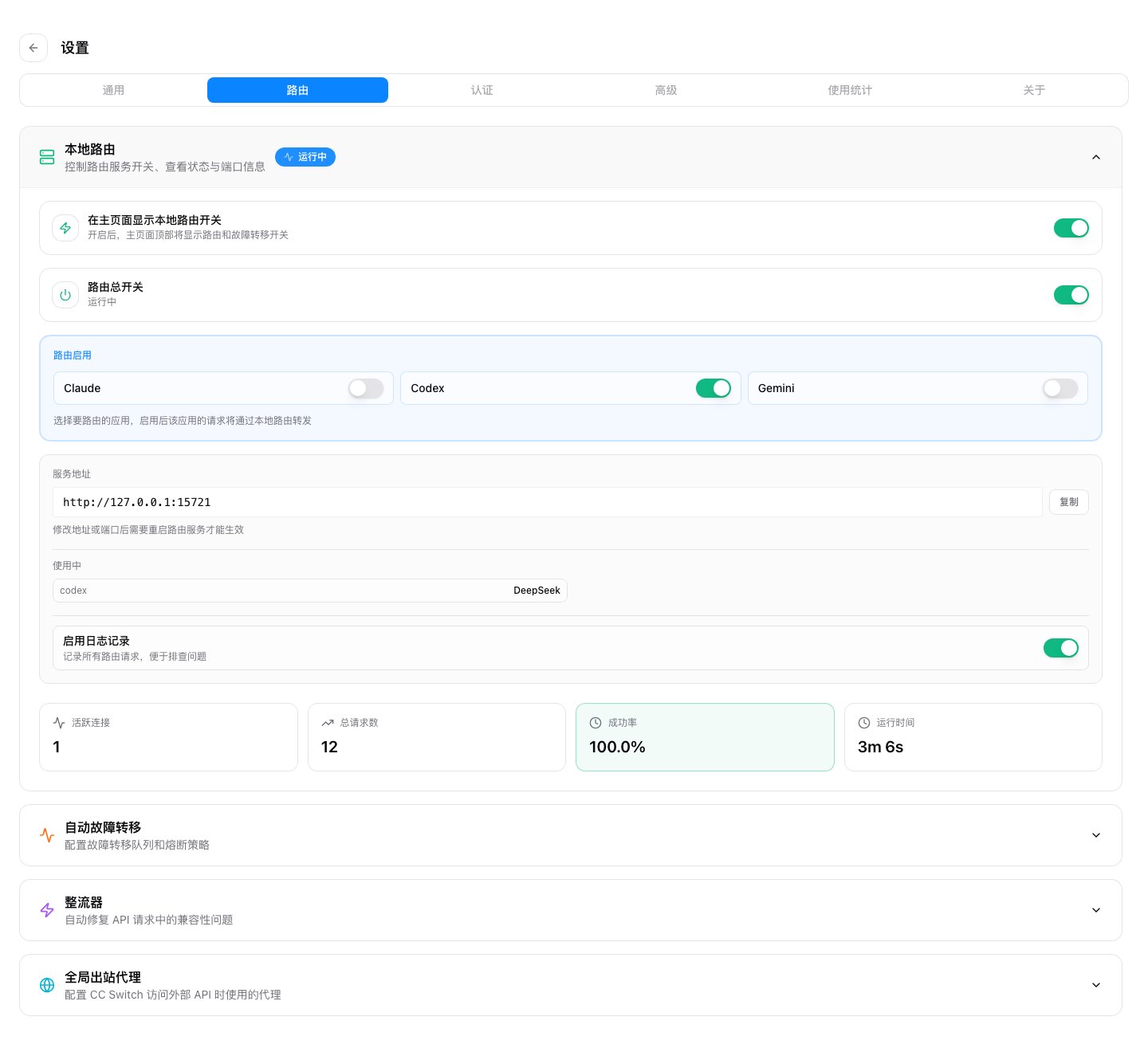
After takeover, Codex's live config.toml will temporarily point to the CC Switch local route. The real third-party API Key is still stored in the CC Switch provider configuration and is projected to the config.toml's experimental_bearer_token when switching providers.
Step 5: Switch to the third-party provider and restart Codex
Return to the Codex provider list and enable the third-party provider you just added. It is recommended to restart Codex after switching for two reasons:
- Codex reads config.toml at startup.
- The /model menu in Codex usually requires a restart to reload the model_catalog_json.
After restarting, you can perform a simple verification:
- In the Codex App, the account information still shows the official account; this is expected behavior.
- In CC Switch, the current Codex provider shows as the third-party provider.
- If local routing is enabled, you will see Codex requests passing through the local route in the request logs or routing statistics.
- Actual model requests will appear in the third-party provider's backend or balance records.
The Principle Behind It
Codex's configuration is mainly divided into two files:
~/.codex/auth.json ~/.codex/config.toml
These two files have different responsibilities:
- auth.json saves the official ChatGPT / Codex login cache, which is the login material required for the Codex App to recognize official accounts, remote operations, and official plugins.
- config.toml saves runtime configurations such as the current model provider, base URL, models, model catalog, and provider-scoped tokens.
After enabling "Retain official login when switching third parties," CC Switch's switching logic will take the third-party provider API Key from the provider configuration and write it to the current provider in config.toml:
model_provider = "custom"
[model_providers.custom] name = "DeepSeek" base_url = "https://api.deepseek.com" wire_api = "responses" experimental_bearer_token = "sk-..."
Meanwhile, auth.json keeps the official login cache unchanged. Thus, the Codex App side can still recognize the official account, while model requests will follow the third-party API based on the current provider and base URL in config.toml.
If the provider uses the Chat Completions protocol, CC Switch local routing adds another layer of conversion:
Codex Responses Request ↓ CC Switch Local Route ↓ Third-party Chat Completions API ↓ Converted back to Codex Responses Response
This is why you can continue to use official plugins / mobile remote operation while switching model traffic to a third-party API.
Side Effects to Understand
The account displayed in Codex is always the official account
This is the most easily misunderstood point. After enabling this capability, the Codex App sees the official login state in auth.json, so it will continue to display official account information.
But this does not mean model requests are still going through official OpenAI. Actual traffic is determined by the current Codex provider in CC Switch, config.toml, and local routing logs.
Do not use Codex account information to judge the billing party
If you switch to DeepSeek, Codex will still display the official account, but model requests will go through the DeepSeek API. Billing, limits, error codes, and data policies should all be understood according to the third-party provider. You can check specific request information in the usage panel of the settings.
Restart Codex after modifying model mappings
Codex's model directory is read at startup. Even if CC Switch has generated a new model directory, a running Codex will not necessarily hot-reload it, so please restart Codex after modifying model mappings.
Turning off the switch returns to old behavior
If you turn off "Retain official login when switching third parties," third-party provider switching will follow the behavior compatible with older versions, which may overwrite auth.json. If your goal is to retain official remote operation and official plugins long-term, it is recommended to keep this switch on.
FAQ
I have switched to a third-party API, why does Codex still show the official account?
This is expected behavior. Official account information comes from auth.json, while the actual provider for model requests comes from config.toml and the current provider in CC Switch.
Is a Free subscription really okay?
Yes. The official account here is mainly used to obtain and retain the official login state required by the Codex App. Third-party model requests use the third-party API Key you configured in CC Switch.
What if official plugins or mobile remote operation are still unavailable after enabling?
Switch back to OpenAI Official first, restart Codex and complete an official login; then confirm that CC Switch's Settings → General → Codex App Enhancement → Retain official login when switching third parties is enabled, then switch back to the third-party provider.
What if third-party requests return 404, the model list is wrong, or streaming responses are abnormal?
If the provider uses the Chat Completions protocol, please confirm that "Requires local routing mapping" is enabled in the provider form, and that the main routing switch and Codex takeover are enabled in Settings → Routing.
Can I switch back to OpenAI Official in local routing mode?
Not recommended. CC Switch will try to prevent switching to the official provider in local routing takeover mode because accessing the official API via a proxy may pose account risks. It is recommended that official login only be used to retain auth.json, while model traffic is switched to third-party providers.
Why is the process so complicated? Can it be simplified?
Because features like the Codex enhancement switch and routing takeover would cause unnecessary trouble for users who do not need them if enabled by default, they are all implemented as toggles.
Reference Links
- Codex DeepSeek Local Routing Practical Guide (https://github.com/farion1231/cc-switch/blob/main/docs/guides/codex-deepseek-routing-guide-zh.md
- Adding Codex Providers: Chat Completions Routing and Model Mapping (https://github.com/farion1231/cc-switch/blob/main/docs/user-manual/zh/2-providers/2.1-add.md
- Local Proxy Service (https://github.com/farion1231/cc-switch/blob/main/docs/user-manual/zh/4-proxy/4.1-service.md
- Local Routing (https://github.com/farion1231/cc-switch/blob/main/docs/user-manual/zh/4-proxy/4.2-routing.md
- CC Switch v3.16.1 Release Note (https://github.com/farion1231/cc-switch/blob/main/docs/release-notes/v3.16.1-zh.md