Most people use Claude Code like a fancy autocomplete.
They prompt. They wait. They accept the first output.
They are leaving 90% of the power on the table.
There are 27 specific moves that separate developers who get 2x output from developers who get 10x.
I am going to break all of them down.
Beginner → Intermediate → Pro.
Read it once. Save it. Come back when you hit each level.
Before we start — the mental model that changes everything
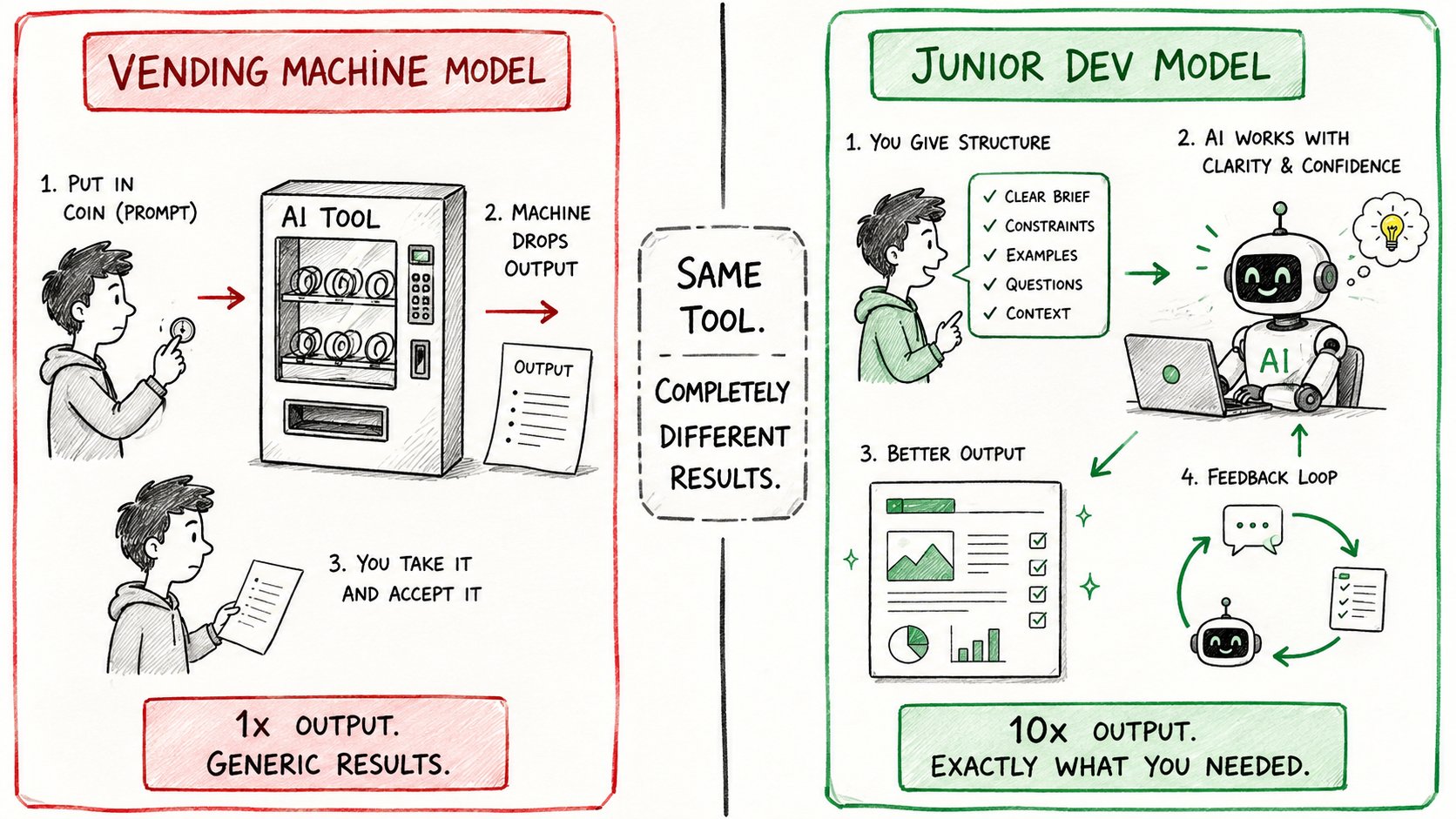
Most developers treat Claude Code like a vending machine.
Put in a prompt. Get out code.
Wrong model.
The right mental model: Claude Code is a junior developer who is extremely talented but needs proper onboarding, clear constraints, and regular check-ins.
Give it structure → it runs. Skip the structure → it wanders.
Every trick below is really just one thing:
Giving Claude better structure so it can run further without you.
BEGINNER HACKS Master these first. They prevent 80% of wasted sessions.
1. Run /init before anything else
First thing you do in every new project: run /init.
Claude reads your codebase and generates a CLAUDE.md file.
This file becomes the project brain — architecture decisions, conventions, patterns, naming rules.
Every future session starts with this context already loaded.
Without it: Claude guesses your conventions. With it: Claude already knows them.
1/init
One command. Done. Never skip it.
2. Use /statusline to see what's happening
Configure /statusline to turn your terminal into a live dashboard.
You see: token usage, session metrics, model info — all in real time.
1/statusline
Stop guessing how much context you've burned.
Look at the number.
3. Enable voice input
Hands-free coding keeps you in problem-solving mode.
Instead of stopping to type, you speak the next instruction.
Especially useful when you are reviewing output and want to redirect without breaking flow.
Enable it once in settings. Use it constantly after.
4. Use /context to find what's eating your tokens
Your context window is a budget.
When it gets heavy, use /context to inspect what's consuming it.
1/context
You will almost always find dead weight — old files, irrelevant context, stale instructions.
Trim it. Your outputs improve immediately.
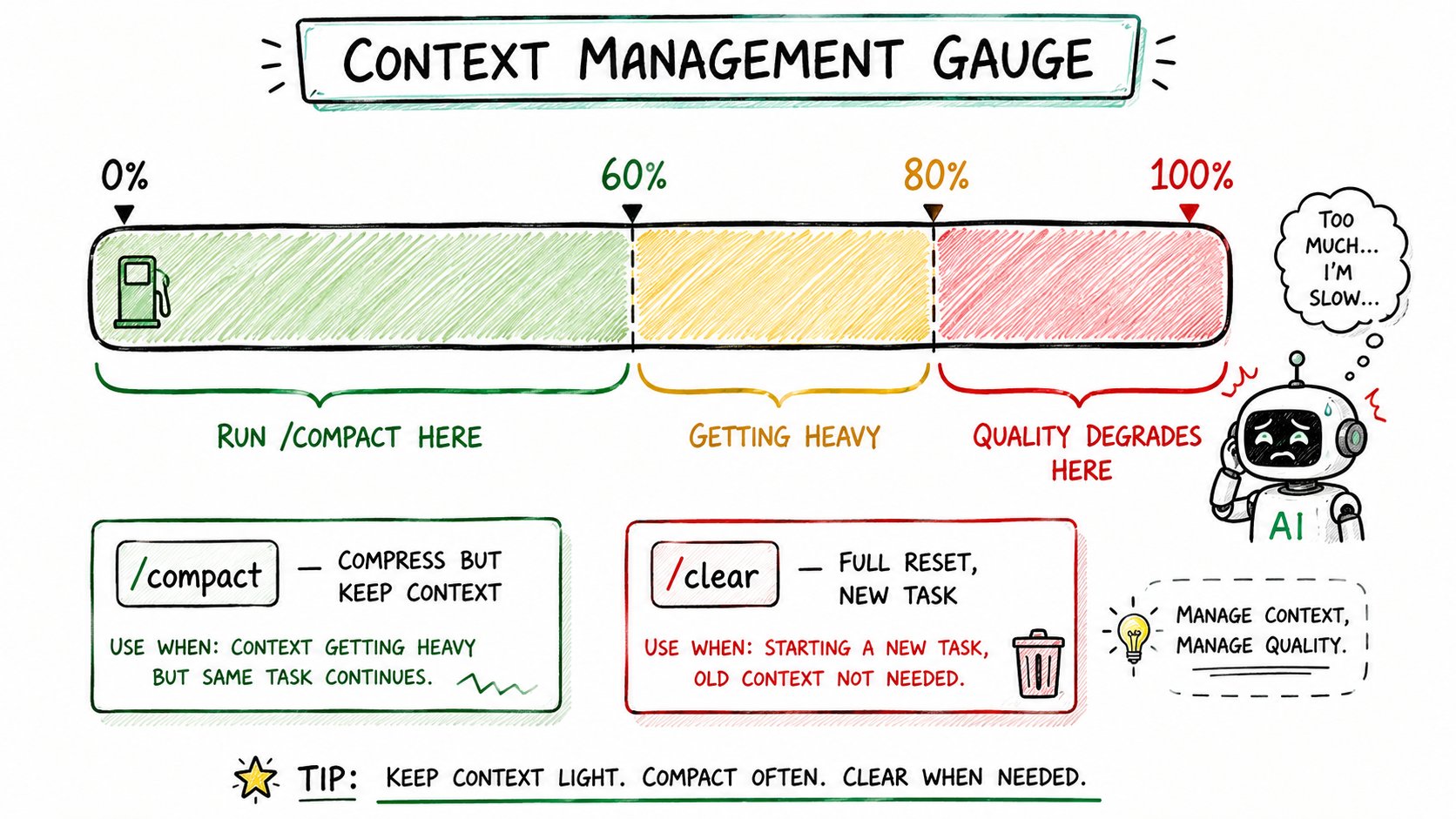
5. Compact at 60%. Clear between tasks.
Two rules for context hygiene:
→ Run /compact when context hits 60% — Claude compresses the conversation without losing key information
→ Run /clear between completely unrelated tasks — start fresh
1/compact # when one task is running long2/clear # when switching to a new unrelated task
Most developers wait until context is completely full.
By then Claude is already degrading.
60% is the sweet spot.
6. Always start in plan mode
Before Claude writes a single line of code — make it plan.
1# Start your session:2"Before doing anything, outline the approach.3List the steps. Flag any assumptions.4Ask me questions if anything is unclear."
Why this works:
→ Forces Claude to think before acting
→ Surfaces misaligned assumptions early
→ Gives you a checkpoint before compute is spent
A session started in plan mode takes 3 extra minutes.
A session started without a plan often takes 3 extra hours to fix.
7. Present problems, not commands
Most people say: "Build me a login page."
Better: "Users can't log in when they use a password with special characters. Here's the error. Here's the constraint — we can't change the database schema."
Problem + constraint + context = dramatically better output.
Claude is not a command executor.
It is a problem solver.
Give it the problem.
8. Make Claude ask questions before starting
Add this to every complex prompt:
Before you start, ask me any clarifying questions
you need to do this well. List them all at once.
The first output is almost never the best output.
The best output comes after Claude understands the edge cases.
Let it ask. Answer once. Then watch it run.
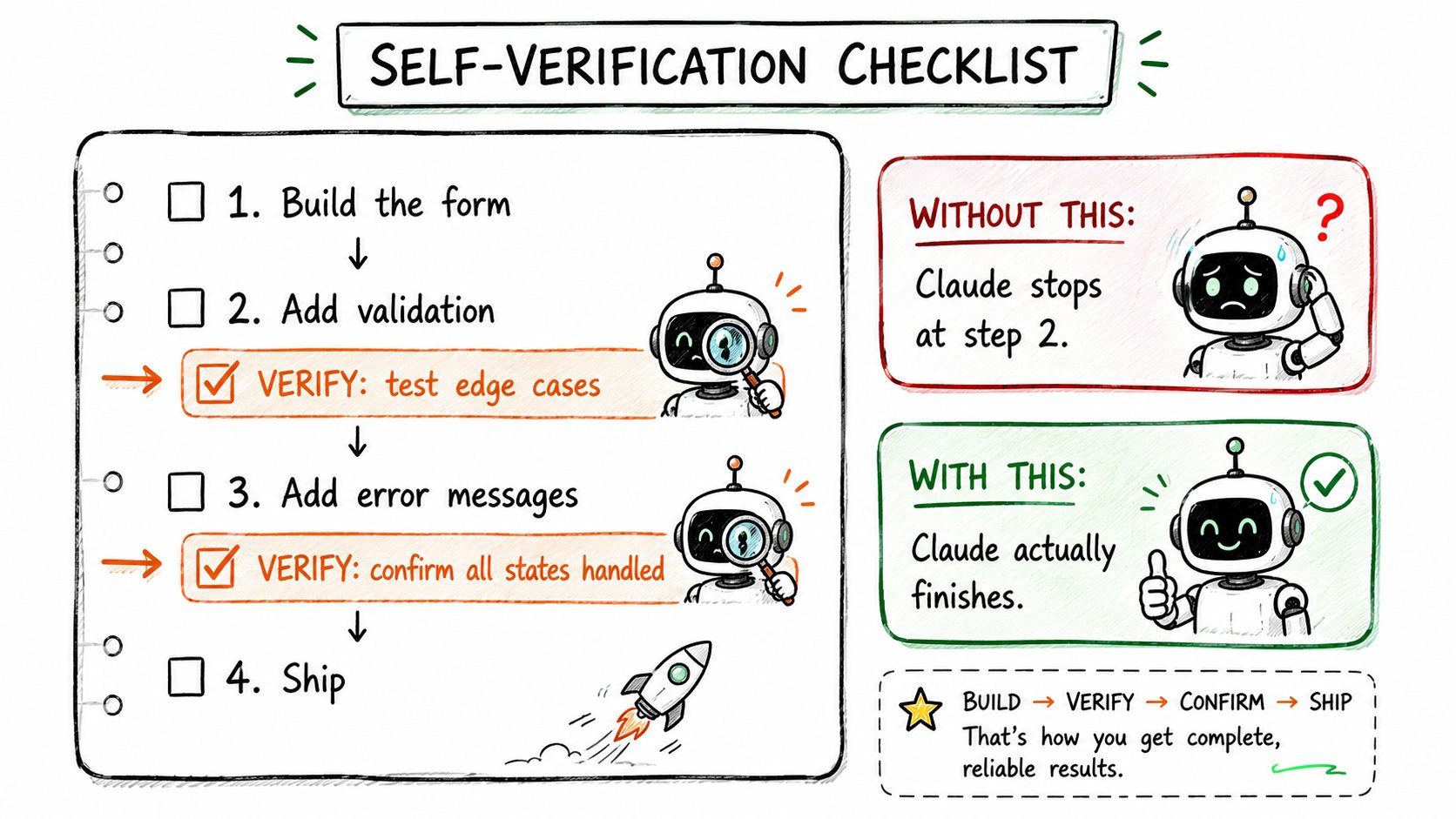
9. Bake self-verification into the to-do list
When giving Claude a task list, add verification steps:
1Todo:21. Build the payment form32. Add input validation43. ✓ Verify: test with empty inputs, special characters, and amounts over $10,00054. Add error messages65. ✓ Verify: confirm all error states are handled and visible
Claude will check its own work before calling the task done.
Without this: Claude declares victory at step 2. With this: Claude actually finishes.
INTERMEDIATE HACKS - Once the basics click, these unlock real productivity jumps.
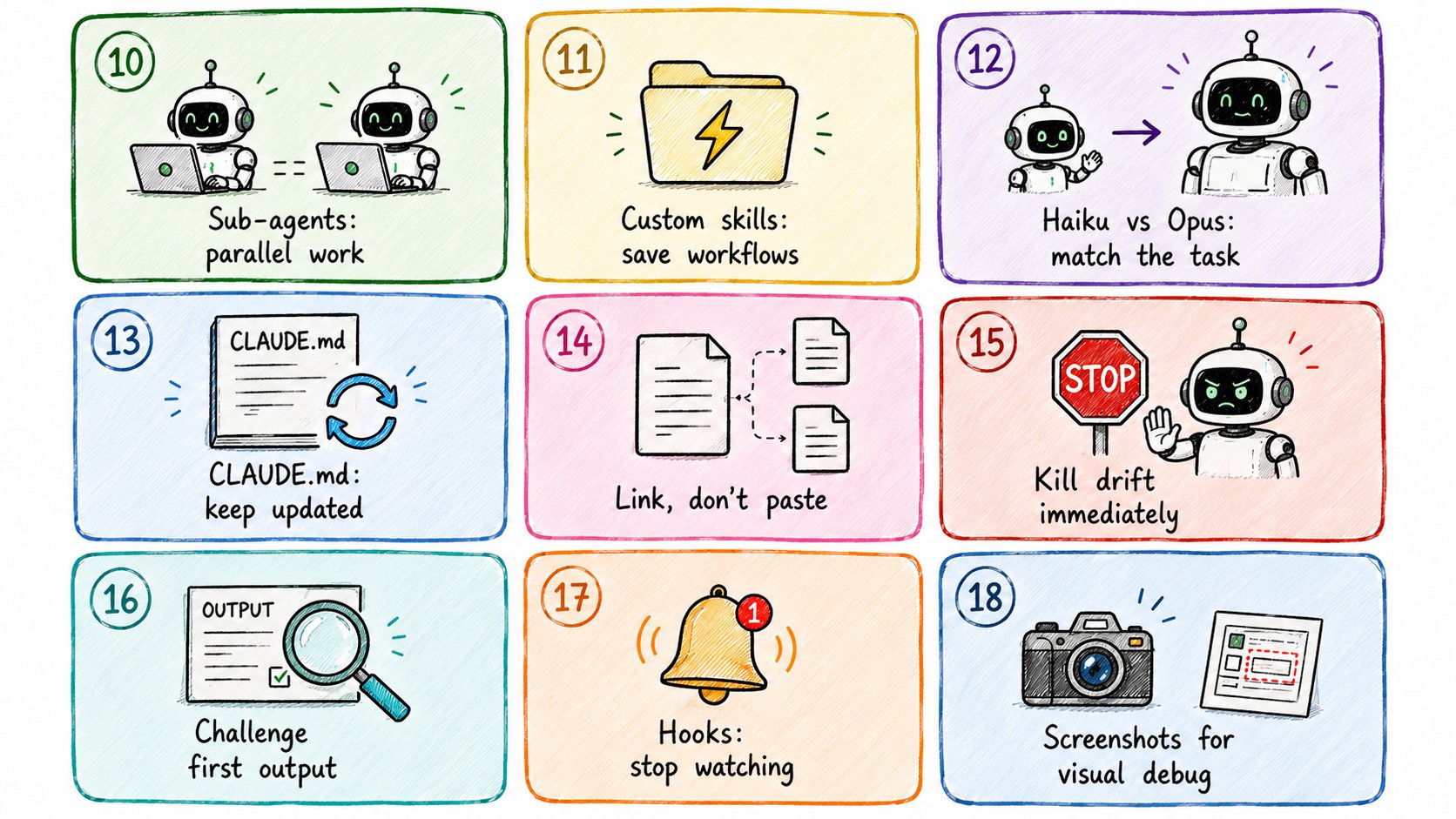
10. Deploy sub-agents for parallel work
One of the most underused features.
Instead of doing tasks sequentially, split them across sub-agents with isolated contexts.
"Spin up a sub-agent to handle the database schema.
Another for the API endpoints.
You coordinate the integration."
Parallel work. Isolated contexts. No cross-contamination.
Productivity jump is not incremental. It is multiplicative.
11. Save reusable prompts as custom skills
Every time you write the same instructions twice, you are losing.
Save reusable workflows as skill files:
1# skills/code-review.md2When reviewing code:31. Check for security vulnerabilities first42. Flag any N+1 queries53. Verify error handling on every external call64. Check variable naming matches our conventions (camelCase, descriptive)75. Output: critical issues first, then suggestions
Load the skill. Claude follows your exact standard. Every time.
Never rewrite the same instructions again.
12. Use lighter models for simple tasks
Haiku for: file renaming, simple refactors, boilerplate, config edits.
Sonnet/Opus for: architecture decisions, complex debugging, multi-file changes.
1# In your session setup:2"Use the most cost-efficient model for this task."
Most developers use Opus for everything.
That is like taking a Ferrari to the grocery store.
Match the model to the task.
13. Keep CLAUDE.md updated as the project evolves
Your CLAUDE.md file from /init is not a one-time document.
Update it as the project changes:
1# CLAUDE.md23## Current Stack4- Next.js 14 (App Router, NOT Pages Router)5- Supabase for auth and database6- Tailwind + shadcn/ui for components78## Strict Rules9- NEVER commit or push. User handles all git operations.10- Always use TypeScript. No JS files.11- All API routes go in /app/api/1213## Known Issues14- Auth session sometimes expires on mobile — check this in any auth-related work
Stale context is worse than no context.
Stale CLAUDE.md sends Claude confidently in the wrong direction.
14. Link external files from CLAUDE.md instead of pasting inline
Do not stuff everything into CLAUDE.md.
Reference external files:
1# CLAUDE.md23## Architecture4See: /docs/architecture.md56## API Conventions7See: /docs/api-standards.md89## Current Sprint10See: /docs/sprint-23.md
Claude loads only what's needed.
Your context stays lean. Your token budget stays healthy.
15. Kill a drifting session immediately
The moment Claude goes off-path — stop it.
Do not let bad work compound.
1Stop. That's not what I asked for.23The actual requirement: [restate clearly]4The constraint: [state the constraint]5Start over with only that in mind.
Bad work that compounds is harder to fix than starting over.
Catch the drift early. Re-prompt hard.
16. Challenge the first output
Acceptance is the enemy of good work.
After every output:
1What is the weakest part of this?2What would you change if you had more time?3Is there a simpler approach I should consider?
Claude's first answer is rarely its best answer.
The best answer comes after being challenged.
17. Set up notification hooks
Stop watching the terminal.
Set up hooks that ping you when a long task finishes:
1# Example: notify when Claude completes2claude run "build the feature" && \3 osascript -e 'display notification "Claude done" with title "Claude Code"'
Go do something else.
Come back when it calls you.
18. Feed Claude screenshots for layout verification
Claude cannot see your running app.
But it can analyze a screenshot of it.
1"Here is a screenshot of the current state.2The button alignment is off on mobile.3Fix the CSS to match the design spec."
Paste the screenshot directly into the session.
Visual debugging just got 10x faster.
PRO HACKS - This is where Claude Code stops being a coding assistant and starts feeling like a team.
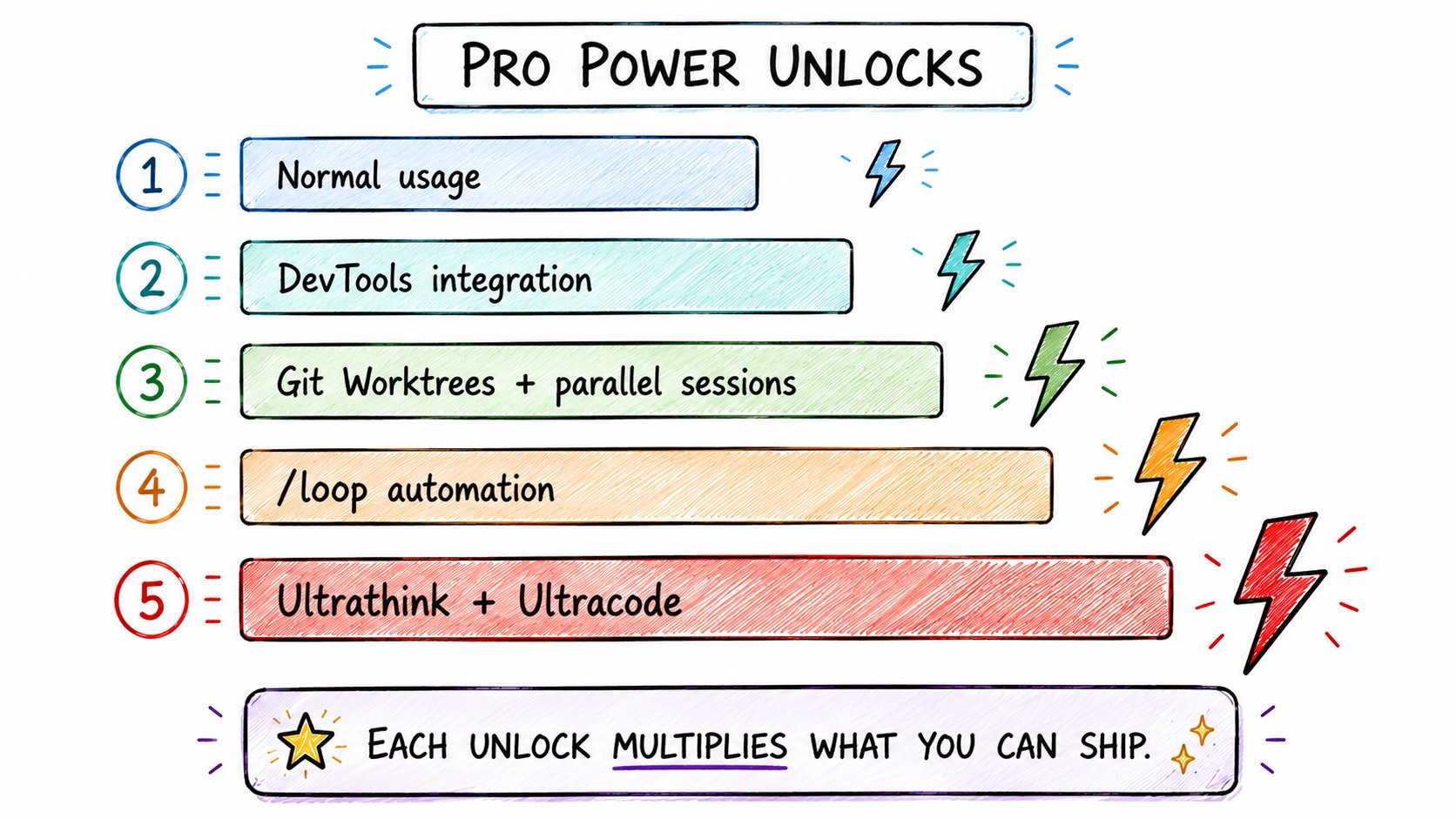
19. Chrome DevTools integration
Let Claude interact with your running app through DevTools.
It can read console errors, network requests, and DOM state in real time.
1"Open DevTools on the checkout page.2Find why the payment button is unresponsive.3Check console errors and network tab."
Debugging becomes: Claude sees the page, Claude fixes the page.
Not: you copy-paste errors, Claude guesses.
20. Resume previous sessions
Never lose context from a previous session.
1claude --resume 9901b366-c4b6-4d78-89ad-81e964e373e
Claude opens the exact session — full conversation history, full context, exactly where you left off.
Find your session IDs in Claude Code history.
Bookmark the sessions you will return to.
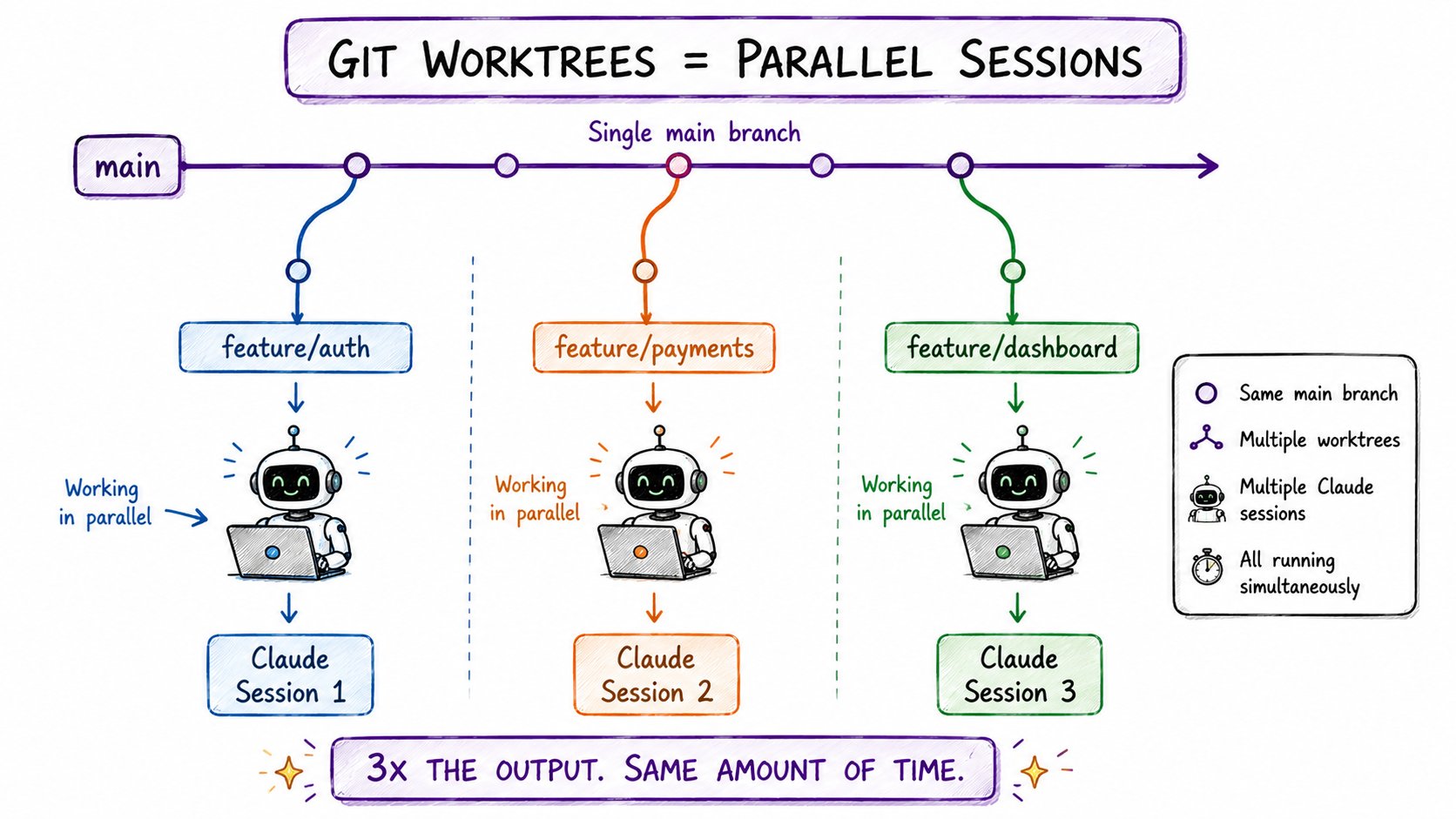
21. Parallel sessions with Git Worktrees
This is the biggest productivity unlock for serious projects.
Run multiple Claude sessions simultaneously on different branches.
1# Create worktrees for parallel work2git worktree add ../project-feature-auth feature/auth3git worktree add ../project-feature-payments feature/payments4git worktree add ../project-feature-dashboard feature/dashboard56# Now run separate Claude sessions in each directory7# Claude works on all three simultaneously8# No conflicts. No waiting.
Session 1: building auth. Session 2: building payments. Session 3: building the dashboard.
All running at the same time.
This is how you ship a week of work in a day.
22. Replace MCP servers with direct API endpoints
MCP servers add overhead.
For performance-critical or high-volume work, call API endpoints directly.
1# Instead of: use MCP server → Notion2# Do: "Call the Notion API directly at api.notion.com/v1/pages3# Here is my API key format and the endpoint structure."
Less overhead. Fewer tokens consumed. Lower latency.
More expensive tool calls → replace with direct API → instant improvement.
23. Automate recurring tasks with /loop
Claude can run tasks repeatedly for up to 3 days unattended.
1"Open DevTools on the checkout page.2Find why the payment button is unresponsive.3Check console errors and network tab."
Set it. Walk away.
Claude monitors, logs, categorizes — for days.
24. Remote control from your phone
Manage your local Claude sessions remotely.
1# Expose your Claude session via ngrok or similar2ngrok http 300034# Access from phone browser5# Kick off builds while commuting6# Check progress without opening the laptop
Useful when you are away from your desk and remember the one thing you forgot to start.
Open your phone. Start the task. Done before you get home.
25. Query databases in plain English
For one-off analysis, skip writing SQL entirely.
1"Open DevTools on the checkout page.2Find why the payment button is unresponsive.3Check console errors and network tab."
Claude translates to SQL, runs it, returns the answer.
No SQL written. No schema memorized. Just a question and an answer.
26. Ultrathink for genuinely hard problems
When a problem is truly complex — allocate maximum tokens and tell Claude explicitly:
1"Open DevTools on the checkout page.2Find why the payment button is unresponsive.3Check console errors and network tab."
For 90% of tasks, fast is fine.
For the 10% that are genuinely hard — slow down.
The thinking budget is there. Use it.
27. Ultracode mode in Opus 4.8
For maximum coding performance:
1/effort high
This activates ultracode — Claude's highest-effort coding mode.
Reserve it for:
→ Complex architecture decisions
→ Security-critical implementations
→ Performance optimization passes
→ Multi-system refactors
It costs more tokens. It takes longer.
And it produces meaningfully better code for hard problems.
The pattern behind all 27 hacks
Every single trick on this list is one of three things:
Context discipline — CLAUDE.md, /init, /compact, /clear, file linking. Give Claude better information and it makes better decisions.
Smart delegation — Sub-agents, worktrees, parallel sessions, /loop. Stop doing one thing at a time when Claude can do many.
Aggressive automation — Hooks, remote control, skills, database queries. If you are doing it manually more than twice, Claude should be doing it.
The developers shipping 10x more are not smarter.
They are more systematic.
Where to start
Do not try to implement all 27 today.
Week 1: /init, /compact, plan mode, self-verification to-dos. These four alone will transform your sessions.
Week 2: Custom skills, lighter models, CLAUDE.md updates, challenge every output. You will stop rewriting the same instructions.
Week 3: Sub-agents, worktrees, parallel sessions. You will start shipping multiple features simultaneously.
Week 4+: Loop, ultrathink, DevTools, remote control. You will stop watching the terminal entirely.
The system compounds.
Each level makes the next level more powerful.
Start at the beginning. Master it. Move up.
Quick reference
**Beginner:
**→ 1. /init — generate project CLAUDE.md
→ 2. /statusline — live token dashboard
→ 3. Voice input — hands-free coding
→ 4. /context — find token waste
→ 5. /compact at 60%, /clear between tasks
→ 6. Plan mode first — outline before executing
→ 7. Present problems not commands
→ 8. Make Claude ask questions before starting
→ 9. Self-verification steps in to-do lists
**Intermediate:
**→ 10. Sub-agents for parallel isolated work
→ 11. Custom skills — save reusable prompts
→ 12. Haiku for simple, Opus for complex
→ 13. Keep CLAUDE.md updated as project evolves
→ 14. Link external files, don't paste inline
→ 15. Kill drift immediately — re-prompt hard
→ 16. Challenge first output every time
→ 17. Notification hooks — stop watching terminal
→ 18. Feed screenshots for visual debugging
**Pro:
**→ 19. Chrome DevTools integration
→ 20. claude --resume for session continuity
→ 21. Git worktrees for parallel sessions
→ 22. Direct API calls over MCP servers
→ 23. /loop for multi-day recurring tasks
→ 24. Remote control from phone
→ 25. Plain English database queries
→ 26. Ultrathink for hard problems
→ 27. /effort high for ultracode mode
If this was useful:
→ Repost — every Claude Code developer needs this list
→ Follow @sairahul1 for more systems that ship faster
→ Bookmark this — it gets more useful every week you use Claude Code
I write about AI, building products, and workflows that do the work without you.