YouMind
تسجيل الدخول

Pixel Art

استكشف مطالبات صورة مجانية ضمن فئة Pixel Art من مكتبة YouMind، والمجمعة تحت الأنماط. كل مطالبة مختارة من مسارات عمل إبداعية حقيقية وجاهزة للنسخ والتعديل وإعادة الاستخدام.

تحويل المطالبة إلى صورةتحويل الصورة إلى مطالبة
بواسطة @ص
GPT Image 2.5
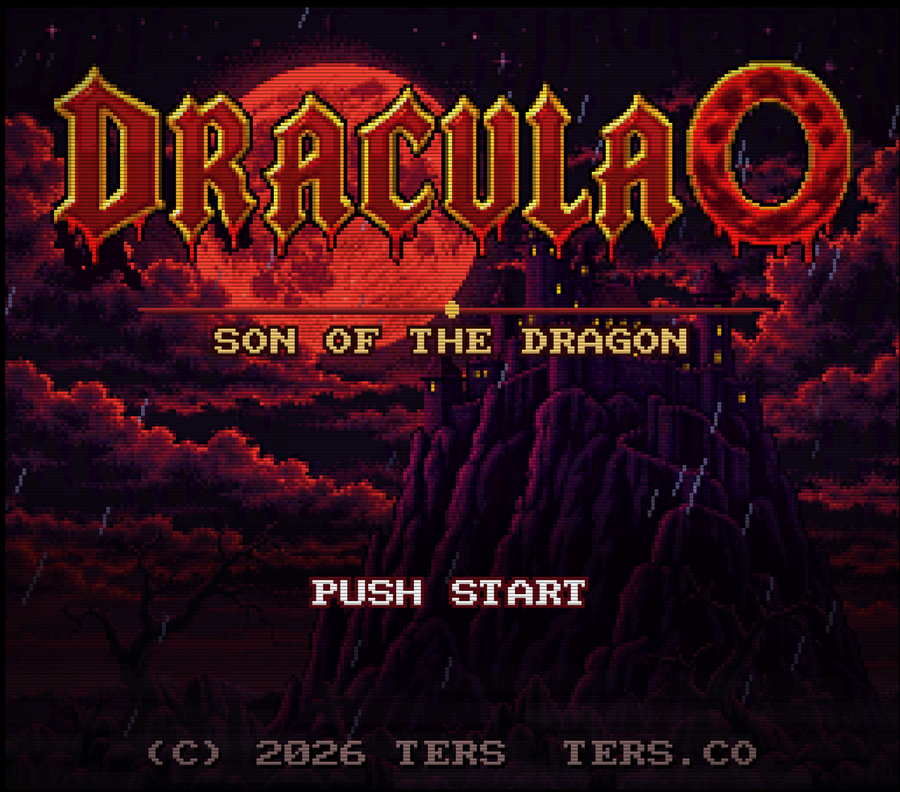
Retro SNES Dracula Title Screen
عرض المطالبة كاملة ونسخها

Create a retro SNES-style title screen for the game "DRACULA 0 - Son of the Dragon". The image should feature a dark, ominous background with a large, blood-red moon partially obscured by jagged, purple mountains and swirling red clouds. In the foreground, depict a gothic castle silhouette perched atop one of the peaks. The main title "DRACULA 0" should be displayed in large, ornate, dripping red letters with gold outlines at the top center. Below it, place the subtitle "SON OF THE DRAGON" in smaller, pixelated gold text. At the bottom center, include the prompt "PUSH START" in white pixel font. Add copyright information "(C) 2026 TERS TERS.CO" at the very bottom in small grey text. Ensure the entire image has a distinct 16-bit pixel art aesthetic.

إنشاء صورة
GPT Image 2
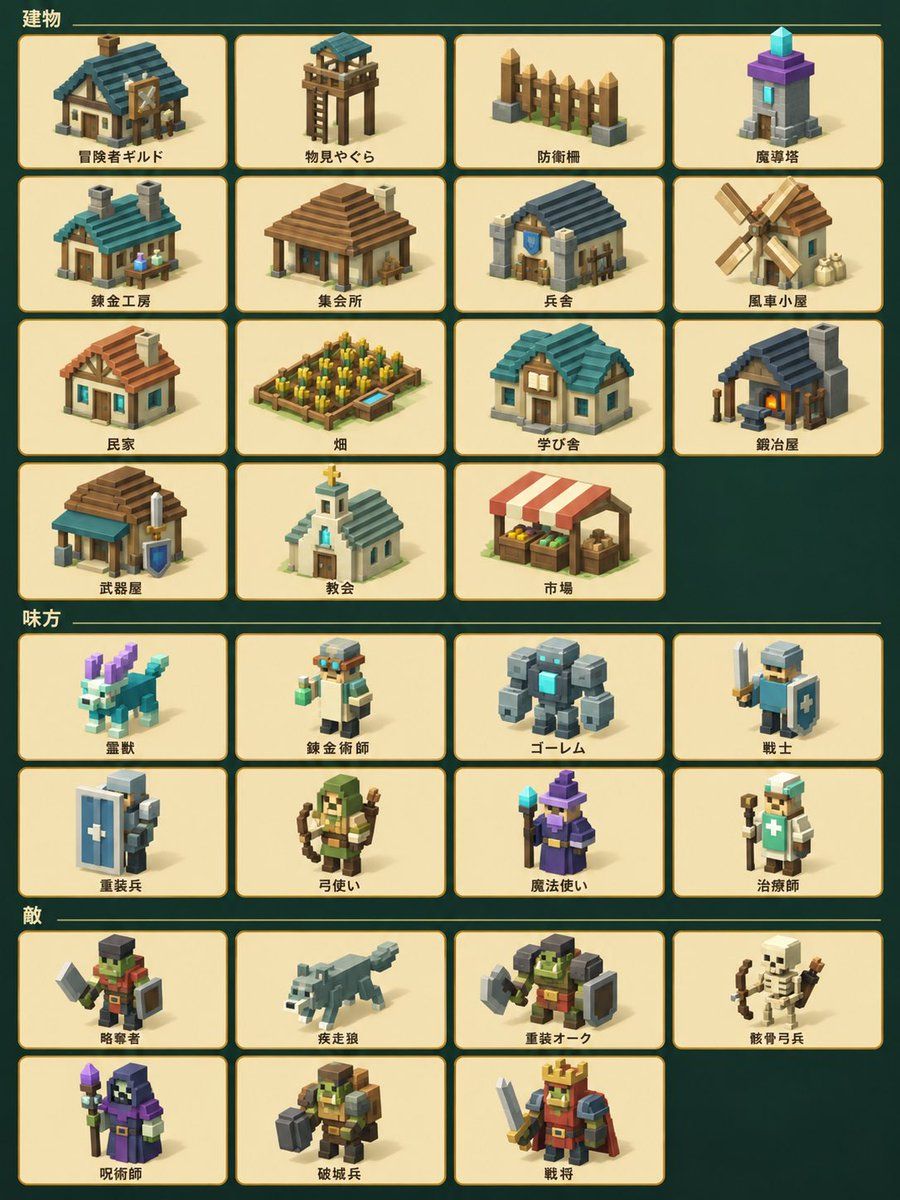
High-Quality Voxel Game Asset Sheet
عرض المطالبة كاملة ونسخها

Using the provided reference image, regenerate all isometric pixel art icons with significantly higher quality and detail. Keep the exact same layout, grid structure, background color, and Japanese text labels unchanged. Upgrade each icon from simple low-poly blocks to richly detailed voxel-style illustrations with proper shading, textures, and distinct features (e.g., add windows/doors to buildings, weapons/shields to characters, fur details to animals). Maintain the same character designs and building types but make them look more polished and professional.

إنشاء صورة
GPT Image 2.5
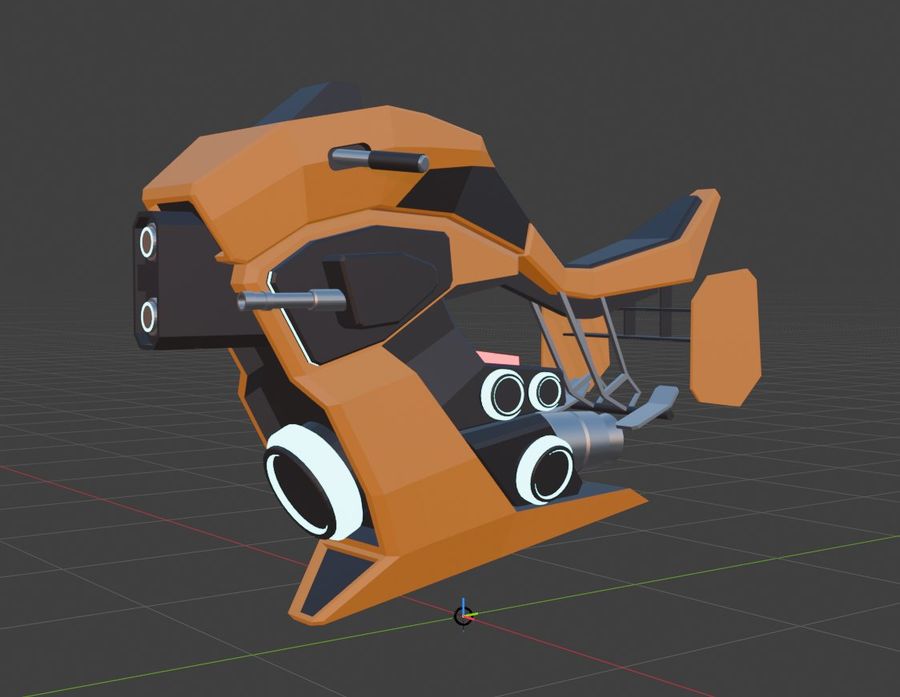
Futuristic Orange Sci-Fi Hoverbike
عرض المطالبة كاملة ونسخها

Goal: Create a 3D model render of a futuristic sci-fi hoverbike. Canvas: A square aspect ratio, rendered against a dark grey viewport background with a perspective grid floor and red/green axis lines typical of 3D modeling software like Blender or Unity. Layout: The vehicle is centered in the frame, angled slightly to show its left side profile and front. It floats just above the grid surface. Sections: The bike features a sleek, angular design with a dominant matte orange body color contrasted by black panels and silver metallic accents. Visual style: Low-poly aesthetic with sharp edges and flat shading. Clean, studio-like lighting that highlights the geometric forms without complex reflections. Subject details: The front section has a prominent black nose cone with two circular white headlights stacked vertically. Below this, a large central intake ring is visible. The mid-section includes a black panel with a horizontal silver handlebar extending outwards. The rear section features a raised seat area with a black cushion and an orange backrest structure. Underneath the main body, there are three distinct circular thruster nozzles arranged horizontally, glowing with a soft white light inside. A small pink rectangular detail sits near the center. The overall shape suggests advanced propulsion technology rather than traditional wheels. Constraints: Maintain the specific low-poly geometry style. Ensure the grid floor looks like a standard 3D editor viewport.

إنشاء صورة
GPT Image 2.5
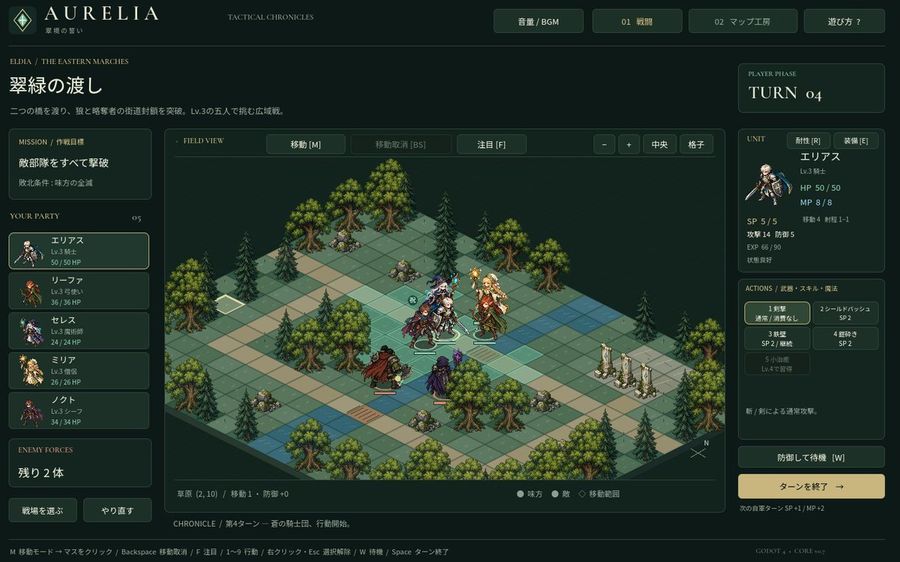
Tactical RPG Interface Mockup
عرض المطالبة كاملة ونسخها

Goal: Create a high-fidelity mockup of a tactical RPG (SLRPG) battle interface, specifically resembling the aesthetic of 'Aurelia'. Canvas: A widescreen desktop UI layout with a dark forest-green and gold color scheme. Layout: - Top Header: Logo 'AURELIA' on the left, navigation buttons 'Volume/BGM', '01 Battle', '02 Map Workshop', and 'Help?' on the right. - Left Sidebar: Mission briefing text in Japanese ('翠緑の渡し'), followed by a vertical list of 5 party members with small portraits and HP bars. Bottom section shows 'Enemy Forces' count. - Center Stage: An isometric grid map featuring grassy tiles, pine trees, rocks, and stone pillars. Several pixel-art style character sprites are positioned on the grid. - Right Sidebar: Turn counter ('TURN 04'), detailed stats for the selected unit (Elias), including HP/MP/SP and attack/defense values. Below this is an action menu with 5 skill slots and a large 'End Turn' button. - Footer: A status bar displaying tile information and keyboard shortcuts. Visual Style: Dark fantasy UI design, crisp typography, isometric perspective, retro-modern hybrid look. Text content: Use Japanese labels for all UI elements as seen in the reference image.

إنشاء صورة
بواسطة @だしのもと
GPT Image 2.5
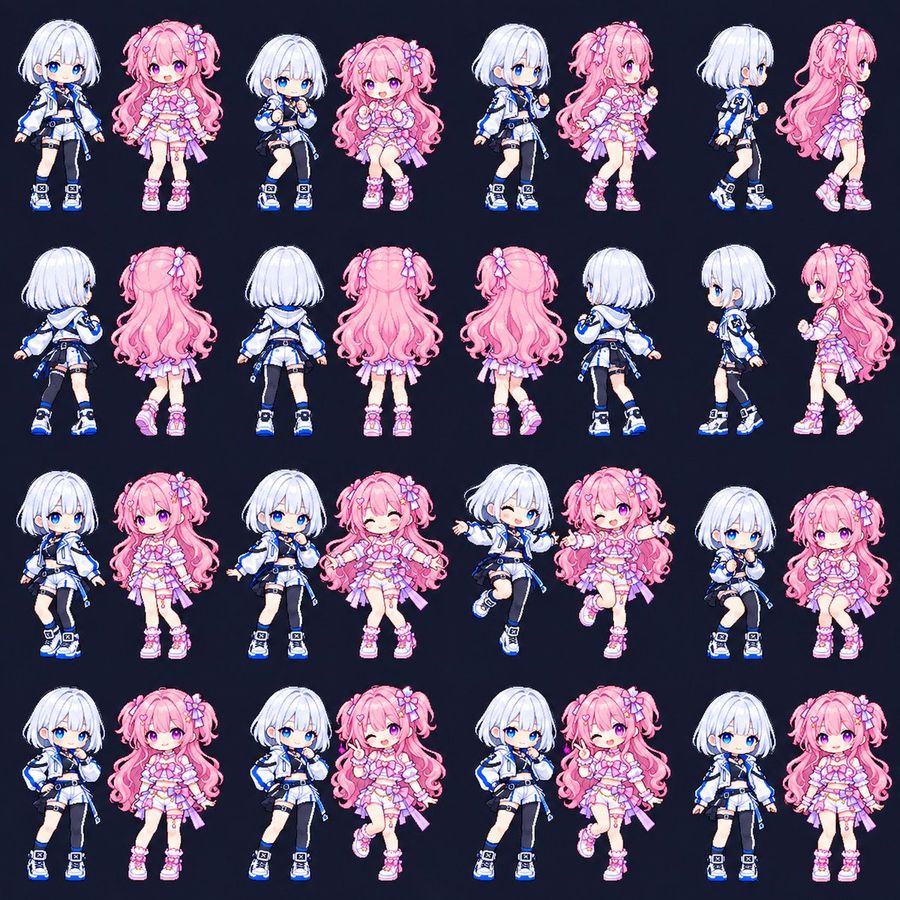
Chibi Game Sprite Sheet Duo
عرض المطالبة كاملة ونسخها

Goal: Create a square pixel-art character sprite sheet for a cute anime game, featuring two chibi magical-idol girls: a petite girl with short white bob hair, bright blue eyes, a white-and-blue techwear jacket, cropped top, shorts, one black thigh-high stocking, belts, straps, and chunky blue sneakers and a petite girl with long fluffy pink twin tails, pink-purple eyes, flower and bow hair accessories, a frilly pastel pink idol dress with ribbons, garters, and chunky pink sneakers. Canvas: Square 1:1 sprite-sheet canvas, dark navy background, no borders, no labels, no UI, no shadows except subtle pixel-art grounding. Arrange the characters in an evenly spaced grid with 4 rows and 8 columns, showing exactly 32 separate full-body chibi sprites. Layout and count: The sheet must contain exactly 32 discrete sprite poses. Row 1 has 8 sprites: white-haired front idle, pink-haired front idle, white-haired seated/knees-up pose, pink-haired seated/knees-up pose, white-haired three-quarter walking pose, pink-haired three-quarter walking pose, white-haired right-facing side walk, pink-haired right-facing side walk. Row 2 has 8 sprites: white-haired back-left view, pink-haired back-left view, white-haired full back view, pink-haired full back view, pink-haired full back view with slight shift, white-haired back-right walking view, white-haired left-facing side view, pink-haired left-facing side view. Row 3 has 8 sprites: white-haired front relaxed pose, pink-haired front relaxed pose, white-haired hand-to-mouth shy pose, pink-haired arms-open wink pose, white-haired jumping wink pose, pink-haired jumping arms-open wink pose, white-haired seated cute pose, pink-haired seated cute pose. Row 4 has 8 sprites: white-haired hand-on-hip pose, pink-haired neutral front pose, white-haired shy hand-near-face pose, pink-haired one-leg-up peace-sign wink pose, white-haired confident hand-on-hip pose, pink-haired peace-sign wink pose, white-haired front idle, pink-haired front idle. Visual style: High-quality 2D chibi pixel art with crisp outlines, soft anime shading, tiny game-sprite proportions, oversized heads, small bodies, expressive glossy eyes, clean cel-shaded highlights, pastel candy colors, and a polished gacha-game aesthetic. Keep the sprites consistent in scale, outfit design, face style, and line thickness across all poses. Character details: The white-haired girl uses a cool palette of white, black, and electric blue, with a short rounded bob, blue eyes, sporty futuristic jacket, asymmetrical black stocking, utility straps, and blue-accented sneakers. The pink-haired girl uses a warm pastel palette of pink, lavender, and white, with very long curly twin tails, bow and flower clips, frilly layered skirt, heart-like accessories, ribbons, lace accents, and pink platform sneakers. Constraints: Use cute chibi pixel-art game sprite sheet. Preserve the dark navy background and evenly spaced grid. Do not add text, logos, watermarks, weapons, props, scenery, or extra characters. The final image should look like an animation-ready character sheet for a small 2D game or GIF sprite set.

إنشاء صورة
GPT Image 2.5
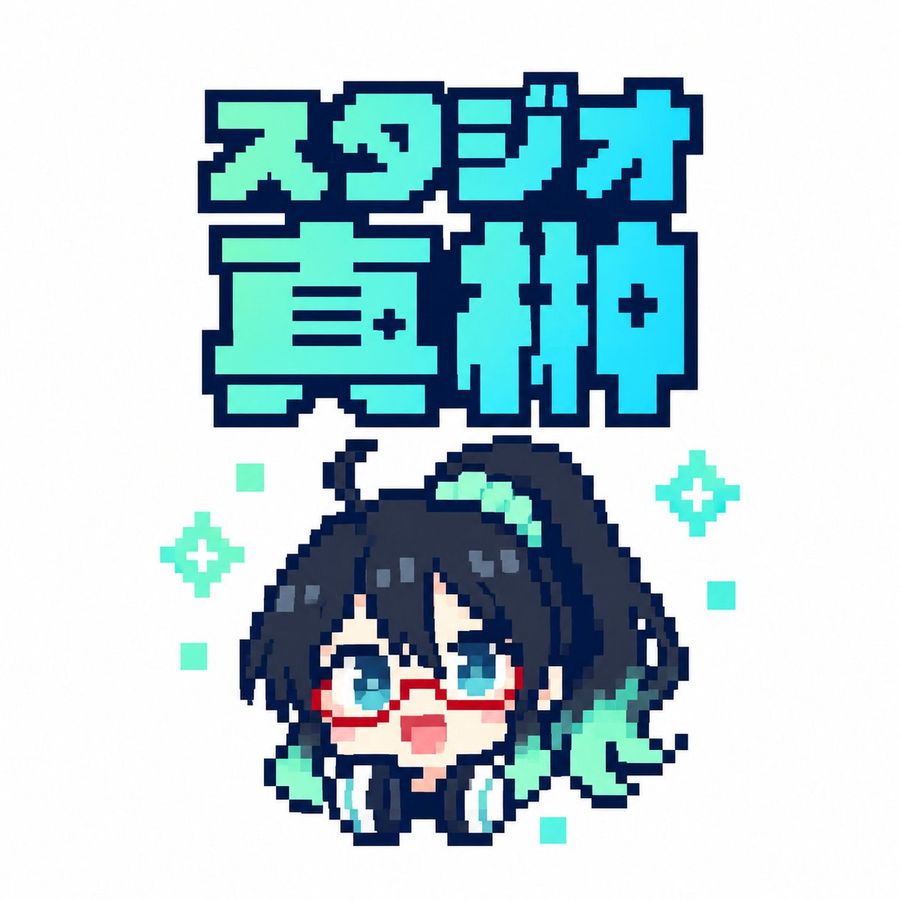
Pixel Art Japanese Studio Mascot Logo
عرض المطالبة كاملة ونسخها

Create a square 1:1 pixel-art logo on a clean white background. At the top, place a large two-line Japanese title in chunky 8-bit block lettering reading スタジオ直紬; the first line is smaller and reads “スタジオ”, the second line is much larger and reads “直紬”. Use a bright cyan-to-mint gradient fill with a very thick dark navy pixelated outline and squared corners, like retro game title typography. Centered below the title, draw one chibi anime mascot head and shoulders in crisp pixel art: a cute surprised character with dark navy black messy hair, long side locks, a high side ponytail sweeping to the right, teal hair highlights, big cyan-blue eyes, red rectangular glasses, a small open pink mouth, pale skin, and oversized black headphones with cyan ear pads around the neck. Add mint-green accent shapes in the hair and beside the face, including a ribbon-like teal shape on the right. The character should look upward with an excited, surprised expression. Use a limited palette of dark navy outlines, cyan, turquoise, mint, white, pale peach, and red glasses. Keep the entire image sharp, low-resolution, and intentionally pixelated with no antialiasing, no shadows, and no photorealism. Count and place the decorative background pixels exactly: 2 mint four-point sparkle icons, one on the left side of the character and one on the right side; and 5 small mint square pixels scattered around the character, with one upper-left, one mid-left, one lower-left, one mid-right, and one lower-right. Maintain generous white margins and a centered sticker-like composition.

إنشاء صورة
GPT Image 2
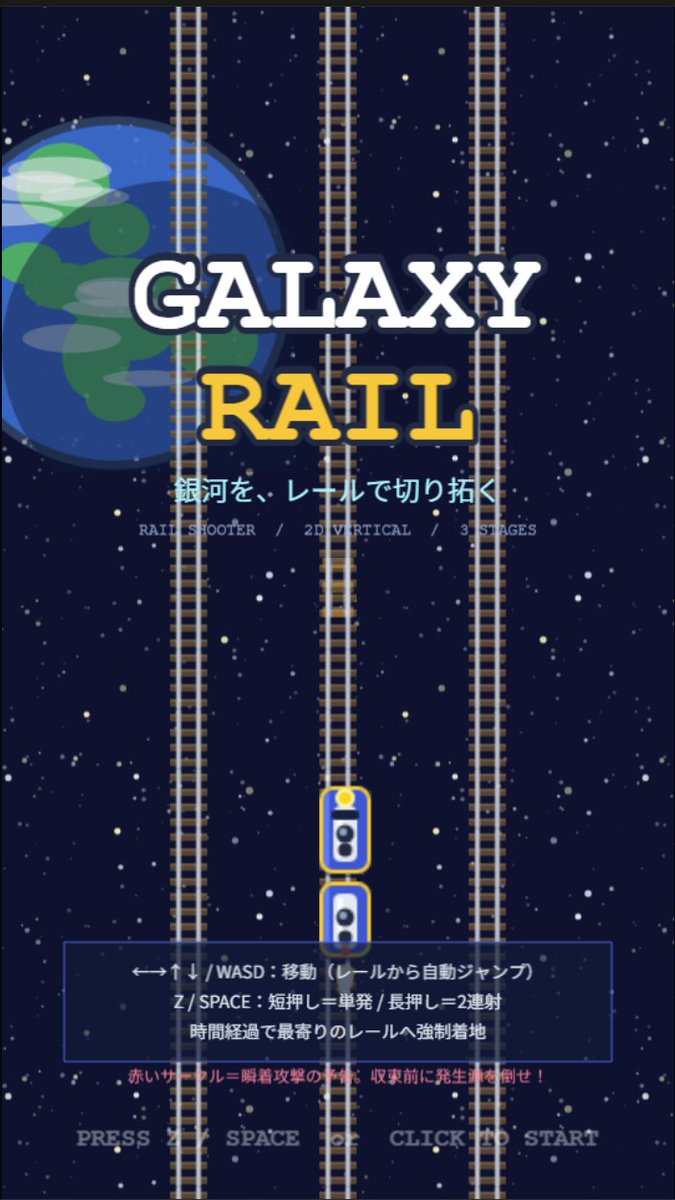
Galaxy Rail Title Screen
عرض المطالبة كاملة ونسخها

Goal: Create a retro 2D vertical arcade game title screen for a rail shooter called GALAXY RAIL, with a space-and-railroad theme and Japanese UI text. Canvas: Portrait mobile game splash screen, 9:16 aspect ratio, pixel-art inspired but clean vector-like illustration, dark navy outer-space background filled with many small white and pale yellow stars. Layout: Center the title in the upper-middle. Place a large partially cropped Earth-like blue planet on the left behind the title, occupying about one third of the image height, with simple green landmasses and translucent cloud streaks. Add exactly 3 vertical railroad tracks running from top to bottom: one left track partly over the planet, one center track, and one right track; each track has gray rails and many brown sleepers. Put exactly 2 small train/player cars on the lower center track, stacked vertically with rounded white bodies, blue windows, yellow outlines, and a yellow headlight on the top car. Text content: Main title text is two lines: “GALAXY” in large white slab-serif letters with a dark navy outline, and “RAIL” below in large golden yellow slab-serif letters with a dark navy outline. Under the title, show the Japanese tagline 銀河を、レールで切り拓く in bright cyan. Beneath it, add small gray feature text: “RAIL SHOOTER / 2D VERTICAL / 3 STAGES”. In the lower third, add a translucent dark blue rectangular instruction panel with a thin blue border. Inside the panel, show three Japanese instruction lines: “←→↑↓ / WASD:移動(レールから自動ジャンプ)”, “Z / SPACE:短押し=単発 / 長押し=2連射”, and “時間経過で最寄りのレールへ強制着地”. Below the panel, add a small red warning line: “赤いサークル=瞬着攻撃の予兆。収束前に発生源を倒せ!” At the very bottom, centered, show pale gray prompt text: PRESS Z SPACE OR CLICK TO START. Visual style: Retro arcade title screen, simple 2D game mockup, crisp shapes, slightly pixelated typography, high contrast, deep-space palette of navy, white, cyan, yellow, gray, and red. The composition should feel like a vertical rail shooter prototype splash screen. Constraints: Use exactly 3 full-height vertical tracks, exactly 2 train cars, one planet on the left, one instruction panel, and no characters or extra UI windows. Keep all text legible and centered, with no logos or watermarks.

إنشاء صورة
بواسطة @パピヨン
GPT Image 2.5
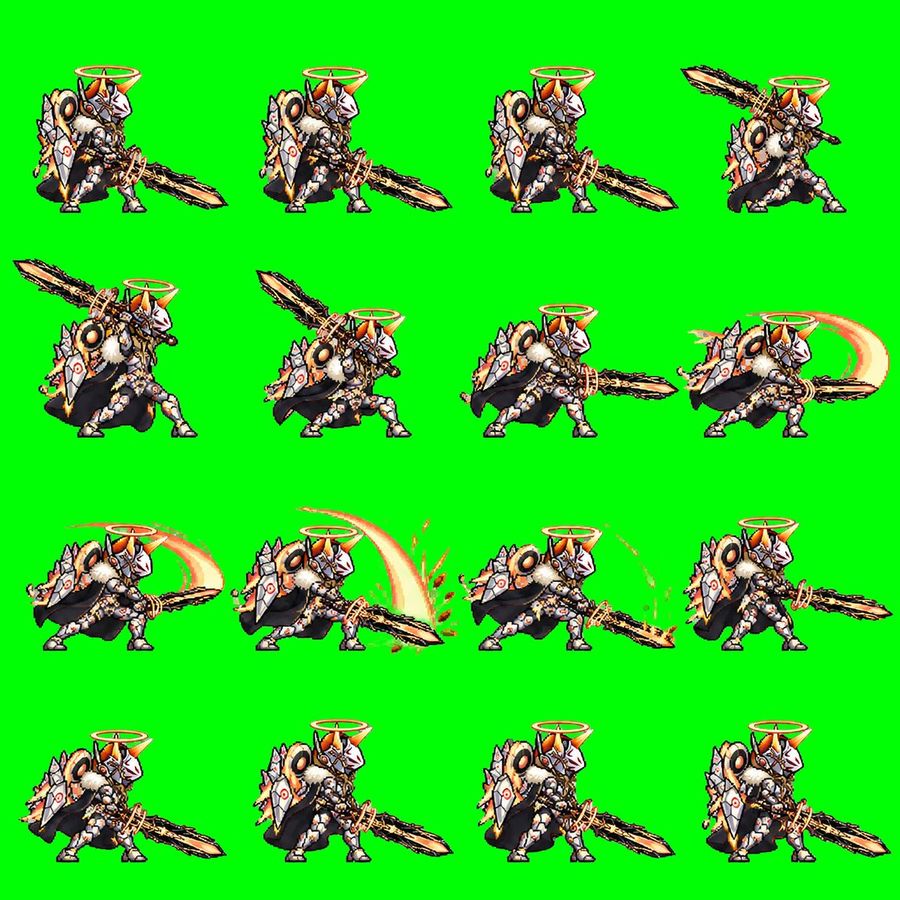
Chibi Knight Attack Sprite Sheet
عرض المطالبة كاملة ونسخها

Goal: Create a pixel-art 2D game sprite sheet for an animated attack sequence featuring Quorila Ketel, a chibi armored holy beast-knight with a huge jagged sword. Canvas: Square 1:1 image, bright solid chroma-key green background (#00ff00), no transparency, no border, no text. Arrange the sprites in an evenly spaced 4-by-4 grid for exactly 16 discrete animation frames. Subject details: The character is a compact fantasy creature-warrior facing mostly right, with white and silver segmented armor, orange-gold accents, black cape or dark fur mass behind the body, large round shoulder details, spiked shield-like armor plates, small sturdy legs, and an orange glowing halo ring floating above the helmet. The helmet has a white faceplate, orange horn-like crest, and ornate mechanical/angelic details. The weapon is a massive rough-edged black-and-gold sword, almost as long as the character, held low or swung in broad arcs. Use crisp retro pixel art with heavy black outlines, detailed dithering, high contrast, and a JRPG / mobile game battle sprite style. Layout and frame count: Use exactly 16 frames, arranged left to right, top to bottom. Each frame shows the same character at the same scale with enough spacing so frames do not touch. Frame descriptions: 1. Idle ready stance, sword angled down to the right, character standing compactly. 2. Ready stance with the sword extended farther forward and low to the right. 3. Similar forward-ready pose, body leaning slightly, sword low and long to the right. 4. Wind-up pose, sword lifted high behind and above the character toward the upper right. 5. Strong wind-up, sword raised diagonally up-left, body crouched and preparing to strike. 6. Mid wind-up, sword crossing above the shoulder, character crouched lower. 7. Horizontal attack start, sword thrusting straight to the right, body leaning forward. 8. First slash follow-through, add a pale orange crescent motion trail behind the sword on the right. 9. Wide slash continuation, large orange arc sweeping behind the character and sword. 10. Peak slash impact, large bright crescent arc above and behind the blade with small orange debris or sparks near the ground. 11. Low follow-through, sword dragging or sweeping along the ground to the right with orange dust, sparks, and curved particles. 12. Recovery pose, character pulling the sword back in front, no large arc. 13. Return-to-idle frame with sword low and character settling. 14. Idle stance with sword down-right, close to the initial pose. 15. Idle stance with slight breathing variation, halo steady above helmet. 16. Final idle frame, sword down-right and character fully reset. Visual style: Low-resolution pixel sprite aesthetic, sharp edges, no antialiasing blur, detailed armor highlights, warm orange glow on halo and slash effects, black shadow shapes under the cape/body, consistent scale and perspective across all frames. Constraints: Do not add labels, frame numbers, UI, watermark, or background scenery. Keep the background pure green for chroma keying. The image must read as a usable sprite sheet for a GIF or game animation.

إنشاء صورة
GPT Image 2.5
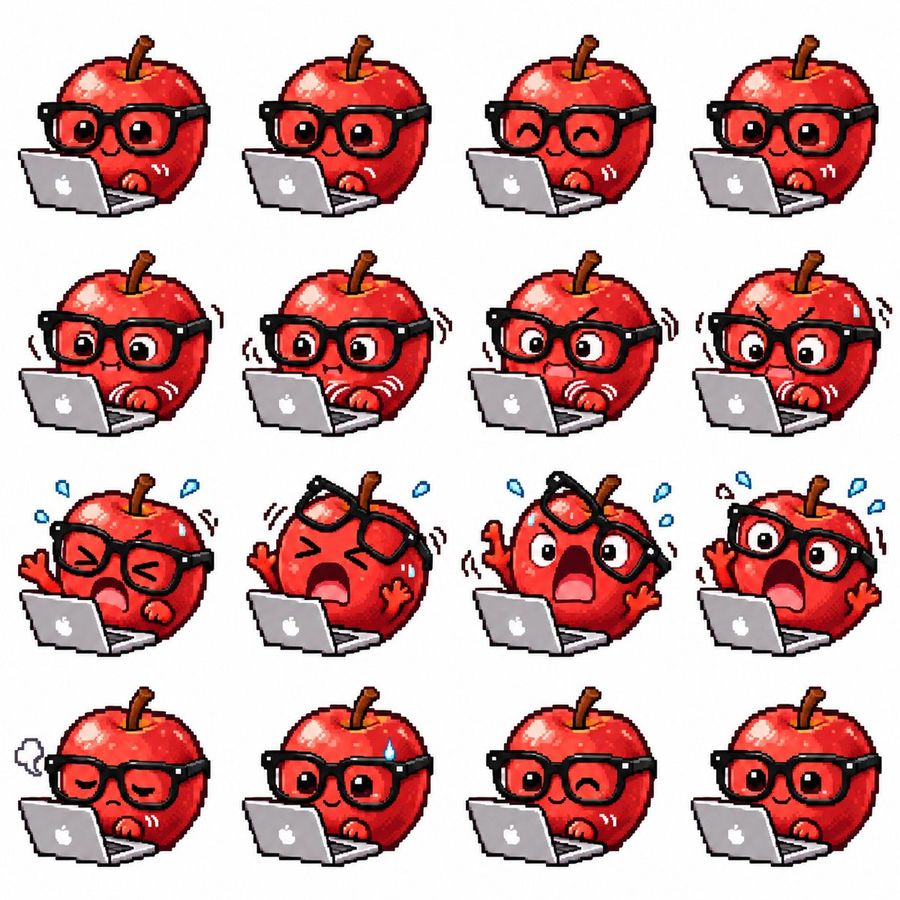
Apple Mascot Pixel Sprite Sheet
عرض المطالبة كاملة ونسخها

Goal: Create a cute pixel-art sprite sheet for a GIF animation featuring a glossy red apple mascot working on a silver laptop with a white apple logo. Canvas: Square white background, clean margin, arranged as an exact 4×4 grid with 16 separate sprites. Each sprite is the same character at roughly the same scale, front-facing three-quarter view, with the laptop in front. Use crisp low-resolution pixel art, chunky black outlines, no shadows on the background, bright saturated colors, and transparent-looking white spacing between cells. Character details: The character is a round shiny red apple with a brown stem, red highlights, tiny red hands, and oversized thick black square glasses. Keep the laptop open in every frame, positioned at the lower left/front of the apple. Make the style expressive, sticker-like, and suitable for animation frames. Sprite count and poses: Include exactly 16 sprites in a 4-row by 4-column layout, left to right and top to bottom: 1) neutral focused face, round open eyes, small smile, one hand near keyboard; 2) similar focused typing pose with slightly different hand position; 3) happy closed-eye smile while typing; 4) calm open-eyed smile; 5) surprised concentration with widened eyes and small straight mouth, motion lines by hands; 6) worried typing with wide eyes and hand vibration lines; 7) anxious shocked face with furrowed brow, open mouth, shaking glasses, fast typing motion lines; 8) more intense panic, big round eyes, furrowed brows, trembling motion lines; 9) squeezed-shut eyes, alarmed open mouth, blue sweat drops, one hand raised; 10) extreme panic with glasses lifted crooked above eyes, huge open mouth, both hands raised, blue sweat drops; 11) shocked scream with one lens/side of glasses tilted upward, wide eyes, raised arms, sweat drops; 12) panic scream with glasses still on, eyes huge, raised hand, sweat drops; 13) exhausted sad face with drooping eyelids, small frown, grey sigh cloud to the left; 14) relieved but nervous smile with one blue sweat drop on forehead; 15) playful wink with small smile, relaxed typing; 16) final calm happy open-eyed smile, similar to the starting pose. Visual style: Retro game sprite sheet, 32-bit pixel art feeling, glossy highlights on the apple, thick black outlines, subtle dithering and blocky pixel edges, cute emoji-like expressions, minimal props besides the laptop, motion lines drawn as pixel strokes. Constraints: Do not add text labels, frame numbers, borders, watermarks, or extra characters. Keep exactly 16 discrete apple-laptop sprites in the grid.

إنشاء صورة
بواسطة @すてら
GPT Image 2.5
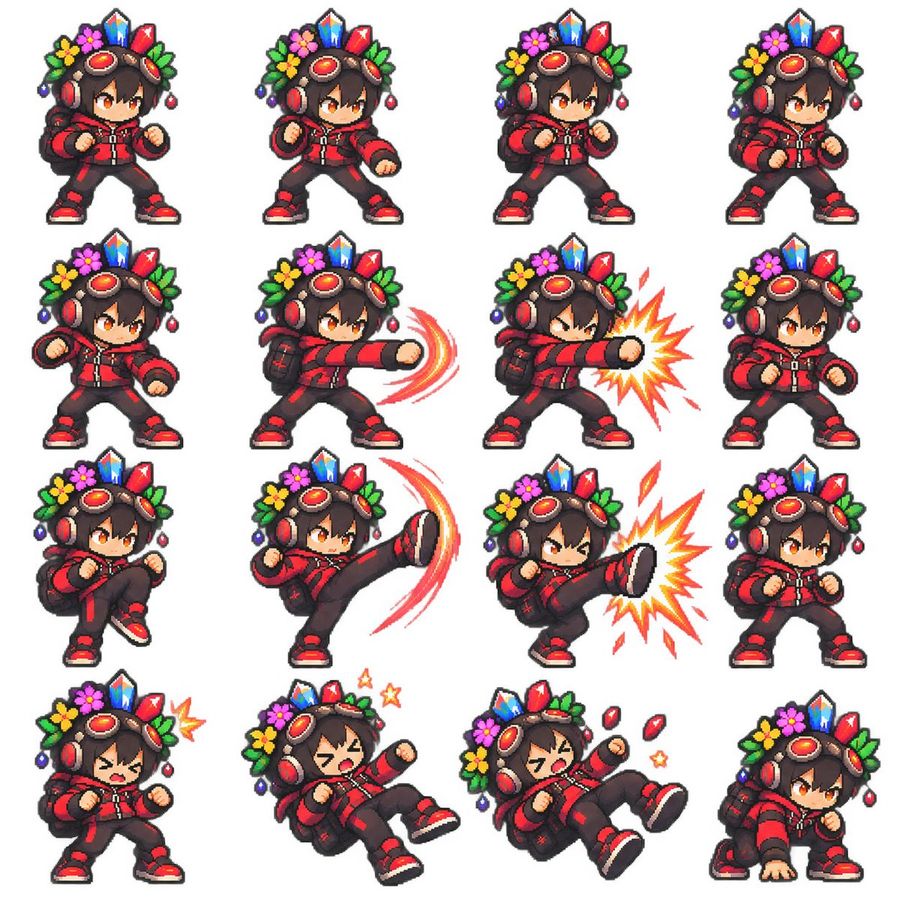
Chibi Pixel Fighter Sprite Sheet
عرض المطالبة كاملة ونسخها

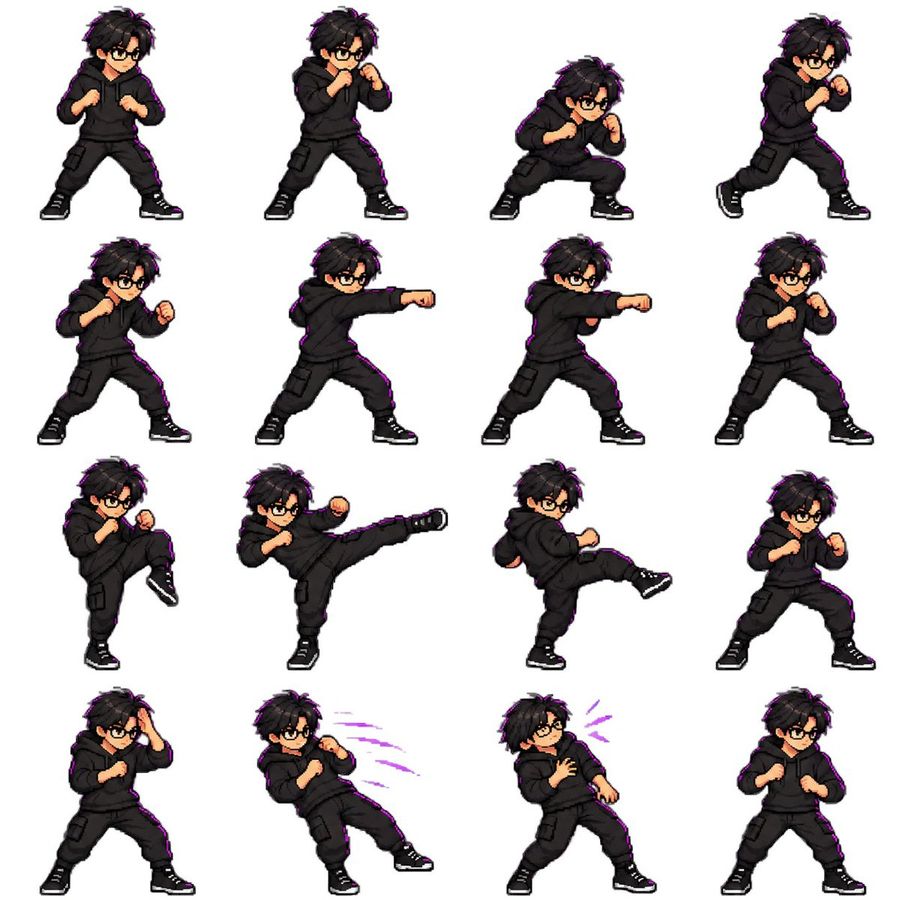
Goal: Create a clean pixel-art fighting game sprite sheet featuring one chibi adventurer character in multiple combat poses. Canvas: Square 1:1 image on a plain white background, arranged as a neat 4 by 4 grid with even spacing and no borders, labels, shadows, watermark, or UI. The final sheet contains exactly 16 separate sprites. Character design: A small chibi fighter with oversized head, short body, orange eyes, dark brown tousled hair, and a determined anime expression. The character wears a red and black streetwear combat outfit: red hooded jacket with black panels and zipper details, black pants with red accents, red-and-black sneakers, fingerless gloves, and a small black backpack. On the head are large red headphones and bronze steampunk goggles with red lenses. A decorative crown-like headdress sits behind the goggles, made of bright crystals, flowers, leaves, and dangling beads: blue crystal in the center, red crystals on the sides, green leaves, yellow and pink flowers, and small purple/red ornaments. Use thick dark pixel outlines, crisp 16-bit/32-bit game sprite rendering, saturated colors, tiny highlight pixels, and transparent-sprite-like isolation against white. Pose layout: Include exactly 16 sprites in a 4-column by 4-row grid. Row 1: 1) neutral fighting stance facing slightly right with both fists raised, 2) forward punch wind-up with one fist extended slightly, 3) ready stance with fists up and feet apart, 4) guarded stance turned slightly right. Row 2: 5) low guarded stance with left fist forward, 6) straight punch to the right with red curved motion trails, 7) powerful straight punch to the right with a yellow-orange starburst impact effect, 8) compact defensive stance with fists close to chest. Row 3: 9) knee raised preparing to kick, 10) high side kick to the right with red-orange crescent motion trail, 11) high side kick landing with a large yellow-orange impact burst, 12) neutral battle stance variant. Row 4: 13) hurt or startled pose with eyes squeezed shut and a small yellow impact mark near the head, 14) knocked-back falling pose with mouth open, one leg lifted, and two small yellow stars, 15) stronger knocked-back pose with mouth open, red crystal fragments flying, and small yellow stars, 16) crouched landing pose with one hand on the ground and eyes focused. Effects: Use only three visible effect types: red curved motion trails for attacks, yellow-orange comic impact bursts, and tiny star/crystal hit effects. Keep all effects pixelated and consistent with the sprite style. Constraints: The sheet must look like a polished retro fighting-game sprite set, not a modern vector illustration. Keep the same character design, scale, colors, and headdress details across all 16 poses. Avoid text, extra characters, background scenery, blur, gradients outside pixel-art shading, or inconsistent costume details.

إنشاء صورة
بواسطة @ZodiacRealm
GPT Image 2.5
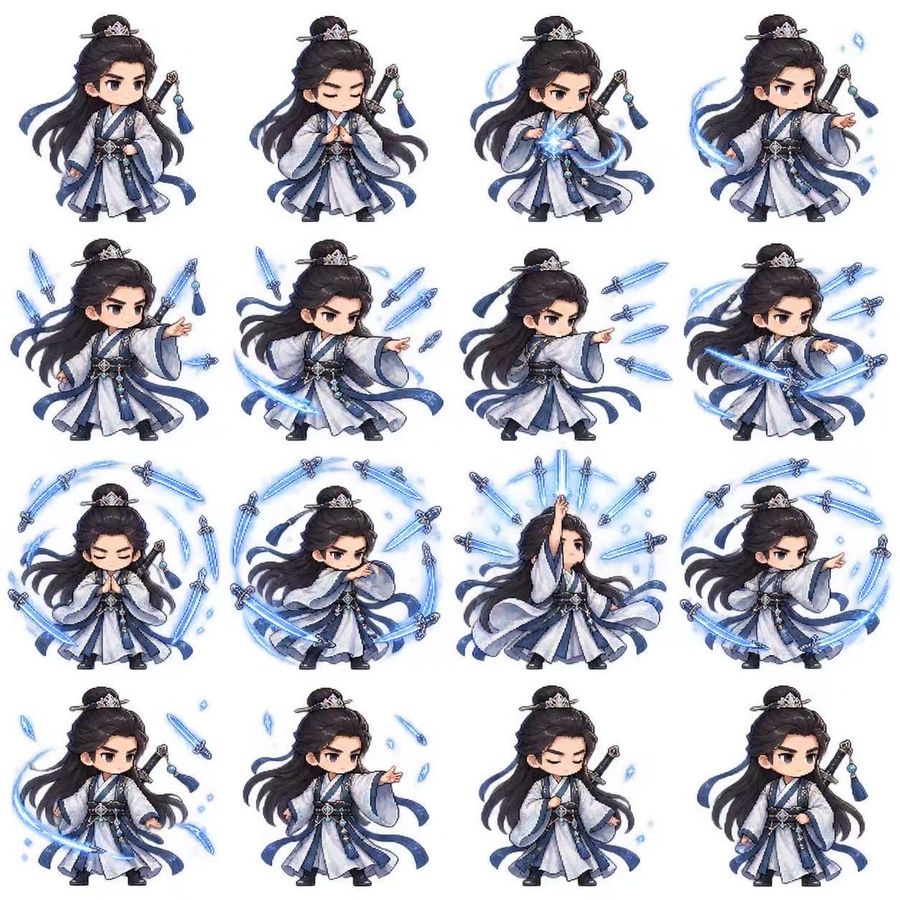
Chibi Xianxia Sword Sprite Sheet
عرض المطالبة كاملة ونسخها

Goal: Create a clean 4-by-4 sprite-sheet style illustration of a chibi fantasy swordsman performing pixel-art combat animation poses, suitable for a game attack sequence. Canvas: Square white background, evenly spaced grid with no visible grid lines, 16 separate full-body sprites arranged in exactly 4 rows and 4 columns. Keep each sprite isolated with consistent scale and generous white space. Subject details: The same chibi male cultivator swordsman appears in every frame: an elegant young xianxia swordsman, large head and small body, pale skin, stern dark eyebrows, narrow focused eyes, long flowing black hair tied in a high half-up bun with a small silver crown hairpiece and hairpin. He wears layered white, pale blue, navy, and silver hanfu-style robes with oversized sleeves, dark inner sash, ornate silver belt, dangling blue tassels, black boots, and a sheathed sword on his back or at his side with a blue tassel charm. Animation frame count and poses: Include exactly 16 discrete sprites. Row 1: 1) idle standing pose facing slightly left, hand near belt, sword visible behind shoulder; 2) calm prayer or hand-seal pose with eyes closed; 3) gathering blue energy between hands with a small glowing swirl; 4) one arm extended outward casting a spell, blue wind ribbon behind him. Row 2: 5) pointing forward while two glowing blue flying swords appear around him; 6) stronger command pose pointing forward with multiple blue swords and a sweeping crescent slash; 7) side-facing attack command pose with three to four flying swords shooting horizontally; 8) dynamic forward strike pose with crossing blue sword trails. Row 3: 9) meditative hand-seal pose surrounded by a circular blue sword aura; 10) defensive stance with arms crossing and a near-complete ring of flying swords around him; 11) dramatic summoning pose with one arm raised upward and many blue swords radiating above; 12) low focused pointing pose encircled by a sweeping blue arc and several swords. Row 4: 13) ready stance with a large crescent slash sweeping near the feet; 14) casting pose with hand extended and small blue crystal shards plus a falling sword; 15) calm recovery pose with eyes closed, hand near chest, scattered blue shards; 16) final idle stance similar to the first, facing slightly right with robes and hair settling. Visual style: Cute high-quality chibi game asset, anime xianxia fantasy, pixel-combat-inspired but polished and painterly, crisp edges, soft cel shading, tiny detailed costume ornaments, luminous cyan-blue sword energy, motion trails, small sparkles and ice-like shards. Use electric cyan blue for all magical effects. The character should be consistent across all frames, with flowing hair and ribbons varying naturally by action. Constraints: No text, no labels, no borders, no watermark, no background scenery, no cropped sprites. Maintain the exact 16-frame count and 4-by-4 arrangement.

إنشاء صورة
بواسطة @瑾 黄
GPT Image 2.5
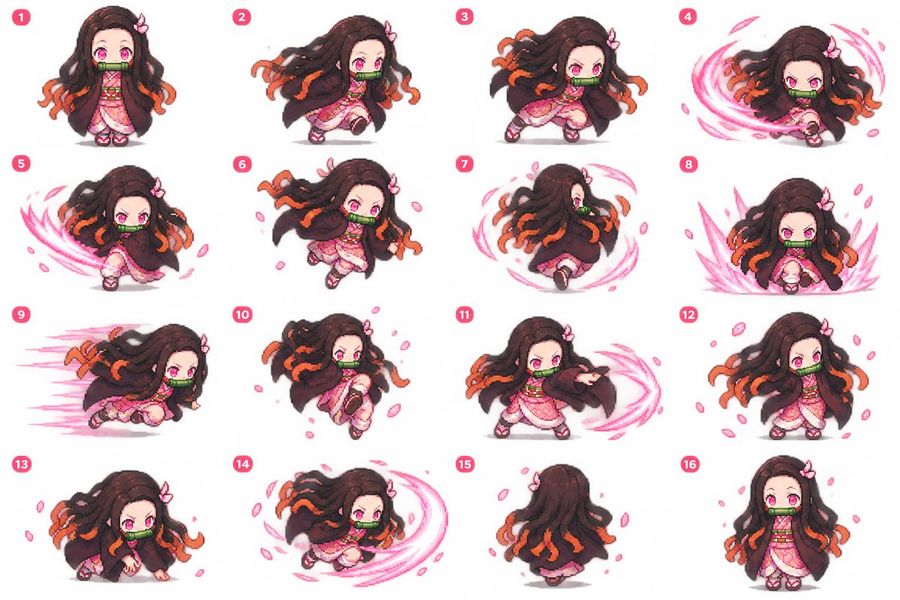
Chibi Nezuko 4x4 Sprite Sheet
عرض المطالبة كاملة ونسخها

Goal: Create a 4×4 pixel-art sprite sheet of Nezuko Kamado as a cute chibi action-game character, suitable for turning into an animated GIF or game attack sequence. Canvas: Wide white canvas, clean empty background, arranged as an evenly spaced 4 columns by 4 rows grid. Each cell contains one full-body sprite with a soft gray contact shadow. Add a small hot-pink rounded number badge in the upper-left of each cell, labeled exactly 1 through 16 in white. Character design: Chibi anime girl with a large head, small body, pale skin, bright pink eyes, long dark brown wavy hair with orange-tinted tips, a small pink bow on one side of the hair, and a green bamboo gag across her mouth. Outfit is a pink patterned kimono under a dark brown haori cloak, pale pink obi, white leg wraps, and pink sandals. Use saturated colors, crisp pixel-art edges, soft anti-aliased highlights, expressive action poses, and a cute but fierce demon-slayer-game feel. Layout and 16 required frames: Include exactly 16 discrete sprites, numbered and posed as follows: 1 standing idle facing forward, hands near chest, calm expression; 2 running or dashing to the right with hair streaming left; 3 crouched combat stance facing right, angry eyes, cloak flaring; 4 spinning slash attack with a bright pink circular energy arc around the character; 5 continuation of spinning attack, body turned left, large pink crescent trail sweeping around; 6 mid-run leap with flower petals, one arm forward; 7 rear-facing spinning motion, hair and cloak spiraling with a pink circular trail; 8 frontal power-up or slash impact pose with tall pink energy spikes rising on both sides; 9 low high-speed dash to the left with horizontal pink speed streaks behind; 10 airborne running jump, knees tucked slightly, petals floating; 11 side slash pose facing right, one arm extended, pink crescent energy arc to the right; 12 relaxed standing pose angled slightly right, petals around, hair flowing; 13 low crouch on hands and knees, fierce eyes, ready to pounce; 14 low sweeping spin attack, body close to ground, large pink crescent trail wrapping around; 15 back view standing/walking away, cloak and hair covering most of the body, orange hair tips visible; 16 front-facing shy idle pose, feet together, hands close, wide pink eyes. Effects: Use cherry blossom petals and pink motion trails in many frames, especially frames 4, 5, 7, 8, 9, 11, and 14. Keep effects contained inside each grid cell and do not overlap between cells. Style constraints: Pixel-art sprite sheet, chibi proportions, consistent scale across all frames, no scenery, no UI besides the 16 number badges, white background, high clarity, animation-ready poses, cohesive lighting and colors.

إنشاء صورة
بواسطة @xiliang
GPT Image 2.5
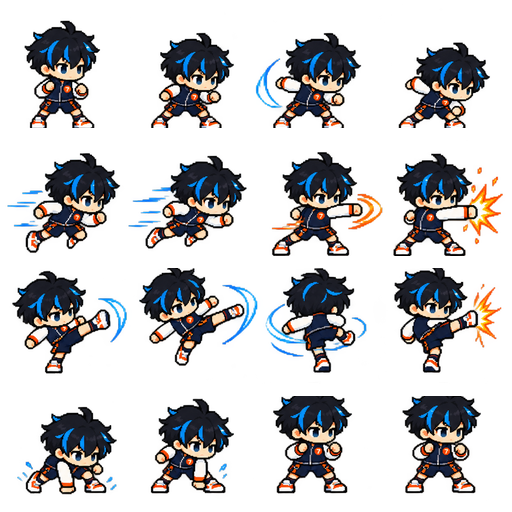
Chibi Pixel Battle Sprite Sheet
عرض المطالبة كاملة ونسخها

Goal: Create a pixel-art sprite sheet for a chibi anime fighting game character, suitable for making a looping battle GIF. Canvas: Square 512×512 image with a pure black background, crisp nearest-neighbor pixel rendering, no grid lines, no labels, no watermark. Arrange the sprites in an even 4×4 sheet, exactly 16 discrete animation frames, each occupying roughly a 128×128 cell with consistent character scale and transparent-feeling empty space around the sprite. Subject details: The character is a chibi blue-haired martial arts hero, a small super-deformed fighter with oversized head, spiky messy black hair with bright electric-blue highlights, large blue eyes, pale skin, determined eyebrows, white boxing-style gloves, black sleeveless combat outfit with orange trim, black shorts or armored panels, white socks, red-and-white sneakers, and small blue accent details. Keep the design consistent in every frame. Animation layout: Include exactly 16 separate sprite poses, ordered left to right and top to bottom: 1. idle ready stance facing front-left, fists up; 2. crouched forward run startup, leaning right; 3. standing punch or slash with a bright blue crescent energy arc in front; 4. compact dash pose with one fist extended; 5. high-speed horizontal dash left-to-right with blue motion streaks behind; 6. faster running dash with longer blue speed lines trailing left; 7. close-range orange energy punch sweeping forward; 8. straight punch impact with orange explosion burst at the right edge; 9. spinning kick or hook attack with blue crescent energy on the right; 10. rising diagonal strike, body tilted, blue energy slash trailing around the leg or arm; 11. back-facing spinning attack with circular blue energy swirl around the body; 12. side kick impact with orange explosion burst on the right; 13. low crouch landing or charge pose with fists near the ground; 14. upright guarded stance with one arm extended and small blue energy sparks near the rear hand; 15. front-facing idle combat stance with both fists raised; 16. alternate front-facing idle stance, nearly symmetrical, fists up. Effects: Use electric blue for speed trails, arcs, and swirling slash effects, plus orange and yellow comic-style impact bursts for hit frames. Energy should be pixelated with jagged edges and bright highlights. Visual style: 16-bit arcade fighting-game sprite art, cute chibi proportions, bold black outlines, high contrast, limited but saturated palette, sharp pixel edges, dynamic poses, readable silhouette, no anti-aliased painterly softness. Constraints: Keep exactly 16 frames in a clean 4×4 arrangement, preserve consistent outfit and proportions, do not add text, UI, frame numbers, background scenery, or extra characters.

إنشاء صورة
بواسطة @SuSu_酥酥👅
GPT Image 2.5
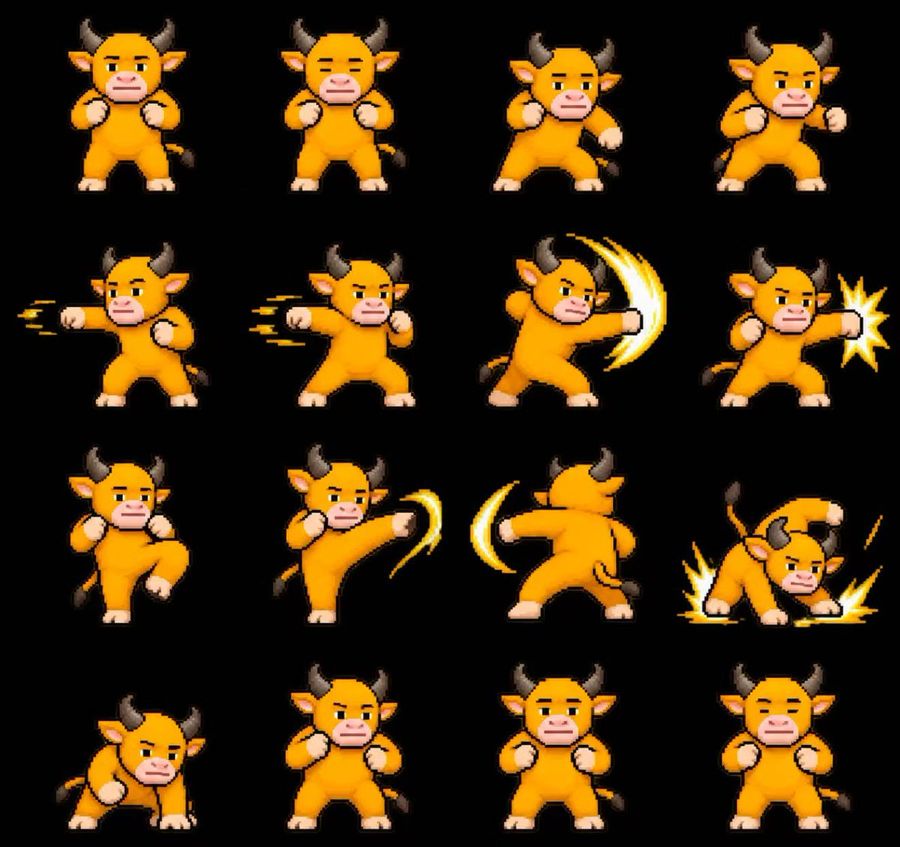
Pixel Sprite Sequence Template
عرض المطالبة كاملة ونسخها

Just toss in any Niulai character image to turn it into an in-game pixel sprite, and it's not a single static frame, but a full 16-frame looping animation: Frames 1-2: Guarding chest with both fists in a idle stance, eyes blinking open and shut Frames 3-4: Turning sideways to charge power, extending the right fist first Frames 5-6: Continuous left straight punches, leaving afterimages behind Frames 7-8: Right fist with a yellow light arc slash, exploding into starlight stars on hit Frames 9-10: Raising knee to jump, side kick trailing a light blade Frames 11: Spinning roundhouse kick, sweeping an arc across a half circle Frames 12: The entire bull slams the ground, sparks exploding from the floor Frames 13: Crouching to buffer the impact, tail giving a flick Frames 14-16: Returning to the idle stance, blinking once more, looping The prompt template can be used by switching images, pixel style + combo sequence all achieved at once.

إنشاء صورة
GPT Image 2.5
Pixel Art Sprite Sheet Creator
عرض المطالبة كاملة ونسخها

Transform the character in Image 1 into a high-quality 2D pixel art game character, generating a square 4x4 grid sprite sheet with 16 continuous action frames. Each grid cell must be the exact same size, playing in order from left to right and top to bottom. Strictly preserve the character's face, hairstyle, body type, clothing colors, signature accessories, and weapon structure. Use consistent pixel scaling, character size, orientation, and color palette across all 16 frames. The character performs one sword attack / jump / roll / spellcast / pounce sequence. Frames 1-3 are idle and charging; 4-7 are weight shifting and movement initiation; 8-10 are the main attack and power release; 11-13 are inertia and recovery; 14-16 return to idle, with frame 16 looping naturally back to frame 1. Adjacent frames should only change the joints, outlines, clothing, hair, and weapon positions needed for the action, maintaining consistent motion trajectories. All cells must maintain the same camera angle, character scale, baseline, and center. Display the character in full without cropping. The background should prioritize transparent channel; if unstable, use a solid color background. Do not generate scenes, floor textures, grid lines, numbers, or text. Use clean hard-edge pixels with a limited palette and uniform density. No blurring, anti-aliasing, semi-realistic rendering, repeated frames, or character distortion.

إنشاء صورة
GPT Image 2.5
Pixel Art Character Sprite Sheet
عرض المطالبة كاملة ونسخها

Unify the face, hairstyle, outfit, color scheme, and physique of the attached character, and generate 4 types of pixel art motions that look great in a game, all on a single sprite sheet image with a maximum of 4 frames each. The size of each frame is 256x256px. - Run: Lean the body forward, moving limbs in large alternating movements. - Jump: Crouch → Jump up → Spread limbs in the air → Land. - Spin Attack: Front → Side → Back → Opposite side, performing one full rotation of the body. - Fall: Stumble → Tilt sideways → Lie down → Close eyes and stop moving. Arrange one action per row in a horizontal line, ensuring all cell sizes, feet alignment, center, and scale are uniform. The background must be a completely solid color; do not use shadows, text, frames, numbers, UI, blur, semi-transparency, gradients, or anti-aliasing. Ensure looping actions connect naturally between the start and end.

إنشاء صورة
بواسطة @Kiki
GPT Image 2.5
4x4 Pixel Art Sword Sprite Sheet
عرض المطالبة كاملة ونسخها

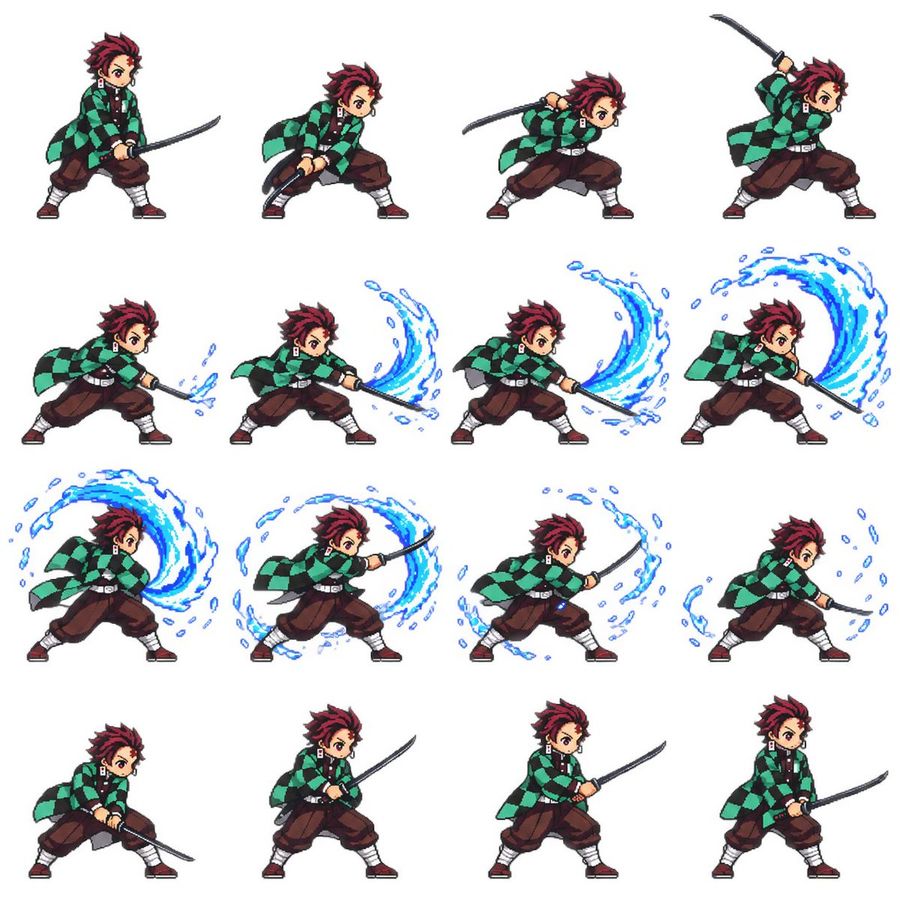
Goal: Create a clean 4×4 pixel-art combat sprite sheet for Tanjiro Kamado, showing one complete sword attack animation sequence suitable for a 2D side-scrolling game. Canvas: Square white canvas, no border, no background scenery, no shadows except subtle pixel grounding if needed. Arrange exactly 16 separate full-body sprites in a perfectly spaced 4-column by 4-row grid, all facing right, each sprite roughly the same scale and centered in its grid cell. Character details: The character is a teenage anime swordsman with spiky dark burgundy hair, determined eyes, hanafuda-style rectangular earrings, a green-and-black checkered haori coat over a dark uniform, loose brown hakama-style pants, white leg wraps, dark red sandals, and a black katana. Keep the character recognizable but rendered as crisp retro pixel art with black outlines, limited colors, and readable small-scale details. Animation sequence: Show exactly 16 discrete poses, counted left to right and top to bottom: 1) ready stance holding katana low in both hands, 2) crouched wind-up with sword drawn back, 3) forward lean with sword raised behind shoulder, 4) high overhead preparation with katana lifted, 5) first low slash beginning with a small blue water splash at the blade tip, 6) stronger horizontal slash with a short blue water arc, 7) broad sweeping slash with a medium crescent of water, 8) extended forward slash with a large blue water wave curling upward, 9) full circular water effect behind the character during the follow-through, 10) forward thrusting follow-through with a large blue crescent wave wrapping around the sword, 11) fading spiral water fragments around the body and blade, 12) final small water droplets dissipating near the blade, 13) low recovery crouch with sword down, 14) standing recovery with sword held diagonally forward, 15) relaxed guard stance with sword forward, 16) return to ready stance holding the katana low. Visual style: Authentic 16-bit / 32-bit fighting-game pixel art, sharp hard-edged pixels, no anti-aliased painterly look, expressive anime proportions with a slightly chibi game-sprite silhouette, dynamic cloth motion in the haori, clear readable sword poses, energetic but compact animation frames. Effects: Use bright blue water breathing arcs only during the middle attack frames. The water should appear as cyan and deep-blue pixelated crescents, splashes, droplets, and curved brush-like waves that grow, peak, and dissipate across frames 5 through 12. Constraints: Exactly 16 sprites, exactly 4 rows and 4 columns, no labels, no UI, no text, no extra characters, no duplicate background elements, maintain consistent character proportions and costume details across every frame.

إنشاء صورة
جارٍ تحميل مزيد من المطالبات

الأسئلة الشائعة

من أين تأتي مطالبات YouMind؟
تختار YouMind أمثلة عالية الجودة لمطالبات الذكاء الاصطناعي من مجتمعات المبدعين ومسارات العمل الإبداعية العامة. تركز المكتبة على المطالبات المفيدة للدراسة وإعادة الاستخدام والتعديل.
كيف تُنظم فئات مطالبات الصور؟
تُجمع مطالبات الصور حسب حالات الاستخدام والأنماط والموضوعات. تصف حالات الاستخدام المهمة المطلوبة، وتصف الأنماط المعالجة البصرية، بينما تحدد الموضوعات المحتوى الرئيسي للصورة.
كيف تُسند المطالبات إلى الفئات؟
تستخدم YouMind الذكاء الاصطناعي لتحليل كل مطالبة من نوع صورة وعنوانها وبياناتها الوصفية والنتيجة المنشأة عند توفرها، ثم تسندها إلى أقرب الفئات. ويمكن للمحررين تحسين الفئات مع تطور نظام التصنيف.
ما YouMind؟
YouMind مساحة عمل مدعومة بالذكاء الاصطناعي لتحويل الأبحاث والأفكار والمراجع الإبداعية إلى مخرجات قابلة للاستخدام. مكتبة المطالبات جزء عام من هذا المسار، وقد صُممت لمساعدة المبدعين على التعلم بسرعة من الأمثلة القوية.