
一鍵修復老照片
修復老照片,同時保留臉部原貌
一鍵修復老照片
修復老照片,同時保留臉部原貌
展示內容
描述
上傳受損、褪色或模糊的老照片,一次處理即可獲得高畫質修復結果:修補撕裂與摺痕、移除污漬與霉斑、恢復偏移或泛黃的色彩、為黑白照片上色,並提升低解析度檔案的清晰度。臉部會嚴格保留:不換臉、不美化,也不捏造細節。每張照片會得到一份 HD 結果與一張前後對照圖,並可逐張處理,另可提供「僅上色」或「保持黑白」等選擇性指示。
相關技能
查看全部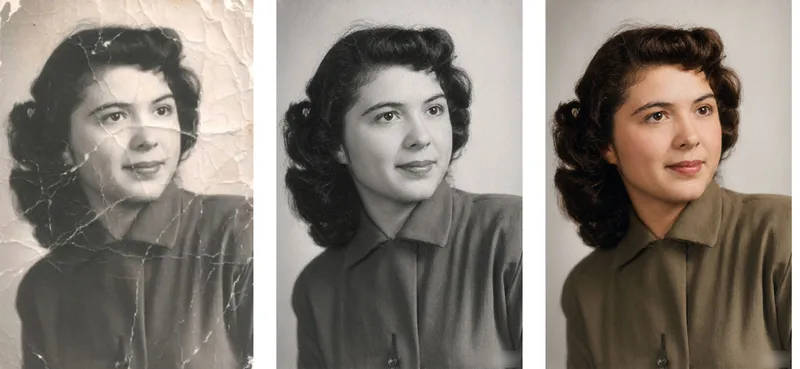 圖片
圖片舊照片修復實驗室
Old Photo Restorer: upload an old photograph of people, buildings, plants or animals; repair the damage (scratches, creases, mold spots, stains, fading, missing pieces) and colorize it in a period-appropriate way, strictly preserving the original composition, number of subjects, expressions and aspect ratio. Trigger when the user says 'restore this old photo', 'colorize old photo', 'fix this damaged photo', 'can you repair a torn photo', 'colorize my grandparents' photo', 'remove scratches from photo', 'make old photo clearer', 'restore family portrait', 'photo cleanup', 'upscale and restore'. Core rules: restoration is subtraction not addition — remove damage only, never add content; the closer it looks to 'nothing was done', the better; the face is the only acceptance criterion; colorization is an educated guess, not fact; output aspect ratio must match the original exactly. Default output aspect ratio = the uploaded photo's ratio. Preferred model: Nano Banana 2.1 high-fidelity reference mode. Midjourney disabled. Heavily damaged photos use a two-step flow: restore in black and white first, then colorize.
 圖片
圖片蠟筆肖像
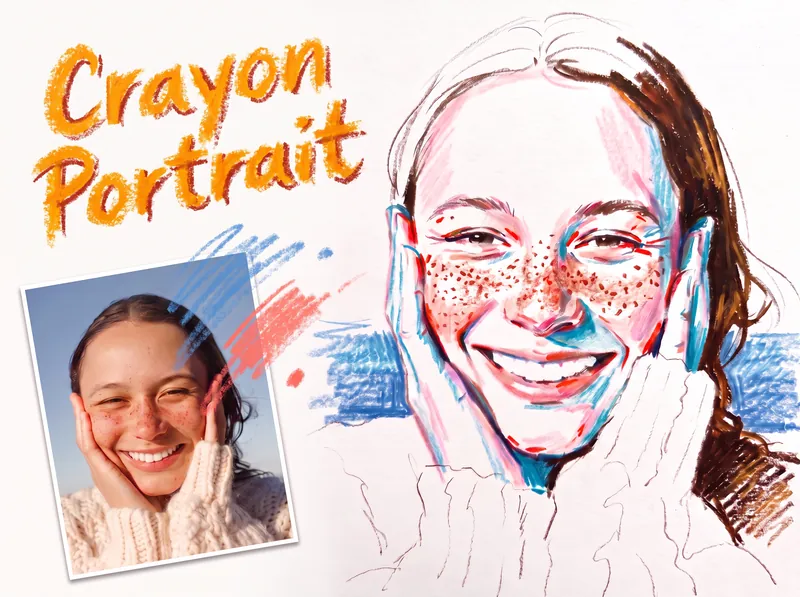
將人物肖像照片轉換成忠實的彩色蠟筆或油粉彩素描,保留人物的身份特徵、表情、姿勢、比例、髮型、服裝、構圖與可辨識細節。雀斑、酒窩、眼鏡、耳環、鬆散髮絲、牙齒與布料質感都會成為相似度的一部分,不會被過度柔化或誇張處理。 完成的作品帶有在現場快速繪製於白色素描紙上的自然感,呈現可見的紙張紋理、乾擦效果、斷續筆觸,以及大面積保留的空白紙面。臉部色彩保持節制,以粉紅、珊瑚色與磚紅色的層疊筆觸,沿著臉部結構轉折處加入色彩,同時讓大部分臉部維持白色;冷藍色或孔雀綠色筆觸則增添透明的陰影層次,並排除黃色。頭髮以溫暖的棕色調呈現,在開闊明亮的區域與較密集的紋理區段之間取得有意識的平衡;服裝與裸露的肩膀大致保留白色,只加入少量富有表現力的線條。 簡潔的單色背景從肩膀附近的兩側柔和地襯托人物,不填滿整張紙,也不與肖像爭奪視線。背景不規則且邊緣開放的蠟筆筆觸會乾淨地貼合人物輪廓,並在頭部周圍與構圖下方保留大片空白。最終呈現的是獨具特色的手繪肖像素描,而非寫實照片風格、精緻的數位繪畫或漫畫化誇張肖像。
資訊
- 版本
- v2
- 更新時間
- 執行點數
- 依實際用量
- 模型
- 自動選擇
