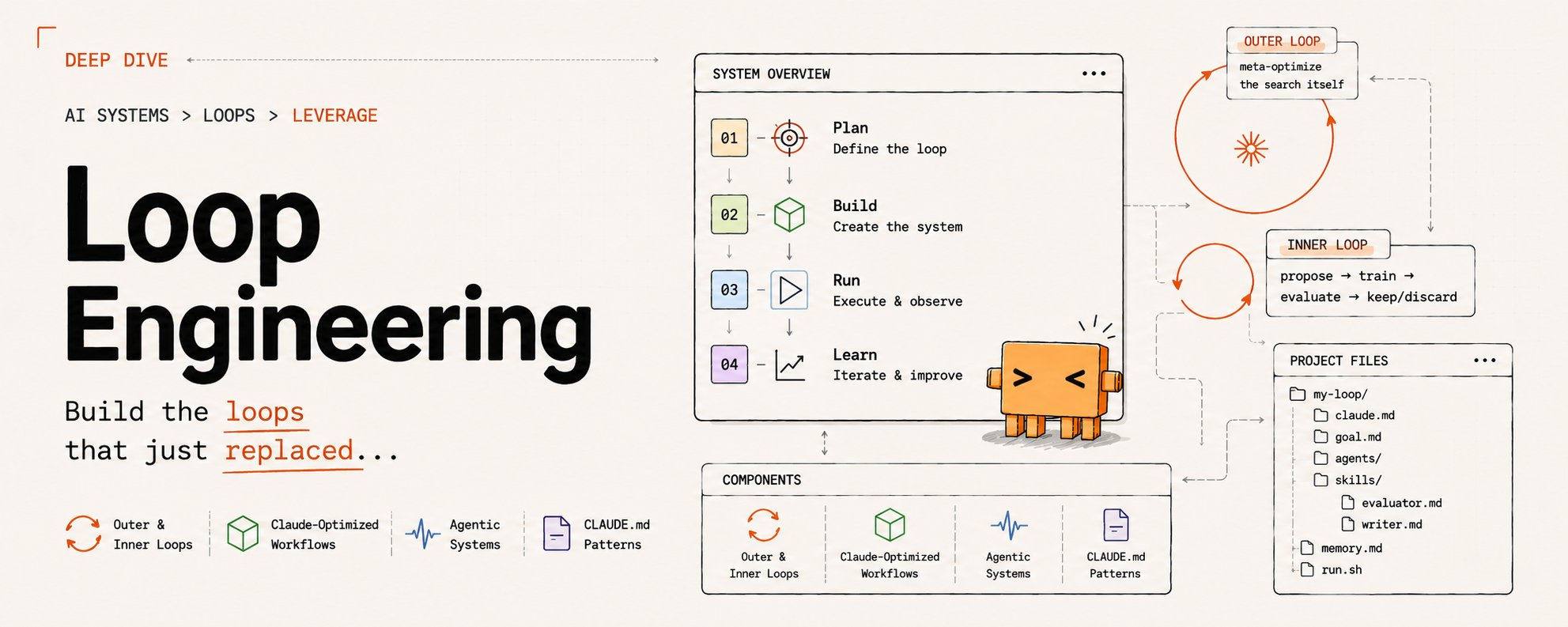
For the past two years, 99% of people using AI to write code or content have followed a similar pattern: write a prompt, wait for a response, read it, add another instruction, and wait again. Humans have been holding the tool, pushing it forward one round at a time.
By mid-2026, the conversation has shifted. Peter Steinberger, author of OpenClaw, posted a tweet with over two million views: "You shouldn't be prompting your programming agent anymore; you should be designing the loops that prompt the agent for you." Boris Cherny, head of Anthropic Claude Code, shared a similar experience: "I don't prompt Claude anymore. I have a bunch of loops running; they prompt Claude and decide the next step. My job is to write the loops." Addy Osmani subsequently named this practice Loop Engineering.
To put it simply:
Loop Engineering is the transition from "prompting line by line yourself" to "designing a system that continues to prompt."
Human value hasn't disappeared; its position has just shifted. On one end is intent: defining "what I actually want" to the point where it can be verified. On the other end is accountability: you are responsible for the final output. The intermediate steps of repeated questioning, checking, and revising can be handed over to loops.
This process has become much easier. A year ago, creating a loop often required a pile of bash scripts only you could understand. By mid-2026, Claude Code, Codex, and OpenCode have integrated many of these components into their products. Understanding the "shape" of a loop is now more important than obsessing over tool names.
I. What is a Loop?
To understand Loop Engineering, look at its position in the spectrum. In recent years, the leverage point has been moving further away from "naked model calls":
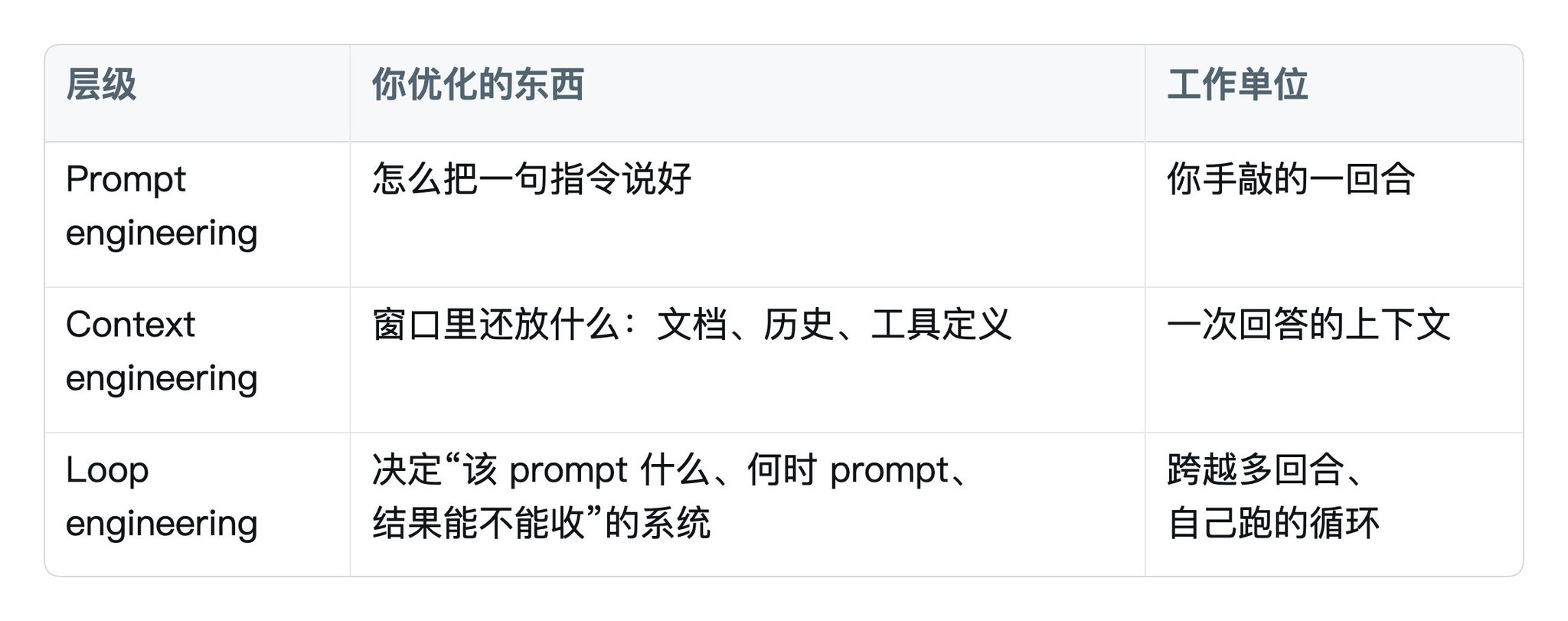
The difference between a loop and a cron job is the presence of an agent that can judge the next step. A cron job runs a hard-coded script; a loop observes the current state, selects an action, executes it, checks the result, and then decides whether to continue, retry, roll back, or stop. This "Observe-Decide-Act-Verify" cycle is the core of a loop. Major AI vendors have eventually converged on this structure, which can be traced back to the 2022 ReAct framework (Reasoning and Acting) from Princeton and Google.
A loop consists of five components and a state layer:
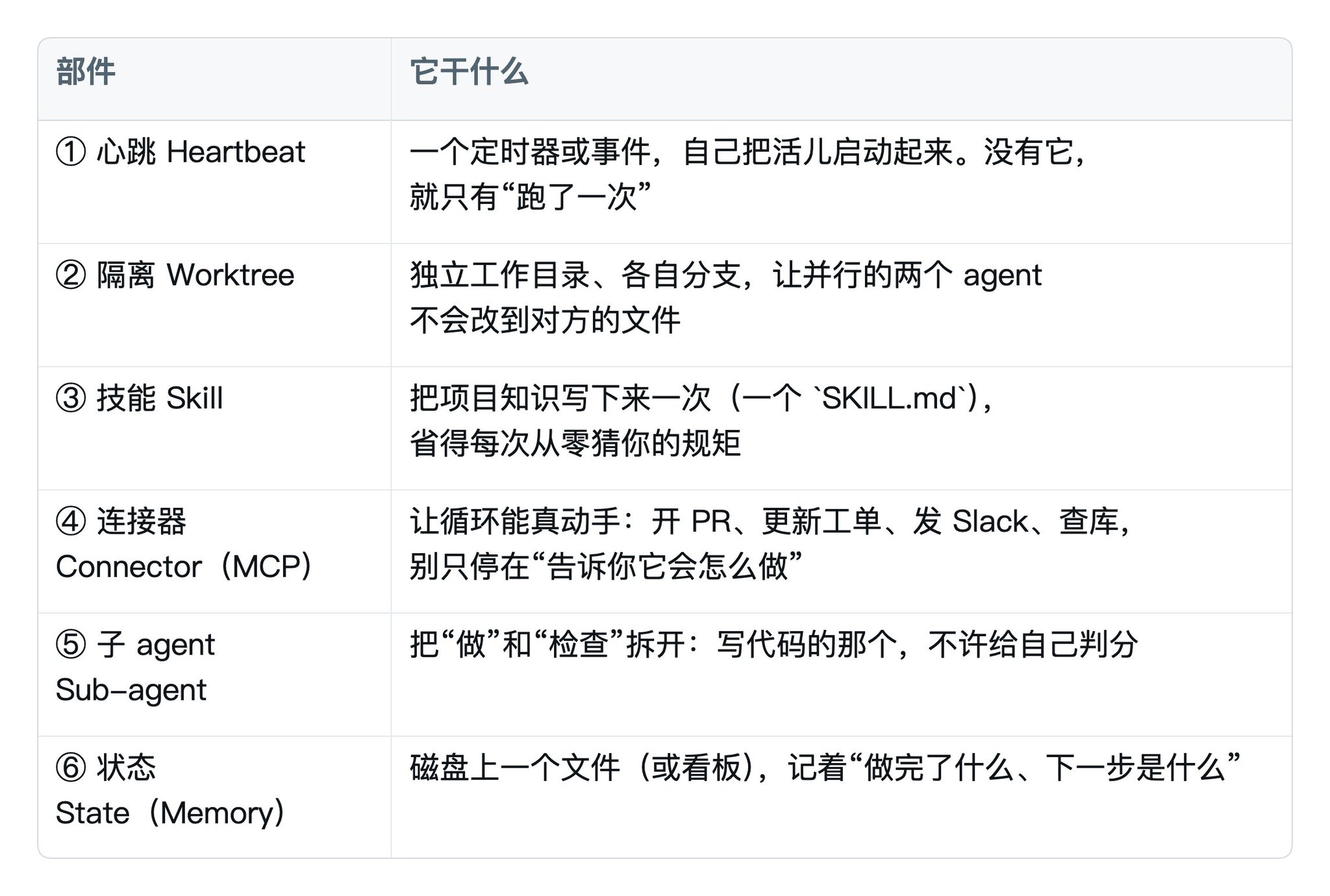
The sixth component is the one most often skipped by beginners. Models forget after each run; the state file is how today's run knows what happened yesterday. Without it, many systems that appear to be looping are actually just repeating the first step.
Remember the shape of this six-piece set and forget specific command keys, and you will have learned Loop Engineering. Conversely, if you memorize command keys but miss the shape, you've only learned this month's CLI.
II. How to Judge if a Task Should Be a Loop
Don't turn every task into a loop. Pass it through three filters first:
- Repetitive: You do it frequently enough that the cost of designing the system pays off.
- Verifiable: "Done" can be written as a check that an agent or a sub-agent can actually run. If you can't define what "passing" looks like, the loop won't know when to stop.
- Worthwhile: The output justifies the tokens burned. Loops have a floor price in time and money; trivial tasks don't qualify.
If all three are met, it wants a loop. If one is missing, stick to manual prompting or a standard script.
Another perspective is the work structure:
- Process-based: Steps and order are known, results are predictable. Use traditional automation (scripts, RPA).
- Tool-assisted: Goal is known, but the path is variable. You are still at the steering wheel. This is where most AI copilots sit today.
- Goal-driven: You set a goal and boundaries, and the system figures out the steps, evaluates, acts, and repeats until completion. This is the category for loops.
III. Building Your First Loop Step-by-Step
Let's build a common "Morning Maintenance Loop." Try this in a throwaway test repository first; don't run it on an important repo initially, as the loop will modify files.
The final product looks like this:
1Every weekday at 9 AM: # ① Heartbeat2 Read progress.md # ⑥ State file (Memory)3 Find last night's CI failures + new issues4 For each item:5 Draft fix in an independent checkout # ② Worktree6 Use project triage skills # ③ Skill7 Have a separate reviewer grade it # ⑤ Sub-agent (Separation of Do/Check)8 PASS: Open PR # ④ Connector9 RISK: Write to progress.md for human review10 Update progress.md # ⑥ State file
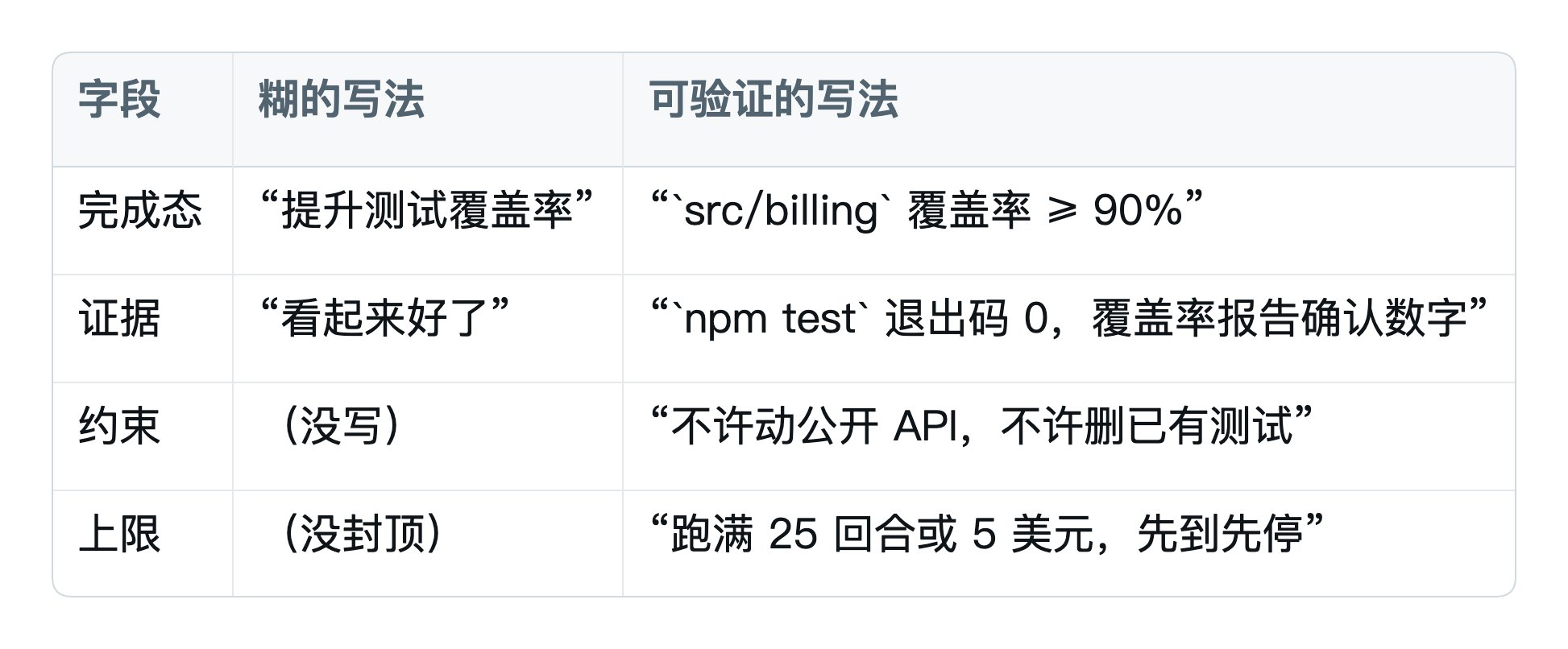
Step 0: Choose a task and write "Done" as a verifiable condition
This is the hardest step. "Fix the code" is too vague; "test/auth passes and npm run lint is clean" is usable. Write the stop condition as a checklist:
Step 1: Install a heartbeat to let it start itself
There are four types of heartbeats, from "staying in this session" to "running without you."
Step 2: Write steps into a Skill to keep the prompt to one line
Anything you have to explain every time should go into a Skill. This keeps the scheduled task prompt short, while details remain in version control.
Step 3: Separate Doing and Checking with a Reviewer Sub-agent
A crucial rule: the agent doing the work is not allowed to grade its own work. Models are often too lenient on themselves. Use a separate, read-only, cheaper model as a reviewer.
Step 4: Install a State File
Memory must exist outside the model on the disk. Use a progress file to track what was tried, what passed, and what is still open.
Step 5: Connect Tools to Let It Act
Connectors (based on MCP) allow the loop to open PRs, update tickets, or send Slack messages. This is the difference between a system that just "suggests" and one that "acts."
IV. What Repetitive Labor Can It Save?
Once you learn the skeleton, you can apply it to other tasks:
- Engineering: CI failure triage, issue triaging, dependency upgrades, framework migrations.
- Content Pipelines: Cleaning copy, turning ideas into hooks, multi-platform versioning.
- Monitoring & Research: Monitoring logs, competitor pricing, or API changelogs.
- Document Generation: Summarizing PDFs, structuring data into reports.
V. Risks and Boundaries
- Stopping is hard: Every loop needs a hard brake (iteration limits, no-progress detection, and budget caps).
- Verification is still your job: You are responsible for the code the loop produces. The most honest checkers are test runners and linters.
- Comprehension Debt: Loops send code to the repo faster than you can read it. Don't use loops to avoid thinking; use them to accelerate work you already understand.
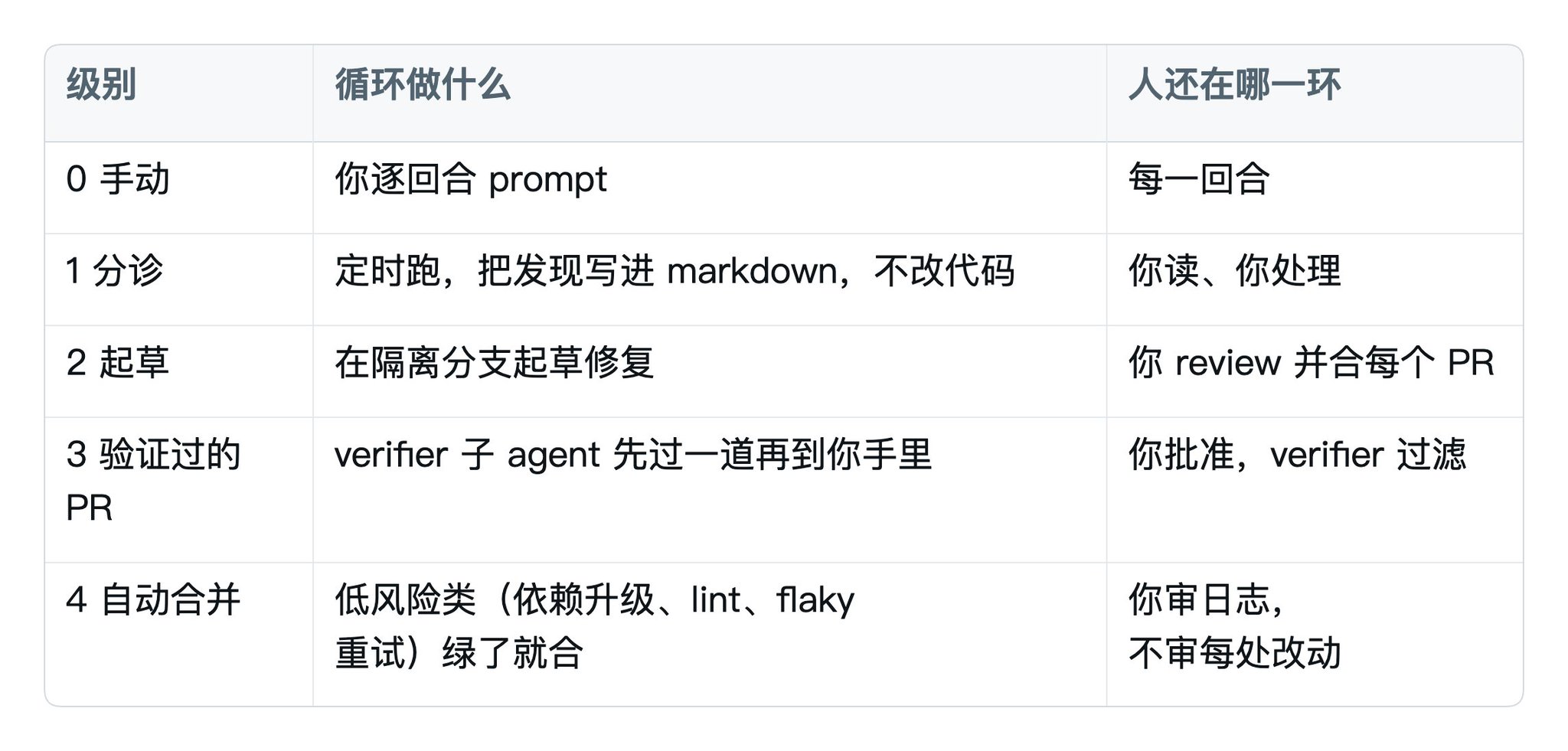
VI. Implementation Rhythm: Earning Trust Step-by-Step
Don't aim for "auto-merge" immediately. Climb the maturity ladder one rung at a time.
About the Author
Kyrie — Former R&D engineer at a major Chinese tech firm, currently based in Bangkok, focusing on overseas BD for Chinese tech companies. Shares insights on AI implementation and overseas business.