After reading this article you'll learn how to take Microsoft's SkillOpt, point it at your own skill, walk away, and come back with a skill that is measurably better than the one you started with.
At the moment people are tweaking their skills be hand, adding rules, deleting lines, running evals, testing it again, seeing how their agent behaves, and then repeating the process.
SkillOpt kills the guessing.
Whenever I write an article I like to ensure I am explaining it so that if someone has no idea what a skill is can learn from this article, and for some of you there is likely sections that will be teaching you how to suck eggs, just scroll past those bits and get to what you want to learn.
a "skill" is just a block of natural-language instructions you hand an agent before it works: procedures, output rules, do's and don'ts. SkillOpt treats that file as something you can train, like training a model, except the thing being trained is the text, not the weights. it runs your agent on a batch of example tasks, looks at what went right and wrong, proposes small edits to the skill, and keeps an edit only if it raises a score on held-out examples. the output is one compact.
before we begin: is skillopt even for you?
SkillOpt is the right tool when your task has outputs you can check against a known-correct answer. extraction, classification, structured generation, question-answering with reference answers, code that either runs or doesn't, anything with a right answer. all squarely in scope.
it is the wrong tool when "correct" doesn't exist.
Contents:
- What is SkillOpt?
- Why is SkillOpt goated on the sticks (good)?
- What you have to give it.
- Install and configure (+ official link)
- Run it
- Reading the result and deploying it
- Fine tuning (if you're a giga nerd)
- Caveats
- Payoff
OKAY, LET'S IMPROVE OUR SKILLS.
1: What is SkillOpt?
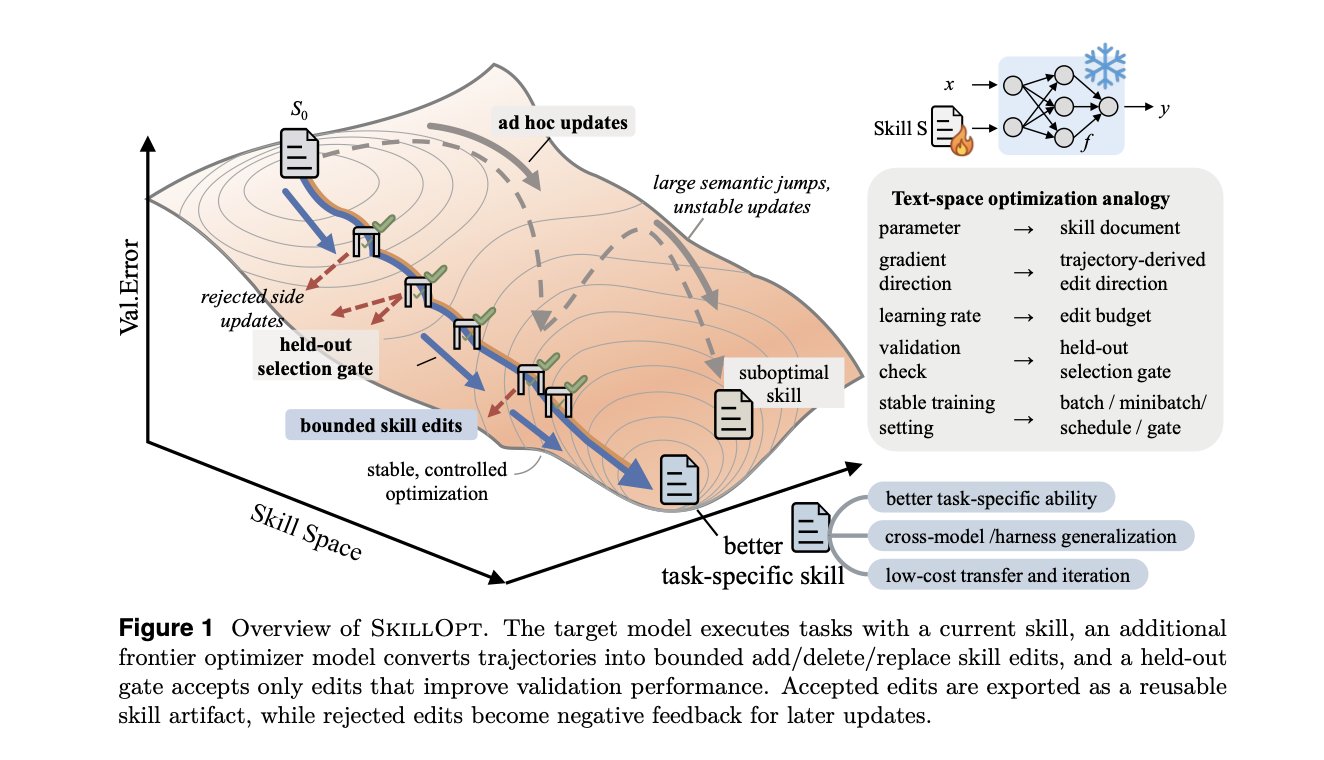
SkillOpt is a text-space optimiser. that phrase is the whole idea, so unpack it.
when people improve a model, they usually change one of two things. the weights (fine-tuning: expensive, often impossible on closed frontier models) or the prompt (cheap, but a one-shot guess that never learns from what happened). SkillOpt changes a third thing: a persistent skill document that sits between you and a frozen model. the model never changes. the skill does.
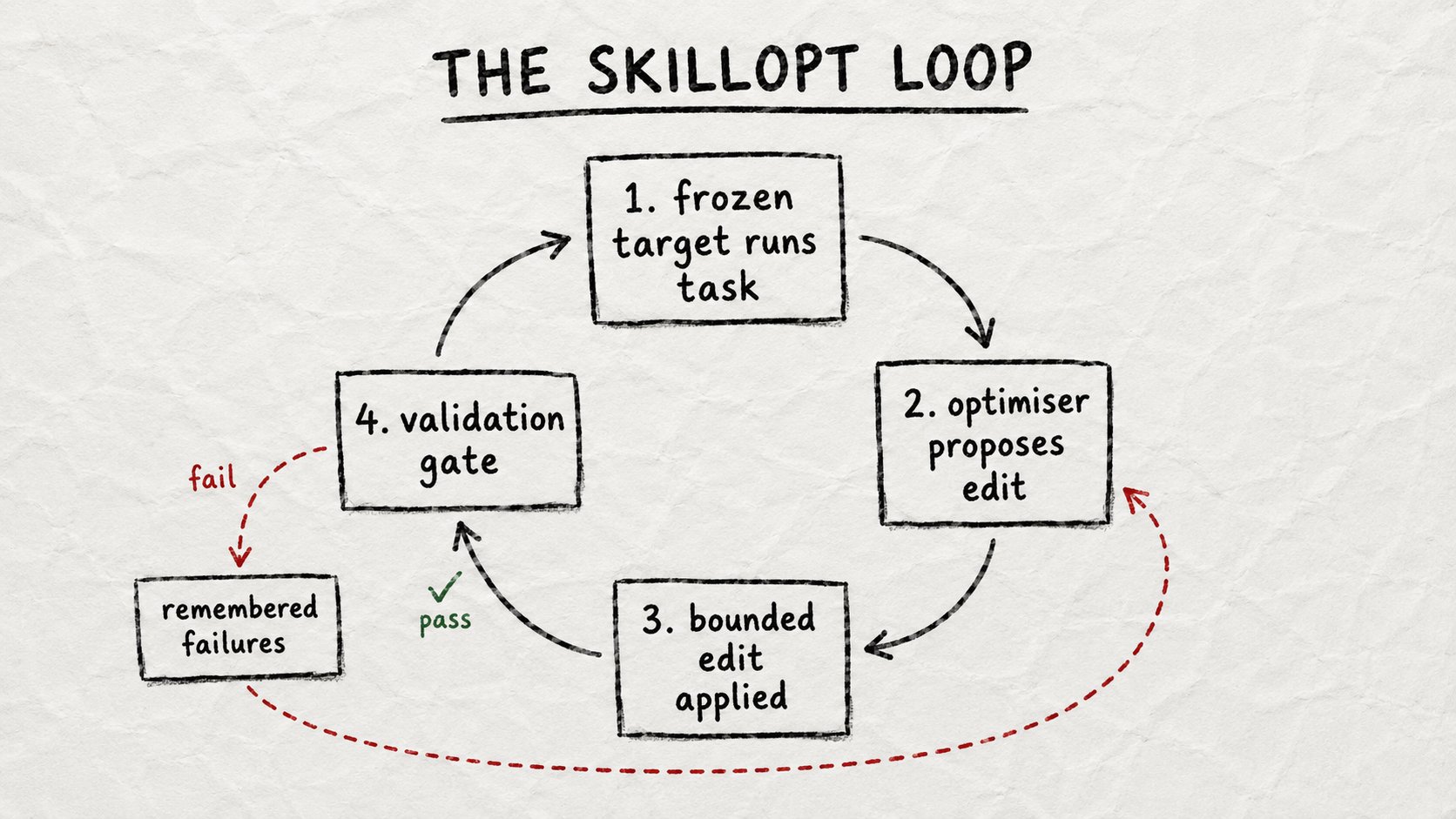
it runs as a loop with four moving parts, and the loop deliberately mirrors how you would train a neural network:
A
frozen target model
runs your tasks using the current skill.
An
optimiser model
(a second LLM, used only during training) reads the resulting successes and failures and proposes structured edits. add this rule, delete that one, replace this line.
A
bounded edit budget
caps how much the skill can change in one step, so it improves gradually instead of being rewritten into something unrecognisable. the paper calls this the "textual learning rate."
A
validation gate
runs the edited skill on a held-out set and
only accepts the edit if the score goes up.
edits that fail are rejected and remembered, so the optimiser stops re-proposing them.
the deployed result is a small file. across the paper's six benchmarks, the authors report the final best_skill.md ran from roughly 380 to 2,000 tokens and came from only 1 to 4 accepted edits. small enough to read and audit in a few minutes.
for the visual learners init
2: Why is SkillOpt goated on the sticks (good)?
two reasons. it works unusually well for a method that never touches weights, and what it produces is portable.
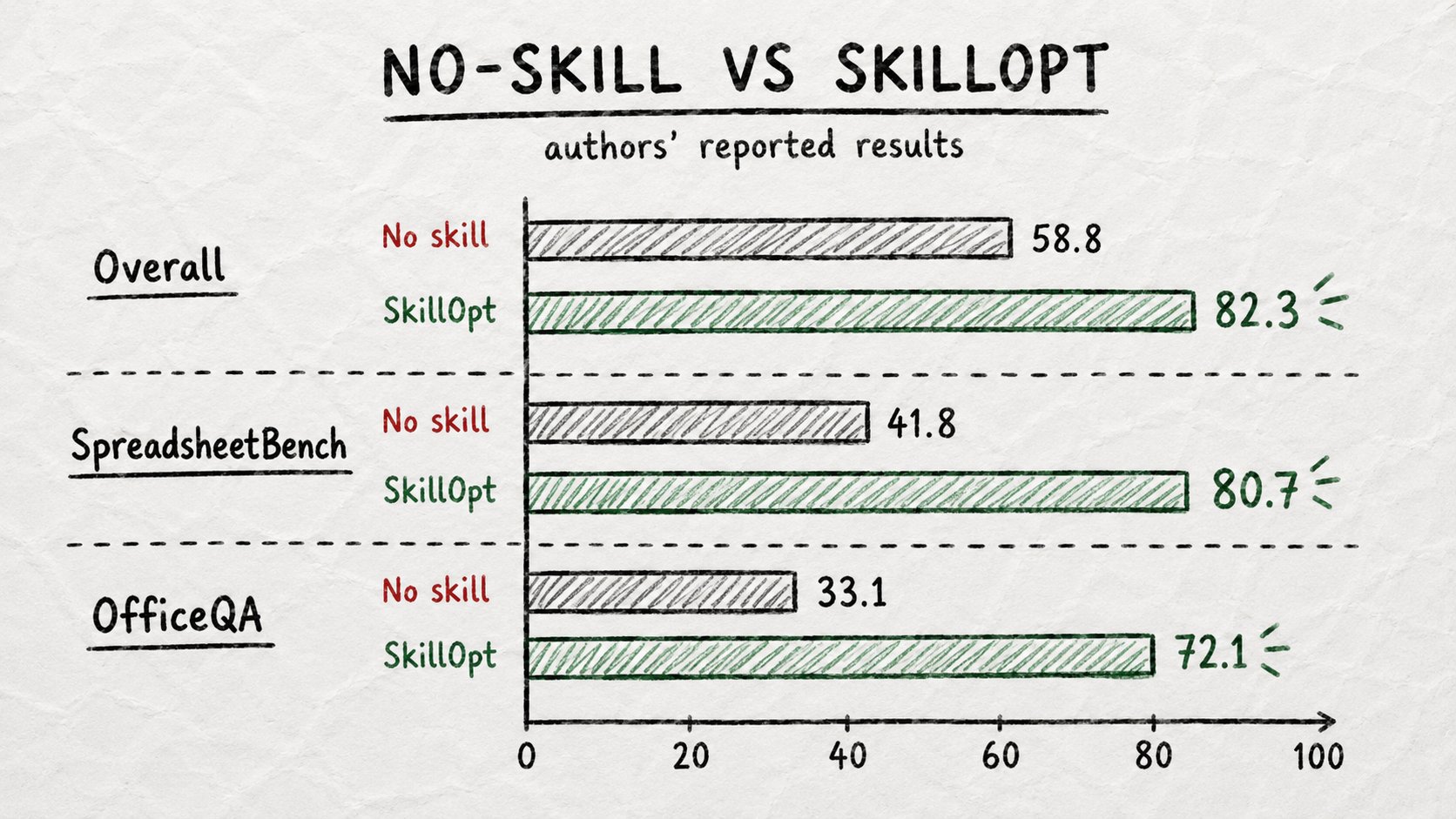
it works. the authors evaluated SkillOpt across six benchmarks (search QA, spreadsheets, documents, multimodal QA, maths, and an embodied-agent task), seven target models, and three execution modes (direct chat, a Codex harness, and a Claude Code harness). they report SkillOpt was the best or tied-best method on all 52 of the 52 (model, benchmark, harness) cells they measured. on GPT-5.5 in direct chat, they report the six-benchmark average rising from 58.8 with no skill to 82.3, a +23.5 point gain, beating the strongest competing baseline on each cell by +5.4 points on average. individual jumps they report include SpreadsheetBench 41.8 to 80.7 and OfficeQA 33.1 to 72.1.
Here's the abstract:
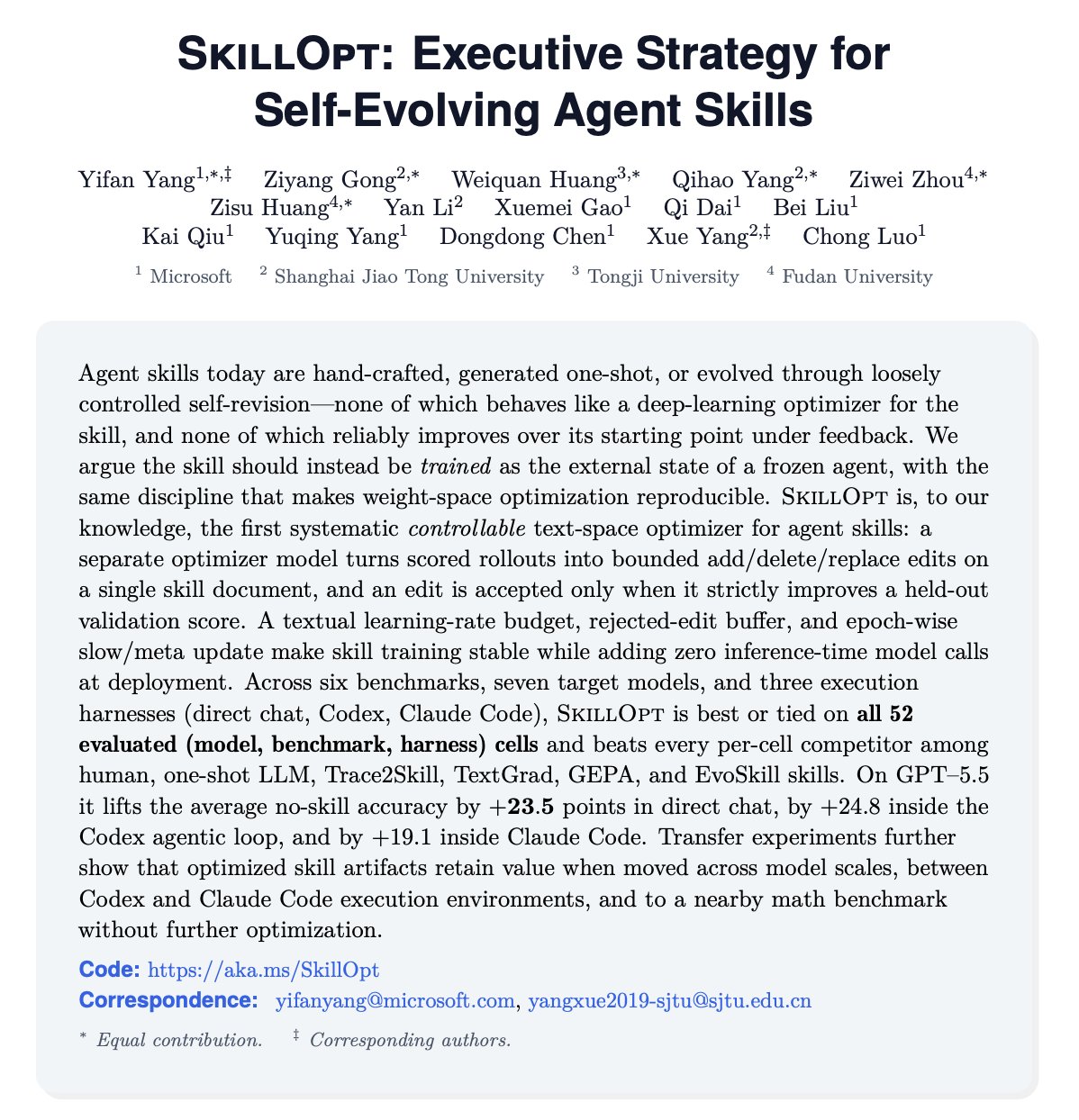
I'll give you the link to the paper later.
one detail worth holding onto: the biggest gains land on procedural tasks. the ones where the model needs discipline about tool use and output format, not more raw knowledge. that tells you where SkillOpt earns its keep. tasks where the model is capable but sloppy.
it's portable. this is the part that matters long term. because the output is plain text calling a frozen model, the authors report a trained skill transferred across settings: a spreadsheet skill trained inside the Codex harness moved to the Claude Code harness with a reported +59.7 point gain, a skill trained on a larger GPT variant improved smaller ones, and a maths skill trained on one benchmark gave positive gains on a different maths benchmark.
3: What you have to give it.
this is the section most write-ups skip, and the one that decides whether you succeed.
SkillOpt brings the scoring machinery. you bring the answer key. the loop scores, gates, and edits. all of that is in the repo. what the repo cannot know is what a correct output looks like for your task. only you know that. so your job is to hand it a set of example tasks, each paired with its correct answer.
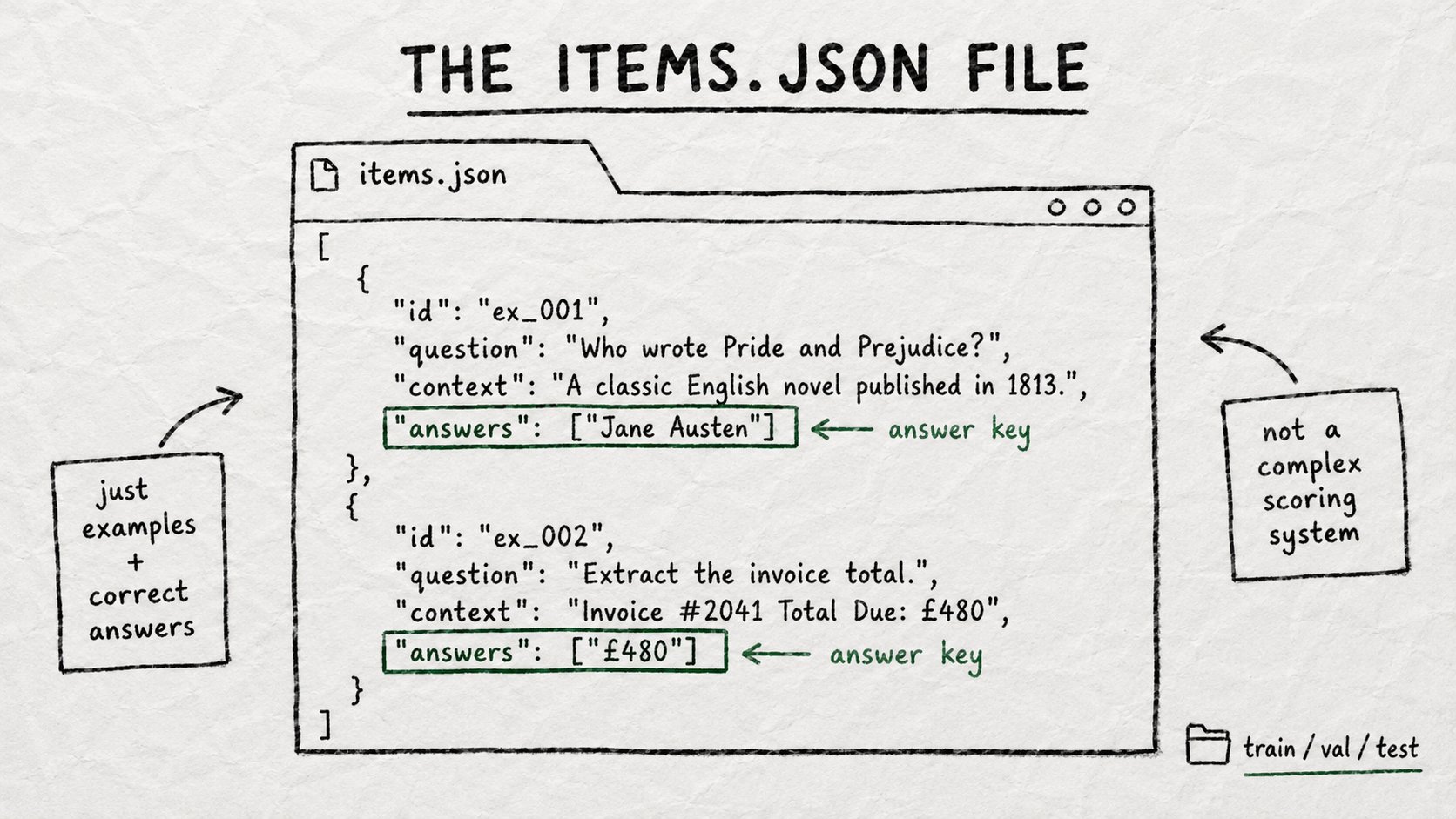
the repo is explicit: datasets are not shipped, you prepare your own. SkillOpt expects a split directory with three subfolders, each holding a JSON file:
1data/my_split/2├── train/items.json # examples the optimiser learns from3├── val/items.json # held-out examples the gate scores against4└── test/items.json # locked away; only used for the final report
each items.json is an array of tasks. the SearchQA format is the simplest and the easiest to borrow:
1[2 {3 "id": "unique_item_id",4 "question": "Who wrote the novel ...",5 "context": "[DOC] relevant passage text ...",6 "answers": ["expected answer"]7 }8]
the answers field is your answer key. that is the whole "build your own scorer". for an objectively-checkable task it collapses to listing examples and their correct answers in a JSON file. you are not writing a scoring system. the comparison logic already lives in the benchmark's environment code (skillopt/envs/<benchmark>/dataloader.py).
The cheapest path: borrow an existing benchmark's shape
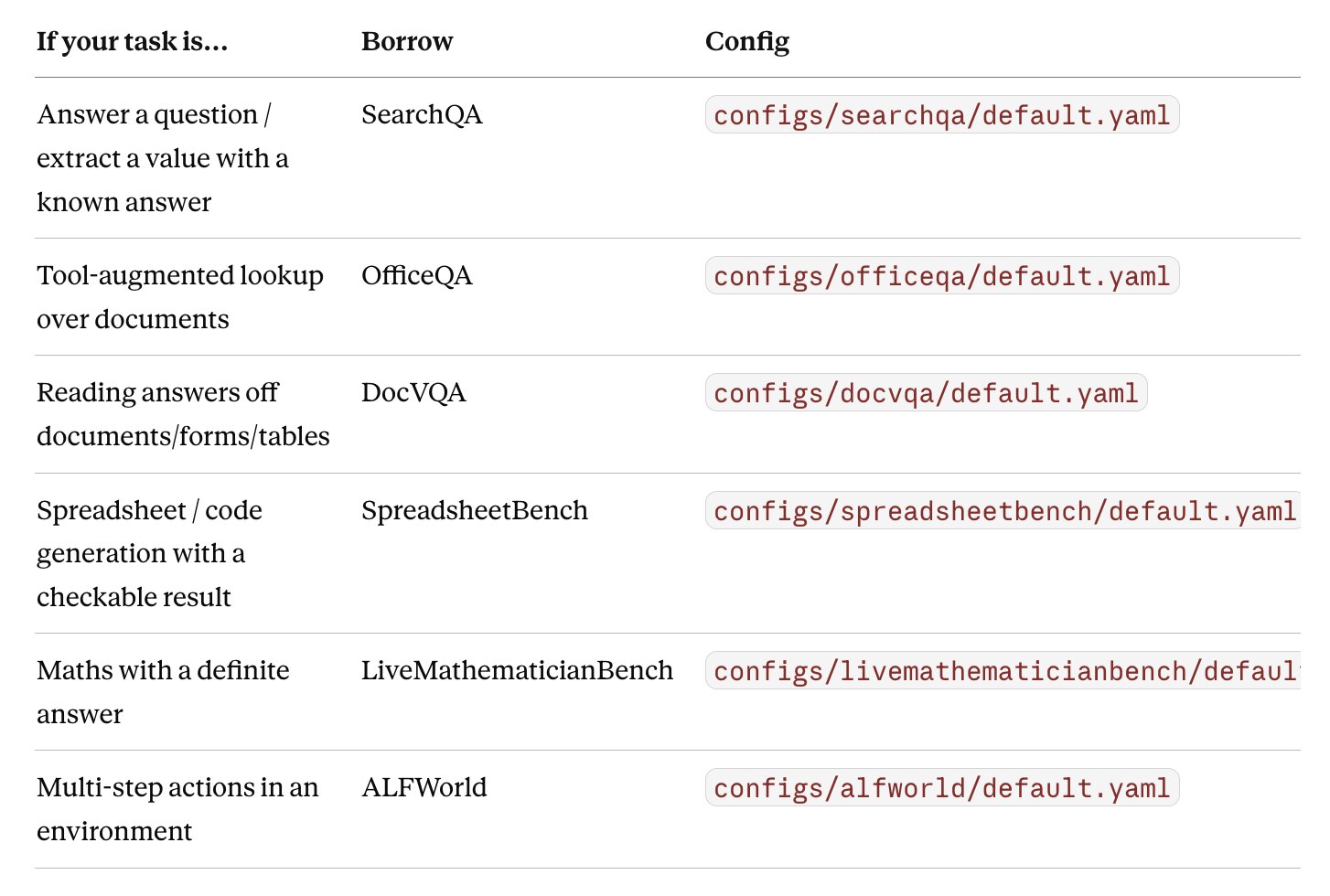
don't invent a new task type. express your task as the closest built-in benchmark and reuse its config and scorer. for most "answer this correctly" or "extract this field" skills, that's SearchQA: a question, optional context, and a short canonical answer matched by the built-in scorer. shape your data to fit items.json, point at configs/searchqa/default.yaml, and you have written zero Python.
the six built-in types you can borrow:
How many examples?
the research paper's full runs use hundreds, but its own analysis shows procedural benchmarks already climbing steeply with a fraction of that, and search-type tasks saturating after about 20% of the training pool. start small. 20 to 40 examples is enough to get a real signal and a cheap first run. split them roughly 4:1:5 across train/val/test, which matches the paper's default split ratio. add more once you have confirmed the loop helps.
When exact-match isn't enough
if your correct answers aren't short canonical strings, if "correct" needs judgement, the fallback is an LLM-as-judgescorer: another model grades each output 0 to 1 against a rubric you write. it's supported (the repo takes OpenAI and Anthropic keys) but it's the harder, less reliable road. a noisy judge accepts bad edits and rejects good ones, and then the whole loop drifts. use it only when exact-match genuinely cannot express your task, and if you do, keep the rubric tight and spot-check the grades by hand. for your first run, pick an objectively-scorable task and avoid this entirely.
the answer key is the whole bloody game. everything downstream trusts it.
4: Install and configure
I would never trust an internet anon with this so I don't expect you to trust me here, instead I'll just link the repo:
https://github.com/microsoft/SkillOpt
https://microsoft.github.io/SkillOpt/
Moving on...
5: Run it
the core command is scripts/train.py. here's the shape, with the SearchQA config you're borrowing:
1python scripts/train.py \2 --config configs/searchqa/default.yaml \3 --split_dir /path/to/your/my_split \4 --optimizer_model gpt-5.5 \5 --target_model gpt-5.5 \6 --num_epochs 4 \7 --batch_size 40 \8 --out_root outputs/my_first_run
two roles to understand:
--target_model
is the model that
uses
the skill. the one you'll deploy with. set it to whatever you actually run in production (an OpenAI, Anthropic, or local model deployment name).
--optimizer_model
is the model that
proposes the edits.
it runs only during training and never ships with your skill, so it adds zero cost at deployment. the paper found a stronger optimiser produces a better skill, so use the best model you can afford here. but it's a training-time luxury, not a requirement.
Run cheap first
before you spend real money, prove the loop helps on your data with a deliberately small, cheap run:
use
the same model for both roles
(--optimizer_model = --target_model). the paper shows a target-matched optimiser still recovers a large fraction of the gain, so this isn't a distillation trick that needs a bigger teacher.
cut
--num_epochs
to 1 or 2 and
--batch_size
down to your dataset size.
use your 20 to 40 example split, not hundreds.
watch the gain. if a tiny run moves the validation score at all, scale up. if it does nothing, your task may not be giving the optimiser enough signal. revisit your examples before spending more.
Seeding your own starting skill
if you already have a hand-written skill (say, an existing Claude Skill document), you don't have to start from the benchmark's default. the starting skill is defined in the chosen configs/<benchmark>/default.yaml. open that file, find where the initial skill text is specified, and paste yours in. SkillOpt will then evolve your skill rather than build one from scratch, which is usually what you want. it keeps what already works and fixes what doesn't.
What it writes
every run produces a structured output folder:
1outputs/my_first_run/2├── best_skill.md # ← the file you deploy3├── history.json # per-step training history4├── skills/skill_vXXXX.md # a snapshot of the skill at each step5├── steps/step_XXXX/ # per-step edits and eval results6├── slow_update/epoch_XX/ # cross-epoch consolidation logs7└── meta_skill/epoch_XX/ # optimiser-side notes (not shipped)
re-running the same command auto-resumes from the last completed step, so an interrupted run isn't wasted.
there's an optional monitoring dashboard if you want to watch progress live:
1pip install -e ".[webui]"2python -m skillopt_webui.app # add --share for a public link
6: Reading the result and deploying it
when the run finishes, two things matter.
read best_skill.md. it's short and in plain English. you'll see it has turned a generic instruction into specific, hard-won rules. the kind a careful practitioner writes after a day with the task. in the paper's spreadsheet case study, a vague "use Python and preserve the workbook" skill evolved into concrete rules like inspect the actual workbook rather than the preview and write evaluated static values even when the prompt mentions formulas. because it's only a handful of accepted edits, you can read every change and decide whether you trust it. that auditability is a feature. you're deploying text you can understand, not weights you can't.
confirm the gain on held-out data. don't take the training score on faith. run the eval script against the test split, the one the loop never touched:
1python scripts/eval_only.py \2 --config configs/searchqa/default.yaml \3 --skill outputs/my_first_run/best_skill.md \4 --split valid_unseen \5 --split_dir /path/to/your/my_split
valid_unseen is the test set, valid_seen is the validation set, all runs everything. compare the skill's test score against a no-skill baseline (run the same eval with an empty or default skill). that difference is your gain on your task. it's the only number that should govern whether you ship it.
deploy. best_skill.md is just text. drop it into your agent wherever procedural instructions go: prepend it to the system prompt for a direct-chat agent, or save it as the skill/procedural-memory file your harness loads. that's the deployment. no weights changed, no inference-time optimiser, nothing extra in the loop. just a better instruction file.
7: Tuning it
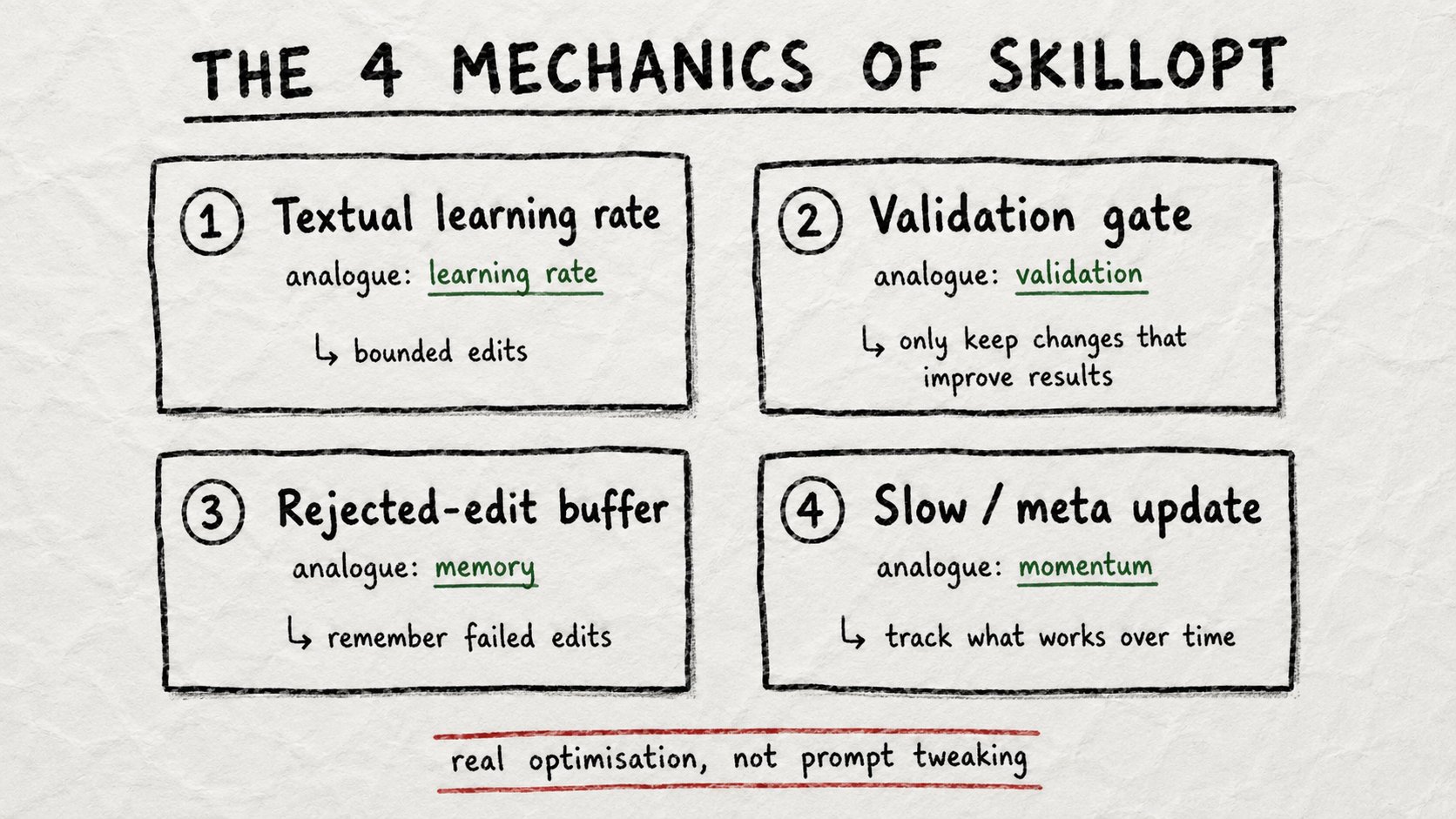
you can run SkillOpt without understanding these. but if you're a nerd and love to get down and dirty with it and you want to tune the configs intelligently instead of guessing, here's what the toggles do. each is a deliberate analogue of a training concept.
Bounded edits (the "textual learning rate"). each step applies at most a few edits, capped by a budget the paper calls Lt(default 4, decaying toward 2). this is the difference between SkillOpt and just asking a model to "rewrite my prompt". unbounded rewrites erase rules that worked and overfit to the last failure. bounded edits keep each version close to the last, so the skill accumulates improvements instead of thrashing. the paper's ablations show any moderate budget beats unbounded rewriting.
The validation gate. every proposed edit is tested on held-out examples and accepted only if the score strictly improves.ties are rejected. this is what turns "the model thinks this edit is good" into "this edit is measurably good", and it's why the method doesn't silently drift into nonsense. it's also the single most load-bearing component, and the reason section 3 exists. the gate is only as honest as the answer key you feed it.
The rejected-edit buffer. edits that fail the gate aren't just discarded. the score drop they caused is recorded and fed back to the optimiser, so it stops re-proposing things that already failed. the paper reports that removing this buffer measurably lowered results. it costs nothing at deployment. pure training-time memory.
The slow / meta update. at the end of each epoch, SkillOpt compares the skill against the previous epoch's version and writes a longer-horizon "what's durably working" note into a protected region of the skill that fast edits can't overwrite. this is the momentum term. the paper reports that removing both the slow and meta updates caused the single largest drop in its ablation suite on the spreadsheet task. the meta-skill part stays optimiser-side and never ships with your deployed file.
8: Honest limits
cost is real and paid up front. two models running across epochs and batches burns API tokens. the paper measures training cost in millions of tokens per single point of test-set gain, from about 0.6M on cheap procedural tasks to 46M on long multimodal ones. i'm deliberately not quoting a dollar figure, because per-token prices change and i can't verify today's rates. budget for it, and that's exactly why section 5 pushes a cheap first run. the good news: the cost is one-time. once you have best_skill.md, using it adds nothing. no optimiser, no extra calls. you're looking at a fair few quid.
garbage answer key, garbage skill. the gate trusts your answers. if your examples are wrong or inconsistent, SkillOpt will faithfully optimise toward the wrong target. spend your effort on the example set. it's the input that determines everything.
it can't manufacture "correct" where none exists. restating the filter from the top because it's the most common way to waste a weekend: if your task has no checkable right answer, this is not your tool.
9: The lasting payoff
here's why this changes how you build skills, not just this one skill.
once you've done it once, you own a portable, inspectable, reusable artefact. a text file, not a black box. you can read it, edit it by hand, version-control it, and hand it to a teammate. and because it calls a frozen model rather than being baked into one, the paper's transfer results suggest it travels: across model sizes, across execution harnesses, onto nearby tasks, without re-running anything.
skills stop being disposable prompts you rewrite on instinct every time something breaks, and become assets you train, validate, keep, and carry forward. the same optimisation toolkit you'd apply to a model (evidence, a learning rate, a validation check, momentum) now applies to the one layer of your agent stack that used to be pure hand-craft.
you're no longer guessing whether a change helped. you're measuring it, and keeping only what wins.
P.S. the whole method lives or dies on one input: a set of examples with correct answers. the rest is two commands. if you run it on something real.
Links:
Paper: https://arxiv.org/pdf/2605.23904
Repo: https://github.com/microsoft/SkillOpt
Cool shit: https://microsoft.github.io/SkillOpt/