This is a complete A-Z guide on how to build the most powerful workflow between Claude Opus4.8, Chat GPT 5.5, and Kimi K2.6.
Most people use AI coding tools wrong.
They open Claude.
Ask it to build the whole app.
Wait.
Hit the rate limit.
Wait again.
Paste the error.
Hit the limit again.
And after 2 hours, they are still fixing the same broken dashboard.
That is not a software factory.
That is expensive vibe coding.
The real workflow is different.
You do not use one model for everything.
You use each model for the job it is best at.
Claude Opus 4.8 is incredible for thinking.
But it is expensive.
Opus 4.8 costs $5 per 1M input tokens and $25 per 1M output tokens.
Kimi K2.6 is much cheaper.
Kimi is around $0.95 per 1M input tokens and $4 per 1M output tokens.
Cached input can go even lower.
GPT 5.5 is very good at fixing bugs, generating assets using gpt-image-2
So why burn Claude on:
→ boilerplate
→ CRUD screens
→ Tailwind fixes
→ auth setup
→ API routes
→ refactors
→ repeated error loops
Use Claude where judgment matters.
Use Kimi where execution matters.
And the best part:
Kimi is not just one more chat app.
Kimi Code works inside your terminal and IDE.
It runs on \kimi-for-coding\, powered by Kimi K2.6.
The same Kimi membership can be used for research and coding workflows.
You can use Kimi for:
→ deep research
→ agent swarm
→ web search
→ codebase analysis
→ file editing
→ command execution
→ subagents
→ coding inside terminal
→ coding inside VS Code
This is the complete workflow.
Save this. It will change how you build.
PART 1: THE SOFTWARE FACTORY MINDSET
(Stop treating AI like one chatbot)
1. One Model Is Not a Team
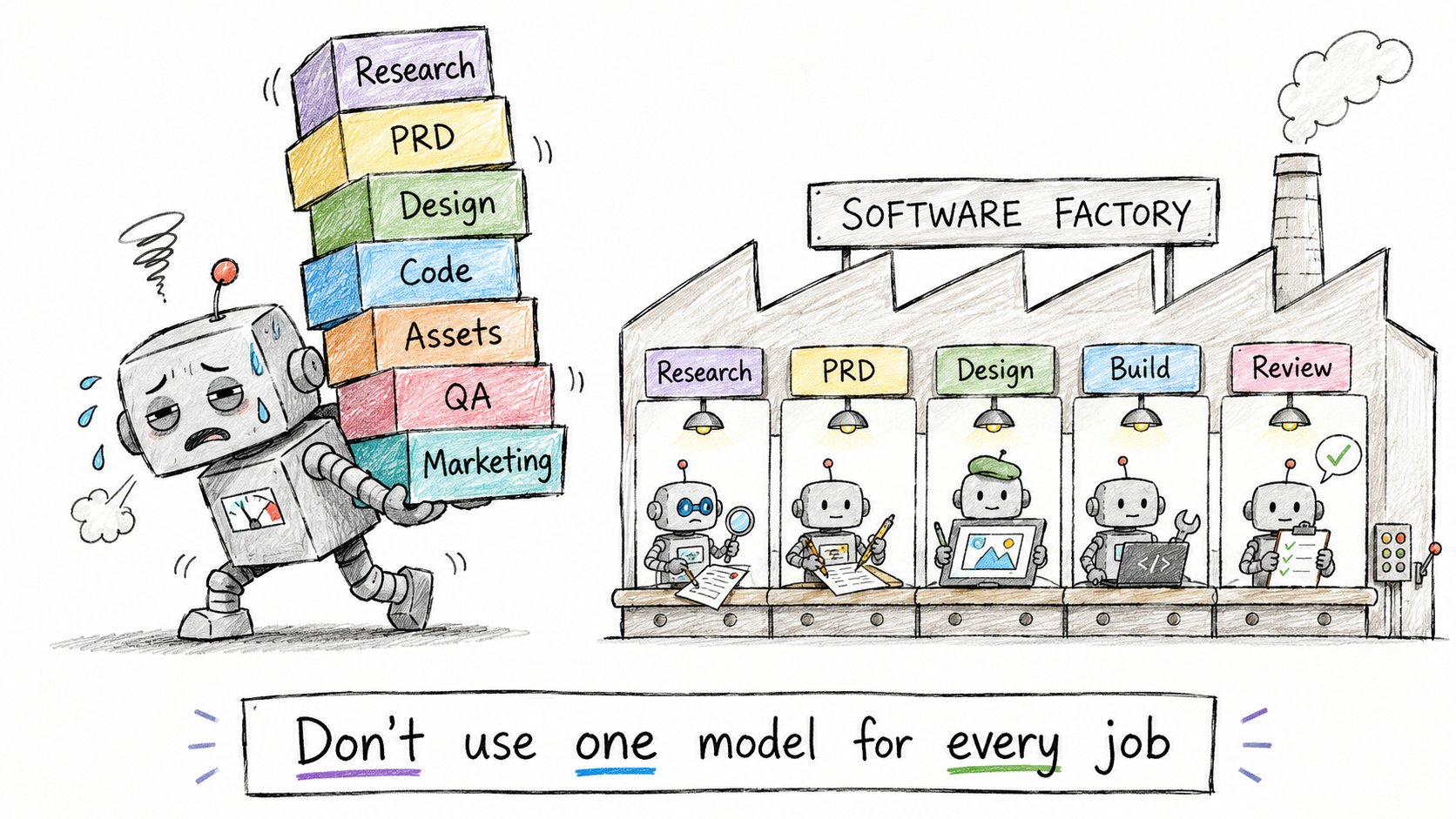
Most builders still ask one model to do everything.
Research the market.
Write the spec.
Design the UI.
Generate icons.
Build the backend.
Fix bugs.
Review the code.
Write the landing page.
That sounds convenient.
But it breaks fast.
Every task has a different shape.
Research needs breadth.
Product specs need judgment.
Design needs visual direction.
Building needs cheap iteration.
Review needs careful reasoning.
One model can do all of this.
But one model should not do all of this.
The software factory is a routing system.
Each model gets the job it is best at.
Before building anything, create the factory rules.
2. Why Claude Should Not Build Everything
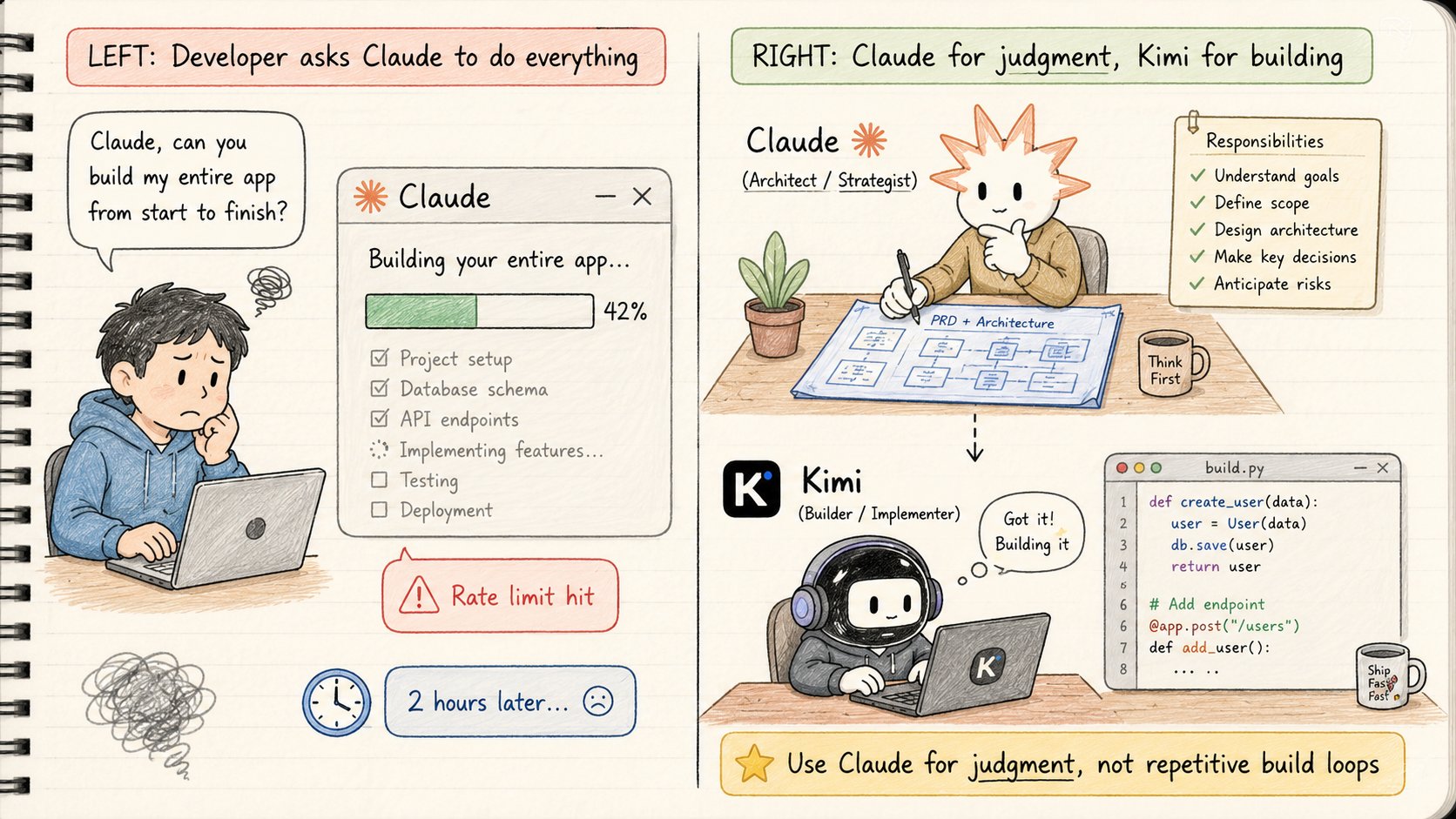
Claude Opus 4.8 is one of the best models for deep thinking.
Use it for:
→ product judgment
→ architecture decisions
→ PRD writing
→ edge cases
→ code review
→ strategy
But do not waste it on the 2-hour build loop.
Building is messy.
You will ask for changes.
You will regenerate files.
You will run tests.
You will paste errors.
You will fix styling.
You will change database fields.
You will rewrite the same component 4 times.
This is where Claude rate limits hurt.
Not because Claude is bad.
Because you are using an expensive thinking model for cheap repetitive execution.
Claude should be the architect.
Not the intern writing the same form again and again.
3. The Pricing Difference Changes the Workflow
Token cost matters when you are building.
Not in theory.
In the actual loop.
Claude Opus 4.8 API pricing:
→ $5 per 1M input tokens
→ $25 per 1M output tokens
Claude Opus 4.8 fast mode:
→ $10 per 1M input tokens
→ $50 per 1M output tokens
Kimi K2.6 API pricing:
→ around $0.95 per 1M input tokens
→ around $4 per 1M output tokens
→ cached input can be much cheaper
Kimi Code:
→ included as a Kimi membership coding benefit
→ works in terminal
→ works in VS Code
→ can be connected to third-party coding agents
→ uses shared membership quota
→ powered by Kimi K2.6 through \kimi-for-coding\
That means one model is better for expensive decisions.
The other is better for high-volume execution.
Claude is where you spend carefully.
Kimi is where you iterate aggressively.
This is the unlock.
The question is not:
"Which model is better?"
The question is:
"Which model should do which job?"
PART 2: RESEARCH WITH KIMI AGENT SWARM
(Find products worth building before writing code)
4. Use Kimi as a Research Organization
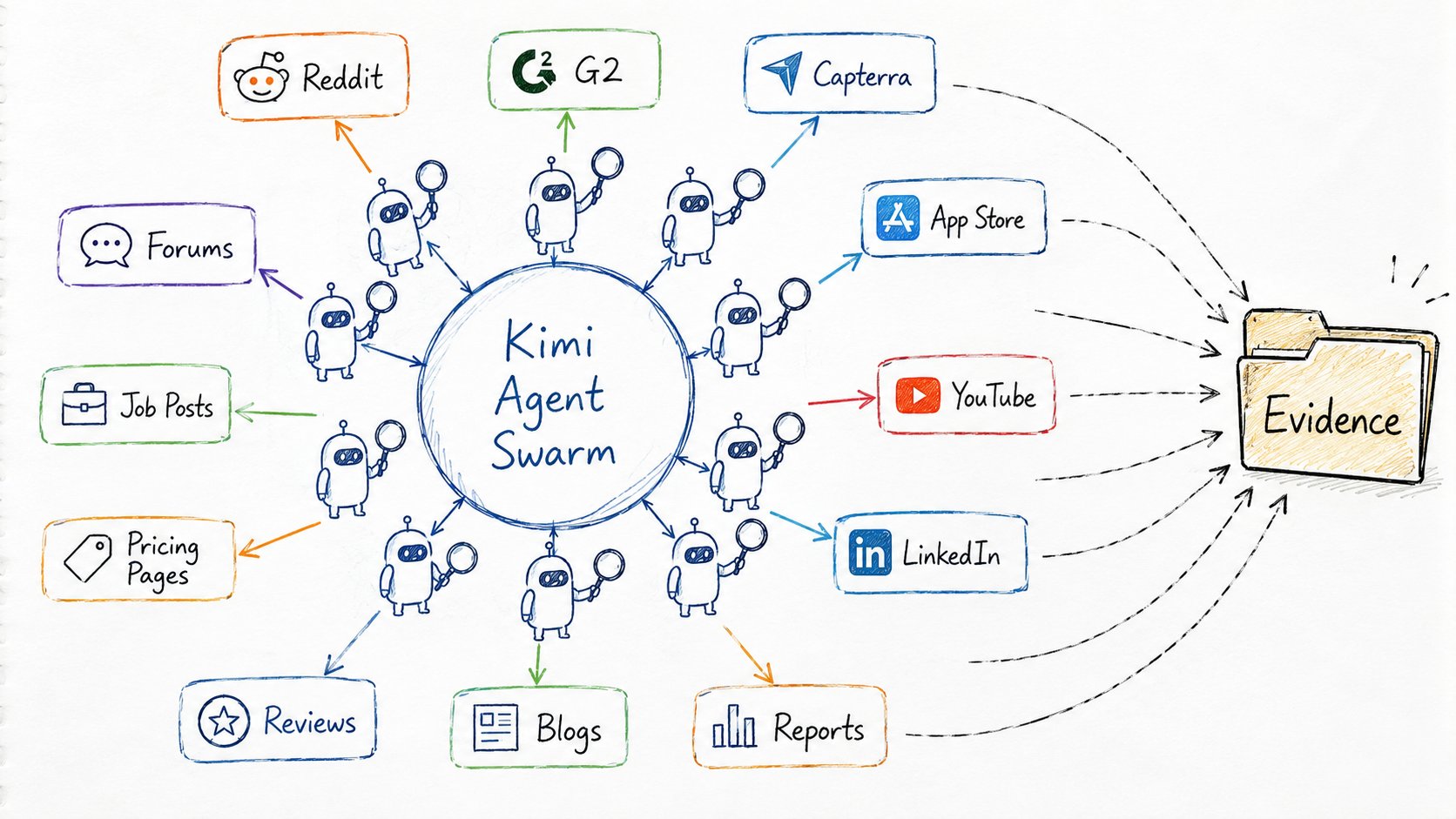
Start with Kimi.
Not for coding.
For research.
Open Kimi.
Use Kimi Agent Swarm / Deep Research.
You can start from the same Kimi ecosystem you will later use for coding.
Then switch to Kimi Code when it is time to build.
Kimi Code can run in your terminal or VS Code.
It can read files, edit files, execute commands, search the web, and spawn subagents.
That means the same Kimi subscription can support both sides:
→ research
→ coding
This is why it fits the factory workflow.
You are not buying one tool for research and another tool for building.
You are using Kimi as the cheap high-volume layer.
Give it a massive prompt and make it act like a startup research organization.
Do not ask:
"Give me 10 startup ideas."
That gives you obvious garbage.
Ask it to spawn research agents.
Each agent should search a different market signal.
→ Reddit pain points
→ Quora questions
→ G2 reviews
→ Capterra complaints
→ App Store reviews
→ Play Store reviews
→ YouTube comments
→ LinkedIn posts
→ job postings
→ competitor pricing pages
→ niche forums
→ industry reports
The goal is evidence.
Not imagination.
You want pain people already talk about.
You want products people already pay for.
You want broken workflows nobody has fixed properly.
Use this prompt:
1KIMI AGENT SWARM RESEARCH PROMPT2You are an autonomous startup opportunity discovery organization.3You are not a single researcher.4You must spawn many independent research agents and subagents in parallel.5Your objective:6Find high-conviction startup, SaaS, AI agent, app, B2B, SMB, enterprise, marketplace, and D2C product opportunities that an indie hacker or solo app developer can realistically build and sell.7Do not brainstorm.8Conduct evidence-based opportunity discovery.9Target audience:10- indie hackers11- app developers12- solo founders13- AI builders14- micro-SaaS founders15- developers who can build fast but need better ideas16Strongly prioritize:17- boring businesses18- operational software19- industries without tech teams20- spreadsheet-heavy workflows21- WhatsApp workflows22- repetitive manual tasks23- compliance pain24- labor replacement25- high-margin industries26- hidden niches27- fragmented markets28- workflows where AI can remove human admin work29Avoid:30- generic ChatGPT wrappers31- social apps32- consumer apps with no willingness to pay33- viral-only ideas34- "Uber for X"35- ad-based businesses36- hyper-competitive AI tools37- ideas that require huge teams or venture funding38Spawn the following agents:391. Pain Point Mining Agents40Search:41- Reddit42- Quora43- niche forums44- Discord communities45- Slack communities46- Facebook groups47- LinkedIn discussions48- YouTube comments49Look for phrases like:50- "I hate this"51- "there has to be a better way"52- "why is this still manual"53- "looking for software that"54- "what do people use for"55- "Excel hell"56- "this takes forever"57- "we still do this in WhatsApp"58- "our current tool sucks"59- "too expensive"60- "too complicated"61Output:62List recurring pains with source links, exact wording, frequency, and buyer type.632. Vertical SaaS Agents64Spawn one agent for each vertical:65- clinics66- dentists67- hospitals68- diagnostics69- real estate brokers70- property managers71- interior designers72- construction companies73- warehouses74- logistics firms75- distributors76- restaurants77- hotels78- gyms79- schools80- coaching businesses81- CA firms82- tax consultants83- legal offices84- recruiters85- staffing agencies86- insurance brokers87- wealth managers88- small manufacturers89- franchises90- home service businesses91- ecommerce sellers92- D2C brands93For each vertical, identify:941. Major workflows952. Manual tasks963. Expensive bottlenecks974. Compliance burdens985. Spreadsheet dependencies996. WhatsApp/email dependencies1007. Current tools1018. Why current tools fail1029. Who pays10310. Fastest MVP opportunity1043. Competitor Intelligence Agents105Research:106- pricing pages107- G2 reviews108- Capterra reviews109- Trustpilot reviews110- app reviews111- Reddit criticism112- changelogs113- support complaints114- feature requests115Find:116- overpriced products117- poor UX118- missing automation119- weak onboarding120- slow support121- feature gaps122- products users tolerate but do not love1234. AI Agent Opportunity Agents124Find jobs that can become:125- AI copilots126- AI analysts127- AI back-office workers128- AI operations assistants129- AI sales assistants130- AI support agents131- AI compliance reviewers132- AI reporting agents133Prioritize workflows with:134- high repetition135- text-heavy work136- expensive labor137- documentation138- manual review139- reporting140- data entry141- customer follow-up142- internal coordination1435. Validation Agents144Destroy weak ideas.145For every opportunity, ask:146- Is the pain frequent?147- Is the pain expensive?148- Is someone already paying for a solution?149- Is the buyer obvious?150- Can we reach the buyer?151- Can an MVP be built in 2 weeks?152- Can AI create a 10x improvement?153- Why has this not been solved already?154- Is this just a feature, not a business?155- Would someone pay $50, $200, $500, or $2,000/month for this?156Reject ideas aggressively.1576. Synthesis Agent158Merge all findings.159Remove duplicates.160Cluster similar opportunities.161Rank the best ideas.162Scoring weights:163- Pain severity: 25%164- Willingness to pay: 20%165- Market gap: 15%166- Ease of execution: 10%167- Distribution: 10%168- AI leverage: 10%169- Market timing: 10%170For each opportunity, provide:1711. Opportunity title1722. Industry1733. Category1744. Exact pain point1755. Evidence with source references1766. Existing alternatives1777. Why existing products fail1788. ICP1799. Buyer18010. Buying power18111. Revenue model18212. MVP complexity from 1-1018313. Time to MVP18414. Distribution difficulty from 1-1018515. Why now18616. AI leverage18717. Defensibility18818. Risk level18919. 2-week MVP scope19020. First 10 customer acquisition strategy19121. Estimated revenue potential19222. Confidence score from 0-10019323. Final recommendation194Final deliverable:195Return:196- 100 raw opportunities197- 25 highest-conviction opportunities198- top 10 fastest-to-revenue opportunities199- top 5 best opportunities for a solo developer200- top 3 I should build first201Do not make the answer motivational.202Be brutally practical.203Reject weak ideas.204Prioritize evidence.
5. What Kimi Should Find
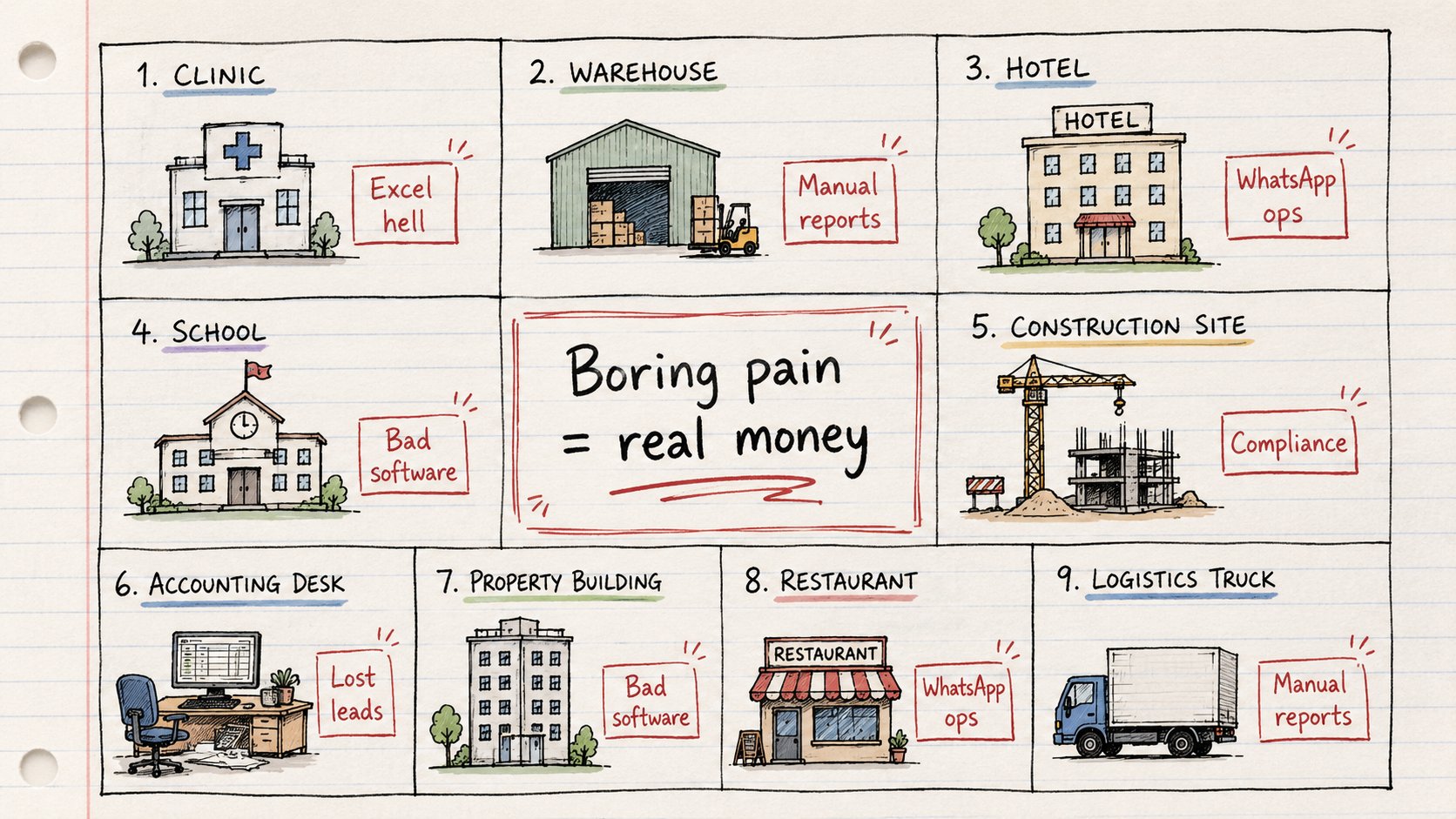
The best opportunities are usually boring.
Not "AI girlfriend."
Not "social app for founders."
Not "ChatGPT wrapper for productivity."
Look for:
→ spreadsheet-heavy businesses
→ WhatsApp-based operations
→ manual reporting
→ compliance work
→ expensive labor
→ repetitive admin
→ bad legacy software
→ industries without tech teams
→ workflows still done by email
→ tasks people hate doing every week
Examples:
Clinics.
Property managers.
CA firms.
Recruiters.
Warehouses.
Distributors.
Interior designers.
Schools.
Hotels.
Construction companies.
These businesses do not want AI demos.
They want time saved.
They want fewer mistakes.
They want more revenue.
They want software that removes pain.
That is what Kimi should find.
6. Make Kimi Kill Weak Ideas
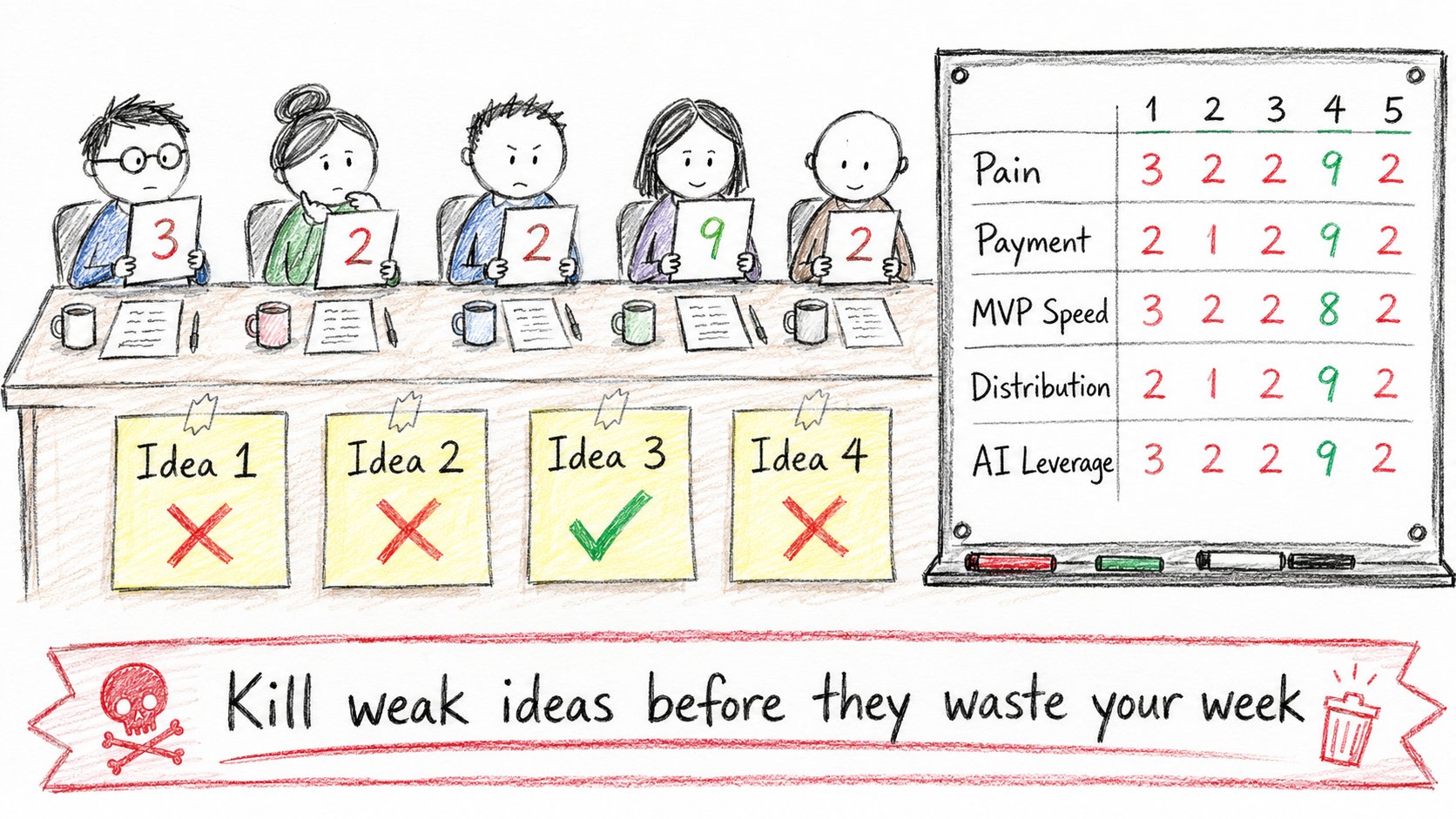
Most startup ideas sound good for 5 minutes.
Then they die when you ask real questions.
So make Kimi destroy weak ideas.
For every opportunity, ask:
→ Is this painful enough?
→ Are people already paying?
→ Why has nobody solved it?
→ Can an MVP be built in 2 weeks?
→ Can I reach the first 10 customers?
→ Is the buyer obvious?
→ Is the workflow repeated often?
→ Can AI make it 10x better?
Reject aggressively.
You do not need 100 ideas.
You need 1 idea with evidence.
The output should be:
Top 25 opportunities ranked by:
→ revenue speed
→ ease of execution
→ evidence strength
→ distribution
→ AI leverage
→ founder leverage
Now you have something worth building.
PART 3: WRITE THE PRD WITH CLAUDE OPUS 4.8
(Turn research into a product people can understand)
7. Bring in Claude Only After the Research Is Done
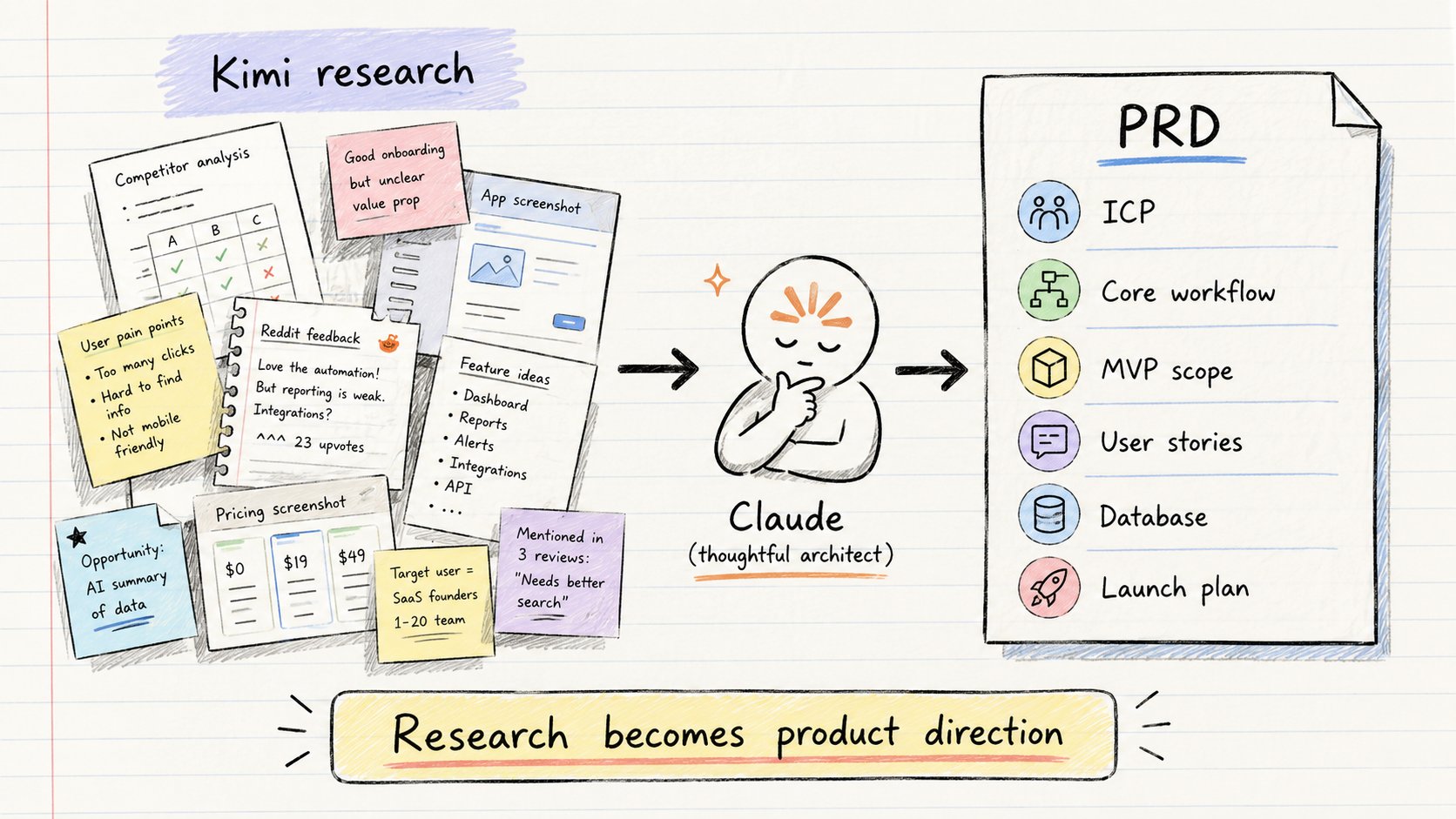
Once Kimi finds the best opportunity, stop researching.
Now use Claude Opus 4.8.
This is where the expensive model makes sense.
Give Claude:
→ the top opportunity
→ pain point evidence
→ ICP
→ competitor gaps
→ workflow details
→ pricing ideas
→ 2-week MVP scope
→ first 10 customer strategy
Then ask it to write the PRD.
Claude should turn messy research into a clean product spec.
This is the step most indie hackers skip.
They jump straight into coding.
Then they build a product with:
→ no clear user
→ no clear workflow
→ no clear pain
→ no clear buyer
→ no clear reason to pay
The PRD fixes that.
Use this prompt:
1CLAUDE OPUS 4.8 PRD PROMPT2You are a senior product strategist, startup CTO, and technical product manager.3I am giving you validated startup opportunity research from Kimi Agent Swarm.4Your job:5Turn this messy research into a complete PRD for a 2-week MVP that a solo indie hacker or app developer can build.6Do not brainstorm new ideas.7Use only the opportunity, evidence, pain points, ICP, and market signals provided.8Your output must be practical enough to hand to a coding agent.9Context:10[PASTE KIMI RESEARCH OUTPUT HERE]11Build the PRD with the following structure:121. Product Summary13- What are we building?14- Who is it for?15- What painful workflow does it remove?16- Why would someone pay for it?172. ICP18- Exact customer type19- Company size20- Role/title of buyer21- Role/title of daily user22- Current tools they use23- Current workaround24- Budget assumptions25- Buying trigger263. Pain Point27- Exact problem28- Why it is painful29- How often it happens30- What it costs in time/money31- What happens if it is not solved32- Evidence from research334. Existing Alternatives34- Current software options35- Manual workarounds36- Spreadsheets37- WhatsApp/email workflows38- Agencies or human labor39- Why each alternative fails405. Product Positioning41- One-line positioning42- Homepage headline43- Subheadline44- Primary promise45- Main objection46- Why now476. Core Workflow48Describe the main user journey step by step.49Example:501. User signs up512. User connects/imports data523. AI analyzes workflow534. User reviews suggestions545. System generates output556. User approves/sends/exports567. System tracks status57Make this specific to the opportunity.587. MVP Feature Scope59Separate into:60Must have:61- Features required for the product to work62Should have:63- Useful but not required for v164Do NOT build:65- Features that would slow down launch66- Nice-to-have dashboards67- Complex integrations68- Enterprise features69- Anything not needed for first 10 customers708. User Stories71Write user stories in this format:72As a [user],73I want to [action],74so that [outcome].75Include at least:76- onboarding stories77- core workflow stories78- admin stories79- billing stories80- error/edge case stories819. Data Model82Design the database schema.83Include:84- tables85- fields86- relationships87- important indexes88- status enums89- audit/logging needs90Keep it MVP-friendly.9110. Pages and Screens92List every required screen:93- landing page94- signup/login95- onboarding96- dashboard97- main workflow page98- detail page99- settings100- billing/pricing101- empty states102- error states103For each screen, describe:104- purpose105- main components106- primary CTA107- data shown108- empty state10911. API / Backend Requirements110List:111- API routes112- background jobs113- third-party services114- file uploads if needed115- AI calls if needed116- scheduled tasks if needed11712. AI Features118If AI is used, define:119- exact AI task120- input121- output122- prompt behavior123- guardrails124- human review step125- failure handling126Do not add AI unless it clearly improves the workflow.12713. Pricing128Recommend:129- free trial or not130- pricing tiers131- first paid plan132- value metric133- why the customer would pay134- what price to test first13514. 2-Week Build Plan136Break the MVP into 10 working days.137For each day:138- goal139- features to build140- files/modules likely needed141- acceptance criteria14215. Launch Plan143First 10 customers:144- who to contact145- where to find them146- exact outreach angle147- what demo to show148- what offer to make14916. Risks150List:151- product risks152- technical risks153- distribution risks154- willingness-to-pay risks155- data quality risks156For each risk, give a mitigation.15717. Success Metrics158Define:159- activation metric160- usage metric161- retention signal162- revenue signal163- first-week success criteria16418. Final Build Brief for Kimi165End with a concise build brief that can be pasted into Kimi Code.166It should include:167- product goal168- tech stack recommendation169- MVP scope170- pages171- database172- APIs173- implementation order174- what not to build175Important rules:176- Be specific.177- Keep scope small.178- Optimize for shipping in 2 weeks.179- Do not write vague startup advice.180- Do not add unnecessary features.181- Think like a product operator who wants revenue fast.
8. What the PRD Must Include
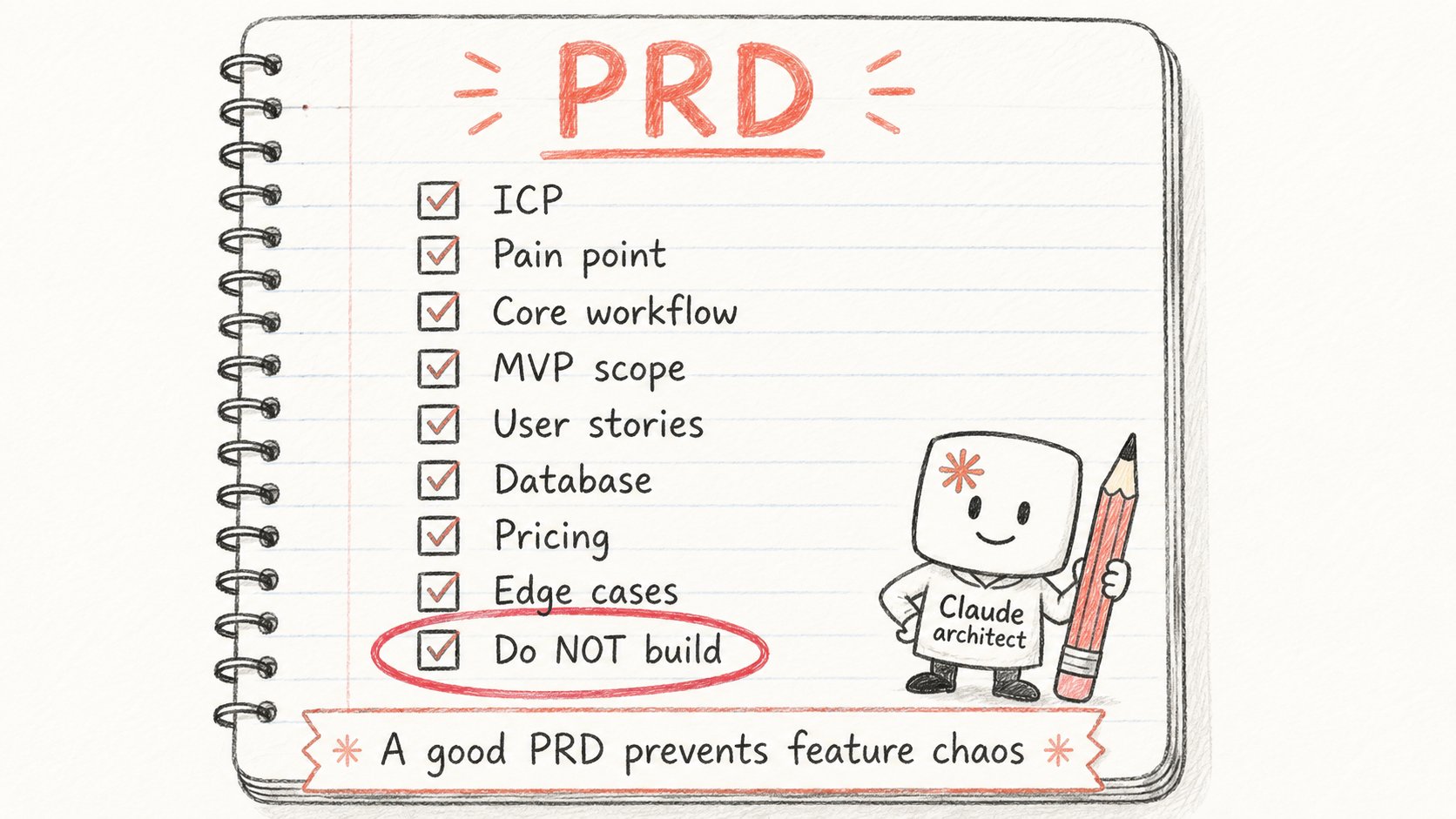
Do not ask Claude for a vague product idea.
Ask for a real PRD.
The PRD should include:
→ product positioning
→ target customer
→ painful workflow
→ user stories
→ feature priorities
→ database schema
→ dashboard structure
→ onboarding flow
→ pricing model
→ MVP scope
→ edge cases
→ success metrics
→ what NOT to build
That last part matters.
What NOT to build saves more time than what to build.
Most MVPs die from extra features.
Claude is good at saying:
"This is not needed for version one."
That is why you use it here.
Not because it writes better buttons.
Because it thinks better.
PART 4: DESIGN BEFORE BUILDING
(Give the coding model a visual target)
9. Use ChatGPT for Visual Assets
After the PRD is done, generate the visual layer.
Use ChatGPT for:
→ app icons
→ dashboard illustrations
→ empty states
→ onboarding graphics
→ landing page visuals
→ feature images
→ small UI icons
Most indie hackers ship ugly products because design slows them down.
But you do not need perfect design on day one.
You need a direction.
Visual assets make the product feel real before the backend is even finished.
They also help the coding model understand the tone.
Is this a clinic tool?
A real estate dashboard?
A warehouse operations system?
A lead generation machine?
Visual direction changes the output.
10. Use Google Stitch for UI
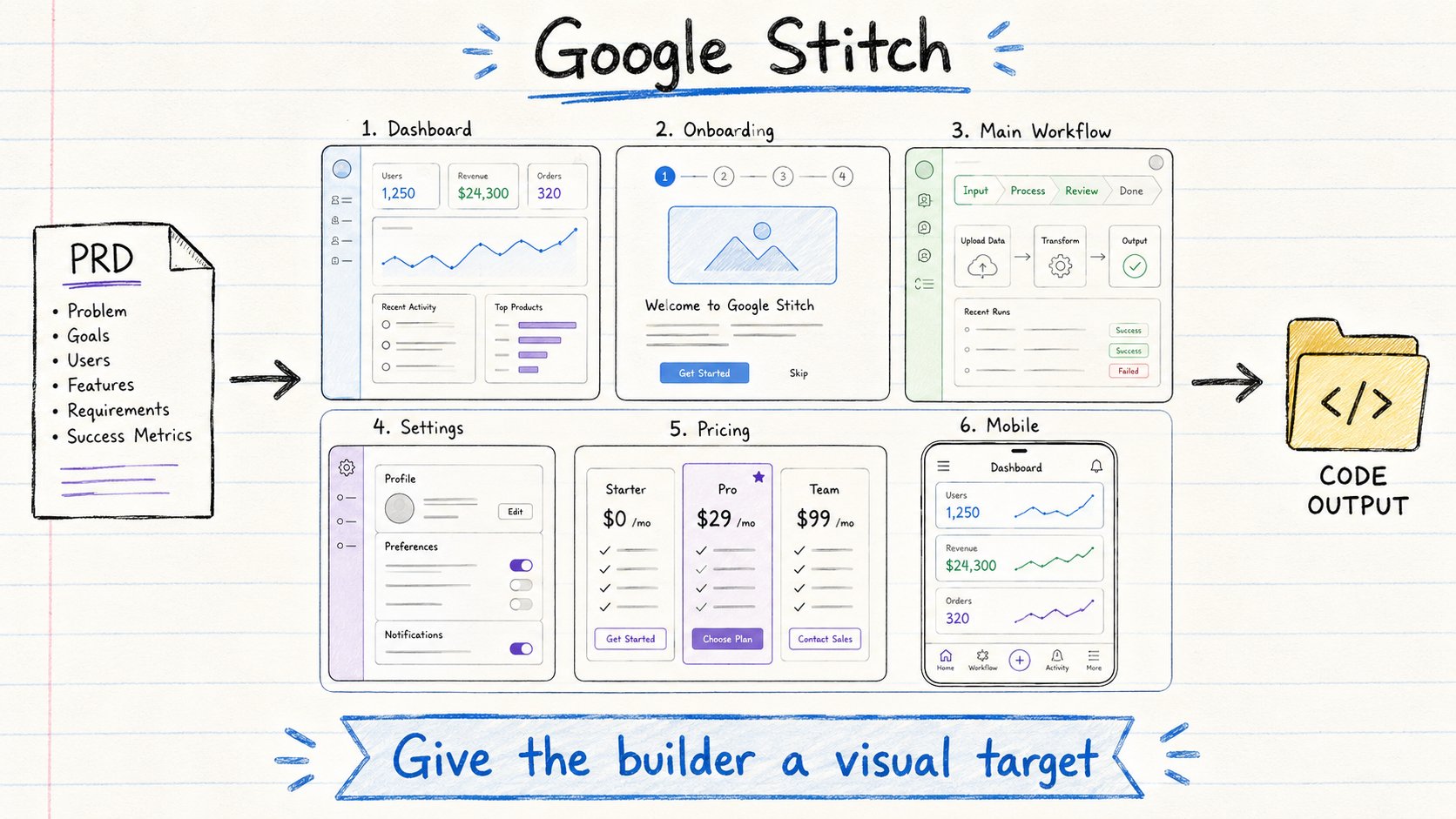
Then use Google Stitch.
Give it the PRD.
Ask it to design the product screens.
You want:
→ dashboard
→ onboarding
→ main workflow
→ settings
→ pricing page
→ empty states
→ mobile screens
This gives Kimi a visual target.
That matters.
If you tell an AI coding agent:
"Make a nice dashboard."
You get the same generic SaaS UI everyone gets.
But if you give it:
→ PRD
→ UI screens
→ assets
→ workflow
Now it can build something much closer to a real product.
Design first.
Build second.
PART 5: BUILD CHEAP WITH KIMI K2.6
(Use cheap tokens for the messy execution loop)
11. Kimi Is the Builder
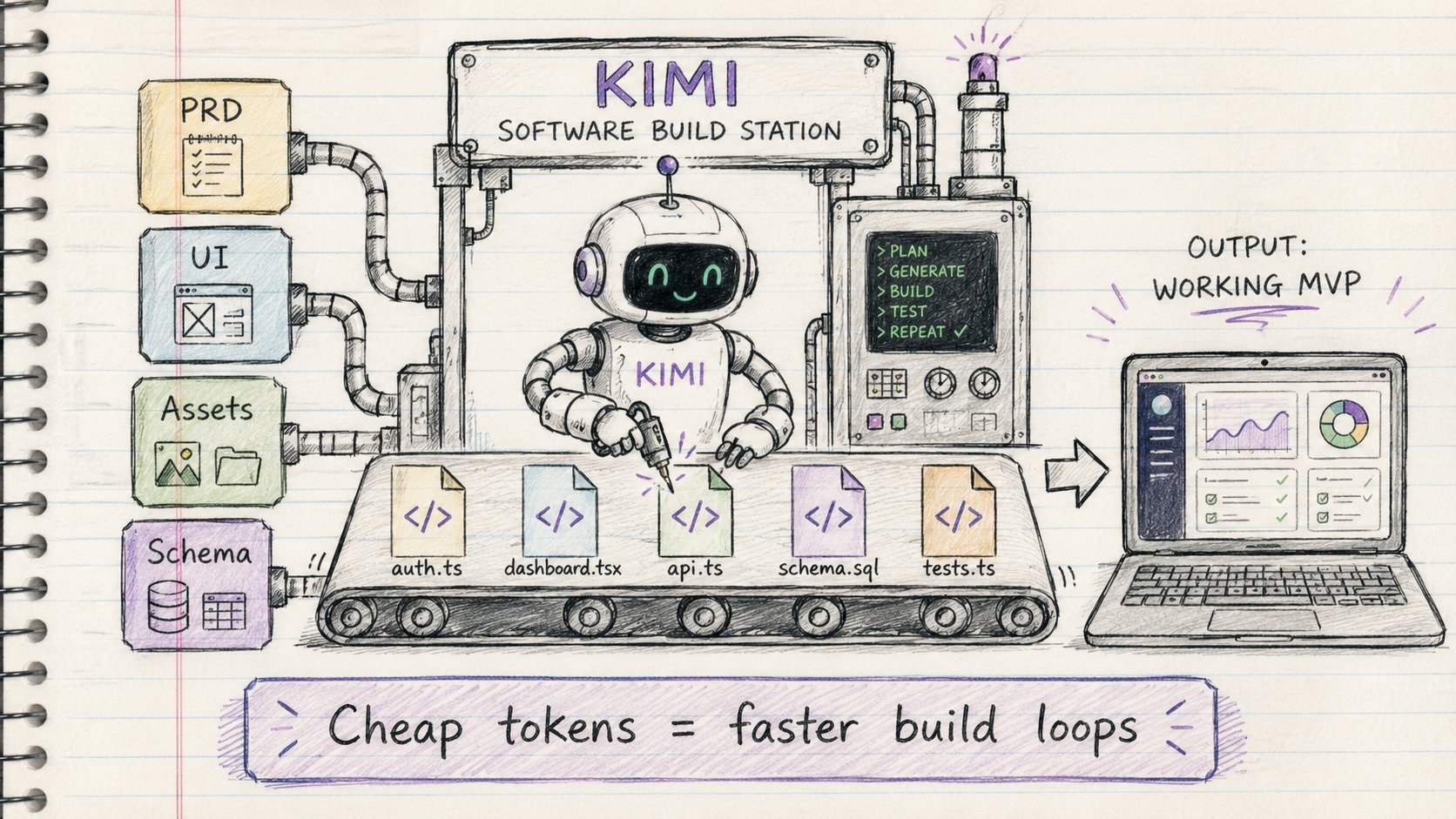
Now bring Kimi back.
This time for execution.
Give it:
→ Claude PRD
→ Stitch UI screens
→ ChatGPT assets
→ tech stack
→ folder structure
→ database schema
→ implementation plan
Then let it build.
Use Kimi for:
→ scaffolding
→ CRUD
→ auth
→ dashboards
→ API routes
→ database models
→ background jobs
→ styling fixes
→ refactors
→ tests
This is where cheap tokens matter.
Building is not one clean prompt.
Building is:
Prompt.
Run.
Error.
Fix.
Run again.
Change scope.
Fix styling.
Refactor.
Test.
Ship.
You do not want to burn Claude Opus limits doing that.
Use Kimi for the messy middle.
12. Claude Comes Back as the Reviewer
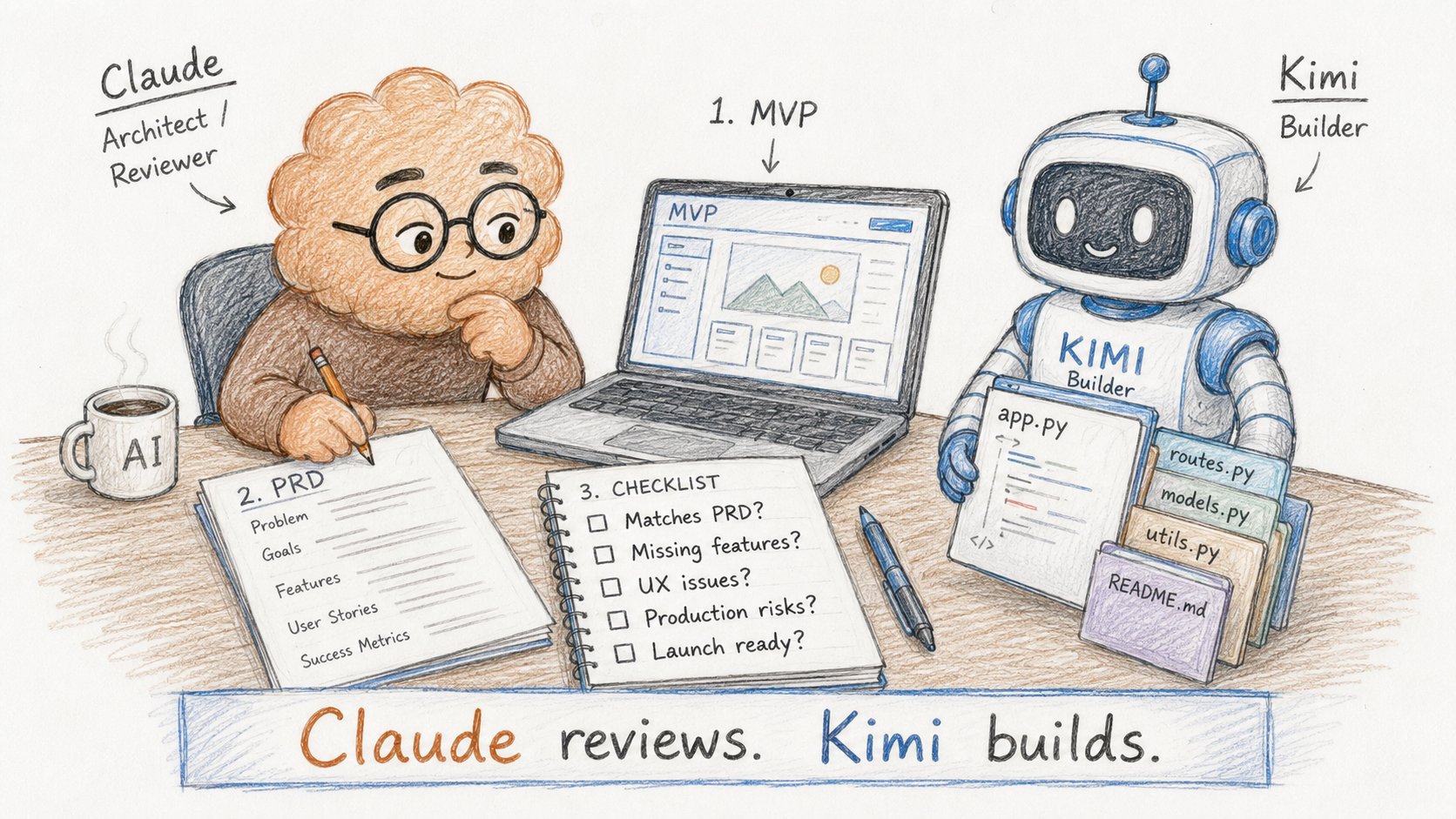
After Kimi builds, bring Claude back.
Not to rewrite the whole app.
To review it.
Ask Claude:
→ Does this match the PRD?
→ What is missing?
→ What will confuse users?
→ What should be removed?
→ What is risky?
→ What will break in production?
→ What should we fix before launch?
This is where Claude is valuable again.
High-level review.
Product judgment.
Architecture sanity check.
Claude should inspect the product like a senior engineer + product manager.
Not like a code generator.
PART 6: THE COMPLETE WORKFLOW
(One person operating like a product team)
13. The Full Software Factory
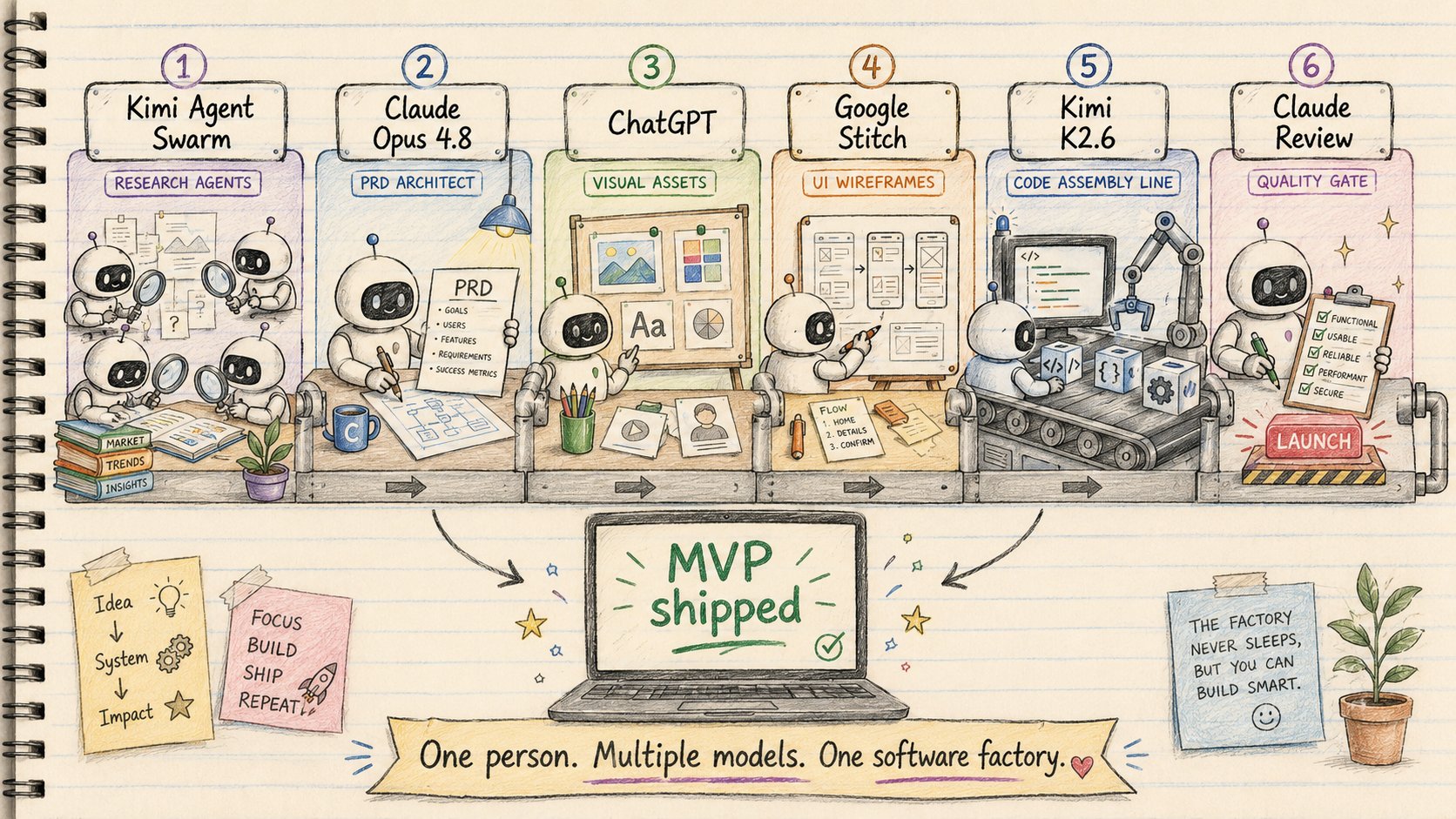
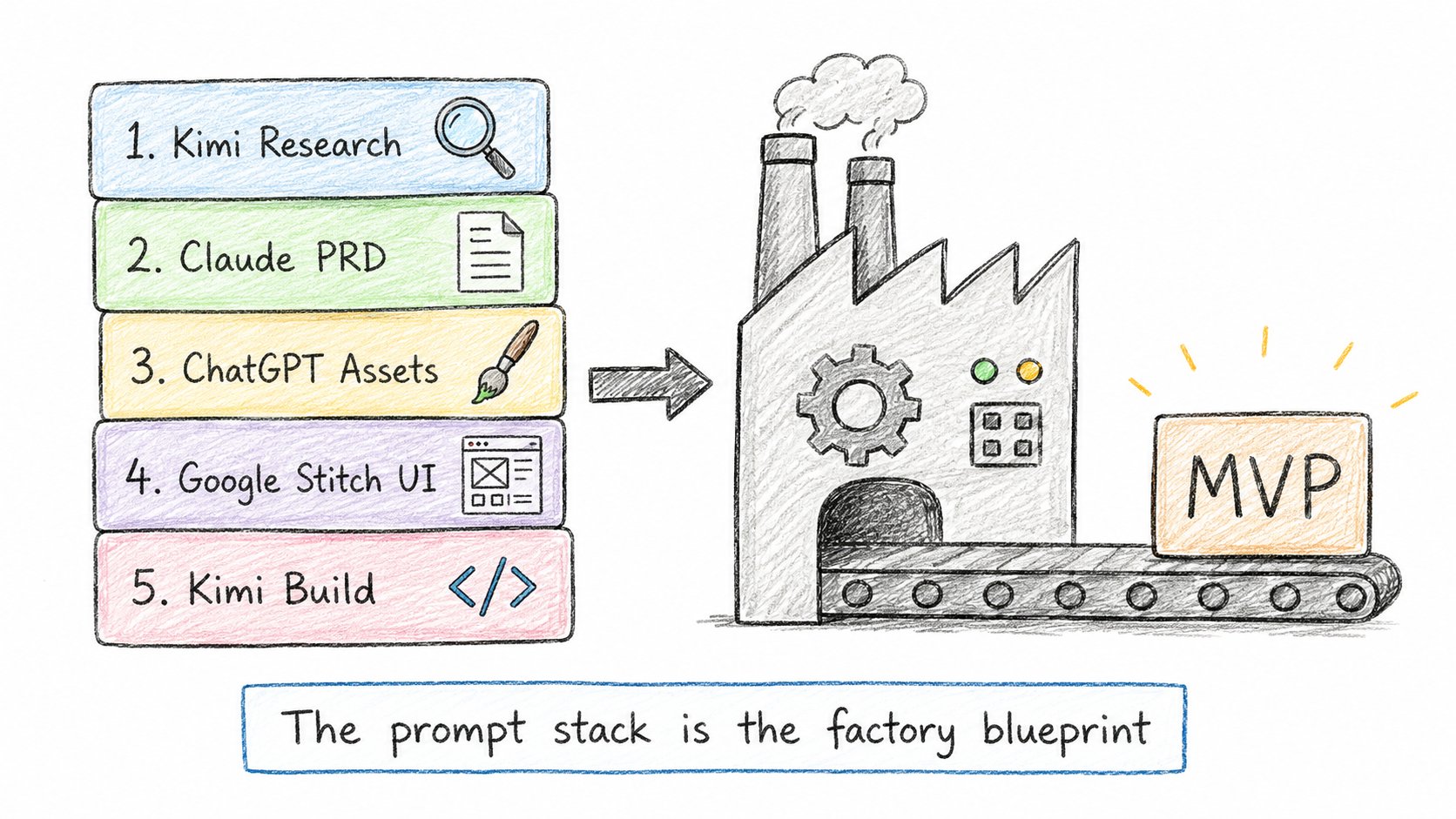
Here is the full workflow:
Kimi Agent Swarm → research opportunities
Claude Opus 4.8 → write the PRD
ChatGPT → generate visuals and assets
Google Stitch → design the UI
Kimi K2.6 → build the MVP cheaply
Claude Opus 4.8 → review the final product
That is the software factory.
One person.
Multiple models.
Each model doing the job it is actually good at.
The old way:
One AI model does everything badly.
The new way:
Research agent.
Product manager.
Designer.
Builder.
Reviewer.
All inside one workflow.
Most people are still asking AI:
"Build me an app."
The builders who win will ask:
"Which model should do which job?"
14. The Exact Prompt Stack
Use this stack:
Kimi Research Prompt
"Act as an autonomous startup opportunity discovery swarm.
Spawn research agents across Reddit, G2, Capterra, reviews, forums, LinkedIn, job posts, and competitor sites.
Find 100 evidence-backed opportunities.
Reject weak ideas.
Rank the top 25 by pain, willingness to pay, distribution, AI leverage, and speed to revenue."
Claude PRD Prompt
"Take this opportunity research and write a complete PRD.
Include ICP, pain point, product positioning, core workflows, MVP scope, user stories, database schema, pricing model, launch plan, edge cases, and what NOT to build."
ChatGPT Asset Prompt
"Create visual direction for this product.
Generate prompts for app icon, dashboard illustration, empty states, onboarding graphics, landing page visuals, and small UI icons."
Google Stitch Prompt
"Design the core product UI from this PRD.
Create dashboard, onboarding, main workflow, settings, pricing, empty states, and mobile responsive screens."
Kimi Build Prompt
"Build this MVP from the PRD, UI direction, assets, database schema, and implementation plan.
Prioritize working product over extra features.
Implement step by step.
Run tests.
Fix errors.
Keep scope tight."
This is not magic.
It is operations.
AI is not replacing software teams with one chatbot.
It is turning one builder into the operator of a small software factory.
FINAL FRAMEWORK
If you remember one thing, remember this:
Claude Opus 4.8 is not your cheap coding worker.
It is your architect.
Kimi is not just a Claude alternative.
It is your research swarm and build engine.
ChatGPT is your visual asset generator.
Google Stitch is your UI designer.
Together, they form a workflow:
Research → PRD → Design → Build → Review
That is how you stop vibe coding.
That is how you build faster.
That is how one indie hacker can operate like a product team.
The future is not one AI model doing everything.
The future is knowing how to route the work.
Save this workflow.
You will use it for your next MVP.