I see that most people are still stuck in “prompter” mode.
Understand that very task is a new conversation.
Every win requires rewriting the same instructions from scratch.
Progress feels linear: you prompt, you get an answer, you move on, and next week you start over. (and this is exactly I want you to unlearn)
Loop Engineering is the practice of designing complete, reliable AI systems that run with minimal daily input.
Instead of writing one-off prompts, you build loops: input → process → output → review → improvement.
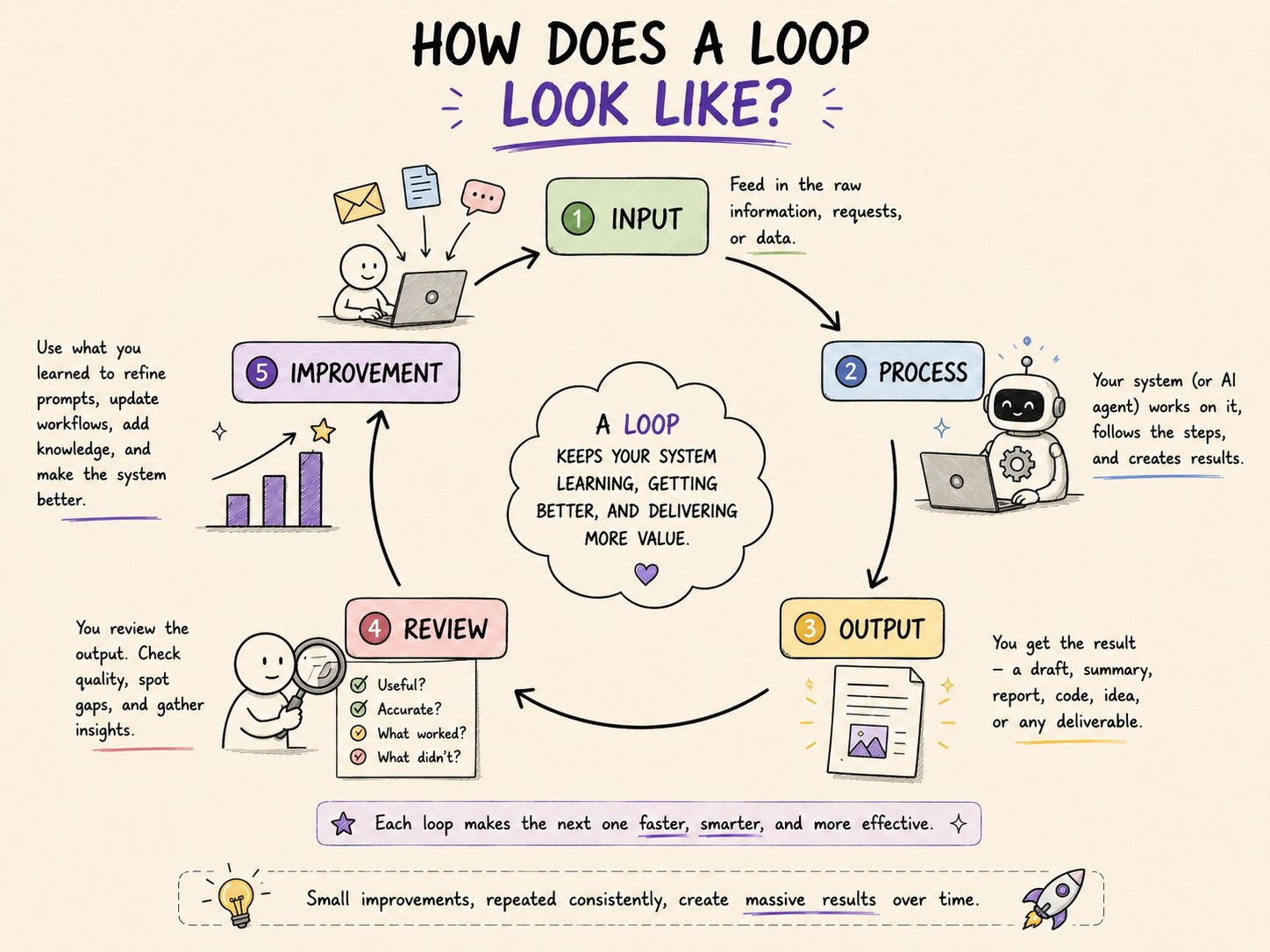
Once good loops are in place, the same work takes less effort every week while quality stays consistent or improves.
This article breaks down the 10 exact shifts I made, along with specific prompt templates you can copy and adapt for each stage.
Why this shift matters
Prompting is linear. Systems create leverage.
In prompter mode:
- You re-explain context every time.
- You write new prompts for familiar tasks.
- Your results depend heavily on mood, energy, and how well you write that day’s prompt.
In system builder mode:
- The AI already knows your context, goals, and preferences.
- You reuse and refine loops instead of starting from zero.
- Spend more time on strategy and less time on repetitive briefs.
The upgrade is a different way of working.
1. Stop treating every request as a new conversation
In early AI use, every task felt like a fresh chat.
That worked when models had no memory and you were just experimenting.
I realised that it becomes a drag when you’re building real workflows.
Loop Engineering starts by creating continuity so the AI already understands your context.
Prompt template
1You are my ongoing operations and creative partner.2You already know my main goals, current projects, preferred writing style, and previous decisions.3Always reference relevant past context when responding.4Do not ask me to re-explain things you already know unless something has changed.
Use this as a base layer in your system prompt or at the start of a long-running thread.
It sets the expectation that this is not a one-off chat, but a continuous working relationship.
2. Move from vague goals to clear success criteria
Most prompts fail because “done” is fuzzy.
“Write a good article,” “do research on X,” “help me plan this” — these leave the model guessing. Loop Engineering replaces vague goals with explicit success criteria so the AI knows exactly what to aim for and when to stop.
Prompt template
1Goal: [Clear outcome]23Success looks like:4- [Specific requirement 1]5- [Specific requirement 2]6- [Specific requirement 3]78Constraints:9- [Any limits or rules]1011When the above criteria are met, stop and deliver the final output.12Do not keep iterating once success criteria are satisfied.
This is the backbone of reliable loops. Once success is defined, you can measure whether a loop is working or needs adjustment.
3. Design the full loop.
A single prompt is a task. A loop is a system.
Loop Engineering means mapping the entire flow: what goes in, how it’s processed, what comes out, how it’s reviewed, and what’s learned for next time.
Prompt template
1Design a complete loop for this task:23Input: [What goes in]4Process: [Steps the AI should follow]5Output Format: [Exact structure required]6Review Step: [How the output will be checked]7Improvement Note: [What should be learned for next time]89Execute the loop and return the final output in the specified format.
Example for a weekly content loop:
- Input: notes, recordings, rough ideas
- Process: extract themes, outline, draft, refine
- Output: 2–3 publishable pieces in a defined structure
- Review: check against success criteria and audience fit
- Improvement: note what topics resonated, what fell flat
You’re running a repeatable system that produces articles.
4. Add feedback and verification layers
One of the biggest upgrades in Loop Engineering is making the system check itself.
Instead of trusting the first output, you add a critic layer: same model, different role. This dramatically improves accuracy, completeness, and alignment with your goals.
Prompt template
1First, complete the task as requested.2Then act as a strict critic and review your own output against these criteria:3- Accuracy4- Completeness5- Clarity6- Alignment with the original goal78List any weaknesses, then provide an improved version.
Use this for:
- research summaries,
- strategic plans,
- important emails or docs,
- anything where mistakes are costly.
The model is often better at spotting issues in a second pass than in the first.
5. Separate roles instead of using one giant prompt
Early prompts often try to do everything at once: research, write, critique, format.
That can work, but it’s harder to control quality.
Loop Engineering benefits from separating roles so each phase has a clear job.
Prompt template (multi-role)
1You will work in three sequential roles:23Role 1 – Researcher: Gather and structure the key information.4Role 2 – Writer: Turn the research into clear, usable output.5Role 3 – Critic: Review the writer’s work and suggest precise improvements.67Complete each role fully before moving to the next.8Label each section clearly.
Benefits:
- Research is focused on gathering and structuring, not writing beautifully.
- Writing is focused on clarity and flow, not re-searching.
- Critique is focused on gaps and improvements, not generating new content.
This pattern scales well into more complex loops with additional roles (editor, strategist, QA, etc.).
6. Build memory and continuity on purpose
Continuity is about building a working memory the AI can use: current projects, key decisions, open questions, preferred approaches.
This turns your AI from a smart stranger into a long-term collaborator.
Prompt template
1Update my working memory with the following:2- Project name:3- Current status:4- Key decisions made:5- Open questions:6- Preferred approach going forward:78Confirm what you have stored and how you will use this information in future interactions.
Use this after:
- strategy sessions,
- project planning calls,
- important decisions,
- when you pivot direction.
Over time, you create a persistent knowledge base that every loop can draw from.
7. Introduce scheduling and triggers
One important point here - Systems run on cues. Loop Engineering moves from “I’ll ask when I remember” to “this loop runs when X happens.”
Prompt template
1This is a recurring system.2Trigger: [e.g., Every morning / When I say “weekly review” / When new research is added]34When triggered, execute the following loop:51. ...62. ...73. ...89Deliver the output in this exact format every time.
Examples: (This is what I built for my sister)
- Daily briefing loop: trigger every morning, output: priorities, risks, next actions.
- Weekly review loop: trigger every Friday, output: wins, blockers, lessons, next week’s focus.
- Research intake loop: trigger when new docs are added, output: summary, key insights, action items.
You’re no longer remembering to run the system.
The system runs when conditions are met.
8. Optimize for cost and reliability together
Not every task deserves your most expensive model or deepest reasoning mode.
Loop Engineering includes routing logic: classify the task, then choose the right level of effort and cost.
Prompt template
1Classify this task first:2- Simple / routine → Use efficient approach3- Complex / high-judgment → Use deeper reasoning45Then execute accordingly.6Explain your classification briefly before starting the work.
This is especially useful when you:
- run many small tasks alongside a few critical ones,
- use multiple models or modes,
- want to keep costs down without sacrificing quality on important work.
Over time, you learn which types of tasks can be “efficient” and which must be “deep.”
9. Document and standardize every working loop
Most people never write down what works.
They run a loop, it goes well, and then they forget the exact structure.
Next week, they rebuild from memory and lose quality. Loop Engineering turns successful processes into reusable assets.
Prompt template
1Document this successful loop as a reusable template:23Name of Loop:4Purpose:5Trigger:6Input Required:7Step-by-step Process:8Success Criteria:9Common Failure Points:10How to Improve Next Time:1112Format it so I can copy and reuse it later.
Use this after:
- a loop that produced great results,
- a workflow you want to hand off or automate further,
- any process you expect to run more than a few times.
Your library of loops becomes part of your infrastructure, not just your notes.
10. Treat systems as infrastructure
The final shift is mindset and it took me good amount of time to understand that mindset can make or break your systems.
In system builder mode, loops are infrastructure: they’re maintained, reviewed, and improved over time.
Prompt template (weekly review)
1Conduct a system health review:231. Which loops ran this week?42. Which ones performed well?53. Which ones needed manual fixes?64. What should be improved or retired?75. What new loop should be designed next?89Give clear, actionable recommendations.
This weekly review:
- surfaces which loops are truly working,
- highlights where you’re still doing manual patching,
- forces you to retire or redesign weak loops,
- and keeps your system evolving instead of stagnating.
Infrastructure is “build, maintain, improve.”
How these 10 ways work together
You can think of the 10 shifts as three layers:
Layer 1 – Improve individual interactions (1–4)
- Create continuity instead of fresh chats.
- Define clear success criteria.
- Design full loops, not just prompts.
- Add self-check and feedback layers.
Layer 2 – Build continuity and structure (5–7)
- Separate roles for better quality.
- Build memory and working knowledge on purpose.
- Add scheduling and triggers so loops run automatically.
Layer 3 – Turn loops into maintained infrastructure (8–10)
- Optimize for cost and reliability with smart routing.
- Document and standardize every working loop.
- Treat your collection of loops as infrastructure with regular reviews.
Each layer makes the next one more powerful.
You don’t need all 10 at once.
Start with one high‑friction area and move through the layers.
What most people miss
Many jump straight to complex multi‑agent setups or fancy automations.
They skip the basics:
- clear outcomes,
- verification layers,
- continuity and memory,
- documentation.
Without those, complexity just creates more breakage.
The biggest missed move is never documenting what works. Progress resets every week because nothing is standardized. Loop Engineering is as much about discipline as it is about design.
Honest limitations
Good loops still require thoughtful design and regular review.
- Not every task should be fully automated. Some work benefits from slow, manual thinking.
- Over‑engineering early creates unnecessary complexity. Start simple, then add structure.
- Loops are only as good as your success criteria and review process. If those are weak, the loop will reliably produce the wrong thing.
Loop Engineering is all about putting humans in the right loops: strategy, judgment, and improvement, not repetitive briefs.
How to start: Worked for me (COPY PASTE MY STRATEGY)
Pick one high‑friction area of your work.
For example:
- weekly research and synthesis,
- content creation from notes,
- project status updates,
- client onboarding.
Apply the first four ways to that single area:
- Set continuity so the AI already knows your context.
- Define clear success criteria for that task.
- Design the full loop (input → process → output → review → improvement).
- Add a feedback/critic layer.
Once that loop feels reliable, expand:
- separate roles,
- add memory updates,
- introduce a trigger (e.g., “every Friday”).
Then move into documentation, routing, and weekly system reviews.
Key takeaway
Actually the real upgrade is learning to design loops.
Moving from prompter to system builder is one of the highest‑leverage shifts available to creators and solo operators today.
You don’t need a fleet of agents or a complex stack. You need a few well‑designed loops, documented and maintained like real infrastructure.
Start with one loop.
Make it reliable.
Then build the next.
Hope you liked the article.
Building better AI workflows for creators like you.
❣️I’m Kanika (@KanikaBK) — follow for more practical tests and setups