Authors: @hi_im_isaac_, @learnwdaniel, @gaozenghao
note: the interactive version of full technical blog available: https://www.cerebras.ai/blog/how-we-built-our-knowledge-base
Employees ask our internal knowledge base more than 15,000 questions every day. It's become one of the most widely adopted internal tools at the company since launching 3 months ago. Used by humans, automations and agents.
At Cerebras, our teams work across data center operations, chip design, hardware, training, inference, cloud platform, and more. With hundreds of new employees joining every year, our communication channels were filling up with the same questions:
- “Where can I find X?”
- “Who is the expert in Y?”
- “What is Z?”
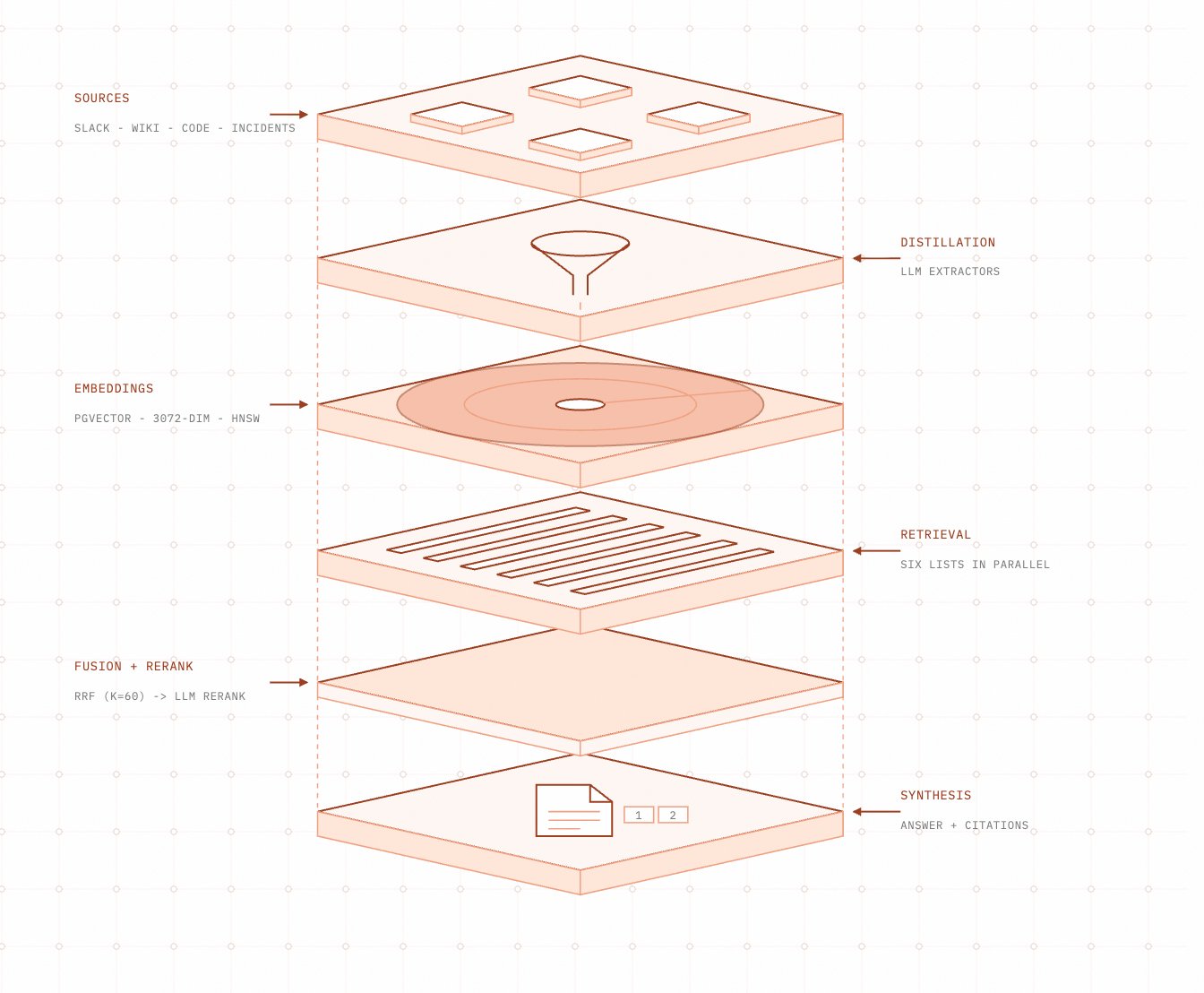
We built Cerebras Knowledge to help people connect people and systems to useful information.
Meeting data where it lives
Finding information inside an organization is hard. The data is scattered across tools, and every quarter or so someone proposes the same brilliant fix: let’s record everything in one platform so that all information is in a single place. The dream of a single source of truth, of course, rarely works in practice.
Information is generated wherever it is convenient and ergonomic: suggested edits in a document, threads in Slack, code references in GitHub, and status metadata in Jira. These platforms are tailor-made for their specific domains, optimized through years of product engineering and analytics. Discussing a pull request in Google Docs would be a terrible experience.
So we set out to design a system that required minimal change to existing behavior. On the data collection side, this meant extracting data from each platform directly.
Anatomy of a knowledge base
Our knowledge base provides three things:
- A platform for collecting and storing internal data.
- A platform for querying that data.
- A layer that enforces authentication and authorization, with auditing and analytics.
At the core is a single Postgres table that holds embeddings, raw summaries, and metadata from many sources. The system continually ingests data from across the company and maintains a query-ready datastore.
We wanted a data interface that was simple but could work with most forms of data. We also wanted other developers at Cerebras to be able to build custom connectors. The result is deliberately simple: every source, from Slack threads to netlists, lands in the same embeddings table, and anything in that table is immediately queryable through the same interface:
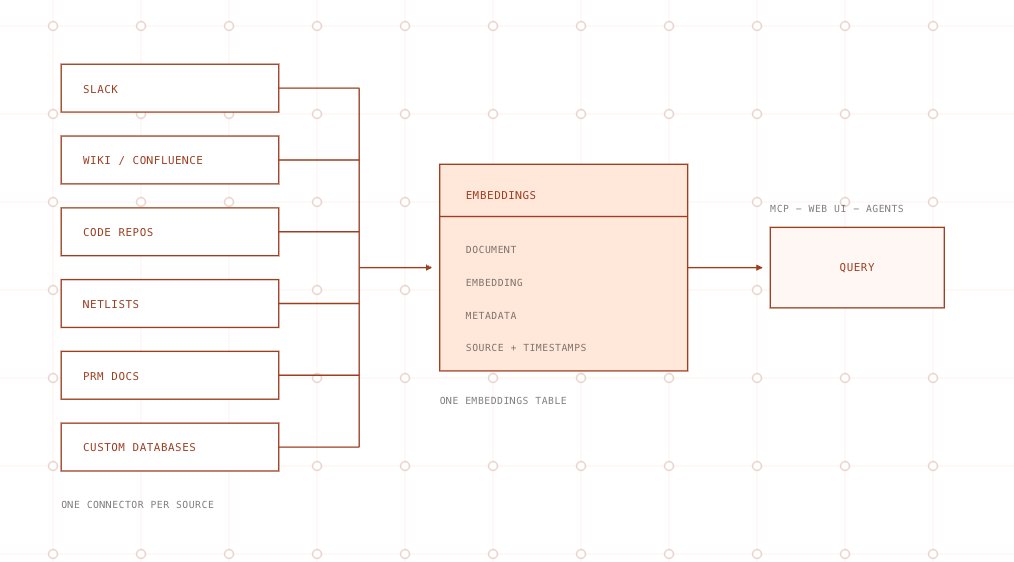
Each data source defines what the data is, how to connect to it, and how often it should be fetched. Each resulting embedding row follows the same interface regardless of whether it came from Slack, a code repository, a document system, or a custom database.
How we process unstructured Slack conversations
Slack was the most important data source we needed to design for. It is where the most up-to-date engineering discussions happen across the company.
We initially tested whether simple embeddings over raw text performed well enough. We quickly realized that vector search alone was insufficient for matching all relevant data.
Slack messages present several challenges:
- Information density varies enormously: “hey yeah sure mike” and a detailed kernel explanation are both messages.
- Message lengths vary, and shorter messages frequently beat longer, more detailed messages in cosine similarity.
- The meaning of a message often depends on the surrounding conversation.
We needed a hybrid approach. We built Slack ingestion so every thread is retrievable through several search techniques at once, where each technique makes up for the weaknesses of the others:
- Full-text search catches the exact tokens that embeddings blur together: error strings, flag names, host names. When an engineer pastes a literal error message, an exact lexical match is almost always the best evidence, and no amount of semantic similarity should outrank it.
- Embedding search catches paraphrase. The person asking “restore hangs after manifest load” and the person who answered “checkpoint stalls on the NFS mount” may never share vocabulary. Vector similarity is what connects a question to an answer written in different words.(1)
- Inverse document frequency separates signal from filler. A short message built around rare tokens, such as an obscure config flag, deserves to rank. “sounds good, thanks!” sits close to many queries in embedding space but scores near zero once term rarity is taken into account.
- Age decay encodes that Slack answers expire. Two threads can answer the same question, and the one from six months ago may describe infrastructure that no longer exists. When relevance is otherwise equal, the newer thread wins.
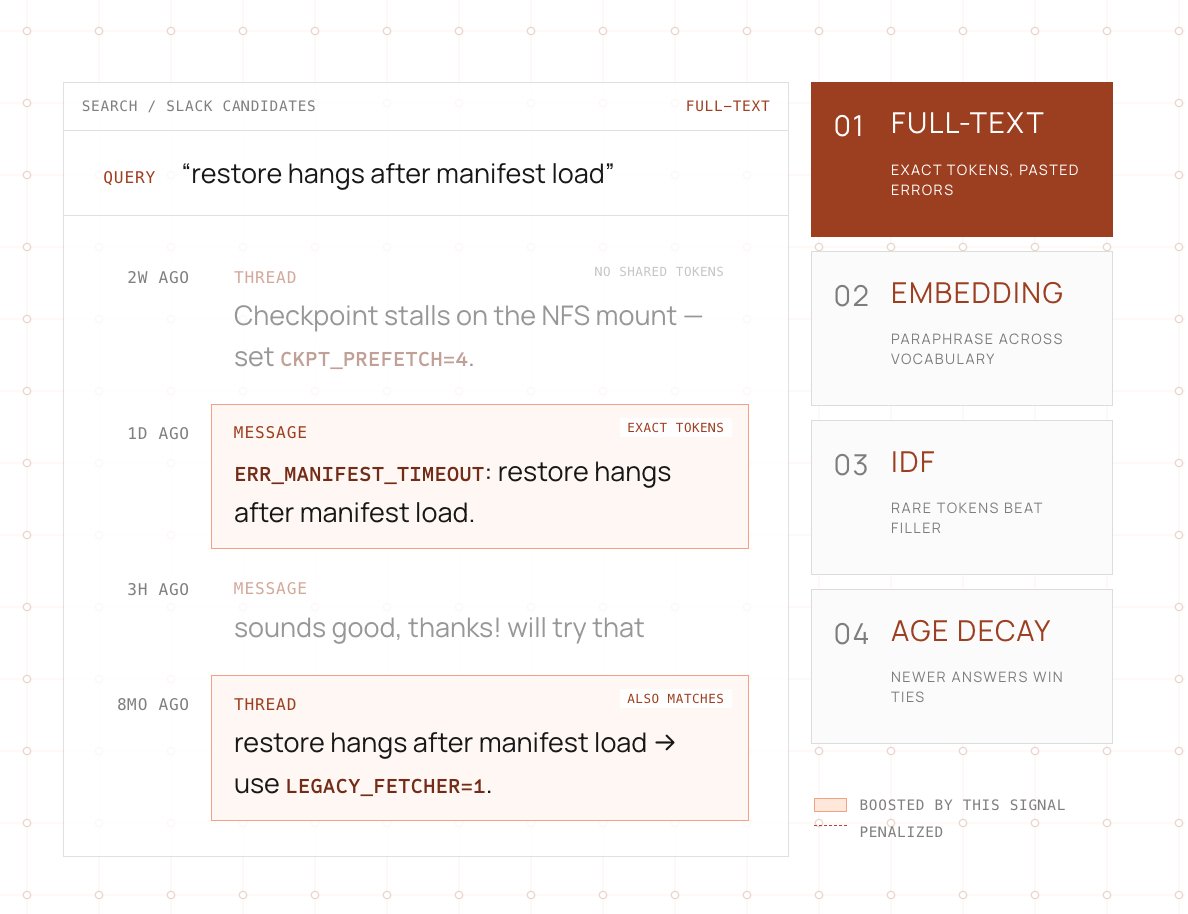
No single scorer is trusted on its own. Each technique produces its own ranked view of the same corpus, and those views are fused at query time (see Reranking).
Socket Mode
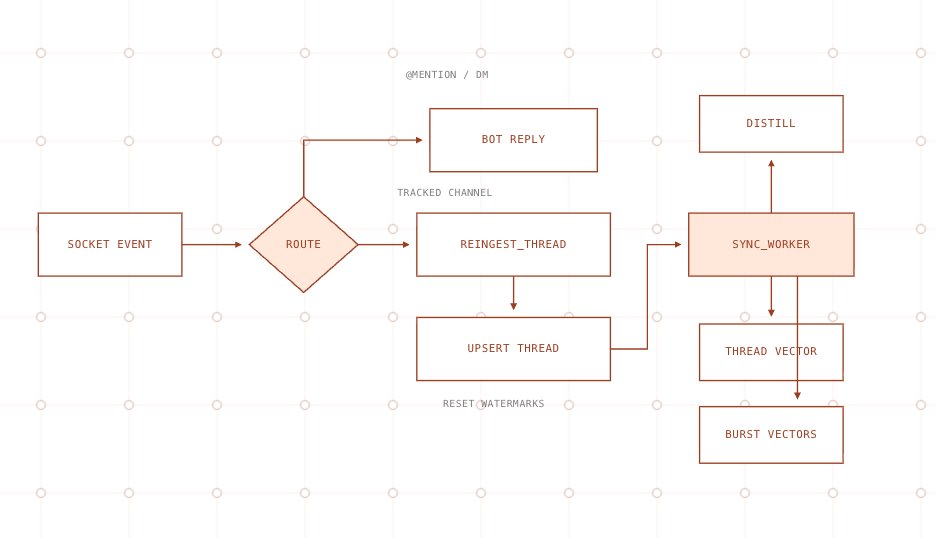
To collect data in real time, we installed a Slack bot into our workspace and ran it in Socket Mode. Slack pushes every message event to us over a persistent WebSocket, so we get real-time updates without polling the Web API and burning through its rate limits.
When an event arrives, we immediately acknowledge it, deduplicate it using the stable event ID, and mark the message for the ingest consumer.
The ingest consumer does not save a new message in isolation. It resolves the thread that the message belongs to and re-fetches the entire conversation, including the parent and every reply, from the Slack API. It then writes the whole thread back as one row. A reply to an existing thread therefore re-pulls the parent and all siblings, so the stored content, participant list, and last-activity timestamp always reflect the complete conversation.
Every Slack channel in our system has its own data source. This provides fine-grained tuning for data freshness. A team may choose to ingest a busy incident channel more frequently, for example.
Threads and messages
Raw Slack text is keyword-searchable as soon as it lands because we maintain a Postgres full-text (GIN) index over the raw content. To enable useful vector search, however, we do some additional processing.(8)
During distillation, an LLM extracts structured data from the full thread:
- A one-line question that an engineer would actually search for.
- A short summary.
- The resolution.
- The systems and code references mentioned.
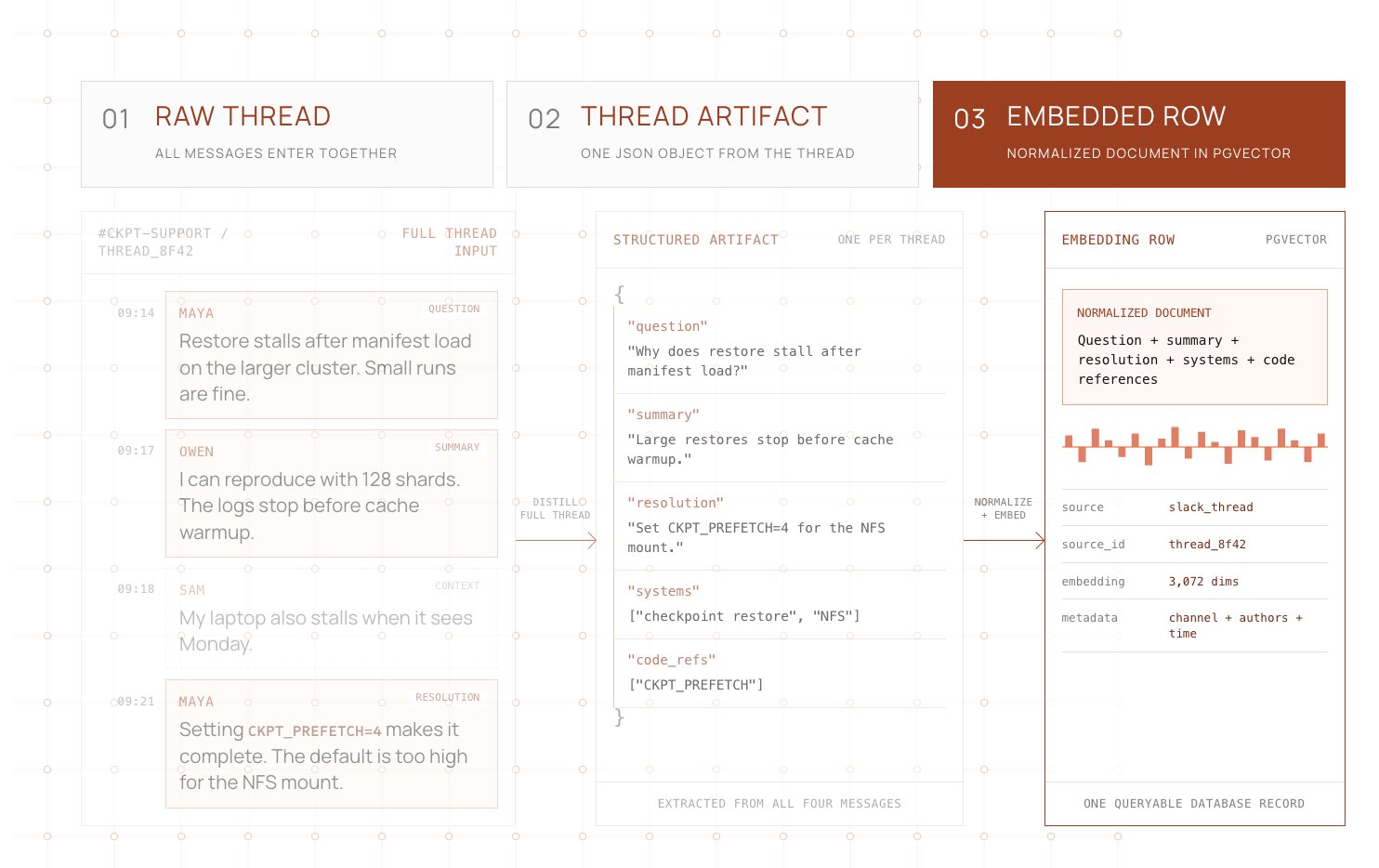
We embed these data points and write them into the shared embeddings table. The original transcript is not embedded directly. In our experiments, accuracy increased significantly when the thread was normalized into a consistent format.(7,9) The additional metadata also gives the semantic match more useful signal.
Bursting
At this point Slack search was good, but we kept encountering the same problem: important messages inside long threads were not always represented in the thread-level summary.
To boost the signal from individual messages, we use bursting. A burst is a run of consecutive messages from the same author. We embed individual bursts with the thread topic prepended as context(2) because sometimes the answer lives in one tangent message whose vocabulary never makes it into the thread summary. Burst embeddings make that message findable on its own.
To prevent low-signal data from reaching the database, each burst is scored against a weighted combination of signals and must clear a threshold before it is embedded:
- It contains a relatively rare token across the corpus, with IDF of at least 4.0.
- The combined burst is at least 200 characters.
- One or more messages in the burst contain reactions, providing a social boost.
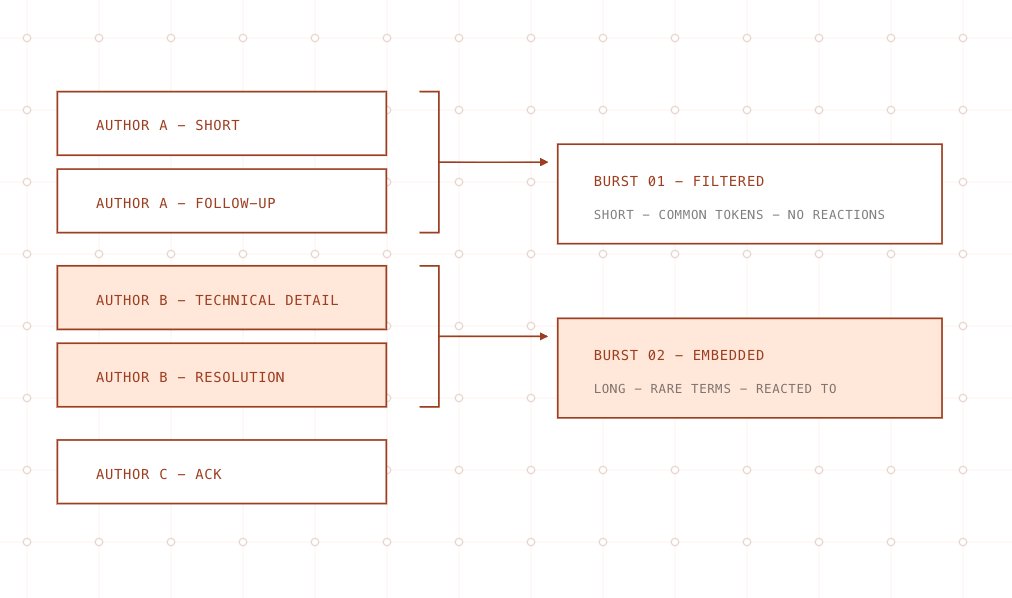
After distillation, qualifying bursts are embedded and stored in the embeddings table alongside the thread-level record.
Code repositories
Initially we debated whether embedding code repositories was necessary. With the rise of Claude Code and other command-line tools, creating code embeddings felt counterintuitive when it seemed like “grep is all you need.” After talking with others in the industry and reading Cursor’s findings on semantic search in large codebases, we decided to try.
We have many internal repositories, some larger than 40 GB. Our main concern was how to keep them current efficiently.
Using @cocoindex_io to maintain code embeddings
After several experiments, we landed on CocoIndex, an open-source document embedding framework that specializes in vectorizing codebases.
For each repository, we split the code using language-specific regex boundaries ordered from coarse to fine. The splitter tries higher-level boundaries, such as classes, first. If a resulting chunk is still too large, it falls back to method boundaries and then smaller blocks. We embed the resulting chunks and write the vectors to Postgres. A single file may generate multiple embeddings at different levels of specificity, such as file-level and function-level records.
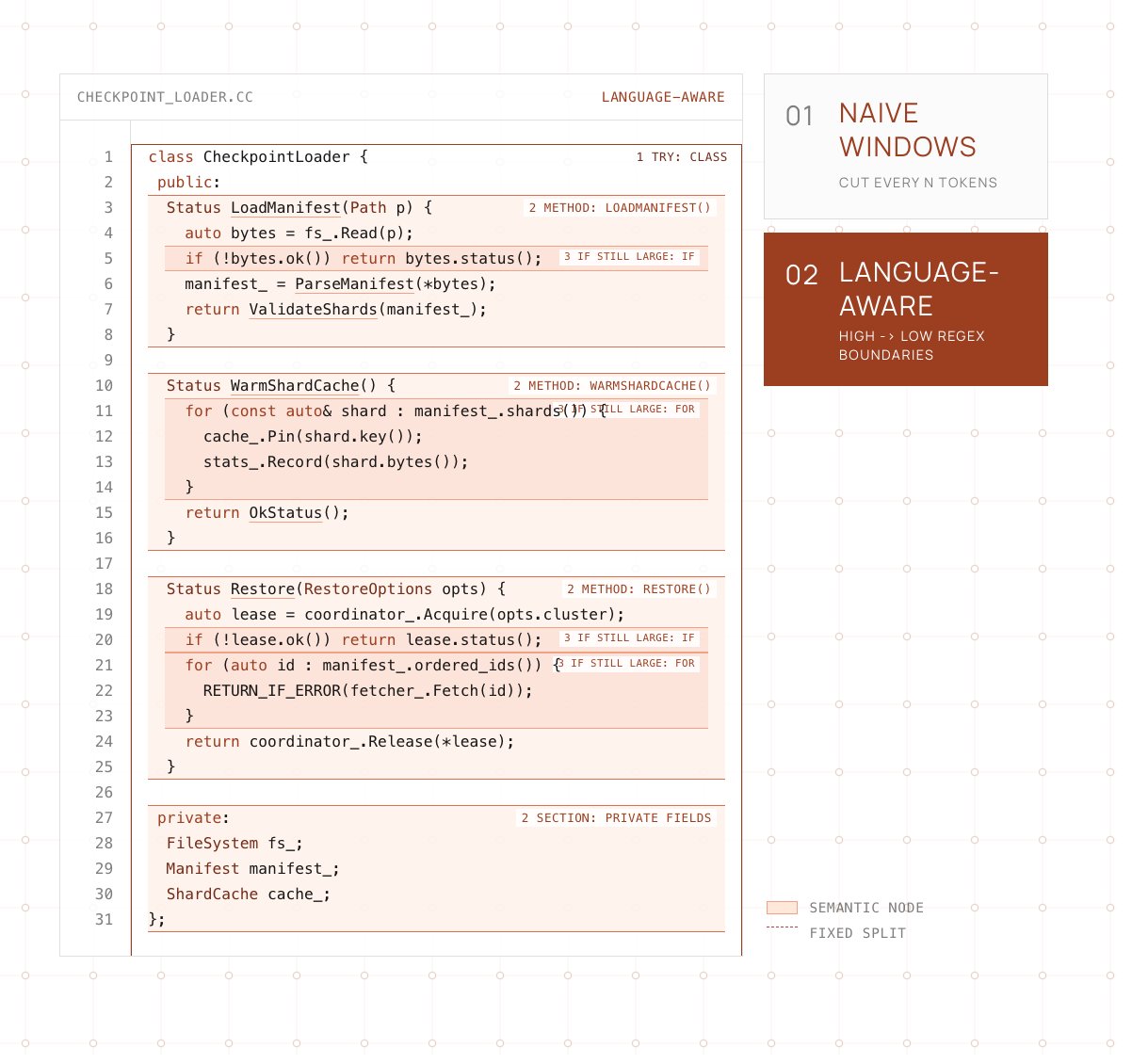
CocoIndex tracks synchronization metadata in Postgres. On each commit, it re-embeds and re-exports only the changed code chunks instead of recomputing the whole repository. This worked especially well for us because the synchronization state and embedding store live in the same database.
As the number of codebases grew, we moved repository onboarding into configuration files that teams can submit themselves, including allowlists and denylists at the file-path level.
Custom data sources
Some teams already had their own databases and did not want to move data into Slack or a document system just to participate in the knowledge base. They wanted the same query surface over their existing tables.
To support this, we treat custom sources as plugin scripts. A team opens a pull request with a small Python module that knows how to read from its system and emit rows shaped like our embeddings table, plus a matching data source entry.
As long as the script writes into the shared database using the same schema as every other embedding row, the rest of the stack works unchanged. The data becomes queryable alongside Slack, code, and documents, with no special handling elsewhere in the system.
Planning and tool fan-out
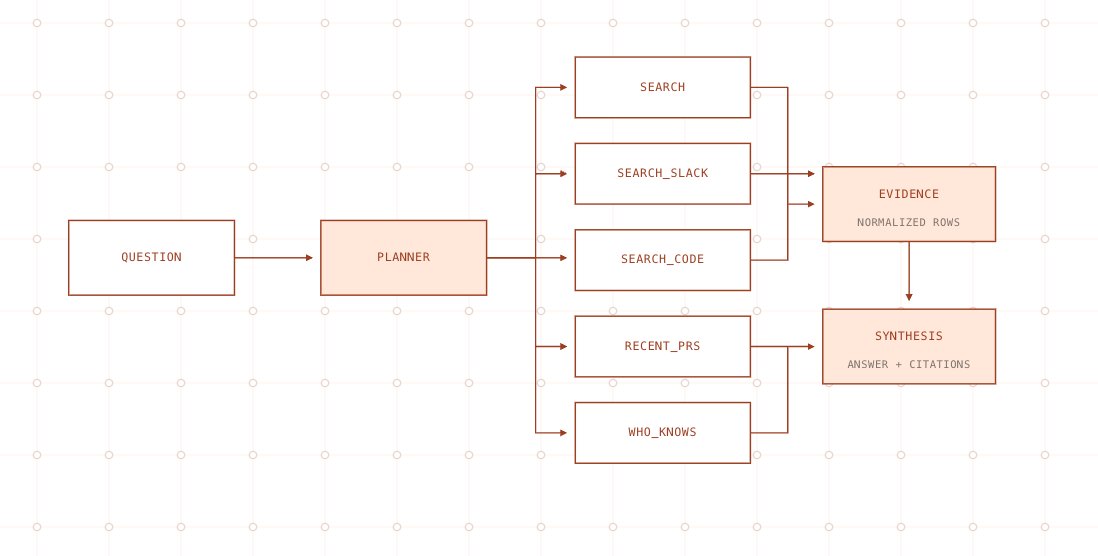
For every query, we first run a short planning pass where an LLM decides which tools and data sources are likely to matter. The main tools:
- subsystem_index: per-file LLM summaries.
- search: the unified vector pipeline across Slack, wiki, code, and other indexed sources, merged and reranked internally.
- search_slack: direct Slack retrieval.
- search_code: ripgrep over source repositories.
- recent_prs: recent pull requests relevant to the question.
- who_knows: people with demonstrated expertise on a topic.
The planner works over a compact description of what we have indexed: which projects exist, which sources are available in each project, and what each source is good at answering. Given the user’s query and active scope, it emits tool selections that the executor fans out in parallel, normalizes into a common evidence format, and passes to a final synthesis LLM.(4)
Reranking
A document can surface near the top simply because it shares vocabulary with the query while answering a different question. Before reranking, we combine the retrievers’ incompatible result lists with reciprocal rank fusion, or RRF. For every document, we add weight / (60 + rank) for each list in which it appears, with a default weight of 1.0 and a smoothing constant of 60.
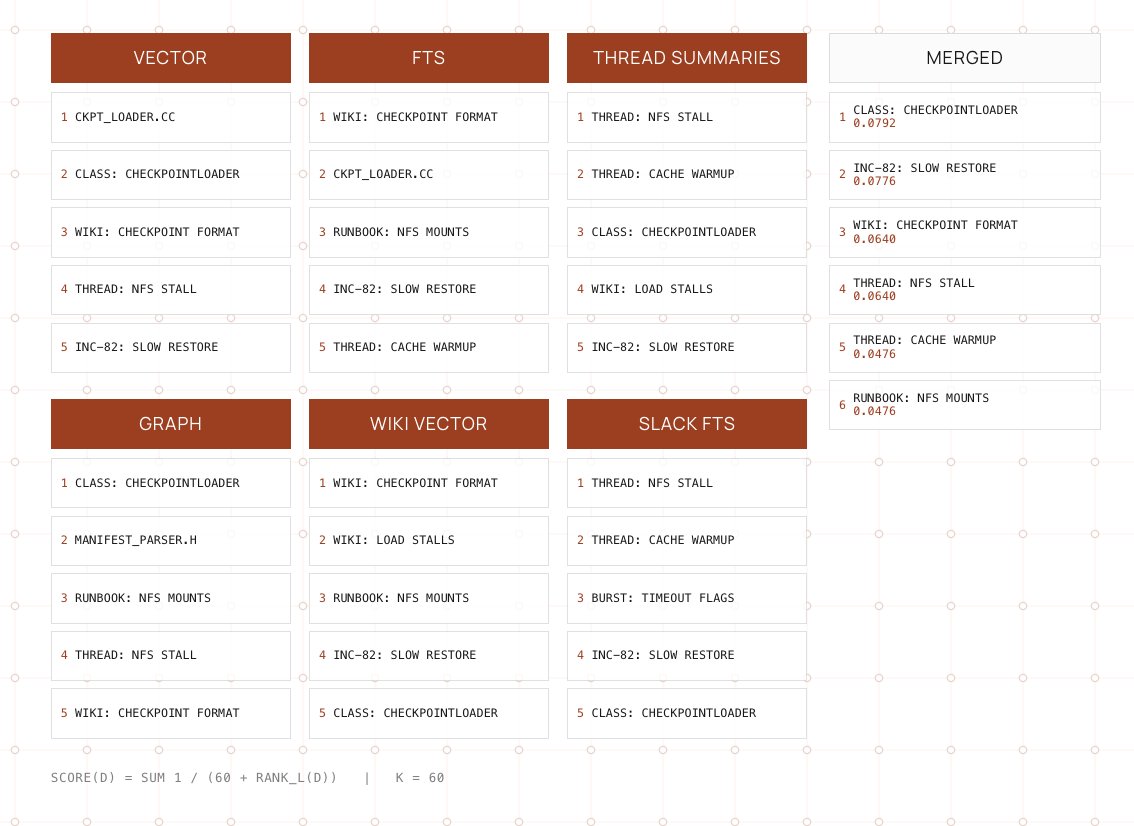
The smoothing constant makes consensus matter more than a single strong vote: a document that shows up near the top across several retrievers can beat one that ranks first in only one of them. We then merge duplicate chunks back to one source, cap how many results each file can contribute, and end up with a more diverse top twenty.
We send the original query and those candidates to a small reranker model. It gives each document a score from zero to ten, and we keep the top ten.(6)
Once the ranking is final, we add context back to the winners. For example, if we match a wiki section we pull in the two neighboring sections so the heading, preconditions, and caveats that chunking split apart aren’t lost. This gives readers a complete snippet instead of a lonely paragraph that’s missing important context.
So the output of search is a rich packet of evidence: results fused from different retrievers, deduplicated at the source level, reranked against the actual question, and only then expanded with surrounding context.
MCP
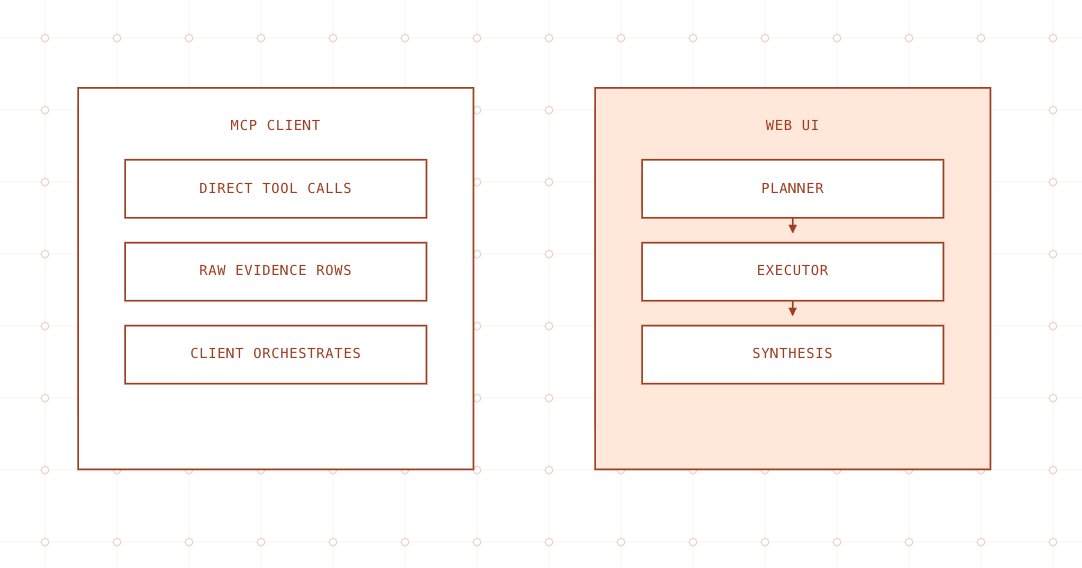
In the MCP integration, we expose retrieval building blocks as direct tools instead of hiding them behind one “answer this question” endpoint. These tools are intentionally simple and as LLM-free as possible so clients can query them quickly and cheaply.(5)
Each MCP tool corresponds to one underlying retrieval primitive, such as search_slack, search_code, search, or who_knows. Tool inputs and outputs are narrow, structured, and stable, making them easy to call from any client or agent without embedding additional orchestration logic inside the tool itself.
Most tools run one query pipeline, such as vector search, lexical search, or ripgrep, apply lightweight scoring heuristics, and return raw evidence rows.
Claude Code, or any MCP-compatible agent, becomes the orchestration engine. It decides which tools to call, in what order, and how to assemble the results into a final answer or code edit. The retrieval layer itself does not depend on those LLM decisions in order to serve requests.
Web UI
In the web UI, the same tools exist, but they are connected to a complete query pipeline that runs end to end for every user question. The UI agent owns the planner and executor steps.
- Planner: A lightweight LLM pass inspects the query and active project, then chooses which retrieval tools to invoke, such as search, search_slack, and subsystem_index.
- Executor: The system fans those tool calls out in parallel, gathers the results, and normalizes them into a shared evidence schema with scores, recency, and source hints.
- Synthesis: A final LLM pass takes the typed evidence bundle and original question, then produces the answer shown in the UI, including citations, caveats, and cross-source synthesis.
From the user’s perspective, the web UI is simply “ask a question and get an answer.” Under the hood, it runs the same planner → executor → synthesizer pattern that MCP clients can recreate explicitly.
Organization
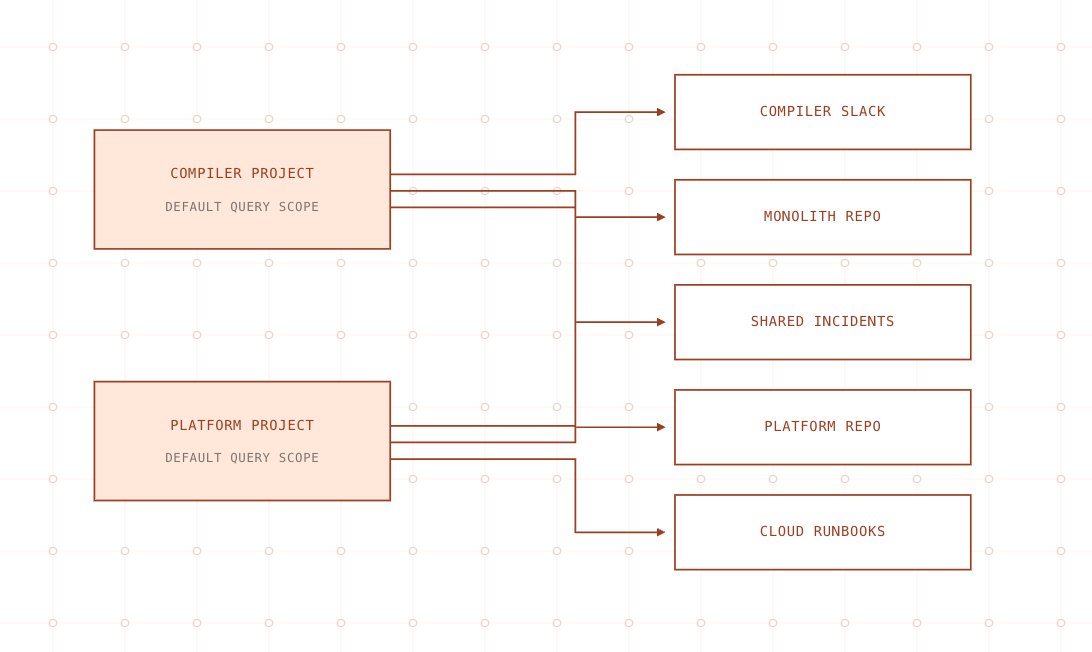
As the corpus grew, “search everything everywhere” rapidly stopped being useful. Engineers on compiler teams did not want infrastructure runbooks in their results, and vice versa. Projects are how we make search relevant by default.
Projects and scoped search
We introduced projects as the primary way to organize the workspace that a query runs over. A project is a named bundle of data sources: specific Slack channels, code repositories, internal databases, and document spaces relevant to a team or initiative.
Projects are intentionally lightweight. The same data source, such as a shared incidents channel or central platform repository, can be referenced by multiple projects instead of being duplicated.
Onboarding and defaults
During onboarding, users are prompted to select or create a default project that matches how they work, such as ML training infrastructure, Compiler, or Data Center Operations.
That default project is stored on the user profile and scopes queries automatically. A new engineer gets high-signal answers without first having to learn which Slack channels, repositories, or document spaces matter.
Final Thoughts
In the end, the knowledge base works because it meets people where the information already lives, instead of forcing everything into one rigid system. By combining various search techniques, we can surface evidence quickly. The result is a search experience that stays flexible enough for real company data, but structured enough to remain useful as Cerebras keeps growing.
If you read this far and this is interesting to you, the ai/growth team is hiring reach out if you are interested @learnwdaniel
References
- Malkov and Yashunin, Efficient and Robust Approximate Nearest Neighbor Search Using Hierarchical Navigable Small World Graphs, arXiv:1603.09320 / IEEE TPAMI 2018.
- Anthropic, Introducing Contextual Retrieval, 2024.
- Cormack, Clarke, and Büttcher, Reciprocal Rank Fusion Outperforms Condorcet and Individual Rank Learning Methods, SIGIR 2009.
- Li et al., Search-o1: Agentic Search-Enhanced Large Reasoning Models, arXiv:2501.05366, 2025.
- Anthropic, Code Execution with MCP, 2025.
- Liu et al., Lost in the Middle: How Language Models Use Long Contexts, arXiv:2307.03172, 2023.
- Anthropic, Use XML Tags.
- Salesforce/Slack Engineering, How Slack AI Processes Billions of Messages.
- Improving Agents, Best Nested Data Format.
- Cursor, Improving Agent with Semantic Search, 2025.