AI dance videos used to feel like a gamble.
You wrote a prompt, hit generate, and waited to see what survived the first body roll. Maybe the video looked amazing. Or maybe the face slowly became someone else, the outfit changed halfway through, the hands gave up, the timing missed the beat, and the dancer moved like the model had only heard rumors about choreography.
That was fine when AI video was still a novelty.
But creators are not just experimenting anymore. They are making TikToks, Reels, Shorts, X content, music teasers, dance challenges, product drops, and full AI influencer accounts. For that kind of work, random motion is not enough.
Dance content needs identity.
It needs rhythm.
It needs continuity.
And most importantly, it needs a repeatable workflow.
That is where APOB AI comes in.
APOB AI is an independent AI influencer platform built for creators who want more than one lucky generation. By combining the AI Influencer Generator, GPT Image 2.0 inside Chat to Generate and Chat to Edit, and Seedance 2.0 inside Image to Video Ultra S, APOB AI helps creators turn dance video creation into a structured production system.
Instead of writing a longer prompt and hoping the model invents a clean routine, creators can now build the dancer, shape the look, control the identity, and guide the movement before the video even begins.
Because the future of AI influencer dance videos is not about luck.
It is about choreography with control.
From Random Motion to Repeatable Choreography
A single impressive AI dance clip can grab attention.
A repeatable choreography workflow can build an audience.
With APOB AI, the process becomes more intentional:
- Build an AI influencer model using the AI Influencer Generator.
- Use Chat to Generate, powered by GPT Image 2.0 inside APOB AI, to create the opening dance frame.
- Use Chat to Edit to turn that frame into a 16-panel dance storyboard and movement guide.
- Use Image to Video Ultra S, built with Seedance 2.0, to generate a guided dance video from the storyboard.
- Add a hook, voice line, talking avatar intro, caption, or lip sync layer.
- Review the motion, refine the storyboard, and repurpose the dance across platforms.
Instead of a simple:
prompt -> dance clip
The workflow becomes:
influencer model -> first frame -> 16-panel storyboard -> guided video prompt -> Seedance 2.0 video -> social content
That shift matters. It turns the AI dance generation from a lucky attempt into a practical creative system.
Step 1: Build the AI Influencer as the Dancer
A strong dance video starts with a recognizable performer.
Not just a pretty avatar.
Not just a random virtual model.
Not just a generic dancer with a good outfit.
Dance content depends on identity. The audience needs to recognize the same face, body language, styling, energy, and attitude from one clip to the next.
APOB AI starts with the AI Influencer Generator so creators can define the character directly. The goal is to create an original AI influencer who can carry many videos, not a one-time image that disappears after one post.
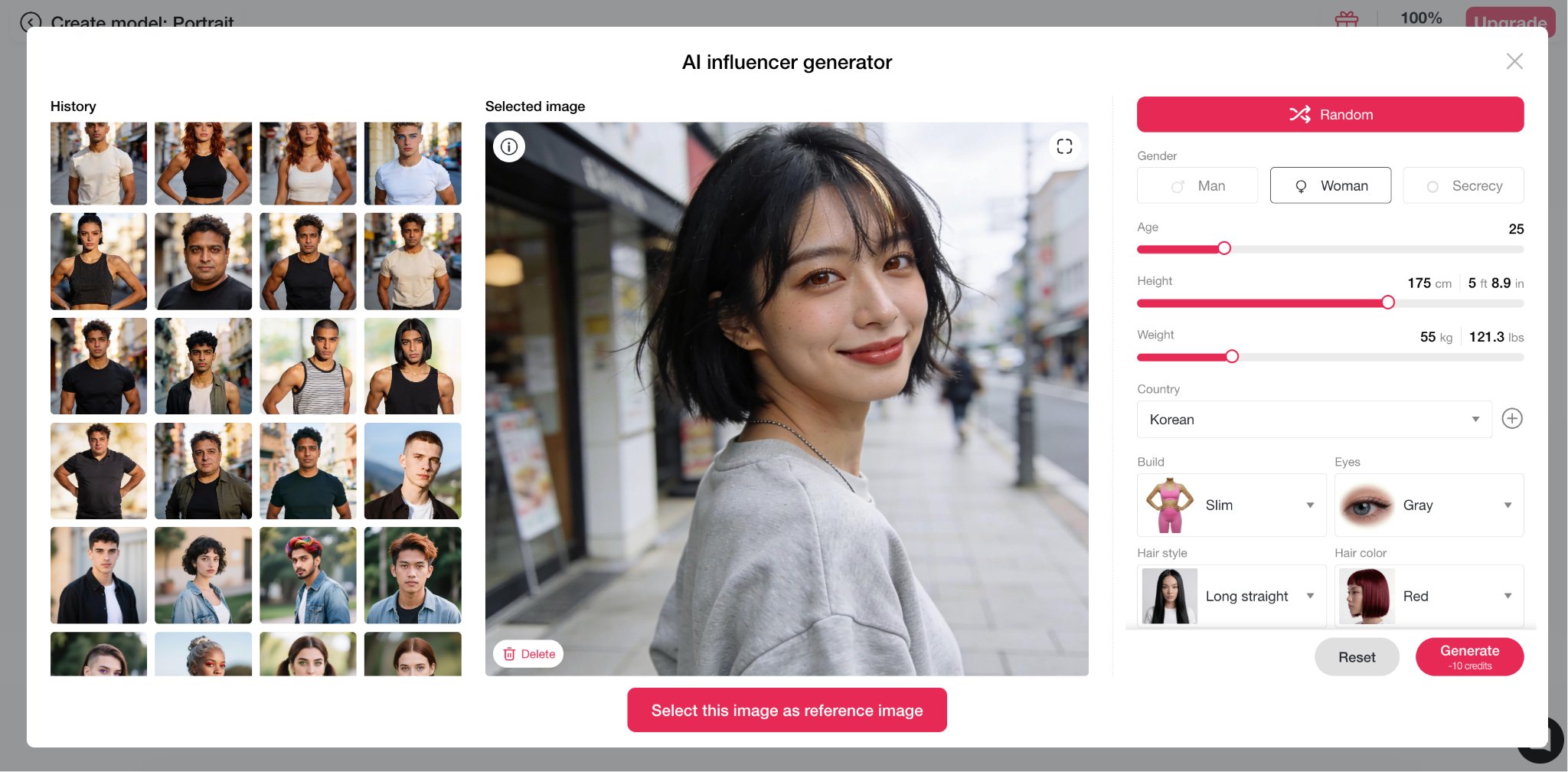
For a dance workflow, the influencer model should include details that matter for movement: body type, height, hairstyle, outfit style, facial expression, posture, and the kind of performance energy the character should bring.
This AI influencer model becomes the identity base for the entire dance series.
Every new frame no longer starts from zero. It starts from the same performer.
That is how an AI dancer becomes a reusable creative asset instead of a lucky clip.
Step 2: Create a Strong First Dance Frame
After the influencer model is ready, the next move is to create the first frame.
This is where Chat to Generate comes in.
Inside APOB AI, Chat to Generate uses GPT Image 2.0 as part of the AI influencer workflow. Instead of asking creators to describe everything from scratch, it helps turn the influencer model into a controlled opening shot.
For a dance video, the first frame matters because it anchors the character, outfit, body position, camera angle, lighting, location, and performance mood.
If the first frame is weak, the video model has to guess too much.
If the first frame is clear, the video already has a visual starting point.
Chat to Generate Prompt: First Dance Frame
1A cinematic first frame for a 15-second vertical K-pop dance video, 9:16 aspect ratio. A single adult female K-pop dancer stands in the center of a dreamy pastel campus courtyard, full body visible from head to shoes.2She has a slim athletic dancer body, deep brown high ponytail tied with a baby blue ribbon, soft wispy bangs, fresh natural makeup, bright confident eyes, and a subtle playful smile. She wears a baby blue cropped varsity jacket with white piping, a fitted white crop top, a white high-waisted pleated mini skirt with pale blue double trim, white mid-calf socks, and white platform sneakers.3Pose: feet shoulder-width apart, left foot slightly forward, torso leaning slightly to the right, right hand lifted beside the ear with palm facing outward, left hand resting near the waist, chin slightly raised, direct eye contact with the camera.4Environment: a clean dreamy school courtyard with white modern academic buildings, pastel blue window frames, pale blue lockers along the corridor, soft pink cherry blossom trees in the distance, floating petals, light cream tiled ground, soft reflections, pale blue sky and fluffy white clouds.5Lighting: bright soft morning sunlight, gentle backlight from upper left, subtle rim light on hair and shoulders, clean facial lighting, pastel volumetric glow, premium K-pop music video cinematography, realistic skin texture, realistic clothing folds, crisp silhouette, shallow atmospheric depth, high detail, polished commercial visual.6Camera: eye-level, 35mm lens, centered symmetrical framing, full-body medium-wide shot, slight cinematic depth of field, no extreme distortion.7Negative prompt: child, minor, dark classroom, empty expression, stiff body, inconsistent outfit, extra limbs, distorted hands, cropped feet, close-up framing, low angle distortion, overexposed face, oversaturated neon colors, gothic mood, blurry image, low resolution, text, watermark, logo.
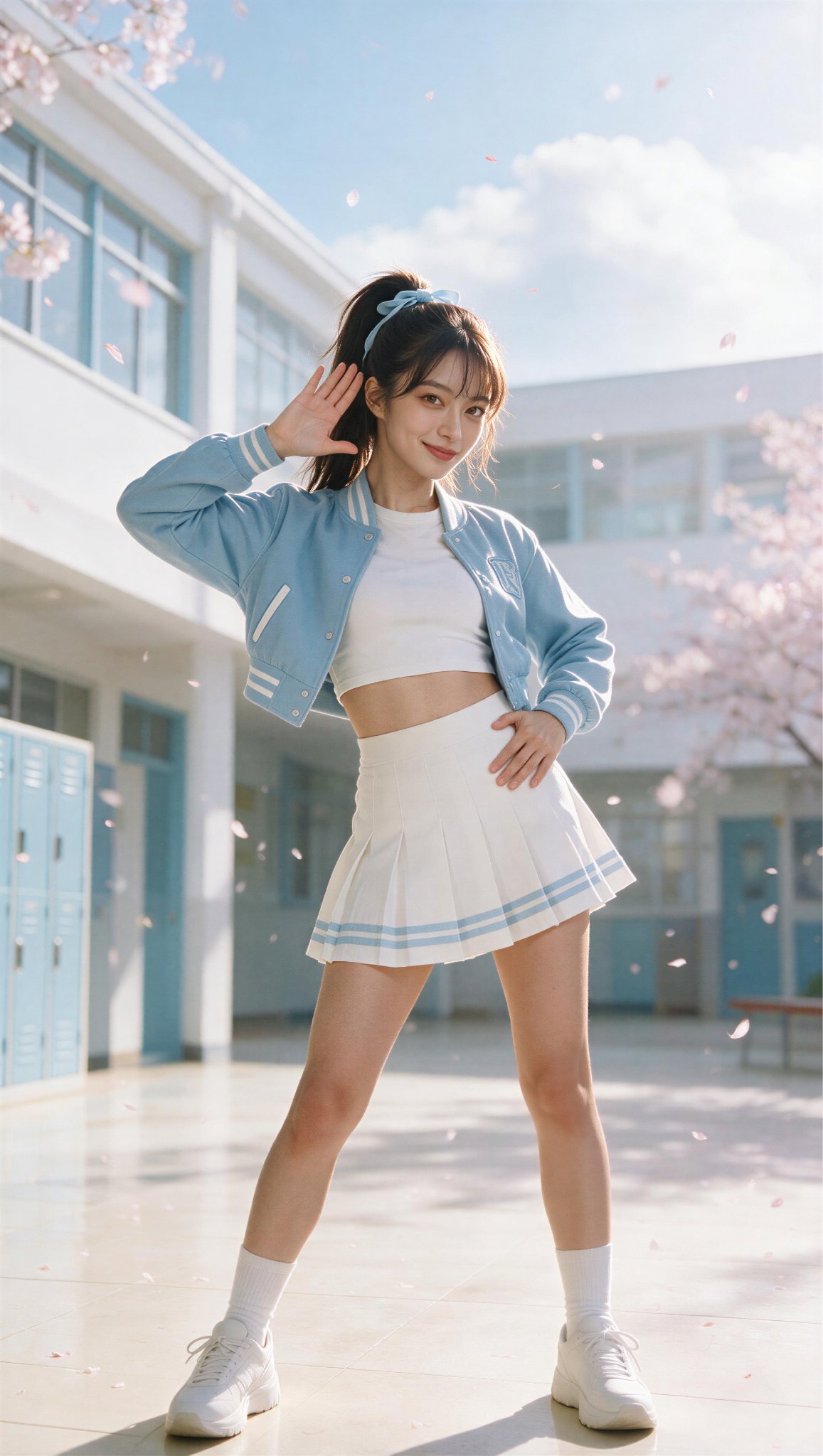
You are not just generating a nice image. You are building the first beat of the video.
Step 3: Turn the First Frame Into a 16-Panel Dance Storyboard
Many creators generate a first frame and immediately send it into image-to-video.
That can work, but dance is one of the hardest formats to leave to chance.
Dance needs timing. It needs clean transitions. It needs a readable body path. It needs the model to understand what happens at every beat.
A stronger approach is to use Chat to Edit after the first frame is created.
Chat to Edit also uses GPT Image 2.0 inside APOB AI, but its role is different. Instead of making another isolated image, it turns the first frame into a choreography map.
The first frame says:
> Start here.
The storyboard says:
> Move like this. Hit these beats. Keep this identity.
Chat to Edit Prompt: 16-Panel Dance Storyboard
1Panel 1 — 0.0s–1.0s2Shot: Front-facing medium-wide shot, full body visible3Camera Height: Eye level4Choreography:5The dancer begins in the exact opening pose.6On the first beat, she sharply slices her right hand downward from beside her ear.7Her left shoulder pops forward.8She gives a small, controlled head accent to the left.9Her right toe turns slightly inward and taps the floor.10Camera Movement:11A very subtle forward dolly.12Push in by approximately 5%.13Keep the dancer’s entire body inside the frame.14Facial Expression:15Confident, light smile.16Direct eye contact with the camera.17Visual Focus:18Clearly establish the dancer and the campus concept.19The first movement must feel sharp and rhythmically precise.20The ponytail and jacket sleeve should react with slight delayed motion.21-22Panel 2 — 1.0s–2.0s23Shot: Medium-wide to full-body shot24Choreography:25The dancer crosses both arms tightly in front of her chest.26She quickly opens both arms outward to the sides.27Her knees pulse downward twice.28She performs two small, controlled chest pops.29On the second pulse, her left foot slides outward to the side.30Camera Movement:31The camera tracks slightly to the left by approximately half a body width.32Keep the dancer centered throughout the movement.33Visual Effects:34Soft pink and blue light reflections appear on the floor.35A few cherry blossom petals drift diagonally from the upper right to the lower left.36-37Panel 3 — 2.0s–3.0s38Shot: Slightly low-angle full-body shot39Choreography:40The right arm draws a semicircle upward over the head.41The left hand sweeps across the waist in the opposite direction.42The dancer sharply accents her right hip.43She lifts her left knee forward in a compact high-knee motion.44The left foot lands into a crossed stance.45Camera Movement:46Shift to a slightly lower camera angle.47Add a gentle push-in to increase the power of the movement.48Facial Expression:49The smile fades.50Her expression becomes focused, controlled, and performance-driven.51-52Panel 4 — 3.0s–4.2s53Shot: Front-facing medium shot54Choreography:55The dancer takes two fast steps toward the camera.56Each step is paired with a synchronized outward wrist rotation.57On the second step, both hands slice downward from shoulder level.58She quickly drops her body into a low level.59She immediately rebounds upward.60Camera Movement:61The camera moves backward at the same speed as the dancer.62Maintain a consistent distance and framing.63The movement should feel like a smooth tracking shot.64Rhythm:65Three distinct accents.66Each beat should have a clear stop and release.67-68Panel 5 — 4.2s–5.5s69Shot: Right-front three-quarter full-body shot70Choreography:71The dancer uses her left foot as the pivot for a fast 180-degree turn.72During the rotation, both arms open from a low position to shoulder height.73The pleated skirt and ponytail flare naturally with the turn.74She finishes facing the camera.75Immediately after the turn, she performs a sharp right-leg kick toward the front-side diagonal.76The toe remains pointed and the leg stays controlled.77Camera Movement:78Move from the front position toward a right-front three-quarter angle.79Add a light orbit of approximately 25 degrees around the dancer.80Visual Focus:81Emphasize the dynamic movement of the costume.82The hair, skirt, and jacket sleeves should create clean motion arcs.83-84Panel 6 — 5.5s–6.8s85Shot: Low-angle medium-wide shot86Choreography:87The right leg lands with control.88The dancer immediately leans her torso diagonally to the left.89Her left arm reaches downward.90Her right arm reaches upward, creating a strong diagonal line.91She quickly pulls both arms back toward her chest.92She performs two sharp shoulder hits.93Camera Movement:94Push in quickly.95Move from a full-body view to a knee-up medium shot.96The push-in should land exactly on the musical accent.97-98Panel 7 — 6.8s–8.0s99Shot: Front-facing medium shot100Choreography:101The dancer brings both hands in front of her face, briefly forming a frame shape.102She sharply whips her head to the right.103Both hands open outward.104She performs one clear body wave.105The wave travels from the chest through the waist and finishes at the hips.106She ends by pointing her right index finger directly toward the camera.107Camera Movement:108Add a short, fast push-in.109On the pointing beat, introduce a very subtle camera impact.110The shake should be minimal and controlled.111Facial Expression:112Slight eyebrow raise.113Playful, confident interaction with the lens.114-115Panel 8 — 8.0s–9.2s116Shot: Left-front three-quarter shot117Choreography:118The dancer travels toward screen left using fast crossing steps.119Both arms swing rhythmically beside the body.120On the third beat, she lifts her right knee.121Both arms rise overhead into a wide V shape.122The arms then drop quickly on the next accent.123Camera Movement:124Track laterally to the left at the same speed as the dancer.125Allow the background to create natural parallax.126Environment Transition:127The dancer moves toward the boundary between the open courtyard and the school corridor.128Soft sunlight reflects across the windows behind her.129-130Panel 9 — 9.2s–10.5s131Shot: Full-body orbit shot132Choreography:133The dancer uses her right foot as the pivot for a complete 360-degree turn.134Her left arm remains extended.135Her right arm sweeps outward from the chest.136After completing the spin, she quickly lowers into a squat.137Both hands land near the outside of her thighs.138On the final beat, she sharply lifts her head.139Camera Movement:140The camera orbits counterclockwise around the dancer by approximately 90 degrees.141The camera rotates in the opposite direction of the dancer’s spin.142This creates a strong sense of speed and energy.143Visual Focus:144The ponytail should form a clean circular arc.145The skirt should respond naturally to centrifugal force.146Body structure and facial identity must remain stable.147-148Panel 10 — 10.5s–11.8s149Shot: Slightly low-angle medium shot150Choreography:151The dancer rises explosively from the squat.152Both arms shoot upward during the rise.153She stomps her right foot forward.154She performs one powerful chest pop.155Her right hand pulls sharply from overhead down toward the chest.156Her left arm extends strongly to the side.157Camera Movement:158Follow the dancer vertically as she rises.159Move the camera upward from the low level to standing height.160Use subtle natural motion blur during the fastest part of the rise.161-162Panel 11 — 11.8s–13.0s163Shot: Front-facing full-body shot164Choreography:165The dancer performs four fast footwork accents:166Right foot taps to the side.167Left foot crosses in front.168Right foot steps backward.169Left foot steps forward.170At the same time, both arms perform sharp geometric cutting motions in front of the chest.171On the final beat, both wrists cross above the head.172Camera Movement:173Hold a stable front-facing camera position.174Pull back slightly.175Keep all footwork clearly visible.176Rhythm:177This is the most rhythmically dense section of the choreography.178Every arm and leg accent should remain visually distinct.179-180Panel 12 — 13.0s–14.0s181Shot: Medium shot with a fast push-in182Choreography:183Both arms explode outward from the crossed overhead position.184The dancer takes one strong step toward the camera.185Her torso rotates 45 degrees to the left.186The right hand sweeps upward along the side of her face.187The left hand settles at the waist.188She finishes with one sharp, controlled hair whip.189Camera Movement:190Push in quickly from a full-body shot to a thigh-up medium shot.191Keep the full range of both arms inside the frame.192Facial Expression:193Bright, confident, and stage-ready.194Direct eye contact on the final beat.195-196Panel 13 — 14.0s–15.0s197Shot: Medium hero shot198Choreography:199The left leg extends diagonally outward.200The right leg remains the supporting leg.201The dancer creates a subtle S-curve through the body.202Her left arm reaches diagonally upward and outward.203Her right hand rests beside her face.204Her fingers remain relaxed and elegant.205She raises her chin slightly.206The final 0.2 seconds are held completely still.207Camera Movement:208Add one final subtle push-in.209Stop all camera movement at 14.8 seconds.210Hold the final hero frame until 15.0 seconds.211Visual Effects:212A small number of cherry blossom petals drift through the background.213A soft white-blue glow appears behind the dancer.214The final image should be crisp, polished, and suitable as a thumbnail or poster frame.
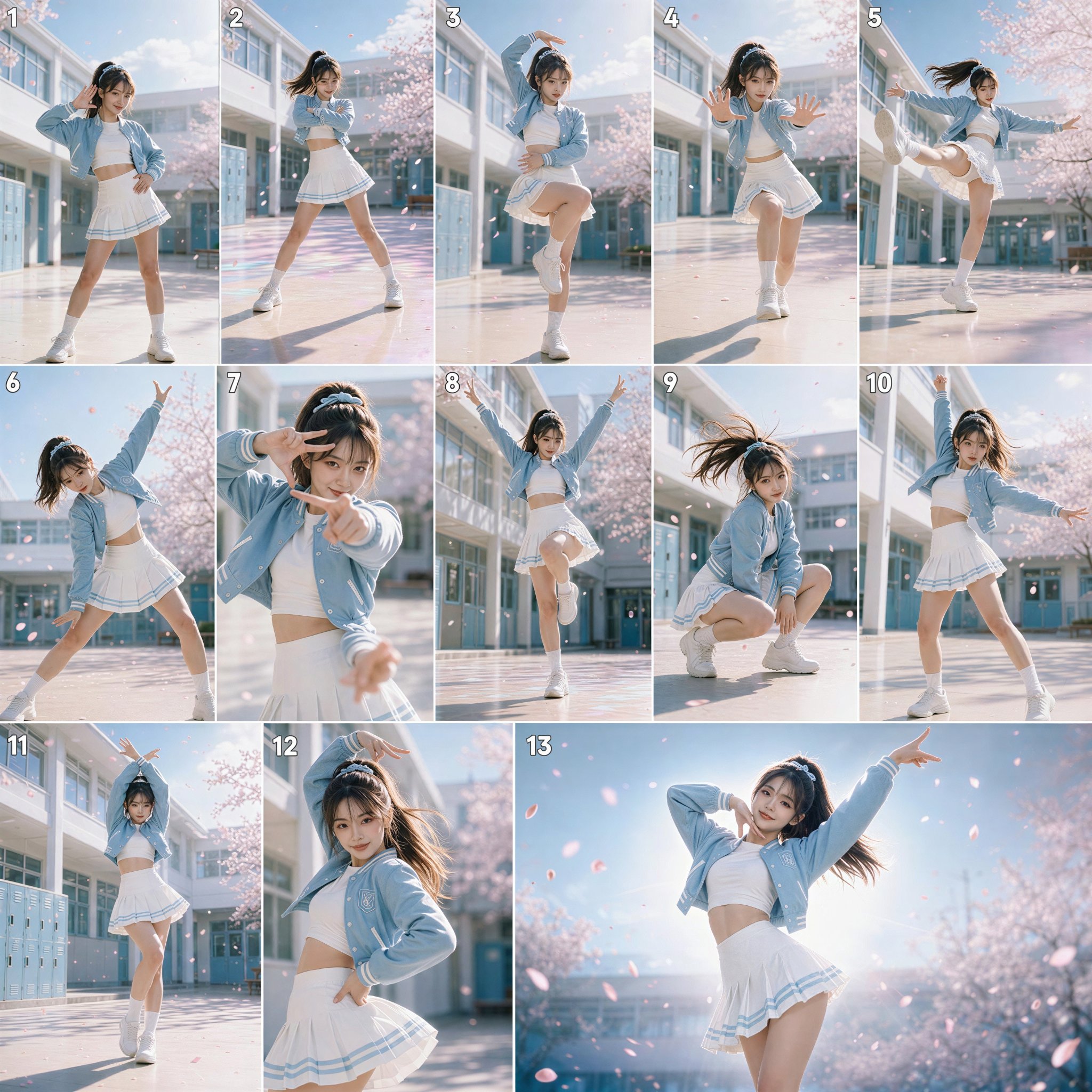
This gives the video model a movement map before animation begins.
The storyboard does not replace the prompt.
It makes the prompt more useful.
That is why Chat to Generate and Chat to Edit work best as a pair.
Chat to Generate creates the visual starting point.
Chat to Edit turns that starting point into choreography direction.
Better direction leads to better dance videos.
Step 4: Generate the Dance Video With Image to Video Ultra S
Once the AI influencer model, first frame, and 16-panel storyboard are ready, the video has a real foundation.
The first frame anchors the performer.
The storyboard defines the routine.
The written prompt clarifies timing, camera behavior, lighting, and realism.
Then Image to Video Ultra S can turn that visual plan into motion.
This is where Seedance 2.0 fits into the APOB AI workflow. It is not being used as a loose text-to-video experiment. It becomes part of a guided image-to-video process built around assets the creator has already shaped.
The workflow is no longer:
text prompt -> dance video
It becomes:
AI influencer model -> first frame -> 16-panel storyboard -> motion prompt -> Seedance 2.0 video
That extra structure makes a real difference.
Image to Video Ultra S Prompt: Seedance 2.0 Dance Video
1Animate the provided first-frame image into a polished 15-second vertical K-pop dance performance video. Preserve the same adult female dancer, facial identity, hairstyle, costume, body proportions, campus environment, pastel color palette, and cinematic lighting throughout the entire clip.2The dancer performs a fast, clean, high-energy K-pop choreography with precise arm lines, controlled shoulder hits, chest pops, hip accents, fast footwork, knee lifts, one 180-degree spin, one 360-degree spin, a side kick, a body wave, a low squat, a strong rise, and a final idol pose.3Movement must look professionally choreographed, rhythmic, athletic, feminine, energetic, and synchronized to an imagined upbeat K-pop beat. Maintain realistic balance, realistic joint motion, stable anatomy, stable face identity, natural hair physics, natural skirt movement, realistic jacket and fabric motion, consistent shoes, consistent background architecture, and consistent lighting.4Camera language: cinematic medium-wide and full-body framing, subtle dolly-in, lateral tracking, low-angle emphasis, smooth 25-degree and 90-degree orbit movements, no random camera shake, no excessive zoom, no fisheye distortion. Keep the dancer fully visible during all important footwork and spins.5Visual style: fresh dreamy campus, pastel blue and white, morning sunlight, soft cherry blossom petals, airy clean atmosphere, premium K-pop music video, realistic, high detail, commercial quality, natural motion blur, sharp final pose.6Avoid identity drift, face morphing, costume changes, disappearing limbs, extra arms, extra legs, unstable hands, broken joints, foot sliding, floating body, unnatural speed changes, warped background, excessive motion blur, cropped feet, sudden lighting changes, camera teleportation, duplicate dancer, background people, text, logo, watermark.7-86. Image-to-Video Prompt by Second90.0s–1.0s10Begin from the exact first frame. The dancer holds the opening pose for 0.15 seconds, maintaining direct eye contact. On the first beat, she sharply lowers her right hand from beside her ear toward her right hip while her left shoulder pops forward. Her head gives one quick controlled nod to the left. Her right toe turns slightly inward. Keep the full body visible. Add a very subtle 5% dolly-in. Hair and jacket sleeve respond naturally with a small delayed motion.11-121.0s–2.0s13The dancer crosses both forearms tightly in front of her chest, then rapidly opens them horizontally to each side. She bends both knees twice in rhythm, creating two clean downward pulses. Add two small chest pops, one per knee pulse. On the second pulse, slide the left foot smoothly to the side while keeping the torso controlled. Move the camera slowly left by approximately half a body width. Preserve stable facial identity and clean hand shapes.14-152.0s–3.0s16Raise the right arm in a smooth semicircle above the head while the left hand sweeps across the waist in the opposite direction. Accentuate the right hip sharply to the side. Lift the left knee forward to waist level in a compact controlled motion. Place the left foot down into a crossed stance. Shift the camera slightly lower and push in gently to increase power. Keep the feet, knees, and arm lines anatomically correct.17-183.0s–4.0s19The dancer takes two quick confident steps toward the camera. With each step, rotate both wrists outward in a synchronized flick. On the second step, slice both hands downward from shoulder level while dropping the body into a brief low level. Immediately rebound upward. The camera moves backward at the same speed, maintaining a consistent full-body framing. Each action should have crisp beat-based stops.20-214.0s–5.0s22Continue the upward rebound and transition into a counterclockwise 180-degree turn led by the left foot. Both arms open from low position to shoulder height during the turn. The ponytail, pleated skirt, and jacket hem flare naturally with rotational momentum. As she completes the turn facing the camera again, shift the camera toward a right-front three-quarter angle. Keep the spin fast but readable.23-245.0s–6.0s25Immediately after completing the turn, the dancer performs a sharp right-leg side-front kick with a pointed toe, no higher than waist level. She lowers the right leg with control and leans the torso diagonally to the left. Extend the left hand downward and the right arm upward, forming a strong diagonal line. Use a slightly low camera angle. Begin a stronger dolly-in from full-body toward a knee-up medium shot.26-276.0s–7.0s28Pull both arms quickly back toward the chest and perform two clear shoulder hits, alternating right then left. Bring both hands up in front of the face to form a brief rectangular frame with the fingers. The dancer maintains a playful focused expression. The camera finishes the push-in at a medium shot but keeps both hands and upper legs visible. Avoid hand deformation and face drift.29-307.0s–8.0s31The dancer sharply whips her head to the right, causing the ponytail to follow with realistic delayed motion. Open both hands outward from the face frame. Perform one smooth body wave starting from the chest, flowing through the torso, waist, and hips. End the wave by pointing the right index finger directly toward the lens. Add a tiny impact shake on the pointing beat, less than 2% frame displacement.32-338.0s–9.0s34Transition into fast traveling cross-steps toward screen left. The dancer crosses one foot over the other while swinging both arms rhythmically beside the body. On the third beat, lift the right knee while raising both arms overhead into a wide V shape. Track the camera laterally to the left, matching her speed. Allow the background lockers and windows to create natural parallax.35-369.0s–10.0s37Lower the raised knee and initiate a full clockwise 360-degree spin using the right foot as the axis. Keep the left arm extended while the right arm sweeps outward from the chest. The camera moves in the opposite direction, orbiting counterclockwise around the dancer by approximately 70–90 degrees. Hair and skirt create a clear circular motion trail, but the body and face remain stable and realistic.38-3910.0s–11.0s40Complete the spin facing the camera and immediately drop into a controlled low squat, placing both hands near the outer thighs. On the next beat, lift the head sharply and rise quickly. As she rises, throw both arms upward. The camera follows vertically from the low level to standing height. Maintain realistic knee alignment and prevent foot sliding.41-4211.0s–12.0s43From standing, stomp the right foot forward on a strong beat. Perform one powerful chest pop. Pull the right hand sharply from overhead down toward the chest while extending the left arm sideways. Transition directly into fast footwork: right foot side tap, left foot cross, right foot step back. Return the camera to a stable centered full-body view so the legs remain clearly visible.44-4512.0s–13.0s46Complete the fast footwork by stepping the left foot forward. At the same time, perform four clean geometric arm cuts in front of the chest: horizontal, diagonal, inward, then upward. Finish with both wrists crossed above the head. The camera drifts backward slightly to preserve the full body and allow the arms to remain inside frame. Every arm position must be sharp and clearly separated by the beat.47-4813.0s–14.0s49Explosively open both arms from the crossed overhead position. Take one strong step toward the camera. Rotate the torso 45 degrees to the left. Sweep the right hand upward along the side of the face while placing the left hand on the waist. Add one quick controlled hair whip. Push the camera rapidly from full-body toward a thigh-up medium shot, while keeping the hands visible.50-5114.0s–15.0s52Transition into the final hero pose. Extend the left leg diagonally to the side while keeping the right leg as the support. Form a subtle S-curve through the body. Extend the left arm diagonally upward and outward. Bring the right hand near the face with relaxed elegant fingers. Raise the chin slightly and look directly into the lens with a bright confident expression.53From 14.0 to 14.7 seconds, add a very small final dolly-in. From 14.7 to 14.8 seconds, allow the skirt and ponytail to settle naturally. From 14.8 to 15.0 seconds, hold the final pose completely still. Add soft floating cherry blossom petals behind the dancer and a gentle white-blue halo of light in the background. End on a crisp, stable, poster-like frame.54-557. Negative Motion Prompt56No face change, no identity drift, no hairstyle change, no costume change, no color shift, no background replacement, no duplicate dancer, no extra limbs, no extra fingers, no fused hands, no missing feet, no twisted knees, no broken elbows, no unnatural spine bending, no floating, no foot skating, no sliding shoes, no random dance moves, no uncontrolled shaking, no sudden camera jump, no fisheye distortion, no extreme zoom, no excessive slow motion, no frame interpolation artifacts, no unstable facial expression, no lip movement, no background crowd, no text, no subtitles, no watermark, no logo.57-588. Continuity Lock Prompt59Use the exact same dancer in every frame. Preserve the same face, eye shape, makeup, skin tone, high ponytail, baby blue ribbon, varsity jacket, white crop top, pleated skirt, socks, sneakers, body proportions, and accessories.60Preserve the same campus courtyard, pastel lockers, white building, blue window frames, tiled floor, cherry blossom trees, morning light direction, pastel color grading, and weather conditions.61The dancer must remain a single adult female performer. The outfit must not transform, disappear, lengthen, shorten, or change material. Hair length must remain consistent. Shoes must remain attached to the feet. The final frame must clearly match the opening character design.
A good video prompt should not compete with the storyboard. It should reinforce it.
If the storyboard shows a clean neon dance routine, the prompt should support that routine. It should not suddenly introduce a new outfit, location, camera style, or unrelated movement.
Think of the storyboard as the choreographer.
The prompt is there to clarify the choreography, not rewrite it.
When the influencer model, first frame, storyboard, and prompt all point toward the same outcome, Image to Video Ultra S can produce stronger motion, smoother continuity, and more controlled results.
Step 5: Add Voice, Hook, and Personality
Motion captures attention.
Personality makes the account memorable.
For dance content, the voice layer does not need to dominate the clip. A short intro, ending reaction, talking avatar post, or caption can be enough.
The script can be simple:
"Wait for the last hit."
"Sixteen counts. One take."
"I built the whole routine from a storyboard."
With APOB AI, creators can add Talking Avatar or Lip Sync when the influencer needs to introduce the routine, explain a challenge, promote a product, or invite the audience to try the move.
Dance videos do not need long speeches.
They need a hook that lands fast.
Step 6: Build a Scalable Dance Content Loop
The real value is not one successful dance generation.
The value is the loop.
Create. Edit. Storyboard. Animate. Review. Improve. Post. Repeat.
That is how one AI influencer becomes an ongoing content series.
One AI influencer model can support:
- TikTok dance challenges
- Instagram Reels
- YouTube Shorts
- X video posts
- music teaser assets
- fashion fit-check routines
- fitness warm-up clips
- product launch videos
- UGC-style dance ads
- recurring virtual brand characters
The identity stays consistent while the choreography changes.
The creator can build different routines, camera moods, outfits, music hooks, and product moments around the same recognizable performer.
That is the shift APOB AI is focused on.
AI influencer dance videos should not feel like a gamble.
It should feel choreographed.
The Next Phase of AI Influencer Dance Video
The strongest AI creators will not be the ones who generate once and get lucky.
They will be the ones who build systems.
With APOB AI's AI Influencer Generator, GPT Image 2.0 inside Chat to Generate and Chat to Edit, and Seedance 2.0 inside Image to Video Ultra S, creators can move from unpredictable dance outputs to a full production workflow:
Build the influencer model.
Create the first frame.
Edit it into a 16-panel dance storyboard.
Generate a more controlled Seedance 2.0 video.
Add a hook or voice layer.
Improve the next version.
Scale the content across platforms.
APOB AI is an independent AI influencer platform built to make advanced AI generation more practical, consistent, and creator-friendly.
Prompt roulette is over.
A better dance workflow has arrived.
Try it now:https://mega.apob.ai/article
🎁Quote or retweet this post to get 5,000 credits to try it out — plus access to more dedicated prompts and workflows.
Disclaimer: APOB AI does not support or permit the creation of deepfakes. Users are responsible for intellectual property rights and legal compliance for their generations. Please review APOB AI's Terms of Service for full details.