Most AI tutorials start with code.
They skip the part that actually matters.
The concepts.
So you build a chatbot that half-works. You don't know why it hallucinates. You don't know what a context window actually means. You don't know why your RAG system returns the wrong documents.
And you're debugging blind.
Here are 10 AI concepts every builder must understand before writing a single line.
No PhD required. No jargon.
Just the mental models that make everything click.
Save this. It will save you weeks.
1. Tokens — What AI Actually Reads
You write a sentence. The model doesn't see a sentence.
It sees tokens.
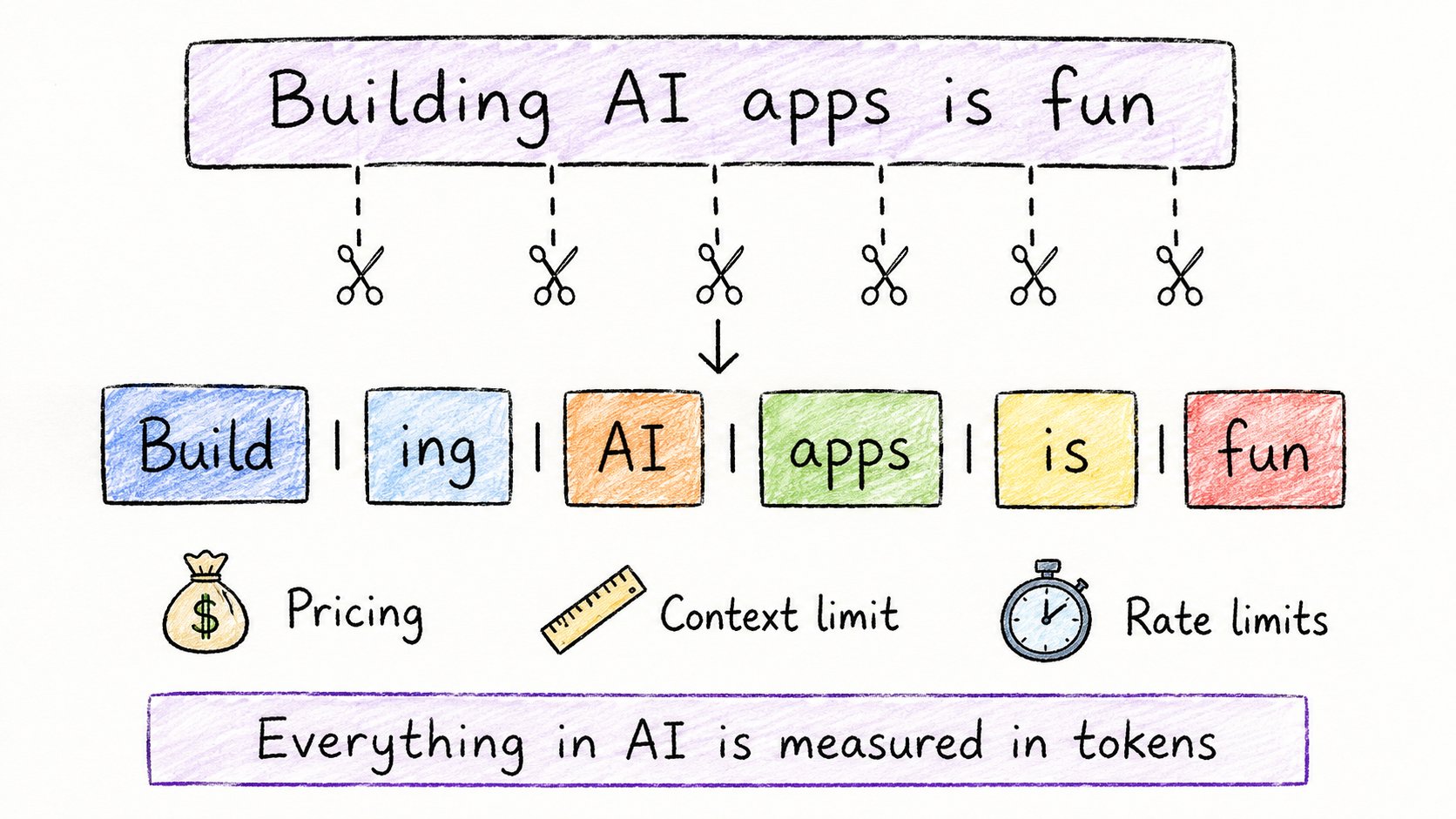
A token is a small chunk of text.
→ Sometimes a full word: "build" → 1 token
→ Sometimes part of a word: "building" → "build" + "ing" → 2 tokens
→ Sometimes punctuation: "." → 1 token
"Building AI apps is fun" → 6 tokens
Why this matters as a builder:
Everything in AI is priced, limited, and measured in tokens.
→ API cost = cost per 1,000 tokens → Context window = max tokens in one request → Rate limits = tokens per minute
The moment you understand tokens, you stop being confused by: → Why your prompt got cut off → Why the API bill was higher than expected → Why the model "forgot" something you said earlier
Rule of thumb: 1,000 tokens ≈ 750 words.
2. Embeddings — How AI Understands Meaning
After text becomes tokens, it becomes numbers.
Those numbers are called embeddings.
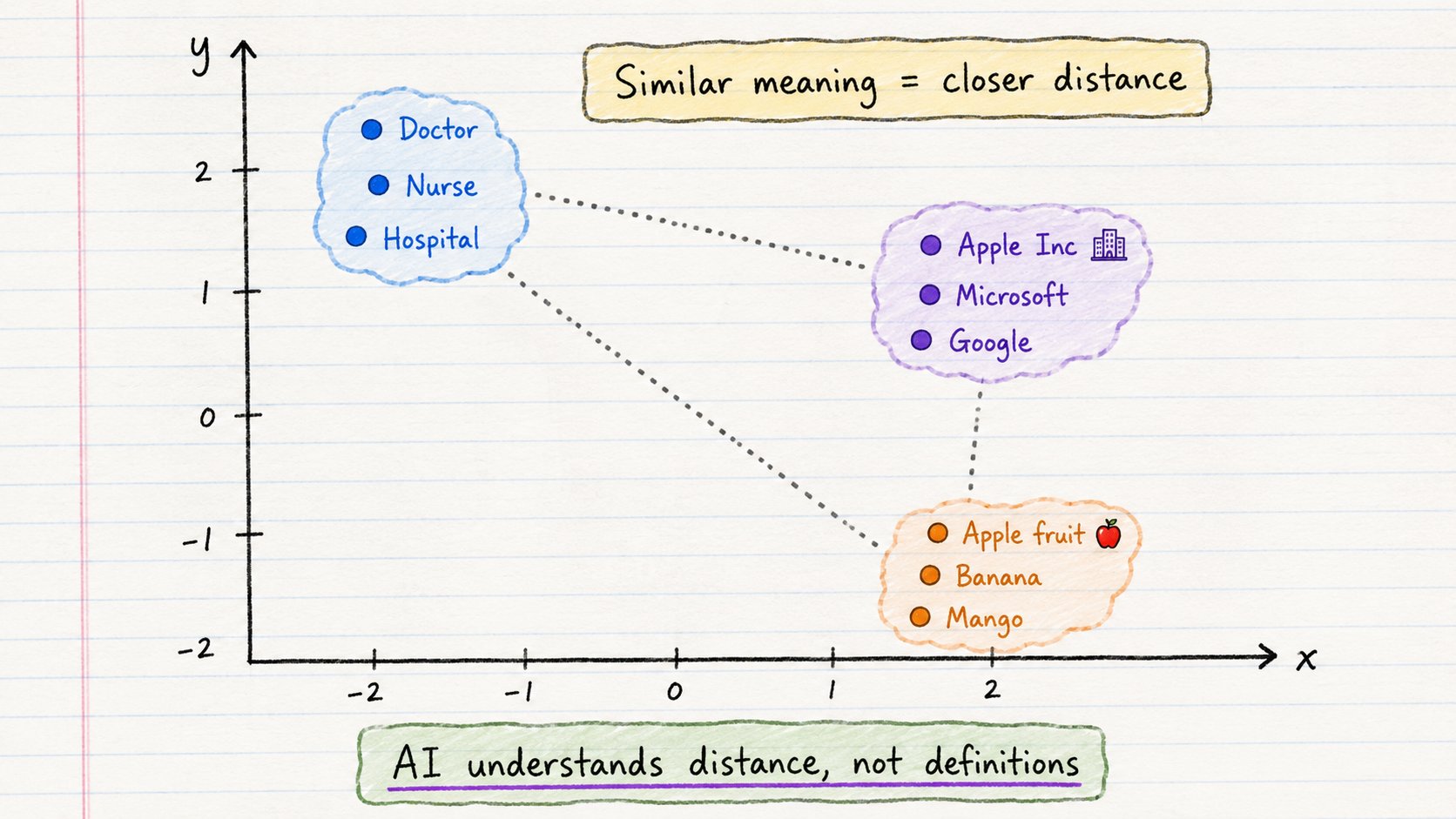
Each word, sentence, or document gets converted into a vector — a long list of numbers that represents its meaning.
The key insight:
Similar meaning = similar numbers = close together in space.
→ "Doctor" sits near "Nurse"
→ "Apple the fruit" sits far from "Apple the company"
→ "King" minus "Man" plus "Woman" ≈ "Queen"
AI doesn't understand meaning the way you do.
It understands distance.
Why this matters as a builder:
Embeddings power everything that "understands intent":
→ Semantic search (finds meaning, not just keywords) → Recommendations (similar items) → RAG systems (finds relevant documents) → Chat with PDF (matches your question to the right page)
If your search returns the wrong results, the embedding model is usually where to look.
3. Attention — How AI Understands Context
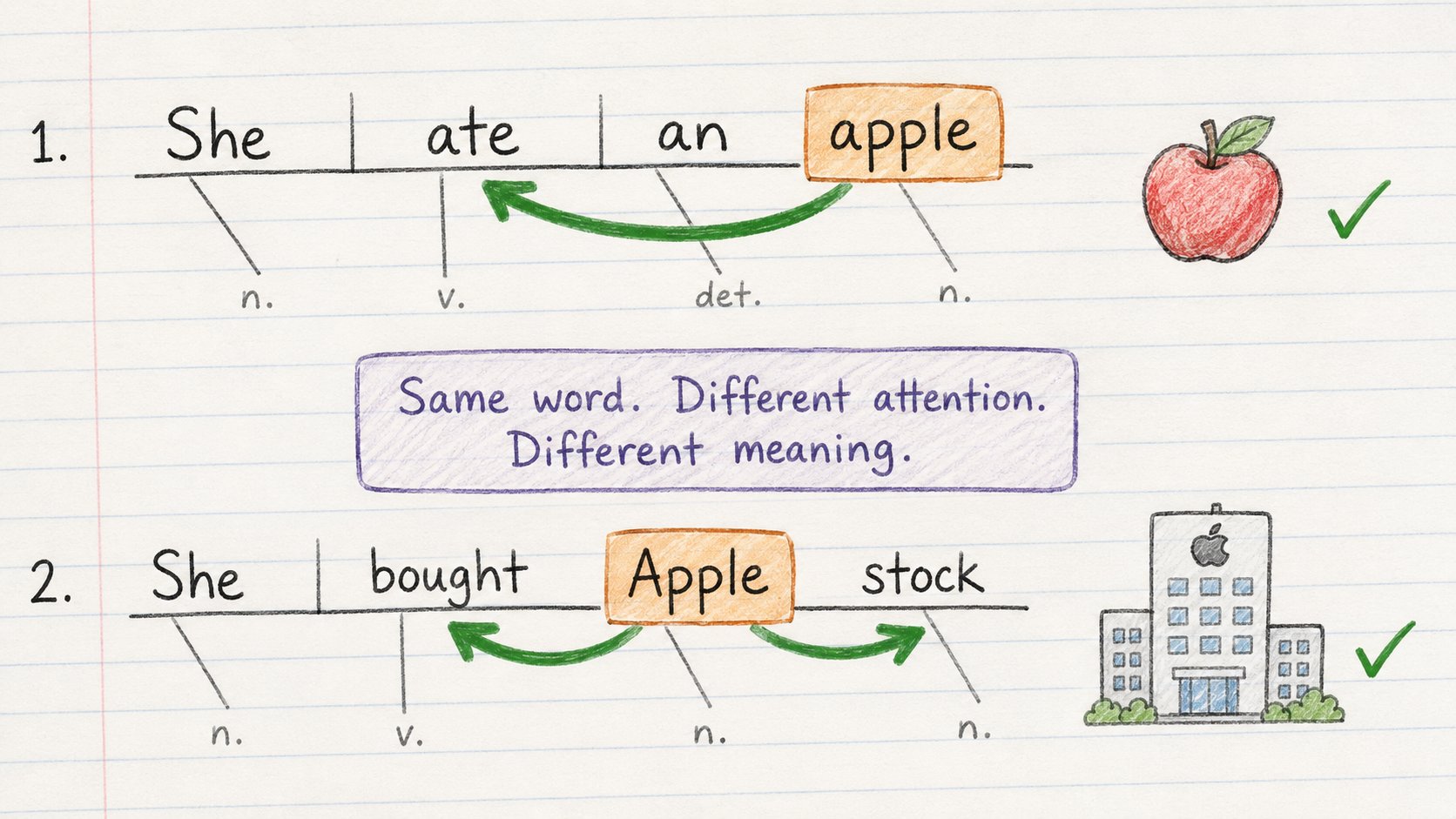
Same word. Completely different meaning.
→ "She ate an apple" → fruit
→ "She bought Apple stock" → company
How does the model know which one?
Attention.
Attention lets every word look at every other word in the sentence and decide what matters most.
It's not reading left to right. It's seeing the whole sentence at once and dynamically connecting the dots.
In "She bought Apple stock": → "Apple" pays high attention to "bought" and "stock" → Model concludes: company
In "She ate an apple": → "apple" pays high attention to "ate" → Model concludes: fruit
Before attention, models read word by word. Slow. Missed long-range connections.
After attention, models see everything at once.
This single idea is why modern AI works.
Why this matters as a builder:
Understanding attention explains why: → Your model handles long prompts well when context is clear → Ambiguous prompts produce inconsistent outputs → Adding context to your prompt dramatically improves results
4. Transformers — The Engine Behind Everything
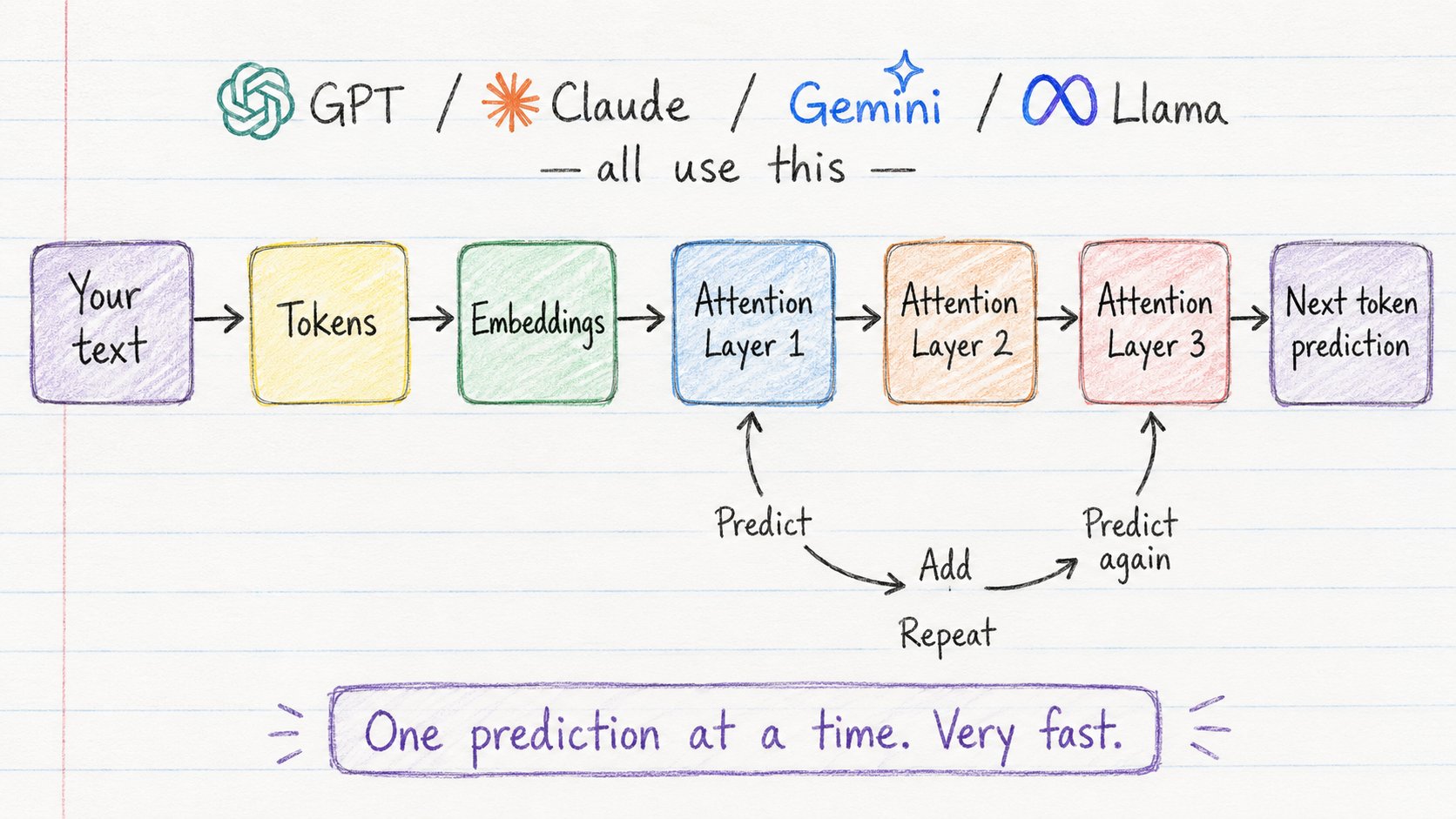
GPT. Claude. Gemini. Llama. Mistral.
All transformers.
The transformer is the architecture that runs under every modern AI model you will ever use.
It works in one simple pipeline:
Text → Tokens → Embeddings → Attention layers → Prediction
The model doesn't generate a full sentence at once.
It predicts one token at a time.
→ Predict next token → Add it to the sequence → Predict next token again → Repeat
That loop — running billions of times per second — is what produces the text you see.
Why this matters as a builder:
Understanding the transformer pipeline explains:
→ Why longer outputs take longer (more prediction loops)
→ Why the model is "non-deterministic" (probability at each step)
→ Why earlier tokens influence later ones
→ Why cutting off context mid-thought breaks output quality
You don't need to build a transformer. You need to understand what's happening inside the box you're calling.
5. LLMs — What They Actually Are
An LLM is a transformer trained on a massive amount of text to do one thing:
Predict the next token.
That's it.
Training data: books, websites, code, Wikipedia, Reddit, documentation.
Trillions of tokens.
The training task sounds too simple to explain what these models can do:
→ See text → Predict what comes next → Check if it was right → Adjust weights slightly → Repeat trillions of times
The result: a model that learned the patterns of human language so deeply it can write code, reason through problems, translate languages, and explain complex ideas.
None of that was explicitly programmed.
It emerged from next-token prediction at scale.
The most important thing to understand as a builder:
LLMs are not databases. They don't look up answers. They predict answers based on patterns.
That distinction explains everything — including why they hallucinate.
6. Hallucination — Why AI Lies Confidently
This will happen to you in production.
A user asks your AI app a question. The AI gives a confident, well-structured, completely wrong answer.
That's a hallucination.
And here's why it happens.
The model is not trying to tell the truth.
It's trying to predict the most probable next token.
If a false statement looks like something that "should come next" based on training patterns — it generates it. No verification. No lookup. Pure pattern completion.
It will:
→ Cite papers that don't exist
→ Describe API functions that were never created
→ State fake statistics with full confidence
→ Invent plausible-sounding but wrong code
The danger: it never sounds uncertain.
What you do about it as a builder:
→ Use RAG (fetch real data, don't rely on memory)
→ Add verification layers before showing output to users
→ Use tool calls (let the model check, not guess)
→ Never use raw LLM output for facts in production without a check
Understanding hallucination is what separates developers who ship safe AI products from developers who ship embarrassing ones.
7. Temperature — The Creativity Dial
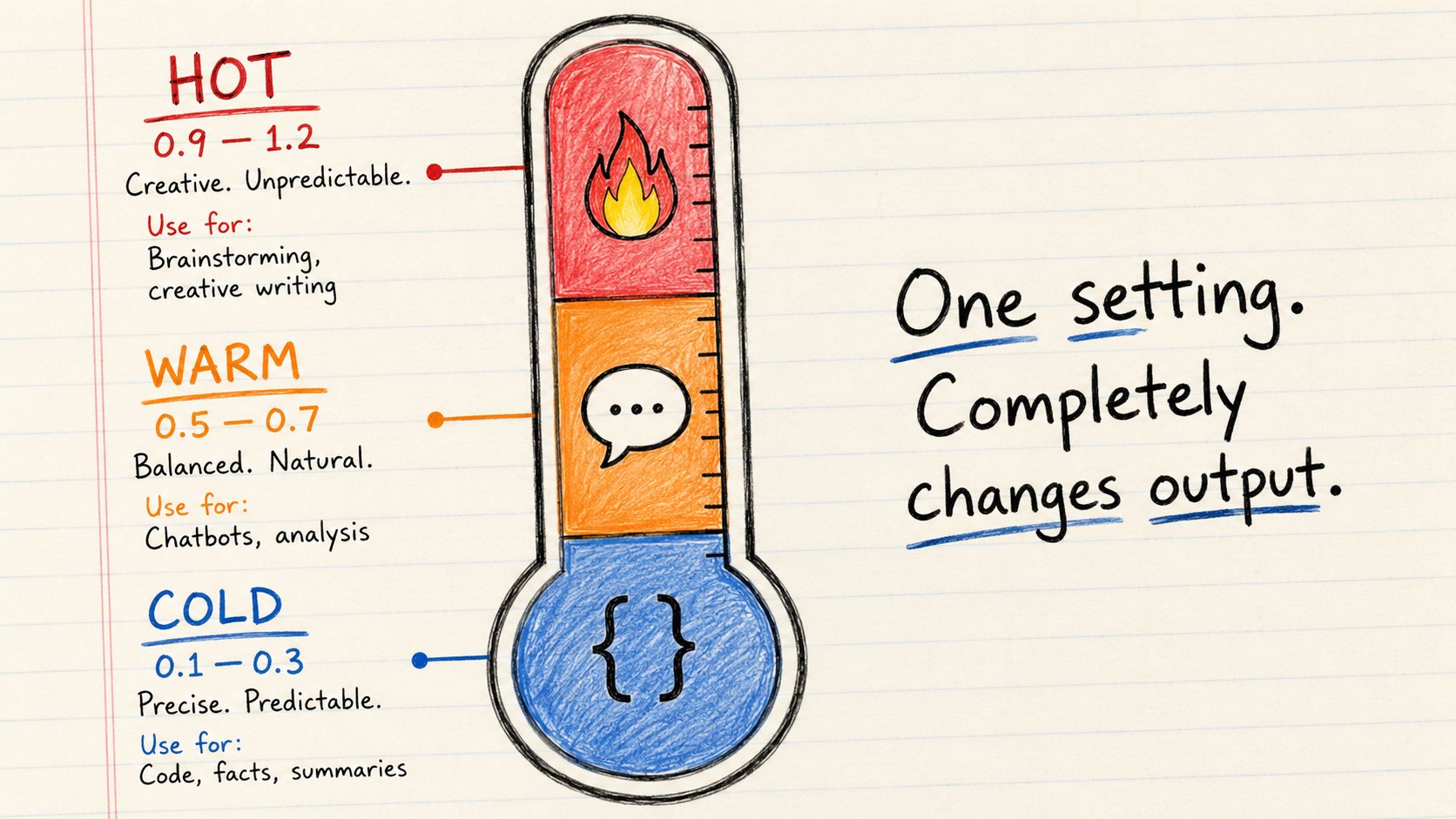
Every time AI generates a token, it calculates probabilities for every possible next word.
Temperature controls what happens next.
→ Low temperature: almost always picks the most likely token. Safe. Predictable.
→ High temperature: picks more randomly from the probability distribution. Creative. Varied.
Practical settings for builders:
Use case Temperature
Writing code 0.1–0.2
Factual Q&A 0.2–0.3
Summarization 0.3–0.5
Chatbot replies 0.5–0.7
Creative writing 0.8–1.0
Brainstorming 1.0+
The mistake most beginners make:
Using the default temperature (usually 0.7–1.0) for everything.
Then wondering why their coding assistant writes creative but broken code.
Temperature is one line of code. Set it intentionally.
8. Context Window — AI's Working Memory
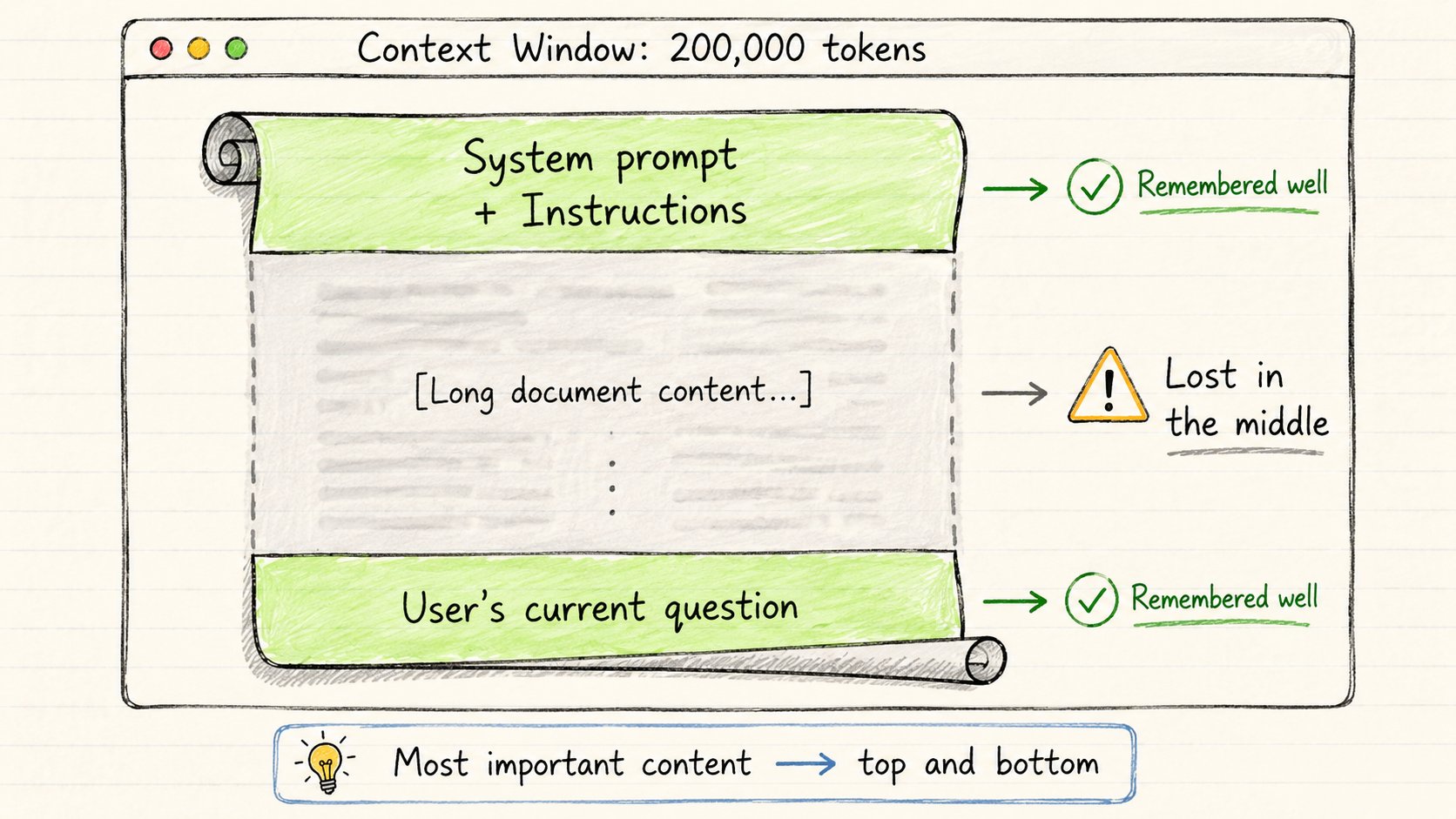
Every AI model can only "see" a fixed amount of text at once.
That limit is the context window.
It includes everything in one request:
→ Your system prompt → Conversation history → Documents you passed in → The model's own responses → Your current message
All of it together must fit inside the window.
Current limits:
→ GPT-4o: 128,000 tokens → Claude 3.5 Sonnet: 200,000 tokens → Gemini 1.5 Pro: 1,000,000 tokens
Bigger sounds better. But there's a problem.
Models don't read context evenly.
They pay more attention to the beginning and end.
The middle? Often ignored.
This is called the "Lost in the Middle" problem.
What this means as a builder:
→ Put the most important instructions at the top of your system prompt → Put the most important context right before the user's question → Don't assume the model "saw" something just because you included it → Chunk and summarize long documents rather than dumping them in whole
Context management is one of the most important skills in AI engineering.
9. RAG — How AI Uses Your Data
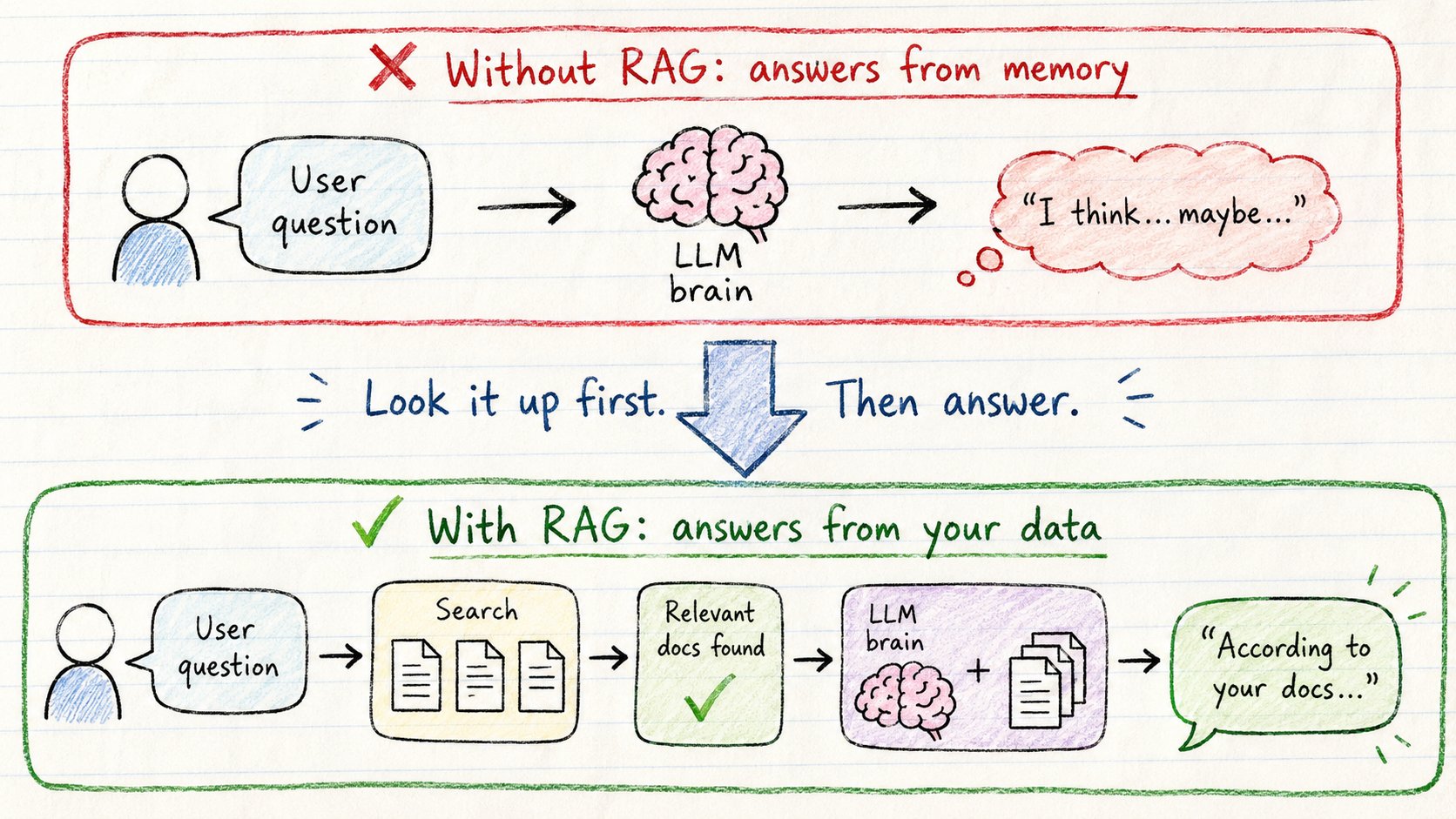
LLMs are trained on data up to a cutoff date.
They don't know about: → Your company's internal documents → Last week's news → Your product documentation → Your users' data
RAG solves this.
RAG = Retrieval-Augmented Generation
Instead of the model answering from memory, it first searches a knowledge base, then answers using what it found.
The flow every builder needs to know:
- User asks question
- Question → embedding → search vector database
- Most relevant documents retrieved
- Documents + question sent to model
- Model answers using real, specific data
Why RAG is better than fine-tuning for most use cases:
→ Your data changes? Just update the documents. No retraining.
→ Need source citations? Documents are right there. → Reduces hallucination dramatically.
→ Works with private data that should never be in training.
Every serious AI product you use has RAG under the hood.
Customer support bots. Documentation assistants. Legal tools. Internal knowledge bases.
If you learn one architecture pattern this year, learn RAG.
10. AI Agents — AI That Actually Does Things
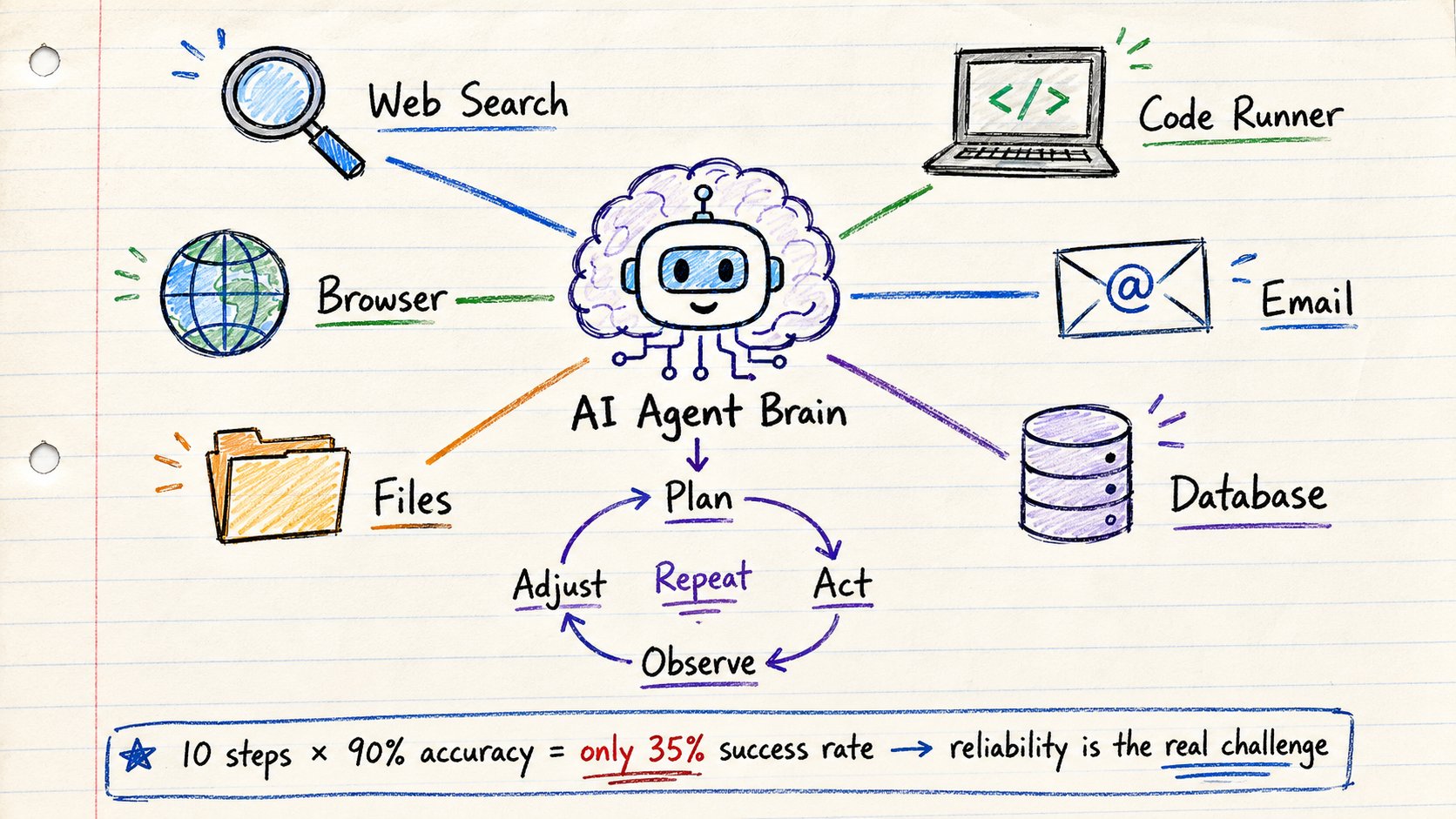
Standard LLM: → You ask. It answers. Done.
AI Agent: → You give a goal. It plans. It uses tools. It checks results. It adjusts. It completes.
The difference is a loop.
The agent loop:
- Understand the goal
- Decide what to do next
- Use a tool to do it
- Check what happened
- Decide next step
- Repeat until done
What tools can agents use?
→ Web search → Code execution → File read/write → API calls → Database queries → Email and calendar → Browser control
Real example — debugging agent:
→ Reads the error → Searches the codebase for the relevant file → Identifies the problem → Writes a fix → Runs tests → Sees 2 tests still failing → Reads the failing tests → Adjusts the fix → Runs again → All tests pass → Done
The model is the brain. Tools are the hands.
What makes agents hard as a builder:
Each step has a failure rate. Three steps at 90% accuracy = 72.9% task completion. Ten steps = 34.8%.
This is why reliability engineering is the real challenge in agents — not building the agent itself.
Here is the exact order to learn these if you are starting from zero:
→ 1. Tokens (understand the unit everything is measured in)
→ 2. Embeddings (understand how meaning becomes numbers)
→ 3. Attention (understand how context works)
→ 4. Transformers (understand the architecture)
→ 5. LLMs (connect it all together)
→ 6. Hallucination (understand the core failure mode)
→ 7. Temperature (learn to control output style)
→ 8. Context Window (learn to manage memory)
→ 9. RAG (learn to use your own data)
→ 10. Agents (learn to build systems that act)
This is not 10 random facts.
It is a complete mental model of how AI engineering works.
Once you understand all 10, AI stops feeling like magic.
It starts feeling like engineering.
And that is when you actually start building things that work.
If this was useful:
→ Repost to help other builders learn this faster
→ Follow @sairahul1 — I write about building real AI systems
→ Bookmark this before your next AI project
I write about Claude, AI systems, and tools for builders.