Using multiple AI tools for coding means maintaining several copies of the same skill. If you change one and forget to sync the others, you'll spend ages troubleshooting only to find it's a version mismatch.
The biggest headache right now isn't writing skills, it's that they are becoming too scattered.
The same skill exists in Codex and Claude Code. At first, it's just a few extra folders, which seems fine.
The real trouble starts later: you update a skill but forget to sync it to the other tool. Consequently, the same task performs one way in Codex and another in Claude Code. You'll waste half an hour before realizing the versions aren't synced. I eventually decided to maintain only one copy.
When different tools read their own copies, skills become increasingly fragmented.
This article solves how to maintain just one copy of your skills and have both Codex and Claude Code read from it.
01 | Maintain Only One Copy of Skills
This "AI Work Manual" shouldn't be scattered across each tool's individual folders.
The recommended approach is to put skills into a unified folder, or even a separate Git repository, and then have the entry points for Codex and Claude Code read from this single source.
We use something called a "symbolic link" (soft link). Think of it as a shortcut to a source folder: when you enter it, you see the content, but the actual files live in the source folder. It's not a copy, so updating the source file automatically updates all entry points.
Here is a sample directory structure:
1~/ai-workspace/2 shared-skills/3 article-writing/4 SKILL.md5 note-capture/6 SKILL.md78 my-project/9 .agents/10 skills -> ../../shared-skills11 .claude/12 skills -> ../../shared-skills
shared-skills is the only place where source files are stored. .agents/skills and .claude/skills are just entry points pointing to it.
When you modify content in shared-skills, all tools reading through their respective entry points will naturally see the latest version.
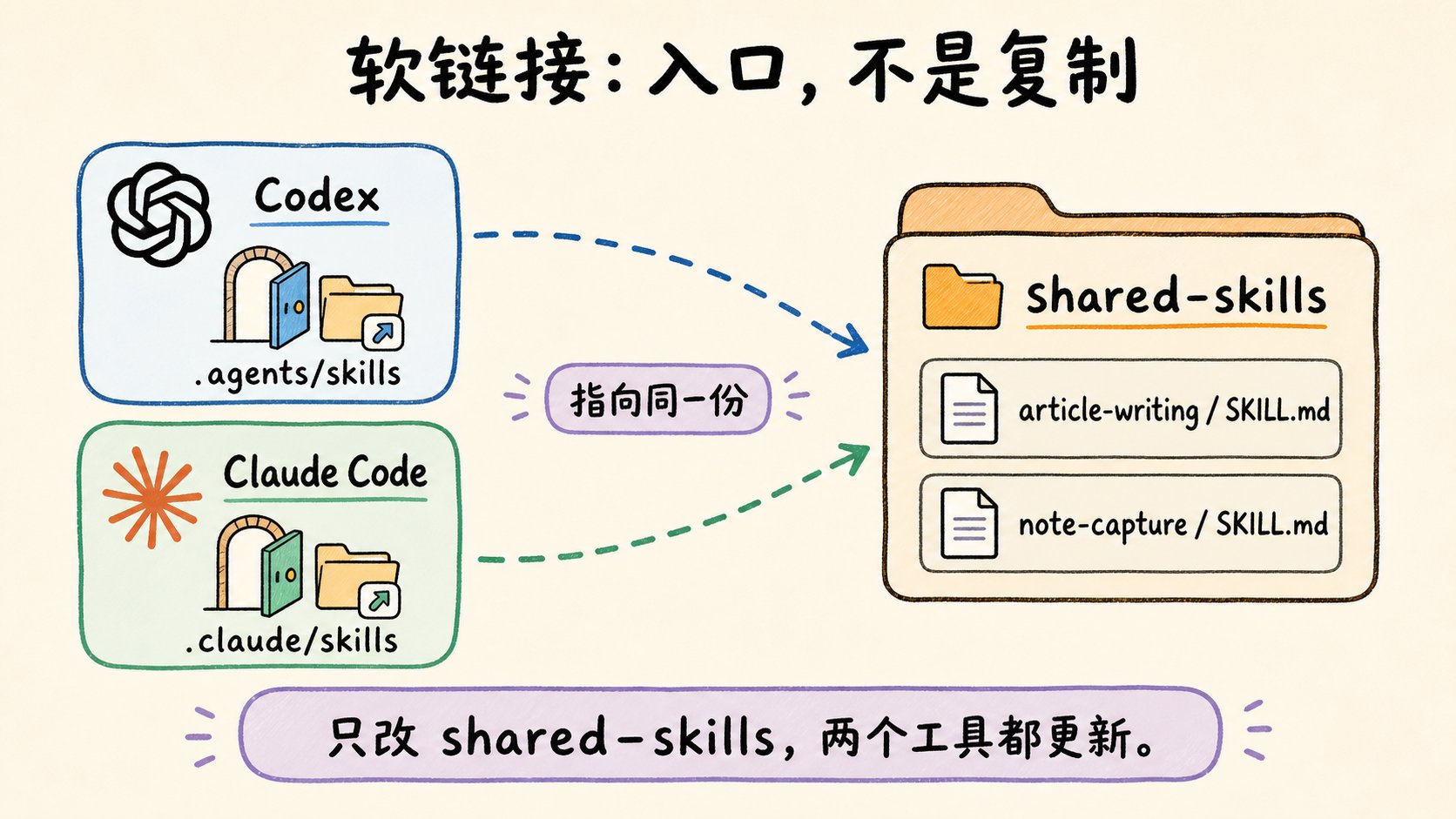
02 | Let AI Help You Organize
You don't have to manually decide which directories to merge or which paths to link.
Drop the following prompt into Codex or Claude Code to let the AI inventory your local structure and provide a migration plan:
1Please help me organize the management of AI tool skills on my computer.23I am not a technical person, so please explain in simple terms without assuming I understand file systems, symbolic links, or the command line.45Goals:61. Identify directories in the current project like .agents/skills, .claude/skills, or others that might store AI tool rules and skills.72. Determine which of these directories contain the actual source files that need maintenance and which are just copies.83. Design a unified shared-skills directory for centralized maintenance.94. Provide a symbolic link or unified reference plan so Codex and Claude Code read from the same instructions.105. List the commands you intend to execute and explain what each command does before outputting.116. Do not delete, overwrite, or move any files without my confirmation.127. Use anonymized paths for all real usernames, private directories, and repository names in the summary.1314Please output in the following format:1516- Which skills or rule directories you found17- Which location is better as the single source directory18- Which locations should be changed to symbolic links or unified references19- What each step will affect20- Commands requiring my confirmation before execution21- How to roll back if something goes wrong
AI will first list what it found, suggest what to do, and explain the impact of each step, waiting for your confirmation before acting.
If skills are already in multiple Git repositories, the unified directory can act as an aggregation point, using symbolic links to point to the source files in various repositories.
03 | Manage Project Rule Files Together
Project rule files face the same issue.
Some tools read AGENTS.md, others read CLAUDE.md. Essentially, they both answer: "How should the AI work in this project?"
If the content is essentially the same, there's no need to maintain multiple copies. Keep one main file and point the others to it using symbolic links:
1AGENTS.md2CLAUDE.md -> AGENTS.md
Again, let the AI handle the judgment. Use this prompt:
1Please help me check the AI tool rule files in the current project.23I am not a technical person, so please explain what these files might be for in simple terms before giving suggestions.45Goals:61. Find if AGENTS.md, CLAUDE.md, or other AI tool rule files exist in the project root.72. Determine if these files have duplicate content, overlapping responsibilities, or only minor differences.83. If they can share content, suggest which one to keep as the main file and change others to symbolic links or reference entries.94. If a tool truly needs separate rules, explain where the differences should be kept instead of forcing a merge.105. Output suggested commands and explain their functions.116. Do not overwrite, delete, or rename existing files without my confirmation.127. Anonymize all local paths in the summary.1314Please output in the following format:1516- Rule files currently found17- What each file is likely responsible for18- Whether they are suitable for merging19- Suggested main file to keep20- Files suggested to be changed to symbolic links or reference entries21- Files to backup before execution22- Suggested commands and explanations of their roles
Write project rules once, and different AI tools will read the same specification. This reduces the "I changed the rule, but it didn't take effect in the other tool" problem.
04 | When is This Suitable?
Suitable for:
- Using multiple AI tools like Codex and Claude Code simultaneously.
- Needing to reuse the same set of skills or project rules across multiple tools.
- Frequently modifying skills and wanting to avoid manual copying.
- Wanting to manage skills in an independent Git repository.
- Needing to reuse the same workflow across multiple projects.
Not suitable for:
- Projects requiring a completely independent set of skills.
- Team members unfamiliar with symbolic links who might accidentally delete the source directory.
- Windows environments where symbolic link permissions are not configured.
- Tools whose official documentation explicitly states they do not support symbolic links (if unsure, ask the AI).
If you're unsure, don't delete files yourself. Use the prompts above to let the AI propose a plan first.
05 | A Few Reminders
Symbolic links point to paths, not file copies. If you move the source directory, the link will break.
For team collaboration, try to use relative paths (e.g., ../../shared-skills) instead of absolute local paths (e.g., /Users/xxx/...).
If the skills repository is managed separately, remember to commit the actual source repository to Git, not just the symbolic links in the project.