A deep dive into how Claude Code discovers, dispatches, and executes tools
Introduction
In a previous post, we reverse-engineered the Anthropic Harness's memory system from its leaked source code. Memory turned out to be surprisingly simple — markdown files, frontmatter, and prompt engineering. The tool system is the opposite. It is the most engineered subsystem in the entire codebase: 43+ tools, a streaming execution pipeline, a layered permission system, a hook framework, and a concurrency scheduler — all wired together to turn a stateless language model into something that can read files, run shell commands, search the web, and spawn sub-agents.
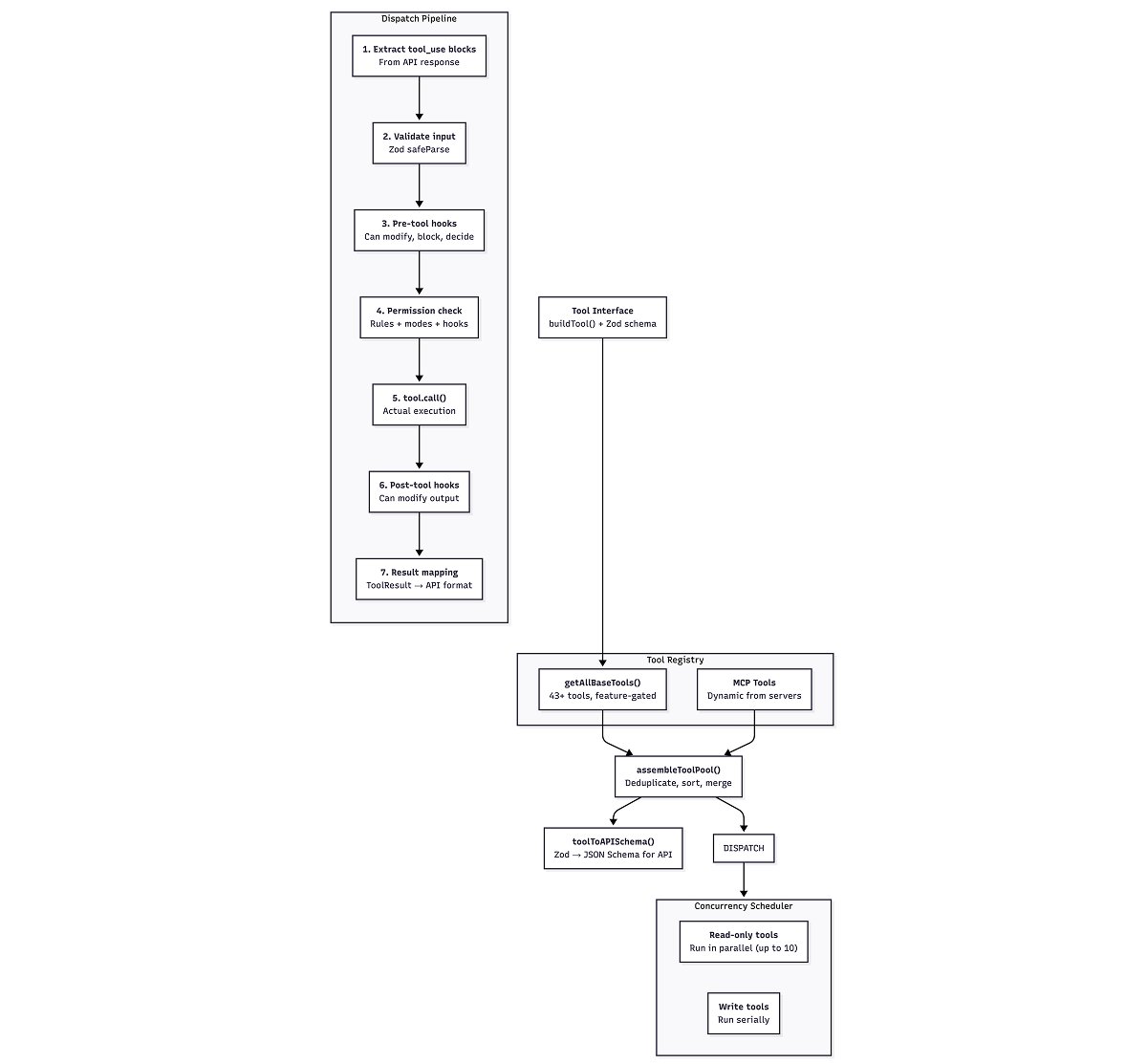
This post walks through the a tool's lifecycle, from how a tool is defined, to how the model's tool calls are dispatched, to how results flow back into the conversation. Broadly, the system is composed of four layers: a tool interface that every tool implements, a registry that assembles the tool pool, a dispatch pipeline that validates, permissions-checks, and executes each call, and a concurrency scheduler that decides what runs in parallel.
The Architecture at a Glance
The Tool Interface
Every tool in Claude Code implements the same interface, defined in Tool.ts. The type is generic over three parameters: Input (a Zod schema), Output (the result type), and P (progress data). In practice, a tool is an object with about 30 methods, but only a handful matter for understanding the system.
The core shape:
1type Tool<Input, Output, P> = {2 name: string3 inputSchema: ZodType // Zod schema for input validation4 call(input, context, canUseTool,5 parentMessage, onProgress): Promise<ToolResult>67 // Behavior declarations8 isConcurrencySafe(input): boolean // Can run in parallel?9 isReadOnly(input): boolean // Read-only operation?10 isDestructive(input): boolean // Destructive action?1112 // Permission and validation13 checkPermissions(input, context): Promise<PermissionResult>14 validateInput(input, context): Promise<ValidationResult>1516 // API integration17 description(input, options): Promise<string>18 prompt(options): Promise<string> // System prompt text for this tool19 mapToolResultToToolResultBlockParam(result, toolUseId): ToolResultBlockParam2021 // UI rendering (React)22 renderToolUseMessage(input, options): ReactNode23 renderToolResultMessage(content, ...): ReactNode24}
No tool implements this from scratch. A factory function called buildTool() fills in safe defaults:
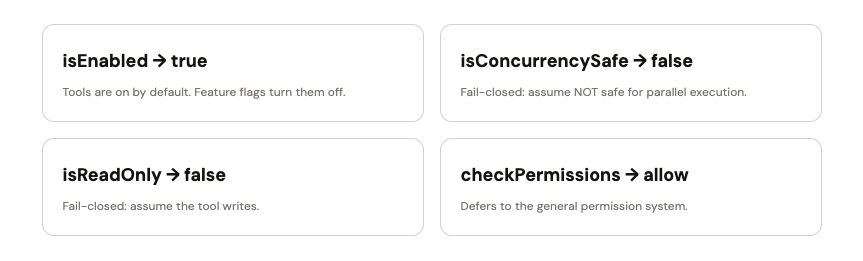
The defaults are deliberately conservative. A tool author who forgets to declare concurrency safety gets serial execution. A tool author who forgets to implement permission checks gets the default permission flow. The system fails closed.
The ToolResult type is worth noting:
1type ToolResult<T> = {2 data: T // The actual output3 newMessages?: Message[] // Optional follow-up messages4 contextModifier?: (ctx) => ToolUseContext // Mutate context for next tool5 mcpMeta?: { ... } // MCP protocol metadata6}
The contextModifier is important — it lets a tool change the execution context for subsequent tools in the same turn. This is how tools like EnterWorktree change the working directory for everything that follows. Critically, context modifiers are only allowed for non-concurrency-safe tools. If a tool runs in parallel, it cannot modify shared state.
The Tool Registry
All tools are registered in a single function: getAllBaseTools() in tools.ts. It returns a flat array. Some tools are always present; others are gated behind feature flags, environment variables, or platform checks.
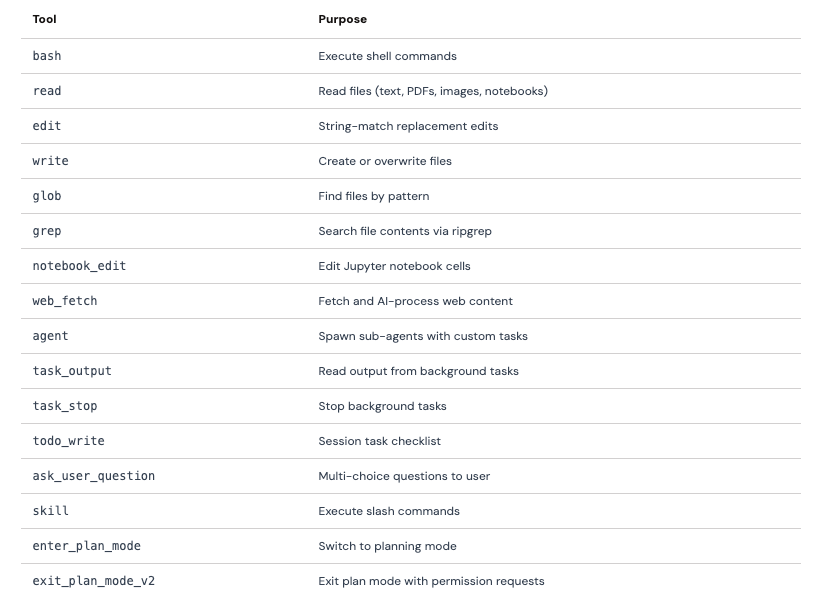
Always Available (16 tools)
Feature-Gated Tools (~27 tools)
The remaining tools are conditionally included. Some are gated behind environment variables (USER_TYPE=ant for Anthropic-internal tools like config and tungsten). Some are gated behind feature flags via Statsig (web_browser, sleep, monitor). Some are platform-specific (powershell on Windows). Some are gated behind compound conditions — the repl tool requires both USER_TYPE=ant and a REPL feature flag.
Full list of feature-gated tools
Ant-only: config, tungsten, suggest_background_pr, repl (also needs REPL flag)
Feature flags: web_browser, web_search, sleep, monitor, overflow_test, ctx_inspect, terminal_capture, list_peers, workflow, snip
Agent triggers: cron_create, cron_delete, cron_list, remote_trigger
Kairos (proactive agent): sleep, send_user_file, push_notification, subscribe_pr
Multi-agent swarms: team_create, team_delete, send_message
Todo v2: task_create, task_get, task_update, task_list
Environment: lsp (ENABLE_LSP_TOOL), enter_worktree / exit_worktree (worktree mode), powershell (Windows)
Tool discovery: tool_search (when tool pool is large)
Test-only: testing_permission (NODE_ENV=test)
MCP Tools
Beyond built-in tools, Claude Code supports Model Context Protocol (MCP) servers — external processes that expose their own tools over a standardized protocol. MCP tools are dynamically registered at runtime from connected servers and wrapped in the same Tool interface. From the dispatch pipeline's perspective, an MCP tool is indistinguishable from a built-in tool.
Each MCP tool carries metadata about its origin server (mcpInfo: { serverName, toolName }), which is used for permission rules, error handling, and authentication. When an MCP tool fails with an auth error, the system automatically updates the server's status to needs-auth and surfaces the issue to the user.
Tool Pool Assembly
Three functions assemble the final tool set:
- getAllBaseTools() — returns the raw list of 43+ built-in tools with feature gates applied
- getTools(permissionContext) — filters by deny rules and isEnabled()
- assembleToolPool(permissionContext, mcpTools) — merges built-in and MCP tools
The merge strategy in assembleToolPool() is deliberate:
Built-in tools come first, so on a name collision, the built-in wins. Alphabetical sorting within each partition keeps the order stable across sessions, which matters for prompt caching — the tools array is part of the API request, and reordering it would bust the cache.
The merge strategy in assembleToolPool() is deliberate:
1// Sort each partition alphabetically, concat, deduplicate2const byName = (a, b) => a.name.localeCompare(b.name)3return uniqBy(4 [...builtInTools].sort(byName).concat(allowedMcpTools.sort(byName)),5 'name',6)
API Serialization
Before tools reach the Claude API, toolToAPISchema() converts each tool's Zod schema into the Anthropic API's JSON Schema format.
The Dispatch Pipeline
When Claude responds, its message may contain tool_use blocks — structured requests to invoke tools. The dispatch pipeline processes these blocks through seven phases. Every tool call goes through every phase, in order.
Phase 1: Extraction
In the main query loop (query.ts), tool_use blocks are filtered out of the assistant message:
1const msgToolUseBlocks = message.message.content.filter(2 content => content.type === 'tool_use',3) as ToolUseBlock[]
Each block has a name, an input object, and a unique id. The id is critical — the tool result must reference the same id when sent back to the API, or the conversation breaks.
Phase 2: Input Validation
The tool's Zod schema validates the raw input using safeParse() — a non-throwing variant that returns either valid data or a structured error. If validation fails, the model gets a formatted error message with schema hints, and execution stops for that tool. No code runs on invalid input.
1const parsedInput = tool.inputSchema.safeParse(input)2if (!parsedInput.success) {3 let errorContent = formatZodValidationError(tool.name, parsedInput.error)4 // Return error to model, skip execution5}
After Zod validation, some tools run a second validateInput() check for semantic validation that can't be expressed in a schema — for example, verifying that a file path is absolute, not relative.
Phase 3: Pre-Tool Hooks
Before permission checks, user-configured hooks execute. These are external shell commands or scripts that fire on tool invocations. A pre-tool hook can:
- Allow the tool call, bypassing the interactive permission prompt
- Deny the tool call outright
- Modify the input before execution
- Block execution with an error message
- Provide additional context to the user
A critical invariant: a hook's allow does not bypass deny rules from settings. The source code has an explicit comment about this: "Hook 'allow' does NOT bypass settings.json deny/ask rules." The intent is that hooks can open doors, but not override locks.
Phase 4: Permission Check
The permission system is the most intricate part of the pipeline. It resolves through multiple layers, in order:
- Deny rules — checked first. If any deny rule matches, execution stops immediately. Deny rules are final and cannot be overridden by any other layer.
- Ask rules — if matched, the user is prompted for approval (unless sandbox auto-allow applies for Bash).
- Tool-specific permissions — the tool's own checkPermissions() method runs. BashTool, for instance, parses the command to check subcommand-level rules.
- Safety checks — hardcoded protections for sensitive paths (.git/, .claude/, shell configs). These are bypass-immune — even in full bypass mode, they require interactive approval.
- Permission mode — the user's configured mode determines the default behavior.
- Allow rules — checked last. If an allow rule matches and no deny/ask rule was triggered, the tool proceeds.
Permission modes
default — Always prompt the user for "ask" decisions.
acceptEdits — Auto-allow safe file operations (reads, edits), prompt for everything else.
bypassPermissions — Auto-allow everything except deny rules and safety checks.
plan — Approve a plan first, then follow the previous mode for execution.
auto — Use an AI classifier to decide whether to allow or prompt.
dontAsk — Convert all "ask" decisions to "deny" — never prompt, just refuse.
Permission rules come from multiple sources, resolved in priority order: policySettings, localSettings, projectSettings, userSettings, flagSettings, cliArg, command, session. This lets organization policies override user preferences, and CLI arguments override both.
Phase 5: Execution
If permission is granted, the tool's call() method is invoked:
1const result = await tool.call(2 callInput,3 { ...toolUseContext, toolUseId: toolUseID },4 canUseTool,5 assistantMessage,6 progress => onToolProgress({ toolUseID: progress.toolUseID, data: progress.data })7)
Five arguments: the validated input, an execution context (working directory, abort controller, app state), a permission callback (for tools that need to request additional permissions mid-execution), the parent assistant message, and a progress callback for real-time updates. Duration is tracked globally.
A subtle detail: the input passed to call() is the model's original input, not the backfilled version that hooks and permissions saw. This preserves transcript consistency — the tool call recorded in the conversation matches exactly what the model generated.
Phase 6: Post-Tool Hooks
After execution, post-tool hooks fire. These can modify MCP tool output, provide additional context, or block the conversation from continuing. There is also a separate PostToolUseFailure hook that fires only on errors, giving external systems a chance to log failures or suggest remediation.
Phase 7: Result Mapping
Each tool implements mapToolResultToToolResultBlockParam() to convert its output into the Anthropic API's ToolResultBlockParam format — a tool_result block with a tool_use_id reference and string or structured content.
If the result exceeds a size threshold, it is persisted to disk at sessionDir/tool-results/{toolUseId}.txt and a preview with a file reference is sent to the API instead. This prevents large outputs (a 10,000-line file read, a verbose command output) from bloating the conversation context.
The Concurrency Scheduler
When the model emits multiple tool calls in a single message, they don't all run at once. A scheduler partitions them into batches based on concurrency safety.
The algorithm is simple. Walk the tool calls in order. For each one, check isConcurrencySafe(input). If it is safe and the previous batch was also safe, add it to the batch. Otherwise, start a new batch.
1// Simplified from toolOrchestration.ts2for (const toolUse of toolUseMessages) {3 const isSafe = tool.isConcurrencySafe(parsedInput)4 if (isSafe && lastBatch.isConcurrencySafe) {5 lastBatch.blocks.push(toolUse) // Merge into concurrent batch6 } else {7 batches.push({ isConcurrencySafe: isSafe, blocks: [toolUse] })8 }9}
Safe batches run concurrently (up to a limit of 10, configurable via CLAUDE_CODE_MAX_TOOL_USE_CONCURRENCY). Unsafe batches run serially, one tool at a time. Context modifiers are only applied between batches, not within them.
In practice, this means a message like "read these 5 files" produces one concurrent batch, while "read this file, then edit it" produces two serial batches. The model can even trigger both patterns in a single turn — consecutive read-only calls get batched, and the first write breaks the batch.
The Streaming Executor
There is a second execution path: the StreamingToolExecutor. When streaming is enabled, tools start executing while the model is still generating its response. As each tool_use block completes in the stream, it's immediately queued for execution rather than waiting for the full response.
The streaming executor uses the same concurrency rules but adds one behavior: Bash error cascading. If a Bash command fails while sibling tools are running in parallel, the executor aborts all siblings. The rationale is that a failing Bash command likely invalidates the context that other tools are operating on — continuing them wastes time and may cause confusing errors.
1if (isErrorResult && tool.block.name === BASH_TOOL_NAME) {2 this.hasErrored = true3 this.siblingAbortController.abort('sibling_error')4}
A Worked Example
To make this concrete, let's trace what happens when the model decides to read a file. The model emits:
1{2 "type": "tool_use",3 "id": "toolu_01XYZ",4 "name": "read",5 "input": { "file_path": "/src/index.ts" }6}
Extraction: query.ts filters this from the assistant message content.
- Tool lookup: findToolByName(tools, "read") finds FileReadTool.
- Input validation: Zod parses { file_path: "/src/index.ts" } against z.object({ file_path: z.string(), offset: z.number().optional(), limit: z.number().optional(), pages: z.string().optional() }). It passes.
- Pre-tool hooks: Any user-configured hooks fire. None modify the input.
- Permission check: FileReadTool's checkPermissions() calls checkReadPermissionForTool(). Read tools are generally allowed in most permission modes.
- Execution: FileReadTool.call() reads the file, applies line numbering (cat -n format), handles PDFs/images/notebooks as special cases.
- Result mapping: The file contents become a tool_result block referencing "toolu_01XYZ".
- Return: The result is appended to the conversation as a user message and sent in the next API call.
Because FileReadTool declares isConcurrencySafe: () => true and isReadOnly: () => true, if the model had emitted five read calls in the same message, all five would execute in parallel.
Summary
The tool system is the execution backbone of Claude Code. It takes the model's intent — expressed as structured tool_use blocks — and turns it into real actions on your machine, with validation, permissions, and concurrency control at every step.
The design is layered: a conservative buildTool() factory ensures safe defaults, a feature-gated registry controls what's available, a seven-phase dispatch pipeline validates and permissions-checks every call, and a concurrency scheduler maximizes parallelism while preserving correctness. The streaming executor adds a performance optimization on top — tools start running before the model finishes thinking.
Compared to the memory system (5 paths, a directory of markdown files, and prompt engineering), the tool system is a proper runtime. It is the difference between a filing cabinet and an operating system.
What's Interesting
The Model as Scheduler
The concurrency scheduler is reactive — it batches whatever the model emits. But the model itself is the real scheduler. The system prompt tells it to "make all independent tool calls in parallel" and to "use a single Bash call with && to chain dependent commands." The runtime trusts this. If the model emits five reads followed by a write, the scheduler will parallelize the reads and serialize the write. But the model decided that order. The scheduler is enforcing the model's plan, not making its own.
Fail-Closed by Default
The most consistent design principle: everything fails closed. Unknown tool? Error. Invalid input? Error. No concurrency declaration? Serial execution. No permission declaration? Ask the user. No feature flag? Tool doesn't exist. This is unusual for a system where the primary user is an AI model that might hallucinate tool names or malform inputs. The system is designed to contain the model's mistakes, not accommodate them.
Hooks as an Extension Point
The hook system — pre-tool, post-tool, and post-failure — is the primary extension point. It's how organizations enforce policy (deny rules in pre-hooks), how logging systems capture tool usage (post-hooks), and how CI/CD pipelines integrate (failure hooks). Importantly, hooks can only tighten restrictions, not loosen them. A hook can deny a tool the settings allow, but it cannot allow a tool the settings deny.
43 Tools, 1 Interface
Perhaps the most striking thing is uniformity. A bash command, a web_fetch, a subagent spawn, a cron job creation, and a push notification all implement the same 30-method interface, go through the same seven-phase pipeline, and respect the same permission system. There are no special cases in the dispatcher. The complexity is in the individual tool implementations and in the permission rules, not in the routing.