YouMind: the best learning AI tool
While AI technology is evolving at an unprecedented pace, and we have access to an endless stream of knowledge channels and tools, the reality isn't quite as rosy as we might imagine. In fact, knowledge workers face tougher challenges than ever before:
- The overwhelming volume of content generated by large language models (LLMs) drowns out truly valuable information, leading us to spend more time reading and understanding than before.
- An increasing number of people are "outsourcing" their thinking to AI, resulting in a flood of automatically generated content that is often repetitive and unremarkable.
Clearly, current AI tools have lowered the cost of acquiring knowledge, making it faster and cheaper. But 'fast' doesn't always equal 'good.' Especially when learning, quickly getting answers often only scratches the surface. Users end up spending more time sifting through and trying to deeply understand the information. For those needing high-quality content, generic tools often fall short.
I believe the key issue lies in the fact that most existing tools are designed around generic scenarios and lack the ability to understand and match specific goals. Even though large models have access to vast amounts of information, accurately extracting and deeply organizing that information remains a significant challenge. Users often have to rely on multiple tools and go through repetitive processes to piece together what appears to be a complete answer.
Imperfections in Traditional Learning Paths

Before designing YouMind, my own learning path looked something like this: When tackling a new topic, I'd typically start with a preliminary search on Google or Perplexity to get a general sense of the subject. Then I'd dive deeper into the referenced webpages, videos, or audio content. Next, I'd use tools like ChatGPT to summarize the information and extract the key points I wanted to understand; Finally, I'd organize the content into my overall topic study using note-taking tools like Notion, building my own knowledge base.
I figured my personal learning path might be representative of many others acquiring knowledge in the age of AI. While individual preferences lead to different tool combinations, the core operation revolves around the IPO model.(The IPO model is a basic framework widely used in system analysis and software engineering, and is also used in scenarios such as knowledge management and learning.)
While this core model provides a good framework and gives us a process to rely on during learning, the current situation has several imperfections:
- System Disconnect: Tools often don't talk to each other, requiring manual transfer of content from one system to another, which is cumbersome and time-consuming.
- Time-Consuming Filtering: Reading content initially takes a lot of time to figure out if the information is valid and aligns with personal preferences.
- Weak Relevance: There is a lack of thematic connections between pieces of information. AI can only handle isolated points, making it difficult to form a systematic knowledge framework.
It was precisely these imperfections that led me to a core idea when conceptualizing the initial framework for YouMind: YouMind isn't just a tool with isolated functions, but a new knowledge learning process or method built around the IPO model.
YouMind: A New Way to Acquire Knowledge
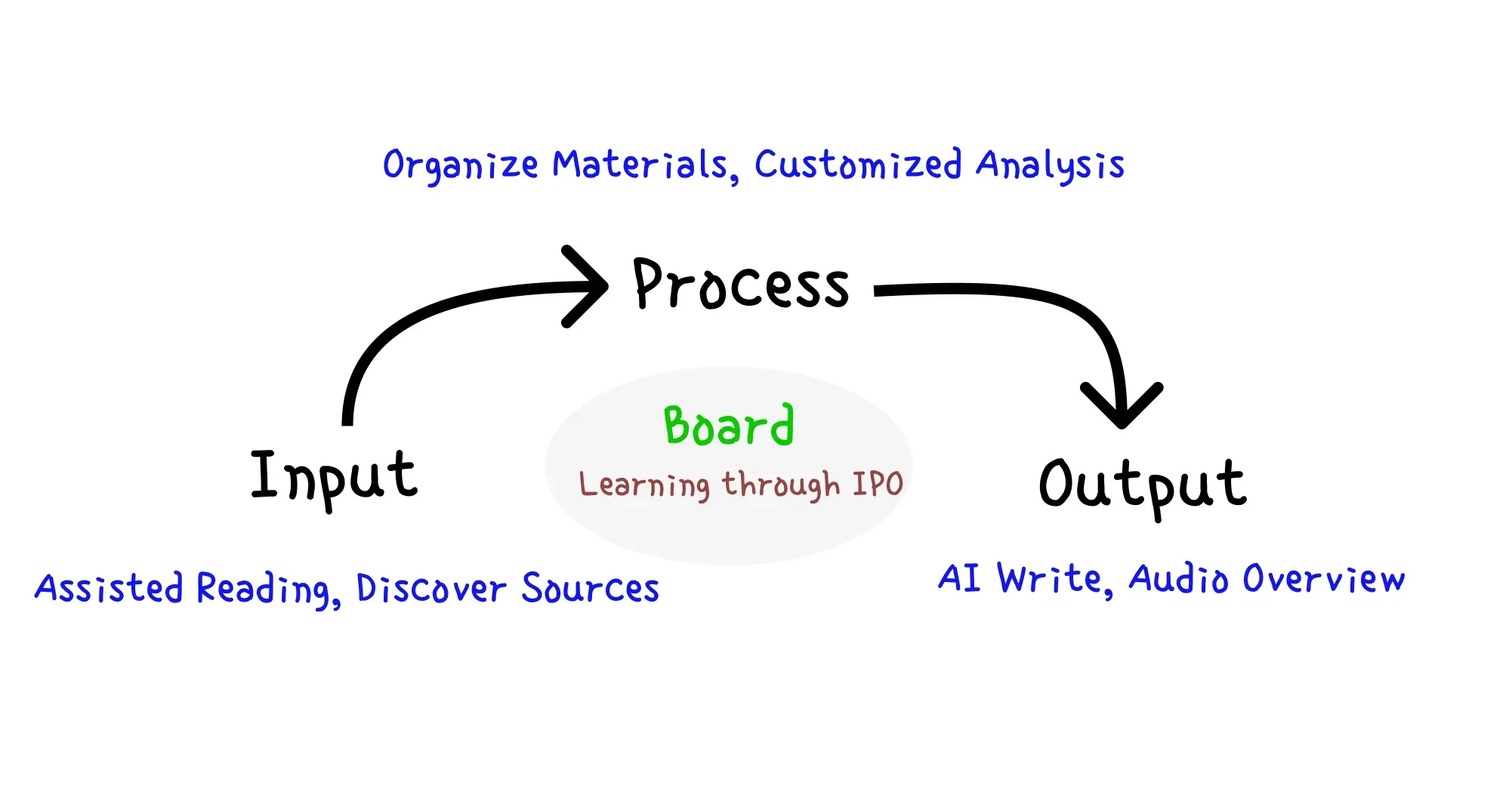
YouMind isn't just a tool for 'getting answers faster.' It's a method to redesign the learning experience by focusing on the entire process. We're building a truly human-centric, AI-native learning space around the IPO (Input–Process–Output) model to help you move from information to understanding, and from understanding to creation.
Input: Building Matched Inputs
In the early stages of learning, the hardest part is not the depth but knowing where to start. YouMind offers three ways to help users quickly construct a foundational framework for topic learning, addressing the issues of "not knowing where to begin" and "difficulty in information filtering."
- Discover Sources: For those stuck on how to begin, when you create a new Board, YouMind uses AI based on your topic description to automatically search for and build relevant content. Unlike the broad results from traditional search engines, YouMind prioritizes content deeply relevant to your topic, providing a precise starting point for your learning.
- Assisted Reading: YouMind offers a browser plugin that automatically summarizes key points, creates a mind map, and supports one-click saving to your topic Board as you read webpages or search for new content.
- Add to YouMind: For materials you've already gathered, YouMind supports easy uploading. Whether it's documents, images, or other formats, you can quickly upload them to your Board to create a unified learning framework.
Through these methods, YouMind ensures that users acquire high-quality information during the input phase, laying the groundwork for subsequent processing.
Process: Extracting Knowledge Structures from Information
Acquiring raw information is just the beginning; true learning occurs during the processing and transformation phase. YouMind provides multidimensional information processing methods to help users overcome the challenges of scattered and unstructured information:
- Organize Materials: Users can freely structure their materials, grouping content, ideas, and Q&A to ensure clear logic and match personal learning habits.
- Customized Analysis: While reading content, YouMind offers multidimensional analysis support, including quickly generating content overviews (Reader), ongoing conversational AI chat (Chat), and cross-language translation assistance (Translator), helping users overcome language barriers. More importantly, users can customize Assistant functions, such as extracting descriptions related to specific topics from web pages, with simple settings for one-click execution, greatly enhancing productivity.
Within a Board, you can continuously deep-dive into content to find the information that's right for you, gradually refining the initially overwhelming raw information.
Output: Output is the Best Input
The ultimate goal of learning is output. YouMind provides various tools to help users internalize knowledge into personal achievements, thereby enhancing learning outcomes.
- AI Write: The writing approach YouMind advocates isn't about handing everything over to AI. It's about collaborative work with AI, continuously refining the output to eventually transform your learning into articles, summaries, or other formats.
- Audio Overview: For content that still feels lengthy even after being refined, YouMind can generate audio summary snippets, allowing users to listen seamlessly during commutes or spare moments for efficient review.(Under development)
AI Is Not the Endpoint, but a Lever
The rise of AI tools often isn't the end point of learning, and we can't rely completely on their output. However, AI tools can better help us leverage the process of acquiring knowledge. By using YouMind, users can extract personalized insights from vast amounts of information and spark creation, avoiding the limitations of traditional tools.
Ultimately, we hope that with YouMind, people won't just gain increased learning efficiency, but also discover a new way and opportunity to take the lead in exploring knowledge in the age of AI.
Have questions about this article?
Ask AI for FreeRelated Posts

Instantly Recognizable: Use Image-to-Prompt to Create a Consistent Brand Visual Style
Take your last ten images and line them up. If they look like they belong to ten different brands — one cool and minimalist, another warm yellow hand-drawn, and the next suddenly high saturation — the problem isn't whether any single image looks good. The problem is that they're each telling a different story. In a feed flooded with content, what makes people remember you isn't a single stunning image, but a sense of continuity that makes them think, "I know it's you before I even see the handle." And that continuity isn't a talent — it's a system. Visual consistency sounds like something reserved for big brands and professional designers, but at its core it's actually quite simple: the same lighting, the same color palette, the same medium texture, the same composition, repeated until it becomes your identity. The hard part is never "making one good-looking image" — it's "making the hundredth image still look like it belongs in the same family as the first." And ironically, AI image generation tools have made this harder. The very thing that makes text-to-image so appealing is precisely what makes it dangerous for branding: every generation is a little different. The same prompt, "warm, healing illustration style," might give you creamy soft light today and a rich orange-red intensity tomorrow. The same "minimalist product shot" might come out with a pure white background this time, and inexplicably add a shadow next time. The model reinterprets your vague description from scratch each time, and it never really internalizes what "your brand should look like" in your mind. So you fall into a familiar loop: you describe each image from zero, it's always a bit off, you settle and post it, and months later you look back and your account looks like it was managed by three or four people with completely different aesthetics. is often used as a simple tool to "reverse-engineer how an image was made." But in the context of branding, it does something far more important: it takes a visual style you can recognize instantly but struggle to describe, and fixes it into a block of text you can copy and reuse. The approach is simple. First, pick a "style anchor" image that represents your brand's vibe — it could be your best-performing post, a reference image you keep coming back to, or a baseline image you specifically created for this brand. Feed it to the tool, and it will "read" that image into a structured description: what the subject is, where the light comes from, whether the color palette is cool or warm, whether it's photography or illustration, the depth of field and texture, and the overall mood. This description is the textual version of your brand's visual DNA. From now on, you don't have to rewrite from scratch by feel every time. You hold a template you can reuse as-is. In an extracted prompt, some elements are your brand's constants, and some are just the content of that particular image. Separating them is the key to the whole method. What you should lock down usually includes these: the color palette — the set of hues that makes people recognize you at a glance; the lighting — soft morning light or hard side light; the medium texture — realistic photography, semi-realistic illustration, or 3D rendering; the composition habit — lots of negative space, subject centered or off-center; and the overall mood — calm, crisp, or vibrant. Together, they are the part that makes people say, "I recognize you before I even see clearly." What you should swap each time is just the content itself: this time the subject is Product A, next time Product B; this image is about a breakfast scene, that one about a desk. You preserve the "genes" of your style, replace only that one variable, and regenerate — the lighting and color palette carry over, and only what you changed actually changes. That is the real dividing line between "producing a whole set of images that belong to the same brand" and "gambling on luck from scratch every single time." The real test of brand visual consistency isn't a single image — it's across contexts. A blog post cover, a set of social media images, an external PPT — if they all have different styles, even great content feels fragmented. With that fixed prompt, you can spread the same visual language across every touchpoint: use it to generate a blog cover that carries your brand's tone, create a set of images for social posts that look like they belong together, and even set a unified look for illustrations in your presentations. In YouMind, starting from this prompt, you can flow through all these tasks seamlessly — covers, supporting images, and slides share the same light and color palette, instead of each going its own way. Since a prompt is plain text, it works across different tools: Nano Banana Pro, GPT Image 2, Midjourney, and Stable Diffusion can all read the same description. Your brand style isn't locked into one model. There's a line worth drawing clearly. Drawing inspiration from an image's lighting, composition, and atmosphere is healthy. But if your "style anchor" comes directly from a competitor's signature visual, a copyrighted famous character, or another brand's logo, and you use it as your own face — that slides from "building a style" into "impersonating an identity." Generic "style" isn't owned by anyone, but a brand's specific, recognizable expression is its own asset. So the safest approach is to anchor on your own material — your products, your scenes, your baseline — and then use the extracted prompt to systematize and scale it. Every image you produce will then be both consistent and genuinely yours. In the past, brand visual consistency relied on a designer who remembered every detail, or a style guide nobody wanted to read. Now, you can compress it into a block of text: extract once, reuse repeatedly, swap only what needs to change. The next time you need an image for new content, you don't have to gamble on luck staring at a blank prompt box. You already know what your brand looks like, and you can make it look that way every time. How does Image to Prompt help with brand visual consistency? It translates an image that represents your brand's vibe into a structured prompt. You lock down the color palette, lighting, medium, and composition, and each time you only replace the subject or scene. The output images will always maintain the same style. Which image should I use as a "style anchor"? Your own material is safest: your best-performing post, a baseline image you specifically created, or a finished image that best represents your brand's vibe. Try to avoid using competitors or copyrighted characters as anchors. Can this prompt be used across different AI tools? Yes. The output is plain text, and mainstream text-to-image tools like Nano Banana Pro, GPT Image 2, Midjourney, and Stable Diffusion can all use it directly. Your brand style won't be locked into one model. Will it make every image look exactly the same? No. It locks down the stylistic constants, but the content is still different each time. The goal is to make them look like "one family," not to copy-paste the same image. Do I need experience in design or prompt writing? No. The extraction step translates visuals into text for you. You just need to decide which elements are your brand constants and which ones to swap, and you can start reusing.

Turn an Image into Reusable AI Image Generation Prompts
You've probably had that moment: you're scrolling, you see an image, and you can't look away—the lighting, the color palette, the atmosphere you've been searching for weeks, all captured in one frame. You want to create something similar, so you open your AI image generator, stare at the blank prompt box, and type something vague like "cinematic photo, nice lighting, full atmosphere." The result? Something that has nothing to do with the image you had in mind. The problem usually isn't your taste—it's the translation. Reversing a finished image back into the text that could recreate it is genuinely difficult. It requires a specialized vocabulary around composition, camera angles, lighting, color schemes, and style—a vocabulary most people never get the chance to build. That's exactly what the does for you: feed it an image, and it gives you back the text. This article will explain what it is, when it works well, where it falls short, and how to get your first prompt in seconds. Image to Prompt is the reverse of text-to-image. Normally, you write a description and the model generates an image. Here, you give the model a finished image, and it writes the description—the prompt you would have needed to input to get that image. You might have heard it called different things: reverse prompting, prompt extraction, image-to-prompt, or simply "reverse engineering prompts from images." The names vary, but the task is the same: converting visual information into a structured, reusable text description that any text-to-image tool can understand. A useful extraction goes far beyond something as vague as "a cat." It captures the elements that truly define an image: You upload an image, and the tool "reads" it like a trained eye, identifying the elements that truly determine the visual impact: subject and composition, direction and quality of light, overall color palette, style and medium, and technical details like depth of field and texture. Then, it translates what it sees into precise language, assembling a coherent, ready-to-use prompt. A certain light becomes "soft morning sunlight," a certain tone becomes "warm, semi-realistic style." In seconds, you have a prompt you can use immediately. In YouMind, you can use it as a starting point to create an article cover or even generate illustrations for a presentation. But remember: this output is a solid first draft, not gospel. It's the tool's best attempt at interpreting the image, which is exactly what the next section will address. Here's a complete real-world run. First, you upload a reference image (in this case, a softly lit illustration of a person holding a white cat). The upload card will show: file ready, ready to process. Click Generate Prompt, and here's the actual output: See? It goes far beyond "a person holding a cat." It specifies the light direction, color palette, depth of field, composition, and mood—exactly the factors that determine whether your next image will match the reference. Along with the prompt, the tool provides clear next steps: generate it as-is, replace one element while keeping the original composition, or reuse the look for covers or social media graphics. From here, you don't have to start over—just change one variable. Swap the white cat for a dog, change the sweater color, or move the scene to a reading nook, then regenerate. The composition and lighting will carry over; only the element you changed will be different. You keep the "DNA" of the reference image—its lighting, framing, and atmosphere—while the final result is unmistakably your own. Most image-to-prompt tools stop at "here's a description"—and that step is now basically standard. Where YouMind's truly shines is what happens after you get the description: It's best at single, clear subjects: portraits, product shots, landscapes, and images with a consistent, recognizable style. Clean, well-lit reference images especially tend to yield equally clean prompts. In a few predictable areas, it becomes unreliable. Busy, multi-subject compositions can confuse it about which element the prompt should emphasize. Abstract art is difficult to reduce to text and will always lose some essence. Text-heavy images (posters, infographics, memes) often return garbled or hallucinated text, because vision models aren't great at transcribing text. And, like any AI model, the extraction tool can hallucinate: it might confidently describe a material, brand, or detail that isn't actually in the image. So treat the output as a draft to be verified against the original image, not a verbatim record: read it, delete what's wrong, keep what's useful. In about ten seconds, you can extract a prompt. Extracting a prompt describes a style; it doesn't transfer ownership. Used well, it's a tool for learning and ideation—a way to understand why an image works and to create something new in the direction you admire. Used carelessly, it slides into plagiarism. A reasonable line is: draw inspiration from the lighting, composition, and atmosphere, but don't replicate a living artist's signature work, a copyrighted character, or a brand logo and pass it off as your own, especially for commercial use. A general "style" belongs to no one, but a specific, recognizable expression can be owned. That's exactly what the "replacement" workflow is for: swap the subject, scene, or angle, and make the result truly yours. Is the Image to Prompt tool free? Yes. You can upload an image and generate a prompt on YouMind without paying. What image formats are supported? JPG and PNG, among others, covering most photos, screenshots, and exported images. Which AI tools can the generated prompts be used with? Any text-to-image model. The output is plain text, so it works with Nano Banana Pro, GPT Image 2, Midjourney, Stable Diffusion, DALL·E, and more. Will it recreate the exact same image? No, and that's intentional. It gives you the prompt behind the style so you can generate your own version, not a pixel-for-pixel copy. Do I need experience writing prompts? No. The whole point of image-to-prompt is to save you the manual writing step. You can refine the result, but you don't have to start from scratch. The next time an image stops your scroll, you don't have to guess the text behind it, and you don't have to just copy it. , shape it into what you want, and create something truly your own.

AI Is Breaking the Old Containers of Human Thought
The first time it happened, the entire office froze. Then someone whispered, “Holy shit.” A whole chorus followed. Static text on a screen had just transformed—right in front of us—into something responsive, fluid, almost breathing. It was the first successful run of Gemini 3’s Dynamic View inside YouMind, together with Nano Banana Pro and its image-generation engine. And of course I had to try it myself. The problem was… I had zero imagination at that moment. So I picked the first idea my mind grabbed: What if I turned my tedious AI newsletter into The Daily Prophet—the moving-portrait newspaper from Harry Potter? I built it. It worked. Interacive The Daily Prophet, AI Newsletter Edition. Get the same effect And for a moment, I honestly thought I might cry. The content was nothing special—just the usual AI updates I publish every week. But now those same words were dancing in a living, enchanted broadsheet that rippled with motion and emotion. I couldn’t look away. And that’s when the real question hit me: If this thing can make mediocre content feel this compelling, what could it do with something truly great? At first glance, this feels like a cool visual trick. A fancy animation. A magic newspaper. But that’s the small story. The big story is that it breaks a spell we’ve been under for thousands of years—a spell that looks suspiciously like a softer version of Orwell’s Newspeak. In 1984, the regime creates Newspeak, a language that shrinks the range of human thought. Take away the word freedom, and people eventually lose the concept of freedom. Compress language, compress thought. But here’s the uncomfortable truth: you and I have been living under our own form of Newspeak too. Not enforced by a regime, but by something subtler: Technique. Inside your mind, ideas aren’t linear. They’re three-dimensional, layered, spatial—like a palace with rooms, staircases, and hidden doors. But unless you’re a painter, architect, or musician, you can’t express that in the most vivid way. You are forced to flatten everything onto the narrow strip of linear text. One sentence after another. One idea squeezed behind the next. The moment the thought leaves your mind, it loses its depth. Even in the internet age, this problem hasn’t gone away. You know a webpage could be spatial, interactive, dynamic—but you don’t know how to code, or design, or orchestrate a layout. So you retreat back to static documents, the safe zone where complexity must shrink to fit. Technique compresses expression. And by compressing expression, it compresses thought itself. This is why your idea feels brilliant in your head but underwhelming on the page. The container kills the energy long before the world has a chance to see it. But when Gemini 3 merges with Nano Banana Pro inside YouMind, that ceiling finally cracks. For the first time, text, visuals, motion, and interaction flow together in a single medium that anyone can control. For the first time, you can express a spatial thought as a spatial thought. Not because you know design—but because AI makes design permeable. This is the anti-Newspeak charm: AI returns the right to think—previously stolen by technique—back to creators. When the container expands, the mind expands with it. There’s another barrier that AI quietly dissolves: aesthetics. Once, beauty was a privilege. At the École des Beaux-Arts in Paris, professors walked through exam studios and silently sorted student drawings into two piles: continue and leave. No criteria. No explanations. Aesthetics was a private language, accessible only to those with time, wealth, and training. YouMind can now generate interfaces with natural rhythm, hierarchy, and harmony. You don’t need to “know design” to express something that looks designed. Beauty becomes public infrastructure. And once the fear of “making it pretty” disappears, creators can finally return to the real question: What kind of spiritual world do I want to build? If aesthetics is the face, value delivery is the soul. In the 1990s, McKinsey redefined consulting by shifting from dense “Blue Books” to clean, visual PowerPoint decks. It changed not only how knowledge was presented, but how it was valued. Today, YouMind stands at McKinsey’s Moment, but multiplied. For consultants, educators, researchers—anyone whose work is knowledge—documents are no longer the final output. They are raw ingredients. The real output is the interface: a living, interactive expression of your ideas. You are no longer selling information. You’re selling an experience of understanding. A century ago, the New Culture Movement in China fought for the right to write in everyday language—vernacular instead of classical. The argument was simple: Expression is a right. Not a privilege. Today, we are in a new kind of cultural movement: the right to use space, motion, and interaction to build the worlds we imagine. For the first time in history: A writer can think like an architect. A student can compose ideas like a director. A researcher can present information like an infographic designer. Your creations don’t just sit on a page. They stand upright. They breathe. They converse back. There’s a quiet irony here. You’re reading this in a text document—while I’m explaining why text is no longer enough. Text remains the fastest way to capture a spark. But it is no longer the limit of what that spark can become. Just like the philosophy at the heart of YouMind: “Everything starts as a Draft. and a Draft becomes Everything.” Text is the seed. Don’t leave it trapped in the jar. This draft and the accompanying visuals were co-created with YouMind.