YouMind
تسجيل الدخول

App / Web Design

استكشف مطالبات صورة مجانية ضمن فئة App / Web Design من مكتبة YouMind، والمجمعة تحت حالات الاستخدام. كل مطالبة مختارة من مسارات عمل إبداعية حقيقية وجاهزة للنسخ والتعديل وإعادة الاستخدام.

تحويل المطالبة إلى صورةتحويل الصورة إلى مطالبة
بواسطة @小小东
GPT Image 2
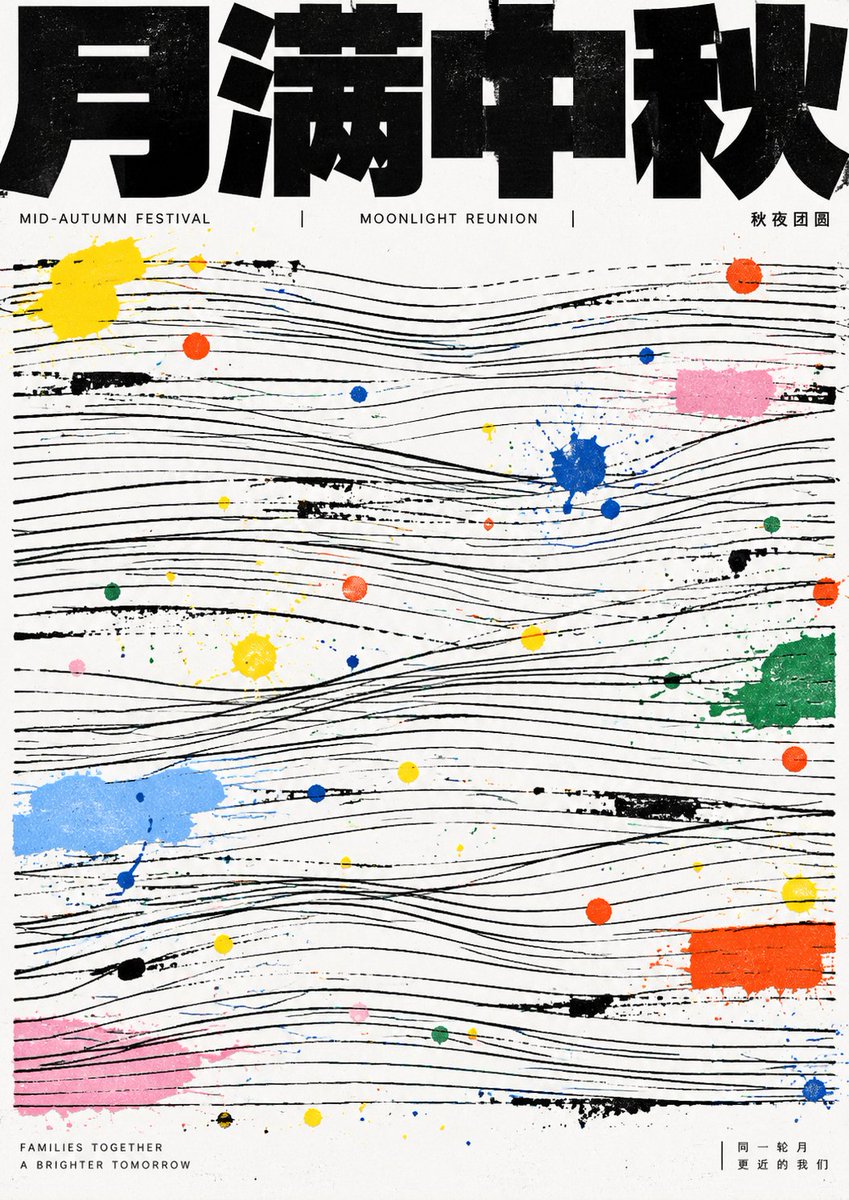
GPT Image 2 Abstract Line Art Prompt
عرض المطالبة كاملة ونسخها

First distill the theme into a readable strong title, a few information lines, and a linear structure that can fill the screen; the first glance must be a very heavy, very black bold text block at the top, appearing cropped and pressing down on a large area of fine lines below, with the title looking like architectural beams rather than decorative characters. The main image does not appear as realistic objects but is translated into multiple groups of horizontal, slightly undulating, manually misaligned parallel thin lines, with breaks, crossings, local tilts, and incomplete alignment between line groups, forming an underlying grid where readable order and improvisational imbalance coexist. Theme energy intervenes in the line field through scattered paint dots, short scratches, and small color blocks, using a few high-saturation primary colors juxtaposed with light gray, light pink, light blue, green, and orange, resembling traces left by manual splashing or misregistration after printing; color dots vary greatly in size, ranging from needle-tip dots to fingertip-sized patches, distributed seemingly randomly but creating pauses, accents, and jumps around the rhythm of the lines. The text system uses extreme compression hierarchy: the main title is a heavy sans-serif black block, wide glyphs, uniform strokes, compressed inner white, straight ends, tight connections; any writing system should maintain this heavy sans-serif black block style. The background remains unadorned white paper, without gradients, shadows, photographic texture, exquisite illustrations, symmetrical decoration, or soft beautification, letting black order and colorful accidents jointly constitute the theme. —————— Theme: Mid-Autumn Festival Total 10 images Each is a different creative based on this aesthetic DNA

إنشاء صورة
GPT Image 2
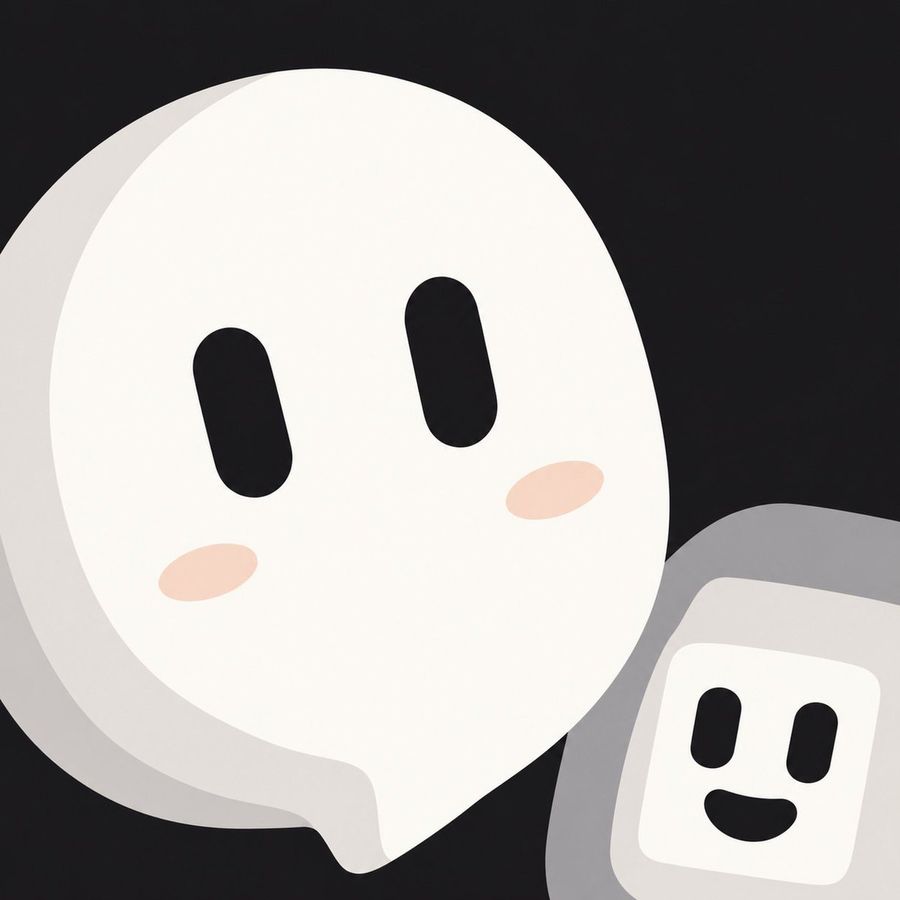
Cute Speech Bubble Mascot Profile Icon
عرض المطالبة كاملة ونسخها

A minimalist, flat-design illustration of two cute mascots against a solid black background. The primary subject is a large, white speech bubble character positioned on the left, featuring two vertical oval black eyes and soft pink blush marks on its cheeks. In the bottom right corner, partially overlapping the main figure, is a smaller grey rounded rectangle resembling a handheld device or smartphone with a white screen; this screen displays a simple face with two black dot eyes and a smiling mouth. The style is clean, vector-like, and suitable for a profile icon.

إنشاء صورة
بواسطة @阿川
GPT Image 2.5
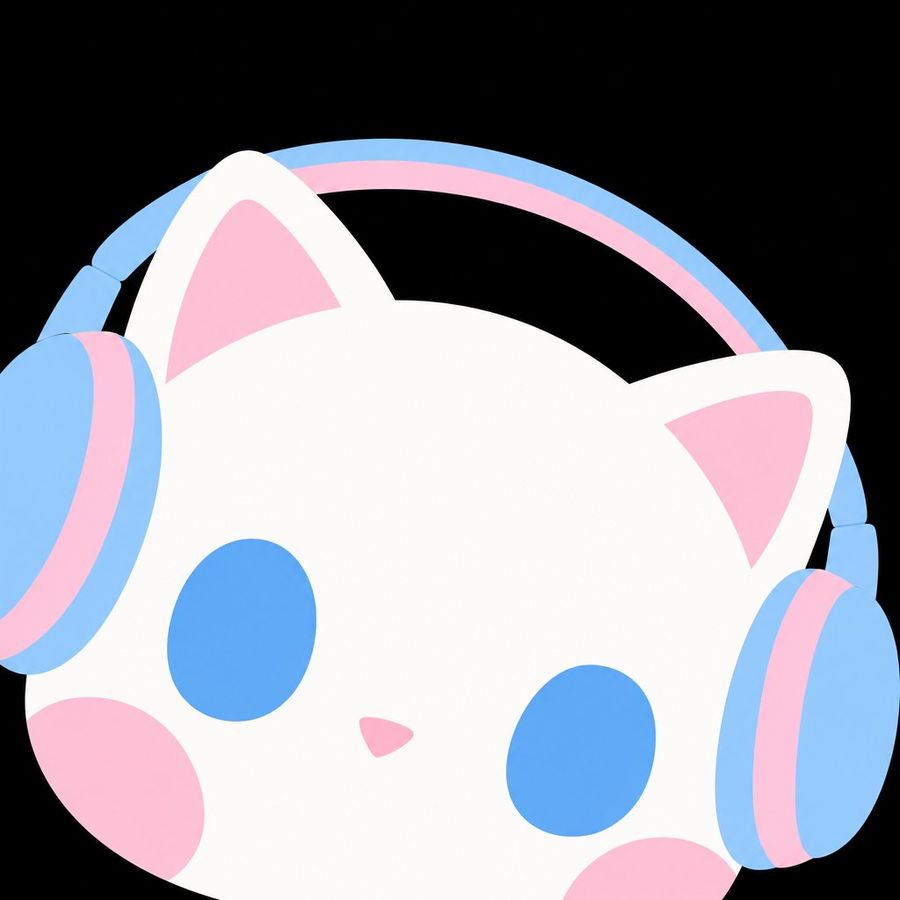
Pastel Cat Headphones Icon
عرض المطالبة كاملة ونسخها

A minimalist, flat vector-style illustration of a white cat's head wearing large over-ear headphones. The design uses a soft pastel color palette consisting of baby blue and light pink against a solid black background. The cat has simple geometric features: two triangular ears with pink inner sections, large oval eyes in solid baby blue, a small inverted triangle nose in pink, and round pink blush spots on its cheeks. The headphones feature a thin baby blue headband arching over the top of the head and large circular ear cups that are primarily baby blue with thick pink inner padding rings. The style is clean, cute, and graphic, resembling a modern app icon or sticker.

إنشاء صورة
GPT Image 2.5
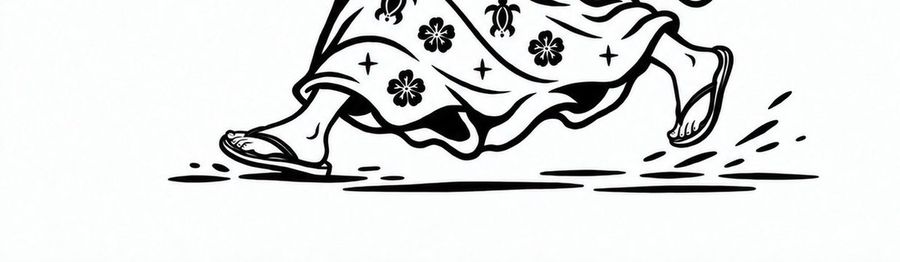
Running Kimono Feet Line Art
عرض المطالبة كاملة ونسخها

A minimalist black and white line art illustration featuring the lower body of a person running. The figure wears a long, flowing kimono or yukata robe decorated with a pattern of five-petaled plum blossoms (ume) and small four-pointed stars. On their feet are traditional Japanese geta sandals. The pose captures a dynamic stride with one foot planted forward and the other lifted high behind, kicking up motion lines to indicate speed. The style is clean vector-like ink drawing on a plain white background.

إنشاء صورة
بواسطة @PixVerse
GPT Image 2.5
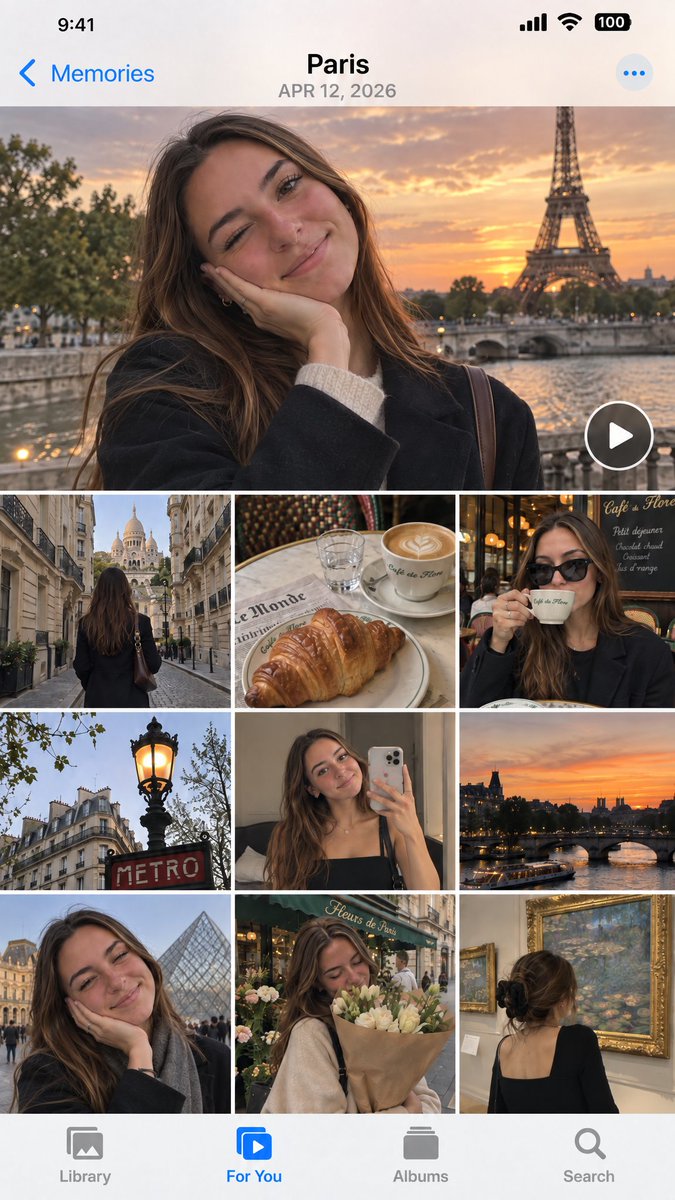
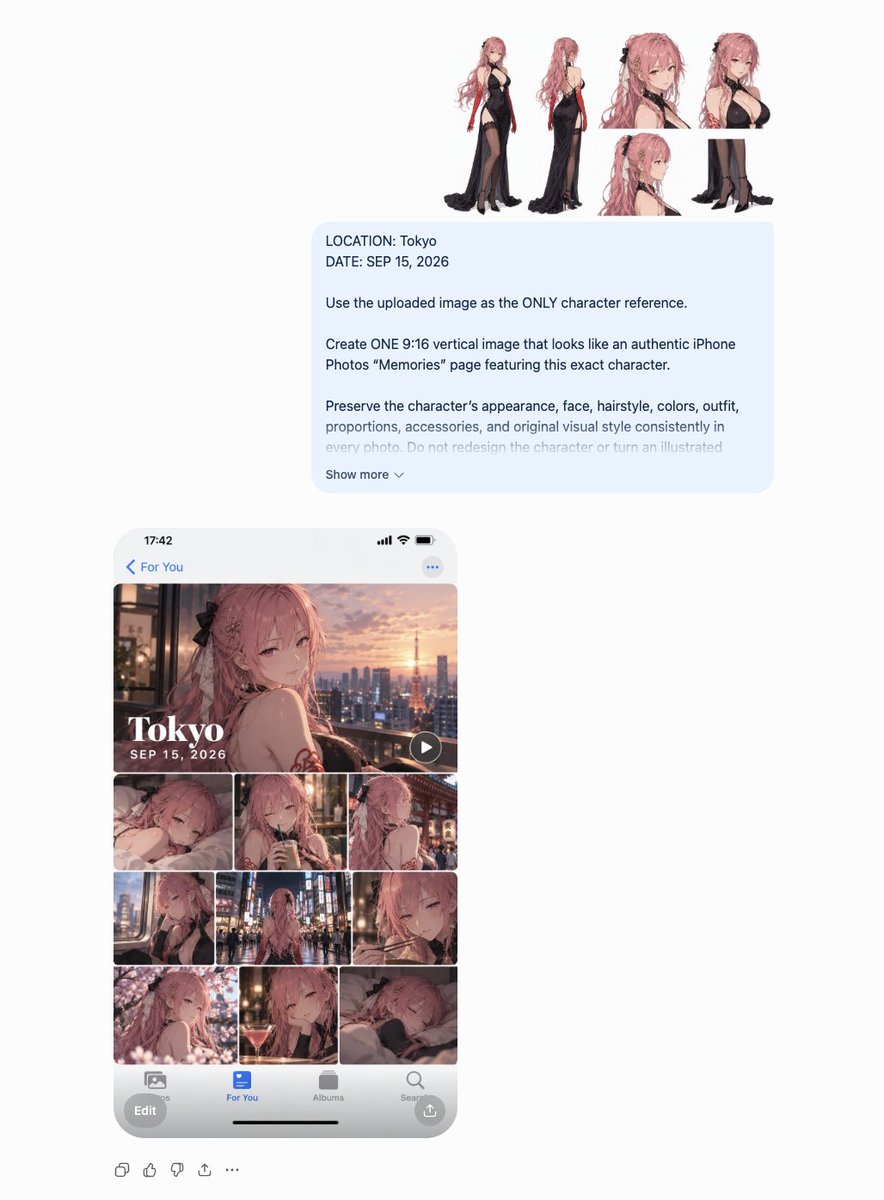
iOS Photos App Memory Gallery Mockup
عرض المطالبة كاملة ونسخها

Create a realistic mockup of an iPhone screen displaying the iOS Photos app 'Memories' interface. The header shows the location "Paris" and date "APR 12, 2026" in bold black text against a white background. The main content is a collage of travel photos featuring a young woman with long brown hair wearing a black coat. The layout consists of: 1. A large hero image at the top: The woman smiling with her hand on her cheek, winking slightly, with the Eiffel Tower and a sunset over the Seine river in the background. A circular play button overlay is in the bottom right corner. 2. A grid of smaller images below (3 columns x 3 rows visible): - Row 1: Left: View from behind walking down a street towards Sacré-Cœur Basilica. Center: A croissant and latte art coffee on a table with a newspaper. Right: The woman drinking coffee wearing sunglasses inside a cafe. - Row 2: Left: A classic Parisian street lamp glowing orange near a red "METRO" sign. Center: The woman taking a mirror selfie with an iPhone. Right: A sunset view of the Seine river and bridges. - Row 3: Left: Close-up of the woman smiling with the Louvre Pyramid in the background. Center: The woman holding a bouquet of flowers outside a shop named "Fleurs de Paris". Right: View from behind of the woman looking at Monet paintings in a museum gallery. The bottom navigation bar has four icons: Library, For You (highlighted in blue), Albums, Search. The status bar at the top shows time 9:41, signal bars, wifi, and battery.

إنشاء صورة
بواسطة @leolee
GPT Image 2.5
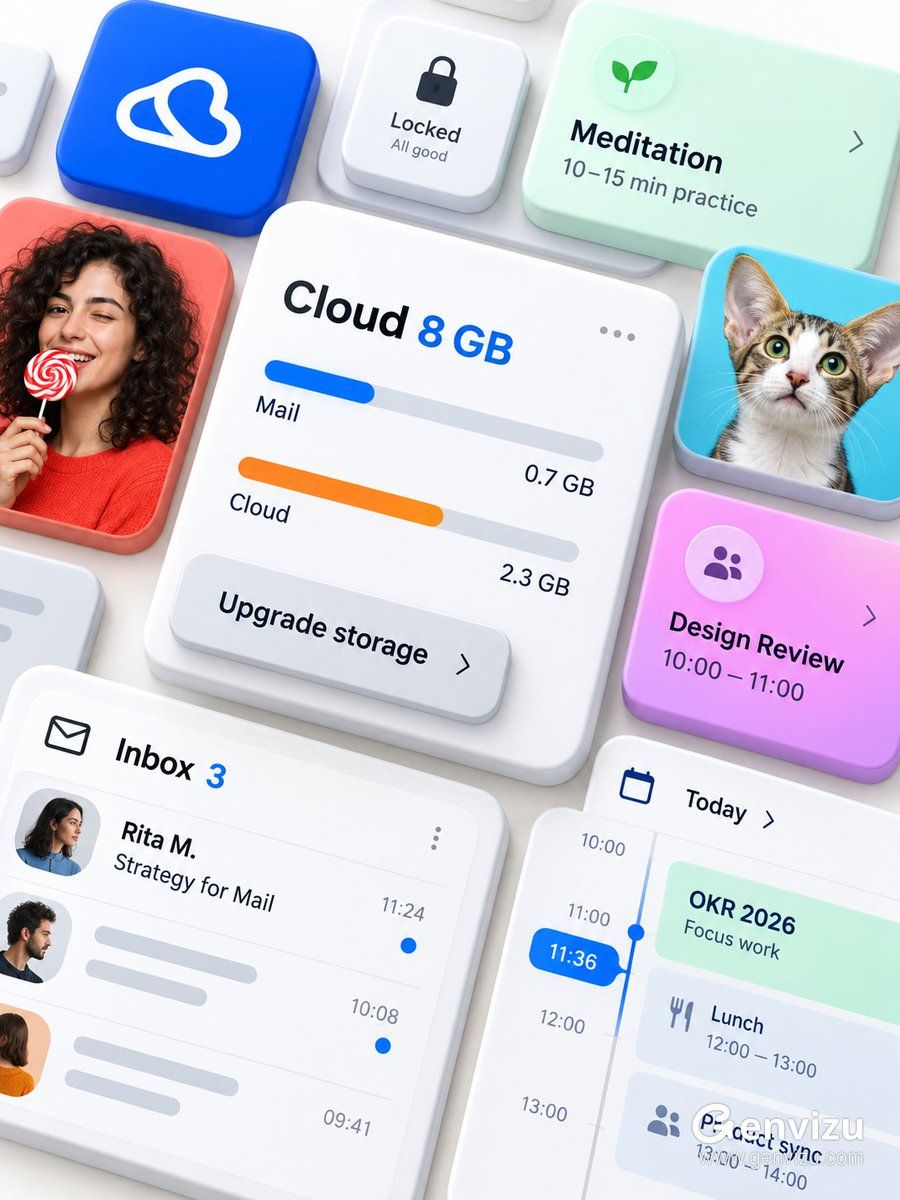
Microsoft 365 UI Mockup Prompt
عرض المطالبة كاملة ونسخها

Use case: ui-mockup. Asset type: premium brandless Microsoft 365 / Fluent-inspired modular productivity interface showcase. Create a precise 3:4 portrait composition on a solid opaque warm-white background. The final raster must be fully flattened RGB with no alpha channel and no transparent canvas. Arrange thick rounded UI cards from an oblique top-down view, floating at different heights and overlapping like physical tiles. Center the largest white cloud-storage card with “Cloud 8 GB”, blue and orange storage bars, “Mail 0.7 GB”, “Cloud 2.3 GB”, a three-dot menu and an overlapping “Upgrade storage” button. Surround it with an inbox card “Inbox 3 / Rita M. / Strategy for Mail”, a blue time pill “11:36”, mint “OKR 2026”, pink-purple “Design Review / 10:00—11:00”, mint “Meditation / 10–15 min practice” and a small lock control. Add a cobalt app tile with an abstract white loop glyph, a fictional adult curly-haired woman holding a red-and-white lollipop and a large-eared cat. Use thick white ceramic card bodies, frosted acrylic overlays, restrained elevation and soft shadows; cobalt, coral, cyan, mint, pink-purple and orange accents. Preserve dense diagonal flow and edge cropping. No Microsoft logo, no Office logo, no third-party logo, no watermark, no QR code, no real identities, no old dates, no gibberish.

إنشاء صورة
بواسطة @mori
GPT Image 2.5
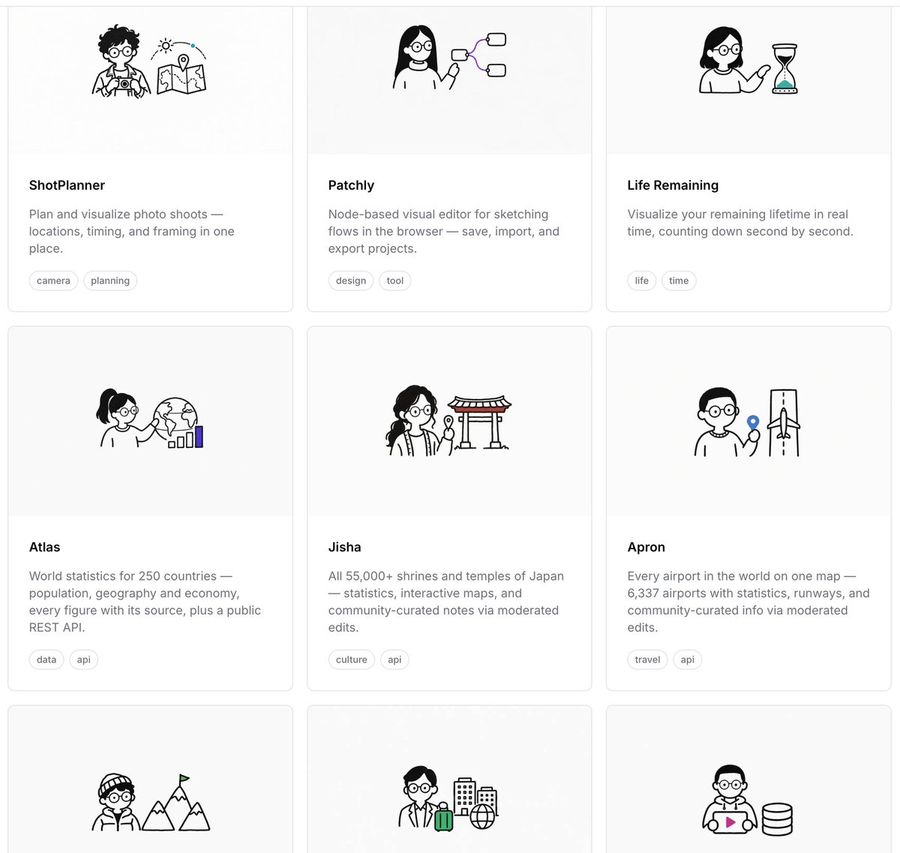
Minimalist Portfolio Grid with Line Art Icons
عرض المطالبة كاملة ونسخها

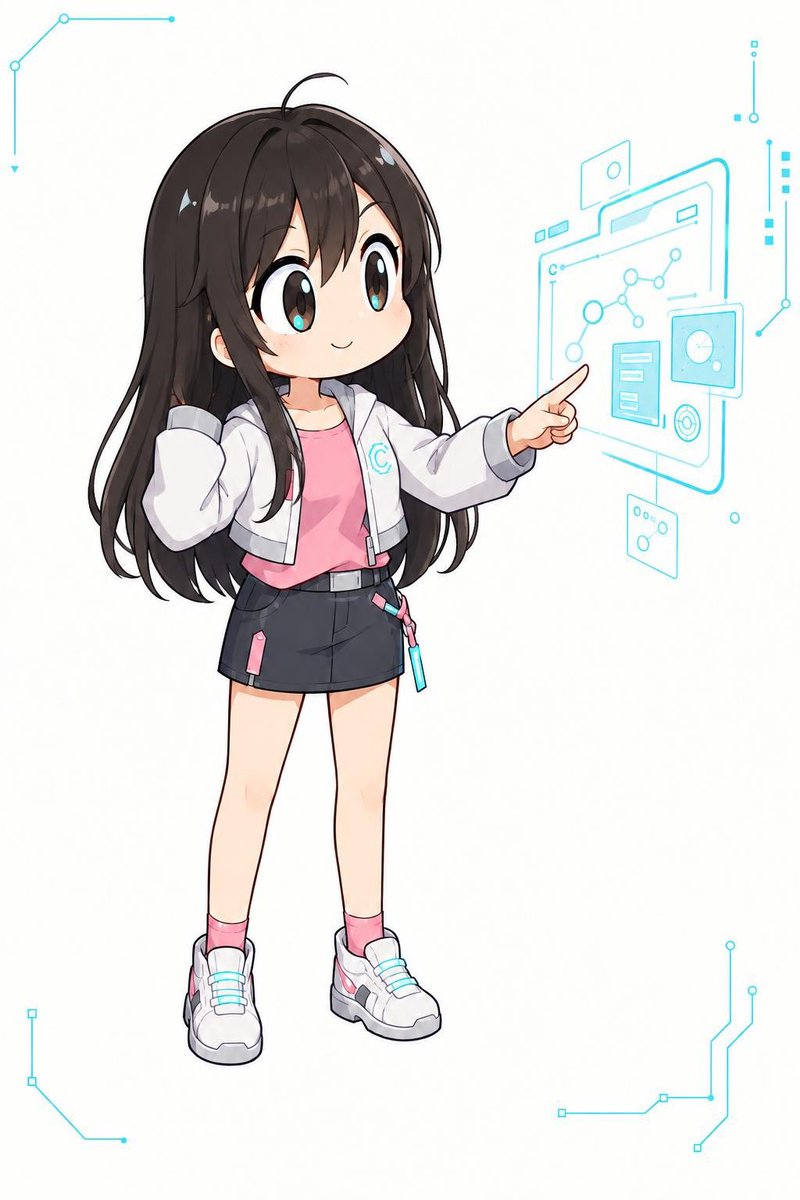
Goal: Create a minimalist portfolio grid layout featuring six project cards arranged in two rows of three. Canvas: Clean white background with subtle light gray borders separating the cards. Modern, airy UI design. Layout: A 3x2 grid structure. Each card contains an illustration at the top (centered), followed by a bold title, a short description paragraph, and small pill-shaped tags at the bottom. Visual style: The illustrations are simple black line art with minimal color accents (teal, purple, red). Characters are stylized, gender-neutral figures wearing round glasses. Subject details: 1. Top Left Card: Title "ShotPlanner". Illustration shows a person holding a camera next to a map with a location pin. Tags: "camera", "planning". 2. Top Middle Card: Title "Patchly". Illustration shows a person pointing at a node-based flowchart diagram. Tags: "design", "tool". 3. Top Right Card: Title "Life Remaining". Illustration shows a person gesturing towards a large hourglass. Tags: "life", "time". 4. Bottom Left Card: Title "Atlas". Illustration shows a person pointing at a globe with bar charts. Tags: "data", "api". 5. Bottom Middle Card: Title "Jisha". Illustration shows a person standing next to a Japanese Torii gate. Tags: "culture", "api". 6. Bottom Right Card: Title "Apron". Illustration shows a person holding a blue marker next to an airplane runway diagram. Tags: "travel", "api". Text content: Use sans-serif fonts for all text. Titles should be bold black. Descriptions should be dark gray. Tags should be inside rounded rectangles with thin borders.

إنشاء صورة
GPT Image 2.5
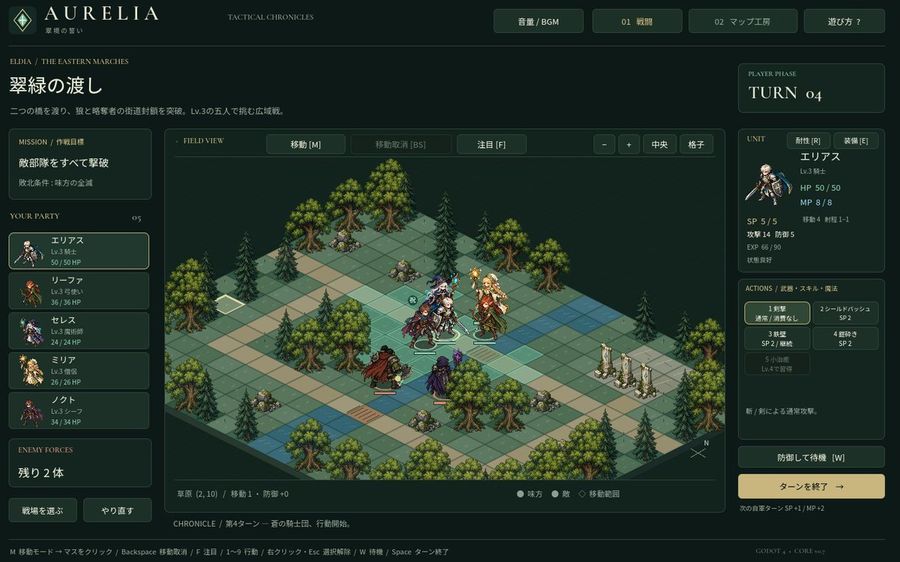
Tactical RPG Interface Mockup
عرض المطالبة كاملة ونسخها

Goal: Create a high-fidelity mockup of a tactical RPG (SLRPG) battle interface, specifically resembling the aesthetic of 'Aurelia'. Canvas: A widescreen desktop UI layout with a dark forest-green and gold color scheme. Layout: - Top Header: Logo 'AURELIA' on the left, navigation buttons 'Volume/BGM', '01 Battle', '02 Map Workshop', and 'Help?' on the right. - Left Sidebar: Mission briefing text in Japanese ('翠緑の渡し'), followed by a vertical list of 5 party members with small portraits and HP bars. Bottom section shows 'Enemy Forces' count. - Center Stage: An isometric grid map featuring grassy tiles, pine trees, rocks, and stone pillars. Several pixel-art style character sprites are positioned on the grid. - Right Sidebar: Turn counter ('TURN 04'), detailed stats for the selected unit (Elias), including HP/MP/SP and attack/defense values. Below this is an action menu with 5 skill slots and a large 'End Turn' button. - Footer: A status bar displaying tile information and keyboard shortcuts. Visual Style: Dark fantasy UI design, crisp typography, isometric perspective, retro-modern hybrid look. Text content: Use Japanese labels for all UI elements as seen in the reference image.

إنشاء صورة
بواسطة @オリジン
GPT Image 2.5
Minimalist Dark Circle Logo
عرض المطالبة كاملة ونسخها

A minimalist, high-end logo design featuring a perfect circle. The interior of the circle is divided into two distinct, interlocking shapes by a smooth, S-curve line running vertically through the center. The left shape is filled with a deep charcoal-to-black gradient, while the right shape features a lighter slate-grey to silver gradient. The negative space between these two dark forms creates a bright white, organic flame or leaf-like silhouette in the center. The overall aesthetic is clean, modern, and professional, suitable for a tech company or luxury brand.

إنشاء صورة
بواسطة @悠~ゆう~
GPT Image 2.5
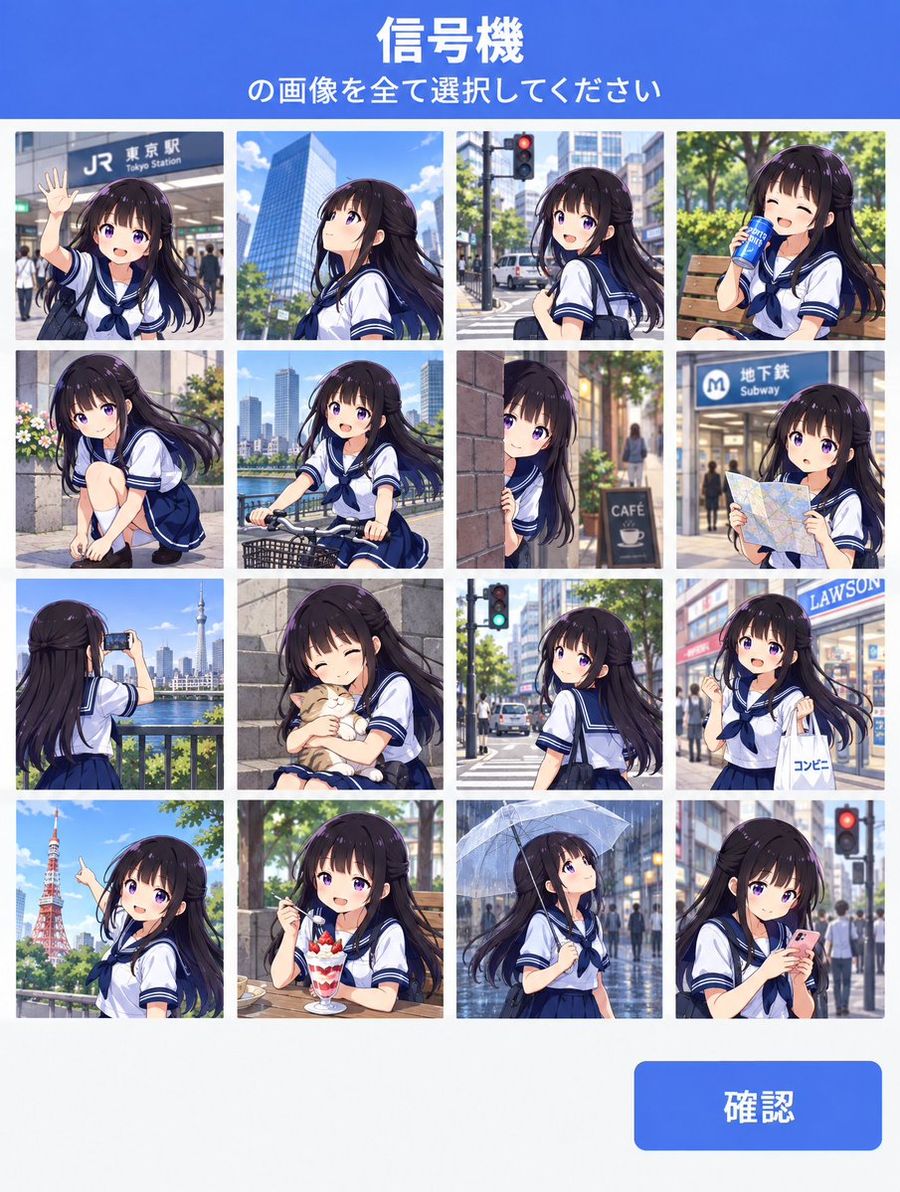
CAPTCHA Grid Illustration Prompt
عرض المطالبة كاملة ونسخها

- The blue (#4169E1) header at the top of the image contains "Select all images containing traffic lights" in white text (#FFFFFF), with the first line slightly larger. - There is a blue (#4169E1) 'Confirm' button in the bottom right corner with white text (#FFFFFF). - An illustration resembling a human vs. robot verification screen seen on the web. - The selectable images are arranged in a 4x4 grid. - Each grid image shows an urban landscape illustration. - Three of the images contain urban landscapes featuring traffic lights. - The character from the reference image appears in each landscape illustration. - The reference character is in various poses across the grids (different pose in every grid). - Please adhere to the following conditions: ### Character Faithfully reproduce the identity, facial features, age impression, body type, and costume without redesign or reinterpretation. ### Style Strictly maintain the same 'original art style', 'illustration expression mode', and 'visual representation' as the reference image. Do not change line thickness/quality, drawing techniques, coloring methods, or overall atmosphere. No style changes, reinterpretations, or arrangements are allowed. ### Color Accurately maintain the same 'original color palette' as the reference image.

إنشاء صورة
بواسطة @Tim_AI
GPT Image 2.5
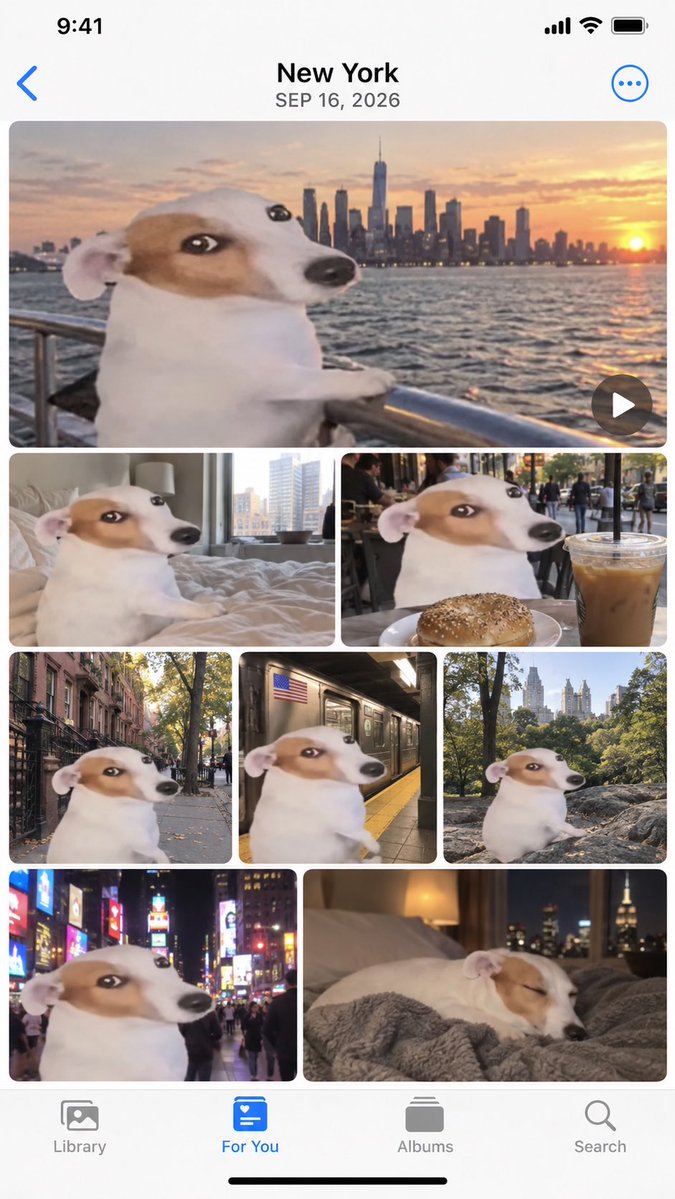
Apple Photos App Mockup - NYC Dog Trip
عرض المطالبة كاملة ونسخها

Create a realistic mockup of an iPhone screen displaying the Apple Photos app interface. The top header displays "New York" and the date "SEP 16, 2026" in black text on a white background, with a blue back arrow on the left and a blue three-dot menu icon on the right. The main content area is a grid of 8 photos featuring a specific meme character: a Jack Russell Terrier with a distorted, wide-eyed face (the 'Wojak' dog) superimposed onto its body. The photo layout is as follows: 1. Top row (Full width): A horizontal video thumbnail showing the dog leaning on a metal railing looking at the New York City skyline during sunset over water. A play button icon is in the bottom right corner. 2. Second row (Two half-width images): Left image shows the dog sitting on a messy bed in a hotel room. Right image shows the dog at an outdoor cafe table with a bagel and an iced coffee. 3. Third row (Three third-width images): Left image shows the dog standing on a city sidewalk near brownstones. Middle image shows the dog inside a subway car next to a window. Right image shows the dog sitting on rocks in Central Park with trees behind it. 4. Bottom row (Two half-width images): Left image shows the dog in Times Square at night surrounded by bright neon billboards. Right image shows the dog sleeping peacefully on a grey blanket with a lamp and city view in the background. At the very bottom is the standard iOS tab bar with four icons labeled "Library", "For You" (highlighted in blue), "Albums", and "Search".

إنشاء صورة
بواسطة @Nora Vale
GPT Image 2.5
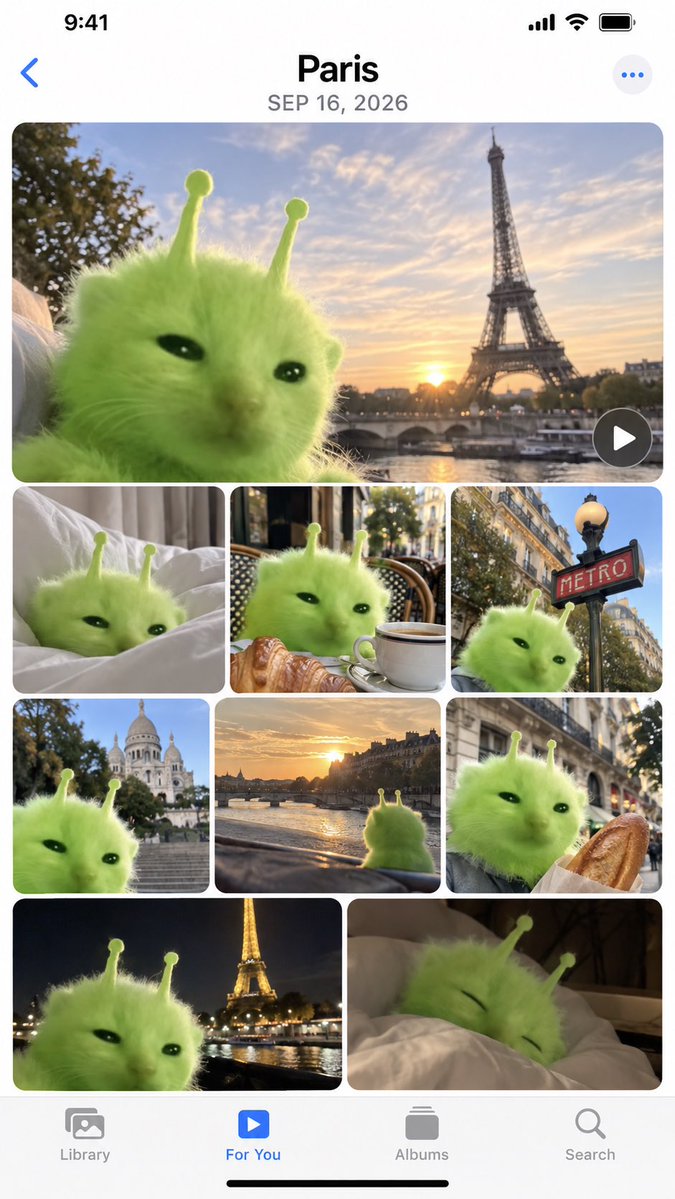
iPhone Memories Mockup with Green Alien Cat
عرض المطالبة كاملة ونسخها

Create a high-fidelity mockup of an iPhone 'Memories' album page. The interface should feature the standard iOS status bar at the top (9:41, signal bars, Wi-Fi, battery) and a bottom navigation bar with icons for Library, For You, Albums, and Search. The main content area displays a photo grid titled Paris with the date SEP 16, 2026. The photos in the grid all feature a fluffy, bright green alien cat creature with two antennae as the central subject. The layout consists of one large hero image at the top showing the cat against a sunset backdrop with the Eiffel Tower. Below this is a row of three smaller square images: the cat on white bed sheets, the cat sitting at a cafe table with a croissant and coffee, and the cat next to a red 'METRO' sign. The next row contains three more squares: the cat with Sacré-Cœur Basilica in the background, a view from inside a car looking at a river sunset, and the cat holding a baguette. The final visible row shows two larger rectangles: the cat with the illuminated Eiffel Tower at night, and the cat sleeping under a duvet.

إنشاء صورة
بواسطة @バナーナ
GPT Image 2.5
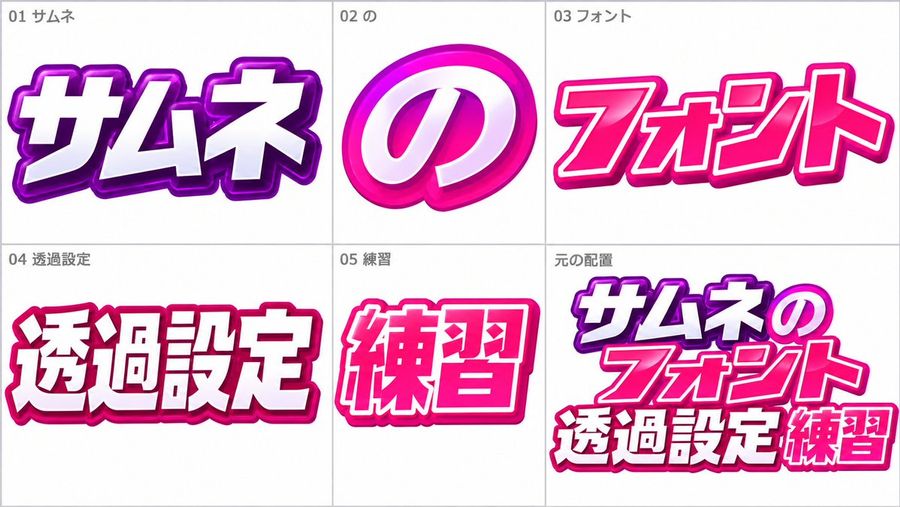
Japanese Text Style Reference Sheet
عرض المطالبة كاملة ونسخها

A reference sheet for a Japanese text style, divided into six panels. The style is bold, glossy, and colorful with thick outlines. Panel 1 (top left) shows the word "サムネ" in white text with a purple outline and drop shadow. Panel 2 (top center) shows the character "の" in white with a pink circular background. Panel 3 (top right) displays "フォント" in pink with a darker pink outline. Panel 4 (bottom left) features "透過設定" in white with a red outline. Panel 5 (bottom center) shows "練習" in pink with a dark pink outline. Panel 6 (bottom right) combines all elements: "サムネ", "の", "フォント", "透過設定", and "練習" arranged together.

إنشاء صورة
GPT Image 2.5
iPhone Lock Screen Wallpaper
عرض المطالبة كاملة ونسخها

Using the person in the reference image as the subject, please create a wallpaper for an iPhone lock screen. Make it look like the person has hijacked the lock screen and is playing around freely. Add bold staging that makes use of the iPhone lock screen UI (time, date, flashlight/camera icons, notifications). Ensure the staging completes beautifully when set as the lock screen. Do not include text or the iPhone UI elements themselves in the image.

إنشاء صورة
جارٍ تحميل مزيد من المطالبات

الأسئلة الشائعة

من أين تأتي مطالبات YouMind؟
تختار YouMind أمثلة عالية الجودة لمطالبات الذكاء الاصطناعي من مجتمعات المبدعين ومسارات العمل الإبداعية العامة. تركز المكتبة على المطالبات المفيدة للدراسة وإعادة الاستخدام والتعديل.
كيف تُنظم فئات مطالبات الصور؟
تُجمع مطالبات الصور حسب حالات الاستخدام والأنماط والموضوعات. تصف حالات الاستخدام المهمة المطلوبة، وتصف الأنماط المعالجة البصرية، بينما تحدد الموضوعات المحتوى الرئيسي للصورة.
كيف تُسند المطالبات إلى الفئات؟
تستخدم YouMind الذكاء الاصطناعي لتحليل كل مطالبة من نوع صورة وعنوانها وبياناتها الوصفية والنتيجة المنشأة عند توفرها، ثم تسندها إلى أقرب الفئات. ويمكن للمحررين تحسين الفئات مع تطور نظام التصنيف.
ما YouMind؟
YouMind مساحة عمل مدعومة بالذكاء الاصطناعي لتحويل الأبحاث والأفكار والمراجع الإبداعية إلى مخرجات قابلة للاستخدام. مكتبة المطالبات جزء عام من هذا المسار، وقد صُممت لمساعدة المبدعين على التعلم بسرعة من الأمثلة القوية.