照片變證件照|ID Photo Studio
上傳照片,紅藍白底任選
照片變證件照|ID Photo Studio
上傳照片,紅藍白底任選
展示內容
描述
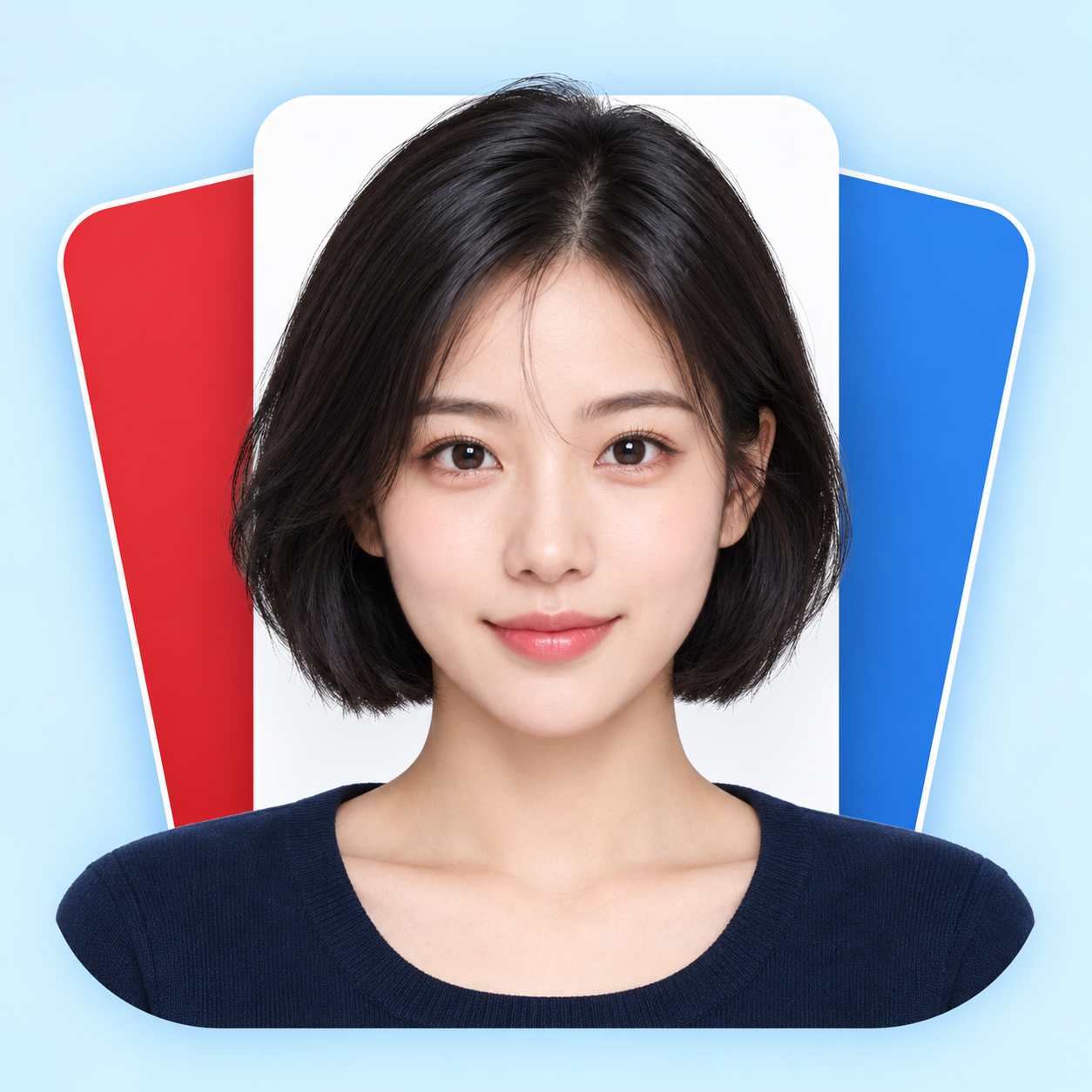
上傳一張人物照片,生成自然清晰的證件照,支援紅底、藍底、白底,也可以一次做齊三種顏色。 把隨手拍整理成正面平視、光線均勻、背景乾淨的頭肩照。保留五官、髮型、眼鏡和個人特徵,預設保留原衣服;需要時可指定襯衫或外套。 • 三種底色任選:紅底、藍底、白底。 • 同一人像三色版:臉、表情、衣服與構圖保持一致,分別輸出。 • 尺寸按需調整:告訴我所需像素或列印寬高。 • 中文、English 都能用,成品預設無文字。 開始試試:上傳照片,說「做藍底證件照,保留原衣服」;或「紅、藍、白底各一張,不要美顏」。 Upload one portrait and create a clean, natural ID-style photo with a red, blue or white background—or get all three colors. Turn a casual photo into a frontal, evenly lit head-and-shoulders portrait. Keep your facial features, hair, glasses and identifying details. Original clothing is retained by default; request a shirt or jacket when needed. • Pick a red, blue or white background. • Get three matched color versions as separate images. • Specify pixel dimensions or print width and height. • Use Chinese or English. Final portraits are text-free. Try: “Make a blue-background ID photo from my upload. Keep my face and clothes.” Or: “Create matching red, blue and white versions. No beauty reshaping.”
推薦自
Dancang
為什麼我們推薦這個技能
精選這項技能,因為它不只是換背景,而是嚴格保留本人五官、髮型與衣著,生成紅藍白三色一致的證件照,並核對實際尺寸與細節,適合直接使用。
適合對象
需要將人物照片整理為自然、清晰證件照的人。
如何使用此 Skill
提供輸入
上傳清晰的人物照片,並選擇紅色、藍色或白色背景;也可指定尺寸、衣服和是否製作三種顏色。
執行 Skill
根據照片生成正面、平視、光線均勻、背景純色的證件照風格人像,預設保留原衣服和個人特徵。
查看結果
獲得一張或多張無文字證件照圖片;三色版本分別輸出,並按要求調整構圖和尺寸。
相關技能
查看全部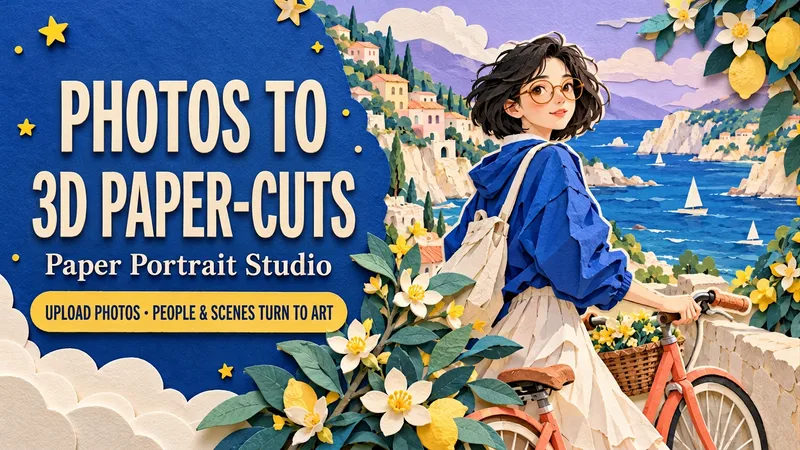 圖片
圖片照片變立體紙雕
上傳人物、合照或寵物照片,把主角與場景一起變成立體分層紙雕;可選海邊騎行、雨天書店、花房與貓,也能自定主題、動作、配色和畫幅。 像把喜歡的一天,一層一層剪下來。頭髮與衣服是疊起的色紙,花葉與街景有清楚的厚度,柔和投影讓熟悉的模樣走進一個彩紙小世界。 • 單人寫真:把自己放進海風、花房或旅行街角。 • 雙人紀念:一起撐傘、散步或看書,保留各自的髮型與穿搭。 • 萌寵日常:讓毛孩子坐在紙藝花園裡,沿用它的毛色與花紋。 預設一張無字3:4直式圖片。可沿用原照場景,也可換一個喜歡的生活片段;支援中文、英文交流,按需新增短標題或分別製作中英文版本。適合頭像、紀念配圖、桌布和社群分享。 試試:「用這張照片,把我變成海邊推單車的紙雕主角。保留短發和圓眼鏡,藍色配珊瑚橙,不加字,直接生成。」 Turn a favorite photo into a little world made of paper. Upload a portrait, a couple photo or a pet photo. Transform both the subject and the setting into a dimensional cut-paper scene, with layered hair and clothes, crisp ivory edges, tactile cardstock and soft cast shadows. Choose Coastal Ride, Rainy Bookshop or Greenhouse Companion—or create your own setting. Keep recognizable hair, glasses, outfit colors and pet markings while customizing the action, palette, background and framing. Create solo portraits, shared memories or a paper garden for your pet. One text-free 3:4 portrait by default. Use English or Chinese, add a short title, or request matching separate language editions. Made for profile art, keepsake images, wallpapers and social posts. Try: “Use my photo for a seaside paper scene. Keep my short hair and glasses. Cobalt blue and coral, walking a bicycle. No text. Generate it.”
 圖片
圖片證件照工作室
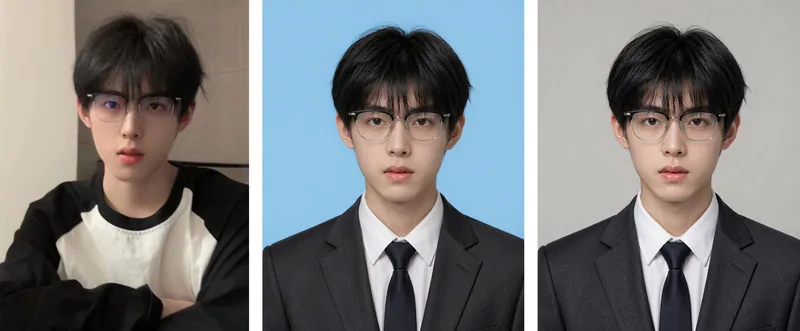
證件照工作室:上傳一張生活照,生成任意底色的正式證件照——白底/藍底/紅底/深紅/灰底,自動將便服換成深色西裝+白襯衫,採用標準證件照姿勢與構圖,臉部嚴格維持原照樣貌。當使用者說「證件照」「做張證件照」「白底證件照」「藍底兩吋照」「履歷照片」「護照照片」「把這張換成證件照」「換個底色」「一吋照/兩吋照」等內容時觸發。核心鐵則:允許去痘,但禁止改臉(需通過官方核驗);先決定底色,再決定衣服(避免同色翻車);眼睛位於上 1/3 線、雙肩水平、頭頂留白,背景純淨無陰影。預設 3:4 直式(可自訂)。首選 Nano Banana 2.1(身分還原能力最強),禁用 Midjourney。支援白、藍、紅等多種底色一次產出。
 圖片
圖片照片生成九宮格寫真
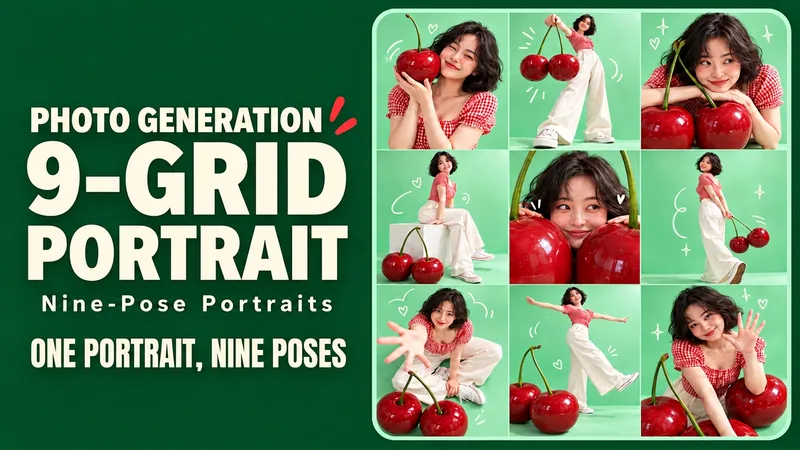
上傳一張人像,生成同一個人的九種姿勢,搭配彩色背景、趣味道具和塗鴉。 上傳一張人物照,把自己放進色彩鮮明的創意寫真:誇張道具、不同機位、自然表情,再配幾筆俏皮塗鴉,組成一張完整九宮格。近景、全身、俯拍、側身各有變化,讓每一格都有自己的看點。 從薄荷櫻桃、落日滑板、紫色太空開始,也能自定你的主題。預設沿用原照的髮型與穿搭,生成一張無字3:4直式九宮格;可換裝、改顏色、加短標題。適合社群分享、生日寫真、個人主頁與創意穿搭配圖。中文、英文都能直接使用;支援中文標題、英文標題或保持同一構圖的獨立中英文版本。單格匯出取決於執行環境。 試試:「保留我的短髮和眼鏡,用薄荷綠+櫻桃紅,九種姿勢,不加字,直接生成。」 Turn one favorite photo into nine playful portraits. Step into a colorful mini photo shoot with oversized props, expressive poses and a few hand-drawn accents. Close-ups, full-body frames, overhead views and side profiles give each panel its own moment while one face, outfit and visual theme hold the set together. Explore Mint Cherry, Sunset Skate and Lilac Orbit—or invent your own theme. Keep your original hair and clothes by default, or request a new outfit. Default: one text-free 3:4 portrait contact sheet in an exact 3×3 layout. Optional individual tile export depends on the host tools. Made for social posts, birthdays, profile pages and outfit inspiration. Use English or Chinese, add short titles, or request matching separate language editions. Try: “Keep my short curls and glasses. Create a Sunset Skate nine-shot sheet in coral and teal. Nine distinct poses. No text. Generate it.”
資訊
- 版本
- v3
- 更新時間
- 執行點數
- 依實際用量
- 模型
- 自動選擇
- 使用情境
- 圖片與設計
- 你將獲得
- 圖片
- 視覺風格
- 照片寫實
