Something other than me is running the morning across all five of my businesses now, and I'm not going back.
I run five things at the same time. An MVP agency at @ignytlabs doing $20K MRR, 3,500+ builders I've taught to build software with AI through @aimvpbuilders, a mobile app studio with a couple of live apps, one-on-one consulting calls with founders, and a 50K+ Instagram account where I run sponsored content.
A few weeks ago I wrote a full breakdown of Hermes Agent and why it was the first AI agent I'd actually trust to run work in the background instead of just answering questions. If you haven't read that one, start there for the full setup. Here's the link.
This is about what changed last week. Nous Research shipped a big update, and it's the reason Hermes went from a tool I was testing on the side to the thing that now runs a real chunk of my day across all of those businesses.
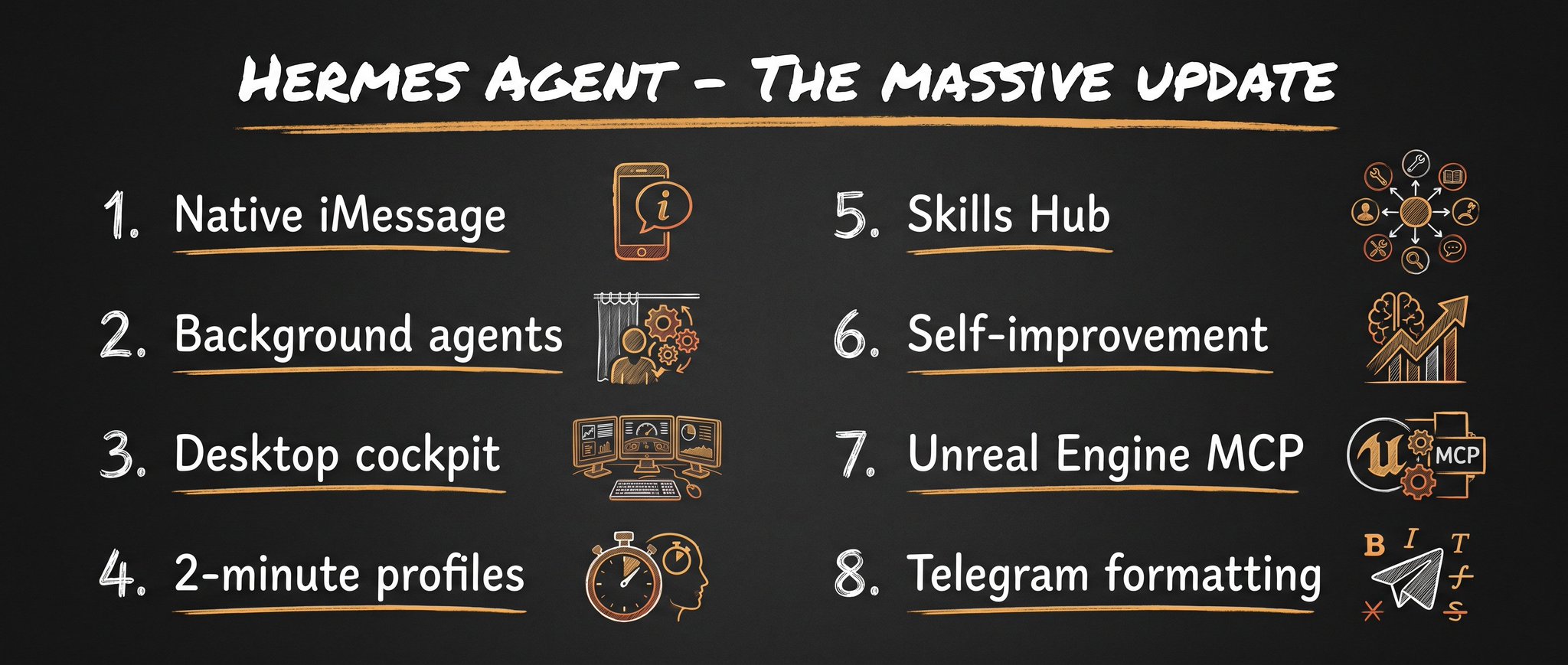
@AlexFinn broke down everything that shipped in this update in his post. I took his list, set all of it up across my businesses. This is what actually changed and how I use each piece.
Quick Recap If You're New To Hermes
If you read the first breakdown, skip to the next section.
Here's Hermes in one paragraph. Most agents you use today are session based. You open Claude Code or Cursor, you give it a task, you close the tab, and the next morning it has forgotten everything about you and your work. Hermes runs the other way around. It lives on a server, it runs all day, it remembers every conversation, and it writes its own skill files as it goes. The longer you run it, the less you have to explain yourself.
That alone made it a different category of tool when I wrote about it. The update last week made the experience around it good enough that I moved real operations onto it.
It Lives In Your iMessage Now
This is the change that rewired my daily habit the most.
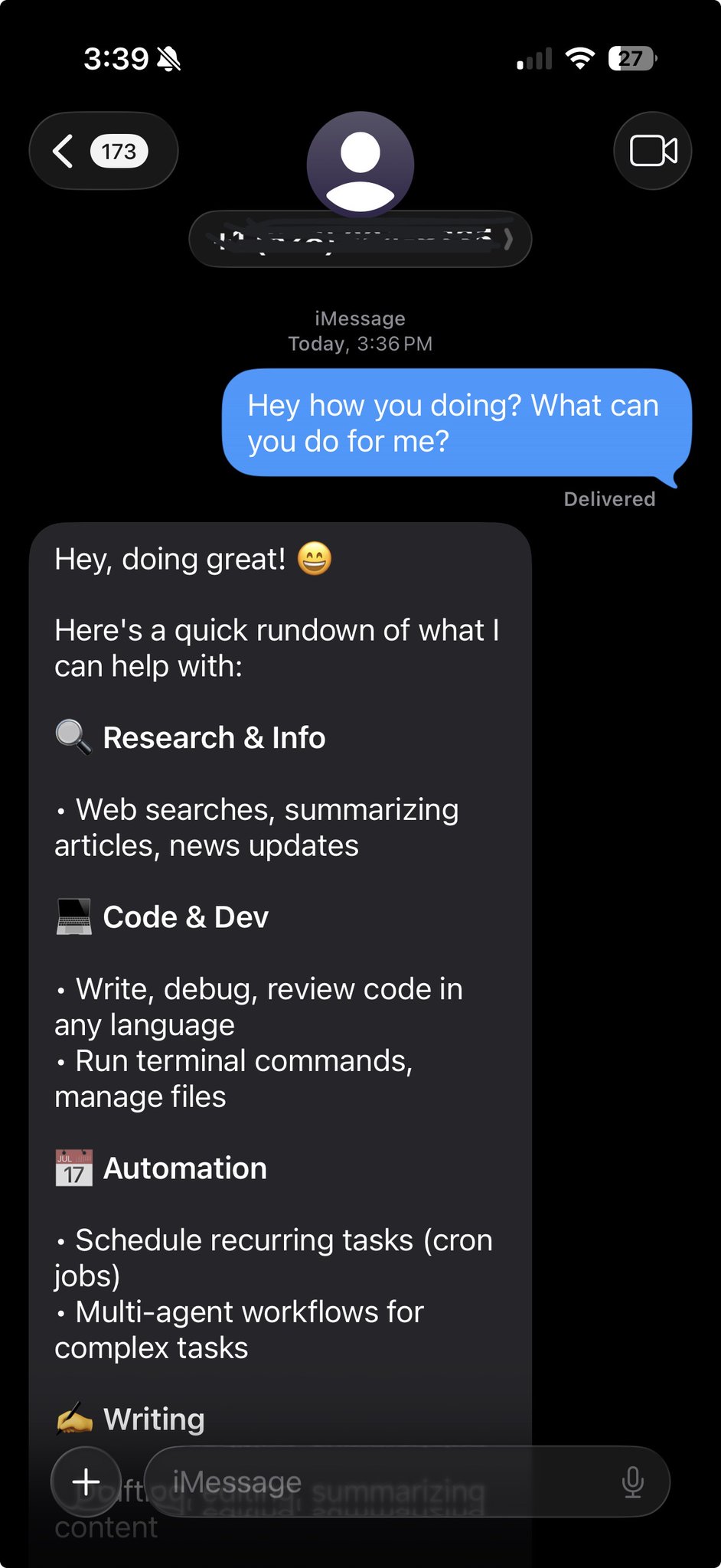
You can now connect Hermes to native iMessage. It's free to set up, and it means the agent shows up in the same app where I text my team and my family. No separate app to open. No dashboard to log into. I just text it like a person.
The way I use it is simple. iMessage for quick things when I'm away from my desk. Then the desktop app when I'm at my machine doing focused work. It's the same agent and the same memory either way.
Connecting it took me a couple of minutes. The easiest path is Photon, which gives you a managed iMessage line with no Mac to keep running.
→ Run hermes photon setup --phone +1... in your terminal
→ Approve the device login it opens in your browser
→ It provisions a line and prints the number you text to reach your agent
That's the whole setup. If you'd rather route through a Mac you already keep on, the BlueBubbles option works too, but Photon is the no-hardware way in.
Think about what that does to your relationship with the tool. Before, my AI lived behind a login I had to go find. Now it sits in my pocket in the same inbox as everyone else I talk to.
That sounds minor until you actually start doing it. You start handing it work the second it pops into your head, like the idea for a consulting follow-up between calls, instead of saving it for when you're back at the laptop.
Background Agents Are On By Default Now
This is the real headline, even though it's less flashy than texting your agent.
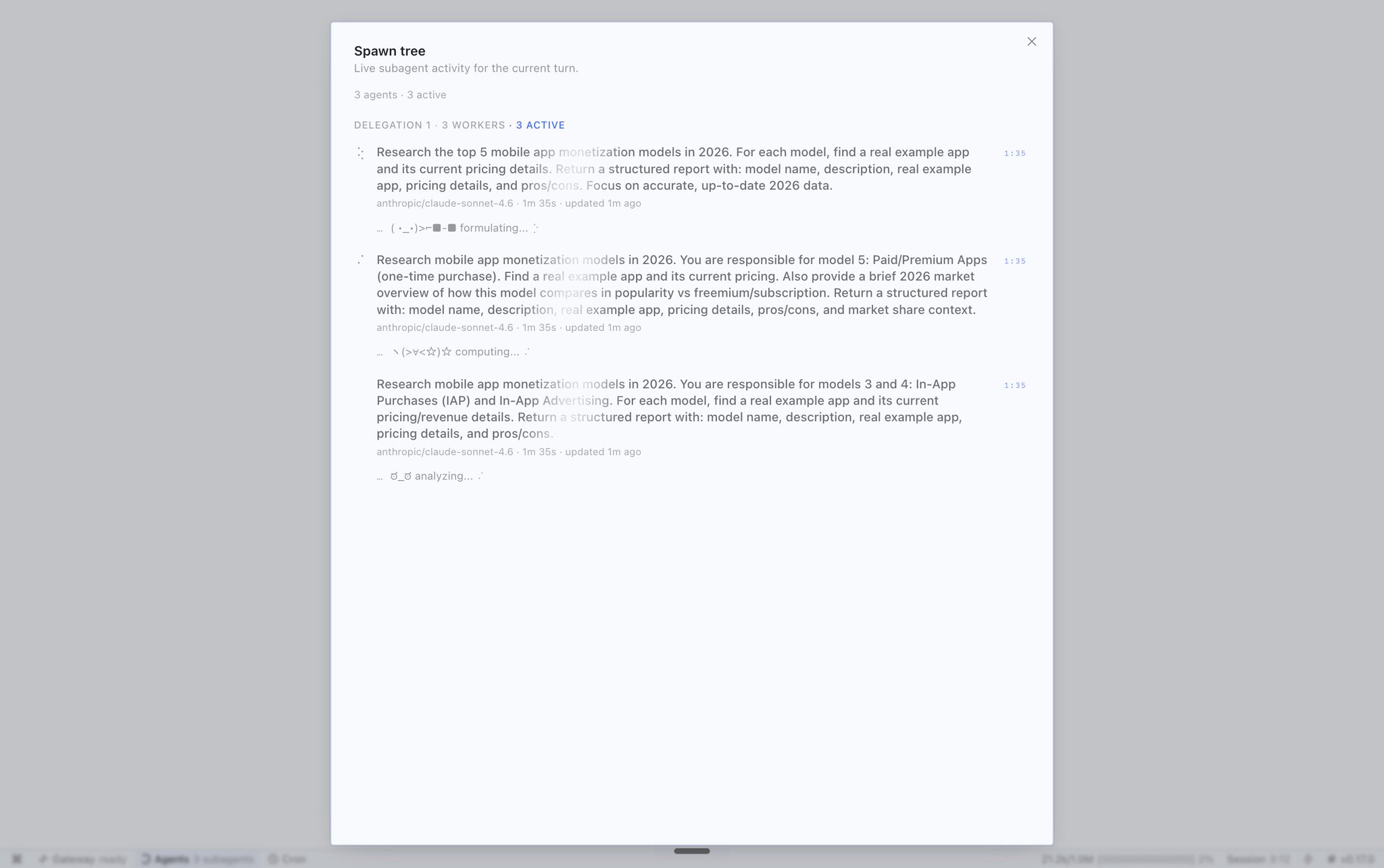
Background agents are now turned on by default. When you give Hermes a complex task, it quietly spins up sub-agents and runs the work in the background. You don't sit there watching a spinner. You fire off the task and keep messaging it about something else while the heavy work happens behind the scenes.
The old way of using any agent was give a task, wait, follow up, wait again. The new default flips it. You're talking to the agent while it's already running four other things you handed it earlier.
For the agency this is the difference between an assistant and an actual employee. A junior person on the team doesn't freeze the whole conversation every time you give them something. They go do it and report back. Hermes now behaves the same way, and that one default change is what made me comfortable putting client research and first-draft work on it. The bottleneck stopped being "how long do I wait" and became "how many of these can I run before I lose track."
The Desktop App Finally Feels Like A Cockpit
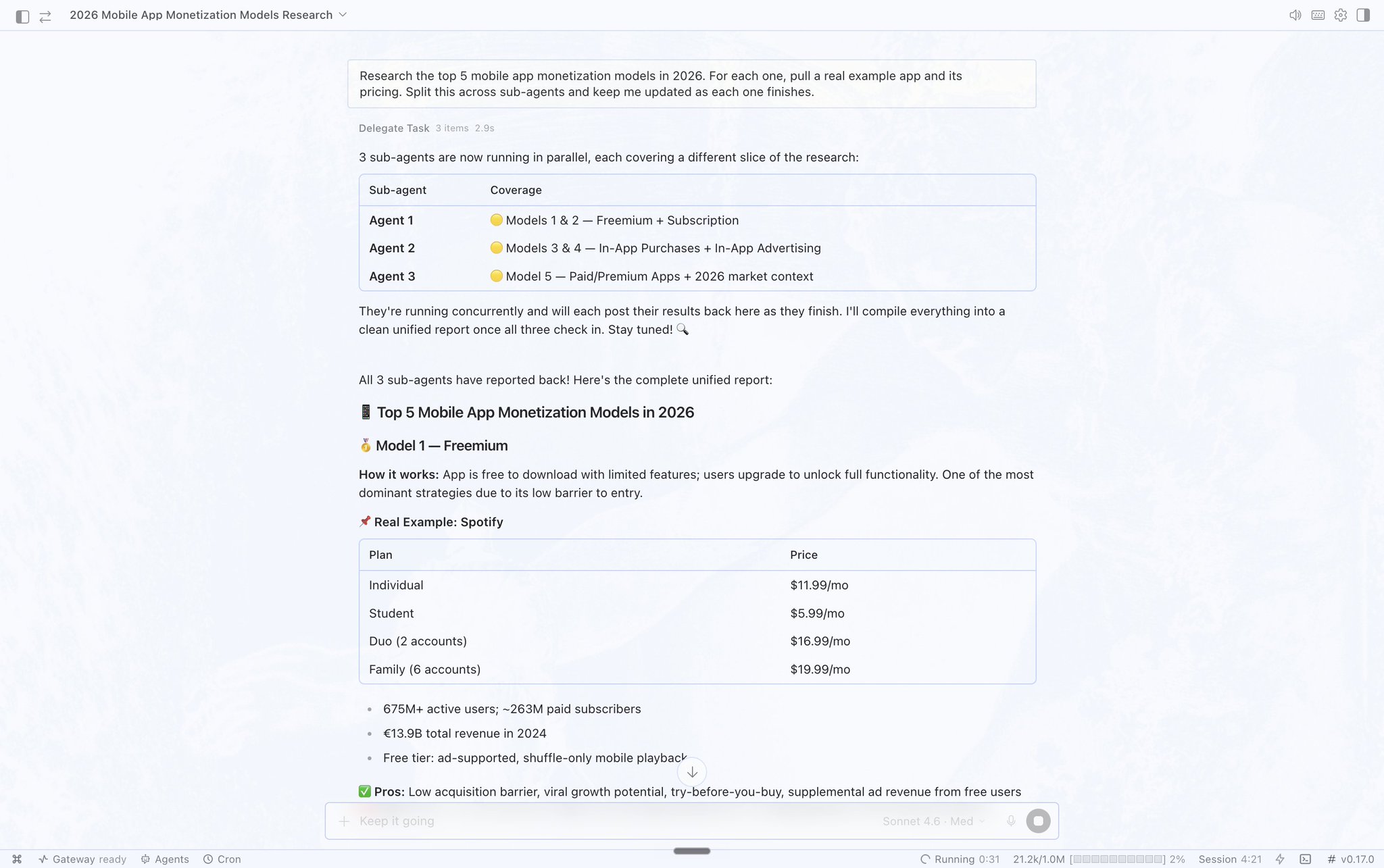
The desktop app got a batch of upgrades that add up to a lot.
→ You can pop chats out into their own windows, so I can watch one agent while I work in another
→ The model selector moved to the bottom where you actually reach for it
→ There's a live sub-agents pane, so you can see exactly what your background agents are doing in real time
→ There's a built in terminal, so I'm not flipping between Hermes and a separate terminal window
None of these are headline features alone. Together they turn the desktop app from a chat box into something closer to a control room. The live sub-agents pane is the one I keep open all day. When background agents are running on client work, being able to see the actual work happening instead of guessing is what lets me trust it enough to walk away and take a consulting call.
Building New Profiles Is Now A Two-Minute Job
Profiles are the feature most people skip, and this update made them too easy to ignore any longer.
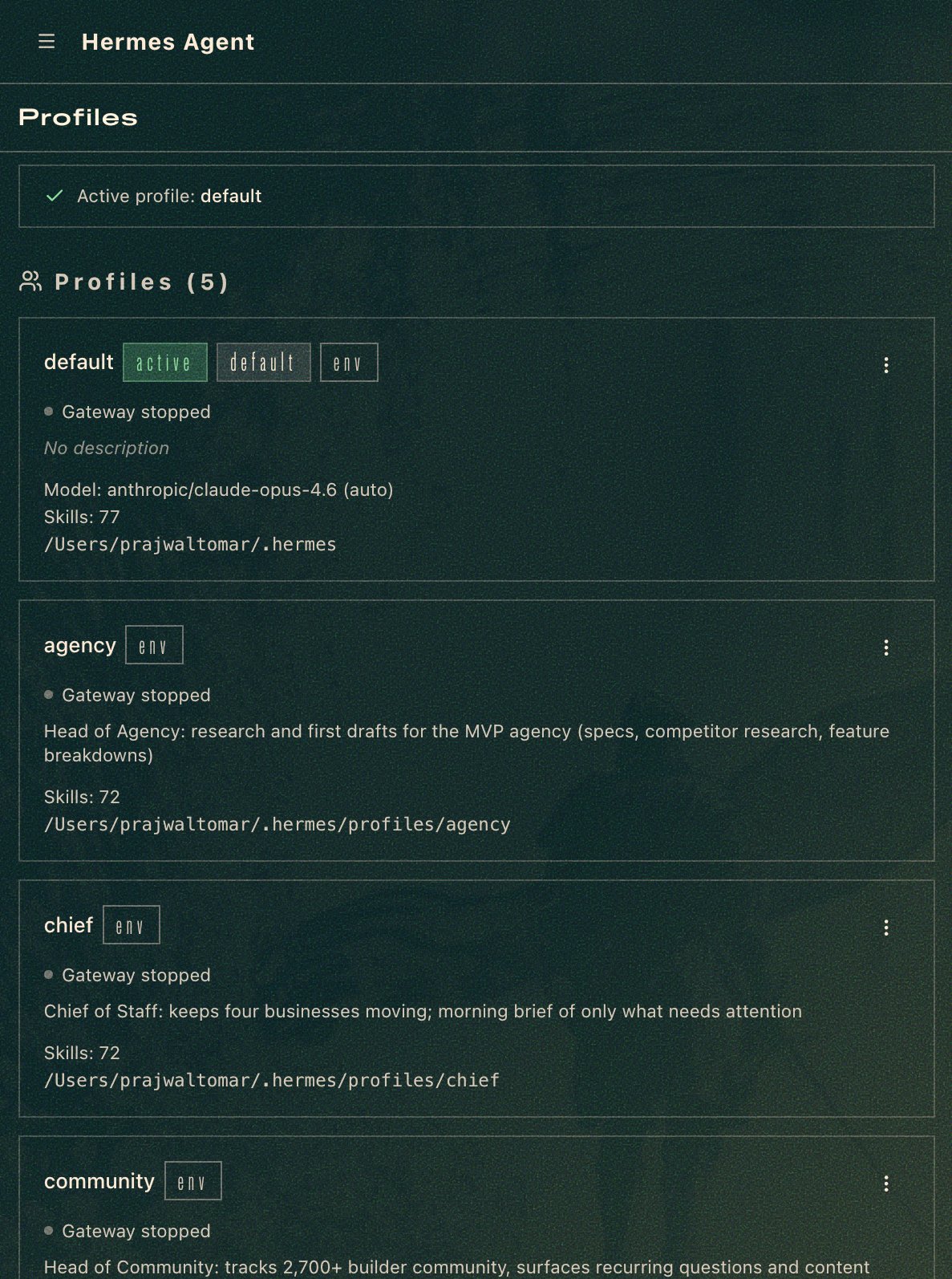
A profile in Hermes is basically a separate agent that runs alongside the others, with its own memory and its own skills. You can now build them straight from the browser. Type hermes dashboard in your terminal, go to profiles, and set one up in a couple of minutes.
This is where I actually run my businesses out of one tool. I set up profiles that mirror the team I'd hire if I wanted to clone myself.
→ A chief of staff profile that knows my priorities across all five businesses and runs my morning brief
→ An agency profile that handles client research and first-draft project specs for our MVP builds
→ A content profile that drafts X articles, tweets, and first-pass scripts for the sponsored posts on my 50K+ Instagram
→ A community profile that keeps a pulse on what my community is asking and surfaces themes
One more thing worth stealing. Run at least two profiles even if you only need one, for reliability. If one goes down, the other can fix it. One profile is a single point of failure. Two is a team that covers for each other.
There's A Skills Hub Now
This one quietly fixes the biggest friction point from the first version.
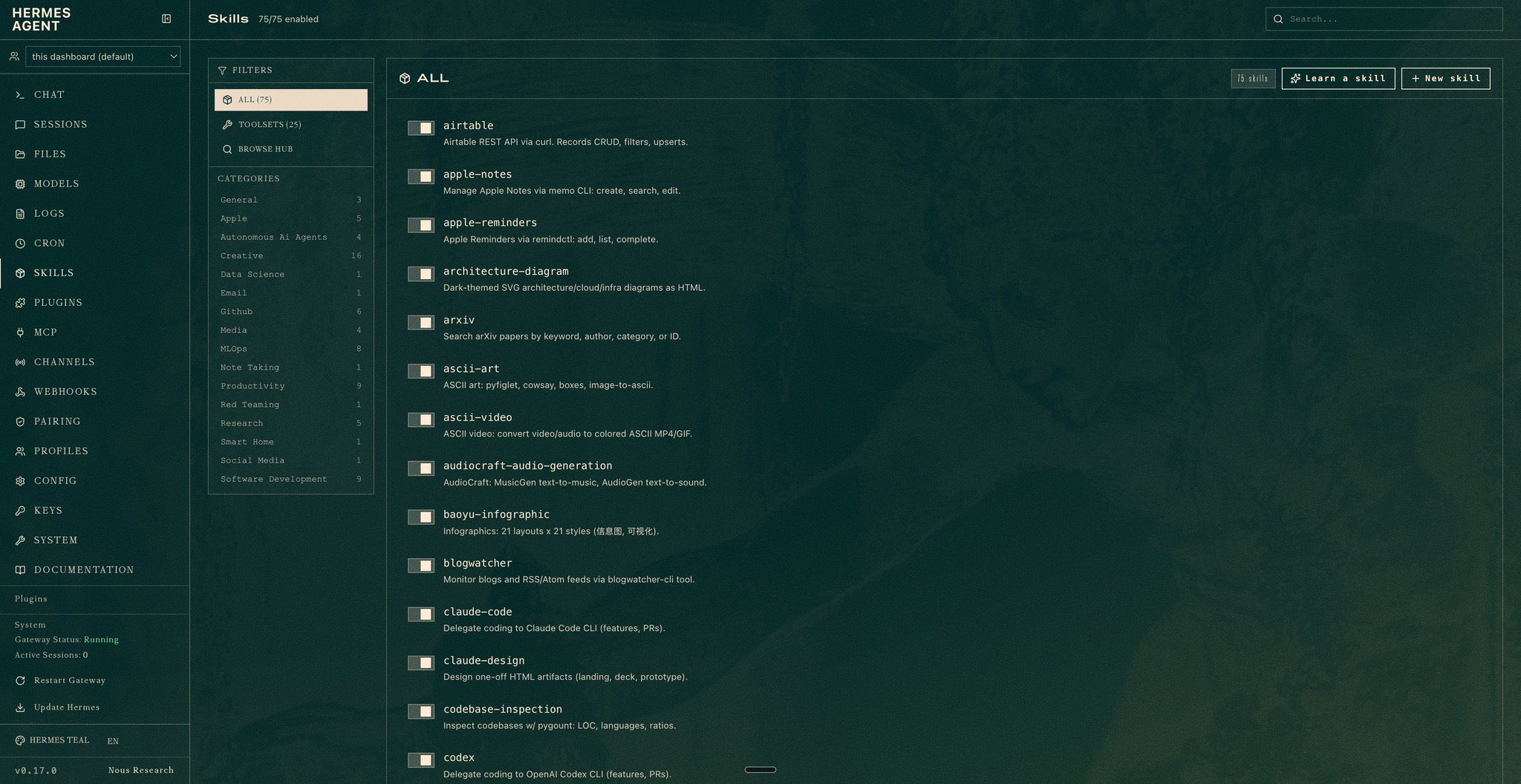
Hermes writes its own skills as it works, which is great, but until now there was no easy way to grab skills other people had already built. The new Skills Hub lives right in the dashboard and lets you browse and install popular skills with a click.
Before, every new profile started from zero and took weeks to build up a useful skill library. Now you can seed a fresh profile with proven skills on day one and let it specialize from there. When I spun up my content profile, this is what let me seed it with proven skills on day one instead of building the library from scratch.
It Got Noticeably Better At Improving Itself
The self-improvement loop got smarter in this update.
Your agent now writes and updates its own skills far more aggressively as you work, and the edits it makes to its own memory are better quality. The original pitch for Hermes was that it gets better the longer you run it. This update sped that curve up. My agency profile already adjusts how it writes project specs after each client build, and the whole idea is that edge compounds the longer it runs.
This is the part that's genuinely hard to copy with another tool, and it's why I keep telling my community Hermes is a different category. Most AI tools are exactly as good on day 90 as they were on day 1. This one is supposed to be measurably better, because it's been writing its own playbook the whole time.
You Can Build Unreal Engine Games With It Now
This is the flashiest update and the one most of you won't touch, so I'll be straight about it.
Hermes now has an Unreal Engine 5.8 MCP. Unreal is the most powerful game engine on the planet, the one behind a huge share of real commercial games. With the MCP installed, you can point your agent at it and have it build complex 3D games.
I'm not about to pretend I'm launching a game studio next week. For most builders this is a flex, not a daily driver. But it matters as a signal. The MCP surface around Hermes is expanding into serious professional software, not just little web tools. When an agent can drive Unreal, the question stops being "what can it build" and starts being "what can't it plug into." For my app studio, that's the part I'm watching closely.
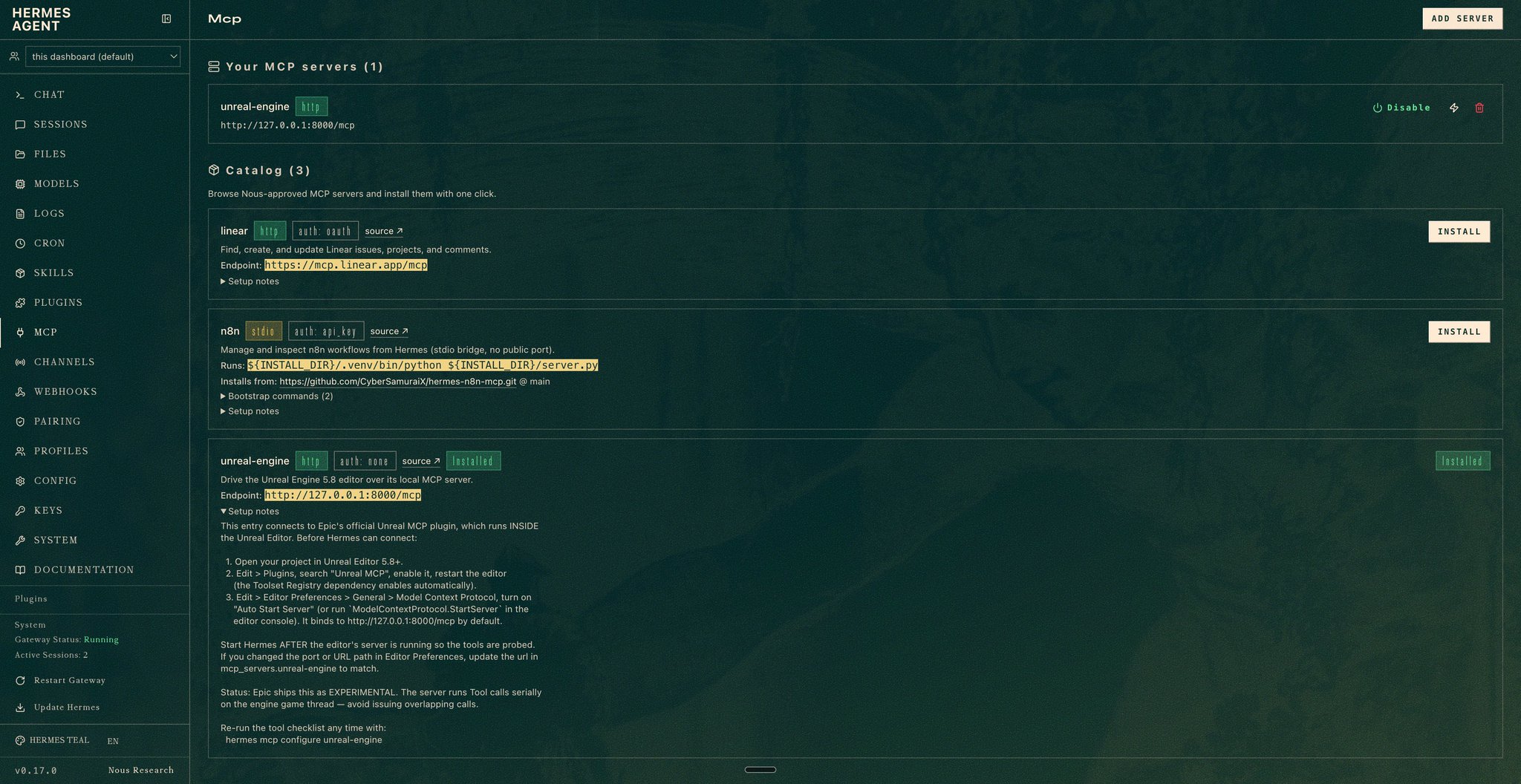
Unreal engine MCP installed and connected.
Telegram Got Smarter Too
Last one, quick.
Hermes now sends proper rich messages in Telegram through Bot API 10.1, with clean formatting and markup instead of a wall of plain text. If you're doing deeper work on the go, that's a real upgrade.
The way I split it now is iMessage for quick prompts when I'm moving, Telegram when I'm doing focused work away from my desk and want the agent's output to actually be readable.
What This Changes In How You Run It
Put it all together and the picture is clear.
When I wrote the first breakdown, Hermes was a powerful agent I drove from my machine. After this update it's an agent I reach from anywhere, that runs work in the background by default, that I run as a small team of profiles instead of one, and that's getting better at its own job while I sleep.
That's not a new tool. It's the same tool that grew up. And the setup still takes about 30 minutes.
What To Watch Out For
A few honest flags before you go all in.
Background agents running by default is great until you forget they cost tokens. Every sub-agent you spin up is real spend. Watch it the first week so you learn your own usage before the bill surprises you.
Run two profiles minimum, but don't go build ten on day one. Each one needs a real job. Empty profiles just clutter your dashboard and confuse your own workflow.
Browser and computer use are still off by default for safety, and you should keep them that way until a specific profile genuinely needs them. Don't hand every agent in your stack the keys to whatever you're logged into.
The Unreal MCP is impressive, but it's early. Treat it as an experiment, not a production pipeline, until you've watched it hold up on something real.
What This Actually Means
The gap between session-based agents and persistent agents just got wider.
Most builders are still living entirely in the open-a-tab, do-a-task, close-the-tab world. That's fine for focused coding. But there's a second half of the stack that runs all day, remembers everything, texts you back, and improves itself, and almost nobody has it set up yet.
For me this lives in the AI employees lane. The agency runs on $20K MRR, and a real chunk of the work around the building, the research, the drafts, the community pulse, the sponsored content first drafts, is now moving onto profiles like the ones above. Hermes after this update is the closest thing I've used to a set of employees that are awake when I'm not.
The builders who set this up this year are going to look unfairly far ahead next year. They just drop the daily tax of re-explaining context to a tool that forgets them every morning.
The update is live. The setup takes 30 minutes. The compounding is permanent.
We are so early.
TLDR
→ Hermes Agent shipped a major update. It now connects to native iMessage, so you text your agent like a person from your phone.
→ Background agents are on by default. Give it a complex task and it works in the background while you keep messaging it.
→ The desktop app got a live sub-agents pane, a built-in terminal, and pop-out chats. It feels like a control room now.
→ Building profiles is a two-minute browser job. I run one per business: chief of staff, agency, content, community. Run at least two for reliability.
→ There's a Skills Hub to browse and install proven skills, so new profiles are useful in days instead of weeks.
→ The self-improvement loop got smarter. It writes and updates its own skills far more aggressively as you work.
→ It can now build games in Unreal Engine 5.8 via MCP. A flex for most, but a signal of where the MCP surface is going.
→ Telegram got richer formatting like tables and clean markup. iMessage for quick prompts on the go, Telegram for deeper work.
LFG.

![成田悠輔的天才 AI 應用技巧 [保存版]](https://youmind.club/__ym/cms-assets/media/1784137658627_u4bwry_HNMS89bbsAAUPJI.jpg)